
The wrong product changes everything.
After 3+ years working with eBay sellers, we have learned that most costly mistakes happen before a listing ever goes live. Great SEO, photos, pricing, and ads mean little if the product itself has weak demand or poor margins.
Successful product research is not about finding what looks popular. It is about finding where demand, competition, profit, supply, and opportunity actually work in your favor.
That means looking beyond sales numbers. You need to understand who controls the market, what buyers really pay, how much profit remains after costs, and whether you can realistically compete.
In this complete guide, we will show you how to research eBay products using eBay Product Research, ZIK Analytics, competitor data, profitability analysis, supplier validation, risk checks, testing, and scaling.
What Is eBay Product Research?

eBay product research is the process of using real marketplace data to decide whether a product is worth selling. Instead of relying on trends or assumptions, sellers look at demand, competition, pricing, sales history, profit potential, sourcing, and risk.
Good product research should answer:
- Are buyers actually purchasing it?
- How often does it sell?
- Who is getting those sales?
- What price are buyers paying?
- Is there enough profit after all costs?
- Can it be sourced reliably?
- Can your offer compete?
The key point is that high demand does not always mean a good opportunity. A smaller niche with lower competition, better margins, and stronger pricing can often be more attractive.
Think of a strong eBay opportunity as: Demand + Competition + Price + Profit + Supply + Risk + Competitive Advantage
Why Sellers Need to Do Product Research
Product research helps sellers answer one important question before spending money: Is this product actually worth selling?
Imagine you are comparing two products.
Product A sells for around $40, while your supplier offers it for $18. At first, it looks like a strong opportunity. But deeper research shows that most completed sales happen closer to $30, competition is very high, shipping costs are around $7, and demand has been declining. Once fees and advertising are added, the margin becomes much smaller than expected.
Now compare that with Product B. It sells for around $35, costs only $10 to source, has cheaper shipping, consistent demand, and fewer strong competitors. The selling price is lower, but the overall opportunity is much healthier.
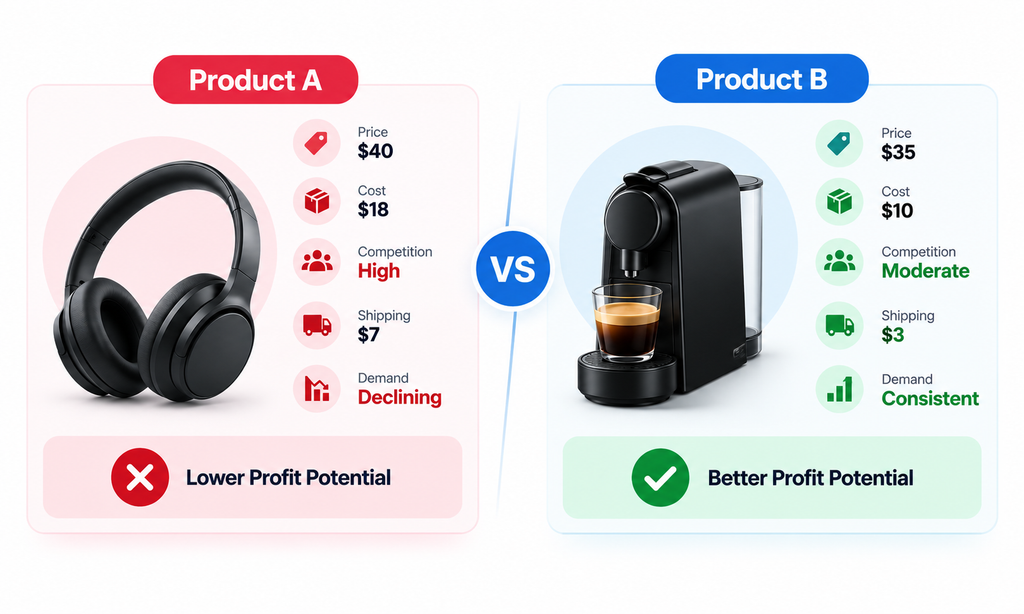
This is why product research matters. The product with the higher selling price or more visible demand is not always the better choice.
What Makes a Good Product to Sell on eBay?
- Proven & Consistent Demand: Choose products that show repeated sales over time, not just views, watchers, or one-off transactions.
- Manageable Competition: Look for markets where demand exists but you still have a realistic chance to compete on price, service, or listing quality.
- Healthy Profit Potential: Make sure the selling price covers product cost, eBay fees, shipping, advertising, returns, packaging, and other operating expenses.
- Reliable Supply & Low Operational Risk: Prioritize products that are easy to restock, store, ship, handle, and manage without excessive returns or fulfilment problems.
- Clear Competitive Advantage: Identify a reason buyers should choose you, such as better photos, faster delivery, stronger bundles, clearer information, or more reliable stock.
How to Do eBay Product Research Step by Step
A strong eBay product research process starts before you open any research tool. First, you need to understand how you plan to sell, because the same product can be a great opportunity for one seller and a poor choice for another.
Step 1: Define Your eBay Business Model First
Before researching products, determine how you intend to sell them. Your business model changes what a ‘good product’ looks like.
You might be:
- Selling used goods
- Flipping clearance products
- Buying wholesale inventory
- Selling private-label products
- Selling refurbished goods
- Selling collectibles
- Selling automotive parts
- Selling vintage products
- Liquidating excess inventory
- Operating an eBay dropshipping business within eBay’s policies
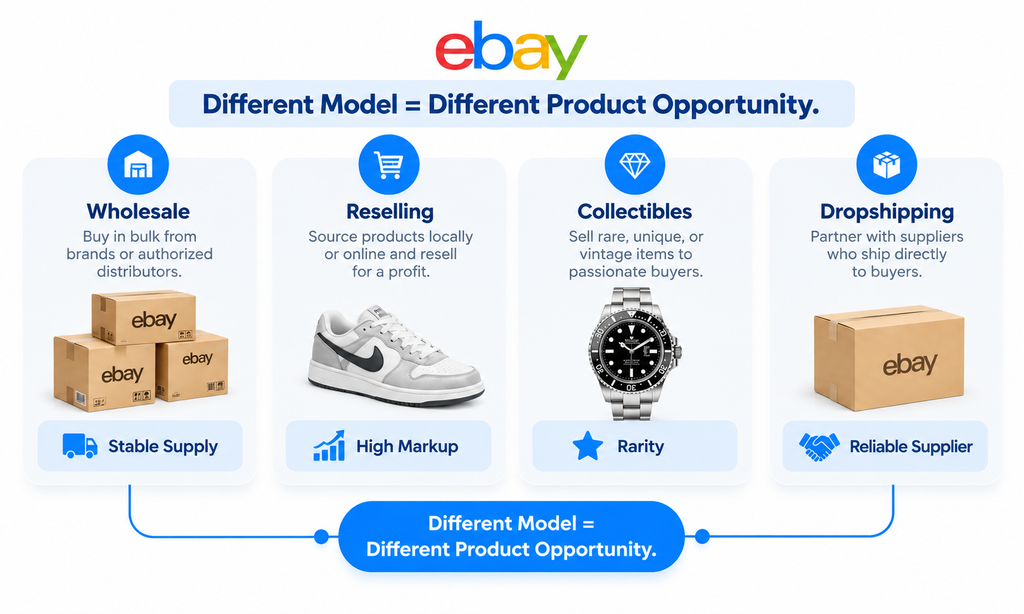
Different sellers should prioritize different things.
- A wholesaler may look for: Stable demand + repeat supply + predictable margins
- A reseller may prioritize: Low buying cost + scarcity + higher markup
- A collectible seller may focus on: Rarity + condition + historical pricing
- A dropshipper may care more about: Supplier availability + margin + delivery speed + stock stability
The Same Product Can Be Good for One Seller and Bad for Another
Imagine a branded kitchen appliance sells consistently for $80 on eBay. A wholesaler who can buy it for $42 in bulk with reliable restocking may see a strong opportunity. But a reseller who can only source it occasionally for $65 may have very little profit left after eBay fees and shipping.
The product is the same. The opportunity is not.
That is why you should define your business model first, then research products that fit your cost structure, sourcing ability, capital, and fulfilment setup.
Step 2: Generate Product Ideas Before You Validate Them
Once your business model is clear, the next step is to build a shortlist of products worth investigating. At this stage, do not ask: Should I sell this product? Ask: Is this product good enough to research further?
Idea generation and product validation are two different jobs. The first gives you possibilities. The second tells you which possibilities are actually worth your money.
A good starting point is to collect 5–10 product ideas from eBay itself before doing deeper analysis.
Use eBay Search Suggestions
Start with a broad keyword related to your niche and pay attention to the suggestions eBay shows as you type.
For example, searching: gaming controller may lead you toward more specific product ideas such as:
- Charging docks
- Replacement batteries
- Thumb grips
- Controller cables
- Protective cases
- Repair kits
- Replacement parts
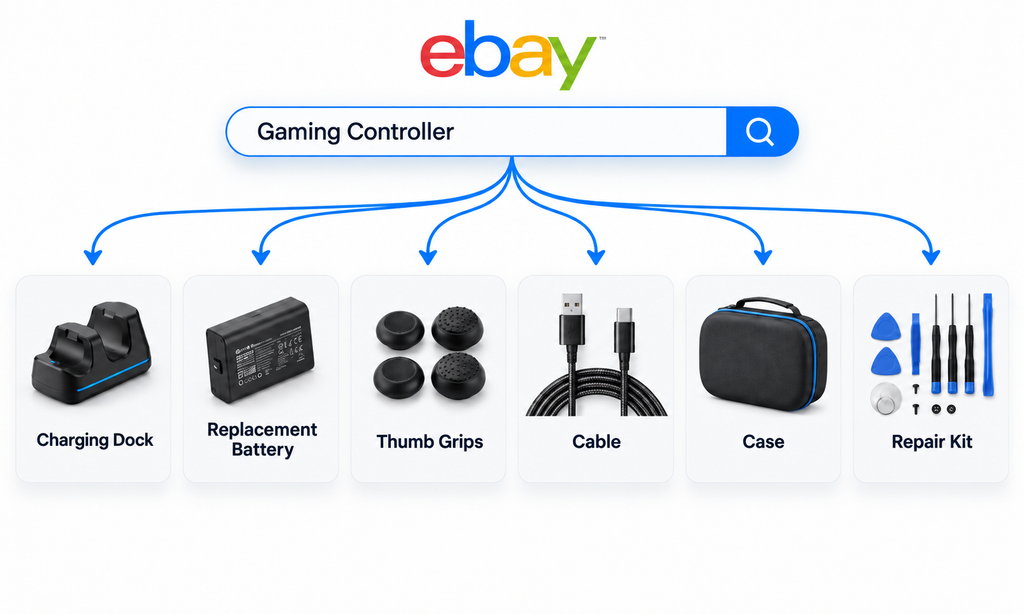
This is useful because broad products are often highly competitive, while smaller sub-niches may reveal more focused buyer intent and better opportunities.
Study Sold Listings for Repeating Patterns
Next, look at sold and completed listings. Do not focus on one product that sold once. Look for products or variations that appear repeatedly.
Pay attention to:
- Brand
- Model
- Condition
- Size or variation
- Quantity
- Bundles
- Compatibility
- Selling price
- Shipping setup
If several different sellers repeatedly sell the same replacement battery, bundle, or model variation, that may be a stronger signal than one unusually expensive sale. You are trying to spot patterns in buyer behaviour, not isolated wins.
Research Established eBay Sellers
Successful sellers can also help you discover product ideas faster.
Find stores operating in the same niche or business model and look at:
- Products they sell repeatedly
- Listings with multiple units sold
- New products they have recently added
- Categories they keep expanding into
- Common price points
- Bundles and variations
- Shipping offers
- Listing quality
This can reveal where experienced sellers are already seeing demand. But do not simply copy their inventory.
Use competitor stores as market evidence, then validate the opportunity yourself.
A product may work extremely well for an established seller because of better sourcing, lower costs, stronger feedback, or faster fulfilment.
So the correct workflow is: Search Suggestions → Sold Listings → Competitor Stores → Product Shortlist → Validation
Step 3: Use eBay Product Research — Formerly Terapeak

Once you have a shortlist of product ideas, the next step is to validate them with real marketplace data.
eBay’s built-in Product Research tool, formerly known as Terapeak, should be one of your main validation tools. You can access it through: Seller Hub → Research → Product Research
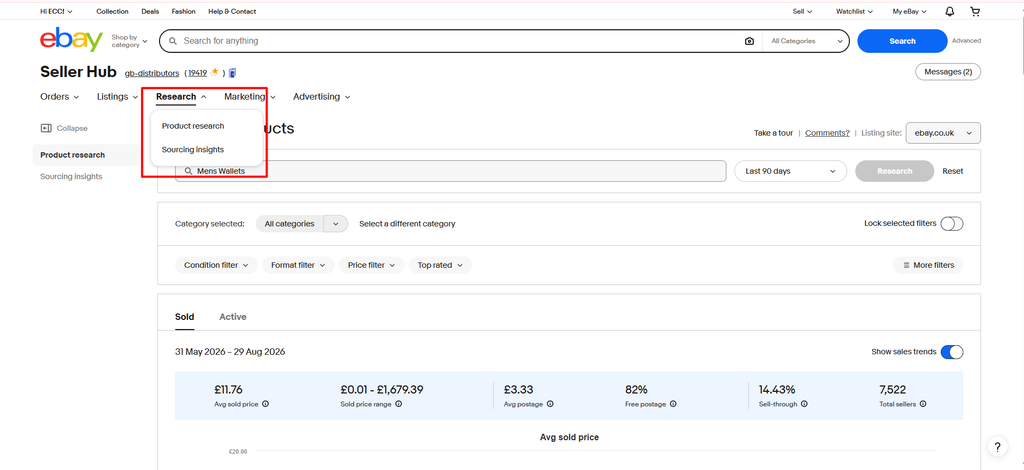
It lets you look beyond active listings and study how products have actually performed over time.
You can analyze data such as:
- Sales trends
- Average sold price
- Sold price range
- Shipping cost
- Sell-through rate
- Number of sellers
- Selling format
- Historical marketplace activity
You can also narrow results using filters such as category, condition, brand, colour, buyer location, seller location, and other product attributes.
How to Research a Product Using eBay Product Research
1. Start With a Specific Search
Broad keywords create broad data.
For example:
- Too broad: Wallet
- Better: Men’s Leather Wallet
- More precise: Men’s Leather Bifold Wallet Black
The more closely your search matches the exact product you plan to sell, the more meaningful the data becomes.
If you search only for ‘wallet,’ your results may mix men’s wallets, women’s wallets, card holders, money clips, travel wallets, and different materials together. That can distort sales volume, pricing, and competition.
2. Clean the Results
Now imagine you search for: Men’s Leather Wallet
Your results may still include:
- Bifold wallets
- Trifold wallets
- RFID wallets
- Card holders
- Money clips
- Genuine leather products
- PU leather products
- Branded wallets
- Gift-box sets
- Different colours and sizes
If you analyze all of these together, the numbers may not represent the exact product you want to sell.
Suppose your target product is: Black genuine leather bifold RFID wallet
Use filters and keyword exclusions to remove unrelated products such as: trifold cardholder moneyclip PU
Then narrow the results by relevant factors such as:
- Material
- Style
- Colour
- Condition
- Brand
- Price range
- Features
Your goal is to compare like with like. A black genuine leather bifold wallet should be researched against similar wallets, not every product containing the word ‘wallet.’
3. Check How Many Units Actually Sold
Now look at total sales during your selected period.
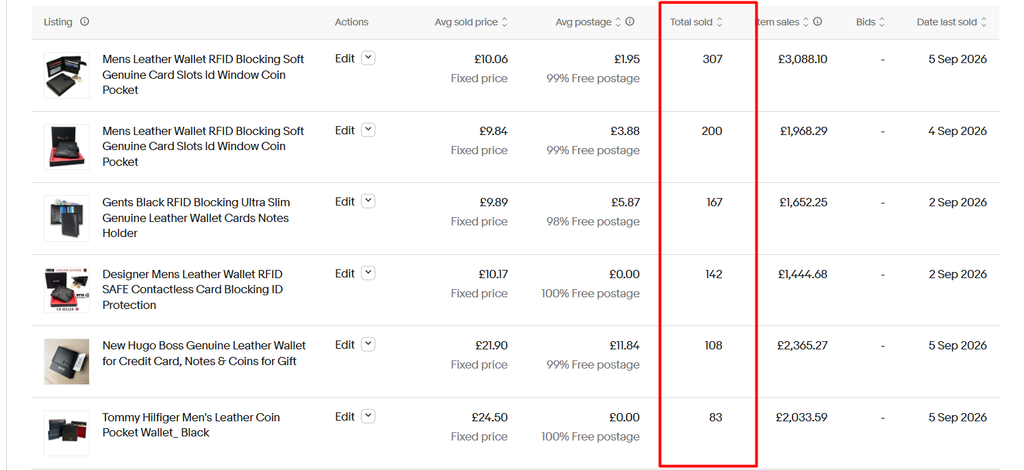
This helps answer: Is there enough real buyer demand? But never judge demand from total sales alone.
For example, 500 sales may look impressive. But if those 500 sales came from a market with 40,000 competing listings, the opportunity may not be as attractive as it first appears.
Always read sales volume alongside competition.
4. Look at Sales Frequency
Total sales tell you how much sold. Sales frequency tells you how consistently it sells.
Look at whether transactions happen:
- Every day
- Several times per week
- Occasionally
- Only during certain periods
A product with steady weekly sales may be easier to build around than one that generated the same total volume through one short spike.
You are trying to distinguish between: Consistent demand → Seasonal demand → Temporary spike
That matters when deciding how much inventory to buy.
5. Check How Sales Are Distributed Across Sellers
Do not stop at the number of units sold. You also need to know: Who is getting those sales?
Imagine two markets each sold 1,000 units.
In Market A, one seller generated 850 of those sales. In Market B, the 1,000 sales were distributed across dozens of sellers.
Both markets show the same sales volume, but Market B may offer a much more realistic opportunity for a new entrant.
This is why seller concentration matters. You are not only measuring demand. You are measuring how accessible that demand is to you.
Step 4: Understand eBay Sell-Through Rate Correctly
Sell-through rate is one of the most useful metrics in eBay product research because it helps you understand how quickly products are moving compared with the amount of inventory available in the market.
A good sell-through rate depends on the type of product, selling price, profit margin, inventory cost, storage requirements, sourcing difficulty, and how quickly you need your money back.
For example, a $15 phone cable may need to sell frequently because the profit per unit is small. A $500 collectible watch may sell much less often but still be attractive because one sale can generate significantly more profit.
Suppose you are researching men’s wallets.
A black leather bifold wallet shows a 70% sell-through rate, while a similar RFID leather bifold wallet shows 95%.
The second product may appear stronger, but you should still check:
- Selling price
- Number of competing sellers
- Supplier cost
- Profit margin
- Sales consistency
If the 95% product has very thin margins and aggressive competition, the 70% product could still be the better opportunity.
Sell-Through Rate vs Sold-to-Active Ratio
Sellers also commonly estimate demand manually using: Sold Listings ÷ Active Listings × 100
For example, if you find 120 sold listings and 200 active listings, the sold-to-active ratio would be: 120 ÷ 200 × 100 = 60%
This can be useful when you want a quick snapshot of demand versus current supply.
However, it should not automatically be treated as identical to eBay’s Product Research sell-through metric.
Why? Because the two numbers are based on different types of data.
Active listings show the inventory available at the moment you check. Sold listings represent transactions that happened across a selected period.
That means active inventory can change every day as sellers:
- Add new listings
- Sell out
- End listings
- Restock products
- Change quantities
So a manually calculated sold-to-active ratio is best used as a consistent comparison tool, not as an absolute rule.
Step 5: Identify What Type of Demand You Are Looking At
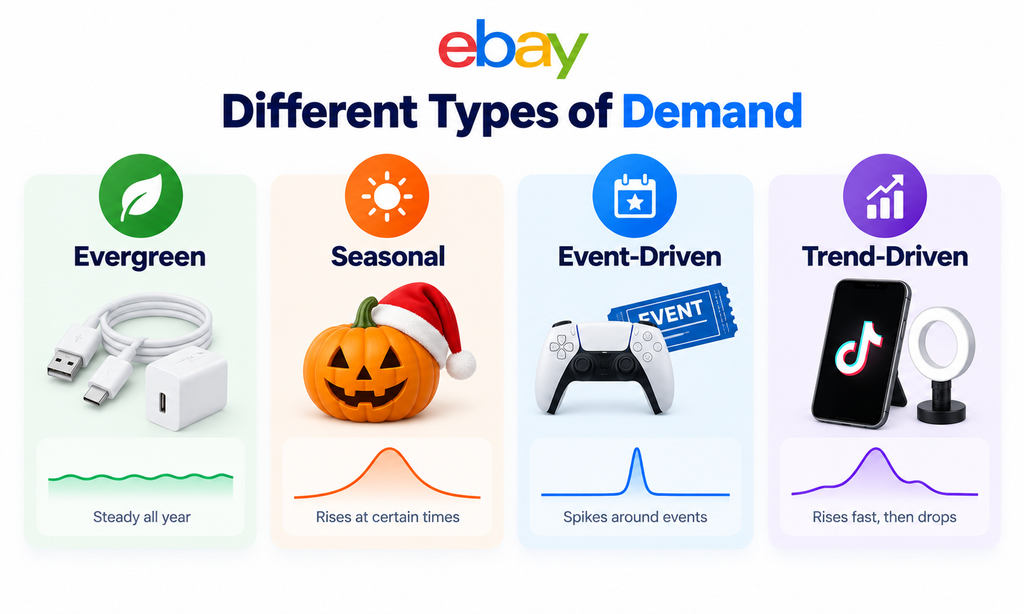
Not every increase in sales means the same thing. Before sourcing inventory, identify whether demand is evergreen, seasonal, event-driven, or trend-driven.
1. Evergreen Demand
These products sell relatively consistently throughout the year.
Examples include replacement parts, cables, basic accessories, and everyday household items. Evergreen products are usually easier to plan around because demand is less dependent on a specific season or event.
2. Seasonal Demand
Sales rise during predictable periods of the year and fall afterward.
Examples include:
- Christmas decorations
- Halloween products
- Summer accessories
- Winter clothing
Seasonal products can be profitable, but timing matters. Buying too late can leave you holding inventory after demand drops.
3. Event-Driven Demand
Demand increases because of a specific event or moment.
Examples include:
- Major sporting events
- Movie releases
- New product launches
- Holidays
- Cultural events
These opportunities can move quickly, so sellers need to understand how long the demand is likely to last.
4. Trend-Driven Demand
Trend-driven products can rise extremely fast because of social media, viral content, or sudden consumer interest. But they can fall just as quickly.
A product may look like a winner today and become dead inventory a few weeks later.
Step 6: Analyze Competition Properly
Do not judge competition by listing count alone. Seeing 850 active listings does not tell you whether the market is easy or difficult to enter.
What really matters is:
- Who is getting the sales
- How strong those sellers are
- How they are competing
- Whether you can offer something better
1. Check Who Controls the Sales
Start by looking at how sales are distributed across sellers.
Imagine a product generates 1,000 sales per month. That sounds attractive. But if two large sellers capture 800 of those sales, the market may be much harder to enter.
Now compare that with another market where those same 1,000 sales are spread across 50–100 sellers. The second market may offer a more realistic opportunity because demand is not controlled by only a few dominant stores.
Look for:
- Sellers with repeated sales
- Listings with high quantities sold
- Sellers appearing across many top results
- Stores dominating a large share of the niche
2. Measure How Strong the Competitors Are
Next, study the sellers who are actually winning.
Look at:
- Feedback score
- Seller history
- Top Rated Seller status
- Delivery speed
- Return policy
- Pricing
- Listing quality
- Product images
- Store professionalism
- Stock availability
For example, competing against a seller with: 100,000+ feedback + fast delivery + strong pricing + optimized listings is very different from competing against sellers with poor images, slower shipping, and incomplete product information.
3. Understand What Sellers Are Competing On
Competition becomes more difficult when every seller offers almost the exact same product and the only difference is price.
In that type of market, sellers often keep undercutting each other.
That can quickly lead to:
- Lower margins
- Higher advertising pressure
- Price wars
- Less room for differentiation
But competition is healthier when sellers compete on several factors.
For example:
- Better images
- Faster shipping
- Better bundles
- Stronger condition
- Clearer compatibility
- Better packaging
- Better service
- More complete listings
If the market gives you several ways to create a stronger offer, you have more room to compete without simply becoming the cheapest seller.
Step 7: Calculate Real Product Profitability
A product can look profitable on the surface and still leave very little money after all selling costs are included.
Suppose a product sells for $45 and costs $20 to source.
At first glance, it looks like: $45 – $20 = $25 profit
But that $25 is only the difference between your selling price and product cost. You still need to pay for:
- eBay fees
- Shipping
- Packaging
- Advertising
- Returns or damaged items
- Other operational costs
A more realistic calculation is:
- Selling Price
- Product Cost
- eBay Fees
- Shipping
- Packaging
- Advertising
- Returns Allowance
- Other Costs
- Contribution Profit
The important number is not how much revenue the product generates. It is how much money remains after the costs required to make the sale.
How to Do eBay Product Research With ZIK Analytics

eBay Product Research is excellent for validating marketplace sales. But when you are researching products every day, studying competitors, looking for supplier matches, or trying to discover opportunities instead of validating one product at a time, you may want a more specialized workflow.
That is where ZIK Analytics becomes useful.
ZIK currently provides dedicated eBay tools covering Product Research, Competitor Research, Product Explorer, Category Research, Market Insights, supplier matching, keyword research, and additional product-discovery workflows.
Method 1: Research a Product by Keyword
Suppose you are considering: Portable thermal printer. Go to: ZIK Analytics → Product Research. Choose eBay and enter the product keyword.
ZIK’s Product Research tool lets you refine results using factors such as:
- Marketplace
- Price
- Feedback
- Sale date range
- Keyword exclusions
Step 1: Choose the Correct Marketplace
Never analyze eBay US if you plan to sell primarily on eBay UK.
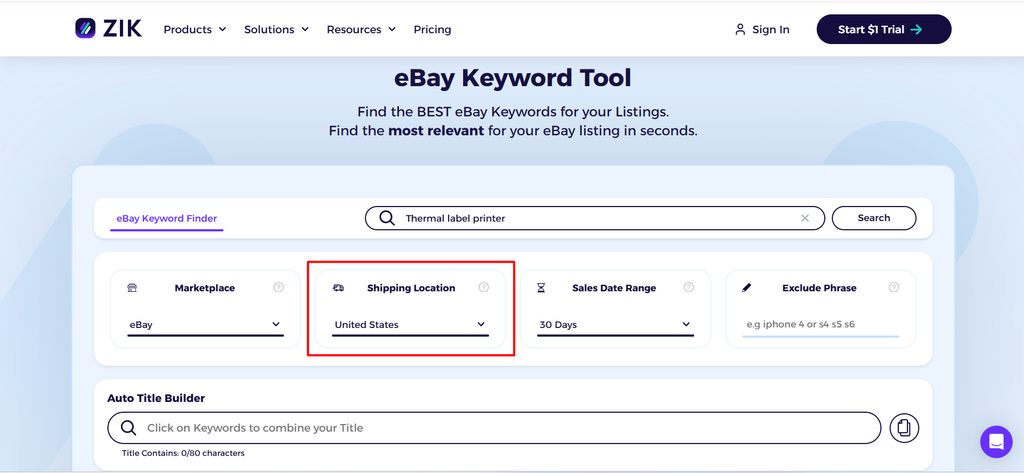
Consumer behaviour, prices, competition, shipping, and supplier availability can all vary between marketplaces. Start with the marketplace where you actually intend to sell.
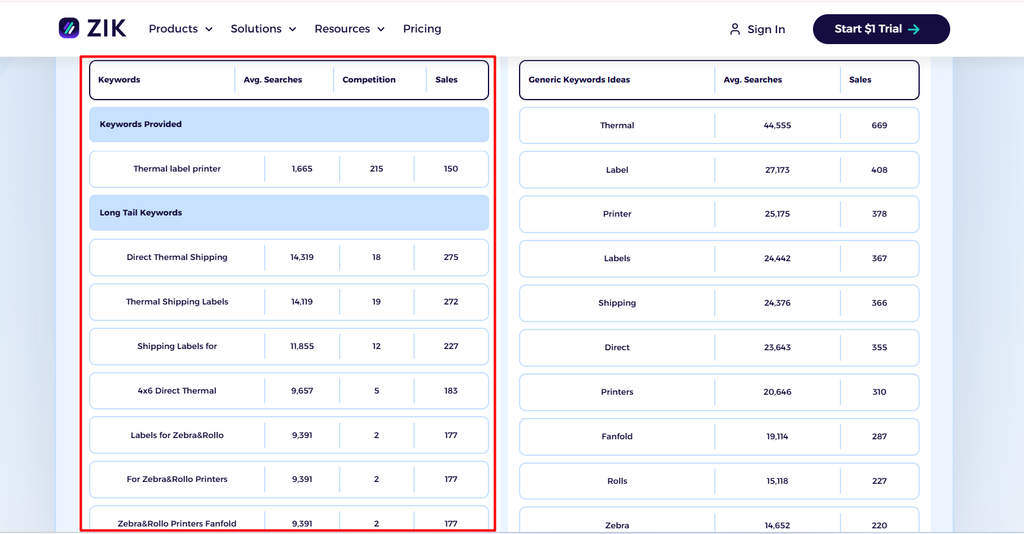
Step 2: Enter the Main Keyword
For example: Thermal label printer. Then narrow the results. Avoid making decisions from an overly broad dataset.
Step 3: Use Exclusion Keywords
If unrelated products appear, remove them.
For example, your results may include:
- Replacement labels
- Printer paper
- Carrying cases
Exclude irrelevant terms until the results represent products that are genuinely comparable.
Step 4: Set a Relevant Price Range
If you are targeting a product between $30 and $70, you probably do not need $5 accessories or $300 industrial equipment included in the same analysis.
Clean data matters just as much in ZIK as it does in eBay Product Research.
Step 5: Read the Main ZIK Metrics Together
ZIK Product Research can show metrics such as:
- Sell-through
- Number of listings
- Sold items
- Sales earnings
- Price
- Seller data
- Recent sales
Step 6: Look at Sales Distribution
One important question is: Who is actually getting the sales?
Suppose a niche generates $50,000 in monthly sales.
That sounds attractive. But if one seller captures $42,000, the opportunity looks very different from a market where the same revenue is distributed across 30 sellers.
Sales distribution helps you understand whether demand is accessible to new competitors.
Method 2: Reverse-Engineer Successful eBay Sellers
ZIK’s Competitor Research tool can help you study seller activity, listings, sales, average prices, feedback, and sell-through.
Step 1: Find a Strong Competitor
You can discover competitors through:
- eBay search
- ZIK Product Research
- Market Insights
- Existing niche knowledge
Choose sellers operating in a business model similar to yours.
Step 2: Enter the Seller ID
Copy the seller ID and go to: ZIK → Competitor Research. Now analyze the store.
Step 3: Review Seller-Level Metrics
Check:
- Active listings
- Total sales
- Sell-through
- Successful listings
- Average price
- Feedback
- Recent sales
You are looking for sellers whose inventory consistently converts.
Step 4: Find Their Best-Selling Products
Study their strongest listings and ask:
- Which products sell repeatedly?
- Which categories generate the most sales?
- Which price points work?
- What conditions sell?
- Which newer listings are gaining traction?
This gives you product ideas.
Finding a competitor’s winner does not automatically make it your winner. You still need to validate margin, sourcing, policy, competition, and fulfilment.
Method 3: Use Product Explorer and Supplier Matching
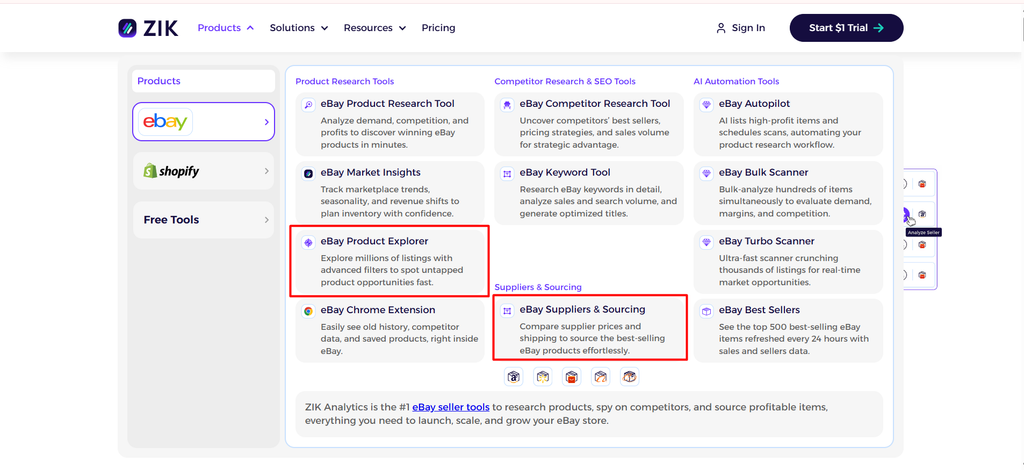
ZIK’s Product Explorer and supplier features can help compare potential sources and estimated margins.
This can be useful for:
- Dropshipping research
- Retail arbitrage
- Supplier discovery
- Margin comparison
- Similar-product sourcing
Example:
Suppose a product sells on eBay for $42 and you find a supplier offering it for $23
Do not assume: $19 profit
You still need to subtract:
- eBay fees
- Shipping
- Advertising
- Returns
- Operational costs
Supplier price is only the starting point.
eBay Product Research With Free and Paid Tools
You do not need every ecommerce tool available. Different tools answer different research questions.
| Tool | Cost Type | Best Use |
| eBay Product Research | Free for eligible Seller Hub users | Sales validation and historical pricing |
| eBay Sold Listings | Free | Quick manual market checks |
| Google Trends | Free | Seasonality and external trend direction |
| eBay Sourcing Insights | Included for qualifying Store sellers | Category demand and supply gaps |
| ZIK Analytics | Paid | Product, competitor, niche and supplier research |
| AutoDS | Paid | Dropshipping product and supplier discovery |
| Algopix | Free/Paid tools depending on use | Multi-market product and margin research |
Other Useful eBay Product Research Tools
Beyond ZIK Analytics, a few other tools can help you validate demand, spot trends, or speed up research.
1. eBay Product Research
This should remain one of your main validation tools because it uses eBay marketplace data.
Use it to check:
- Sales history
- Sell-through rate
- Average sold price
- Seller competition
- Shipping trends
- Historical demand
Use third-party tools for discovery, but cross-check important product decisions with eBay Product Research.
2. eBay Sold and Completed Listings
For quick manual research, sold listings are one of the easiest options.
They help you see:
- What is actually selling
- Recent transaction prices
- Product condition
- Shipping offers
- Successful listing patterns
This is especially useful when you need a fast check before doing deeper research.
3. Google Trends
Google Trends helps you understand whether broader interest in a product is:
- Rising
- Falling
- Stable
- Seasonal
It should be used as a supporting signal, not proof of eBay demand. Always confirm the opportunity using actual eBay sales data.
4. eBay Sourcing Insights
Sourcing Insights can help identify categories where demand appears strong relative to available supply.
Use it for product discovery, then move promising ideas into eBay Product Research for deeper validation.
Think of it this way: Sourcing Insights → Find opportunities
Product Research → Validate opportunities
5. AutoDS
For dropshipping sellers, AutoDS can help with:
- Product discovery
- Supplier research
- Trending products
- Pricing
- Stock and shipping analysis
However, products discovered through AutoDS should still be validated using eBay Product Research, ZIK Analytics, or sold listings before listing them.
6. Algopix
Algopix can be useful for wholesalers or sellers researching larger product catalogues.
For example, if a supplier gives you hundreds of UPCs, you can use bulk research to shortlist promising products before performing deeper eBay analysis.
eBay Product Research Mistakes
Even good data can lead to bad decisions if you read it the wrong way. Avoid these common mistakes:
- Looking only at active listings: Active listings show supply, not proven demand. Always check what has actually sold.
- Researching broad categories instead of specific products: “Electronics sell well” is not useful enough. Research the exact product, model, condition, and variation.
- Following sell-through rules blindly: A high sell-through rate does not automatically mean a product is profitable. Consider price, margin, competition, and inventory cost too.
- Using overly broad keywords: Broad searches mix unrelated products and distort your data. Narrow the search to products that are genuinely comparable.
- Mixing different product conditions: New, used, refurbished, and parts-only products can have completely different demand and pricing.
Frequently Asked Questions About eBay Product Research
Q1. What is eBay Product Research?
eBay Product Research is eBay’s marketplace research tool for analyzing historical sales, pricing, competition, seller activity, shipping, and product performance.
Q2. Is eBay Product Research the Same as Terapeak?
Yes, Terapeak Product Research was renamed eBay Product Research and is now available through Seller Hub.
Q3. Is eBay Product Research Free?
Yes, eBay Product Research is available at no additional cost to sellers who have access to Seller Hub.
Q4. How Far Back Does eBay Product Research Go?
eBay Product Research provides access to up to three years of historical marketplace sales data.
Q5. What Is a Good eBay Sell-Through Rate?
There is no universal good sell-through rate; compare it with similar products, conditions, price ranges, and time periods while also considering profit and competition.
Q6. Is ZIK Analytics Good for eBay Product Research?
Yes, ZIK Analytics is useful for product discovery, competitor research, seller analysis, niche research, supplier matching, and identifying potential opportunities.
Q7. Should I Use ZIK Analytics or eBay Product Research?
Use eBay Product Research for first-party marketplace validation and ZIK Analytics for deeper product discovery, competitor intelligence, and research workflows.
Q8. Can I Do eBay Product Research Without Paying for Software?
Yes, you can research products using eBay Product Research, sold listings, competitor listings, Google Trends, supplier websites, and spreadsheets without paid software.
Make Smarter eBay Product Research Decisions
Successful eBay product research is not about chasing whatever looks popular. It is about using real data to understand demand, competition, pricing, profit, sourcing, and risk before investing in inventory.
Use eBay Product Research to validate marketplace data, ZIK Analytics for deeper product and competitor insights, and other tools where they add useful context.
The process is simple: Research the market → Validate the opportunity → Test small → Scale what works.
How Ecomclips Helps Sellers Research, Launch, and Grow on eBay
Building a profitable eBay business requires more than finding a product that looks popular. Sellers need a connected strategy across product research, competitor analysis, pricing, listing optimization, advertising, fulfilment, and profitability.
At Ecomclips, we help eBay sellers and brands make better product decisions, build stronger listings, and create a clear path from initial research to long-term marketplace growth.
Our support includes:
- eBay Product Research & Opportunity Analysis: Identify potential products using demand, sell-through, competition, pricing, historical sales, and profitability data.
- Competitor & Market Research: Analyze successful sellers, top-performing listings, pricing strategies, market gaps, and opportunities to differentiate your offer.
- Listing Optimization & eBay SEO: Improve titles, item specifics, descriptions, images, keywords, and listing structure to increase visibility and conversion.
- Pricing & Profitability Analysis: Evaluate sourcing cost, eBay fees, shipping, advertising, returns, and margins before products are scaled.
- eBay Advertising Management: Build and optimize Promoted Listings campaigns to increase qualified traffic while protecting advertising efficiency and profit.
- Inventory, Fulfilment & Growth Strategy: Support sourcing decisions, inventory planning, fulfilment, performance analysis, and product scaling based on real marketplace results.
Scale Your eBay Business With Ecomclips
Finding the right product is only the beginning of building a profitable eBay business. Once you know what to sell, you still need to optimize listings, improve visibility, protect margins, manage advertising, and adapt as the marketplace changes.
For the complete selling strategy, read our Complete Guide to Selling on eBay in 2026. Once you have validated your products, continue with our Complete eBay Listing Optimization Guide to improve titles, keywords, item specifics, images, descriptions, mobile experience, and conversion.
Watch practical eBay tutorials, marketplace growth strategies, advertising insights, and ecommerce updates on the Ecomclips YouTube channel, or explore more seller guides, marketplace strategies, and optimization resources on the Ecomclips Blog.
Stay connected with the latest ecommerce trends and company updates through the Ecomclips Facebook page and follow Ecomclips on LinkedIn for professional marketplace insights and ecommerce discussions.
Have questions about eBay product research, listing optimization, search visibility, advertising, profitability, or scaling your store? Contact the Ecomclips team at info@ecomclips.com or book a consultation with our ecommerce experts to discuss your goals and explore how we can help grow your eBay business.