
Over the last 3+ years working on eBay listings, we’ve learned one simple truth: high-performing listings are not published, they are built. Not by stuffing keywords or cutting prices, but by combining smart research, strong listing structure, buyer-focused content, and continuous optimization.
Many eBay sellers assume poor sales mean they need a better product or a lower price. In reality, the bigger problem is often how the product is being found, presented, and compared against competing listings.
A strong eBay listing connects every part of the buyer journey, from keyword research, category selection, titles, and item specifics to photos, descriptions, pricing, shipping, video, and mobile experience. Miss one important piece, and you may lose visibility, the click, or the sale.
That is why this guide goes beyond basic eBay SEO tips. We are breaking down the complete eBay listing optimization process step by step, so you can build listings that are easier to find, stronger against competitors, more convincing to buyers, and ultimately more likely to sell.
What Is eBay Listing Optimization?
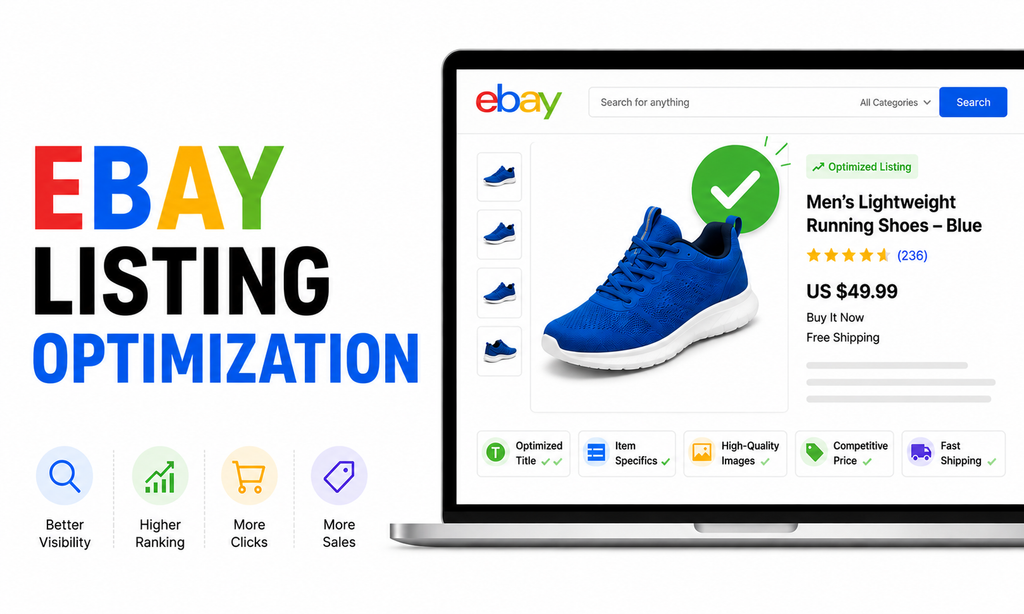
eBay listing optimization is the process of improving every important part of a product listing so it performs better in search and gives buyers a stronger reason to purchase.
A properly optimized listing can help you:
- Appear for more relevant buyer searches
- Improve visibility in eBay search results
- Attract more clicks
- Present product information clearly
- Build buyer confidence
- Improve conversion rates
- Reduce unnecessary questions and returns
- Support stronger long-term seller performance
It is not only about adding keywords to the title. Effective optimization brings together your title, item specifics, category, images, description, pricing, shipping, returns, and seller performance to create a stronger overall offer.
Why Do eBay Sellers Need Listing Optimization?
Because buyers usually have plenty of alternatives.
When someone searches for a product on eBay, they may see dozens, or even hundreds of similar listings. If your listing does not appear for the right search, stand out visually, or communicate value quickly, buyers can move to a competitor within seconds.
Listing optimization helps you compete at every stage. Better keywords and item specifics improve discoverability, stronger images and titles encourage clicks, while competitive pricing, clear descriptions, and reliable shipping help turn those clicks into sales.
For example, imagine two sellers offering the same wireless headset at almost the same price.
Seller A uses a vague title, three average photos, incomplete item specifics, and a basic description. Seller B uses a keyword-focused title, accurate item specifics, clear high-quality photos, detailed condition information, competitive shipping, and a buyer-friendly description.
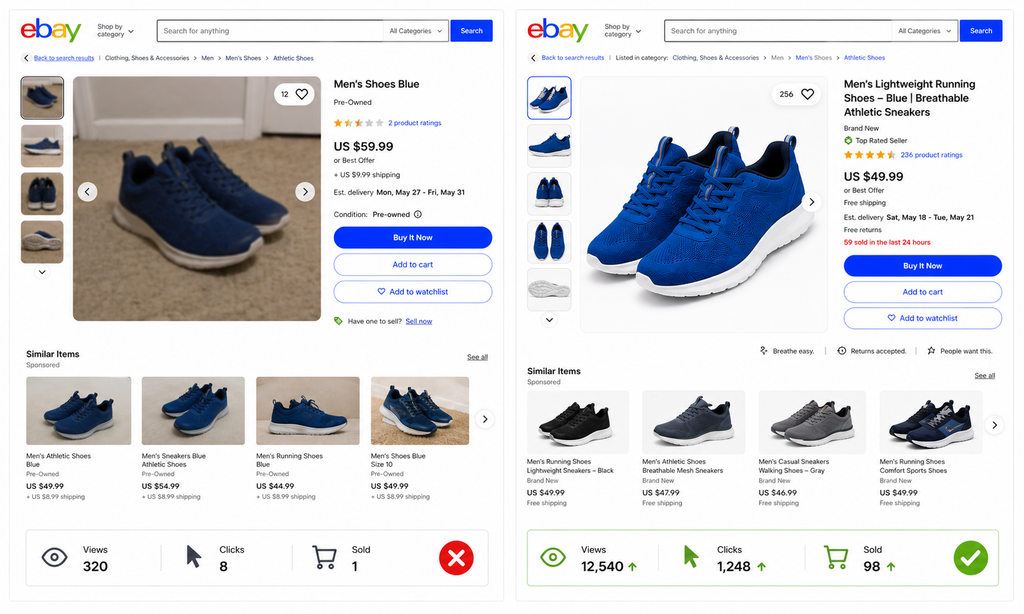
Even though the products are almost identical, Seller B gives both eBay and the buyer more useful information. That listing has a much better chance of being discovered, clicked, and purchased.
That is the real purpose of eBay listing optimization, making the same product easier to find and easier to choose.
How eBay Search Works in 2026
Before optimizing anything, you need to understand what you are optimizing for. When buyers search on eBay, the default sorting method is Best Match.
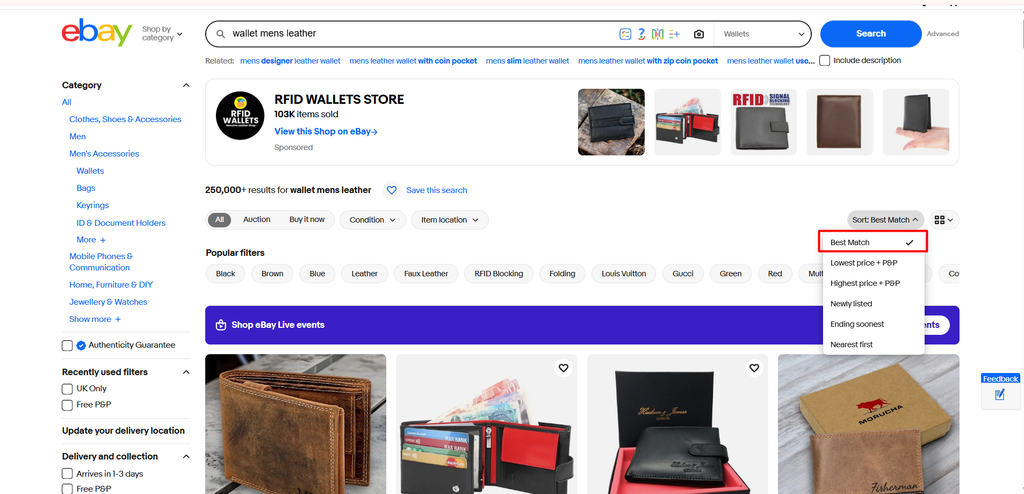
You may still hear sellers and third-party tools refer to eBay’s search system as Cassini. That name has been widely used in the seller community for years. However, eBay’s current official documentation focuses on Best Match when explaining how listings are ranked.
According to eBay, Best Match considers factors including:
- How closely the listing matches the buyer’s search terms
- How popular the item is
- The item’s price
- Listing quality
- Listing completeness
- Return policy and handling time
- The seller’s track record
eBay also says search results can be influenced by the buyer’s browsing history, item location, selected filters, and the amount of competition for the search query.
This tells us something important.
eBay SEO Is Not Traditional SEO
Google SEO is often heavily focused on webpages, content, backlinks, authority, and search intent. eBay SEO works differently because eBay’s ultimate objective is commerce.
The platform wants to connect a buyer with a relevant item they are likely to purchase from a seller capable of delivering a good experience.
That means eBay optimization involves two interconnected jobs:
1. Make the listing discoverable
You need:
- Relevant keywords
- Accurate item specifics
- Correct category
- Product identifiers
- Strong structured data
2. Make the offer attractive
You need:
- Good photos
- Competitive pricing
- Clear condition
- Fast and reasonable shipping
- Good returns
- Strong seller performance
- High buyer confidence
That is why sellers who treat eBay SEO as simply ‘put more keywords in the title’ usually leave a lot of opportunity on the table.
How to Optimize Your eBay Listings Step by Step
Successful eBay listing optimization does not happen by changing one title or adding a few extra keywords. It is a process of understanding what buyers are searching for, how successful competitors position their products, and which listing elements influence clicks and purchases.
The following steps will help you optimize your listing systematically, from initial market research to improving visibility, conversion, and overall performance.
Step 1: Start With eBay Keyword and Market Research
Before writing your title or filling out item specifics, understand the market you are entering.
Do not begin by guessing what buyers might search. Instead, use actual eBay search behavior and sales data to understand:
- What buyers call the product?
- Which product attributes matter most?
- Which keyword combinations appear frequently?
- What successful competitors are doing?
- What buyers are actually willing to pay?
This research gives you the foundation for your title, item specifics, pricing, images, shipping strategy, and overall offer.
Use eBay Search Suggestions
One of the easiest places to begin is eBay’s own search bar.
Start typing the main name of your product. For example: wireless gaming headset. As you type, eBay may display longer search suggestions based on related searches shoppers make on the marketplace.
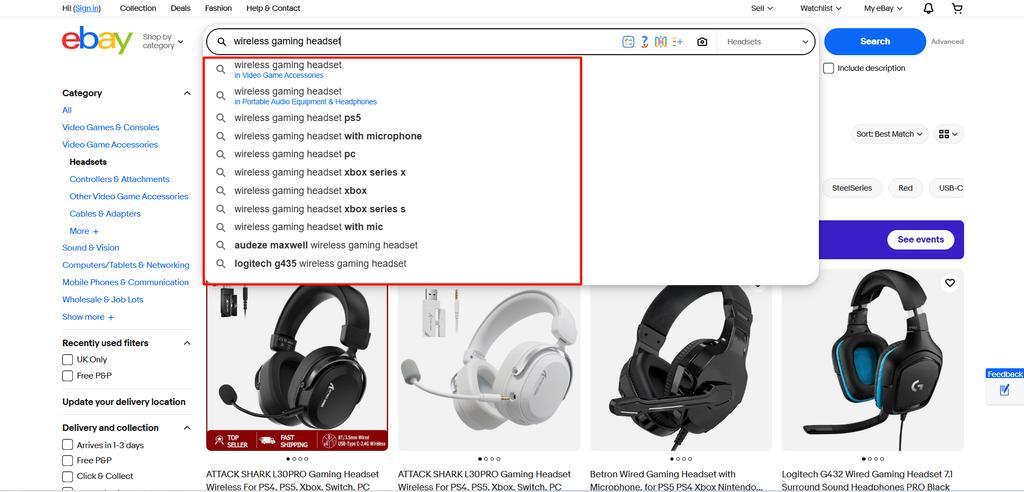
You might discover variations involving:
- Product type
- Brand
- Model
- Size
- Color
- Compatibility
- Material
- Style
- Features
- Intended use
These suggestions can help you understand the language buyers naturally use when looking for products like yours.
Use eBay Product Research
Search suggestions tell you what buyers may be looking for. Product Research tells you what is actually selling.
Available through Seller Hub, eBay Product Research, previously known as Terapeak Product Research, gives sellers access to historical sales and pricing information that can help evaluate demand and competition.
You can access it through: Seller Hub → Research → Product Research
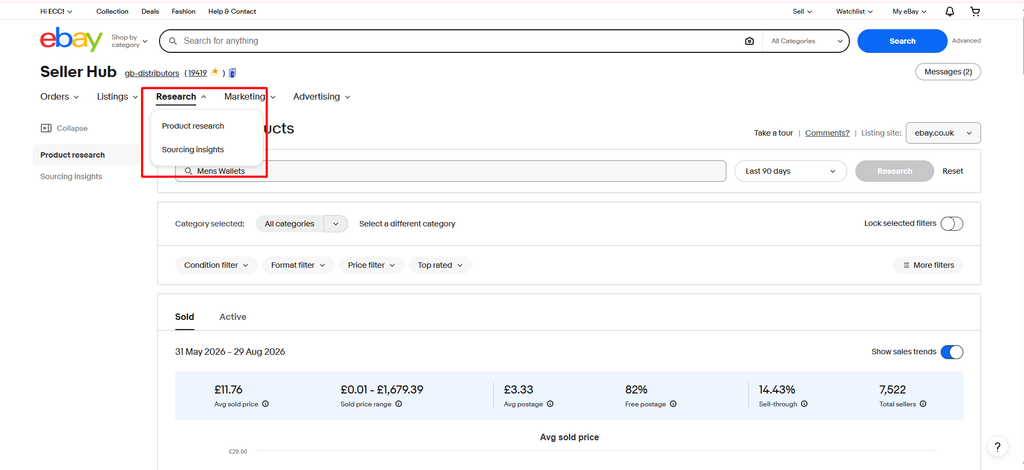
Search for your product and review information such as:
- Average sold price
- Sold price range
- Number of sellers
- Number of units sold
- Sell-through rate
- Shipping behavior
- Listing format
- Popular product characteristics
- Historical sales activity
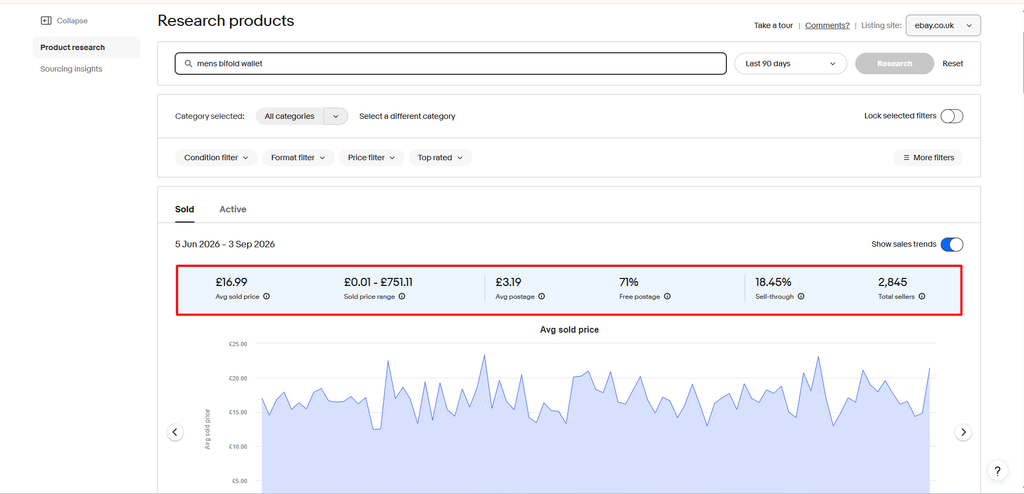
This information helps you answer important questions before creating the listing.
Study Successful Sold Listings
Product Research gives you the numbers. Now examine the listings behind those numbers.
Find recently sold products that are genuinely comparable to yours and look for patterns across multiple successful listings. Do not judge your strategy from one unusually successful sale. Look for characteristics that repeatedly appear among listings that sell.
1. Examine the titles
Look at how successful sellers structure their titles.
Which words appear repeatedly? Are sellers leading with the brand, product type, model, size, compatibility, or another important attribute?
The objective is not to copy their titles. It is to understand which information buyers in that category appear to care about.
2. Examine the item specifics
Check which attributes successful listings complete.
For example, in clothing this may include size, color, material, style, fit, and department. For electronics, it may include model, storage capacity, connectivity, compatibility, and features.
Repeated attributes can reveal what buyers commonly use to compare products.
3. Examine the product photos
Look beyond image quality.
Ask:
- What angle is used for the main image?
- How much of the frame does the product occupy?
- Are several angles included?
- Are labels or model numbers photographed?
- Are defects clearly shown on used products?
- Are accessories displayed?
This helps you understand what visual information buyers expect before making a decision.
4. Examine price positioning
Do not automatically assume successful sellers are the cheapest.
Compare:
- Product price
- Shipping cost
- Condition
- Seller reputation
- Delivery speed
- Returns
- Included accessories
Sometimes a slightly higher-priced listing sells because the overall offer is stronger.
5. Examine the offer structure
Finally, study how the product is actually being sold.
Look for:
- Buy It Now
- Auction
- Best Offer
- Multi-quantity listings
- Variations
- Bundles
Different categories behave differently. A collectible may perform well through auction, while a regularly stocked household product may be better suited to Buy It Now.
Step 2: Choose the Correct eBay Category
Choosing the right category may seem like a small setup task, but it plays a much bigger role in how eBay understands and displays your listing.
A category tells eBay what type of product you are selling, which buyer filters should apply, which item specifics should appear, and where the listing belongs within eBay’s browse structure. Choosing an inaccurate category can therefore limit visibility even if the rest of the listing is well optimized.
For example, suppose you are selling: Nike Air Max 270 Running Shoes
Listing them under a broad fashion category gives eBay less context. A more specific footwear category helps the marketplace understand that the product is a pair of athletic shoes and allows buyers to narrow results by attributes such as:
- Brand
- Size
- Color
- Style
- Department
- Condition
- Shoe type
Correct category selection can influence:
- Search relevance
- Buyer filtering
- Browse visibility
- Available item specifics
- Required listing attributes
- Product classification
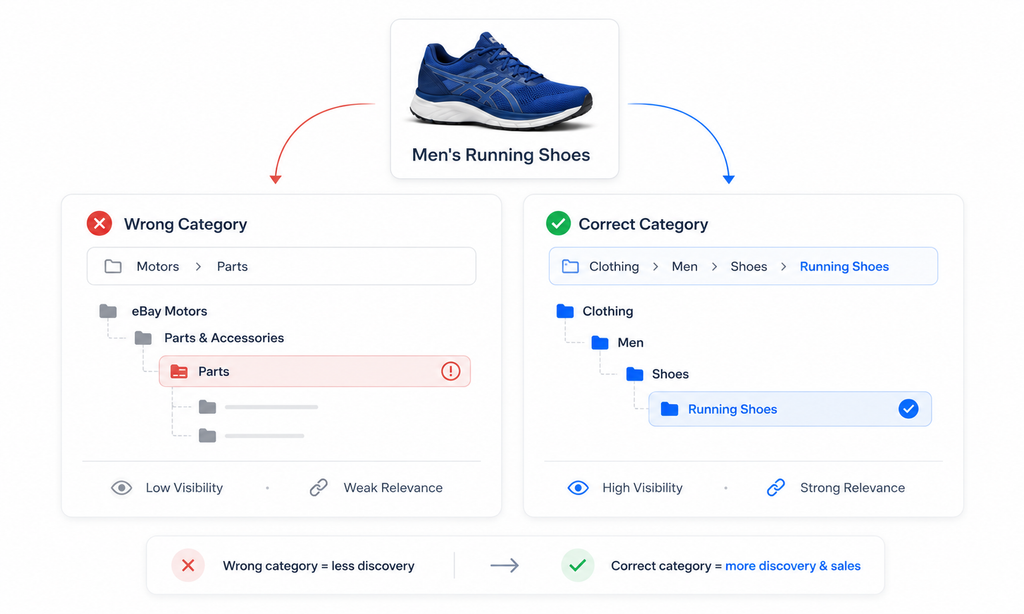
It also improves the buyer experience. Someone browsing specifically for running shoes is far more likely to discover your product when it sits in the correct category than when it is buried inside a broad or loosely related one.
eBay may suggest a category automatically while you create a listing, but do not accept that suggestion blindly. Review the category path and make sure it accurately describes the product.
Step 3: Optimize Your eBay Listing Title
Your title is one of the first things both eBay and buyers use to understand what you are selling. A strong title can improve search relevance while also making the listing easier to recognize in a crowded results page.
eBay currently allows up to 80 characters in the title, so every word should add useful product information.
The key word is: Relevant. Not filler. Not promotional language. Not repeated keywords.
Using the faux fur slipper listing as an example, the goal is to tell buyers exactly what the product is and highlight the attributes they are most likely to search for.
Use a Clear Title Structure
A practical structure is: Brand + Product Type + Main Material/Feature + Comfort Feature + Intended Use + Key Benefit
Poor: Amazing Ladies Slippers Super Soft Warm Best Deal
Better: Bargain Baazar Ladies Mule Slippers, Faux Fur Lined Memory Foam, Warm Indoor House Shoes, Anti Slip Sole
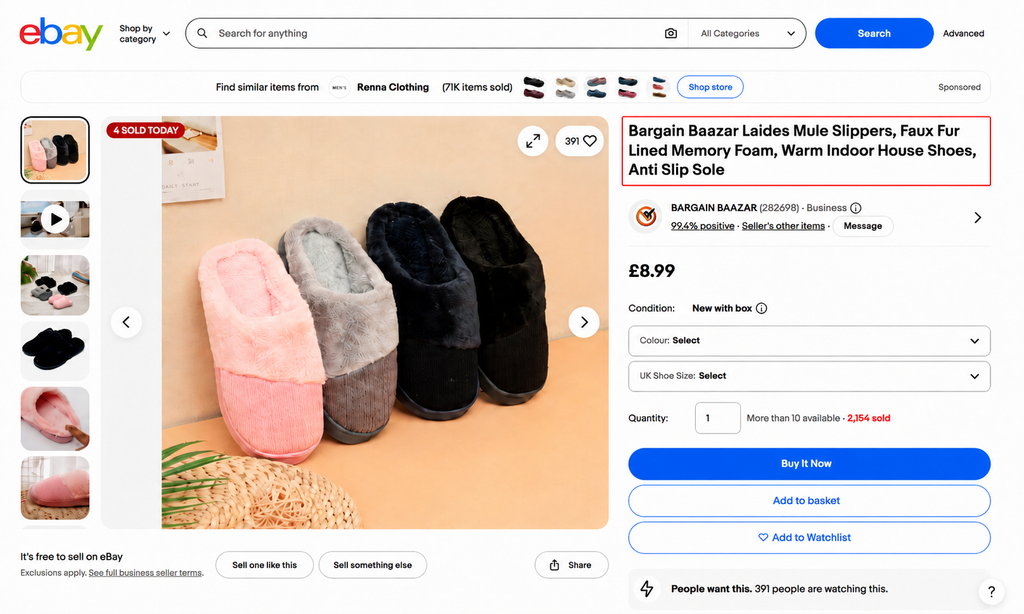
The improved title immediately explains the product type, material, comfort feature, intended use, and key benefit.
Include the Attributes Buyers Actually Search
For a product like these slippers, useful title elements may include:
- Brand
- Product type
- Style
- Material
- Lining
- Comfort feature
- Intended use
- Sole type
- Gender or department where appropriate
- Color
- Size range
Put Important Keywords Earlier
The first part of your title should clearly identify the product.
For example, ‘Ladies Mule Slippers Faux Fur Lined Memory Foam’, is much stronger than Amazing Comfortable Warm Soft Ladies Footwear
The first version immediately tells buyers what the item is and includes specific searchable attributes.
Step 4: Treat Item Specifics as Search Infrastructure
Item specifics are one of the most important parts of eBay listing optimization, yet many sellers still focus almost entirely on the title and leave these fields incomplete.
That is a mistake.
Item specifics give eBay structured information about your product. They help the platform understand what the item is, which attributes matter, and which buyer filters should apply.
Depending on the category, item specifics may include:
- Brand
- Type
- Size
- Color
- Material
- Style
- Model
- Features
- Department
- Pattern
- Dimensions
- Compatibility
- Country/Region of Manufacture
- Condition
The exact fields vary by category, but the principle is the same: the more accurate and relevant information you provide, the easier it becomes for eBay to classify your product and match it with the right shoppers.
More importantly, item specifics affect filtered searches.
If a buyer searches for a product and then filters by attributes such as brand, color, size, material, style, or condition, eBay relies heavily on your structured listing data to determine whether your item should remain visible.
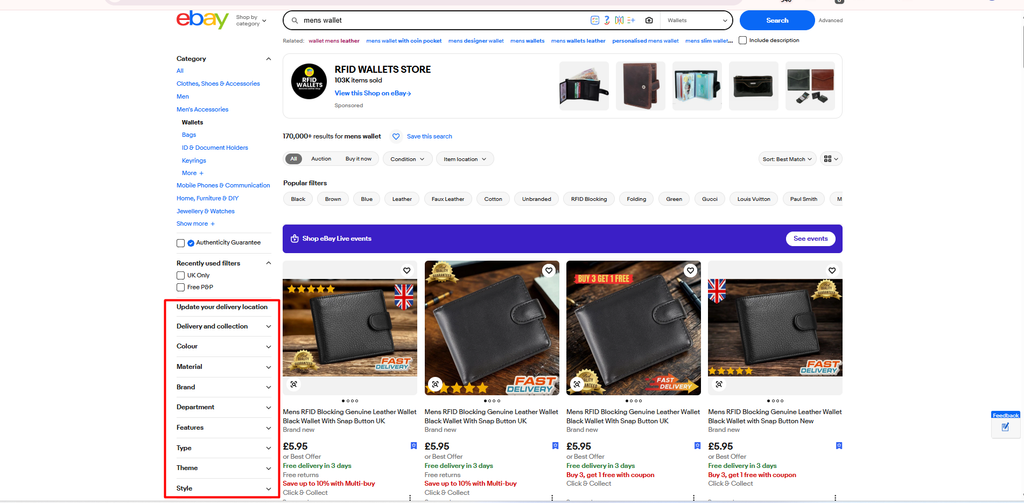
So even a strong title may not be enough if the important item specifics are missing.
Follow eBay Search Demand Signals
eBay also provides search-demand guidance for certain item specifics.
These signals can show which attributes buyers have been actively searching for recently. Think of it as eBay telling you: Buyers care about this detail.
If a recommended field has strong search demand and it applies to your product, it should become a priority.
For example, if buyers frequently search for wallets by color, material, style, department, and closure type, leaving those fields incomplete can make the listing less competitive in filtered searches.
Example: Wallet Listing
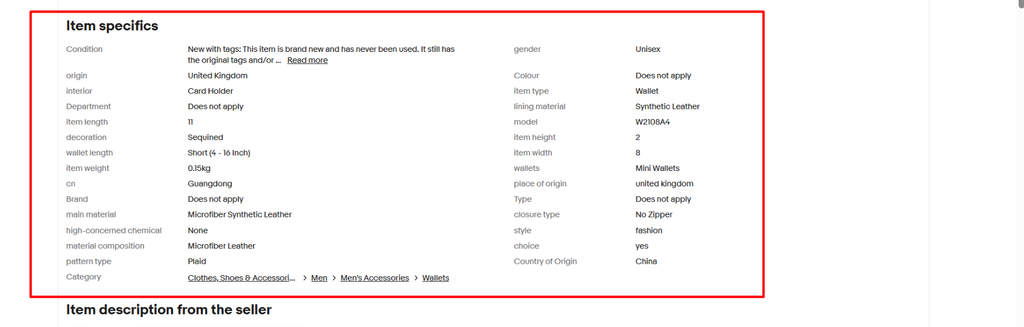
Take the wallet listing shown above. It contains a good number of item specifics, but it also shows why simply filling more fields is not enough. The information needs to be accurate, relevant, and consistent.
The seller has provided details such as:
- Condition: New with tags
- Gender: Unisex
- Item Type: Wallet
- Interior: Card Holder
- Main Material: Microfiber Synthetic Leather
- Lining Material: Synthetic Leather
- Material Composition: Microfiber Leather
- Pattern Type: Plaid
- Decoration: Sequined
- Style: Fashion
- Closure Type: No Zipper
- Model: W2108A4
- Wallet Length: Short
- Item Length: 11
- Item Width: 8
- Item Height: 2
- Item Weight: 0.15 kg
- Country of Origin: China
- Category: Men → Men’s Accessories → Wallets
That gives eBay useful structured information about the product. However, several fields could still be improved.
For example, the listing shows:
- Brand: Does not apply
- Colour: Does not apply
- Department: Does not apply
- Type: Does not apply
If the seller actually knows these details, more specific values would be much better. For example:
- Brand: Unbranded
- Color: Black
- Department: Men / Unisex
- Type: Wallet
- Style: Card Holder
- Features: Compact, Lightweight, Multiple Card Slots
There is also a consistency issue. The listing shows Origin: United Kingdom and Place of Origin: United Kingdom, while Country of Origin: China and CN: Guangdong suggest China.
That kind of conflicting information should be corrected before publishing. Item specifics should help buyers understand the product—not create more questions.
Step 5: Write an Accurate Condition Description
Your title and item specifics help buyers find the listing, but the product description helps them decide whether to buy.
A strong eBay description should answer the questions a buyer may still have after looking at the title, images, and item specifics. It should explain the product clearly without turning the listing into a wall of unnecessary text.
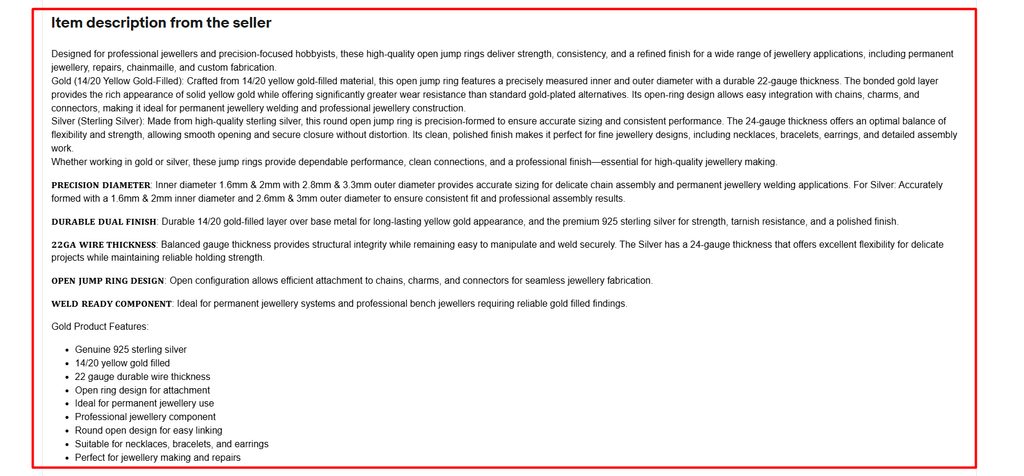
The description shown in the example above is a good example of detailed product information. The seller explains what the jewelry jump rings are, what materials they are made from, their dimensions, thickness, finish, intended applications, and important features.
That gives buyers a much clearer understanding of the product before they place an order.
Step 6: Optimize Your Product Photos for Both Clicks and Conversion
Product photos influence two critical moments in the buyer journey.
Your first image has to win the click. Your remaining images have to remove doubt and help the buyer feel confident enough to purchase.
That is why product photography is not just a visual extra on eBay. It is part of both your click-through strategy and your conversion strategy.
eBay currently allows sellers to upload up to 24 photos per listing. You do not need to use all 24 for every product, but you should use enough images to answer the questions a buyer may have before purchasing.
1. Start With a Strong Main Image
Your main image is the photo buyers usually see first in search results. Treat it like the thumbnail of your listing.
It should be:
- Sharp and high quality
- Properly exposed
- Easy to understand at a glance
- Centered
- Large enough to inspect
- Free from distracting clutter
- Representative of the actual item
- Consistent with the condition being sold
If the main image is dark, cluttered, too far away, or visually confusing, buyers may simply move to another listing before ever opening yours.
2. Use Additional Images to Answer Buyer Questions
Once the buyer clicks, your other images should help them understand the product from every important angle.
A strong general photo sequence could include:
- Main hero image
- Front view
- Rear view
- Left side
- Right side
- Top view
- Bottom view
- Important feature close-up
- Label, model, or serial information
- Included accessories
- Size or scale reference
- Packaging
- Cosmetic wear
- Defect close-up
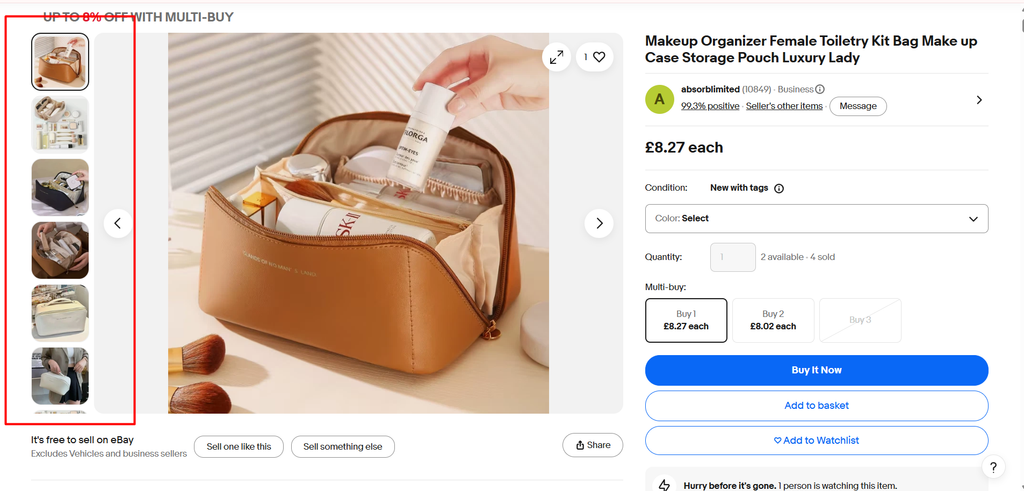
For Fashion Products
Fashion buyers often care about fit, material, construction, and condition.
Useful additional photos may include:
- Fabric texture
- Tags
- Size labels
- Measurements
- Stitching
- Logos
- Soles
- Closures
- Inside lining
- Any wear or damage
For example, if you are selling shoes, do not stop at one front-facing image. Show the side profile, sole, heel, size label, interior, and any visible wear. That gives the buyer a much better understanding of what will arrive.
Show Defects Clearly
If the product has scratches, dents, stains, chips, fading, or other imperfections, photograph them clearly. Do not hide them.
Clear defect photos help set expectations and can reduce:
- Returns
- Buyer disputes
- Item-not-as-described complaints
- Negative feedback
This is especially important for used, refurbished, vintage, and collectible items.
Show What Is Included
If accessories are part of the sale, photograph them.
For example, if you are selling a camera, show:
- Camera body
- Lens
- Battery
- Charger
- Strap
- Case
Step 7: Add a Product Video When It Helps the Buyer
Photos can show a product clearly, but sometimes buyers need more than still images. That is where video becomes useful.
eBay currently allows sellers to add one video per listing free of charge, and it can be especially effective when the product has features, movement, sound, installation steps, or condition details that are difficult to explain through photos alone.
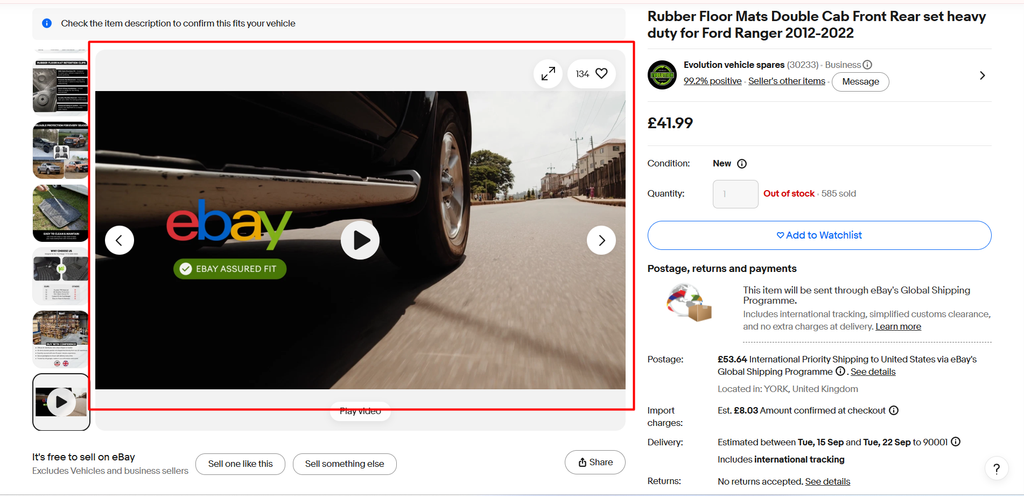
Use Video to Answer Questions Photos Cannot
Video works best when it adds information rather than simply repeating what buyers can already see in your image gallery.
Useful video content can include:
- Product demonstrations
- Installation steps
- Setup instructions
- Unboxing
- Condition walkthroughs
- Moving parts
- Sound or performance
- Features that are difficult to photograph
For example, a photo can show a cordless drill.
A short video can show:
- The drill powering on
- Speed settings working
- Chuck movement
- Battery connection
- Actual operating sound
That gives the buyer much more confidence in the product.
Keep the Video Short and Focused
eBay supports listing videos up to 150MB and generally recommends keeping them around a minute or less. That does not mean you need to use the full minute.
In many cases, 20–40 seconds is enough to show the most important information.
A useful structure could be:
- Show the complete product
- Demonstrate the main feature
- Show important controls or details
- Highlight condition
- Show included accessories
Avoid long introductions, unnecessary branding, or content that does not help the buyer make a decision.
Step 8: Optimize for Mobile Buyers
A listing can look perfect on desktop and still perform poorly on a phone.
That matters because a large share of eBay shopping now happens on mobile devices. Mobile buyers usually scan quickly, compare several listings, and make decisions on a much smaller screen.
Your mobile listing should be:
- Easy to scan
- Broken into short paragraphs
- Structured with bullet points
- Free from oversized tables
- Free from horizontal scrolling
- Readable without zooming
- Focused on the most important product information first
Keep the Layout Simple
Avoid complicated description templates that look impressive on desktop but collapse badly on mobile.
Large banners, multi-column layouts, oversized images, and wide tables can force buyers to scroll sideways or zoom in just to understand the listing.
Instead, use a simple structure such as: Short introduction → Key features → Specifications → Condition → What is included
This allows buyers to find the information they need quickly.
Make the Text Easy to Read
Do not use tiny fonts just to fit more information on the screen.
eBay recommends using a mobile-friendly font size of around 16px and avoiding formatting that forces buyers to zoom or scroll horizontally.
Short sentences and clear spacing also make a big difference.
Better mobile format:
- Material: Genuine leather
- Color: Black
- Size: 11 × 8 × 2 cm
- Condition: New
- Features: Multiple card slots
- Package Includes: 1 wallet
The second version is much easier to understand on a small screen.
Put Important Information First
Mobile buyers may not read the entire description.
Make sure the most important information appears near the top, such as:
- Product type
- Key specifications
- Compatibility
- Size
- Condition
- Main features
- Important exclusions
Do not make someone scroll through several promotional paragraphs before discovering whether the item actually fits their needs.
eBay Listing Optimization Mistakes
Even a good product can underperform if the listing has avoidable optimization issues.
- Keyword stuffing: Repeating similar terms wastes title space and makes the listing look spammy.
- Ignoring item specifics: Missing attributes can reduce visibility when buyers use filters.
- Choosing the wrong category: Listing in a broad or inaccurate category can hurt relevance and discoverability.
- Using too few photos: Limited images leave buyers with unanswered questions about the product.
- Hiding defects: Undisclosed damage can lead to returns, complaints, and negative feedback.
- Copying manufacturer descriptions: Generic text often fails to explain the actual item, condition, or buyer-relevant details.
- Cutting price too quickly: A sales drop may come from visibility, competition, shipping, demand, or seller performance—not price alone.
Frequently Asked Questions About eBay Listing Optimization
Q1. What is eBay listing optimization?
eBay listing optimization means improving titles, keywords, item specifics, images, pricing, shipping, and other listing elements. The goal is to increase visibility, clicks, buyer confidence, and ultimately sales.
Q2. How do I optimize my eBay listing for search?
Use the correct category, relevant keywords, a clear title, complete item specifics, accurate identifiers, and competitive pricing. Also focus on listing quality, shipping terms, seller performance, and buyer experience.
Q3. How many characters can an eBay title have?
eBay currently allows up to 80 characters in a listing title. Use that space for relevant details such as brand, model, product type, size, color, and key features.
Q4. How many photos can I add to an eBay listing in 2026?
eBay currently allows sellers to upload up to 24 photos per listing. Use enough images to clearly show the product, important details, accessories, and any visible defects.
Q5. Do item specifics really matter on eBay?
Yes, item specifics help eBay understand your product and help buyers narrow search results using filters. Missing important attributes can reduce your visibility in highly relevant filtered searches.
Q6. Should I use every recommended item specific?
Complete as many relevant and accurate recommended item specifics as possible. Never guess or add incorrect information simply to fill every available field.
Q7. Does eBay use Cassini in 2026?
Cassini is still commonly mentioned by sellers, but eBay currently explains search ranking through its Best Match system. Focus on documented factors such as relevance, listing quality, price, selling terms, popularity, and seller performance.
Q8. Does price affect eBay ranking?
Yes, price is one of the factors eBay says Best Match considers when ranking listings. However, the cheapest listing does not automatically rank first because relevance, quality, shipping, and seller performance also matter.
Optimize Smarter, Sell Better on eBay
eBay listing optimization is not about finding one secret keyword. It is about making your product easier to find, understand, trust, and buy.
Strong titles, complete item specifics, clear photos, competitive pricing, reliable shipping, and good seller performance all work together to improve results.
Instead of asking, How do I rank first?, ask: Where is my listing losing the buyer? Once you identify that weak point, you can make smarter changes and improve performance with purpose.
Grow Your eBay Business With Ecomclips
Building a successful eBay business requires more than simply publishing listings. Sellers need to continuously improve product research, listing optimization, pricing, advertising, shipping, and seller performance as the marketplace evolves. Ecomclips provides practical ecommerce resources, marketplace insights, and seller strategies to help businesses improve visibility, increase conversions, protect profitability, and scale successfully on eBay.
Watch eBay tutorials, listing optimization strategies, marketplace growth tips, advertising insights, and ecommerce updates on the Ecomclips YouTube channel. Explore detailed seller guides, eBay SEO strategies, marketplace updates, and ecommerce growth resources on the Ecomclips Blog. You can also read our Complete Guide to Selling on eBay in 2026 for a complete overview of setup, SEO, listings, advertising, fees, and growth strategies.
Stay connected with the latest ecommerce trends and company updates by following the Ecomclips Facebook page, and connect with Ecomclips on LinkedIn for professional marketplace insights, ecommerce discussions, and industry updates.
Have questions about optimizing eBay listings, improving search visibility, increasing conversions, managing Promoted Listings, improving seller performance, or scaling your eBay store? Contact the Ecomclips team at info@ecomclips.com or book a consultation with our ecommerce experts to discuss your goals and discover how we can help you grow your eBay business.