
Selling on eBay but not getting the sales you expected? You’re not alone.
Many sellers believe success on eBay is simply about adding more products and waiting for buyers to find them. But in reality, profitable selling depends on much more: finding the right products, creating optimized listings, improving search visibility, pricing competitively, managing advertising, and maintaining strong seller performance.
The truth is, eBay success is not about listing more products. It’s about building a complete marketplace strategy where every part of your business works together.
This guide breaks down the practical strategies you need to launch, optimize, and scale a profitable eBay business in 2026, from product research and listing optimization to SEO, ads, fees, fulfilment, and long-term growth.
Why Sell on eBay in 2026?
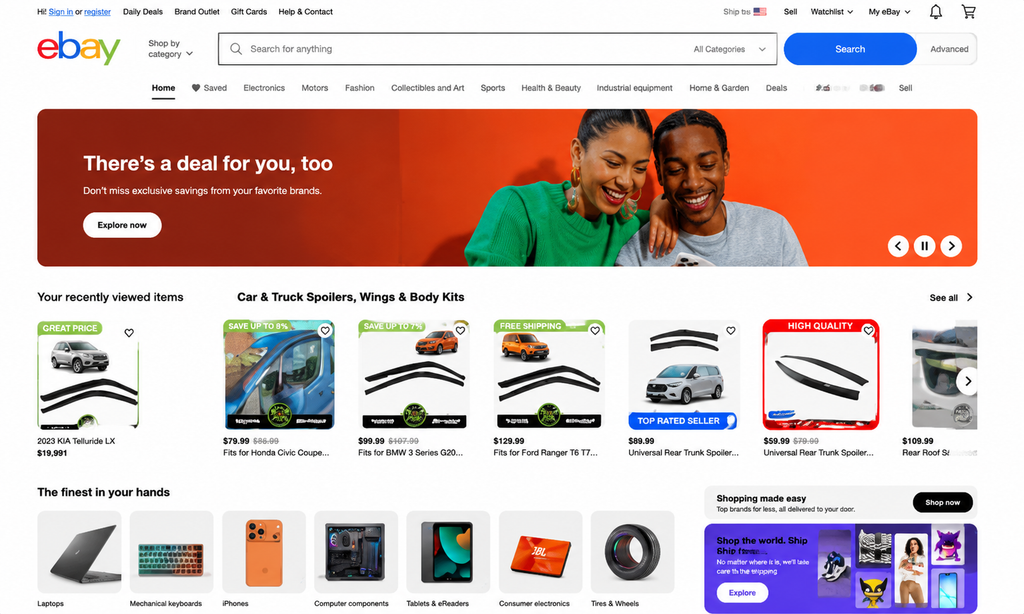
Most marketplaces focus mainly on new catalogue products. But eBay works differently.
eBay is built around variety, flexibility, and buyer discovery. Unlike platforms that mainly focus on standardized products, eBay allows sellers to find opportunities across different categories, product conditions, and business models.
1. A Marketplace Built Around Product Variety
One of eBay’s biggest advantages is the range of products sellers can offer.
Instead of being limited to only new branded products, sellers can build opportunities around:
- Electronics and refurbished devices
- Fashion and accessories
- Vehicle parts and replacement items
- Collectibles, trading cards, and vintage goods
- Business and industrial products
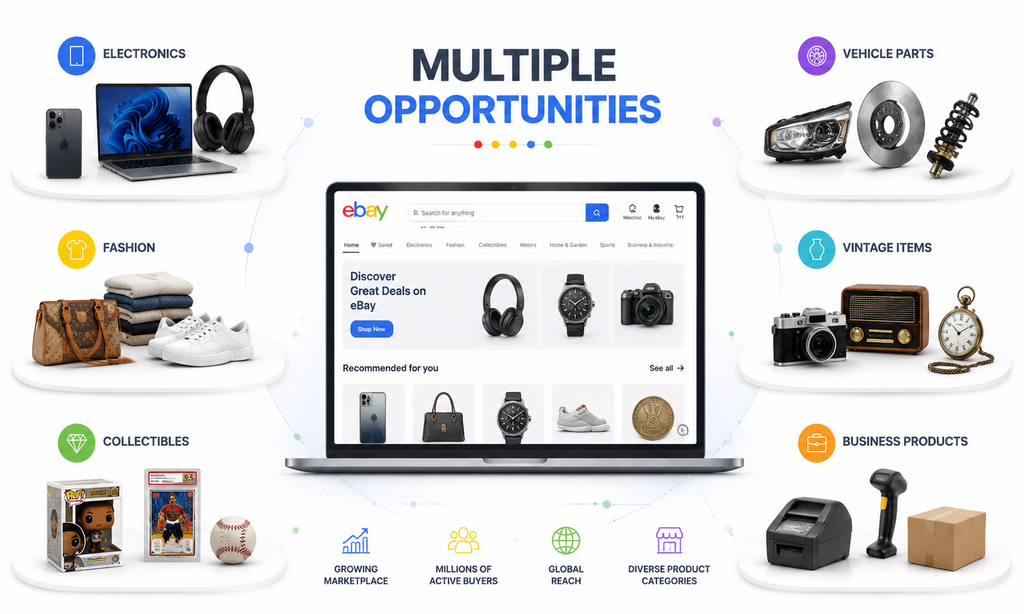
Whether a product is brand new, used, refurbished, rare, or hard to find, eBay provides a marketplace where there can be demand.
This flexibility allows sellers to choose products based on market trends, sourcing opportunities, and customer interest.
2. A Marketplace for Unique and Hard-to-Find Products
eBay attracts a different type of buyer and customers who are searching for products they cannot easily find on traditional marketplaces.
Many buyers come to eBay specifically for discontinued products, rare collectibles, replacement parts, vintage items, and older product models.
Imagine a seller finds an older camera model that is no longer available in regular stores.
On many marketplaces, this product may struggle because buyers usually search for the latest catalogue products. But on eBay, customers often search for discontinued, collectible, or hard-to-find items.
That camera can become a profitable opportunity because eBay connects the seller with buyers who are already looking for that exact product.
3. Supports Different Business Models
Another reason eBay stands out is its flexibility for different types of sellers.
Whether you are a reseller, brand owner, refurbisher, wholesaler, or a business looking to clear inventory, eBay provides opportunities to sell in different ways.
Sellers can use eBay to:
- Resell used and pre-owned products
- Sell refurbished electronics
- Move clearance and open-box inventory
- Build niche product businesses
- Expand their existing ecommerce presence alongside Amazon, Walmart, Shopify, and other channels
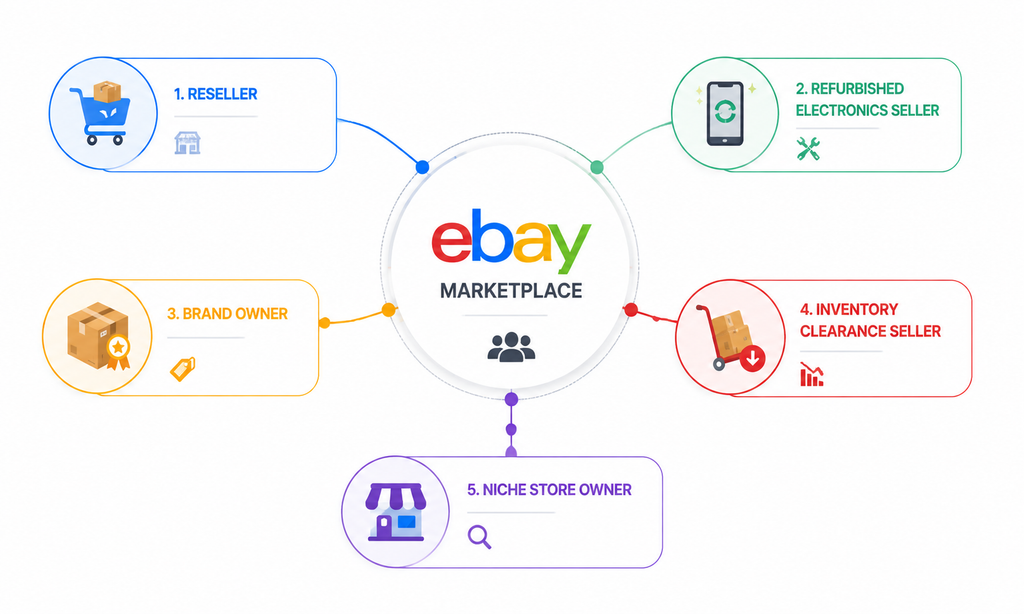
This makes eBay more than just another marketplace — it can become a valuable sales channel for businesses looking to reach different types of buyers.
eBay Product Research Strategy: Finding Profitable Opportunities Before Listing
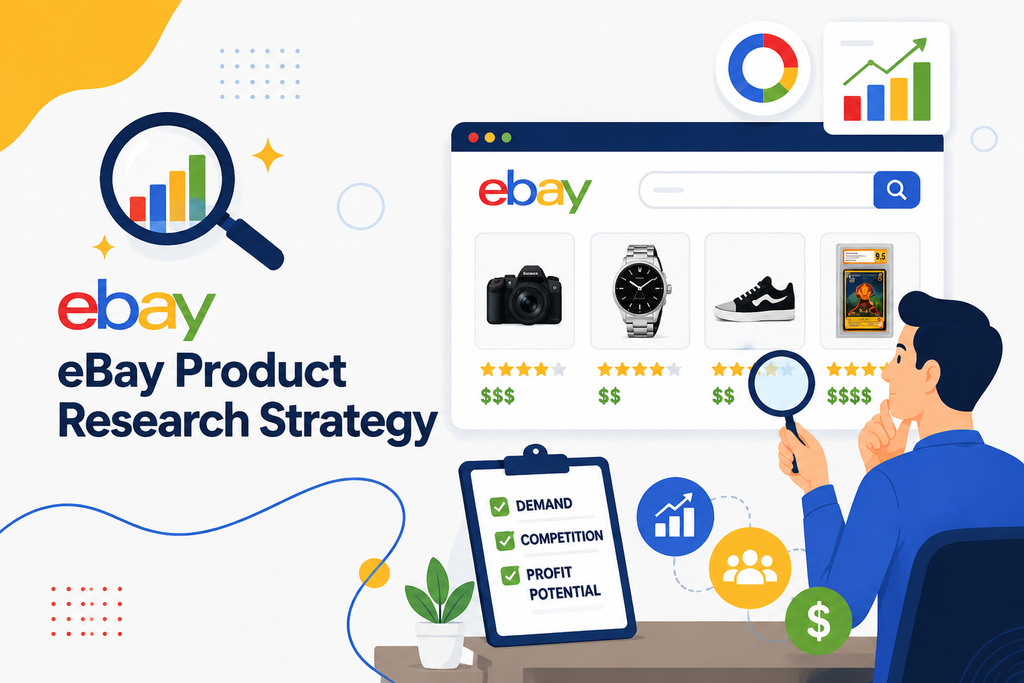
Product research is the foundation of a successful eBay business.
Before creating dozens or hundreds of listings, sellers need to understand one important question: Is there a real opportunity behind this product?
Successful sellers do not simply look for products that have sold before. They analyze whether a product has consistent demand, reasonable competition, and enough profit potential after considering marketplace fees, sourcing costs, shipping expenses, fulfilment, and advertising.
1. Use eBay Product Research to Validate Opportunities
The first step is understanding what buyers are actually purchasing.
eBay provides Product Research inside Seller Hub, allowing sellers to analyze real marketplace data before making sourcing decisions.
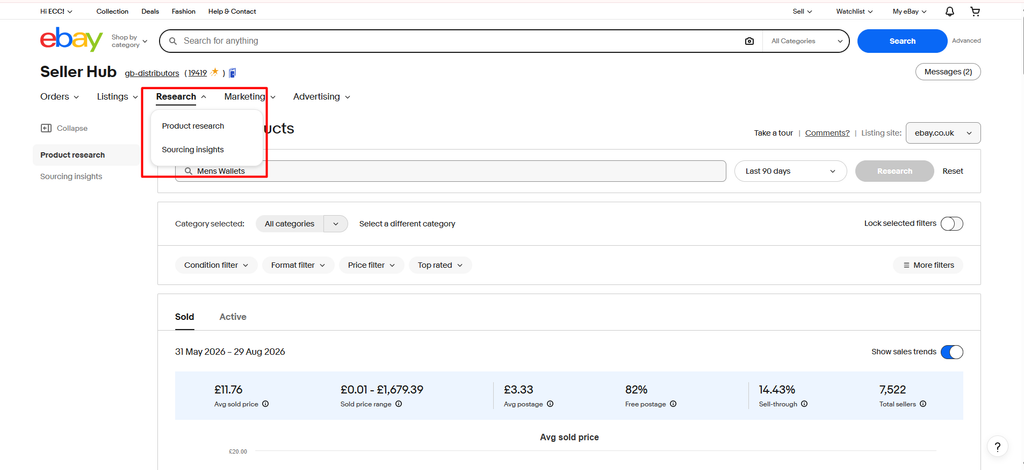
Instead of relying on assumptions or only looking at active listings, sellers can study actual sales behaviour and identify products with proven demand.
Use eBay Product Research to Analyse:
- Historical sales trends
- Actual sold prices
- Buyer demand patterns
- Competition levels
- Listing performance
- Product conditions
- Selling formats
- Shipping trends
According to eBay, Product Research provides access to up to three years of sales data across millions of products, helping sellers identify long-term opportunities and make better sourcing decisions.
2. Evaluate the Real Profit Potential Behind Every Product
A product selling successfully does not automatically mean it is a good opportunity. Before investing in inventory, sellers need to understand whether the numbers actually work.
Analyze Sales Consistency
A strong product opportunity should show regular purchasing activity rather than occasional sales. Consistent sales history indicates reliable demand and reduces the risk of holding slow-moving inventory.
Understand the True Selling Price
Look at actual sold prices instead of relying on listing prices. This helps sellers estimate realistic revenue and calculate whether the product can generate profit after all expenses.
Measure Competition Before Entering
Competition is not always a reason to avoid a product. The important question is: Can you create a better offer?
Sellers should evaluate competitors based on pricing, listing quality, customer service, shipping speed, and overall value.
Check Sell-Through Potential
A healthy relationship between available listings and completed sales usually indicates stronger inventory potential. Products that consistently sell compared to the number of competing listings often provide better opportunities.
3. Find Products That Match Buyer Behaviour and Market Trends
Not every product performs the same way throughout the year. Understanding buyer behaviour helps sellers choose products with stronger long-term potential.
Consider Seasonality
Some products experience higher demand during holidays, specific seasons, or events. Sellers should determine whether demand is stable throughout the year or depends on a short-term trend.
Understand Product Condition Demand
Different categories have different buyer expectations.
Some products perform best as new items, while others have strong demand in used, refurbished, or open-box conditions. Understanding condition preferences helps sellers identify additional opportunities.
Calculate Shipping Economics
A product may look profitable until shipping costs are included.
Sellers should consider:
- Product size and weight
- Packaging requirements
- Delivery costs
- Fulfilment options
The best opportunities are products where the selling price, demand, and shipping economics work together.
How to Start Selling on eBay in 2026
Once you understand what products you want to sell, the next step is building the foundation of your eBay business.
Creating an account is only the beginning. Successful sellers need to set up payments, understand account limits, configure fulfilment, and create optimized listings before scaling their catalogue.
Step 1: Build Your Seller Foundation With an eBay Account
The first step is creating your eBay seller account. Make sure your account information is accurate and matches your business records, including contact details, business information, and payment details.
Depending on your location and seller profile, eBay may request additional verification for:
- Identity verification
- Business information
- Payment details
How to Set Up Your eBay Seller Account:
- Visit eBay.com and select Register.
- Choose between a personal account or business account depending on your selling goals.
- Add your:
- Name and contact details
- Email address
- Business information (if applicable)
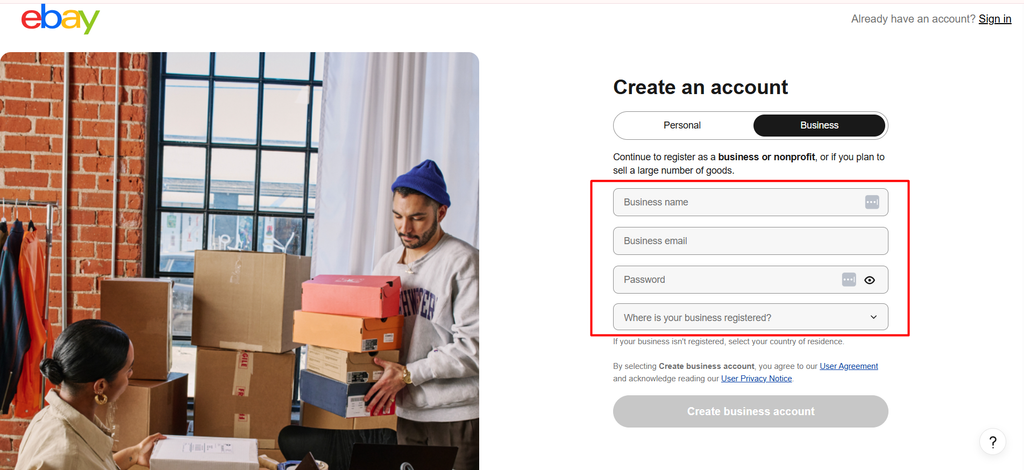
- Verify your email address and phone number.
- Go to Account Settings and review your personal and business information.
- Complete any identity verification steps requested by eBay.
A properly verified account helps build trust and prevents issues when you start receiving orders.
Step 2: Set Up Payments and Seller Financials
Before selling, you need to configure your payment information so eBay can process transactions and send your payouts.
During this process, sellers should understand:
- How payouts are received
- How selling fees are deducted
- How refunds and adjustments are handled
Generally, eligible selling costs are deducted from your sales proceeds before the remaining balance is transferred to you.
How to Set Up Payments:
- Open Seller Hub after logging into your eBay account.
- Go to Payments or Account Settings → Payments.
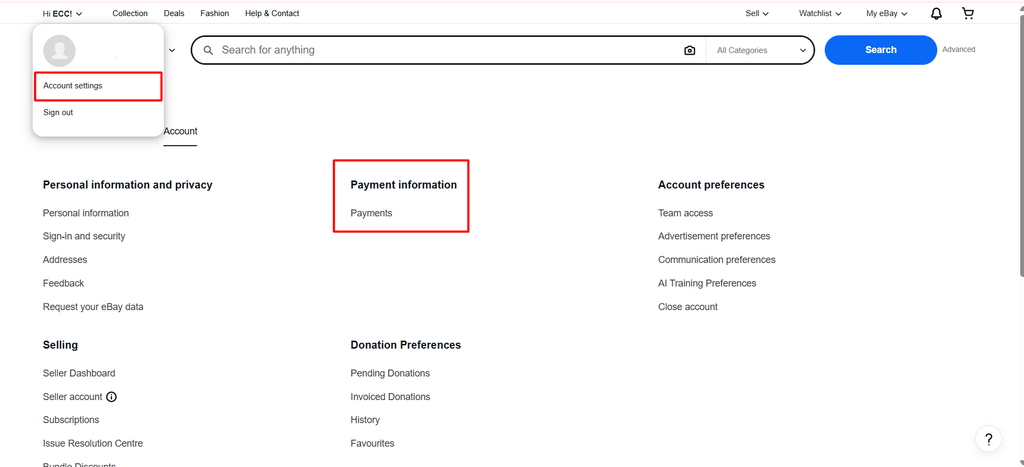
- Add your bank account details for receiving payouts.
- Provide any required verification information.
- Review your payout schedule and payment history.
- Understand your selling costs, including:
- Final value fees
- Advertising costs
- Refund adjustments
- Optional listing fees
Setting up payments correctly helps you track revenue and calculate your actual profit.
Step 3: Understand Your Selling Limits Before Scaling
New sellers should avoid uploading a large catalogue immediately. eBay may apply selling limits to new or developing accounts based on factors such as account history, performance, and sales activity.
Instead of focusing only on adding more products, sellers should gradually build account credibility through:
- Reliable fulfilment
- Positive customer experiences
- Accurate listings
- Consistent order handling
How to Check and Improve Selling Limits:
- Open Seller Hub.
- Navigate to your Overview dashboard.
- Review your current selling limits:
- Number of items allowed
- Maximum selling value
- Start with a smaller number of products.
- Maintain strong account performance by:
- Shipping orders on time
- Avoiding cancellations
- Responding quickly to buyers
- Maintaining accurate product information
A strong account foundation makes future scaling easier and helps you qualify for higher selling limits.
Step 4: Create a Shipping and Return Strategy
Shipping plays a major role in buyer trust and marketplace performance.
Before creating listings, define your operational process, including:
- Handling time
- Shipping services
- Domestic delivery options
- International shipping strategy
- Free versus paid shipping approach
- Return window
- Return shipping responsibility
- Return address
How to Configure Shipping and Returns:
- Go to Seller Hub → Account Settings.
- Open Shipping Preferences.
- Select your shipping services and delivery options.
- Define your handling time based on your actual fulfilment ability.
- Create your return policy:
- Return period
- Refund conditions
- Return shipping responsibility
6. Save your business policies and apply them to listings.
The goal is not simply offering fast shipping; it is creating delivery promises that your business can consistently maintain.
Build Your eBay Store: Turning Listings Into a Brand
An eBay Store is different from a standard seller account.
While a seller account allows you to list products, an eBay Store gives businesses additional tools to organize, brand, and promote their catalogue.
eBay currently offers five Store subscription levels:
- Starter
- Basic
- Premium
- Anchor
- Enterprise
For US sellers, annual-plan pricing currently starts at $4.95/month for Starter and $21.95/month for Basic, with higher plans designed for businesses managing larger catalogues.
Why Consider Opening an eBay Store?
An eBay Store helps sellers create a more professional marketplace presence by allowing them to:
- Build a recognizable brand and organize products into categories
- Feature important listings, create promotions, and access additional selling tools
eBay allows sellers to create up to 300 Store categories and feature selected listings within Store sections.
However, opening a Store alone does not guarantee sales. The Store provides the foundation, but sellers still need strong products, optimized listings, and a professional customer experience.
Create Professional Listings That Convert
On eBay, your product listing is your digital storefront.
A well-designed listing does more than display product information; it helps build trust, highlight key product benefits, and create a stronger brand impression.
This is where BoostOnTime’s eBay Listing Builder can help sellers create professional, responsive listing designs without needing advanced coding skills.
With BoostOnTime, sellers can:
- Choose and customize professional eBay templates to match their brand identity
- Add branding elements such as logos, banners, menus, and promotional sections
- Create structured layouts for product descriptions, features, policies, and related products
- Automatically apply templates across multiple listings using bulk update tools
- Maintain a consistent professional appearance across their entire catalogue
For sellers managing multiple products, a consistent listing design can save time while creating a more trustworthy shopping experience for buyers.
You can explore the tool here: BoostOnTime eBay Listing Builder
A Store gives you the platform, but professional presentation and optimized listings help turn visitors into buyers.
eBay Listing Optimization: Creating Listings That Get Found and Convert
An eBay listing has two important jobs.
First, it needs to help eBay understand what your product is so the platform can show it to the right buyers. Second, it needs to convince customers why your product is worth purchasing.
That means successful listing optimization is not just about adding keywords. It is about creating a listing that improves search visibility, builds buyer confidence, and increases conversions.
Create Titles That Match What Buyers Search
Your eBay title plays a major role in helping both search algorithms and buyers understand your product.
In this example, the seller uses important search terms and product details:
Optimized eBay Title: Living Room Rug Large Soft Thick Turkish Floor Carpet, Modern Bedroom Decor, Grey
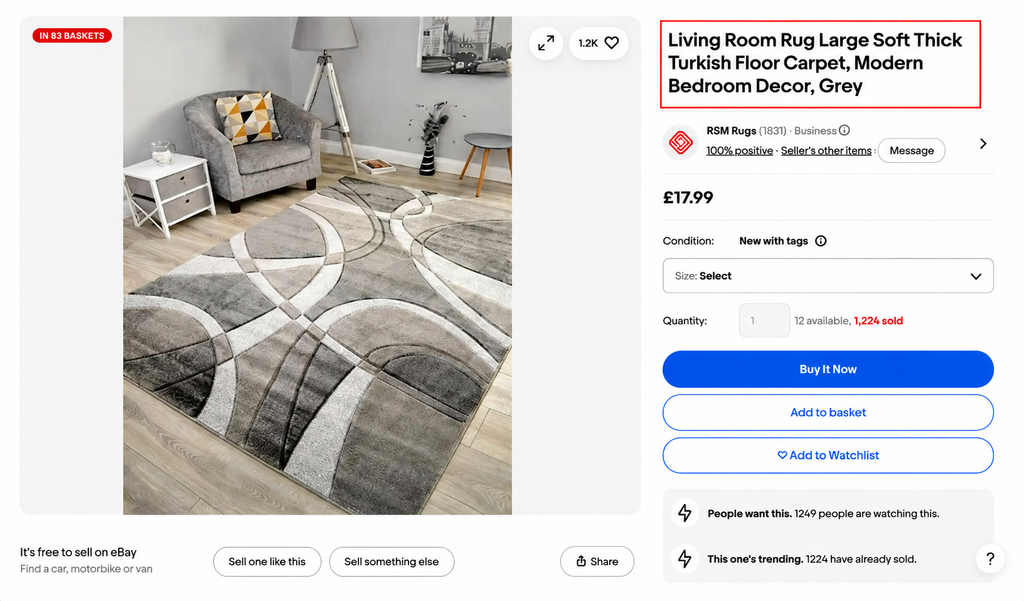
Title Breakdown:
- Living Room Rug → Main product type and primary search term
- Large Soft Thick → Key product features that influence buyer decisions
- Turkish Floor Carpet → Material/style keyword that matches customer searches
- Modern Bedroom Decor → Expands visibility for related searches and use cases
- Grey → Colour variation helping customers find the right option
Why This Title Works:
This title clearly explains what the product is while naturally including important keywords buyers may search for.
A strong eBay title should balance search visibility and customer clarity, not just add random keywords. The goal is to help eBay understand the product and help buyers quickly decide if it matches their needs.
Avoid keyword stuffing or repeating the same phrase multiple times. The goal is to create a clear, natural title that matches how real buyers search while helping eBay understand the product.
2. Complete Item Specifics to Improve Product Discovery
Item specifics work like product signals that help eBay categorize your listing and match it with relevant buyer searches.
These details allow shoppers to filter results based on specific requirements, making it easier for them to find the right product.
Important attributes may include:
- Brand
- Size
- Colour
- Type
- Style
- Material
- Model
- Compatibility
- Condition
- Features
For example, a buyer searching for a replacement car part may filter by vehicle model, year, brand, or compatibility. If those details are missing, your product may not appear even if it is the right match.
Best practices include:
- Complete every required field
- Add all relevant recommended attributes
- Use accurate product information
- Avoid leaving important details blank
The more complete your listing data is, the better chance your product has of appearing in relevant searches.
3. Create Descriptions That Remove Buyer Doubts
A product description is where you turn customer interest into purchase confidence.
Many buyers hesitate because they still have unanswered questions about the product, its features, fit, quality, or usage. A strong description removes these doubts by clearly explaining the product’s value and helping customers understand exactly what they are buying.
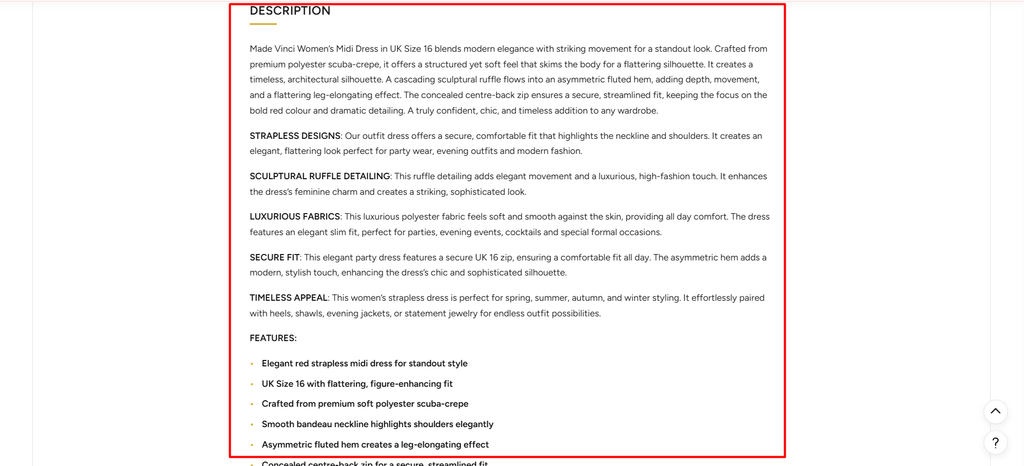
For example, this women’s midi dress listing uses a detailed description to highlight the product’s design, material, fit, and key benefits.
The description explains:
- What the product is — Women’s strapless midi dress with an elegant red design
- Material details — Premium polyester scuba-crepe fabric for a soft and structured feel
- Key features — Sculptural ruffle detailing, asymmetric fluted hem, and concealed centre-back zip
- Fit information — UK Size 16 with a flattering silhouette and secure fit
- Style benefits — Suitable for parties, evening events, and formal occasions
Instead of simply writing: Red women’s midi dress.
A stronger description explains:
Made from premium polyester scuba-crepe, this strapless midi dress features a sculptural ruffle design and asymmetric fluted hem to create an elegant silhouette. The concealed centre-back zip provides a secure fit, making it ideal for parties, evening events, and special occasions.
A well-written description should include:
- Product overview
- Condition details
- Main features and benefits
- Measurements and specifications
- Materials and construction
- Compatibility information (where relevant)
- Package contents
- Usage instructions
- Limitations or defects
Avoid copying generic manufacturer descriptions without checking accuracy.
4. Choose Categories That Put Your Product in Front of the Right Buyers
Category selection affects how eBay understands your product and where it appears in search results. Choosing the wrong category can reduce visibility, even if your product has strong demand.
Always select the most accurate category because it helps you:
- Reach the right audience
- Improve search relevance
- Appear in targeted category searches
- Reduce competition from unrelated products
For example, placing a specific vehicle replacement part in a general automotive category may attract fewer qualified buyers compared to placing it in the exact vehicle parts category.
The objective is not to get the highest number of views. The objective is to attract buyers who are actively searching for that product and are more likely to purchase.
5. Price Strategically to Stay Competitive and Profitable
Pricing is not simply about choosing the lowest price. Successful eBay sellers understand that the right price should balance buyer expectations, market competition, and business profitability.
Before setting your price, analyze the market and understand how similar products are performing.
Compare Competitor Offers, Not Just Prices
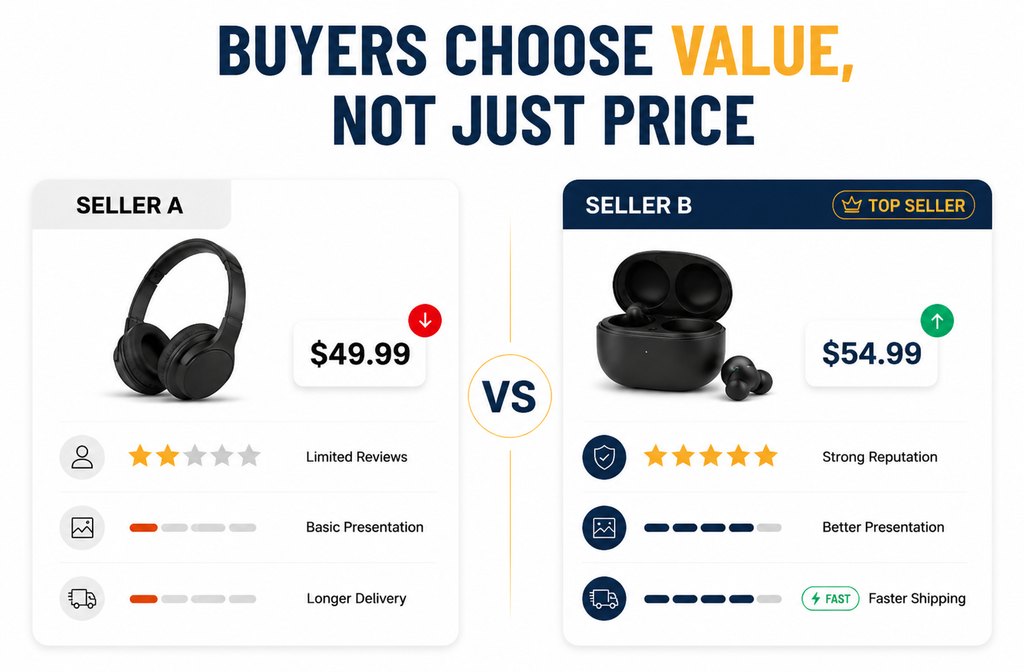
A common mistake sellers make is looking only at the cheapest competitor. Buyers do not always choose the lowest-priced option — they compare the overall value of the offer.
For example:
Seller A:
- Lower price
- Few reviews
- Basic listing presentation
- Longer delivery time
Seller B:
- Slightly higher price
- Strong seller reputation
- Better product presentation
- Faster shipping
Even though Seller A is cheaper, many buyers may choose Seller B because the overall buying experience feels more reliable.
When comparing competitors, analyse:
- Similar Sold Products — Check completed sales to understand what buyers are actually paying, not just current listing prices.
- Competitor Pricing — Compare prices along with reviews, shipping speed, and listing quality.
- Product Condition — New, used, refurbished, and open-box products may require different pricing strategies.
- Total Selling Costs — Include eBay fees, shipping expenses, and advertising costs.
- Profit Margin — Ensure your final price supports sustainable business growth.
A strong pricing strategy focuses on: Customer Expectations + Market Competition + Business Profitability
The goal is to create the best-value offer that gives buyers a reason to choose your listing over competitors.
Use eBay Promoted Listings to Increase Product Visibility
Organic search visibility is important, but competition on eBay can make it difficult for new or existing listings to reach enough buyers. eBay Promoted Listings helps sellers increase product exposure by placing eligible listings in additional advertising positions across the marketplace.
However, advertising should not be used as a replacement for listing optimization. A promoted listing still needs the right product, competitive pricing, strong images, accurate item specifics, and a clear description to convert visitors into buyers.
Choose the Right Advertising Strategy
eBay currently offers different Promoted Listings strategies depending on the seller’s goal:
- General Campaigns: This strategy uses a cost-per-sale model, where sellers pay an advertising fee when a promoted item sells after an eligible ad interaction. It is useful for sellers who want additional visibility while controlling costs based on actual sales.
- Priority Campaigns: This strategy works on a cost-per-click model, where sellers pay when shoppers click on promoted listings. It provides more advanced campaign controls and is suitable for sellers who want greater control over advertising performance.
Example: Promoting a Product the Right Way
Imagine a seller is selling a wireless gaming keyboard for $80.
The product already has:
- Strong images
- Competitive pricing
- Complete item specifics
- Positive customer reviews
However, the listing receives limited traffic because many similar products are competing for the same buyers.
The seller uses Promoted Listings to increase visibility.
With a General Campaign, the seller may choose an advertising rate and only pay an additional advertising fee when the promoted listing generates an attributed sale.
If the product receives more visibility, gains more sales, and maintains a healthy profit margin after product costs, eBay fees, and advertising costs, the campaign can become a scalable growth strategy.
However, if the same product has poor images, weak keywords, or an uncompetitive price, advertising may only increase clicks without creating profitable sales.
The lesson is simple: Promote products that are already strong — do not use advertising to hide weak listings.
Advertise Products With Strong Potential
Not every product is suitable for advertising. Promoting a weak listing with poor pricing, low-quality images, or limited demand can increase traffic without generating profitable sales.
Before launching ads, evaluate:
- Product demand
- Conversion rate
- Profit margin
- Competition level
- Listing quality
- Customer feedback
Measure Profit, Not Just Sales
A successful advertising campaign is not measured only by revenue generated. Sellers should analyse the complete picture, including advertising costs, product costs, eBay fees, and profit margins.
The goal is not simply to get more clicks — it is to generate profitable sales and build a sustainable eBay business.
Remember: Advertising can increase visibility, but optimization creates conversions. The strongest eBay sellers combine SEO, listing quality, competitive pricing, and advertising to create long-term growth.
eBay SEO Strategy: Improve Visibility and Reach More Buyers
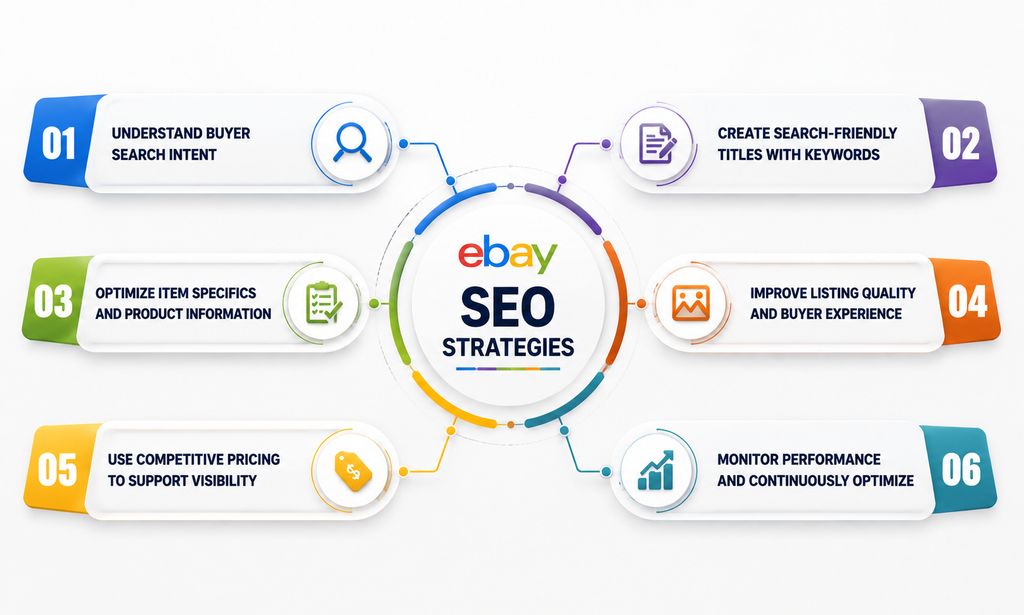
eBay SEO is the process of optimizing your listings so they appear for relevant buyer searches. A strong SEO strategy combines keyword optimization, product data, listing quality, pricing, and customer experience to improve visibility and conversions.
1. Understand Buyer Search Intent Before Optimizing
Successful eBay SEO starts with understanding how customers actually search for products. Analyze eBay search suggestions, competitor listings, Product Research data, and customer terminology to identify the keywords buyers use.
2. Create Search-Friendly Titles With Relevant Keywords
Your title is one of the strongest ranking signals on eBay. Use important keywords such as product type, brand, model, features, and compatibility while keeping the title natural and easy for buyers to understand.
3. Optimize Item Specifics and Product Information
Complete item specifics and accurate product details help eBay categorize your listing and match it with relevant searches. Attributes like brand, size, colour, material, and model improve filtered search visibility.
4. Improve Listing Quality and Buyer Experience
A high-quality listing improves both search performance and conversions. Detailed descriptions, professional images, accurate information, reliable shipping, and strong seller performance help build buyer trust.
5. Use Competitive Pricing to Support Visibility
Pricing affects clicks, conversions, and sales performance. Analyse sold prices, competitor offers, fees, shipping costs, and profit margins to create a competitive offer without sacrificing profitability.
6. Monitor Performance and Continuously Optimize
SEO is not a one-time process. Track impressions, clicks, conversions, and sales data regularly, then improve titles, pricing, product details, and listing quality based on performance.
eBay Marketplace Fees Explained
Understanding eBay fees is essential before calculating product profitability.
Many new sellers focus only on the product cost and selling price, but the actual profit comes after removing all marketplace and operational expenses.
eBay does not charge one fixed fee for every seller. The total cost of selling depends on several factors, including:
- Product Category: Different categories can have different fee structures and final value fee rates.
- Selling Price: Higher-value products may generate higher selling fees because charges are usually calculated based on the total sale amount.
- Store Subscription: Store subscribers may receive different fee benefits, including higher listing allowances and potentially reduced fees in eligible categories.
- Listing Format: Fees can vary depending on whether you use fixed-price listings, auction formats, or other selling options.
- Optional Features: Additional listing upgrades and promotional features can create extra costs.
- Advertising Usage: Promoted Listings fees should be considered separately when calculating profitability.
- International Selling: Currency conversion, international fees, and additional selling costs may apply.
1. Insertion Fees: The Cost of Creating Listings
Insertion fees are the charges associated with creating a listing on eBay.
eBay provides sellers with a certain number of zero-insertion-fee listings, depending on account type and Store subscription.
For sellers without higher Store allowances, eBay.com currently provides up to 250 zero-insertion-fee listings per month. Once that allowance is exceeded, additional listing fees may apply.
For many standard categories without a Store, the additional insertion fee is currently $0.35 per listing.
Store subscribers may receive larger allowances depending on their subscription level. For example, a Basic Store includes higher fixed-price listing allowances compared with non-Store sellers.
The important point is that listing more products does not always mean higher profit. Sellers should understand their available allowances and calculate whether additional listings are financially worthwhile.
2. Final Value Fees: The Main Selling Cost
The final value fee is the main fee sellers pay when a product successfully sells.
This fee is generally calculated as a percentage of the total transaction amount and can vary depending on:
- Product category
- Selling price
- Store subscription
- Seller circumstances
For many categories on eBay.com, the standard rate for non-Store sellers is currently 13.6% on the total sale amount up to $7,500 per item, with 2.35% applying to the portion above $7,500.
Store subscribers may qualify for different rates depending on their subscription and category.
Because final value fees directly reduce your revenue, sellers should always include them when calculating product margins.
3. Advertising Fees: Paying for Additional Visibility
Advertising can help sellers increase product visibility, but it should be treated as an additional business expense.
eBay Promoted Listings allow sellers to increase exposure by placing products in front of more buyers.
Different advertising strategies have different cost structures:
- General Campaigns: Use a cost-per-sale model, where sellers pay when an attributed sale occurs.
- Priority Campaigns: Use a cost-per-click model, where sellers pay for eligible ad clicks.
Advertising can accelerate sales, but it should only be used when the product has strong demand, competitive pricing, and enough profit margin to support the additional cost.
4. Optional Listing Fees and Additional Costs
Beyond standard selling fees, sellers may choose additional features to improve listing visibility or presentation.
These optional costs may include:
- Subtitles
- Listing upgrades
- Additional category placement
- Promotional features
These tools can be useful, but sellers should evaluate whether the expected increase in visibility or sales justifies the additional expense.
How to Grow an eBay Business in 2026
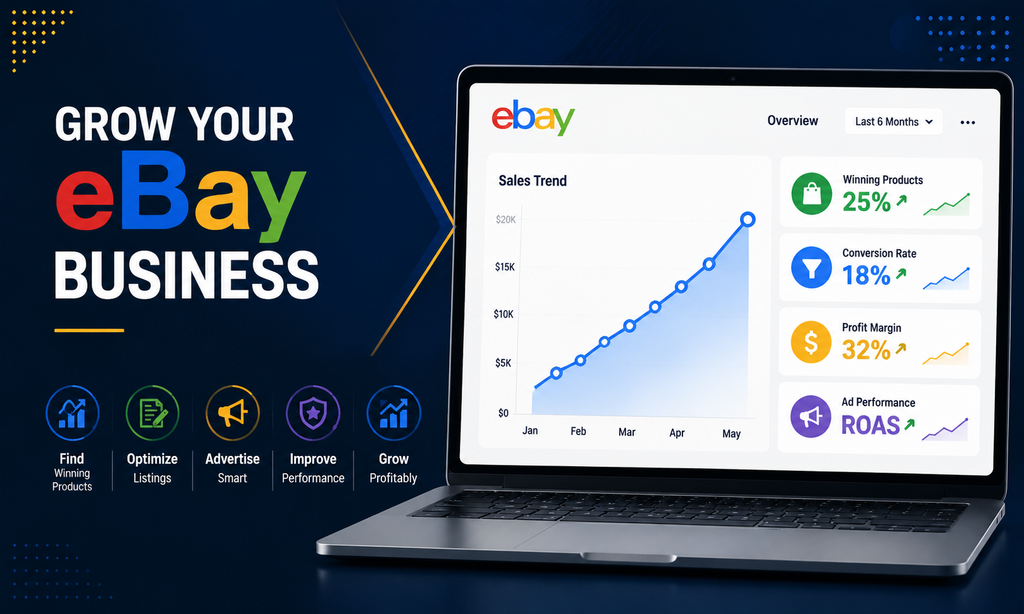
Once the foundation of your eBay business is working, growth should come from improving multiple areas together, not simply uploading more products.
Successful sellers focus on scaling what works, improving weak areas, and using data to make better decisions.
1. Scale Winning Products
Identify products that are already performing well and look for ways to expand around them.
Focus on products with:
- Strong conversion rates
- Healthy profit margins
- Low return rates
- Stable customer demand
- Efficient advertising performance
Once you identify winners, explore related products, variations, and complementary items to grow your catalogue.
2. Improve Underperforming Listings
Not every listing will perform equally. Review low-performing products and identify what is preventing sales.
Analyse areas such as:
- Title and keywords
- Item specifics
- Category selection
- Images and descriptions
- Pricing strategy
- Shipping options
- Competitor offers
Use eBay Product Research to compare your listings with successful competitors and identify improvement opportunities.
3. Build a Strong Store Experience
A well-organized Store helps customers discover more products and improves your overall brand presence.
Create logical categories, feature important products, and use promotions strategically to encourage browsing and repeat purchases.
4. Use Advertising With Profit in Mind
Advertising should not be measured only by sales volume.
Track the profit generated after advertising costs and focus on products where ads create a positive return.
A product with fewer sales but stronger margins can be more valuable than a high-volume product with low profitability.
5. Protect Seller Performance as You Scale
As sales increase, operational mistakes can have a bigger impact on your business.
Maintain strong performance by improving:
- Inventory accuracy
- Order fulfilment
- Shipping reliability
- Customer communication
- Return management
A scalable business requires systems that can support higher order volumes.
6. Use Seller Hub as Your Growth Dashboard
Seller Hub brings together important business data in one place, including:
- Listings
- Orders
- Marketing
- Advertising
- Performance
- Payments
- Research
- Reports
Use these insights regularly to identify opportunities, monitor performance, and make smarter decisions as your eBay business grows.
7. Continuously Adapt to Market Changes
eBay trends, buyer behaviour, and competition constantly change.
Successful sellers regularly review their products, pricing, competitors, and customer feedback to adjust their strategy and stay competitive in the marketplace.
Common eBay Selling Mistakes
Many sellers struggle on eBay not because of a lack of products, but because of mistakes in research, listing optimization, pricing, and operations.
Avoiding these common mistakes helps sellers build a stronger foundation and create a more profitable eBay business.
- Choosing Products Without Research: Listing products without validating demand can lead to slow sales and wasted inventory. Use actual sales data, competition analysis, and market trends before investing in products.
- Copying Listings From Other Marketplaces: Amazon, Walmart, and eBay have different buyer behaviour and search systems. Product details can remain the same, but titles, descriptions, and listing structure should be optimized specifically for eBay.
- Ignoring Item Specifics: Missing product attributes can reduce visibility because your listing may not appear when buyers use search filters. Complete item specifics help eBay understand your product and match it with relevant searches.
- Competing Only on Price: Constantly lowering prices can damage profit margins and create an unsustainable business. Focus on the complete value of your offer, including product quality, shipping, reviews, and customer experience.
- Advertising Weak Listings: Promoted Listings can increase visibility, but ads cannot fix poor product selection, weak listings, or uncompetitive offers. Optimize your product, pricing, and listing quality before increasing ad spend.
eBay vs Amazon: Should You Sell on Both?
For many businesses, the answer may be yes.
Amazon and eBay both provide access to millions of online shoppers, but they operate differently and attract different types of buyers.
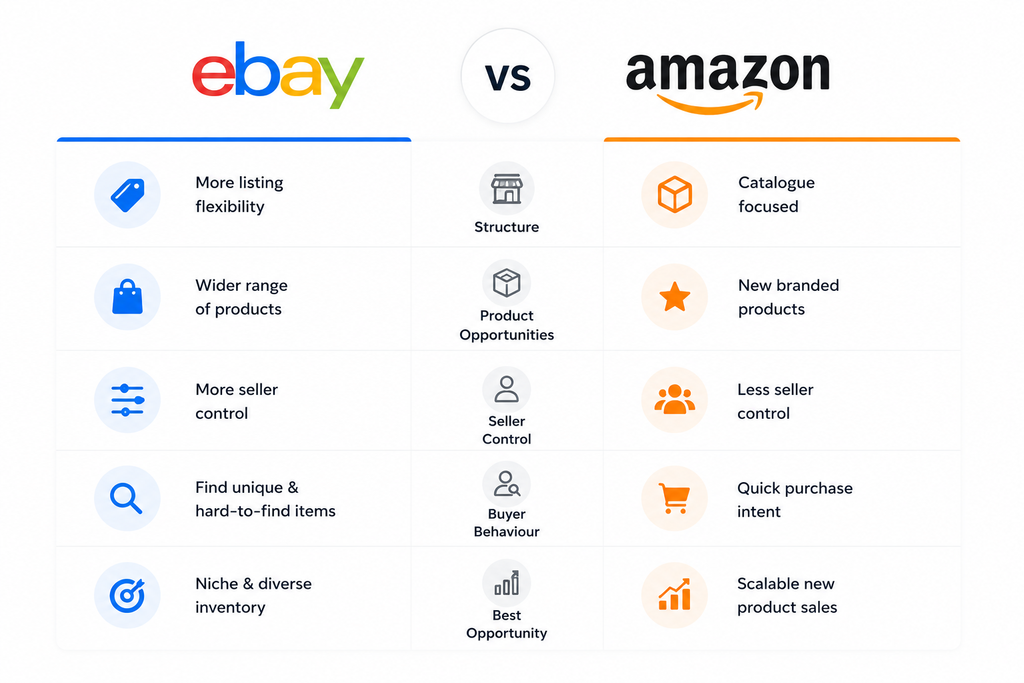
Amazon is mainly catalogue-driven, where customers often search for specific products and compare offers within a standardized listing structure. eBay gives sellers more flexibility, allowing them to sell a wider range of inventory, including new, used, refurbished, rare, vintage, and collectible products.
Using both marketplaces can help businesses reach different buyer segments and create a stronger multichannel ecommerce strategy.
| Factor | Amazon | eBay |
| Marketplace Structure | Catalogue-driven platform where products are organized around standardized listings and shared product pages. | Listing-focused marketplace where sellers have more control over individual product presentation and offers. |
| Product Opportunities | Strong focus on new branded products and frequently purchased items. | Supports a wider range of products including used, refurbished, rare, vintage, and collectible items. |
| Seller Control | Less flexibility because multiple sellers often compete on the same product page. | More control over titles, descriptions, images, pricing, and listing presentation. |
| Buyer Behaviour | Buyers often search with the intention of purchasing known products quickly. | Buyers often search for unique, hard-to-find, discontinued, or specialized products. |
| Best Opportunity | Suitable for businesses focused on scalable new product sales. | Suitable for businesses selling diverse inventory, niche products, and unique opportunities. |
However, selling on both platforms requires careful management.
Inventory should be synchronized to avoid overselling, and each marketplace should be optimized separately.
Titles, images, descriptions, pricing strategies, advertising campaigns, and customer experience should be adapted based on how buyers behave on each platform rather than simply copying the same listing everywhere.
A strong multichannel strategy does not mean being everywhere — it means understanding each marketplace and using its strengths to reach the right customers.
Frequently Asked Questions About Selling on eBay
Q1. Is it free to sell on eBay?
eBay provides sellers with a monthly allowance of zero-insertion-fee listings, but additional costs can apply when products sell or when sellers use optional services. On eBay.com, sellers without higher Store allowances currently receive up to 250 zero-insertion-fee listings per month.
Q2. Do I need an eBay Store to sell?
No. You can start selling on eBay without opening a Store. An eBay Store becomes more useful when you need additional branding options, merchandising tools, higher listing allowances, or Store-specific fee benefits as your business grows.
Q3. How long can an eBay product title be?
eBay currently allows up to 80 characters in a listing title. Sellers should use this space strategically by including accurate and relevant product keywords that help both eBay and buyers understand the product.
Q4. What is eBay Product Research?
Product Research is a Seller Hub tool that helps sellers analyse marketplace demand, pricing trends, and historical sales data. The tool currently provides access to up to three years of eBay sales data across millions of items, helping sellers make better sourcing and pricing decisions.
Q5. What are eBay Promoted Listings?
Promoted Listings are eBay advertising tools designed to increase product visibility and help sellers reach more buyers. The General strategy uses a cost-per-sale model, while Priority campaigns use cost-per-click pricing with more advanced advertising controls.
Q6. Is eBay SEO important?
Yes. eBay SEO plays an important role in helping products appear in relevant buyer searches.
Factors such as titles, categories, item specifics, product identifiers, and complete product information help eBay understand when a listing matches customer intent.
Q7. Does eBay charge a commission?
Yes. eBay generally charges a final value fee when an item sells. The exact rate can vary depending on factors such as product category, Store subscription, selling conditions, and seller circumstances.
Q8. Is an eBay Store worth it?
It depends on your catalogue size, sales volume, and the features your business needs. Before choosing a Store plan, sellers should compare subscription costs with potential benefits such as higher listing allowances, fee advantages, branding tools, and merchandising features.
Build a Successful eBay Business in 2026
Building a successful eBay business is no longer about simply uploading products and waiting for sales. Growth comes from creating a complete selling system where research, listings, SEO, pricing, advertising, fulfilment, and customer experience work together.
Successful sellers use data to find better opportunities, optimize listings to improve visibility, and build trust through strong service and reliable operations. Every part of the business, from product selection to profit calculation, plays a role in long-term growth.
The sellers who succeed on eBay are those who understand it as a unique marketplace with its own buyers, search system, and selling strategies. Instead of copying listings from other platforms, they adapt, optimize, and build a business designed specifically for eBay.
How Ecomclips Helps Sellers Launch and Grow on eBay
Launching on eBay requires more than simply creating listings and waiting for customers. Successful sellers need the right product strategy, optimized listings, strong marketplace operations, and continuous improvement based on data.
At Ecomclips, we help sellers build and manage the systems required to grow on eBay, from product research and listing optimization to store management, SEO, advertising, and ongoing performance improvement.
Our eBay growth support includes:
- Product Research & Market Analysis: We help identify potential opportunities by analysing demand, competition, pricing, and product trends to make smarter sourcing decisions.
- eBay Listing Optimization: We optimize titles, item specifics, descriptions, categories, and product information to improve search visibility and help listings convert better.
- eBay Store Setup & Management: We help sellers organize their catalogue, improve store structure, manage listings, and maintain a professional marketplace presence.
- eBay SEO & Advertising Support: We help improve organic visibility through better keyword targeting and support paid campaigns to increase product exposure.
- Account Operations & Growth Management: From inventory updates and order management to performance monitoring, we help sellers maintain a healthy account while scaling their business.
Whether you are launching your first eBay product or looking to expand an existing store, Ecomclips helps turn eBay selling into a structured growth system instead of a trial-and-error process.
Ready to build and scale your eBay business? Get in touch with Ecomclips and discover how we can help you grow.
Continue Growing Your eBay Business With Ecomclips
Building a successful eBay business requires continuous learning, adapting to marketplace changes, and applying the right strategies at every stage of growth. Ecomclips provides valuable ecommerce resources, marketplace insights, and seller strategies to help businesses make better decisions and improve their online performance.
Watch marketplace tutorials, eBay selling strategies, and ecommerce updates on the Ecomclips YouTube channel. Explore detailed marketplace guides, industry insights, and ecommerce growth strategies on the Ecomclips Blog.
Stay connected with the latest ecommerce trends and company updates by following the Ecomclips Facebook page, and connect with Ecomclips on LinkedIn for professional ecommerce insights and marketplace discussions.
Have questions about launching your eBay store, optimizing listings, improving search visibility, or building a long-term marketplace growth strategy?
Contact the Ecomclips team at info@ecomclips.com or book a consultation with our ecommerce experts to discuss your goals and explore how we can help you grow your eBay business.