

Want to sell on Walmart Marketplace but not sure where to start? You are not alone.
Many e-commerce sellers want to expand beyond Amazon, eBay, or Shopify, but Walmart Marketplace can feel difficult at first. The opportunity is clear, but the process is not always simple. Sellers often get stuck on the same questions: Do I qualify? What documents do I need? How much does Walmart charge? How do I create listings? And most importantly, how do I get sales after approval?
Selling on Walmart Marketplace becomes much easier when you understand the process before you start. You need to meet Walmart’s seller requirements, prepare the right business documents, create optimised product listings, choose the right fulfilment method, and monitor performance after launch.
Walmart is not just another marketplace where you upload products and wait for orders. It is a structured e-commerce channel that rewards sellers with strong product data, competitive pricing, reliable fulfilment, and good customer experience.
In this guide, we will break down exactly how to sell on Walmart Marketplace, including seller requirements, fees, listing optimisation, Walmart Fulfillment Services, common mistakes, and a practical launch checklist to help you start.

Table of Contents
- What Is Walmart Marketplace?
- Why Sell on Walmart Marketplace?
- Is Walmart Marketplace Right for Your Business?
- Walmart Marketplace Seller Requirements
- What Can You Sell on Walmart Marketplace?
- Walmart Marketplace Fees
- How to Start Selling on Walmart Marketplace Step by Step
- How to Optimise Walmart Product Listings
- Walmart SEO: How Search Visibility Works
- Walmart Fulfillment Services vs Seller-Fulfilled Orders
- How to Win the Walmart Buy Box
- Walmart Seller Performance Standards
- Walmart Marketplace Advertising
- Common Mistakes to Avoid When Selling on Walmart
- Real Case Study: Walmart as a Diversification Channel
- Walmart Marketplace Launch Checklist
What Is Walmart Marketplace?
Walmart Marketplace is Walmart’s third-party ecommerce platform where approved sellers can list and sell products directly to customers alongside Walmart’s own inventory. Instead of selling products to Walmart as a supplier, Marketplace sellers manage their own product listings, pricing, inventory, orders, and fulfilment while using Walmart’s seller tools to track performance, optimise listings, and monitor sales.
Sellers also get access to advertising options and seller support, which can help their products gain more visibility in a competitive marketplace. With a reported audience of over 438 million unique monthly visitors, Walmart Marketplace gives ecommerce businesses a strong opportunity to reach more shoppers, diversify beyond platforms like Amazon or Shopify, and build an additional sales channel through a trusted retail brand.

Why Should You Sell on Walmart Marketplace?
Many sellers first consider Walmart Marketplace because they want to reduce their dependence on Amazon. That is a smart reason, but it is only part of the opportunity.
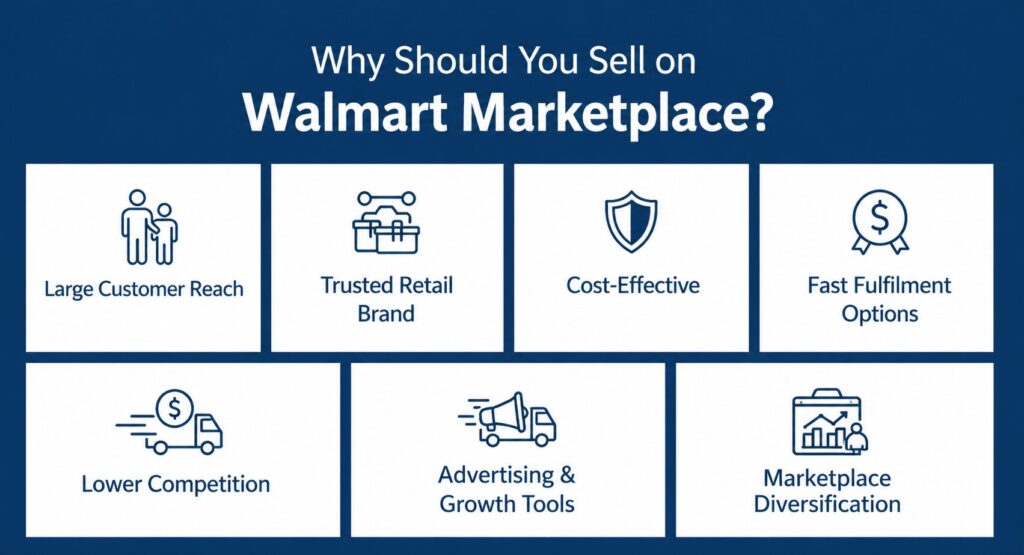
Walmart combines a trusted retail name, a growing ecommerce ecosystem, and strong fulfilment capabilities, making it a valuable channel for sellers who want to expand strategically. In Q4 FY25, Walmart reported 20% ecommerce growth in Walmart U.S., while its U.S. Marketplace grew 34%. Walmart also expanded same-day delivery reach to 93% of U.S. households, showing how strongly the company is investing in online convenience, speed, and customer experience. For sellers, the key benefits include:
- Large Customer Reach: Walmart gives sellers access to a large audience of online shoppers who already trust the Walmart brand.
- Trusted Retail Brand: Selling on Walmart.com allows your products to appear on one of the most recognised retail platforms in the world.
- Cost-Effective: Walmart does not charge a standard monthly subscription fee, so sellers usually pay referral fees only when products are sold.
- Lower Competition: Walmart’s selective approval process can reduce competition in some categories and improve visibility for prepared sellers.
- Fast Fulfilment Options: Walmart Fulfilment Services helps sellers offer faster delivery by handling storage, shipping, support, and returns.
- Advertising and Growth Tools: Walmart Connect helps sellers promote products, improve visibility, and reach shoppers throughout he buying journey.
- Marketplace Diversification: Walmart gives sellers another strong sales channel, reducing dependence on Amazon or any single marketplace.
Walmart Marketplace is not just another place to upload products. With the right listings, pricing, fulfilment setup, and performance strategy, it can become a serious growth channel for e-commerce sellers.
Walmart Marketplace Requirements: How to Get Approved
Walmart is actively growing its third-party seller network, but it still maintains a selective approval process to protect customer trust and marketplace quality. Unlike some platforms where sellers can start almost instantly, Walmart expects businesses to show that they are legitimate, experienced, compliant, and capable of handling orders professionally.
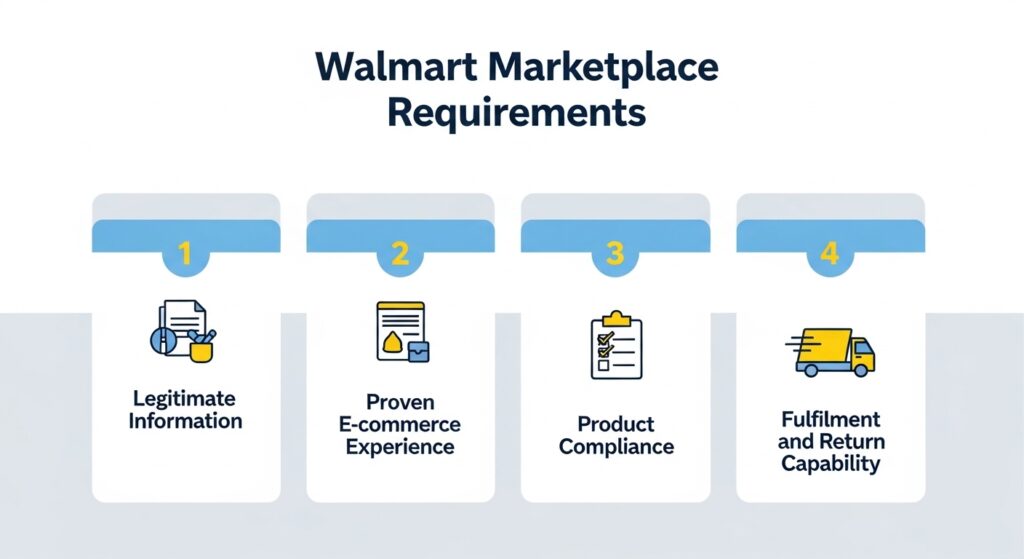
Here are the main requirements sellers should prepare:
1. Legitimate Business Information: You need a valid business identity, including your Business Tax ID or Business License Number, business entity information, personal identification document, business contact details, and documents confirming your business name and address. Make sure every detail matches your official records, because even small differences in your business name or address can delay approval.
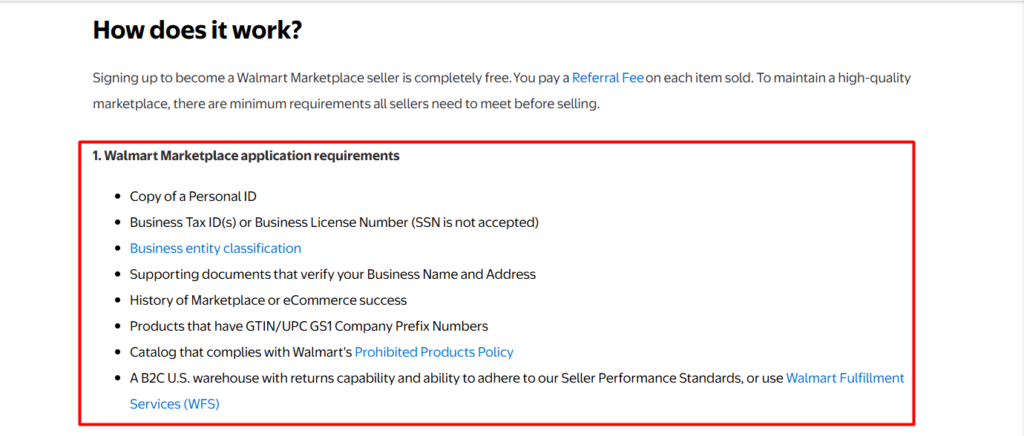
2. Proven E-commerce Experience: Walmart usually looks for sellers with a track record of selling through e-commerce platforms or marketplaces. This could include previous experience on Amazon, eBay, Shopify, your own website, or other online sales channels. A clear sales history shows that Walmart understands online selling and customer service expectations.
3. Product Compliance: Your product catalogue must follow Walmart’s marketplace policies, including its Prohibited Products Policy. You should also prepare valid GS1 UPC or GTIN information so your products can be properly identified, listed, and tracked within Walmart’s system.
4. Fulfilment and Return Capability: Walmart wants sellers who can fulfil orders reliably and manage returns smoothly. You can either handle fulfilment yourself through a suitable warehouse and return process, or use Walmart Fulfillment Services, where Walmart supports storage, shipping, customer service, and returns for eligible products.
What Can You Sell on Walmart Marketplace?
Walmart Marketplace allows approved third-party sellers to sell a wide range of products across major retail categories. Common product areas include home and kitchen, garden, apparel and accessories, consumer electronics, electronics accessories, automotive, baby, beauty, health and personal care, grocery, furniture, books, jewellery, luggage, music, tools, and industrial supplies. Walmart’s referral fee schedule also shows many active selling categories, including apparel, beauty, grocery, electronics, home, furniture, books, and more.
Items You Can Sell on Walmart Marketplace
- Home, Kitchen, Decor & Garden
- Apparel & Accessories
- Electronics & Accessories
- Automotive & Powersports
- Baby, Toys & Kids Products
- Beauty, Health & Personal Care
- Grocery & Food Products
- Books
- Music
- Jewellery
- Luggage
- Specialty Categories
Products That May Require Pre-Approval
Some products are not completely prohibited, but sellers may need Walmart’s approval before listing them. Walmart specifically identifies categories that require pre-approval, including books, ingestible products, topical products, over-the-counter drugs, medical devices, fragrance, luxury brands, software, Halloween, and select seasonal products, and custom content.
This is important because many sellers assume that if a product is allowed on Amazon or Shopify, it will automatically be allowed on Walmart. That is not always true. A product may be eligible, restricted, or require extra documentation depending on the category, brand, ingredients, safety risks, or legal requirements.
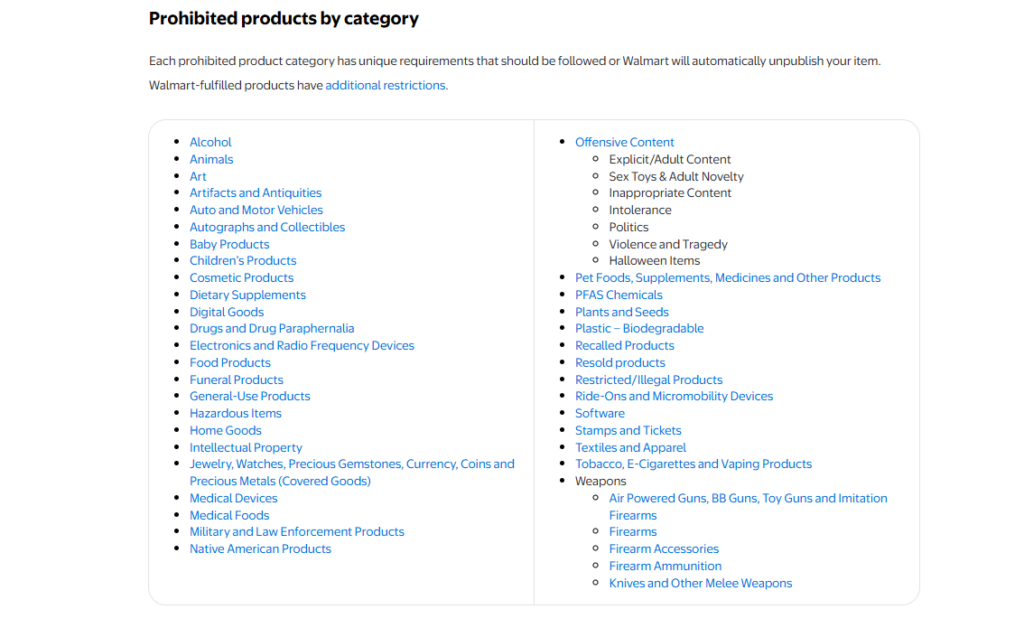
Items You Cannot Sell on Walmart Marketplace
- Illegal or Restricted Products
- Counterfeit or IP-Infringing Products
- Firearms and Firearm Parts
- Drugs and Drug Paraphernalia
- Gift Cards
- Non-Compliant Electronics
- Unsafe or Recalled Products
- Products with Misleading Claims
- Unauthorised Branded or Licensed Products
- Restricted Health, Beauty, or Food Items
How Much Does It Cost To Sell On Walmart Marketplace Fees?
Understanding Walmart Marketplace fees is important before you start selling, because your profit margin depends on more than just the selling price. The good news is that Walmart keeps its seller fee structure relatively simple compared with many e-commerce platforms. Before launching a product on Walmart, consider your full cost structure:
- Product cost
- Walmart referral fee
- Shipping cost
- Packaging cost
- Return cost
- Advertising cost
- Fulfilment or WFS cost
- Storage cost
- Marketplace management cost
Walmart does not charge a standard monthly subscription fee, setup fee, or listing fee for Marketplace sellers. Instead, sellers usually pay a referral fee when a product is sold. You are mainly charged after you make a sale, which can reduce upfront costs for new or expanding sellers.
| Cost Type | What It Means |
|---|---|
| Setup fee | No standard setup fee |
| Monthly fee | No monthly subscription fee |
| Referral fee | A percentage charged when an item sells |
| Fulfilment fee | If you use Walmart Fulfillment Services |
| Storage fee | May apply if inventory is stored through WFS |
| Advertising cost | Based on the campaign budget |
| Operational cost | Product data, tools, shipping, content, and catalogue management |
Walmart’s referral fee schedule lists 15% for categories such as Books, Home, Kitchen, Decor & Garden, Pet Supplies, Toys & Games, Music, and Luggage & Travel Accessories. Some categories have lower rates, such as Consumer Electronics at 8%, Camera & Photo at 8%, Personal Computers at 6%, and Automotive & Powersports at 12%.
| Product Category | Example of Referral Fee |
| Books | 15% |
| Home, Kitchen, Decor & Garden | 15% |
| Pet Supplies | 15% |
| Toys & Games | 15% |
| Music | 15% |
| Luggage & Travel Accessories | 15% |
| Consumer Electronics | 8% |
| Camera & Photo | 8% |
| Personal Computers | 6% |
| Automotive & Powersports | 12% |
| Grocery | 8% for items priced $15 or less; 15% for items priced above $15 |
| Beauty, Health & Personal Care | 8% for items priced $10 or less; 15% for items priced above $10 |
For example, a product that looks profitable on Amazon may not perform the same way on Walmart. The referral fee may be different, shipping expectations may vary, fulfilment costs may change, and competition may affect your final selling price. That is why sellers should calculate their profit margin before uploading products, not after the first few orders come in.
Walmart’s fee structure is easy to understand, but profitability still requires careful planning. A seller should review Walmart’s official referral fee schedule for their exact product category, calculate all fulfilment and operational costs, and set pricing that protects both competitiveness and margin.
How to Start Selling on Walmart Marketplace
Getting started on Walmart Marketplace is easy when you follow the process in the right order. The real challenge is making sure your business documents, product data, fulfilment setup, and listings are ready before you go live.
Step 1: Check Your Eligibility
Before applying, first make sure your business is ready for Walmart Marketplace. Walmart is selective, so sellers should review the requirements before starting the application. Ask these questions before getting started:
- Do I have a registered business?
- Do I have valid business documents?
- Do I have previous e-commerce or marketplace selling experience?
- Do my products have GS1 UPCs or GTINs?
- Can I fulfil orders reliably?
- Are my products allowed on Walmart Marketplace?
If your answer is yes to these questions, you are in a stronger position to apply.
Step 2: Create Your Walmart Seller Account
Once you confirm that your business is eligible, the next step is to create your Walmart Marketplace seller account. This account is different from a normal Walmart.com shopping account. It is the main place where you will manage your business details, product catalogue, payments, shipping settings, orders, inventory, and overall seller performance.
1. Go to Walmart’s official seller registration page and start the account creation process. You will need to provide basic business information such as:
- Your full name
- Business name
- Business email address
- Business phone number
- Login details for your seller account
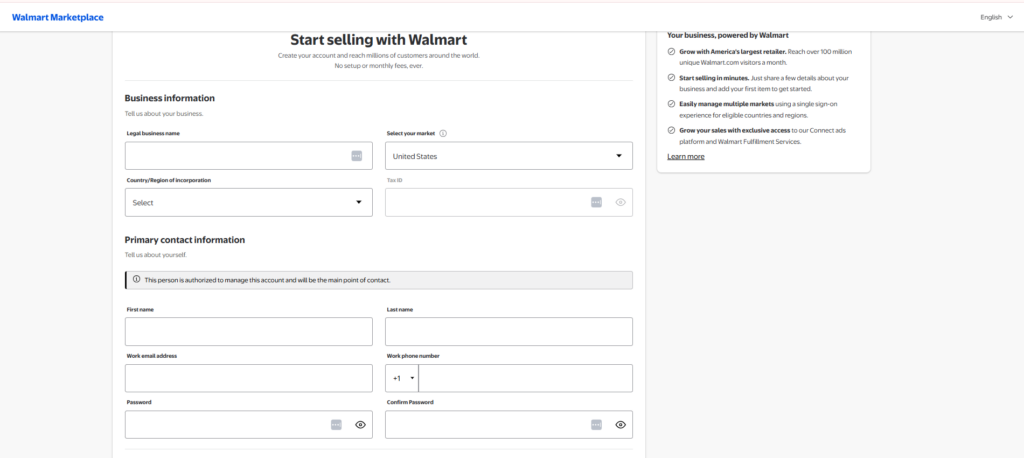
2. Make sure the information you enter matches your official business records. Even small differences in your business name, email, or contact details can create issues during verification. It is also better to use a professional business email because Walmart will use this address for important seller communication, verification updates, and account notifications.
3. Next, review Walmart’s seller terms and conditions carefully. These terms explain the rules and responsibilities that apply when you sell on Walmart Marketplace.
4. Submit the registration form to create your seller account and move forward with the onboarding process.
Step 3: Prepare and Submit Your Business Documents
The next important step is to submit your business verification details. This stage allows Walmart to confirm that your business is legitimate, properly registered, and ready to sell on the marketplace.
1. Before you start the verification process, make sure all required documents and information are ready. Many sellers face delays at this stage because their documents are incomplete, outdated, or inconsistent with their official business records.
2. Prepare your Business Tax ID or Business License Number, business address verification, personal ID copy, business entity classification, bank details, tax information, product catalogue information, and fulfilment and return details.
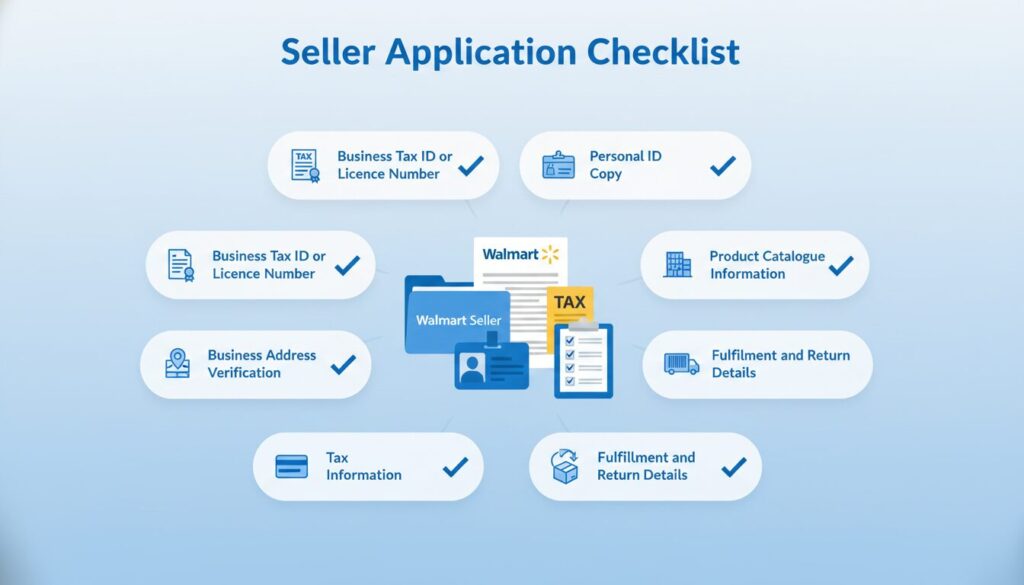
3. Log in to your Walmart Seller Center account, and you can access the verification section and begin entering your business details. This may include your tax information, legal business name, business address, contact details, seller profile information, product category, and fulfilment method.
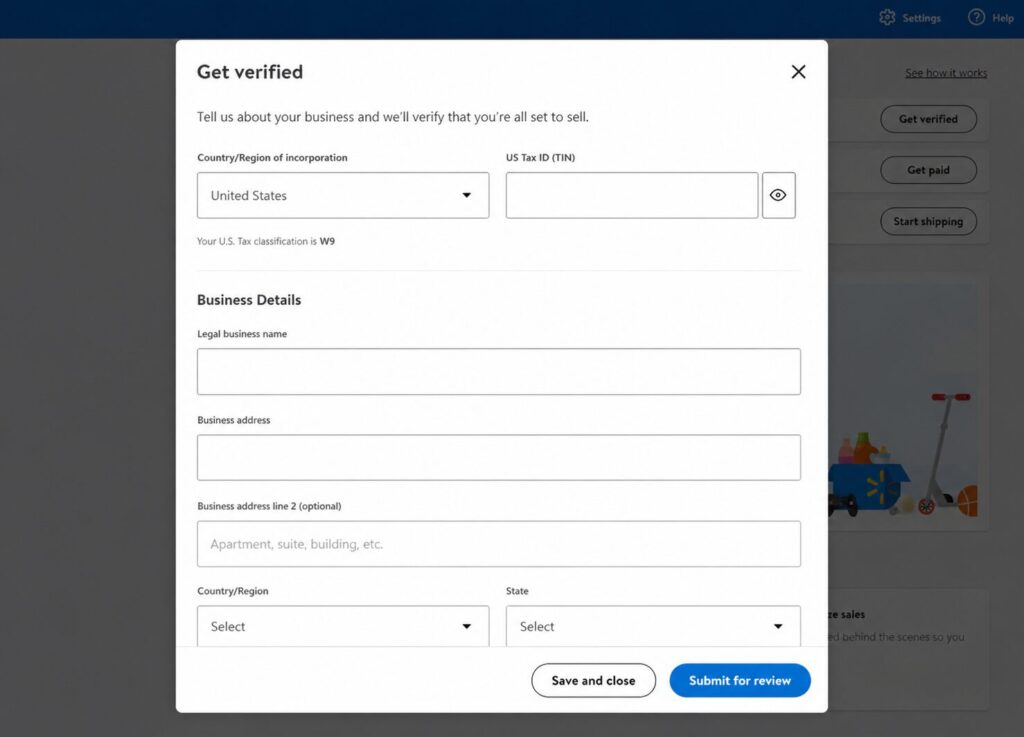
4. Before submitting, review everything carefully. Your business name, address, tax details, and contact information should match across all documents. Even a small mismatch, such as a slightly different business name or address format, can slow down the approval process.
5. Submit your details for review. If Walmart asks for additional information, respond as quickly and clearly as possible.
Step 4: Set Up Payments and Tax Information
Once your seller account moves forward, you need to configure your payment and tax settings. This step allows Walmart to process your payouts once you start receiving orders. You may need to provide:
- Bank account information
- Tax form details
- Business payment information
- Payout account setup
Do not leave this section incomplete. Payment setup is essential before you can properly operate as a Walmart Marketplace seller.
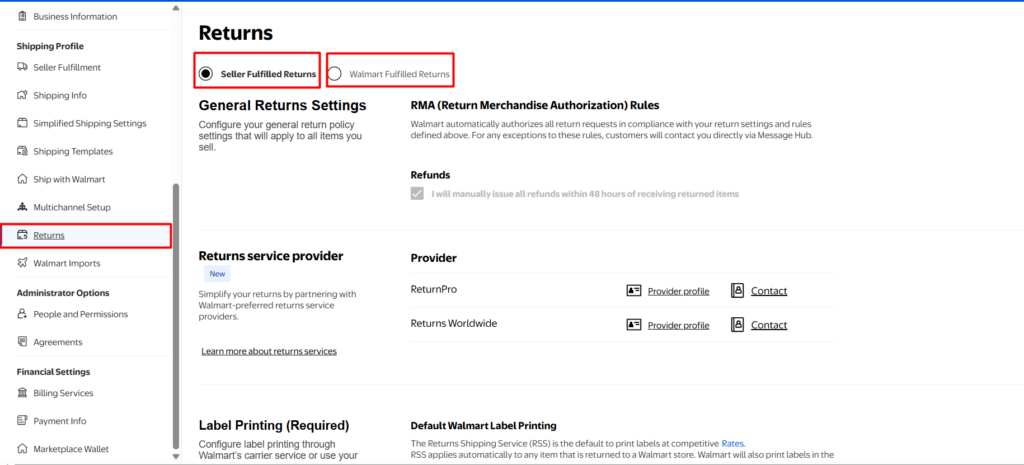
Step 5: Configure Shipping and Returns
Once your payment setup is complete, the next step is configuring your shipping and returns settings. This part is important because it directly affects customer experience, delivery performance, and your overall seller account health. Before you begin, make sure you are ready to define the key details of your fulfilment process:
- Shipping templates
- Handling time
- Delivery regions
- Shipping cost settings
- Carrier information
- Return address
- Return policy
- Fulfilment method
1. To set up your shipping and returns, go to your Walmart Seller Center dashboard and access the shipping setup section. From there, you can choose or customise your shipping templates based on how quickly you can process and deliver orders. You should also define where you can ship, how much shipping will cost, and which carriers you plan to use.
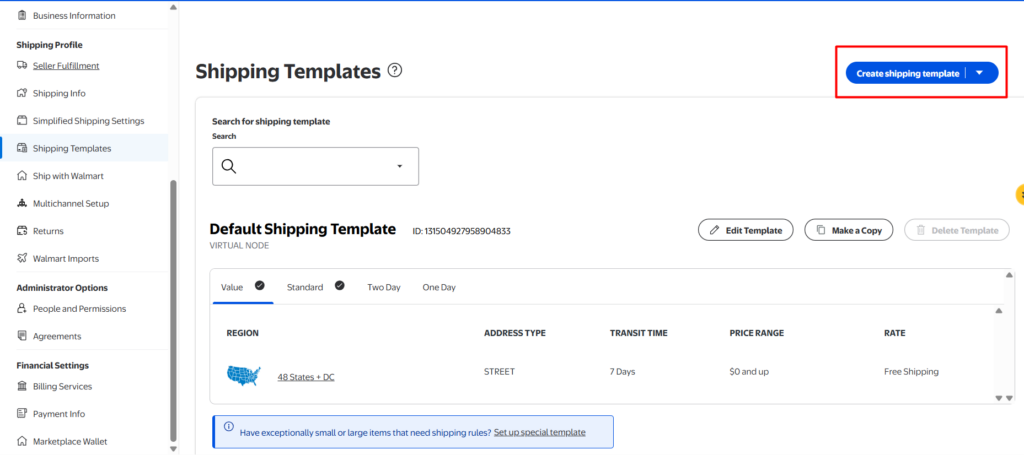
2. Next, set up your return information carefully. Add the correct return address and review your return policy so customers know what to expect if they need to send an item back. A clear return process helps reduce confusion and protects the customer experience.
You can either fulfil orders yourself or use Walmart Fulfillment Services. If you choose seller-fulfilled shipping, make sure your delivery times, tracking updates, and return handling are reliable. Poor fulfilment performance can lead to late deliveries, customer complaints, and account health issues. For sellers who want Walmart to manage storage, shipping, customer support, and returns, Walmart Fulfillment Services can be a stronger option.
Step 7: Add Your Products to Walmart Marketplace
Once your business verification, payment setup, and shipping configuration are complete, you can start adding products to your Walmart Marketplace catalogue. This is where your products become visible and ready to sell, so accuracy is very important. Walmart gives sellers several ways to upload products depending on catalogue size and business setup:
- Manual Product Upload: Best for sellers with a small number of products.
- Bulk Upload: Ideal for sellers with larger catalogues because you can upload multiple products at once using a spreadsheet.
- API Integration: Suitable for high-volume sellers who need automatic catalogue updates.
- Feed Management Tools: Useful for multi-channel sellers who manage product data across Walmart, Amazon, Shopify, eBay, and other platforms.
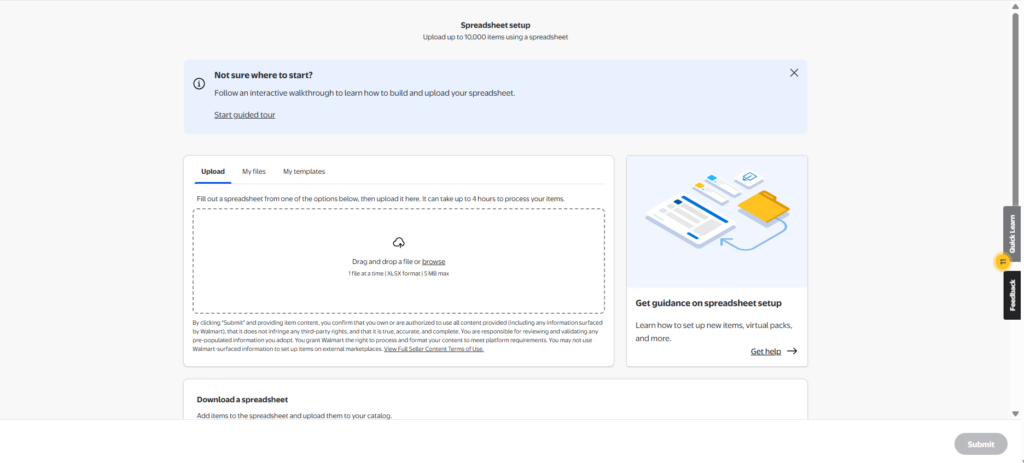
Bulk Upload:
1. Log in to your Walmart Seller Center dashboard using your seller account credentials. Go to Product Catalogue and select Items. Click Add Items and choose the bulk upload option. Bulk upload is useful when you want to add multiple products at once instead of creating each listing manually.
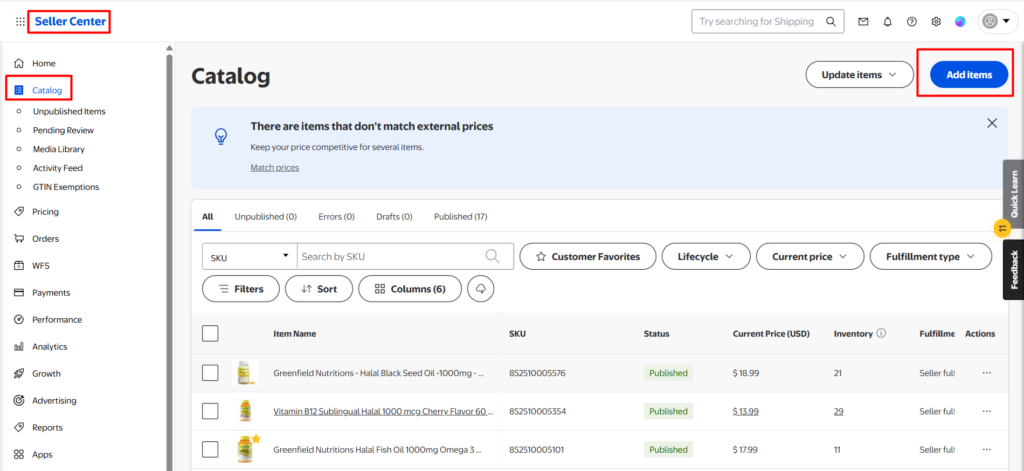
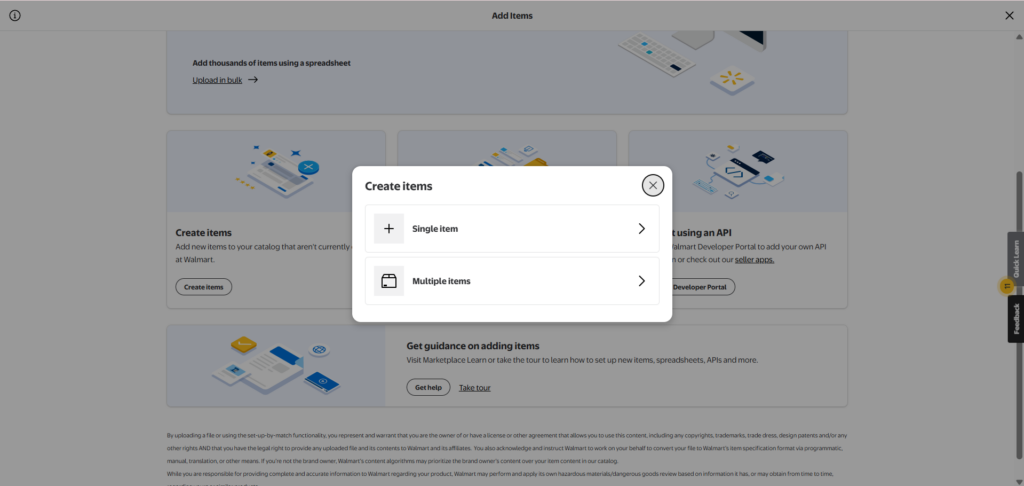
2. Upload your Walmart template or completed product spreadsheet. Make sure the file includes key details such as product title, SKU, UPC or GTIN, price, inventory, category, product attributes, and fulfilment information.
3. Review the required fields, correct any missing or inaccurate information, and follow the remaining steps to submit your products. Clean and complete data helps reduce upload errors and improves your chances of getting listings approved smoothly.
Single Item Upload Process
- From your Walmart Seller Center homepage, go to Product Catalogue > Items and click Add Items.
- Enter the product name, UPC, GTIN, or another product identifier in the Search the Walmart catalogue field. If your item already exists, you can add your offer to that listing. If it is not listed, choose Create a New Item and provide the required product information.
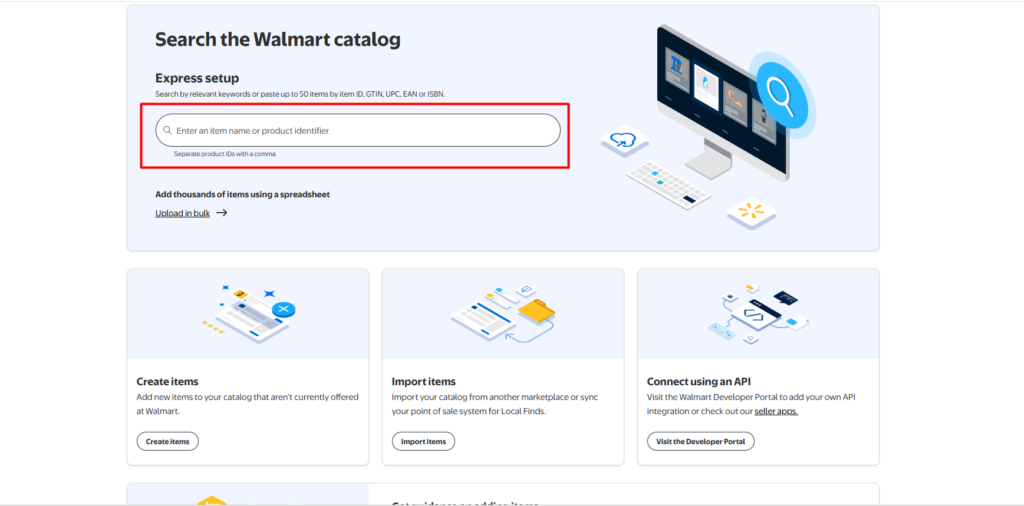
- Once you find the correct product or create a new one, click Add Item to include it in your catalogue. Make sure the product information matches your actual item.
- Fill in the offer details, including your product SKU, selling price, fulfilment type, shipping weight, inventory, and other required information. You can also complete optional fields to make the listing more accurate and detailed.
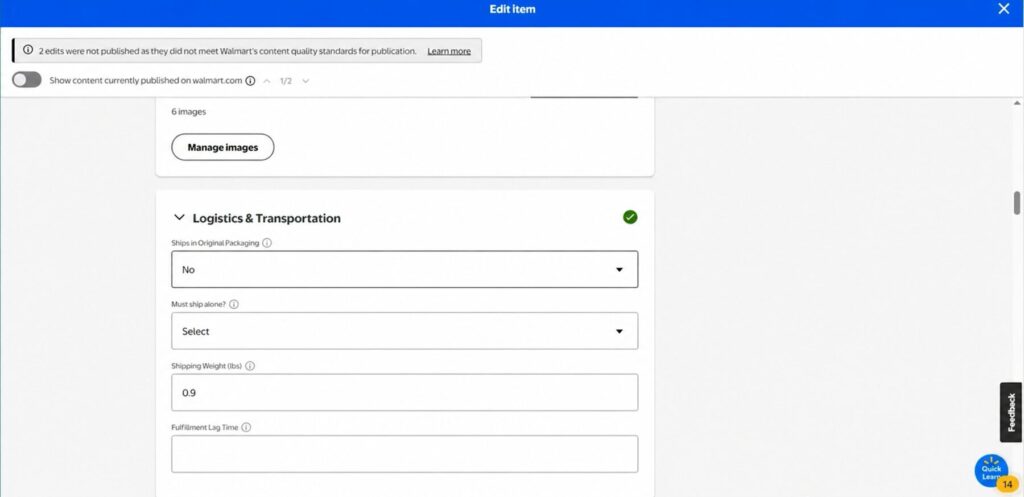
- Review all information carefully, then click Submit to officially add the item to your Walmart Marketplace catalogue. Clean and accurate product data helps reduce approval issues and improve listing quality.
Step 8: Configure Inventory Levels
Once products are added, make sure your inventory is accurate. Inventory mistakes can lead to cancellations, poor customer experience, and account health issues.
You should regularly check:
- Available stock
- Low-stock items
- Out-of-stock products
- Inventory sync across channels
- WFS inventory, if using Walmart Fulfillment Services
- Seller-fulfilled inventory, if shipping from your own warehouse
Accurate inventory management helps protect your seller performance and prevents overselling.
Step 9: Optimise Your Listings
Uploading products is only the beginning. To compete on Walmart Marketplace, your listings need to be optimised for both search visibility and conversion.
Focus on:
- Clear product titles
- Complete product attributes
- Strong descriptions
- Helpful key features
- High-quality images
- Correct category placement
- Competitive pricing
- Relevant keywords
- Strong delivery promise
A good Walmart listing should help shoppers understand the product quickly and give Walmart’s system enough information to place the item in relevant search results.
Step 10: Launch and Monitor Performance
Going live does not mean the work is finished. Walmart’s selling is not a “set and forget” process. After launch, you need to monitor your performance regularly and make improvements based on real data.
Track these areas:
- Listing status
- Inventory
- Pricing
- Buy Box performance
- Search visibility
- Orders
- Returns
- Reviews
- Account health
- Advertising performance
The strongest Walmart sellers do not only upload products. They keep improving listings, pricing, fulfilment, advertising, and customer experience over time. This ongoing optimisation is what helps turn Walmart Marketplace from a simple sales channel into a long-term growth opportunity.
How to Optimise Walmart Product Listings
Listing quality can make or break your Walmart Marketplace performance. A product may have strong demand, but if the listing is weak, incomplete, or difficult to understand, shoppers may not click, trust, or buy it.
Walmart also needs structured product data to understand where your item should appear in search and browse results. That means listing optimisation is not only about adding keywords. It is about improving the full product page: content, offer quality, images, pricing, fulfilment, reviews, and overall seller performance.
Walmart’s listing quality approach focuses on three major areas: content, offer, and performance. Strong content helps shoppers understand the product, a strong offer improves competitiveness, and strong performance helps build trust through fulfilment, reviews, and post-purchase experience.
A strong Walmart listing should include:
- A clear and searchable product title
- Accurate category selection
- A detailed product description
- Useful key features or highlights
- Complete product attributes
- High-quality product images
- Correct product variations
- Competitive pricing
- Accurate inventory
- Clear shipping and delivery details
1. Choose the Right Product Category First
Before writing the title or description, make sure the product is placed in the correct category. Category selection matters because it determines which attributes Walmart asks for and where the item appears across search and browse results.
For example, a stainless steel water bottle should not be placed only under a broad “Home” category if a more accurate drinkware or hydration category is available. The more accurately your product is categorised, the easier it becomes for Walmart and shoppers to understand the item.
2. Write a Clear Walmart Product Title
Your product title is one of the most important parts of your Walmart listing. It helps Walmart understand the product clearly and helps shoppers quickly decide whether the item matches what they are searching for.
A good title should include the main keyword, product type, strength, key ingredient, count, and important benefit-focused attributes without looking overstuffed.
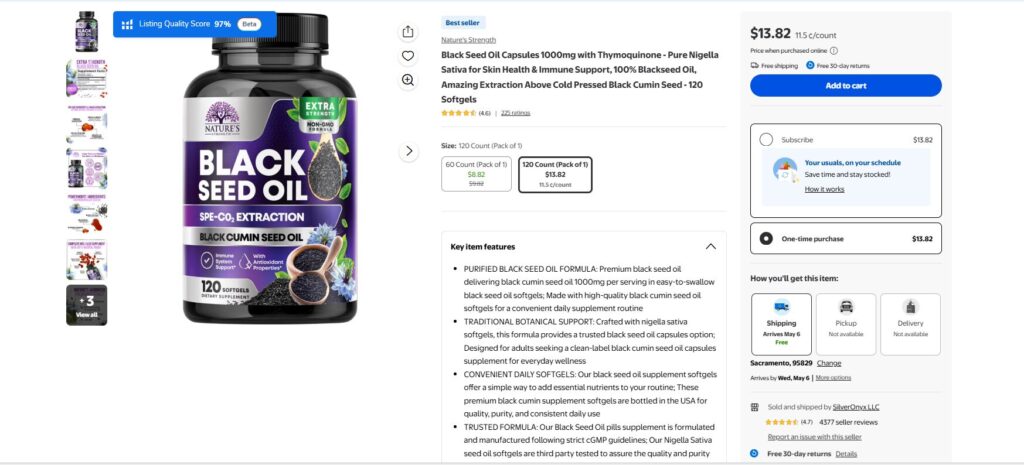
A stronger title should be cleaner, easier to read, and more focused.
Weak title: Black Seed Oil Capsules
Better title: Nature’s Strength Black Seed Oil Capsules 1000 mg with Thymoquinone, Nigella Sativa Black Cumin Seed Oil Supplement, 120 Softgels
The second title works better because it includes the brand, product type, dosage, key ingredient, botanical name, supplement form, and pack count. A shopper can immediately understand what the product is, while Walmart receives clearer keyword signals for search relevance.
A good Walmart title for this product should usually include:
- Brand
- Product type
- Dosage or strength
- Key ingredient
- Supplement form
- Pack count
- Main health-support keyword, if relevant
Avoid repeating the same keyword too many times. A title like “Black Seed Oil Blackseed Oil Black Cumin Seed Oil Nigella Sativa Oil Capsules” looks spammy and may reduce shopper trust. Instead, use the most important keywords naturally and keep the title readable A good Walmart title usually includes:
3. Write Product Descriptions That Help Buyers Decide
Your product description should not sound like a keyword list. It should explain what the product is, who it is for, and why the shopper should consider it. A strong description should include:
- What the product is
- Main benefits
- Important features
- Size, colour, material, or technical details
- Use cases
- Compatibility or care instructions, if needed
- Available variations, if applicable
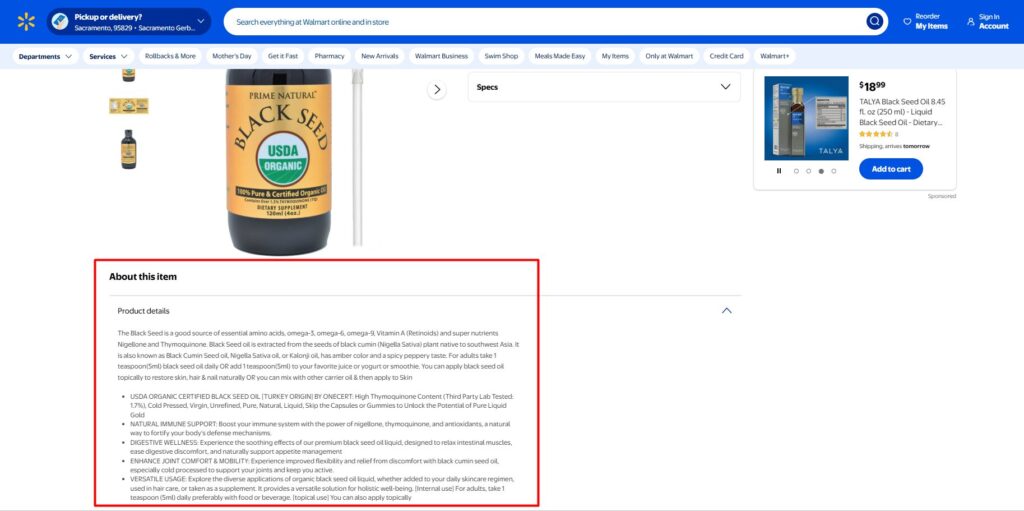
For example, if you sell black seed oil, do not repeat the phrase “black seed oil” again and again. You can naturally include related and relevant terms such as black cumin seed oil, Nigella sativa oil, organic oil, liquid supplement, cold-pressed oil, omega fatty acids, thymoquinone, immune support, digestive wellness, and daily wellness supplement, depending on the product.
In the example shown, the product description uses several useful related terms, including USDA organic, black cumin seed, Nigella sativa, omega-3, omega-6, omega-9, thymoquinone, and cold pressed. These terms help Walmart better understand the product and give shoppers clearer information about what they are buying.
Walmart descriptions should be specific, clear, relevant, and easy for customers to understand. It should explain the product’s key ingredients, form, size, usage, and main benefits naturally. Avoid repeating the same keyword too many times or making vague claims such as “best oil” or “amazing health solution.” Instead, write helpful product copy that supports the customer’s buying decision.
4. Use Key Features for Quick Scanning
Key features, also called highlights, help shoppers quickly scan the most important benefits. These should be short, specific, and benefit-focused. If you sell a stainless steel water bottle, your key features could be:
- Keeps drinks cold for up to 24 hours
- Made from BPA-free stainless steel
- Leak-resistant lid for travel and gym use
- Fits most car cup holders
- Available in multiple colours and sizes
This is much more effective than repeating phrases like “best water bottle” or “high-quality bottle” without explaining why the product is useful. Walmart guidance recommends using short bullet-style key features, putting the most important benefits first, and avoiding vague or unproven marketing claims.
5. Add Complete Product Attributes
Attributes are the structured details Walmart uses to organise and filter products. These may include brand, size, colour, material, gender, age group, compatibility, count per pack, dimensions, model number, and other category-specific details.
Complete attributes can improve visibility because they help Walmart match your product to relevant filters and search results. They also improve the customer experience because shoppers can compare products more easily.
Missing attributes can make a listing look incomplete, reduce discoverability, and limit where the product appears.
6. Use High-Quality Product Images
Images are one of the biggest conversion factors on Walmart Marketplace. Shoppers cannot touch the product, so your images need to do the selling visually.
Use images that are:
- Clear and professionally lit
- High resolution
- Focused on the actual product
- Shown on a clean background
- Accurate to what the customer will receive
- Supported by additional angles or lifestyle shots where relevant
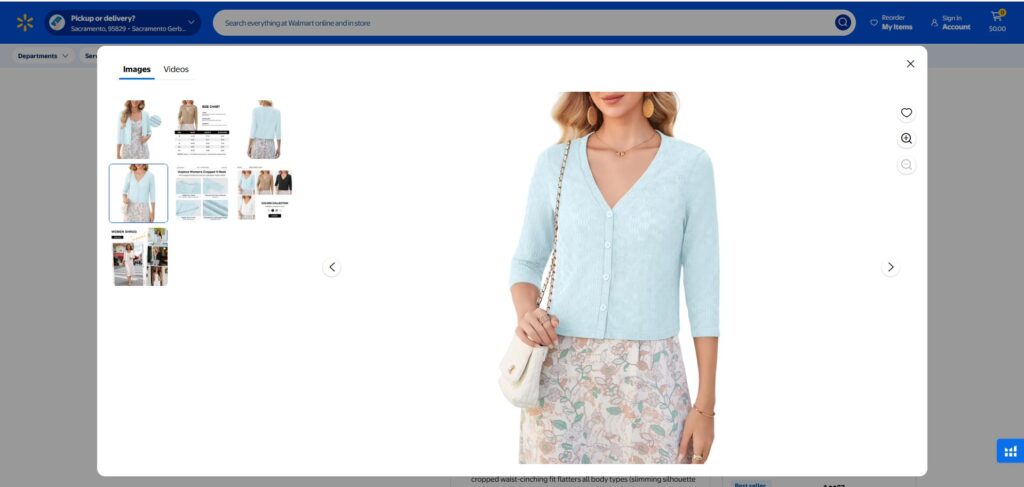
Walmart guidance recommends uploading multiple images where applicable, using RGB image format, and ensuring product images are clear, professional, and not misleading. It also notes that images should not use placeholders or show accessories that are not included with the product.
7. Keep Pricing, Inventory, and Delivery Competitive
Walmart listing optimisation is not only about content. Your offer also matters. A strong listing should have:
- Competitive pricing
- Accurate stock availability
- Reliable fulfilment
- Clear delivery promise
- Strong shipping options
- Low cancellation risk
A well-written listing can still underperform if the price is too high, inventory is unstable, or delivery is slow. This is why Walmart optimisation should combine content quality with offer competitiveness and seller performance.
Use Helium 10 Tools for Walmart Listing Optimisation
Manual optimisation is useful, but sellers can make better decisions when they use data. Helium 10 provides tools for Amazon, Walmart, and TikTok Shop sellers, including product research, keyword research, listing optimisation, operations, analytics, and advertising support.
For Walmart sellers, these tools can support product research, keyword discovery, listing improvements, monitoring, and profit analysis.
- Xray: Xray helps sellers analyse Walmart product opportunities by reviewing product-level data such as revenue estimates, pricing, ratings, competition, and market demand. Helium 10’s Xray page also includes guidance for using Product Analyzer on Walmart.
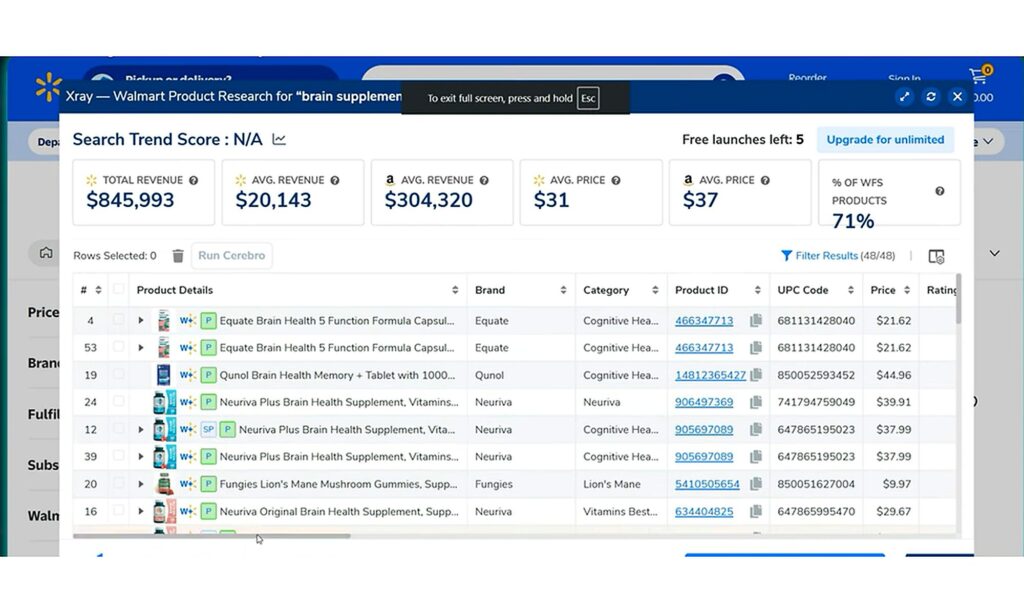
- Cerebro: Cerebro can help with keyword research by showing which keywords competitors or similar listings may be ranking for. Sellers can use this data to identify terms to include naturally in titles, descriptions, key features, and ads.
- Magnet: Magnet helps sellers discover relevant keyword ideas with search demand. This is useful when building keyword lists for Walmart product titles, descriptions, and advertising campaigns.
- Frankenstein: Frankenstein helps clean, organise, and refine large keyword lists. This is especially helpful when sellers collect keywords from multiple sources and need to remove duplicates, irrelevant terms, or messy keyword combinations before writing listing content.
- Helium 10 Alerts: Alerts can help sellers monitor listing issues, potential changes, and brand-related risks. This is useful because unauthorised listing changes, content issues, or sudden performance problems can affect visibility and sales.
Walmart’s Marketplace page also notes that Helium 10 tools such as Xray, Cerebro, Magnet, and Profits can help sellers make more informed decisions about product sourcing, keyword improvements, listing optimisation, advertising, and performance.
Walmart Fulfillment Services vs Seller Fulfilled Orders
Fulfilment is one of the most important decisions you will make as a Walmart Marketplace seller. It affects delivery speed, customer satisfaction, return handling, account health, and even your ability to compete for sales. As a Walmart seller, you usually have two main fulfilment options:
- Walmart Fulfillment Services (WFS)
- Seller-Fulfilled Orders, either handled by your own warehouse or a third-party logistics provider
What are Walmart Fulfillment Services?
Walmart Fulfilment Services, or WFS, is Walmart’s fulfilment solution for Marketplace sellers. It works in a similar way to Amazon FBA, but within the Walmart Marketplace ecosystem.
With WFS, sellers send their inventory to Walmart fulfilment centres. When a customer places an order on Walmart.com, Walmart handles the picking, packing, shipping, customer support, and returns for eligible WFS orders. The WFS process looks like this:
- Sellers send inventory to Walmart fulfilment centres
- Walmart stores the products
- Customers place orders on Walmart.com
- Walmart picks, packs, and ships the orders
- Walmart manages customer support and returns for WFS orders
WFS can be useful for sellers who want faster delivery, less operational pressure, and a more streamlined fulfilment process. Instead of packing and shipping every order yourself, you can use Walmart’s logistics network and focus more on product growth, pricing, advertising, and listing optimisation.
Is WFS the Same as Amazon FBA?
WFS and Amazon FBA are similar, but they are not the same. Both services help sellers outsource fulfilment to a major marketplace, and both usually involve storage, picking, packing, shipping, and fulfilment-related fees.
The main difference is the marketplace they support. WFS is built for Walmart Marketplace, so your products are listed and fulfilled through Walmart.com. Amazon FBA is built for Amazon, so products are listed and fulfilled through Amazon’s fulfilment network.
To use WFS, you need to be an approved Walmart Marketplace seller. To use FBA, you need to be an Amazon seller and enrol eligible products in the FBA programme.
Both services are designed to simplify fulfilment, but your choice depends on where you sell, your product margins, your logistics needs, and your marketplace growth strategy.
What Are Seller-Fulfilled Orders?
With seller-fulfilled orders, you manage the fulfilment process yourself. This means you store the products, pack the orders, arrange shipping, provide tracking, manage customer communication, and handle returns.
Seller-fulfilled orders give you more direct control over your operations, but they also require a reliable fulfilment system. If your shipping is slow, tracking is inaccurate, or returns are poorly handled, it can affect customer experience and seller performance. With seller-fulfilled orders, you are responsible for:
- Storage
- Picking and packing
- Shipping
- Tracking
- Customer communication
- Returns
- Delivery performance
- Inventory accuracy
This option can work well if you already have a strong warehouse, fulfilment team, or third-party logistics partner. However, it requires discipline, because Walmart customers expect reliable delivery and a smooth post-purchase experience.
| Area | Walmart Fulfillment Services | Seller-Fulfilled |
| Storage | Walmart stores inventory | Seller stores inventory |
| Shipping | Walmart handles shipping | Seller or 3PL handles shipping |
| Returns | Walmart handles returns for WFS orders | Seller handles returns |
| Customer support | Walmart handles support for WFS orders | Seller manages support |
| Control | Less operational control | More direct control |
| Best for | Sellers wanting scale and faster fulfilment | Sellers with strong logistics systems |
If you are already strong in fulfilment, seller-fulfilled may work well. If you want Walmart to handle logistics and improve the delivery experience, WFS may be the better option.
Which Fulfilment Option Should You Choose?
If you already have a reliable fulfilment setup, seller-fulfilled orders may work well. This gives you more control over storage, packaging, carriers, and return handling.
If you want Walmart to manage logistics, improve delivery experience, and reduce day-to-day fulfilment pressure, Walmart Fulfillment Services may be the better option.
The right choice depends on your business model. For smaller sellers with limited fulfilment capacity, WFS can simplify operations. For established sellers with strong warehouse systems, seller-fulfilled orders may offer more flexibility and control.
The key is to choose the option that helps you deliver orders accurately, quickly, and consistently. Fulfilment is not just an operational task on Walmart Marketplace. It is a major part of customer experience, seller performance, and long-term growth.
How to Win the Walmart Buy Box
The Walmart Buy Box is the section on a product page where customers can add an item to their cart. Winning the Buy Box matters because it directly affects sales.
If multiple sellers offer the same product, Walmart needs to decide which seller gets the main purchase position. The winner usually has a strong combination of price, availability, shipping speed, and seller performance.
To improve your Buy Box chances:
- Keep pricing competitive
- Maintain accurate inventory
- Offer fast shipping
- Avoid cancellations
- Provide valid tracking
- Keep return rates low
- Use WFS where it makes sense
- Maintain strong seller metrics
- Monitor competitor pricing regularly
A common mistake is thinking the lowest price always wins. Price matters, but it is not the only factor. If your fulfilment is slow or your seller performance is weak, a slightly higher-priced competitor may still outperform you.
Walmart Marketplace Advertising
New sellers often expect organic traffic as soon as their products go live, but that rarely happens. Even with strong listings, you may need advertising to gain early visibility, test keyword demand, and compete in crowded categories.
Walmart Marketplace advertising is managed through Walmart Connect, which offers solutions such as Sponsored Search, Onsite Display, Brand Shop and Shelf, Offsite Media, and Store Ads. For most Marketplace sellers, the best starting point is Sponsored Search, especially Sponsored Products Ads.
Sponsored Products Ads
Sponsored Products Ads help place your products in high-visibility areas such as search results, product grids, shopping carousels, and Buy Box-related placements. These ads are shown to shoppers who are already searching for products like yours, which makes them useful for driving traffic to specific item pages.
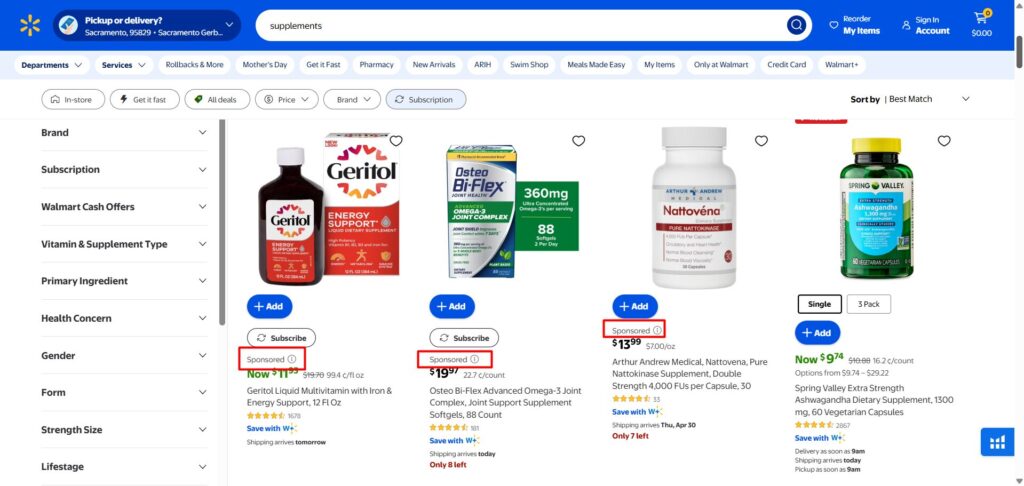
Walmart generally selects ads based on product relevance and bid strength, so your item should be in stock, published, competitively priced, and eligible for the Buy Box.
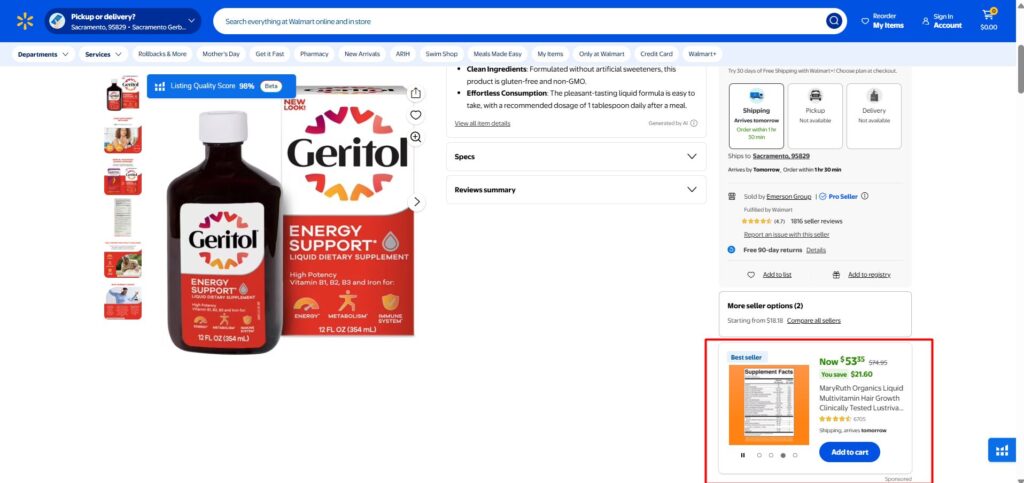
Sponsored Brands Ads
For brand owners, Sponsored Brands Ads can also be valuable. These ads appear in premium search placements and can display a brand logo, custom headline, and multiple products. They are especially useful for building brand awareness, launching new or seasonal products, and improving visibility for items that do not yet have a strong organic ranking.
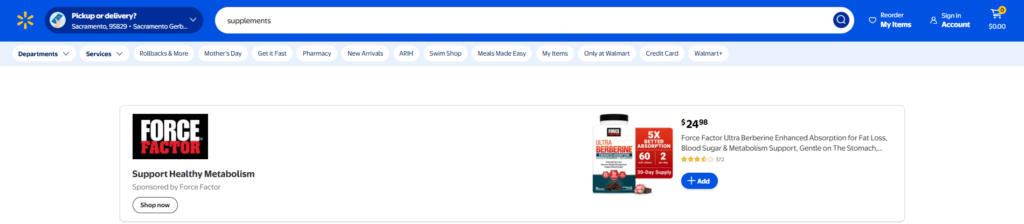
Walmart ads can help sellers:
- Launch new products faster
- Drive traffic to optimised listings
- Test high-intent keywords
- Improve early sales velocity
- Promote seasonal or new collections
- Increase brand and product visibility
- Compete in crowded categories
However, advertising cannot fix a weak listing. Before spending on ads, make sure your product page has a strong title, clear images, complete attributes, useful descriptions, competitive pricing, available inventory, and reliable shipping. Otherwise, you may pay for clicks but fail to convert those visitors into buyers.
Common Mistakes to Avoid When Selling on Walmart
Many sellers fail on Walmart, not because the marketplace is bad, but because they approach it the wrong way. Here are the most common mistakes.
- Treating Walmart Exactly Like Amazon: Walmart and Amazon are not the same. The product data structure, customer expectations, content rules, fulfilment options, and marketplace dynamics are different. You can use your Amazon experience, but do not copy everything blindly.
- Applying Before Documents Are Ready: Incomplete or inconsistent documents can delay approval. Prepare your business information carefully before applying.
- Using Weak or Incorrect Product Identifiers: Walmart expects valid product identifiers. Incorrect UPCs or poor catalogue data can create listing issues.
- Uploading Poor Product Content: Short titles, thin descriptions, missing attributes, and low-quality images can hurt search visibility and conversion.
- Ignoring Pricing Competitiveness: Walmart shoppers are price-conscious. If your total price is not competitive, your product may struggle.
- Poor Inventory Management: Inventory errors can lead to cancellations, late orders, and account health problems.
- Slow Fulfilment: Fast, reliable fulfilment matters. If you cannot fulfil orders properly, consider WFS or a stronger logistics partner.
- Not Monitoring Account Health: Do not wait until a warning appears. Monitor performance metrics weekly.
- Launching Without a Marketing Plan: Simply listing products does not guarantee sales. You need SEO, pricing, fulfilment, advertising, and performance tracking working together.
How Ecomclips Helps Sellers Launch and Grow on Walmart Marketplace
At Ecomclips, we focus on measurable marketplace growth, not generic promises. Selling on Walmart requires more than account approval. Sellers need accurate product data, optimised listings, competitive pricing, reliable fulfilment, advertising strategy, and continuous performance monitoring. Our data-driven approach helps brands launch, optimise, and grow on Walmart Marketplace with a clear focus on visibility, conversion, and long-term profitability.
- Walmart Marketplace Setup & Onboarding: We help sellers prepare account information, product data, category details, fulfilment settings, and listing requirements so they can move through the Walmart setup process more smoothly.
- Product Listing Optimisation: We optimise Walmart product titles, descriptions, key features, attributes, categories, and product data to improve search visibility, listing quality, and shopper confidence.
- Keyword & Competitor Research: We identify high-intent Walmart search terms, competitor gaps, category trends, and product opportunities to make listings more discoverable and relevant.
- High-Quality Images & Content Support: We improve product presentation with professional image guidance, infographics, lifestyle visuals, and content recommendations that help shoppers understand the product faster.
- Walmart SEO + Advertising Integration: We align organic optimisation with Walmart Connect advertising, helping sellers drive traffic, test keywords, improve visibility, and support early sales momentum.
- Fulfilment & Performance Monitoring: We help sellers track inventory, pricing, Buy Box performance, shipping setup, returns, account health, reviews, and listing issues so performance stays consistent after launch.
With Ecomclips, Walmart sellers get a structured, data-driven strategy that connects product setup, listing optimisation, advertising, fulfilment, and performance tracking into one clear growth system.
Need Help Selling on Walmart Marketplace?
Managing Walmart Marketplace requires continuous optimisation, clean product data, competitive offers, reliable fulfilment, and performance monitoring. If you want expert support, our team at Ecomclips helps brands launch, optimise, and scale on Walmart with practical, data-driven marketplace strategies.
Contact us today at info@ecomclips.com or book an appointment with our e-commerce experts to start growing smarter on Walmart Marketplace.
FAQs
1. How do I start selling on Walmart Marketplace?
To start selling on Walmart Marketplace, you need to check your eligibility, prepare your business documents, submit an application, complete verification, set up payments and shipping, upload product listings, and launch your products.
2. Is Walmart Marketplace free to join?
Walmart does not charge a standard monthly subscription fee or setup fee. Sellers usually pay referral fees when products are sold.
3. What are the main Walmart seller requirements?
Walmart seller requirements include business documentation, personal ID, Business Tax ID or Business License Number, business verification documents, ecommerce success history, GS1 product identifiers, and a compliant product catalogue.
4. Do I need ecommerce experience to sell on Walmart?
Yes, Walmart looks for sellers with marketplace or ecommerce success history. This helps Walmart maintain a reliable customer experience.
5. What are Walmart Marketplace fees?
Walmart generally charges referral fees based on product category. Additional costs may include fulfilment, storage, advertising, tools, and operational support.
6. What is Walmart Fulfillment Services?
Walmart Fulfillment Services is Walmart’s fulfilment programme for Marketplace sellers. Sellers send inventory to Walmart fulfilment centres, and Walmart handles storage, picking, packing, shipping, customer support, and returns for eligible orders.
7. Is Walmart Marketplace better than Amazon?
It depends on your business. Amazon has larger marketplace maturity and higher competition. Walmart may offer stronger diversification, less saturation in some categories, and access to Walmart’s trusted customer base. Many sellers use both.
8. How do I optimise Walmart product listings?
To optimise Walmart product listings, use clear titles, complete attributes, strong descriptions, useful key features, high-quality images, competitive pricing, and accurate category selection.
9. How can I increase sales on Walmart Marketplace?
You can increase Walmart sales by improving listing quality, using competitive pricing, maintaining inventory, offering fast fulfilment, winning the Buy Box, collecting reviews, and running Walmart Connect advertising campaigns.
10. Should I use Walmart Fulfillment Services?
WFS can be a good choice if you want faster fulfilment, Walmart-managed support, and easier logistics. Seller-fulfilled may be better if you already have a reliable fulfilment operation.
Watch how we help sellers maximise their Walmart Marketplace performance:
200k Sellers & Growing: How To Compete On Walmart Marketplace In 2026
How to Win the Buy Box on Walmart Marketplace & 10x Your Sales
Walmart SEO Tutorial 2025: Rank on Page 1 & Boost Sales Fast
Ecomclips: Your Complete eCommerce Solution Under One Umbrella
At Ecomclips, we bring every eCommerce service you need under one roof – strategy, operations, design, marketing, and growth, all seamlessly connected to help your brand thrive across every marketplace.
Since 2012, we’ve been helping businesses of all sizes launch, scale, and dominate online. From Amazon, Walmart, eBay, and Etsy to Shopify and WooCommerce, our team of marketplace experts, designers, developers, and marketers works together to deliver measurable results.
Our services span the full eCommerce lifecycle:
- Account Setup & Product Listing Management: We handle registrations, compliance, and product data optimization across all marketplaces.
- Amazon Optimization Service: From keyword-rich titles and A+ content to PPC campaigns and storefront design, we craft listings that convert.
- Creative Design & Content Production: A+ visuals, infographics, brand stores, and product videos built to boost engagement.
- Advertising & PPC Management: Smart, data-driven ad strategies for Amazon, Walmart, and Google that maximize ROI.
- Web Development & Store Design: Shopify, WooCommerce, and Magento websites built for performance and conversion.
- Data Management & Automation: Streamlined product feeds, catalog syncing, and inventory control for effortless scalability.
- Customer Service & Order Fulfillment: End-to-end support that enhances customer satisfaction and builds long-term loyalty.
- Analytics & Growth Strategy: Real-time insights and ongoing optimization to ensure consistent, profitable growth.
Whether you’re launching a new store or managing multiple global marketplaces, Ecomclips acts as your single strategic partner, simplifying complexity and driving sustainable revenue growth.