
Fast delivery sells. But behind every fast Walmart order are storage fees, inventory decisions, packaging rules, returns and one bigger question: is the product still profitable?
That is where Walmart Fulfillment Services (WFS) comes in. Walmart stores, picks, packs and ships your inventory, but WFS is more than outsourced fulfillment. It can influence delivery speed, conversion, cash flow and how efficiently you scale.
In this guide, we will break down how WFS works in 2026, what it costs, which products fit best, where sellers lose money and how to use it strategically, with practical examples throughout.
What Is Walmart Fulfillment Services?
Walmart Fulfillment Services (WFS) is Walmart’s fulfillment program for Marketplace sellers. You send eligible inventory to Walmart, and Walmart handles storage, picking, packing, shipping, customer support and eligible returns.
The process is simple: your supplier or warehouse sends inventory to Walmart, and Walmart fulfills the order when a customer buys. But your responsibility does not disappear. You still control the product, pricing, listing, advertising, inventory planning and profit margin.
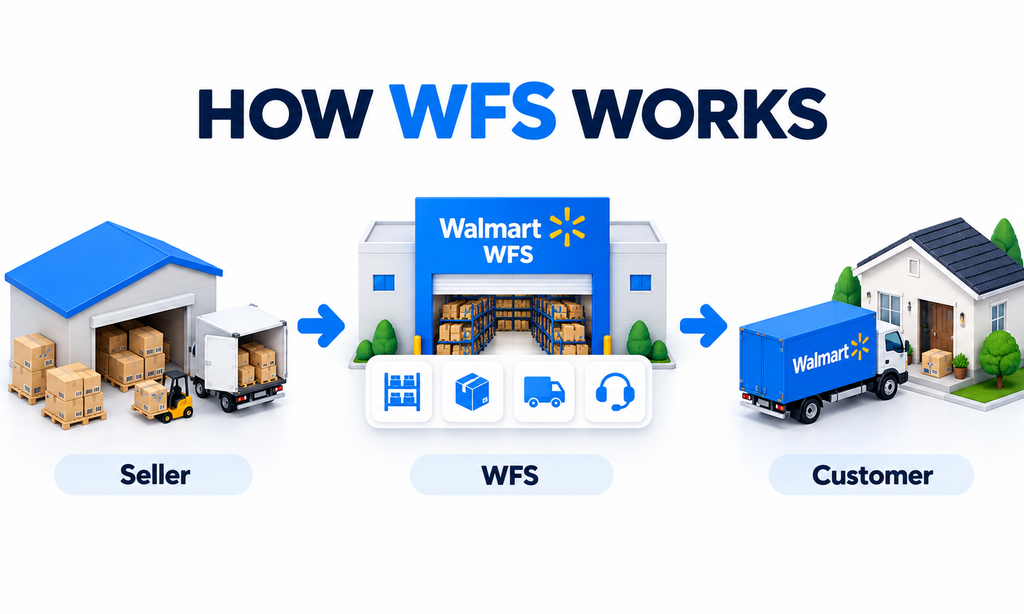
In short, WFS handles fulfillment, but you still have to build the business around it.
Why WFS Matters Beyond Shipping
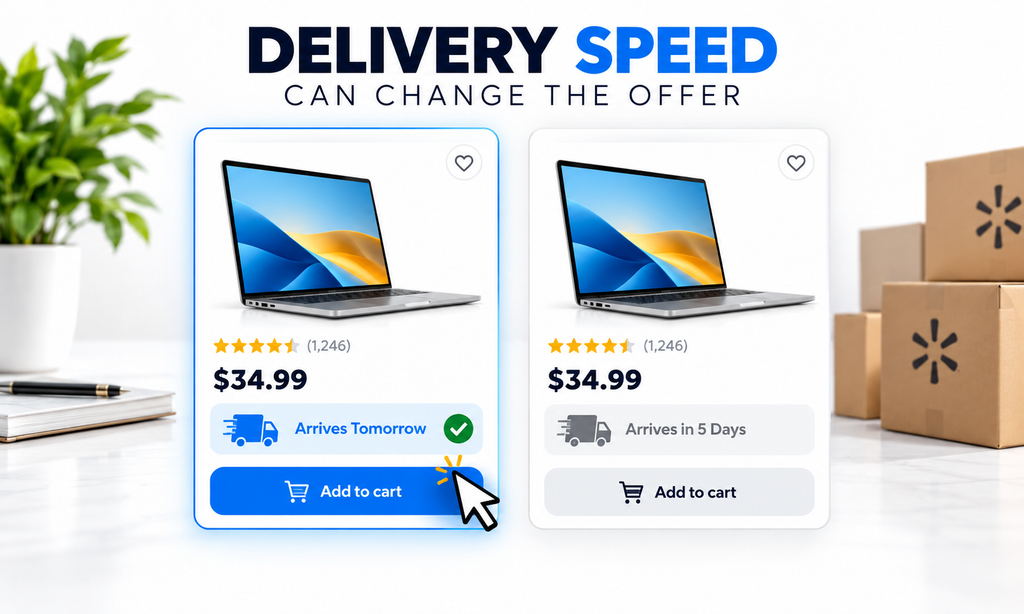
Imagine two similar Walmart listings at the same price. One arrives tomorrow, while the other takes five days. For many customers, faster delivery can make the decision much easier.
That is where WFS becomes more than just a shipping service. Faster delivery and eligible Walmart+ benefits can strengthen an already competitive offer and improve the overall customer experience.
But WFS does not create demand on its own. A weak product or poor listing will still struggle. WFS will not sell a bad offer, but it can make a strong offer easier to choose.
Which Products Are Eligible for WFS?
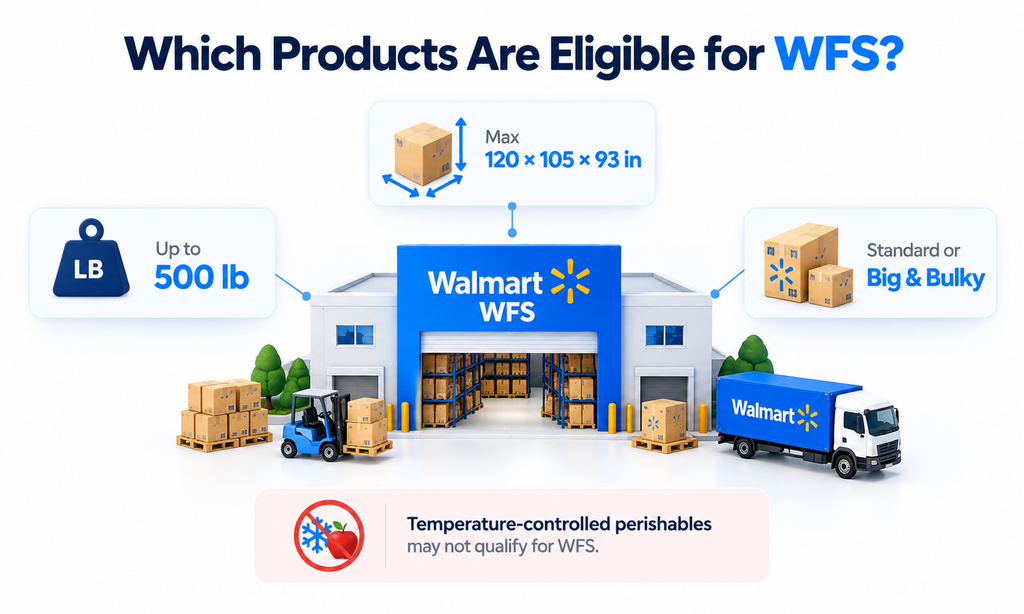
WFS now supports more than small parcel products. Eligible items can weigh up to 500 lb including packaging and measure up to 120 × 105 × 93 inches, although temperature-controlled perishables and some restricted products may not qualify.
For standard WFS pricing, products generally need to stay within these limits:
| Requirement | Standard WFS Limit |
| Unit weight | 150 lb |
| Longest side | 108 in |
| Longest side + girth | 165 in |
Walmart calculates girth as 2 × (width + height). Products that exceed standard limits but remain within WFS maximum limits may fall under Big & Bulky pricing.
Example: Standard vs Big & Bulky
An office organizer measuring 20 × 14 × 10 inches and weighing 12 lb fits comfortably within standard WFS limits. A massage chair measuring 53 × 32 × 50 inches and weighing 230.4 lb is different. Its longest side plus girth is:
53 + 2(32 + 50) = 217 inches
That pushes it into the Big & Bulky category. In Walmart’s current pricing example, a product with these specifications has a 231 lb shipping weight and a $267.80 fulfillment fee.
Walmart WFS Fees in 2026
WFS does not charge one flat fulfillment fee. Your cost mainly depends on the product’s shipping weight, size, price, and classification.
Standard WFS Fulfillment Fees
For standard-size products, Walmart’s current fulfillment rates are:
| Shipping Weight | Fulfillment Fee |
| 1 lb or less | $3.45 |
| 2 lb | $4.95 |
| 3 lb | $5.45 |
| 4–20 lb | $5.75 + $0.40 per lb above 4 lb |
| 21–30 lb | $15.55 + $0.40 per lb above 21 lb |
| 31–50 lb | $14.55 + $0.40 per lb above 31 lb |
| 51 lb+ | $17.55 + $0.40 per lb above 51 lb |
Additional WFS Charges
Some products can also receive extra per-unit fees:
| Condition | Additional Fee |
| Apparel | +$0.50 |
| Hazardous material | +$0.50 |
| Retail price below $10 | +$1.00 |
| Oversize Level 1 | +$3.00 |
| Oversize Level 2 | +$20.00 |
This is why two products with the same selling price can have very different WFS costs. A lightweight standard-size item may be inexpensive to fulfill, while an oversized or low-priced item can quickly become more expensive.
Walmart WFS Storage Fees
WFS fulfillment fees are charged when a product sells. Storage fees are charged while the inventory sits inside Walmart’s fulfillment network, which is why slow-moving stock can become expensive.
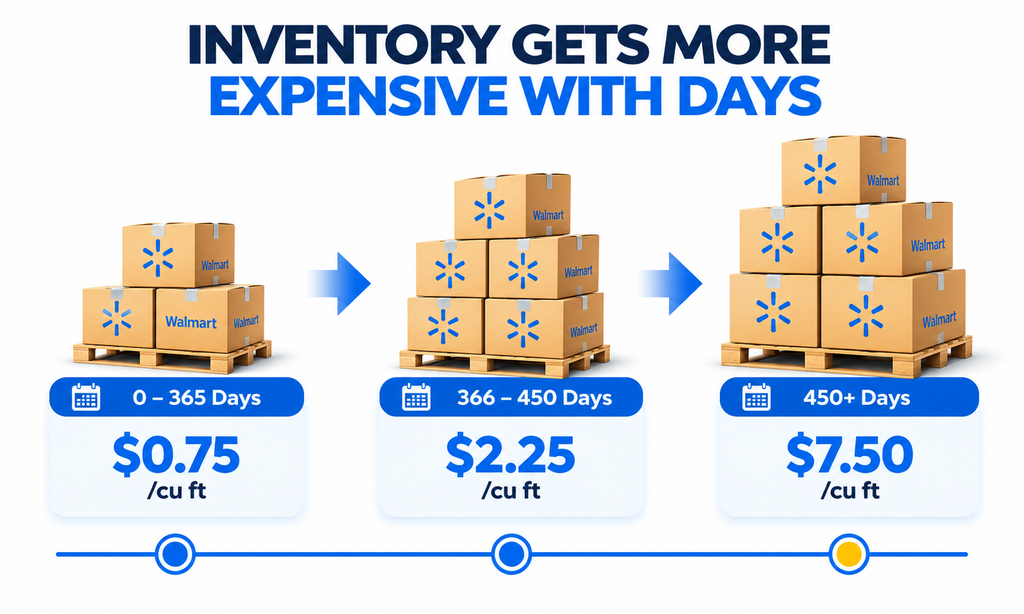
Walmart’s current storage rates are:
| Storage Period | Rate |
| January–September | $0.75/cu ft/month |
| October–December, stored ≤30 days | $0.75/cu ft/month |
| October–December, stored >30 days | $0.75 + $1.50/cu ft/month |
| 366–450 days | $2.25/cu ft/month |
| More than 450 days | $7.50/cu ft/month |
Storage volume is calculated as: Length × Width × Height ÷ 1,728
The biggest jump comes after 450 days, when storage rises to $7.50 per cubic foot per month, compared with the normal $0.75 rate.
Example: When Inventory Stops Moving
Suppose one unit occupies 1.5 cu ft.
At the normal rate: 1.5 × $0.75 = $1.125 per unit/month
After 450 days: 1.5 × $7.50 = $11.25 per unit/month
If 100 units remain in stock, that becomes: $1,125 per month in storage alone.
That is why WFS should support inventory movement, not long-term warehousing.
Which Products Are Best for WFS?
WFS works best when you evaluate products SKU by SKU, not at the account level.
Strong WFS candidates usually have consistent demand, healthy margins, manageable dimensions, low return risk, and reliable replenishment. Slow-moving, bulky, low-margin, or high-return products may be better suited to seller fulfillment or a 3PL.
Walmart’s Item Conversion Report can also help identify seller-fulfilled products that may benefit from WFS by using signals such as historical sales, seasonality, pricing, and listing quality. Treat those recommendations as useful guidance, not a guarantee.
Example: Which SKU Is the Best WFS Candidate?
| SKU | Monthly Sales | Price | Size | Margin | WFS Fit |
| Product A | 400 | $34.99 | Compact | Strong | Strong candidate |
| Product B | 12 | $129.99 | Bulky | Moderate | Review carefully |
| Product C | 60 | $8.49 | Small | Thin | Margin risk |
Product A is the clearest fit because it already sells consistently, is compact, and has a healthy margin.
Product B has a higher selling price, but low sales and bulky dimensions mean storage and fulfillment costs need closer analysis.
Product C is easy to store, but the price is below $10 and the margin is thin, so WFS economics may be weaker.
The better question is not: Should my brand use WFS? It is: Which SKUs should use WFS?
How to Start Using Walmart Fulfillment Services
Once you have identified the right products for WFS, the next step is getting them into Walmart’s fulfillment network.
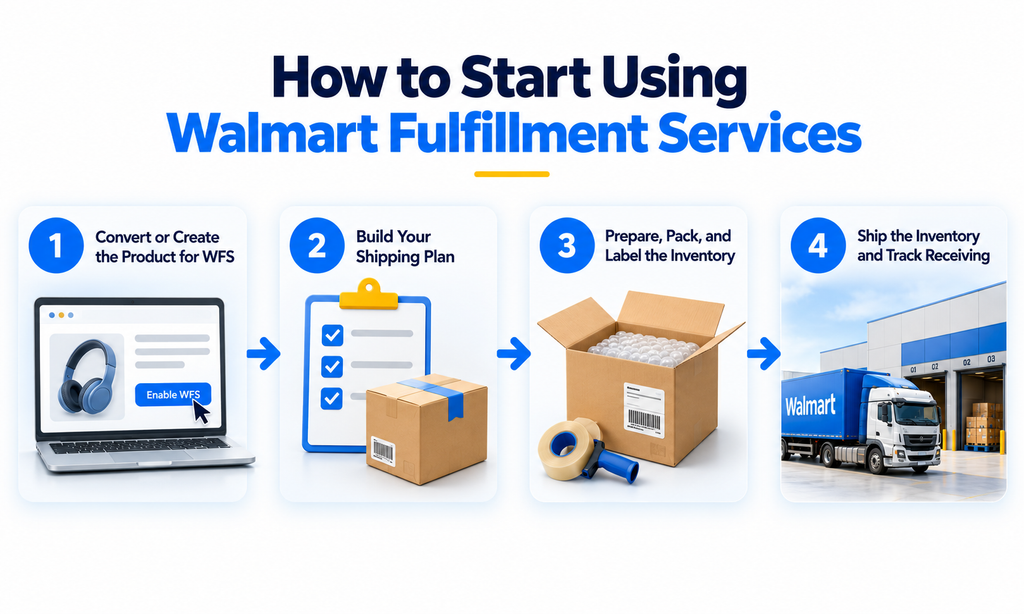
Before you begin, make sure the product is correctly set up in your Walmart catalog, is eligible for WFS, and that your WFS billing method is active. From there, the process generally follows: Product Setup → Shipping Plan → Preparation & Labels → Ship & Receive
Step 1: Convert or Create the Product for WFS
Eligible seller-fulfilled products can be converted to Walmart fulfillment, while new products can be created directly for WFS.
Do not convert your entire catalog automatically. Start with SKUs where you already understand the sales velocity, margin, dimensions, return rate, and replenishment lead time. Testing a smaller group first gives you real WFS performance data before committing more inventory.
Step 2: Build Your Shipping Plan
Your shipping plan tells Walmart what inventory is coming and how it is packed.
Depending on your Seller Center setup, you may need to provide details such as SKU quantity, units per case, carton dimensions, carton weight, and whether cases contain single or mixed SKUs.
Accuracy matters. The information in Seller Center should match the physical shipment Walmart receives.
Step 3: Prepare, Pack, and Label the Inventory
Before shipping, prepare each unit and carton according to Walmart’s WFS requirements.
Products may require specific preparation depending on whether they are fragile, liquid, battery-powered, sharp, bundled, or oversized. Each sellable unit also needs an acceptable barcode, while shipping cartons require the correct WFS receiving labels.
Poor preparation or incorrect labels can lead to receiving delays, additional charges, or inventory problems.
Step 4: Ship the Inventory and Track Receiving
Once everything is prepared, choose the appropriate carrier and send the shipment to the Walmart location assigned in your shipping plan.
After pickup, monitor the shipment through Seller Center until Walmart receives, verifies, and makes the inventory available for sale. If quantities, labels, or carton details do not match the shipping plan, receiving can take longer.
WFS Packaging Requirements
Inventory sent to WFS must meet Walmart’s preparation and packaging standards. Different rules can apply to liquids, fragile items, batteries, sharp products, sets, loose items and heavy products.
If inventory is not prepared correctly, Walmart may apply additional prep charges or return it at the seller’s expense. Always check the latest WFS Routing and Packaging Guide before shipping inventory.
WFS Labeling Requirements
Each sellable unit needs a valid barcode on the outer packaging, and each shipping carton needs the correct WFS receiving label.
Accurate labels help Walmart identify and receive inventory quickly. Incorrect or reused labels can delay receiving and keep stock from becoming available for sale.
Example: One Barcode Error Can Delay 500 Units
Suppose Walmart expects Product A, but 500 units arrive with a barcode linked to Product B.
Instead of moving directly into available inventory, the shipment may enter a receiving-issue workflow while Walmart investigates the mismatch.
Common receiving problems include unscannable barcodes, GTIN mismatches, unexpected inventory, damaged units and shipment discrepancies.
How Do You Ship Inventory to Walmart?
After creating a WFS shipment, the inventory still needs to reach Walmart. Depending on the shipment type, sellers can use supported carriers and track inbound progress through Seller Center.
Inbound transportation should always be included in your cost model. If WFS costs $5.00 per unit and inbound freight adds $1.20, your fulfillment cost is already $6.20 before storage or other expenses.
Walmart may also split inventory across multiple fulfillment centers so products sit closer to customers and can arrive faster. That can mean creating several separate inbound shipments.
What Is Walmart Inventory Transfer Service?
For eligible products, Inventory Transfer Service (ITS) can simplify this process. Instead of shipping to multiple fulfillment centers yourself, you send inventory to one Walmart transfer station, and Walmart distributes it across the network.
Eligible ITS inventory generally needs to stay within:
| Requirement | Limit |
| Weight | Under 25 lb |
| Dimensions | Max 25 × 20 × 14 in |
| Volume | Under 1.6 cu ft |
ITS fees currently start at $0.25 per unit and increase with weight.
How Much Inventory Should You Send to WFS?
Too little inventory creates stockouts. Too much inventory increases storage costs and ties up cash.
A useful starting formula is: Demand During Lead Time + Safety Stock – Available/Inbound Inventory
Your final quantity should also consider sales velocity, supplier lead time, seasonality, promotions, and advertising plans.
Walmart’s Inventory Health Report can help by showing data such as available units, inbound inventory, inventory age, days of supply, forecast demand, suggested units, and surplus stock.
That is far more useful than simply knowing you have ‘600 units left.’ Six hundred units could represent two weeks, six months, or two years of supply depending on demand.
How WFS Handles Returns
WFS handles customer returns and fulfillment-related customer support for Walmart-fulfilled orders. But that does not mean returns stop affecting your business.
What Return Reasons Can Tell You
A return can reveal issues with the product, listing, sizing, compatibility, quality, shipping, or customer expectations. That makes return data more than a service issue—it is useful business intelligence.
Walmart’s Fulfillment Reports include customer-return information, so sellers should regularly review return reasons and look for patterns.
For example, repeated ‘does not fit’ returns may point to weak compatibility information, while repeated ‘not as described’ returns may indicate a listing-content problem.
WFS vs Seller Fulfillment: Which Model Fits Your Business?
WFS is not automatically better than seller fulfillment. The right choice depends on your cost structure, fulfillment capabilities, delivery expectations, and how much operational control you want to keep.
| Factor | WFS | Seller Fulfilled |
| Inventory storage | Walmart network | Seller or 3PL |
| Pick and pack | Walmart | Seller or 3PL |
| Shipping | Walmart | Seller manages |
| Fulfillment support | Walmart | Seller |
| Fulfillment fees | WFS fees apply | Seller pays own fulfillment costs |
| Operational control | Lower | Higher |
| Fast-delivery capability | Built into WFS network | Depends on seller |
| Scaling fulfillment | Walmart handles workload | Seller must expand capacity |
| Inventory control | Stock held inside WFS | Seller retains direct control |
WFS vs Amazon FBA: Similar Model, Different Economics
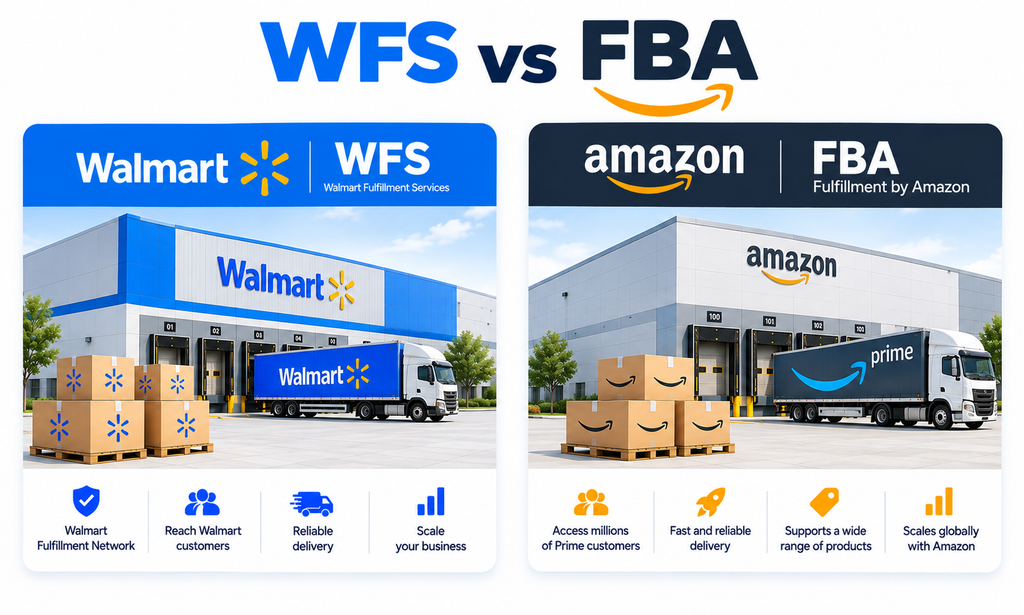
WFS and Amazon FBA follow the same basic model: the marketplace stores inventory and fulfils orders on behalf of third-party sellers.
But they are not identical. Their fee structures, storage rules, inbound processes, marketplace demand, delivery networks, and SKU economics can differ considerably.
| Factor | Walmart WFS | Amazon FBA |
| Marketplace | Walmart Marketplace | Amazon |
| Inventory storage | Walmart fulfilment network | Amazon fulfilment network |
| Pick, pack & shipping | Walmart | Amazon |
| Customer returns | Walmart handles WFS returns | Amazon handles FBA returns |
| Fulfilment fees | Based on WFS pricing structure | Based on FBA size/weight tiers |
| Storage fees | WFS storage rates and ageing charges | FBA monthly and aged-inventory charges |
| Inbound process | WFS shipping plans / eligible ITS | FBA shipment and inventory placement process |
| Delivery benefits | Fast WFS delivery eligibility | Prime-eligible delivery where applicable |
| Marketplace demand | Walmart customer base | Amazon customer base |
| Best use | Depends on Walmart SKU economics | Depends on Amazon SKU economics |
Frequently Asked Questions About Walmart WFS
Q1. What is Walmart Fulfillment Services?
WFS is Walmart’s fulfillment program where Walmart stores, picks, packs, ships, supports, and processes eligible returns for Marketplace orders.
Q2. How much does Walmart WFS cost?
WFS fees vary by shipping weight, product size, price, and fulfillment classification, with standard fulfillment currently starting at $3.45 per unit.
Q3. Does Walmart WFS charge storage fees?
Yes, WFS charges storage based on inventory volume and age, with higher fees applying to older inventory.
Q4. What is the maximum product size for WFS?
Eligible WFS products can currently weigh up to 500 lb including packaging and measure up to 120 × 105 × 93 inches.
Q5. Can I use WFS for only some products?
Yes, sellers can use WFS selectively for suitable SKUs while keeping other products seller fulfilled.
Q6. Does WFS automatically increase sales?
No, WFS can improve delivery speed and customer experience, but sales still depend on demand, pricing, listing quality, and advertising.
Q7. What is Walmart Inventory Transfer Service?
ITS lets eligible sellers send inventory to one Walmart transfer station, after which Walmart distributes it across its fulfillment network.
Q8. How much inventory should I send to WFS?
Base the quantity on demand during lead time, safety stock, current inventory, inbound stock, seasonality, and expected sales velocity.
Q9. Does Walmart handle WFS returns?
Yes, Walmart handles WFS customer returns and fulfillment-related support, while sellers should still monitor return reasons and costs.
Q10. Is WFS better than Amazon FBA?
Neither is universally better; the stronger option depends on the SKU’s fees, demand, storage costs, inbound process, and marketplace economics.
Final Thoughts: WFS Works Best When the Numbers Work
Walmart Fulfillment Services can make fulfillment easier, improve delivery speed, and remove a large amount of operational work from a growing Walmart business.
But WFS should not be treated as a simple ‘send inventory and forget about it’ solution.
The sellers who use it most effectively understand the full picture: Product fit → WFS fees → Packaging → Inbound shipping → Inventory planning → Storage → Returns → Margin
A fast-selling, compact product with healthy margins may be an excellent WFS candidate. A slow-moving, bulky, or low-margin product may tell a completely different story.
That is why the best WFS strategy starts at the SKU level. Calculate the costs, send controlled inventory, monitor performance, and scale the products where WFS genuinely improves both the customer experience and the economics of the business.
Grow Your Walmart Business With Ecomclips
Managing Walmart successfully requires more than choosing a fulfillment method. Sellers need a connected strategy across product research, catalog management, listing optimization, WFS, inventory planning, pricing, advertising, and performance analysis.
At Ecomclips, we help Walmart sellers build and manage that complete marketplace system.
Our Walmart support includes:
- Walmart Marketplace Setup & Catalog Management: Build accurate product catalogs, attributes, variations, and marketplace configurations.
- Walmart Listing Optimization & SEO: Improve titles, attributes, key features, descriptions, images, and keyword targeting.
- WFS & Inventory Strategy: Evaluate WFS suitability, fulfillment costs, inventory levels, and replenishment planning.
- Walmart Advertising Management: Build and optimize Walmart Connect campaigns to improve visibility and advertising efficiency.
- Competitor & Market Analysis: Review pricing, fulfillment, content, positioning, and marketplace opportunities.
- Marketplace Growth Strategy: Connect SEO, advertising, inventory, pricing, and fulfillment into a scalable Walmart growth plan.
WFS can simplify fulfillment, but the real growth comes from making fulfillment, content, inventory, pricing, and advertising work together.
Need Help Growing Your Walmart Marketplace Business?
Whether you need help with Walmart Marketplace setup, listing optimization, Walmart SEO, WFS strategy, inventory planning, advertising, or a complete marketplace growth strategy, the Ecomclips team can help you build a stronger Walmart business around your products, margins, and growth goals.
For more practical Walmart and ecommerce guidance, explore the Ecomclips Blog, watch Walmart selling strategies and marketplace updates on the Ecomclips YouTube channel, or explore additional ecommerce resources on the Boostontime Blog.
Need direct support? Email us at info@ecomclips.com or book an appointment with our ecommerce experts to discuss your Walmart listings, WFS fulfilment, inventory strategy, advertising, and marketplace growth.