
Struggling to get your Shopify store noticed on Google?
You’ve built a beautiful Shopify store, uploaded stunning product photos, and organized your collections. Yet your organic traffic isn’t growing, and potential customers keep finding your competitors instead. Sound familiar?
Here’s the thing: a smart Shopify SEO strategy isn’t about stuffing keywords everywhere. It’s about helping Google discover your products, attracting shoppers ready to buy, and turning searches into sales.
So, how can you make that happen in 2026?
This guide covers everything from keyword research and product page optimization to technical SEO, content creation, backlinks, and performance tracking, with practical tips to help your Shopify store rank higher, attract the right shoppers, and grow organically.
What Is Shopify SEO?
Shopify SEO is the process of improving your store’s visibility in unpaid search results. It combines keyword and intent research, helpful product and collection content, crawlable site architecture, fast mobile experiences, and trustworthy external signals.
Paid campaigns can create immediate visibility, but the traffic usually stops when spending stops. Organic search can become a durable acquisition channel, although rankings are not guaranteed and the work requires consistent maintenance.
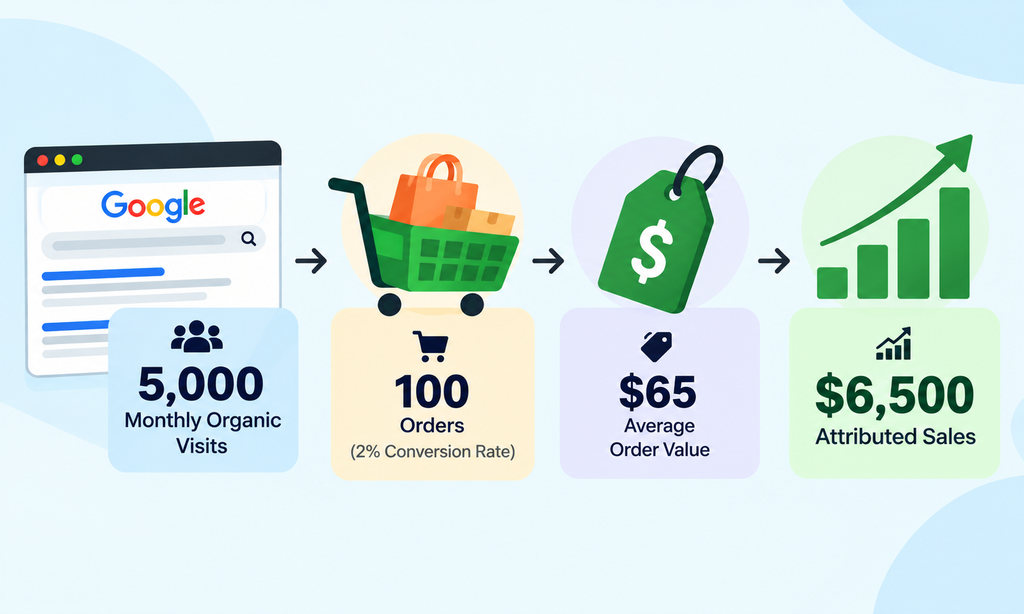
Imagine 5,000 monthly organic visits that turn into 100 orders at a 2% ecommerce conversion rate. At a $65 average order value, that is $6,500 in attributed sales. This is an illustration, not a forecast. Better SEO earns relevant visits; the store experience determines what happens next.
Shopify SEO Strategies in 2026: How to Rank Higher & Attract More Customers
Getting your Shopify store to appear on Google takes more than adding keywords to product descriptions. You need a strategy that connects what shoppers are searching for with the products, collections, and content your store offers.
The good news? You don’t have to be an SEO expert to get started. By focusing on the right keywords, optimizing your pages, and creating a better shopping experience, you can gradually improve your store’s visibility and attract more potential buyers.
1. Find Keywords That Match How Customers Shop
Want more customers to discover your Shopify products on Google? Start by understanding what they’re actually searching for.
Here’s the catch: high search volume doesn’t always mean high sales potential. A keyword might attract thousands of searches, but if those shoppers aren’t interested in your products, that traffic won’t contribute much to your business.
That’s why effective Shopify keyword research focuses on search intent, relevance, and buying behavior, not just popularity.
Understand the Four Main Types of Search Intent
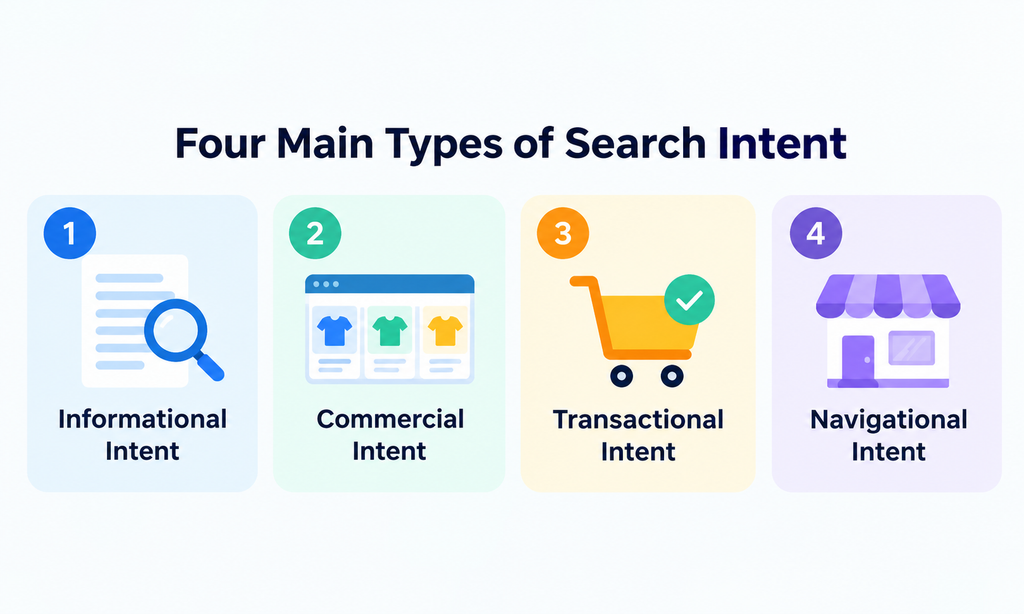
Before choosing your target keywords, it’s important to understand why people search. Search intent generally falls into four categories:
1. Informational Intent
Shoppers are looking for answers, tips, or guidance rather than making an immediate purchase. For example, “How to wash linen cushion covers.” A helpful blog post is an effective way to target these searches.
2. Commercial Intent
Shoppers are exploring options, comparing products, or researching before buying. For example, “Best linen cushion covers for sofas.” Comparison guides or well-optimized collection pages work well for this intent.
3. Transactional Intent
Shoppers are ready to purchase and searching for specific products. For example, “Buy beige linen cushion cover.” Optimized product pages or highly relevant collection pages are ideal for capturing these searches.
4. Navigational Intent
Shoppers already know which brand or store they want to visit. For example, “Your brand + cushion covers.” Your homepage or relevant store pages should help them find exactly what they’re looking for.
How to Find the Right Keywords for Your Shopify Store
Now that you understand search intent, how do you find keywords worth targeting?
Follow these practical steps:
- Start With Your Products: List your product categories, materials, sizes, features, and common customer needs to identify potential keywords.
- Use Keyword Research Tools: Explore Google Keyword Planner, Ahrefs, Ubersuggest, and Google autocomplete to discover relevant search terms and keyword variations.
- Analyze Google’s Search Results: Check whether your target keywords primarily display product pages, collection pages, or blog posts. This helps you understand which type of content matches the search intent.
- Group Similar Keywords: Organize closely related search terms into keyword clusters rather than creating multiple pages targeting nearly identical queries.
- Assign Keywords to Relevant Pages: Choose one primary keyword topic and a few supporting keywords for each important Shopify product, collection, or blog page.
How to Use Keyword Research for a Shopify Store
Let’s say you run a Shopify store selling linen cushion covers. Instead of trying to rank every page for the broad keyword “cushion cover,” you could target different search queries based on customer intent.
- Collection Page: Target “linen cushion covers” to reach shoppers browsing this product category.
- Product Page: Target “beige linen cushion cover 18×18” to attract shoppers looking for a specific item.
- Blog Post: Target “how to style linen cushion covers” to reach customers searching for decorating ideas and inspiration.
This creates a more organized SEO structure, giving each page a clear purpose while helping shoppers discover relevant products and information.
These keywords are examples. Validate their search demand, competition, and relevance to your market before using them.
2. Turn Product Pages Into Search-Friendly Sales Pages
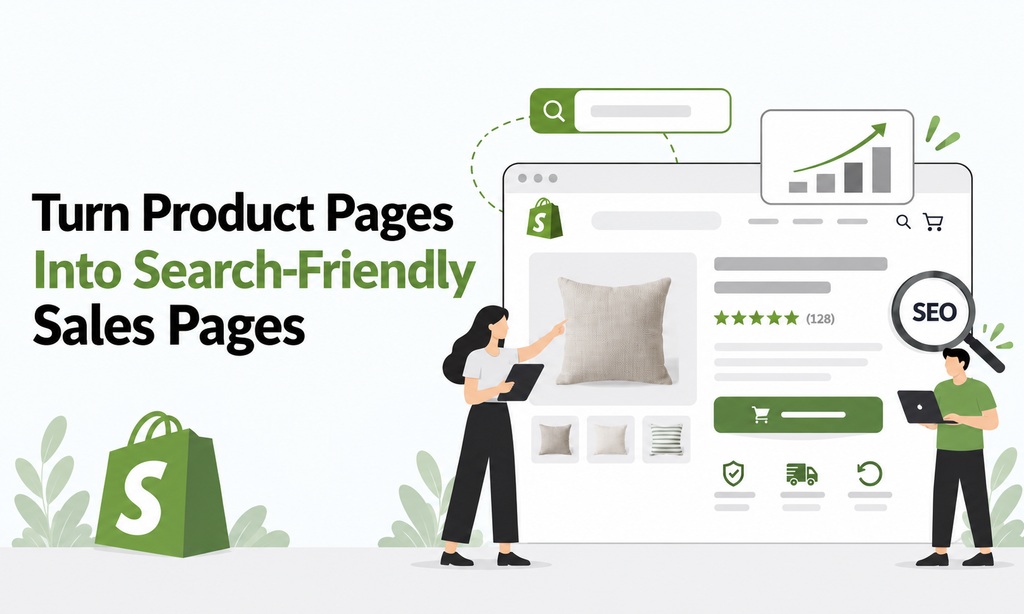
Your Shopify product pages are more than just digital shelves. They’re where potential customers discover your products, explore their benefits, and decide whether to hit that “Add to Cart” button.
But here’s the challenge: even great products can struggle to rank if their pages have generic titles, copied descriptions, or missing product details.
That’s why Shopify product page SEO is about more than keywords. It’s about helping Google understand your products while giving shoppers the information and confidence they need to buy.
How to Optimize Shopify Product Pages for SEO
Ready to make your product pages work harder? Focus on these essential elements:
- Write Clear, Keyword-Rich Product Titles: Include your primary keyword naturally, along with important details such as color, material, size, or product type. Avoid vague titles that don’t explain what you’re selling.
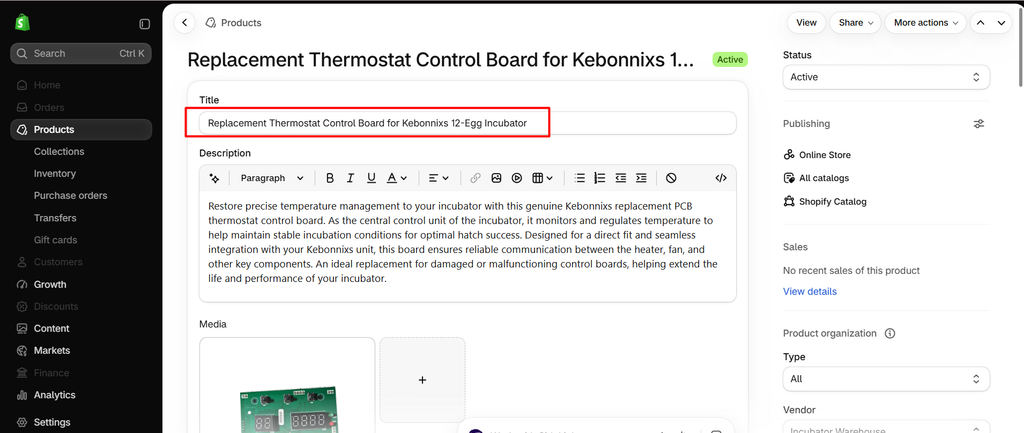
- Optimize Title Tags and Meta Descriptions: Create unique, compelling search listing titles that accurately describe each product. Write meta descriptions highlighting key benefits and reasons to click. Remember, Google may generate a different search snippet depending on the query.
- Keep Product URLs Short and Descriptive: Use readable URL handles that reflect the product. Avoid unnecessary numbers or confusing words. If you change an existing URL, make sure the old address redirects to the new one.
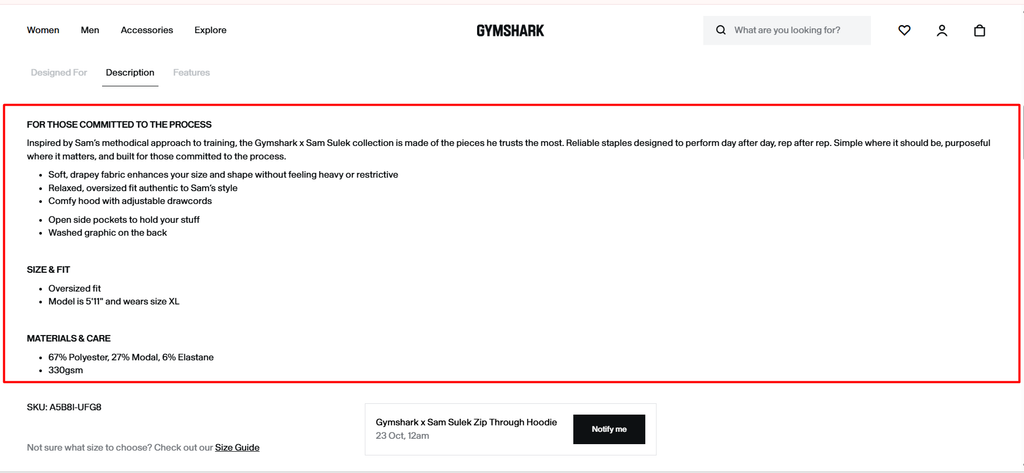
- Create Unique, Helpful Product Descriptions: Go beyond basic features. Explain materials, dimensions, compatibility, care instructions, what’s included, and how the product solves a customer’s problem. Avoid copying manufacturer descriptions across multiple pages.
- Optimize Product Images and Alt Text: Use high-quality product images with descriptive filenames when practical. Add meaningful alt text describing what’s actually shown instead of stuffing it with keywords.
- Use Clear Headings and Organized Content: Keep your main product heading descriptive and use relevant subheadings to organize specifications, benefits, care instructions, and other helpful details.
- Build Trust With Essential Product Information: Make pricing, availability, shipping details, return policies, and authentic customer reviews easy to find. These details help shoppers feel more confident about their purchases.
Your product page should answer a shopper’s most important questions without forcing them to search elsewhere. The easier you make it to understand your product, the smoother the buying experience becomes.
3. Make Collection Pages Worth Ranking
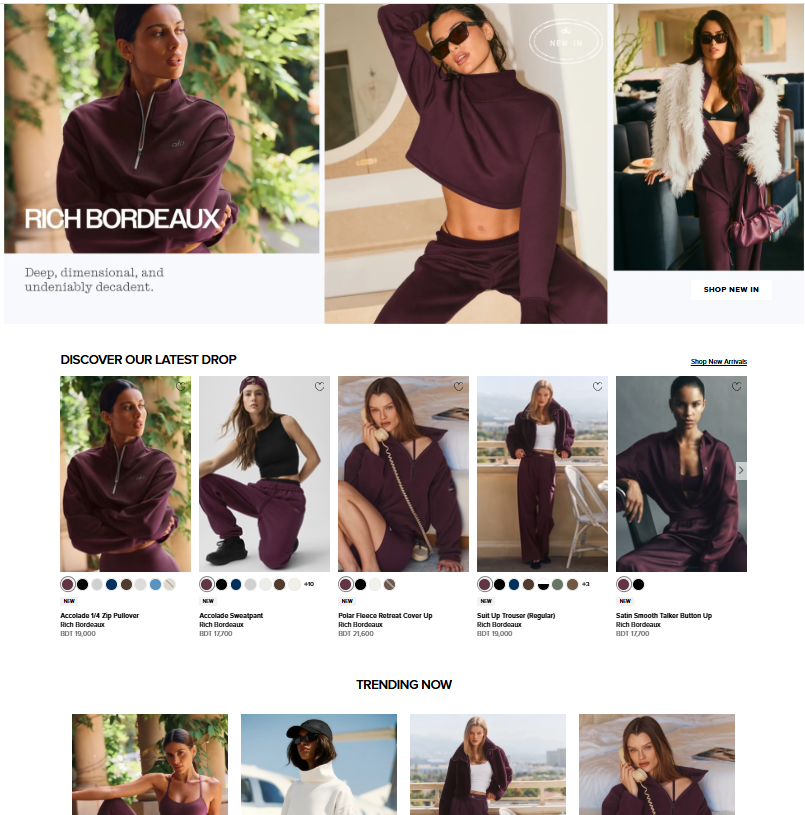
Think of your Shopify collection pages as more than just groups of products. They’re often the first place shoppers land when they search Google for an entire product category.
For example, someone searching for “linen cushion covers” may not have a specific product in mind yet. They want to explore colors, compare styles, and find the right option. That’s where a well-optimized collection page makes all the difference.
A strong Shopify collection page SEO strategy helps search engines understand your product categories while making it easier for customers to browse, compare, and shop.
How to Optimize Shopify Collection Pages for SEO
To make your collection pages more search-friendly and useful for shoppers, focus on these essential elements:
- Use Clear, Keyword-Focused Collection Titles: Give each collection a unique, descriptive H1 that naturally includes its primary keyword. For example, “Linen Cushion Covers” is clearer than simply “Cushions.”
- Write Helpful Collection Descriptions: Add a short, engaging introduction explaining what shoppers can find in the collection. Highlight important features such as materials, sizes, colors, or styles without overwhelming visitors with unnecessary text.
- Organize Products With Useful Filters: Make browsing easier by offering relevant filters such as size, color, material, price, or availability. Keep navigation intuitive so shoppers can quickly narrow down their options.
- Optimize SEO Titles and Meta Descriptions: Create unique search listing titles and compelling meta descriptions that accurately reflect each collection and encourage relevant shoppers to explore it.
- Add Internal Links to Related Pages: Connect your collections to relevant subcollections, products, and helpful buying guides. This improves navigation and helps search engines discover related content.
- Manage Filtered URLs Carefully: Filtering and sorting can generate multiple URLs with similar content. Review which URLs should be accessible to search engines and which, if any, deserve indexing. Avoid applying blanket noindex rules or changing robots.txt without understanding the SEO implications.
- Keep Products Easy to Discover: Place your product grid prominently on the page. Avoid adding long, repetitive blocks of keyword-heavy content above the products, as this can make shopping frustrating.
4. Publish Blog Content That Helps People Choose
Ever wondered why some Shopify stores attract visitors even when shoppers aren’t searching for a specific product? The answer often lies in helpful, SEO-friendly blog content.
Shopify’s built-in blogging feature gives you an opportunity to answer customer questions, share useful advice, and introduce your products naturally. But publishing articles just to target keywords won’t get you very far.
A strong Shopify content SEO strategy focuses on creating content that genuinely helps shoppers make informed buying decisions while building your store’s visibility on Google.
How to Create SEO-Friendly Blog Content for Shopify
Want your blog to do more than just attract readers? Focus on these practical strategies:
- Answer Real Customer Questions: Identify common questions shoppers ask before purchasing your products. Create articles that provide clear, practical answers rather than generic information.
- Build Topic Clusters: Organize your content around broader topics supported by focused blog posts. For example, a main cushion cover guide can connect to articles about materials, sizes, styling, and maintenance.
- Target Relevant Long-Tail Keywords: Focus on specific search queries that reflect your customers’ needs. Naturally include your primary keyword in the title, headings, and content without forcing it.
- Add Helpful Visual Content: Include original product photographs, comparison images, infographics, or demonstrations when available. Relevant visuals make your content easier to understand and more engaging.
- Link to Relevant Products and Collections: Help readers take the next step by connecting informational articles to related Shopify product and collection pages. Keep links natural and relevant to the topic.
- Include Useful Comparisons and FAQs: Address common buying concerns, explain product differences, and answer questions that shoppers frequently ask.
- Keep Your Content Accurate and Updated: Review existing articles regularly and update outdated product information, recommendations, or advice whenever necessary.
5. Fix Technical SEO Before It Blocks Your Growth
What’s the point of creating amazing Shopify content if Google struggles to find it?
Even the most beautifully designed store can miss out on organic traffic because of technical issues like broken links, duplicate URLs, indexing problems, or slow-loading pages.
That’s where Shopify technical SEO comes in. It ensures search engines can discover, crawl, and understand your store while giving shoppers a smooth browsing experience.
The good news? Shopify already handles several technical SEO basics. You just need to make sure everything is configured correctly.
Make the Most of Shopify’s Built-In SEO Features
Before installing additional SEO apps, start by checking the tools and features Shopify already provides.
- Submit Your XML Sitemap: Shopify automatically generates a sitemap.xml file for your store. Submit it through Google Search Console to help Google discover your important pages and monitor their indexing status.
- Check HTTPS and SSL Security: Shopify provides SSL certificates for supported store domains. Make sure your website loads securely over HTTPS and that visitors consistently reach your preferred domain.
- Optimize Search Engine Listings: Shopify lets you edit SEO titles, meta descriptions, and URL handles for relevant pages. Use these settings to make your search listings clear, accurate, and keyword-relevant.
- Review Canonical Tags: Canonical tags help search engines identify the preferred version of pages with similar or duplicate content. Shopify themes commonly include them, but review their implementation after theme customizations or app installations.
- Set Up URL Redirects: Changing a product or collection URL? Create an appropriate redirect from the old address to the new one to preserve access and help search engines find the replacement.
Check Indexing and Structured Data
Getting your Shopify pages discovered is only the beginning. You also need to confirm that Google can index your important content and interpret your product information correctly.
Here’s what to review:
- Monitor Indexing in Google Search Console: Use the Pages report and URL Inspection tool to investigate important product, collection, and blog URLs that aren’t indexed. Remember, submitting a sitemap doesn’t guarantee Google will index every page.
- Review Product Structured Data: Check whether your product pages include relevant Product and Offer structured data. Where applicable, keep pricing, availability, shipping, returns, and product variants consistent with what’s displayed on the page.
- Test Your Schema Markup: Use Google’s Rich Results Test to identify supported structured data and potential errors. Valid markup can make eligible pages appear with enhanced search features, although rich results aren’t guaranteed.
- Check Product Variants and Duplicate URLs: Shopify products may have multiple colors, sizes, or variants. Review how your store handles variant URLs and canonical tags instead of assuming every variation needs a separate indexed page.
- Audit Important Page Templates: Don’t just check your homepage. Review product pages, collection pages, and blog templates to identify technical issues that could affect multiple URLs.
6. Make Your Store Mobile-Friendly and Easy to Use

Ever clicked on a product page that took forever to load? Chances are, you didn’t stick around for long. Your Shopify customers probably won’t either.
A slow-loading store, confusing navigation, or poor mobile experience can frustrate shoppers before they even explore your products. And when potential buyers leave, you’re missing opportunities to turn organic traffic into sales.
That’s why Shopify website speed optimization and mobile-friendly design are essential parts of a successful SEO strategy.
How to Improve Shopify Store Speed and Mobile Performance
Want to create a faster, smoother shopping experience? Start with these practical improvements:
- Optimize Product Images: Compress images, use appropriate dimensions, and choose efficient formats without compromising visual quality. Avoid uploading unnecessarily large files for small display areas.
- Choose a Mobile-Responsive Shopify Theme: Select a theme that adapts to different screen sizes. Make sure product images, menus, collection filters, and shopping buttons work properly on smartphones.
- Remove Unnecessary Apps and Scripts: Review installed Shopify apps, tracking scripts, and third-party integrations. Remove unused features that add loading time without providing meaningful value.
- Keep Navigation Simple: Organize your menus, collections, and product categories so shoppers can easily find what they’re looking for. Test the browsing experience on a real mobile device.
- Avoid Intrusive Popups and Layout Shifts: Limit disruptive promotional popups and ensure banners, images, and widgets don’t unexpectedly move content while the page loads.
- Test Different Page Types: Use Google PageSpeed Insights to evaluate your homepage, collection pages, product pages, and blog posts. Different templates may have different performance issues.
- Monitor Core Web Vitals: Pay attention to Google’s performance metrics, including Largest Contentful Paint (LCP), Interaction to Next Paint (INP), and Cumulative Layout Shift (CLS), to identify opportunities for improvement.
Understand Google’s Core Web Vitals for Shopify SEO
Google uses three Core Web Vitals to evaluate important aspects of the user experience:
1. Largest Contentful Paint (LCP) – Loading Performance
LCP measures how quickly the largest visible content element, such as a product image or banner, appears on the screen.
- Good performance: 2.5 seconds or less.
- Shopify optimization tip: Optimize large images, reduce unnecessary scripts, and improve how important above-the-fold content loads.
2. Interaction to Next Paint (INP) – Responsiveness
INP measures how quickly a page responds visually to user interactions, such as clicking a product variant, opening a menu, or selecting a filter.
- Good performance: 200 milliseconds or less.
- Shopify optimization tip: Reduce unnecessary JavaScript and review apps or scripts that delay interactions.
3. Cumulative Layout Shift (CLS) – Visual Stability
CLS measures unexpected movement of visible page elements during the browsing experience.
- Good performance: 0.1 or less.
- Shopify optimization tip: Reserve appropriate space for images, banners, and dynamically loaded widgets to prevent sudden layout changes.
These thresholds are based on Google’s recommended Core Web Vitals targets, generally evaluated at the 75th percentile of real-user visits.
Shopify SEO Mistakes to Avoid
Even a strong SEO strategy can fall short if you overlook common mistakes. Here are eight to avoid:
- Keyword Cannibalization: Targeting the same search intent across multiple pages without meaningful differences.
- Duplicate Product Descriptions: Copying manufacturer descriptions instead of writing unique, helpful content.
- Overestimating Meta Descriptions: Assuming meta descriptions directly improve Google rankings.
- Changing URLs Without Redirects: Updating product or collection URLs without proper redirects.
- Installing Too Many SEO Apps: Using overlapping apps that can slow down your Shopify store.
- Ignoring Broken Links: Overlooking broken URLs, out-of-stock products, and discontinued listings.
- Publishing Low-Quality AI Content: Relying on generic AI-generated articles without fact-checking or original insights.
- Chasing Traffic Over Conversions: Focusing on visitor numbers instead of attracting shoppers likely to buy.
Frequently Asked Questions About Shopify SEO
Q1. Is Shopify good for SEO?
Yes! Shopify offers built-in SEO features like editable meta tags, secure hosting, and automatic sitemaps to help optimize your store for search engines.
Q2. Do I need an SEO app for Shopify?
Not necessarily. Shopify’s built-in tools cover basic SEO needs, while specialized apps can help with advanced optimization.
Q3. How long does Shopify SEO take?
SEO improvements can take weeks to several months, depending on competition, website quality, and optimization efforts.
Q4. Should I optimize product pages or blog posts first?
Start with high-value product and collection pages, then create helpful blog content to attract relevant traffic and support organic growth.
Q5. Can Shopify SEO help with AI-powered search?
Yes. Helpful content, structured data, and accurate product information can improve how AI-powered systems understand your store, although visibility isn’t guaranteed.
Q6. What are the best keywords for Shopify SEO?
Focus on relevant, high-intent keywords that match your products and customer searches rather than targeting search volume alone.
Q7. How can I improve my Shopify store’s Google rankings?
Optimize product pages, collections, keywords, site speed, internal links, and technical SEO while regularly publishing useful content.
Q8. Are Shopify collection pages important for SEO?
Absolutely! Optimized collection pages help target category-related keywords and make it easier for shoppers to discover relevant products.
Q9. Does Shopify store speed affect SEO?
Yes. Page experience and Core Web Vitals can contribute to search performance, while faster loading improves the shopping experience.
Q10. How do I track my Shopify SEO performance?
Use Google Search Console and Google Analytics 4 to monitor organic traffic, search visibility, user engagement, and conversions.
Build an SEO Strategy That Earns Its Traffic
You do not need to overhaul your entire Shopify store overnight. Start with the phrases real customers use, improve the pages most likely to answer them, remove technical friction, and connect helpful content to products shoppers can actually buy.
The real goal is not just higher rankings. It is a steady flow of the right visitors who find answers, trust your brand, and feel confident making a purchase. That is how Shopify SEO supports long-term store growth.
Grow Your Shopify Store With Ecomclips
Building organic visibility is only one part of sustainable ecommerce growth. Ecomclips helps brands think across Shopify SEO, product content, conversion optimization, analytics, and marketplace operations so their growth plans stay focused on profitable outcomes.
Watch practical tutorials on the Ecomclips YouTube channel, explore the Ecomclips Blog, or revisit our complete Shopify growth guide for the broader store-growth picture.
Follow Ecomclips on Facebook and LinkedIn for more practical ecommerce insights. Have questions about search visibility, your product catalog, or a sustainable growth roadmap? Email info@ecomclips.com or contact our team to discuss your Shopify goals.