

You found what looked like the perfect product. Strong margins. Good reviews. A promising sales rank.
You ordered inventory, sent it to FBA and then everything changed. New competitors flooded in. Amazon joined the listing. Fees and ads quietly erased your profit.
Here’s the truth: Amazon product research isn’t just about finding products that sell. It’s about finding products you can sell profitably with manageable competition and realistic ranking potential.
Amazon product research is the process of finding, analyzing, and validating products before you invest your money. The goal is simple: choose products with strong demand, controllable competition, and healthy margins, while avoiding hidden fees, restrictions, and saturation.
In this guide, you’ll discover proven Amazon product research tactics to find profitable, low-competition products and position them to rank faster. Whether you’re a new seller trying to find your first winning product or you’re already selling but struggling to scale, this step-by-step framework will help you research smarter.
Kinds of Amazon Product Research
Let’s be honest, most sellers who fail on Amazon don’t fail because they picked a “bad” product. They fail because they never properly researched it in the first place.
Product research is simply the process of finding products that people are already buying, at prices that leave you with real profit after Amazon takes its cut. Sounds straightforward, right? But here’s where it gets interesting: the way you research depends entirely on how you sell.
If you’re a wholesale seller, you’re working through supplier catalogs with hundreds of SKUs, trying to find the hidden gems. If you’re doing online arbitrage or dropshipping, you’re scanning deals and matching them to Amazon demand. Each model has its own research rhythm, but all of them need the same thing: a system that filters fast and validates deep.
The tactics in this guide are built specifically for wholesale sellers, online arbitrage sellers, and dropshippers. They’re practical, proven, and designed for the reality of researching dozens (sometimes hundreds) of products every single day.
Here’s the thing most new sellers don’t realize: you simply cannot research every product the same way. There isn’t enough time. Experienced Amazon sellers know this, which is why they split their research into two distinct phases.
Quick Product Research Tactics
Think of quick research as your first line of defense. Your only job here is to answer one question: “Is this product even worth looking at?”
You’re checking for the obvious deal-killers, products you’re not eligible to sell, listings dominated by Amazon, items with too many competitors, or margins that don’t survive basic fee calculations. If a product fails any of these checks, you move on immediately. No second-guessing, no “but maybe.” You move on.
For wholesale sellers, this phase is especially critical. When you’re evaluating a supplier price list with 500 SKUs, you can’t afford to manually dig into each one. Quick research — done right with the right process can cut that list down to 20-30 genuinely promising products in a fraction of the time.
The 5 quick tactics below show you exactly how to do that.
Advanced Product Research Tactics
Here’s where most sellers either make their money or lose it.
Advanced research is your proof phase. You’ve already filtered out the obvious losers. Now you need to confirm that what’s left is actually worth buying inventory for. And that means going beyond the surface numbers.
A product with a decent BSR and a few sellers might still be a terrible investment if the price has been dropping for three months, Amazon keeps jumping in and out of the listing, or the profit margin evaporates once you factor in inbound placement fees. Advanced research catches all of that — before you spend a dollar.
Real sellers who do this consistently report fewer dead inventory situations, better cash flow predictability, and significantly higher ROI on their purchases. The extra 10-15 minutes per product pays for itself many times over.
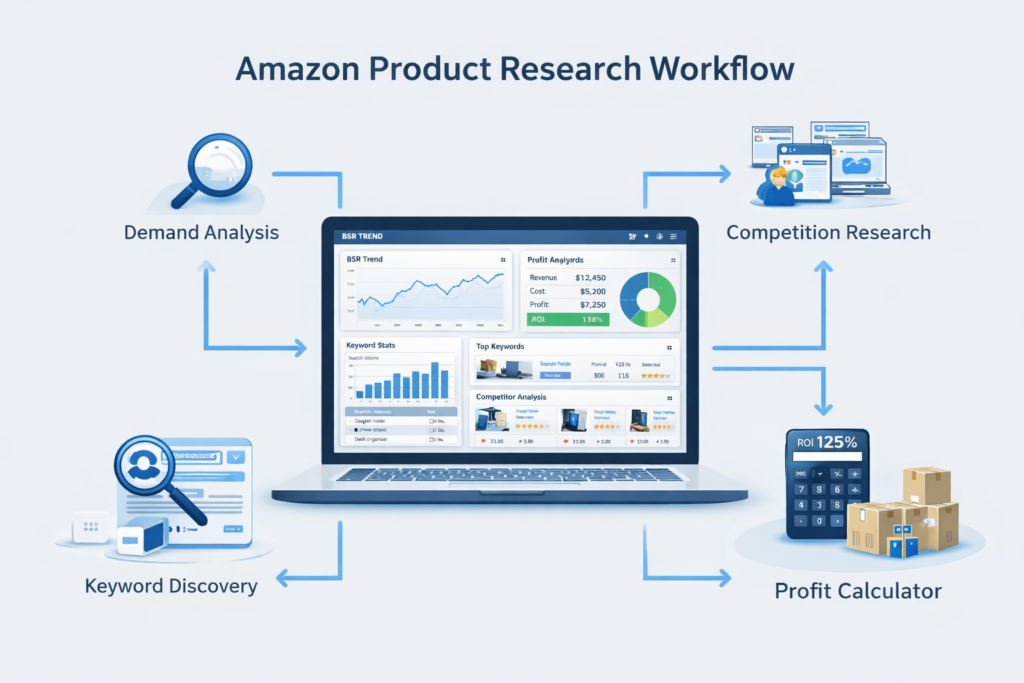
What Changed in Amazon Product Research?
Amazon isn’t the same marketplace it was two years ago. Sellers using outdated research methods are getting crushed by changes they didn’t see coming. Here’s what’s different in 2026 and why it matters for your product research.
1. Fees Can Kill “Good” Products Now
Amazon’s fee structure has become significantly more complex, and what looked profitable in 2023 might lose money today. Several fee changes impact product selection:
- Inbound Placement Service Fees: Amazon now charges additional fees based on how you ship inventory to fulfillment centers. Products requiring distribution across multiple facilities cost more, directly affecting your landed costs and profit margins.
- Low-Inventory-Level Fees: Amazon charges extra fees when your inventory levels fall below certain thresholds relative to sales velocity. This affects how you calculate reorder timing and minimum viable order quantities.
- Updated FBA Fulfillment Fees: Dimensional weight pricing and size tier classifications have changed. A product that was “standard size” before might now be “large standard” with significantly higher per-unit fees.
The bottom line: you can’t use rough estimates or old calculators anymore. Every product research decision must include current, accurate fee calculations based on exact dimensions, weight, and fulfillment requirements.
2. Amazon Tools Give Better Demand Signals than Guessing
Amazon has significantly improved the data available to sellers, making demand estimation more accurate than ever:
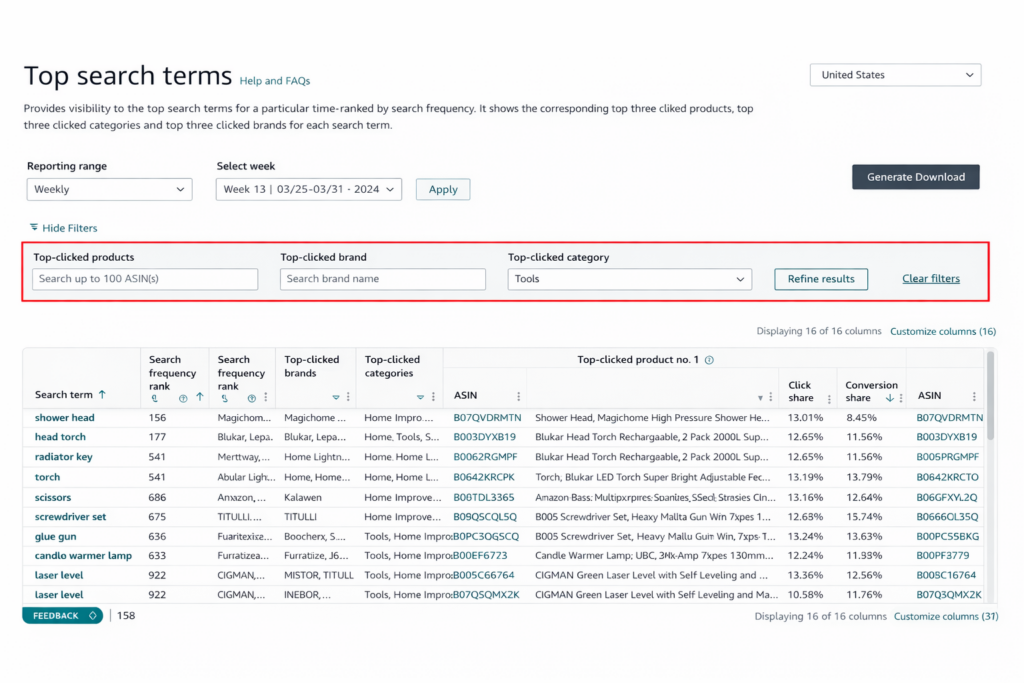
- Product Opportunity Explorer: This tool provides actual search volume data, click-through rates, conversion rates, and pricing information for products and keywords. Instead of guessing whether demand exists, you can see real numbers showing how many customers are searching and buying.
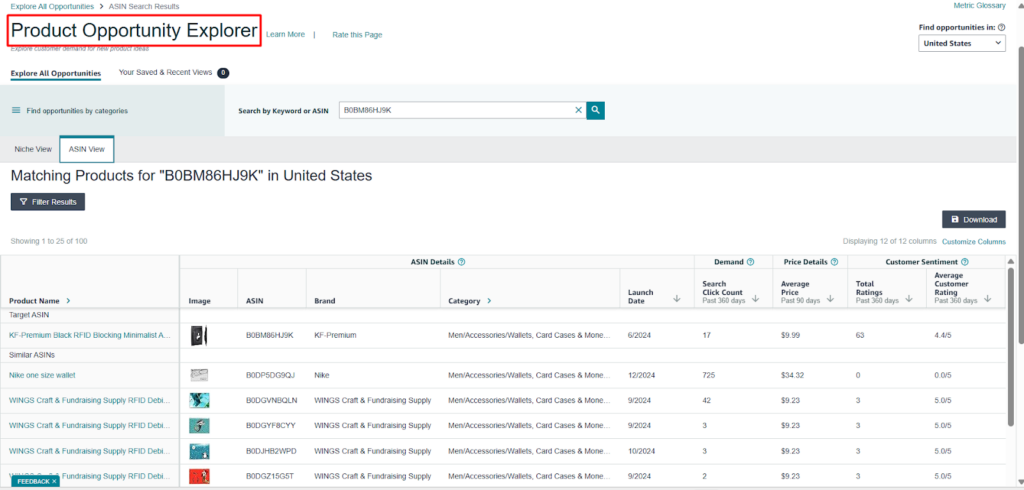
- Search Query Performance: Available through Brand Registry, this tool shows exactly which search terms drive traffic to your listings, their conversion rates, and how you rank for each term. This helps validate whether keyword demand translates to actual sales.
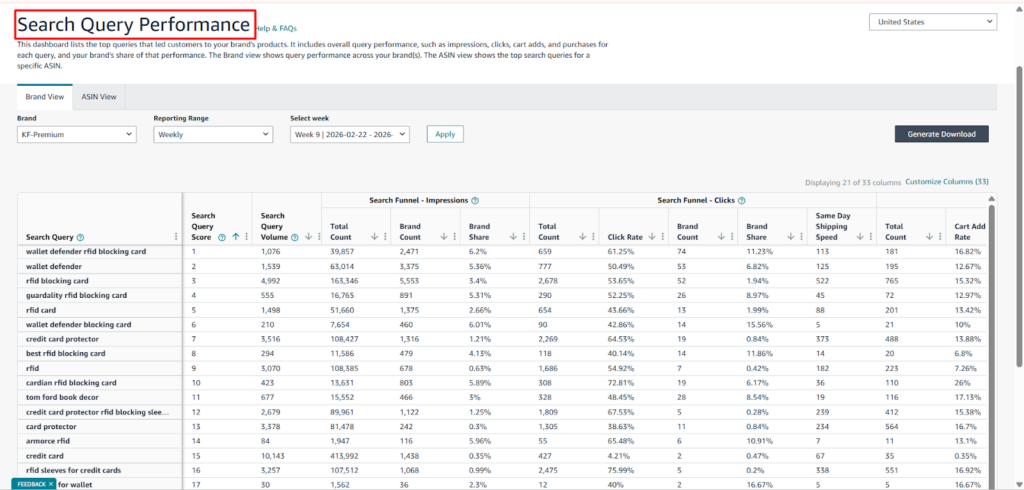
- Customer Behavior Analytics: Amazon now provides data on how customers interact with similar products, including add-to-cart rates, purchase patterns, and cross-shopping behavior.
Smart sellers use these tools during product research to validate demand with real data instead of making assumptions based on BSR alone.
3. Restrictions and Compliance Risk Are a Bigger Deal
Amazon has significantly tightened category restrictions, brand protections, and compliance requirements:
- Category Gating Expansion: More categories now require approval before you can list products. What you could sell freely last year might require documentation, invoices from approved suppliers, or demonstrated expertise this year.
- Intellectual Property Enforcement: Amazon’s Brand Registry and Transparency programs give brands more power to remove unauthorized sellers. Products that seem resale-friendly might trigger IP complaints from brands protecting their distribution channels.
- Compliance Documentation: Certain product categories now require testing certificates, safety documentation, or regulatory compliance proof. Without these, your listings can be suppressed or your account suspended.
The lesson: check restrictions and compliance requirements during initial product research, not after you’ve bought inventory. A product you can’t list is worthless regardless of its profit potential.
Quick Research: 5 Tactics to Filter Products Fast
Quick research is about speed and elimination. Your goal is to process dozens or hundreds of products quickly to identify the small percentage worth deeper investigation.
Tactic 1: Quick View Metrics (The 60-Second Product Check)
Quick View research lets you decide if a product is worth opening at all. You’re looking at surface-level metrics that reveal deal-breakers before you waste time on detailed analysis.
What to Check in Under 60 Seconds
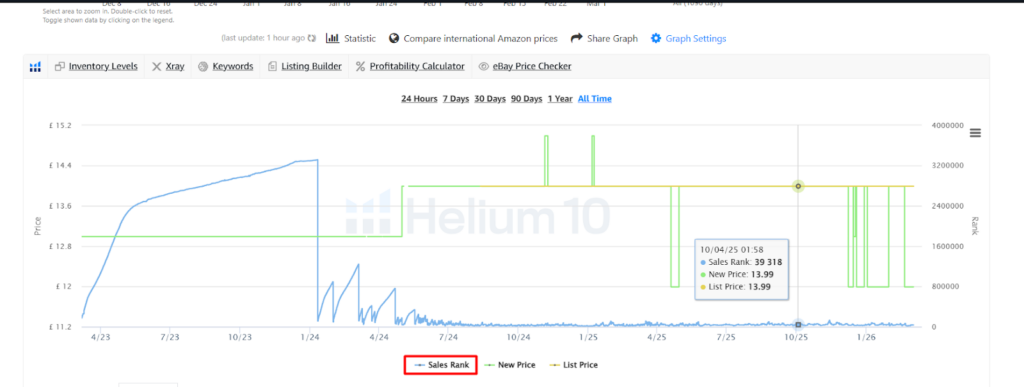
1. BSR (Best Sellers Rank): Check the product’s current BSR and category. Generally, products with BSR under 50,000 in their main category show consistent demand. However, don’t treat BSR as an absolute rule—a BSR of 80,000 in a small niche might represent excellent sales, while 30,000 in Electronics might be insufficient.
Look at the trend, not just the number. Is BSR improving (number decreasing) or declining (number increasing)? A product with BSR of 25,000 that was 15,000 last month is trending down. A product at 40,000 that was 60,000 last month is trending up and worth investigating.
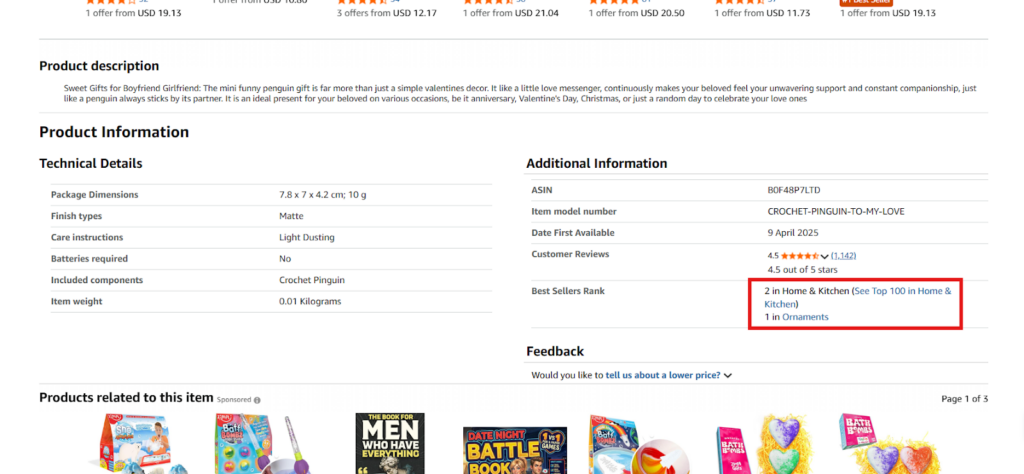
2. Seller Count (FBA/FBM): How many FBA sellers are currently offering this product? The ideal range is typically 3-15 FBA sellers. Here’s why:
- 1-2 sellers: Often indicates a private label product you cannot resell, or a product with severe sourcing limitations
- 3-7 sellers: Sweet spot showing demand exists but competition is manageable
- 8-15 sellers: Moderate competition requiring competitive pricing and good execution
- 16+ sellers: High competition often leading to price wars and margin erosion
Also, check the FBM seller count. If dozens of FBM sellers exist but few FBA sellers, it might indicate the product has fulfillment challenges or restrictions that make FBA difficult
Amazon as a Seller: If Amazon directly sells the product, evaluate carefully. Amazon typically dominates the Buy Box when they’re in stock, leaving other sellers with minimal sales. Some sellers successfully compete with Amazon on certain products, but beginners should generally avoid these situations.
Restrictions/Eligibility: Immediately check if you’re eligible to sell this product on your account. Common restriction types include:
- Category gating (requires approval for the category)
- Brand restrictions (brand owner has restricted distribution)
- Product-level restrictions (requires invoices or certificates)
- Hazmat restrictions (dangerous goods approval required)
A product you can’t sell is worthless no matter how profitable it appears.
Red Flags That Kill a Deal Immediately
Certain indicators mean “skip this product” without further research:
- You’re not eligible to sell it (red lock with exclamation point)
- Amazon controls 80%+ of the Buy Box share
- 25+ FBA sellers competing
- BSR over 100,000 with a declining trend
- Hazmat, meltable, or oversized with excessive fees
- Known IP complaint history or trademark issues
Mini Checklist
Use this quick checklist for every product:
- BSR under 50,000 (or appropriate for category)
- BSR trend stable or improving
- 3-15 FBA sellers
- Amazon not dominating (less than 30% Buy Box share if selling)
- I’m eligible to sell (green lock or can get ungated)
- No immediate red flags (hazmat, IP, oversize)
- Price point allows for 20%+ margin after fees
If any item fails, move to the next product.
What is BSR and how do I use it for product research? BSR (Best Sellers Rank) indicates how well a product sells compared to others in its category. Lower numbers mean better sales. For product research, check both the current BSR number and the trend direction. A BSR under 50,000 typically indicates consistent demand, but the ideal range varies by category. More important than the absolute number is whether BSR is stable or improving over 30-90 days.
How many sellers is “too many” on Amazon? Generally, more than 15 FBA sellers indicates high competition that can lead to price wars and reduced profitability. The ideal range is 3-15 sellers, showing demand exists without excessive competition. However, this varies by price point and product type. Higher-priced products can support more sellers, while lower-priced items become unprofitable with fewer competitors.
Tactic 2: Reverse Sourcing (Supplier → Amazon)
Reverse sourcing is critical for wholesale sellers and online arbitrage sellers working with supplier catalogs. Instead of finding products on Amazon and then sourcing them, you start with supplier price lists and identify which products are profitable on Amazon.
Why Supplier Lists Hide Profit Gems (and Landmines)
Wholesale suppliers often provide price lists with hundreds or thousands of SKUs. Buried in these lists are products with excellent profit potential that most sellers overlook because manual research is too time-consuming.
However, these lists also contain landmines:
- Products with terrible BSR that won’t sell
- Items Amazon dominates completely
- Products with razor-thin margins after fees
- Restricted or gated items you can’t sell
- Seasonal products are currently out of season
The key is automated filtering that quickly identifies profitable opportunities while eliminating time-wasting dead ends.
What to Calculate: ROI, Profit, Fees, Buy Box Price, Stable Pricing
For each product in the supplier list, you need these calculations:
1. Cost of Goods (COG): Your actual cost from the supplier, including any shipping to your location
2. Buy Box Price: The current selling price on Amazon (not the highest or lowest, but the actual Buy Box price)
3. Amazon Fees: Total fees including:
- Referral fee (percentage of sale price)
- FBA fulfillment fee (varies by size/weight)
- Storage fees (monthly and long-term if applicable)
- Inbound placement fees (if distributing to multiple fulfillment centers)
4. Net Profit: Buy Box Price – COG – Amazon Fees – Shipping to Amazon
5. ROI: (Net Profit / Total Investment) × 100
6. Margin: (Net Profit / Buy Box Price) × 100
Additionally, check price stability. A product might show great margins today, but if the Buy Box price dropped 30% last month, those margins won’t last.
How to Shortlist Your Top 20 From a Huge List
When working with supplier lists containing 500+ products, use this filtering process:
Step 1: Automated Initial Filter: Upload the list to a product research tool that automatically:
- Matches supplier SKUs to Amazon ASINs
- Pulls current Buy Box prices
- Calculates fees and profitability
- Checks BSR for demand indicators
This eliminates 70-80% of products immediately.
Step 2: Apply Minimum Thresholds: Filter the remaining products by:
- ROI above 20%
- BSR under 50,000 (or category-appropriate threshold)
- Minimum $5 profit per unit
- 3-15 FBA sellers
This narrows to your top 50-100 products.
Step 3: Manual Review of Top Products: Personally review the top 20-30 products checking for:
- Restriction/eligibility issues
- Price trend stability
- Competition dynamics
- Risk flags
This gives you a final shortlist of 10-20 products worth detailed research.
How do wholesale sellers do product research faster? Wholesale sellers use reverse sourcing to automate product research. They upload supplier price lists to research tools that automatically match products to Amazon ASINs, calculate profitability, check BSR, and identify restrictions. This filters thousands of products down to a shortlist of profitable opportunities in minutes instead of days of manual research.
What is reverse sourcing on Amazon? Reverse sourcing is starting with supplier price lists and working backward to find which products are profitable on Amazon, rather than finding Amazon products first and then sourcing them. This approach is particularly effective for wholesale sellers who receive catalogs with hundreds of products and need to quickly identify profitable opportunities.
Tactic 3: Competitor Research
Competitor research isn’t about copying what successful sellers offer—it’s about identifying gaps and opportunities they’re missing that you can exploit.
What to Monitor Weekly
Track your main competitors systematically:
1. New Listings They Added: When a competitor adds new products, investigate why. Did they identify a new demand trend? Is a supplier offering a new product line? What makes this product attractive enough for them to invest?
Don’t blindly copy their additions, but use them as research leads. If three competitors all added similar products in the same category last month, that signals something worth investigating.
2. Removed Listings: Products competitors stop selling are equally informative. Why did they discontinue? Common reasons include:
- Poor sales performance (helps you avoid the same mistake)
- Restriction or compliance issues
- Supplier problems or discontinued items
- Margin erosion making it unprofitable
- Seasonal product now out of season
3. Price Changes: Systematic price drops often indicate:
- Increased competition forcing lower prices
- Overstock situations
- Seasonal decline
- Margin pressure from fee increases
Price increases might signal:
- Supply constraints creating opportunity
- Improved product quality or sourcing
- Successful brand building allowing premium pricing
How to Spot Gaps: High Demand + Weak Listing + Missing Variants
The best opportunities exist where demand is proven but execution is poor:
High Demand Indicators:
- Strong BSR (consistent sales)
- High search volume for related keywords
- Good review count (people are buying)
- Multiple sellers competing (validates demand)
Weak Listing Indicators:
- Poor quality images (blurry, no lifestyle shots, missing angles)
- Weak titles and bullet points (keyword stuffing, unclear benefits)
- No A+ Content or Brand Story
- Few or low-quality reviews
- Missing or incorrect product specifications
Missing Variant Opportunities:
- Size options customers are requesting in reviews
- Color variations selling well for similar products
- Bundle configurations no one offers
- Quantity packages (single, 2-pack, 6-pack) with different margins
When you find high demand combined with poor execution, you’ve found an opportunity to win with better optimization rather than better pricing.
The “Don’t Copy Blindly” Warning
Just because a competitor sells something successfully doesn’t mean you will. Consider:
- Seasonality: A product selling well in summer might perform terribly in winter. Check sales history across full year cycles, not just current performance.
- Old Success Patterns: A product that worked great two years ago might be saturated now. Always verify current competition and margin realities, not historical success.
- Special Supplier Relationships: Some competitors have exclusive arrangements, better pricing, or bulk discounts you can’t match. Their profitability might not be replicable at your volume.
- Different Business Models: A competitor running private label can succeed at margins that would destroy a reseller. Don’t compare your wholesale margins to their private label margins.
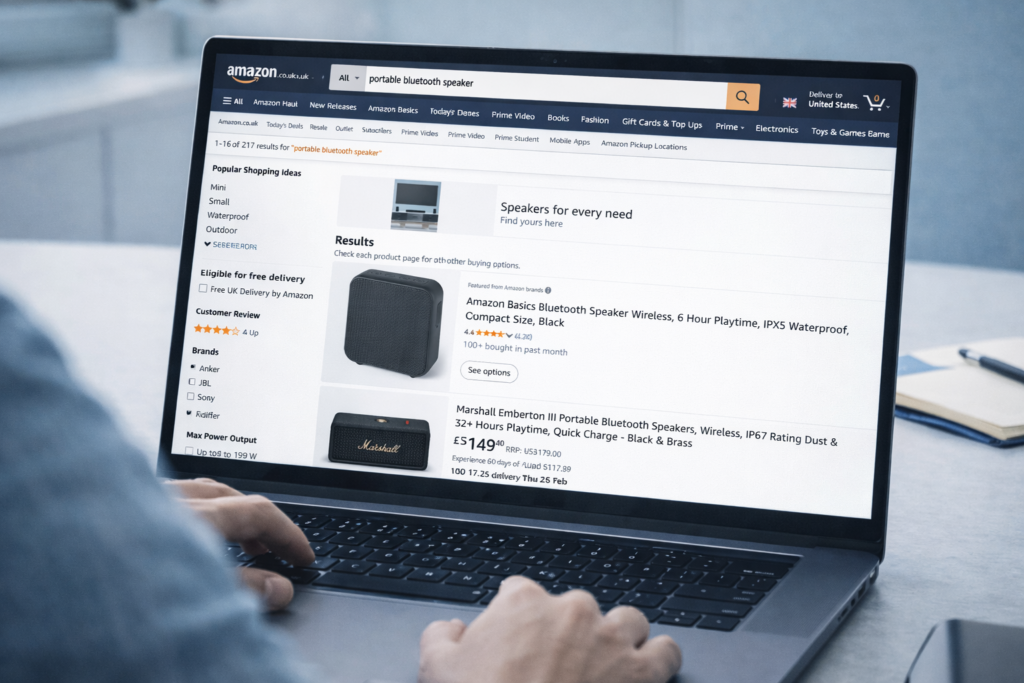
How do I find what my competitors are selling on Amazon? Visit your competitors’ Amazon storefronts and review their current product listings. Track which products they add or remove over time to identify trends and opportunities. Use this information not to copy their products directly, but to discover categories, brands, or product types worth investigating for gaps you can fill better than they do.
How do I find product gaps on Amazon? Look for products with strong sales (good BSR) but weak listings (poor images, unclear descriptions, missing variants). Read customer reviews to identify features buyers want that current sellers don’t provide. Check if successful products in one category are missing in related categories. These gaps represent opportunities to succeed with better execution rather than just lower prices.
Tactic 4: Category Research (Pick Your Battlefield)
Choosing the right category is as important as choosing the right product. Some categories offer opportunity; others are virtually impossible for new sellers to penetrate.
Demand vs Competition (Why “Popular Categories” Can Be Traps)
The most popular Amazon categories attract the most sellers, creating intense competition that makes profitability difficult:
High-Competition Categories:
- Electronics (dominated by brands and established sellers)
- Toys & Games (highly seasonal, intense competition)
- Clothing, Shoes & Jewelry (size/fit returns, brand dominance)
These categories have huge demand but equally massive competition. New sellers often struggle because:
- Established sellers have better supplier relationships and pricing
- Brands control distribution and use IP complaints aggressively
- Price competition drives margins to unsustainable levels
- Customer acquisition costs are high due to advertising competition
Better Opportunities Often Exist in “Medium” Categories:
- Home improvement and tools
- Kitchen gadgets and specialty appliances
- Pet supplies (specific niches)
- Crafting and hobby supplies
- Automotive accessories (specific vehicles/models)
These categories have sufficient demand to support profitable sales but less intense competition, allowing better margins and more sustainable businesses.
Category Restrictions & Approvals (Don’t Discover After Buying Stock)
Many categories require approval before you can list products. Common gated categories include:
- Grocery & Gourmet Food
- Health & Personal Care (certain subcategories)
- Beauty
- Watches
- Fine Jewelry
- Collectible Coins
- Amazon Device Accessories
Before selecting a category, verify:
- Whether the category requires approval
- What documentation you need (invoices, certificates, business registration)
- If you can realistically meet approval requirements
- How long the approval process typically takes
Discovering restriction issues after purchasing inventory is a costly mistake.
Practical Method: Sample 20 Listings → Check Seller Counts & Price Clustering
To properly research a category:
Step 1: Identify 20 random products within the category at various price points Step 2: For each product, note:
- Number of FBA sellers
- Buy Box price
- Price range (lowest to highest FBM offers)
- Amazon’s presence (selling or not)
Step 3: Analyze patterns:
- If most products have 20+ sellers: high competition category
- If prices cluster tightly: margin pressure, price wars common
- If Amazon sells 70%+ of sampled products: avoid this category
- If many products are restricted: difficult category for new sellers
This sampling gives you real data about category dynamics instead of assumptions.
What category is best to sell in on Amazon? The best category depends on your experience level, capital, and business model. For beginners, categories like Home & Kitchen, Pet Supplies, and Sports & Outdoors often offer good opportunities with manageable competition. Avoid highly competitive categories like Electronics and Clothing initially. Always research specific niches within categories rather than treating entire categories as uniform opportunities.
Which categories are hardest to get approved for? Grocery & Gourmet Food, Beauty, Health & Personal Care, Watches, Fine Jewelry, and Collectible Coins typically have strict approval requirements. These categories require invoices from approved suppliers, business documentation, and sometimes safety certificates. Amazon reviews applications carefully and may request additional information or testing certificates before granting approval.
Tactic 5: Brand Research (Resale-Friendly or Lawsuit Magnet?)
Not all brands welcome resellers. Some actively use Amazon’s systems to remove unauthorized sellers, creating costly IP complaints, listing suppressions, or account health issues.
Signs a Brand Is “Resale-Friendly” vs “IP-Complaint Prone”
Resale-Friendly Indicators:
- Multiple sellers offering the brand’s products (15+ sellers)
- No consistent pattern of seller removals
- Brand is sold through multiple retail channels (not exclusive distribution)
- Products available from multiple wholesalers/distributors
- Positive seller community feedback about the brand
IP-Complaint Risk Indicators:
- Very few sellers despite good product performance
- Seller count fluctuates dramatically (sellers being removed)
- Brand actively enrolled in Amazon Brand Registry and Transparency
- Brand owner or exclusive distributor controls most listings
- Recent reports of IP complaints in seller forums
Before investing in a brand, research:
- Does the brand have a history of IP complaints?
- Are current sellers being removed systematically?
- Does the brand require authorized reseller status?
- Can you document legitimate sourcing (invoices from approved suppliers)?
Amazon as a Seller Share (Why It Matters)
When Amazon sells a brand’s products, check what percentage of Buy Box share they control:
Less than 20% Amazon Buy Box Share: Other sellers can compete effectively 20-40% Amazon Share: Challenging but possible with good execution 40-60% Amazon Share: Very difficult to win consistent sales 60%+ Amazon Share: Generally not worth pursuing as a reseller
Amazon’s algorithm favors Amazon-sold products, giving them Buy Box priority. They also have cost advantages (no FBA fees, can operate at lower margins). Unless you have exceptional sourcing, avoid brands where Amazon dominates.
Ratings + Review Patterns (What You’re Really Checking)
When researching brands, reviews reveal critical information:
Total Review Count:
- Few reviews (under 50): New or slow-moving products, demand uncertain
- Moderate reviews (50-300): Established products with steady demand
- Many reviews (500+): High demand, but also likely high competition
Rating Distribution:
- High ratings (4.5+ stars): Quality product, lower return risk
- Medium ratings (3.5-4.4 stars): Some quality issues, check negative reviews carefully
- Low ratings (under 3.5 stars): High return risk, potential account health impact
Review Velocity:
- Reviews appearing steadily: Consistent sales
- Reviews stopped months ago: Declining product, possible discontinuation
- Reviews clustered around specific dates: Possible review manipulation or marketing campaigns
Review Content:
- What do customers love? (These are selling points to emphasize)
- What do customers complain about? (These are risks to consider)
- Are issues related to product quality or fulfillment? (Quality issues are bigger risks)
How do I know if a brand is safe to resell on Amazon? Check if multiple sellers (10+) are successfully offering the brand without frequent removals. Research whether the brand has a history of IP complaints in seller communities. Verify you can source the brand from legitimate wholesalers who provide proper invoices. Brands sold through many retail channels are generally safer than brands with exclusive distribution. Always document your sourcing to prove authenticity if challenged.
What are IP complaints on Amazon and how do I avoid them? IP (Intellectual Property) complaints occur when brand owners report unauthorized sellers for trademark infringement or selling counterfeit goods. To avoid them, only source products from authorized distributors with proper invoices, avoid brands known for aggressive IP enforcement, maintain clear documentation of authentic sourcing, and never sell obvious private label products. If you receive an IP complaint, respond quickly with documentation proving legitimate sourcing.
Advanced Research: 2 Tactics to Validate Profit + Reduce Risk
Quick research filters out bad products. Advanced research proves good products are actually worth your investment. This is where you separate profitable opportunities from expensive mistakes.
Tactic 6: Product Page Deep-Dive (12-Step Validation Checklist)
Once a product passes quick filters, validate it systematically using this 12-step checklist. Each step has a pass/fail rule and explains why it matters.
Demand Proof
Step 1: BSR History + Trend Logic
What to check: Review 30-day, 90-day, and 180-day BSR trends using historical data Pass/Fail rule: BSR should be stable or improving, not in sharp decline Why it matters: Current BSR might look good, but if it was 15,000 three months ago and is 45,000 now, demand is declining. You’ll buy into a dying product.
Look for:
- Green trend arrows (BSR number decreasing = sales increasing)
- Stable BSR range (not wild fluctuations)
- BSR drops indicate actual sales events
- Seasonal patterns, if applicable
Step 2: External Demand Signal Using Amazon’s Tools
What to check: If you have access, use Product Opportunity Explorer to verify search volume and demand data Pass/Fail rule: Search volume should support expected sales, conversion rate should be reasonable (varies by category, but typically 10%+ is healthy) Why it matters: BSR shows relative rank but doesn’t prove absolute demand. Product Opportunity Explorer shows actual search volume, confirming people are actively looking for this product type.
Check:
- Monthly search volume for main keywords
- Click-through rate on search results
- Conversion rate (searches to purchases)
- Average selling price trends
Competition Reality
Step 3: FBA Seller Count Range
What to check: Total FBA sellers and their Buy Box eligibility Pass/Fail rule: Ideally 3-15 FBA sellers; proceed cautiously if outside this range Why it matters:
- 1-2 sellers often means private label you can’t resell
- 3-7 sellers is ideal competition level
- 8-15 sellers requires competitive execution
- 16+ sellers typically means margin-crushing competition
Don’t just count sellers—check how many are actually Buy Box eligible and actively selling.
Step 4: Buy Box Dominance Check
What to check: Review Buy Box percentage by seller over the past 30 days Pass/Fail rule: No single seller should control more than 60% Buy Box share (unless it’s Amazon) Why it matters: If one seller dominates the Buy Box, they have advantages you don’t—better pricing, exclusive sourcing, or algorithmic preference. You’ll struggle to win sales.
Analyze:
- Buy Box rotation patterns
- Whether sellers run out of stock (creating opportunity)
- If you can match or beat Buy Box price profitably
- Shipping speed advantages (Prime vs non-Prime)
Risk & Eligibility
Step 5: Gating / Category Approval Checks
What to check: Verify you can list this specific product on your seller account Pass/Fail rule: Green open lock (eligible) or you have a plan to get ungated Why it matters: Discovering restriction issues after buying inventory means dead capital. Always verify before purchasing.
Different restriction types:
- Green open lock: You can sell now
- Red closed lock: Category or brand gating, requires approval
- Red lock with exclamation: Product-specific restriction, often impossible to resolve
If restricted, research:
- What documents are needed for approval
- How long approval typically takes
- If your sourcing can provide required documentation
- Whether approval is even realistic for your situation
Step 6: Flags (Hazmat, Meltable, Oversize)
What to check: Identify any product flags that increase costs or complexity Pass/Fail rule: Calculate if additional fees still allow profitable margins Why it matters: Special handling requirements increase costs:
- Hazmat (dangerous goods): Requires special approval, limited fulfillment centers, higher fees
- Meltable: Restricted shipping seasons, storage concerns
- Oversize/Heavy: Dramatically higher FBA fees (can be $10+ per unit)
- Fragile: Higher damage rates, potential customer issues
- Adult products: Different search visibility, category restrictions
Each flag isn’t necessarily a deal-killer, but you must account for additional costs and complexity in your profitability calculations.
Step 7: Listing Age and History
What to check: Verify the product listing is at least 6 months old with consistent sales history Pass/Fail rule: Prefer listings older than 6 months; proceed cautiously with newer listings Why it matters: New listings lack sufficient data for confident analysis. A 2-month-old listing might show great BSR because of a temporary trend, launch promotion, or seasonal spike that won’t continue.
Check:
- When the listing was first created
- If sales have been consistent across multiple months
- Whether there are seasonal sales patterns to consider
- If the product is established or potentially a trend
Profit Math That Doesn’t Lie
Step 8: Determine Selling Price
What to check: Analyze Buy Box price, lowest FBA price, and lowest FBM price over 30-90 days Pass/Fail rule: Price should be stable within 10-15%; larger fluctuations indicate volatility risk Why it matters: Today’s Buy Box price might be $29.99, but if it was $39.99 two months ago and dropped to $24.99 last week, you can’t confidently plan around current pricing.
Examine:
- Average Buy Box price (not just current)
- Price trend direction (increasing, stable, or decreasing)
- Price volatility (stable vs frequent changes)
- Whether price changes correlate with competition changes
Step 9: Real Fees, Storage Considerations, and Modern Fee Updates
What to check: Calculate all Amazon fees accurately using current fee schedules Pass/Fail rule: Net profit must account for every fee, including often-forgotten costs Why it matters: Sellers consistently underestimate fees, leading to “profitable” products that actually lose money.
Calculate these fees precisely:
Referral Fee: Percentage of sale price (varies by category, typically 15%) FBA Fulfillment Fee: Based on size tier and weight (check current fee schedule) Monthly Storage Fee: Varies by cubic foot and season (higher Oct-Dec) Long-Term Storage Fee: Additional fees for inventory stored over 365 days Inbound Placement Fee: Cost to distribute inventory to fulfillment centers (varies by configuration) Return Processing Fee: For certain categories, Amazon charges to process returns
Use Amazon’s current fee calculator—don’t rely on old estimates or outdated tools.
Step 10: Realistic Cost of Goods and Logistics
What to check: Your actual cost from supplier plus all costs to get product into Amazon Pass/Fail rule: Include every cost realistically, not optimistic estimates Why it matters: Forgetting costs makes unprofitable products look profitable
Include:
- Product cost from supplier
- Shipping from supplier to you (if applicable)
- Prep costs (labeling, poly bags, bubble wrap)
- Shipping to Amazon fulfillment center
- Inbound placement fees (if distributing across multiple FCs)
- Credit card processing fees or payment terms costs
Step 11: Calculate Target ROI
What to check: Calculate Return on Investment after all costs and fees Pass/Fail rule: Target minimum 20% ROI; prefer 25-35% for sustainable business Why it matters: Lower ROI leaves no buffer for mistakes, price drops, fee increases, or unexpected costs
ROI calculation:
ROI = (Net Profit / Total Investment) × 100
Where:
Net Profit = Selling Price – Amazon Fees – COG – Shipping – Prep
Total Investment = COG + Shipping + Prep + Initial Amazon Fees
Account for:
- Capital tied up during storage and sales cycle
- Risk of price drops or increased competition
- Potential for returns, damages, or lost inventory
- Amazon fee increases (they happen regularly)
A 15% ROI might seem acceptable, but after accounting for risks and capital costs, it barely breaks even. Target 25%+ ROI to build a sustainable, profitable business.
Step 12: The “Beginner Safe Rule”
What to check: Can you explain in one simple sentence why this product will sell to you at a profit? Pass/Fail rule: If you can’t clearly articulate the opportunity, don’t invest Why it matters: Complexity and confusion hide risk. Simple, clear opportunities are safer.
Good answer example: “This garlic press has consistent 20,000 BSR, only 6 FBA sellers, 30% ROI after fees, and I can source it for $8 while Buy Box is stable at $19.99.”
Bad answer example: “Well, the BSR fluctuates but sometimes it’s good, and there are a lot of sellers but maybe they’ll run out of stock, and margins are thin but maybe I can negotiate better pricing later…”
If you need to justify or rationalize multiple weak points, the product isn’t as good as you want it to be.
Tactic 7: Direct Sourcing (Amazon → Supplier)
Direct sourcing involves identifying high-demand products on Amazon first, then finding suppliers who can provide those products at prices allowing profitable resale. This tactic is particularly effective for online arbitrage and dropshipping.
Where to Find Demand-Backed Products
Amazon provides several lists highlighting products with proven demand:
Amazon Best Sellers
- Products currently selling best in each category
- Updated hourly, shows real-time demand
- Use this to identify consistently popular products, not temporary spikes
Amazon Movers & Shakers
- Products with biggest sales rank improvements in past 24 hours
- Good for identifying emerging trends
- Be cautious—some “movers” are one-day promotions, not sustainable trends
Amazon Hot New Releases
- New products generating immediate sales
- Can indicate emerging categories or product types
- Risky—many new releases fade quickly after launch promotions end
Amazon Most Wished For
- Products customers are adding to wish lists
- Indicates intent but not immediate purchases
- Good for seasonal planning (what people want for upcoming holidays)
When using these lists, focus on products appearing consistently across multiple days or weeks, not one-time spikes.
How to Avoid “Viral Product Traps”
Viral products look amazing—explosive BSR improvement, thousands of sales seemingly overnight. But they’re often terrible investments:
Why Viral Products Fail Resellers:
- Demand disappears as quickly as it appeared
- Competition floods in immediately (you won’t be the only one who noticed)
- By the time you source inventory, the trend is already declining
- Margins get crushed by sellers racing to liquidate inventory
Red Flags for Viral Products:
- BSR jumped from 100,000+ to under 5,000 in days
- Review count is low despite high sales (new product riding trend)
- No clear reason for popularity (not seasonal, no obvious need)
- Similar products all spiking simultaneously
- Heavy social media promotion or influencer mentions
Safer Approach:
- Focus on products with steady 6-12 month sales history
- Choose products solving real problems, not novelty items
- Prefer evergreen products over trend-dependent ones
- Wait 30-60 days after identifying a “hot” product to see if demand sustains
Supplier Validation: Consistency, MOQ, Lead Times, Genuine Invoices
Finding a supplier is just the first step. Validating they’re reliable and meet your needs is critical:
Consistency: Can they reliably provide the product?
- Do they stock it consistently or is it frequently out of stock?
- Have they carried this brand/product for years or just started?
- Are they an authorized distributor or gray market source?
Minimum Order Quantity (MOQ): What’s the minimum purchase required?
- Can you afford the MOQ financially?
- Can you sell through the MOQ in a reasonable time frame (3-6 months)?
- Does the MOQ tie up too much capital in one product?
Lead Times: How quickly can they deliver?
- Normal lead time (days or weeks)?
- Consistency of lead times (predictable or variable)?
- Rush order options if you need to restock quickly?
Genuine Invoices: Critical for ungating and authenticity proof
- Do they provide proper invoices with all required information?
- Are they an authorized distributor recognized by brands and Amazon?
- Can their invoices be used for category or brand ungating?
- Will brands honor warranties for products sourced from them?
Test new suppliers with small orders before committing to large inventory purchases. A supplier might look perfect on paper but fail to deliver on time, send wrong products, or have quality control issues.
How do I find a supplier for a product I see on Amazon? Use the product name and brand to search wholesale directories, industry trade shows, manufacturer websites, and B2B marketplaces like Alibaba or Faire. Contact the brand directly to request their authorized distributor list. Search for “[brand name] wholesale distributor” or “[product type] wholesale supplier”. Verify suppliers provide proper invoices and are authorized distributors before purchasing significant inventory.
Is it legal to resell branded products on Amazon? Yes, reselling branded products is legal under the First Sale Doctrine, which allows you to resell legitimately purchased products. However, you must source products through legitimate channels, not counterfeit or gray market sources. Brands can restrict who sells their products on Amazon through gating, and some brands actively enforce their distribution policies. Always maintain documentation proving authentic sourcing to protect against IP complaints.
Keyword Research for Ranking
Product research and keyword research aren’t separate processes—they’re interconnected. The right product with wrong keyword targeting won’t sell. The right keywords targeting a wrong product won’t profit.
How Keyword Research Connects to Product Research
Keywords reveal crucial information during product selection:
Demand Validation: High search volume for relevant keywords confirms people are actively looking for this product type. A product with great BSR but no keyword search volume might indicate most sales come from brand searches or external traffic you can’t replicate.
Competition Assessment: If keyword demand exists but competition is insane (dozens of sponsored ads, page 1 dominated by major brands), you face an uphill battle. Better to find products where keyword competition matches your capabilities.
If low competition keywords exist but no buyer intent, you won’t get sales: A keyword might have low competition because nobody buys from those searches. “Unique handcrafted artisan bottle opener” might have low competition because people actually search “bottle opener” and buy based on price and reviews, not uniqueness.
Where to Find High-Volume Keywords
- Amazon Auto-Suggest: Type your main product keyword into Amazon’s search bar and note suggested completions. These suggestions reflect actual customer searches, making them highly valuable.
- Product Opportunity Explorer: If you have Brand Registry, this tool shows exact search volumes for keywords, along with click-through rates and conversion rates.
- Competitor Listings: Examine titles, bullets, and descriptions of top-selling products. The keywords they emphasize repeatedly are likely driving their sales.
- Customer Reviews: Read what customers actually call the product. Their natural language often reveals keyword opportunities you wouldn’t think of.
Broad vs Exact vs Long-Tail
Broad Keywords:
- General product categories (“blender”, “yoga mat”)
- Highest search volume
- Highest competition
- Lower conversion rates (searchers haven’t decided what specifically they want)
Exact Keywords:
- Specific product descriptions (“Vitamix blender”, “cork yoga mat”)
- Moderate search volume
- Moderate competition
- Better conversion rates (more specific intent)
Long-Tail Keywords:
- Very specific searches (“vitamix 750 blender for smoothies”, “extra thick cork yoga mat for beginners”)
- Lower individual search volume but many variations
- Lower competition
- Highest conversion rates (very specific intent)
For product research, pay attention to long-tail keywords. They reveal specific customer needs that current sellers might be missing.
Buyer-Intent Modifiers
Certain words in keywords signal strong buying intent:
“For” Keywords: “blender for smoothies”, “mat for hot yoga”
- Shows a specific use case
- Indicates researched purchase, not casual browsing
“Replacement” Keywords: “replacement filters”, “replacement parts”
- Extremely high intent
- Customer knows exactly what they need
“Compatible” Keywords: “compatible with iPhone 14”, “works with KitchenAid”
- Specific compatibility requirements
- Ready to purchase if product matches
Size/Quantity Keywords: “32 oz water bottle”, “6-pack paper towels”
- Precise specifications
- High conversion intent
“Best” Keywords: “best gaming headset”, “best yoga mat for beginners”
- Comparison shopping phase
- Close to purchase decision
Products that align with high buyer-intent keywords are safer bets than products depending on casual browsers.
What are long-tail keywords on Amazon? Long-tail keywords are specific, longer search phrases that have lower search volume but higher conversion rates. Instead of “headphones,” a long-tail keyword would be “wireless noise-cancelling headphones for travel.” These keywords face less competition and attract buyers with specific needs who are closer to making a purchase decision. Target several long-tail keywords rather than competing only on broad, high-competition terms.
Use Brand Analytics If You Have Access
Search Query Performance exists for Brand Registry users and provides invaluable data:
- Which search terms drive traffic to your listings
- Conversion rates for each search term
- Where you rank for each term
- How search behavior changes over time
Use this data to:
- Identify which keywords actually drive sales (not just traffic)
- Discover unexpected keyword opportunities
- Optimize underperforming keywords
- Track improvements after listing optimization
If you don’t have Brand Registry yet, consider enrolling. The data access alone justifies the effort.
The “Low Competition Niche” Reality Check
Every new seller wants to find a “low competition niche with high demand.” Here’s the truth: those are extremely rare, and when they exist, they don’t stay low competition for long.
“Low competition” usually means one of these realities:
- Low Demand: Competition is low because sales volume doesn’t support many sellers. A product with 3 sellers and BSR of 250,000 isn’t a hidden gem—it’s a slow-moving product.
- Restrictions: Few sellers exist because most can’t get ungated. You might face the same barriers, or if you do get ungated, it’s because the hassle filters out casual sellers (that’s actually good).
- Dominated by Brand/Amazon: Competition appears low because the brand owner or Amazon controls the listing. Third-party sellers get suppressed, removed, or can’t win Buy Box.
- Fragile Pricing: Low competition exists because margins are too thin to support more sellers. One additional seller triggers price wars that make everyone unprofitable.
- High Barriers: Low competition might reflect high capital requirements, complex logistics, strict regulations, or specialized knowledge most sellers lack.
The Real Target
Instead of chasing “low competition,” pursue reasonable demand + manageable competition:
- BSR showing consistent sales (not massive, but steady)
- 5-12 sellers (proves demand exists without overcrowding)
- Margins supporting 25%+ ROI even with competition
- Clear differentiation opportunities (better images, bundles, improved listings)
- Products solving real problems, not novelty items
This is realistic and sustainable. “Secret low competition niches” are fantasies that waste time better spent on solid opportunities.
How to Approach Amazon Product Research the Right Way
Amazon product research is systematic, not magical. Success comes from filtering fast to eliminate bad products, validating deeply to prove good products are actually profitable, and only then investing in inventory.
The framework is straightforward:
Filter Fast → Validate Deep → Then Invest
Start with quick research tactics (Quick View, reverse sourcing, competitor research, category research, brand research) to eliminate unsuitable products in seconds. Then apply advanced validation (product page deep-dive, direct sourcing) to the survivors to confirm profitability and minimize risk. Finally, use the Ecomclips Product Research Scorecard to make objective decisions based on data, not excitement.
Remember these key principles:
- Truly low competition usually means low demand or high barriers
- Margins must account for ALL fees, including new Amazon charges
- Restrictions and compliance issues destroy otherwise profitable products
- Keyword research isn’t separate from product research—they inform each other
- Better execution beats better products when listings are weak
- Sustainable businesses choose manageable competition over fantasy niches
Most importantly: research is cheap, inventory is expensive. Spend more time validating products and less money buying unproven inventory. Every hour invested in better product research saves hundreds or thousands of dollars in failed inventory purchases.
FAQ: Amazon Product Research Questions
Q. What is Amazon product research for beginners?
Amazon product research for beginners is about finding products that have customer demand, manageable competition, and good profit margins. Use quick filters to remove unsuitable products, and validate your choices to ensure profitability before buying inventory.
Q. How do I find low competition products on Amazon?
Look for products with 5-12 sellers and a decent BSR (under 50,000). Focus on improving weak listings, and use long-tail keywords for lower competition and better opportunities.
Q. What is a good ROI for Amazon FBA in 2026?
A good ROI for 2026 is between 25-35% after fees. Anything under 20% is too risky, as it leaves little room for errors or unexpected costs.
Q. How do I find high-volume keywords on Amazon?
Use Amazon’s auto-suggest, the Product Opportunity Explorer (with Brand Registry), competitor listings, and customer reviews to find high-traffic, buyer-intent keywords.
Q. How many reviews are “too many” to compete against?
It’s not about the number, but the quality of reviews. Products with 1,000+ reviews are still competitive if they have negative feedback or the opportunity for differentiation.
Q. How do I avoid restricted/gated products?
Before diving deep into research or purchasing, always check product eligibility. Ensure you’re ungated or eligible, and maintain access to authorized distributors for valid documents.
Q. What is Product Opportunity Explorer and how do I use it?
It’s an Amazon tool within Seller Central that helps you validate product demand by analyzing search volume, conversion rates, and pricing.
Q. Why do some products look profitable but lose money after fees?
You may miss fees like storage, inbound placement, and shipping. Always account for all costs in your calculations.
Q. What tools do I need for product research?
You’ll need an Amazon fee calculator, a Chrome extension for quick product metrics, and product research software. Optional tools like Keepa and Product Opportunity Explorer can provide additional insights.
Watch our in-depth video guide on Amazon here:
AMAZON PREMIUM A+ CONTENT TUTORIAL
Amazon Halloween Sales Strategy 2025
Amazon CTR Hacks: Boost Sales with Better Main Images
Win Big on Amazon with This Premium Product Strategy
How I Got My Amazon Product Recommended by ChatGPT
Ecomclips: Your Complete eCommerce Solution Under One Umbrella
At Ecomclips, we bring every eCommerce service you need under one roof — strategy, operations, design, marketing, and growth, all seamlessly connected to help your brand thrive across every marketplace.
Since 2012, we’ve been helping businesses of all sizes launch, scale, and dominate online. From Amazon, Walmart, eBay, and Etsy to Shopify and WooCommerce, our team of marketplace experts, designers, developers, and marketers works together to deliver measurable results.
Our services span the full eCommerce lifecycle:
- Account Setup & Product Listing Management: We handle registrations, compliance, and product data optimization across all marketplaces.
- Amazon Optimization Service: From keyword-rich titles and A+ content to PPC campaigns and storefront design, we craft listings that convert.
- Creative Design & Content Production: A+ visuals, infographics, brand stores, and product videos built to boost engagement.
- Advertising & PPC Management: Smart, data-driven ad strategies for Amazon, Walmart, and Google that maximize ROI.
- Web Development & Store Design: Shopify, WooCommerce, and Magento websites built for performance and conversion.
- Data Management & Automation: Streamlined product feeds, catalog syncing, and inventory control for effortless scalability.
- Customer Service & Order Fulfillment: End-to-end support that enhances customer satisfaction and builds long-term loyalty.
- Analytics & Growth Strategy: Real-time insights and ongoing optimization to ensure consistent, profitable growth.
Whether you’re launching a new store or managing multiple global marketplaces, Ecomclips acts as your single strategic partner, simplifying complexity and driving sustainable revenue growth.