

Getting traffic on Amazon is hard. Getting the right traffic is even harder.
Many sellers spend hours collecting keywords, stuffing them into titles and bullet points, and still wonder why their products do not rank, get clicks, or convert. The problem is not always the product. Often, the problem is that the listing is targeting keywords that shoppers search for, but not the keywords that make them buy.
Amazon keyword research in 2026 is no longer about chasing the biggest search volume. It is about understanding buyer intent, validating keywords with real Amazon data, and placing the right terms naturally across your listing, PPC campaigns, backend fields, A+ Content, and image text.
In this guide, you will learn how to find Amazon keywords that actually matter, how to check whether they can drive clicks and sales, and how to use them without keyword stuffing.
What Is Amazon Keyword Research?
Amazon keyword research is the process of identifying the words and phrases shoppers use to search for products on Amazon.
These phrases are also called search terms, search queries, keyphrases, or Amazon SEO keywords. They help Amazon understand what your product is and which shoppers’ searches your listing may be relevant for.
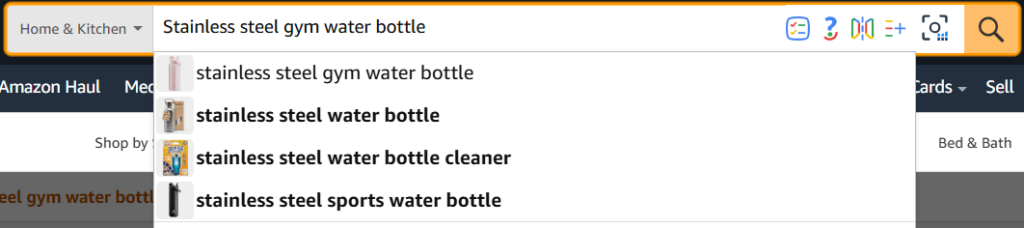
A shopper looking for a water bottle may search in different ways. All of these searches relate to the same product category, but they do not carry the same value. “Water bottle” is broad and competitive. “Stainless steel gym water bottle” is more specific and shows a clearer buying need.
A good keyword strategy should answer:
- What is the product?
- Who is searching for it?
- What problem does the shopper want to solve?
- What features matter most?
- Which keywords are broad discovery terms?
- Which keywords show stronger purchase intent?
- Where should each keyword go in the listing?

Why Keyword Research Has Changed in 2026
1. Shoppers Search With More Detail
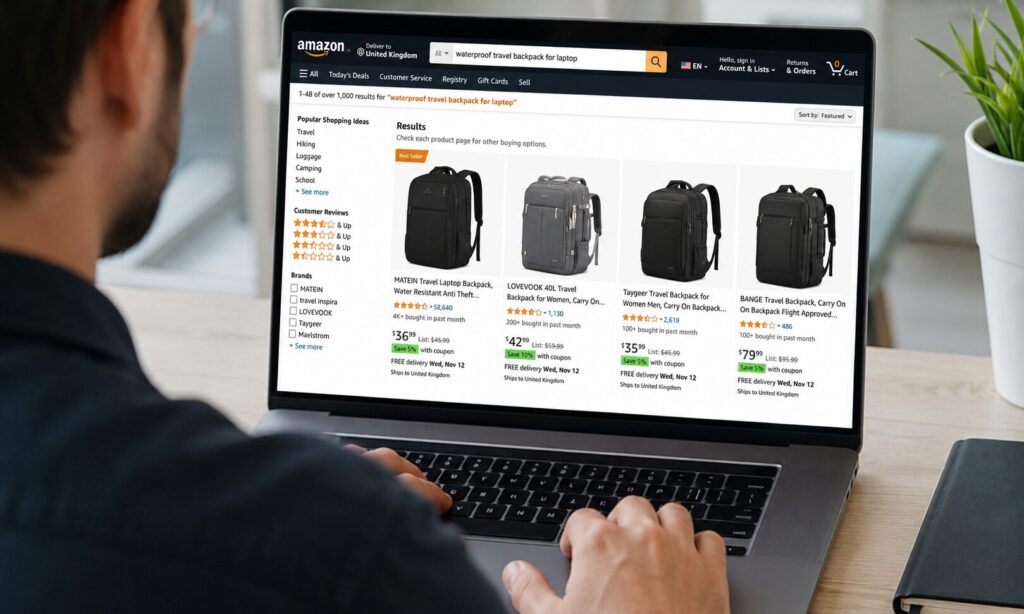
Shoppers no longer search only by simple product names. They search by use case, feature, size, material, compatibility, audience, and problem.
2. Intent Matters More Than Volume
High search volume does not always mean high value. A broad term may bring traffic, but not the right buyers. A more specific phrase may have lower volume, but stronger purchase intent.
Sellers should not only ask, “How many people search this?” They should ask, “Does this search match my product and buyer needs?”
3. Amazon Data Becomes More Important
Tools like Search Query Performance, Brand Analytics, and PPC Search Term Reports help sellers see how search phrases perform through impressions, clicks, cart ads, and purchases. This means keyword planning is no longer based only on estimates. Sellers can now use real Amazon data to find which phrases create visibility, which ones attract clicks, and which ones actually convert.
4. AI Search Makes Product Context More Important
Amazon shopping is becoming more conversational. With Rufus and other AI-assisted shopping experiences, shoppers can ask more natural questions based on activity, purpose, event, product problem, or use case.
That means sellers need listings that explain the product clearly. Amazon needs to understand what the product is, who it is for, what problem it solves, when it should be used, and how it compares with alternatives.
5. Keyword Stuffing No Longer Works
Adding keywords everywhere creates messy listings and a weak buyer experience. In 2026, search terms should be placed with purpose. Primary keywords belong in titles, secondary terms support bullets, long-tail phrases work well in descriptions and A+ Content, and backend terms should be used for clean, relevant variations.
The Ecomclips Amazon Keyword Research Framework
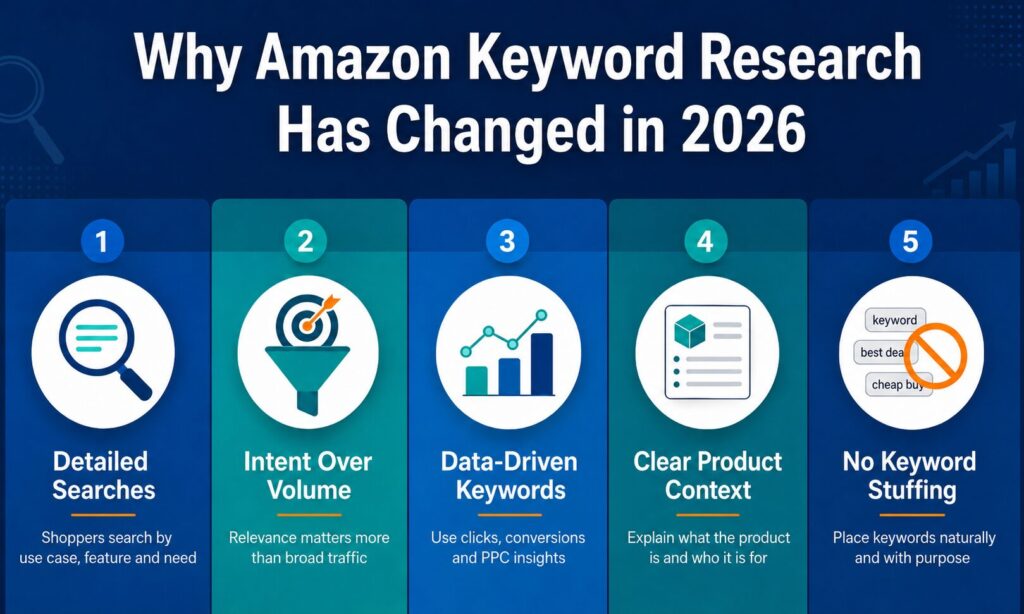
To make keyword research practical, sellers need a repeatable system. At Ecomclips, we recommend this 2026 Amazon keyword research framework:
Find → Validate → Prioritise → Map → Test → Refresh
| Stage | What Sellers Should Do |
| Find | Collect keywords from seed terms, Amazon autocomplete, competitors, reviews, Q&A, tools, and PPC data |
| Validate | Check Brand Analytics, Search Query Performance, Product Opportunity Explorer, and PPC Search Term Reports |
| Prioritise | Score keywords by relevance, buyer intent, demand, competition, and conversion potential |
| Map | Place keywords naturally across title, bullets, description, backend terms, A+ Content, image text, and ads |
| Test | Monitor ranking, CTR, conversion rate, ACoS, cart adds, and purchases |
| Refresh | Update keywords regularly based on seasonality, new competitors, review language, and performance data |
This framework helps sellers avoid the common mistake of building a large keyword list without knowing which terms actually matter.
Types of Amazon Keywords
Primary Keywords
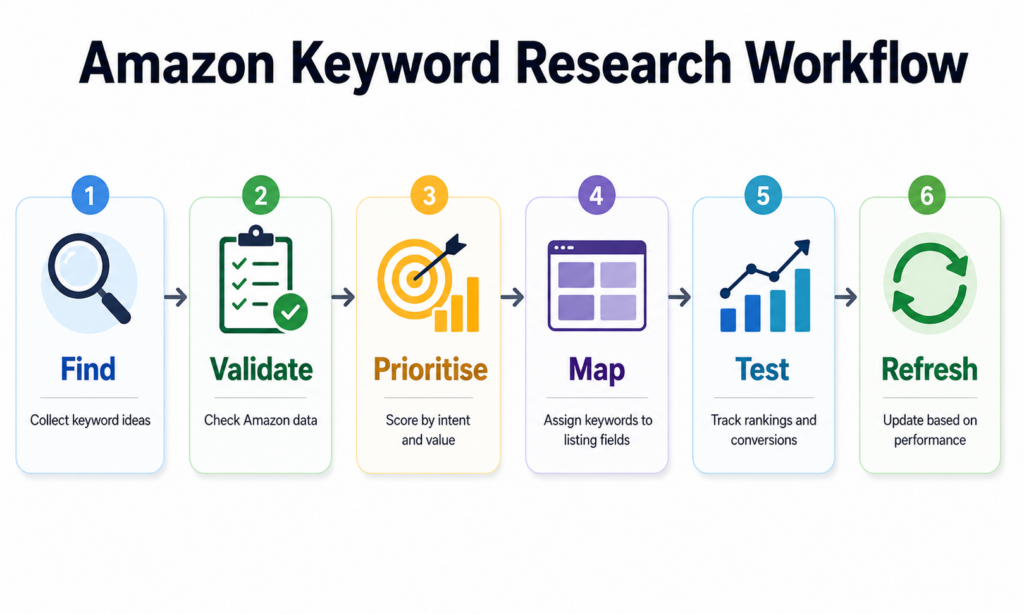
Primary keywords are the main terms that define the product. These are usually the most important phrases because they tell Amazon and shoppers exactly what the product is.
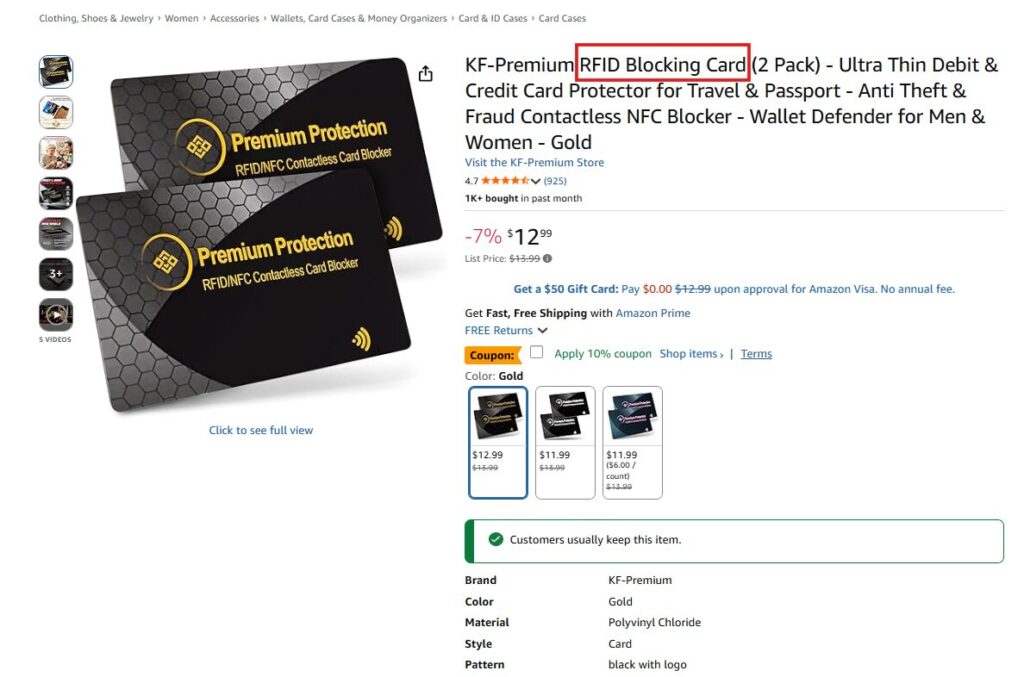
Primary keywords usually belong in the product title. If the product is an RFID blocking card, the phrase “RFID blocking card” is much stronger than a broad term like “wallet accessory” because it clearly explains the product.
Secondary Keywords
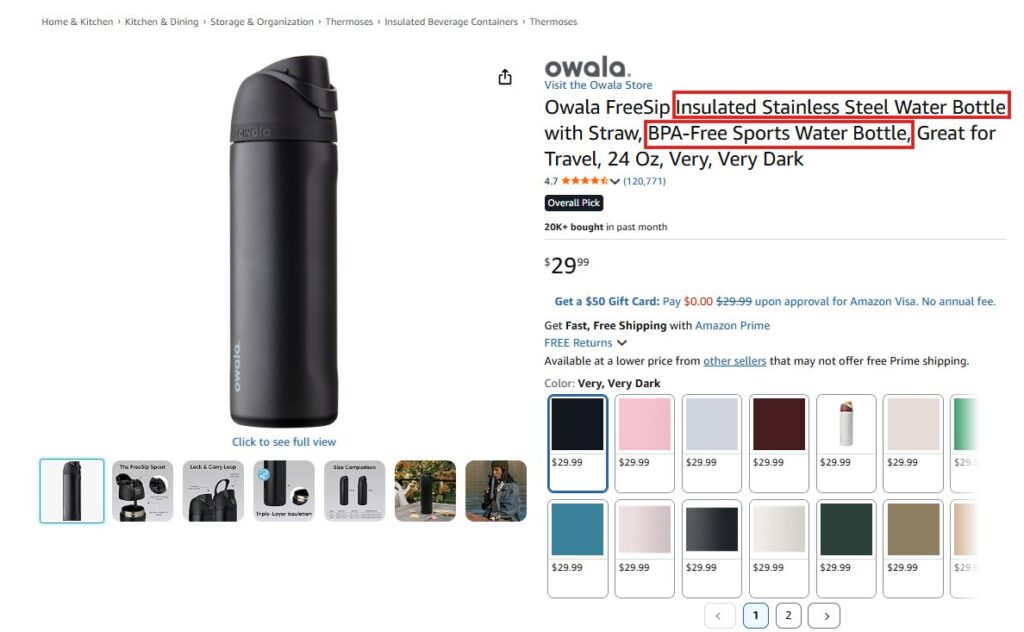
Secondary keywords support the main term by adding more detail. They usually describe features, benefits, materials, styles, or use cases. For a stainless steel water bottle, secondary phrases may include “leak proof lid,” “double wall insulated bottle,” “water bottle with straw,” “BPA-free drinking bottle,” or “gym water bottle.”
Short-Tail Keywords
Short-tail keywords are broad search terms, usually one or two words long. Examples include “backpack,” “headphones,” “water bottle,” “gloves,” and “wallet.”
These terms often have high search volume, but they are competitive and less specific. A shopper searching for a “backpack” could want a school bag, laptop bag, travel backpack, or hiking backpack. That is why short-tail keywords are useful for category relevance, but they should not be the only focus.
Long-Tail Keywords
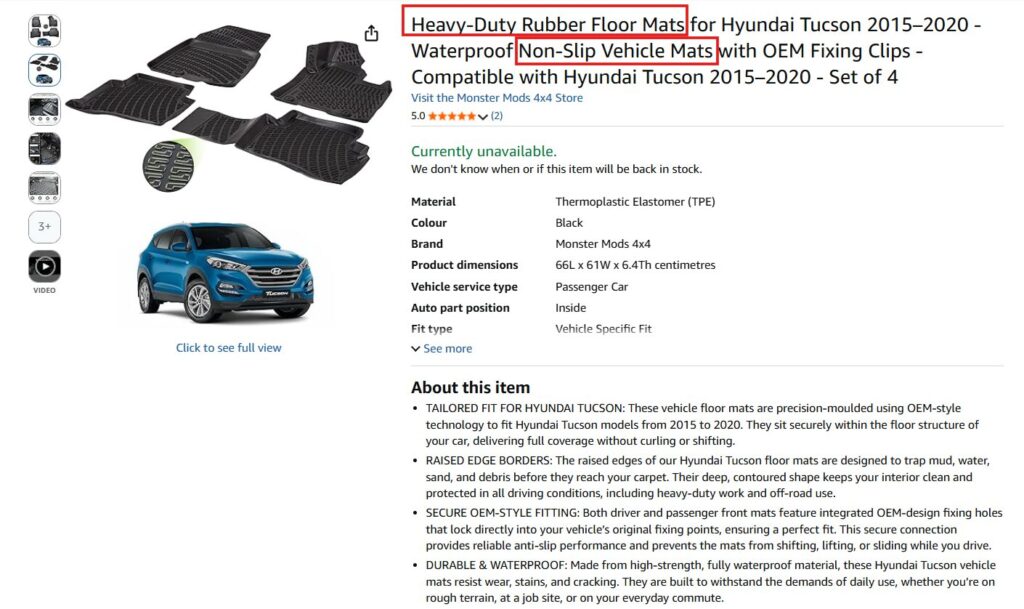
Long-tail keywords are more specific search phrases that show clearer buying intent. For a boot mat, long-tail phrases may include “waterproof rubber boot mat,” “anti-slip car boot liner,” “heavy-duty boot mat for muddy shoes,” “raised edge boot tray for pets,” and “custom fit car boot protector.”
Short-Tail vs Long-Tail Keywords
| Keyword Type | Example | Benefit | Risk |
| Short-tail | water bottle | High search demand | Broad intent and high competition |
| Mid-tail | gym water bottle | More specific buyer need | Still competitive |
| Long-tail | leak proof gym water bottle with straw | Clear purchase intent | Lower search volume |
Backend Keywords
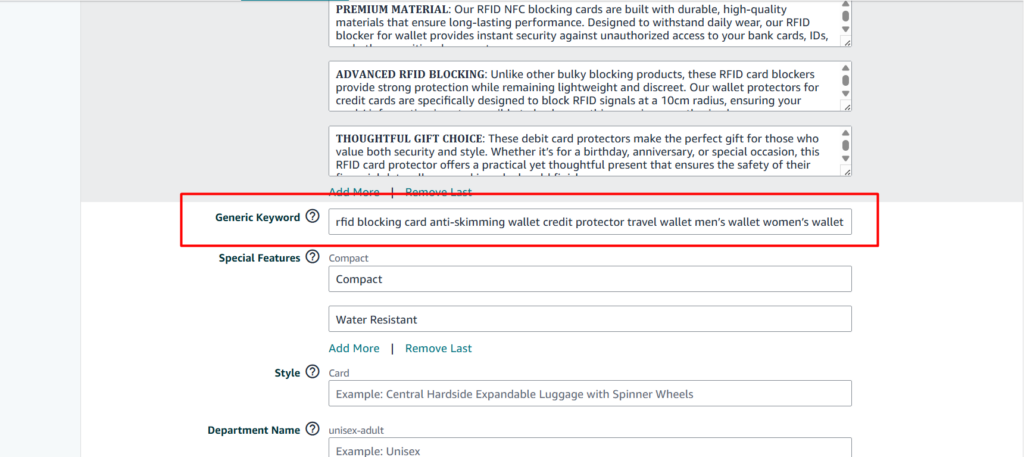
Backend keywords are hidden search terms added inside Seller Central. Shoppers do not see them, but Amazon can use them to understand extra relevant phrases connected to the product. They are useful for synonyms, spelling variations, alternate product names, abbreviations, regional terms, and extra long-tail phrases. For example, if the visible listing uses “RFID blocking card,” backend terms could include “bank card blocker,” “RFID shield card,” or “contactless card guard,” as long as they are relevant.
Seed Keywords
Every strong research process starts with one simple term.
Seed keywords are the basic terms that describe your product most clearly. They are not the full strategy, but they give sellers a focused starting point before expanding into long-tail phrases, buyer-intent terms, and PPC-tested searches.
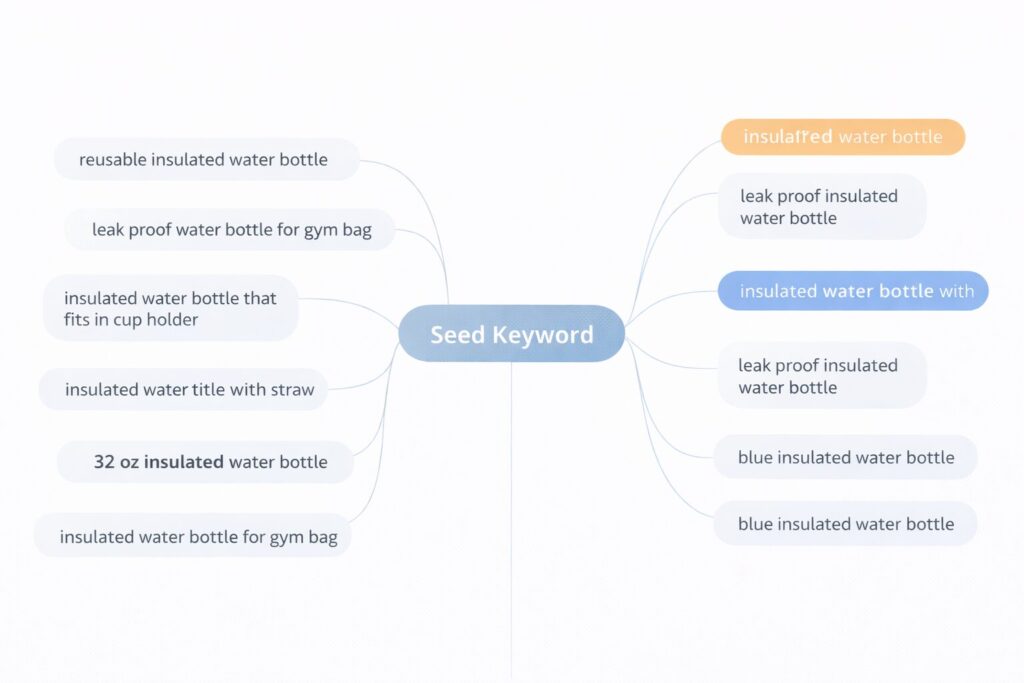
If the product is an insulated water bottle, the seed term could be “insulated water bottle.” From that one phrase, sellers can expand into more specific ideas such as “reusable insulated water bottle,” “leak proof water bottle for gym bag,” “insulated water bottle that fits in cup holder,” “insulated water bottle with straw,” and “32 oz insulated water bottle.”
| Seed Keyword Formula: Core Product + Feature + Use Case + Size/Attribute = Strong Keyword |
Where to Find Amazon Keywords
1. Amazon Autocomplete
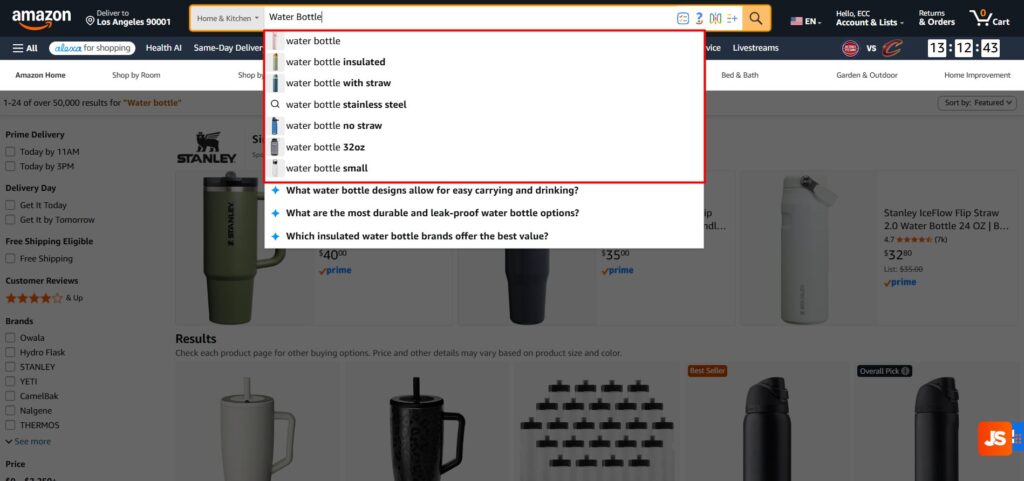
Amazon Autocomplete is one of the easiest ways to find real shopper search phrases.
Start with a seed keyword and type it into the Amazon search bar. Amazon will suggest related phrases based on what shoppers commonly search. If your seed keyword is “water bottle,” Amazon may suggest terms like:
- water bottle with straw
- water bottle for gym
- water bottle stainless steel
- water bottle leak proof
- water bottle for kids
- water bottle 1 litre
2. Competitor Listings
Competitor listings show how top sellers target shoppers in your category. They reveal the terms, benefits, features, and buyer questions that already matter in the market. The goal is to find patterns, gaps, and opportunities your listing can use better.
How to Find Keywords in Competitor Listings
Start by searching your main seed keyword on Amazon, such as lavender plant, rosemary plant, acer tree, hydrangea plant, or garden ready plants. Open the top-ranking organic and sponsored listings, then review each section carefully.
- Product title: Collect main keywords such as plant name, botanical name, pot size, height, colour, and plant type
- Bullet points: Look for feature and benefit terms such as hardy, evergreen, low maintenance, fragrant, flowering, patio plant, or garden ready
- Image text: Check callouts for keywords related to colour, bloom time, size, care, and garden placement
- A+ Content: Review lifestyle sections, planting guides, care tips, and comparison charts for long-tail keyword ideas
- Product description: Find phrases about where the plant grows best, when it flowers, how large it gets, and how easy it is to care for
- Reviews: Note buyer language around plant health, size on arrival, packaging, growth, flowering, fragrance, and garden performance
- Q&A: Collect questions about sunlight, watering, pruning, pot size, winter hardiness, indoor/outdoor use, and pet safety
- Sponsored listings: Check which plant listings appear repeatedly for your target searches because they may be targeting valuable keywords
3. Amazon Brand Analytics
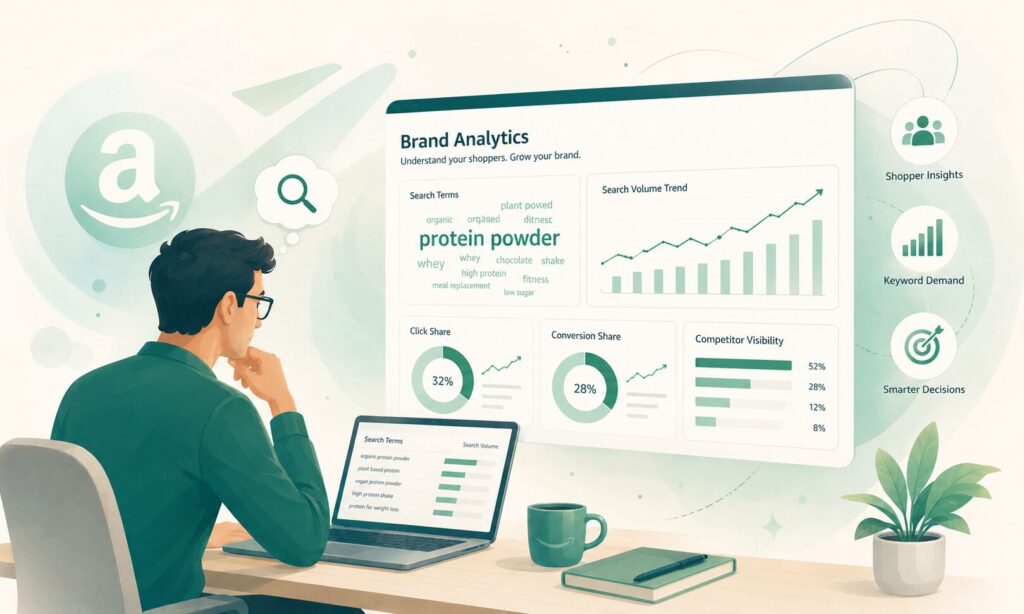
Amazon Brand Analytics helps eligible brand owners understand shopper search behavior and competitive performance. It gives sellers access to Amazon’s own customer and brand performance data, which can support better product, listing, and advertising decisions. Amazon also notes that Brand Analytics is available under the Brands tab in Seller Central for eligible brand owners.
How to Find Keywords in Amazon Brand Analytics
- Log in to Amazon Seller Central and go to the Brands tab.
- Open Brand Analytics. Make sure your brand is enrolled in Brand Registry and your account has access.
- Go to the Amazon Search Terms report to find search terms shoppers are using in your category.
- Review search frequency, click share and conversion share to understand which keywords have demand and which listings are getting buyer attention.
- Open Search Query Performance to see how keywords perform through the shopper journey.
- Check impressions, clicks, cart adds and purchases to identify which keywords only bring visibility and which ones actually move shoppers closer to buying.
- Save the strongest keywords that show good demand, relevant clicks and purchase potential.
- Compare those keywords with your listing. Check whether your title, bullets, images, A+ Content and backend terms clearly support the keyword intent.
- Place the keywords naturally in the right areas: primary terms in the title, benefit keywords in bullets, synonyms in backend terms and buyer-intent phrases in A+ Content or image text.
- Review the data regularly because keyword demand, competition and shopper behavior change over time.
5. Product Opportunity Explorer
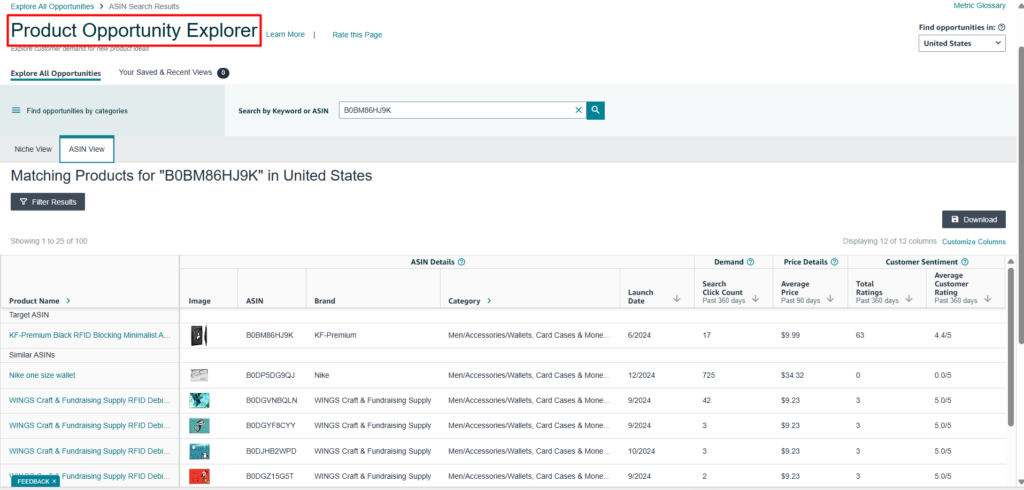
Product Opportunity Explorer helps sellers understand demand, pricing, review levels and product opportunities within Amazon. Use it to study:
- niche demand
- pricing patterns
- review expectations
- product gaps
- search behavior
- category competition
- seasonal shifts
How to Find Keywords in Product Opportunity Explorer
- Open Amazon Seller Central and go to Product Opportunity Explorer.
- Start with a broad seed keyword related to your product, such as “water bottle,” “boot mat,” “fish oil,” or “travel backpack.”
- Review the niche results Amazon shows for that product area. Look for search terms, customer demand, product trends, pricing patterns and review levels.
- Check the phrases shoppers use inside the niche. These can reveal keyword ideas based on product type, feature, use case, material, size or buyer problem.
- Look for repeated customer needs. For example, shoppers may search for terms like “leak proof,” “easy clean,” “custom fit,” “for dogs,” “travel size,” or “high strength.”
- Compare demand with competition. A keyword or niche with strong demand but weak competitor listings can become a useful SEO and content opportunity.
- Save relevant search terms and group them by purpose: primary keywords, secondary keywords, long-tail keywords, use-case keywords and backend keyword ideas.
- Use those terms to improve your product title, bullet points, description, A+ Content, image text and PPC campaigns
6. Sponsored Products Search Term Reports
Sponsored Products Search Term Reports show what shoppers typed before your Amazon ads appeared. They are powerful because they connect search phrases with real performance: impressions, clicks, orders, and wasted spend.
How to Download a Sponsored Products Search Term Report
- Log in to Amazon Seller Central and go to Advertising.
- Open Campaign Manager.
- Go to the Reports or Measurement & Reporting section, depending on your Seller Central layout.
- Choose Sponsored Products as the campaign type.
- Select Search Term Report from the report options.
- Choose the date range you want to analyze. A 7-day report can show recent trends, while a 30-day or 60-day report gives a better view of keyword performance over time.
- Generate and download the report.
- Open the report and review the search terms that generated impressions, clicks, spend, orders and sales.
- Highlight search terms that are converting well. These can become keyword opportunities for your listing and PPC campaigns.
- Mark high-spend terms with no sales as possible negative keyword candidates.
Amazon Keyword Tools
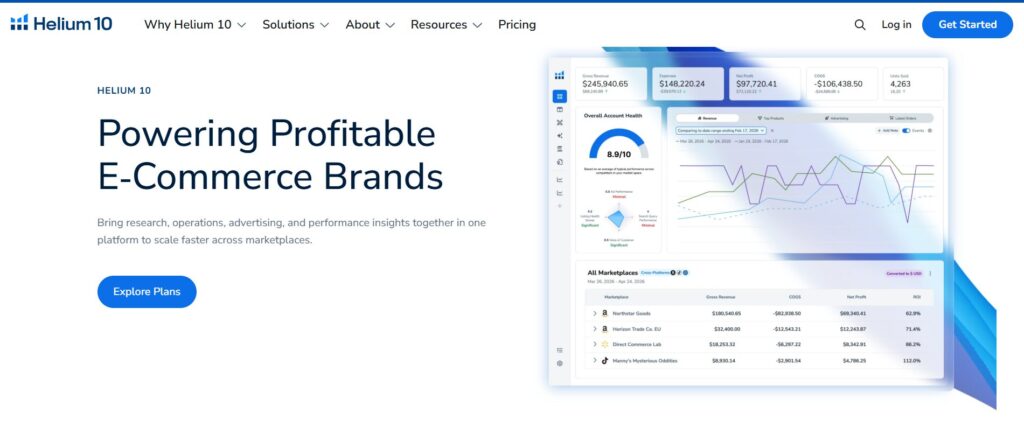
Helium 10
Helium 10 is a popular Amazon seller tool for keyword research, competitor analysis, listing optimisation, and rank tracking.
Helium 10 should not be used only to collect keywords. A better approach is to use it as part of a workflow: discover keyword ideas, analyze competitors, clean the list, build the listing, check indexing, and track ranking performance over time.
Cerebro
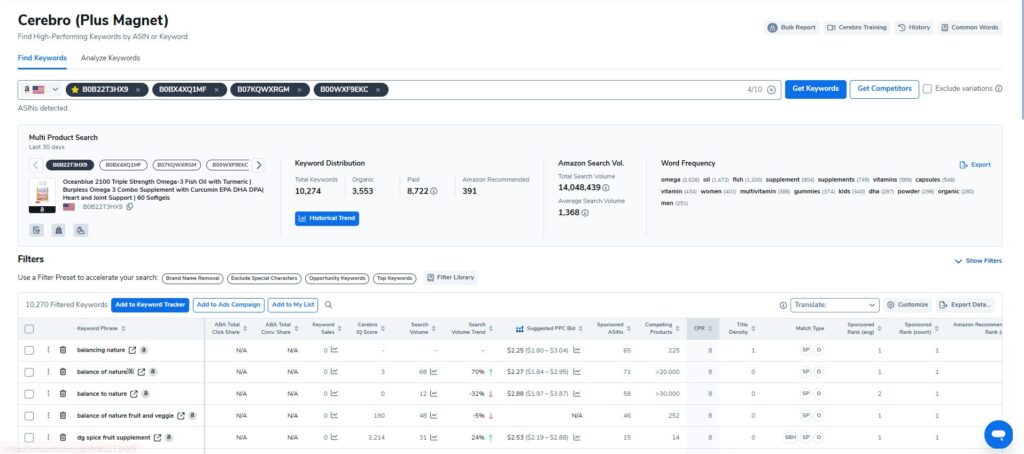
Cerebro is Helium 10’s reverse ASIN keyword research tool. It helps sellers analyze competitor ASINs and find keywords that those products may be ranking for. This is useful when you want to understand which keywords are already working in your category.
- Enter one or more competitor ASINs into Cerebro.
- Review the keywords connected to those competitor products.
- Look for keywords that appear across several strong competitors.
- Separate broad keywords, long-tail keywords, product-specific phrases and buyer-intent terms.
- Remove terms that do not match your product.
- Save relevant keywords for listing optimisation, backend search terms and PPC testing.
Magnet
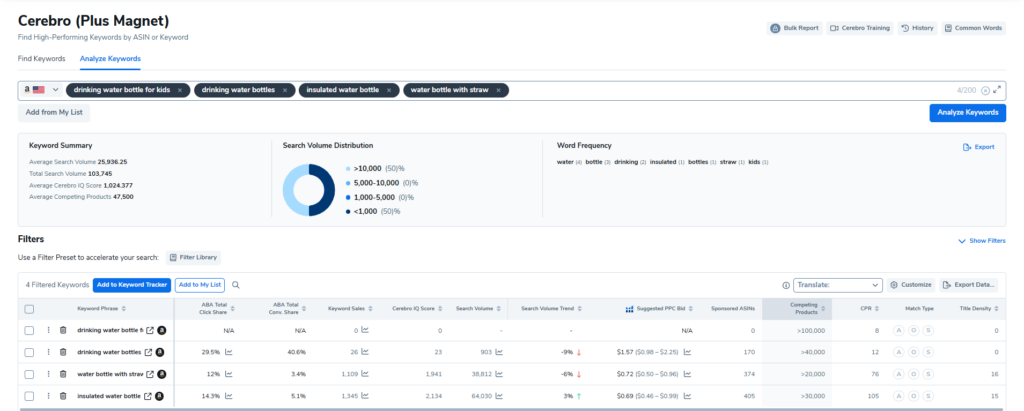
Magnet is Helium 10’s keyword discovery tool. It is useful when sellers want to expand keyword ideas from one seed keyword.
- Enter a seed keyword such as “insulated water bottle,” “boot mat,” or “fish oil.”
- Review the related keyword suggestions.
- Use filters such as search volume, competing products, title density or trends.
- Remove keywords that are too broad, irrelevant or weak in buyer intent.
- Group the remaining keywords by product type, feature, use case and buyer need.
- Move the strongest keywords into your listing plan or PPC testing plan.
Keyword Processor
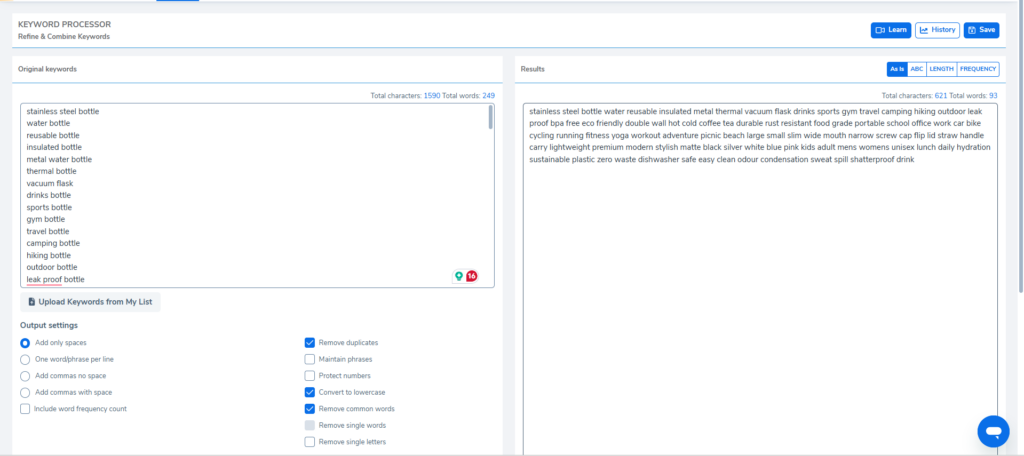
Keyword Processor helps sellers clean and organize keyword lists before using them in a listing. This is useful when keywords come from multiple sources such as Magnet, Cerebro, competitor listings, PPC reports and Amazon Autocomplete.
- Add your raw keyword list.
- Remove duplicate words and repeated phrases.
- Clean unnecessary characters or formatting.
- Remove irrelevant or weak terms.
- Organize keywords into cleaner groups.
- Use the refined list for titles, bullets, backend terms and PPC planning.
Listing Builder
Listing Builder helps sellers create and optimise Amazon listings using selected keyword targets. It connects keyword research with actual listing writing.
- Upload your selected keyword list.
- Build the product title using the most important primary keywords.
- Write bullet points around benefits, features and secondary keywords.
- Add long-tail keywords naturally into the description.
- Use backend terms for relevant phrases that do not fit naturally in visible copy.
- Review the listing for readability, relevance and keyword coverage.
Chrome Extension and Xray
Helium 10’s Chrome Extension and Xray help sellers analyze Amazon search results while browsing. This connects keyword research with actual marketplace results.
- Search your main keyword on Amazon.
- Open the Helium 10 Chrome Extension.
- Use Xray to review the product ranking for that keyword.
- Check competitor ASINs, estimated sales, reviews and pricing.
- Collect relevant competitor ASINs for Cerebro research.
- Use the data to decide whether the keyword is relevant to your product.
How Sellers Should Use Helium 10
- Start with Magnet for seed keyword expansion: Use Magnet first to turn a basic seed keyword into a wider list of related search terms. For example, a keyword like “insulated water bottle” can expand into feature-based, use-case and long-tail keyword ideas.
- Use Cerebro for competitor keyword research: After building your first keyword list, use Cerebro to analyze competitor ASINs. This helps you see which keywords top competitors may be ranking for and which terms appear repeatedly across strong listings.
- Clean the keyword list with Keyword Processor: Once you collect keywords from Magnet, Cerebro and other sources, use Keyword Processor to remove duplicates, unnecessary words and irrelevant terms. This keeps the list focused and easier to use.
- Build the listing with Scribbles or Listing Builder: Use Scribbles or Listing Builder to place keywords naturally into the product title, bullet points, description and backend search terms. The goal is not to use every keyword. The goal is to use the right keywords without making the listing sound stuffed.
- Check indexing with Index Checker: Use Index Checker to confirm whether Amazon is recognising your important keywords. If a key term is not indexed, review your title, bullets, backend terms or listing content.
- Track ranking movement with Keyword Tracker: After optimisation, use Keyword Tracker to monitor whether your product is gaining or losing visibility for important keywords. This helps sellers understand whether the keyword strategy is actually working.
Jungle Scout
Jungle Scout is useful for sellers who want keyword research and market intelligence in the same workflow. Its Keyword Scout tool helps sellers discover search volume, recommended PPC bids and competitive insights. Jungle Scout also says sellers can view historical search volume for up to two years and use that trend data to adjust PPC campaigns and optimize listings.
Keyword Scout
Keyword Scout is Jungle Scout’s main keyword research tool. It helps sellers find search terms, understand keyword demand and review advertising competition.
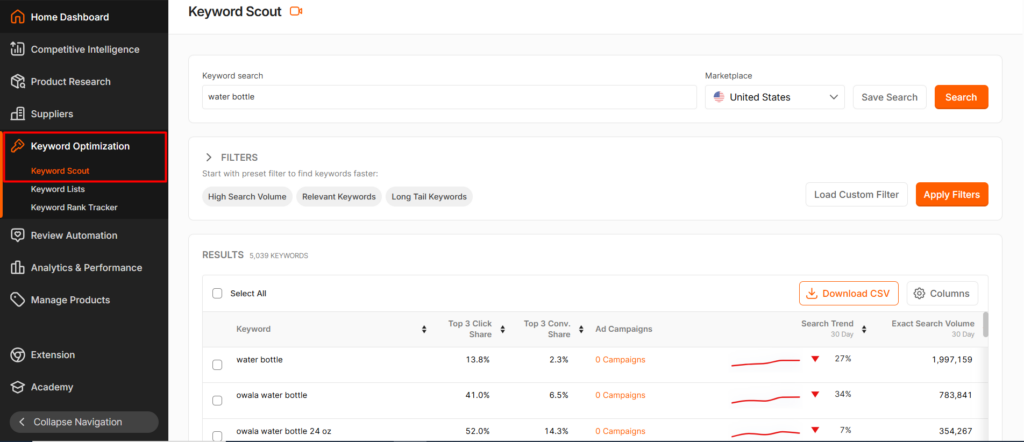
- Enter a seed keyword related to your product.
- Review the keyword suggestions.
- Check the estimated search volume to understand demand.
- Review historical search trends to understand seasonality.
- Check PPC bid suggestions to understand advertising competition.
- Choose keywords that match the product, buyer intent and listing angle.
- Validate the strongest terms with Amazon data or PPC performance.
How Sellers Should Use Jungle Scout
Use Jungle Scout when you want keyword research connected with product and niche research. It is helpful for checking whether a keyword has enough demand, whether demand changes seasonally and whether the competition level makes sense for your product.
How to Map Keywords to Amazon Listing Fields
Once keywords are grouped by intent, place them into the correct listing areas.
| Listing Area | Keyword Role | Example |
| Product title | Primary keyword and core identifiers | VW Golf Mk7 Rubber Boot Liner |
| Bullet points | Benefits, features, and use cases | waterproof raised edge protection |
| Product description | Long-tail context and product explanation | ideal for muddy shoes, shopping spills, and pet hair |
| Backend search terms | Synonyms and variations | car boot tray vehicle boot protector |
| A+ Content | Use cases, comparison points, objections | rubber boot liner vs carpet mat |
| Image text | Fast visual proof points | raised edges, anti-slip surface, easy clean |
| FAQs | Buyer questions | Does this fit the upper boot position? |
| PPC campaigns | Tested keyword targets | exact match converting search terms |
This step prevents keyword stuffing because every term has a role. Primary terms define the product. Secondary terms explain benefits. Long-tail terms capture buyer-ready searches. Backend terms cover relevant variations. PPC-proven terms show real performance.
| Keyword mapping formula: Keyword Meaning + Shopper Stage + Listing Placement = Better Keyword Use |
Step-by-Step Amazon Keyword Research in 2026
Amazon keyword research in 2026 is not about collecting the longest keyword list. It is about building a search-term system that helps Amazon understand your product, helps shoppers find it, and helps your listing move buyers from search to purchase.
| 2026 Keyword Research Formula: Seed Keywords + Buyer Intent + Competitor Gaps + Amazon Search Data + PPC Validation + Listing Mapping = Strong Amazon Keyword Strategy |
Step 1: Start With Seed Keywords
Every keyword research process should begin with seed keywords. These are the simple terms that describe your product clearly. They are not the final strategy, but they give sellers a focused starting point before expanding into long-tail phrases, competitor research, Amazon Autocomplete, and PPC search terms.
| Seed Keyword Formula: Product Type + Main Feature + Material + Use Case = Strong Keyword Direction |
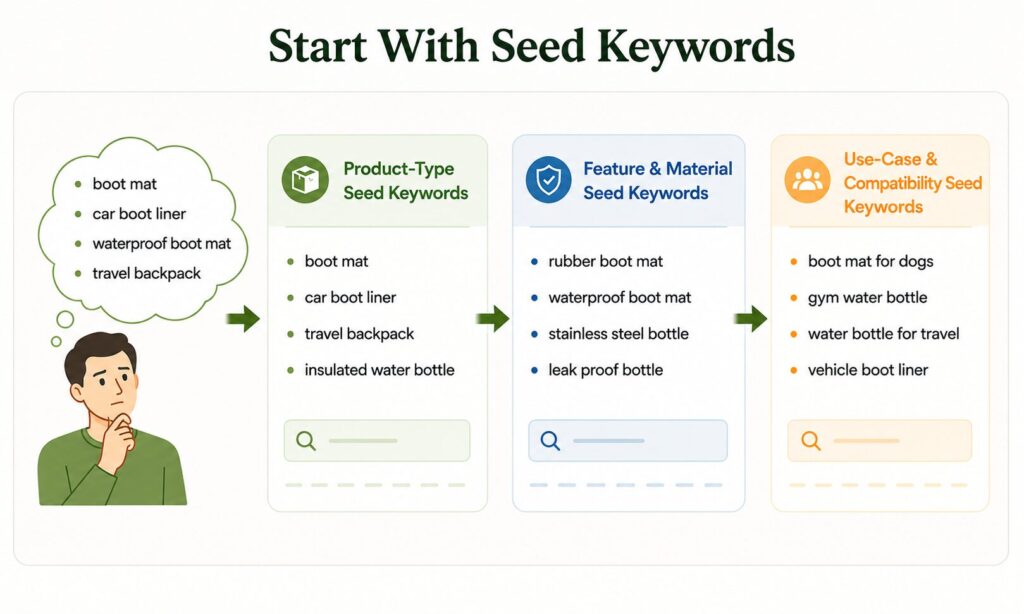
Seed keywords usually come from three areas:
- Product-Type Seed Keywords: These describe what the product is, such as boot mat, car boot liner, insulated water bottle, fish oil supplement or travel backpack.
- Feature or Material-Based Seed Keywords: These describe the product’s material or key feature, such as rubber boot mat, waterproof boot mat, stainless steel bottle, leak proof bottle or non-slip car mat.
- Use-Case or Compatibility-Based Seed Keywords: These describe how or where the product is used, such as boot mat for dogs, gym water bottle, car boot protector, vehicle boot liner or water bottle for travel.
Expand Seed Keywords With Amazon Autocomplete
After choosing seed keywords, use Amazon Autocomplete to find real shopper search phrases. Type each seed term into the Amazon search bar and review the suggested phrases. These suggestions show how shoppers commonly search on Amazon.
If the seed keyword is “water bottle,” Amazon may suggest phrases like water bottle with straw, water bottle for gym, water bottle stainless steel, water bottle leak proof, water bottle for kids, and water bottle 1 litre.
| Search Term | Buyer Intent | What It Shows |
| water bottle | Broad intent | Shopper is still exploring |
| stainless steel water bottle | Feature intent | Shopper wants a specific material |
| water bottle for gym | Use-case intent | Shopper has a clear purpose |
| leak proof water bottle with straw | Purchase intent | Shopper knows what they want |
Step 2: Analyze Competitor Listings
Check Competitor Product Titles
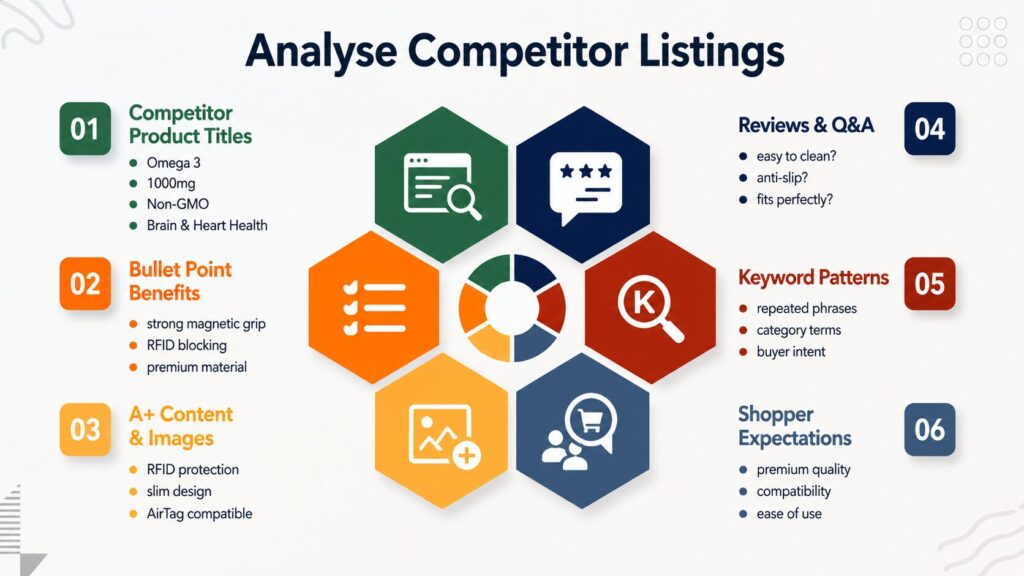
Start with competitor product titles because they show the main phrases sellers are targeting.
This competitor title uses terms such as Glucosamine Chondroitin MSM, Joint Support, Supplement for Women and Men, Glucosamine Sulfate 1500 mg, Chondroitin and MSM, Cartilage, Joint Health, Flexibility, and 90 Capsules.
These terms show what the seller wants Amazon and shoppers to understand. Glucosamine Chondroitin MSM explains the product type and key ingredients. Joint Support, Joint Health, Cartilage, and Flexibility target benefit-led search intent. Supplement for Women and Men expands audience relevance, while 1500 mg and 90 Capsules provide dosage and quantity details that shoppers often compare before buying.
Analyze Bullet Points for Benefit Keywords
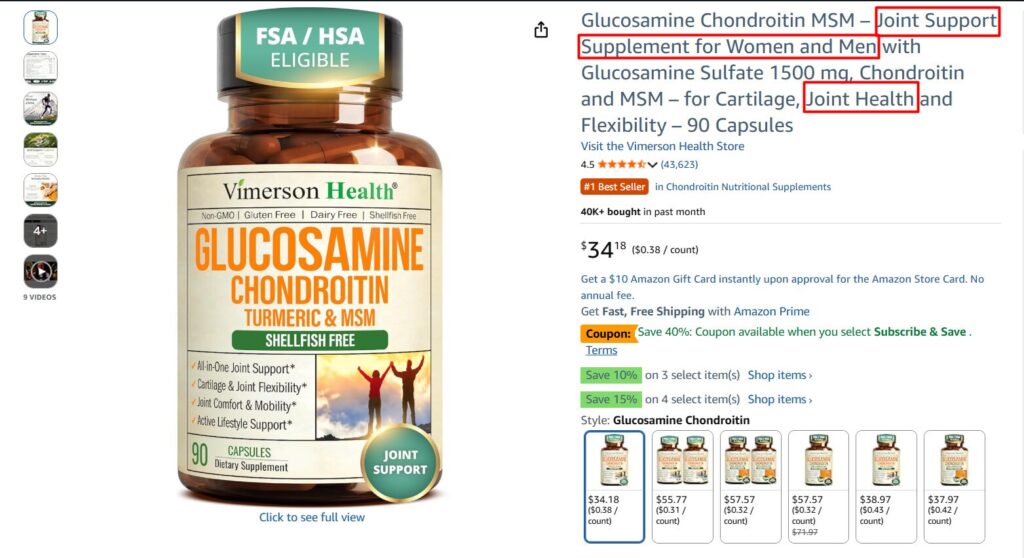
Bullet points usually reveal secondary terms, buyer benefits, and use-case language.
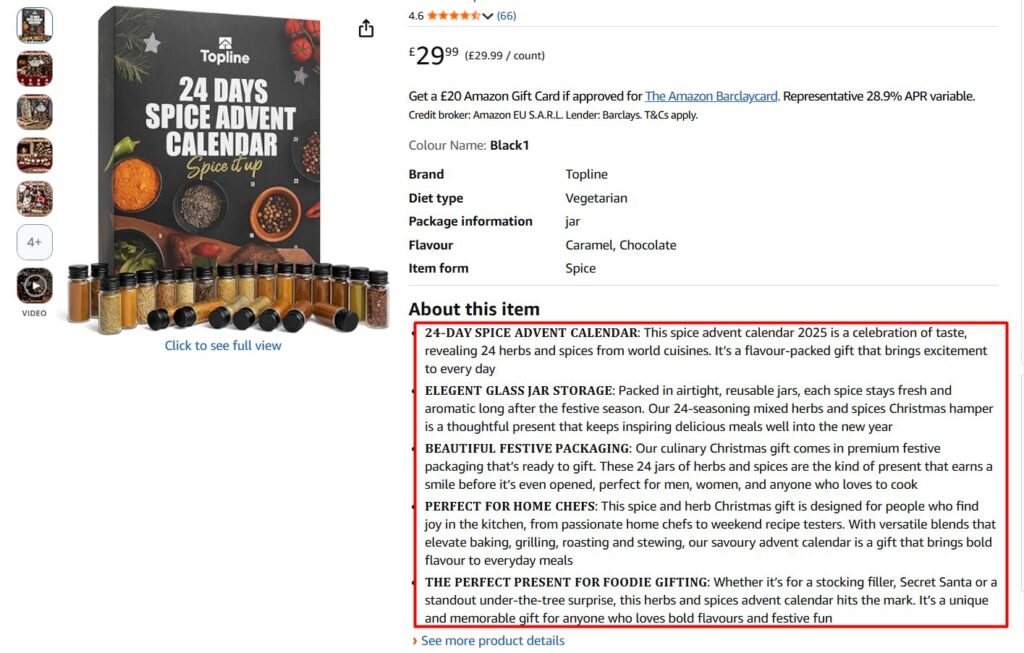
Here, the bullets use phrases like “24-day spice advent calendar,” “herbs and spices,” “airtight reusable jars,” “festive packaging,” “Christmas gift,” “home chefs,” “foodie gifting,” “stocking filler,” and “Secret Santa.” These phrases show what shoppers may care about after landing on the listing: the number of items, freshness, packaging, gifting use, Christmas occasion, and target buyer.
Review A+ Content and Image Text
A+ Content and image text are useful because they show how competitors explain the product visually. The image text highlights phrases like “upgraded adhesive,” “never fall off,” “magnetic phone holder for car,” “dashboard mount,” “strong magnets,” “phone mount,” and “car accessories.”
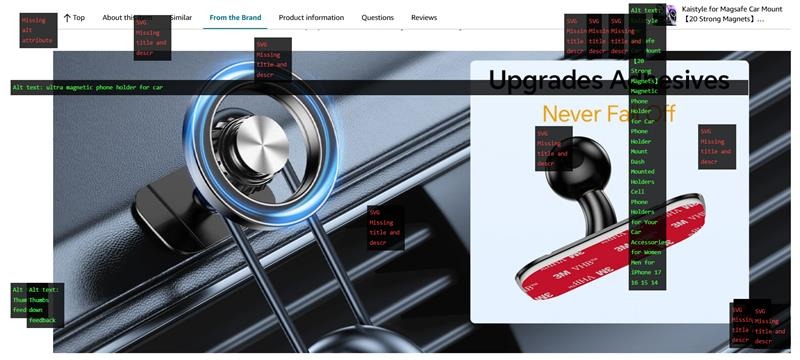
These phrases show what the competitor wants shoppers to notice quickly: stronger grip, reliable adhesive, magnetic holding power, dashboard use, and car compatibility.
Study Reviews and Q&A for Buyer Language
Reviews and Q&A often reveal the exact words buyers use. Shoppers may ask:
- Will this fit my car model?
- Is it easy to clean?
- Does it smell like rubber?
- Is it suitable for dogs?
- Does it slide around in the boot?
- Does it have raised edges?

Use Competitor Research to Improve Listing Structure
| Competitor Finding | What It Shows | How to Use It |
| Repeated title keywords | Main category terms | Use naturally in title if relevant |
| Repeated bullet benefits | Buyer priorities | Explain those benefits more clearly |
| Repeated image claims | Visual proof points | Add stronger image callouts |
| Repeated review questions | Buyer objections | Add FAQ, bullet or A+ Content section |
| Missing compatibility details | Content gap | Make fitment clearer |
| Weak comparison content | Decision gap | Add comparison chart or A+ module |
| Repeated complaints | Buyer pain point | Address the issue if your product solves it |
Step 3: Use Keyword Tools for Discovery
Once you have seed keywords, autocomplete ideas, and competitor insights, use keyword tools to expand the research.
Tools such as Helium 10, Jungle Scout, Data Dive, MerchantWords, and AMZScout can help sellers find search volume estimates, reverse ASIN keywords, competitor gaps, related phrases, long-tail keywords, and ranking opportunities.
Use keyword tools to:
- Expand seed keywords into more search terms
- Analyze competitor ASINs
- Find long-tail phrases
- Identify keyword gaps
- Check estimated search demand
- Organize terms into clusters
- Track ranking movement
Use keyword tools based on their main purpose:
- Magnet: Best for expanding seed keywords into related keyword ideas, long-tail phrases and search demand opportunities.
- Cerebro: Best for reverse ASIN research and finding keywords that competitors may be ranking for.
- Keyword Scout: Best for checking keyword demand, search volume trends, PPC bid estimates and keyword competitiveness.
- Data Dive: Best for organising large keyword lists, clustering keywords by intent and building a cleaner listing strategy.
- MerchantWords: Best for discovering broader Amazon search terms, marketplace keyword variations and shopper search trends.
- AMZScout: Best for reverse ASIN research, keyword tracking, competitor keyword discovery and ranking movement.
- Keyword Processor: Best for cleaning keyword lists by removing duplicates, irrelevant terms and repeated words.
- Keyword Tracker Tools: Best for monitoring whether your product is gaining or losing visibility for important keywords over time.
Step 4: Validate With Amazon Brand Analytics
Amazon Brand Analytics should be part of your 2026 keyword research process. It helps sellers move beyond third-party estimates and understand how customers search, click, and buy inside Amazon’s own shopping environment.
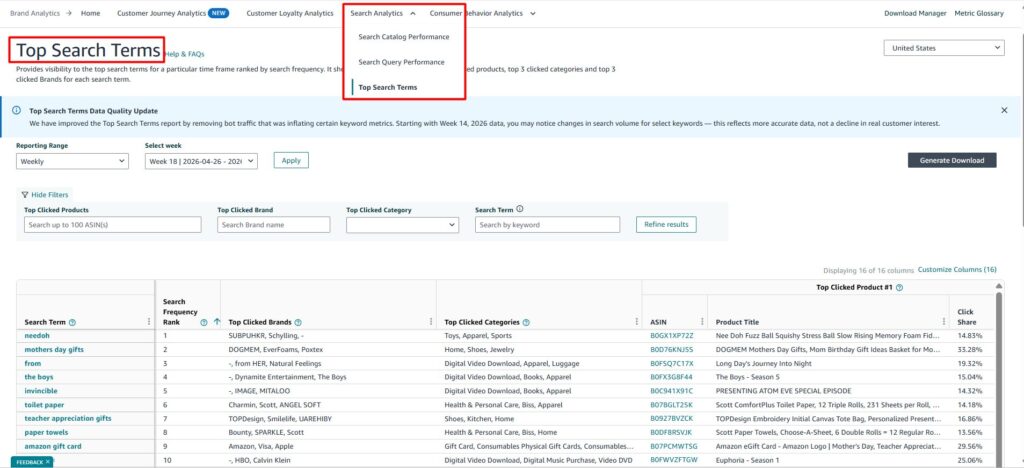
Amazon Brand Analytics gives eligible brand owners access to useful dashboards such as Search Query Performance, Search Catalog Performance, Top Search Terms, and Market Basket Analysis. Sellers usually need a Professional selling account and Brand Representative access for a brand enrolled in Brand Registry.
Check the Amazon Search Terms Report
Start with the Amazon Search Terms report. This report helps sellers review search frequency, click share, and conversion share.
Search frequency shows how often shoppers search a term. Click share shows which products attract shopper clicks. Conversion share shows which listings turn those clicks into purchases. This helps sellers separate visible terms from valuable terms.
Compare Broad Keywords With Specific Keywords
A broad keyword may have high demand, but that does not mean it is the best phrase for your listing.
For example, fish oil may have broad demand, but halal omega 3 fish oil may show stronger buyer intent for a specific audience. The second phrase is more specific, which can make it more useful for targeting, listing content, and PPC testing.
| Brand Analytics Metric | What It Tells Sellers |
| Search Frequency | How often shoppers search the term |
| Click Share | Which products attract shopper clicks |
| Conversion Share | Which listings turn clicks into sales |
| Top Clicked Products | Which competitors shoppers prefer |
| Top Converted Products | Which listings are winning purchases |
Step 5: Use Product Opportunity Explorer to Find Demand and Gaps
Product Opportunity Explorer is useful for 2026 keyword research because it connects search terms with product and niche demand. It helps sellers look beyond lists and understand what customers are actually searching for, viewing, and buying inside a niche.
Amazon says Product Opportunity Explorer groups products into niches that represent specific customer needs. These niches are created by grouping search terms based on the products customers view or purchase after searching. Sellers can use the tool to explore demand data, search volume, purchasing behavior, competitive pricing, niche saturation, reviews, returns, and product features that drive sales.
1. Start With a Broad Product Keyword
Begin with a broad phrase related to your product, such as water bottle, boot mat, fish oil, or travel backpack. Then review the niche results Amazon shows. Look at the search terms, customer needs, pricing patterns, review levels, product gaps, and competition inside that niche.
This helps sellers understand whether the phrase is only popular or whether it connects to a real product opportunity.
2. Identify Repeated Customer Needs
After reviewing the niche, look for repeated customer needs. These often become strong keyword ideas because they show what shoppers care about most.
For example, shoppers may repeatedly search for or respond to terms such as leak proof, easy clean, custom fit, for dogs, travel size, or high strength. These terms can become more than keywords. They can guide your product title, bullet points, image text, A+ Content, FAQs, and PPC campaigns.
3. Find Product and Content Gaps
Product Opportunity Explorer can also reveal gaps in the market. If a niche has demand but many products have weak reviews, unclear images, poor feature explanations, or missing details, that can become a listing opportunity. Sellers can use those gaps to create stronger content and better targeting.
For example, if shoppers want a custom fit boot mat for dogs, but competitor listings do not clearly show pet use, waterproof protection, or easy cleaning, those details can become keyword and content opportunities.
| Product Opportunity Formula: Search Demand + Customer Need + Weak Competition = Keyword Opportunity |
Step 6: Review Search Query Performance
Search Query Performance is one of the most important keyword research reports for 2026 because it shows how search queries move through the shopping funnel.
It helps sellers understand more than search volume. You can see how each query performs through impressions, clicks, cart adds, and purchases. This gives a clearer picture of whether a term is only creating visibility or actually helping shoppers move closer to buying.
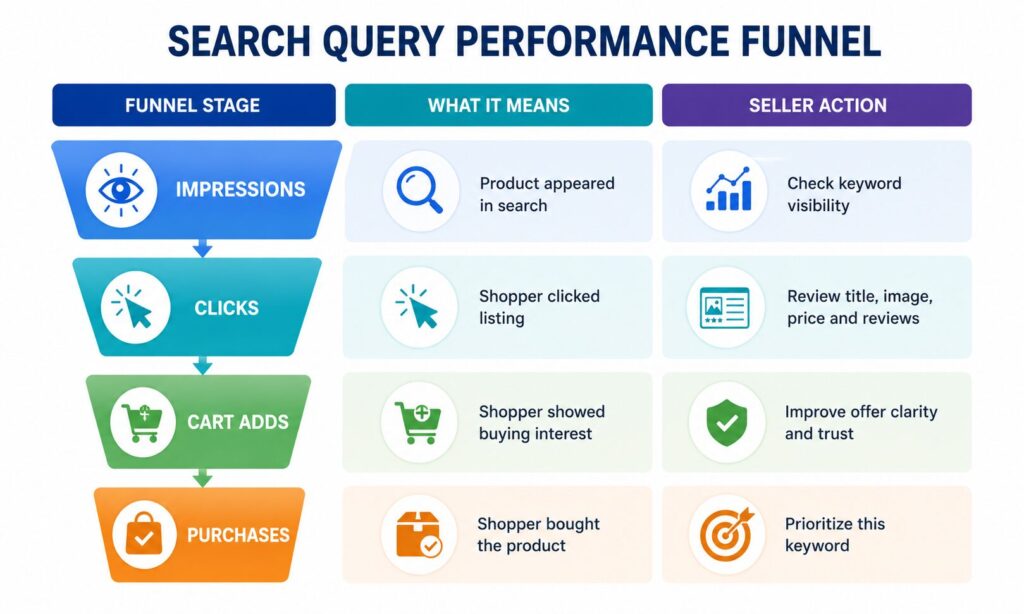
Search Query Performance Insights
- Weak Search Appeal: Many impressions but few clicks mean the title, image, price, reviews, or offer may not be strong enough.
- Conversion Problems: Clicks but few purchases mean the listing may not answer buyer questions clearly enough.
- Hidden Long-Tail Opportunities: Fewer impressions but strong purchases may show high-intent keywords worth adding to SEO or PPC.
Step 7: Validate With PPC Search Term Reports
PPC Search Term Reports show what shoppers typed before your Amazon ads appeared, making them a strong keyword validation source.
Keyword tools can estimate demand, but PPC data shows which terms actually received impressions, clicks, orders, and sales. This helps sellers move from keyword guessing to keyword proof. High-performing search terms can be added to SEO and campaigns, while weak or irrelevant terms can be used as negative targets.
Find Keywords Worth Adding to SEO
If a search term converts well through PPC, it may deserve a stronger placement in your organic listing. Depending on the keyword type, it can be added naturally to:
- product title
- bullet points
- product description
- A+ Content
- backend search terms
- image text
Identify Wasted or Weak Keywords
If a term gets clicks but no sales, review it carefully.
The issue may be weak listing content, poor offer positioning, low review trust, uncompetitive pricing, or a phrase that attracts the wrong shoppers. Not every high-click term deserves SEO placement. Some terms should be improved, reduced in bid, or added as negative keywords.
Use PPC Data to Make Keyword Decisions
| PPC Result | What It Means | SEO Action |
| High clicks + high orders | Strong keyword | Add naturally to listing |
| High impressions + low clicks | Weak search appeal | Improve title, image, price or reviews |
| High clicks + no orders | Poor conversion or wrong intent | Review listing or add negative |
| Low impressions + strong orders | Hidden long-tail opportunity | Add to SEO and increase PPC support |
| High spend + no orders | Wasted traffic | Reduce bid or add negative keyword |
Step 8: Build a Buyer Intent Keyword Map
The next step is to group phrases by buyer intent. Search intent means the reason behind the shopper’s search. Some shoppers are still learning. Some are comparing options. Some are ready to buy. In 2026, this matters more because Amazon is no longer only matching terms to listings. It is also trying to understand what the shopper wants, what problem they are trying to solve, and which product content best answers that need.
That is why sellers need a keyword map. It helps you decide which terms belong in the title, bullets, backend search terms, A+ Content, Q&A, Brand Store pages, and PPC campaigns.
| Intent Mapping Formula: Keyword Meaning + Shopper Stage + Listing Placement = Better Keyword Use |
| Keyword Intent | Example | What It Means | Best Use |
| Broad discovery | water bottle | Shopper is exploring | Category relevance |
| Feature intent | stainless steel water bottle | Shopper wants a feature/material | Title, bullets |
| Use-case intent | water bottle for gym | Shopper has a purpose | Bullets, images, A+ |
| Problem-solving intent | leak proof water bottle | Shopper wants a solution | Bullets, images |
| Purchase intent | 32 oz leak proof water bottle with straw | Shopper knows what they want | Title, bullets, PPC |
| Backend variation | reusable flask | Alternative phrase | Backend search terms |
| PPC-proven term | insulated bottle 32 oz | Performance-backed keyword | Listing and campaign priority |
How to Use Keywords by Intent
Informational keywords
Informational keywords should not take up too much title space. These keywords are better for educational sections, such as A+ Content, Brand Store pages, comparison guides, Q&A and image explanations. For example, phrases like “how to choose a water bottle” or “benefits of turmeric for joints” help shoppers learn before buying.
Comparative keywords
Comparative keywords are useful when shoppers are evaluating options. These terms work well in comparison charts, A+ Content, bullet points and Sponsored Brands campaigns. For example, “stainless steel vs plastic water bottle” can be supported with content explaining durability, insulation, safety and daily use.
Transactional keywords
Transactional keywords are the highest-priority terms because they show stronger buying intent. These should be placed closer to the main conversion areas, such as the product title, first two bullet points, backend search terms and Sponsored Products campaigns. For example, “40 oz insulated water bottle with straw” tells you the shopper already knows the size, product type and feature they want.
Match Keyword Intent With Listing Placement
| Intent Type | Best Listing Placement | Best Ad Use |
| Informational | A+ Content, Brand Store, Q&A, educational images | Sponsored Brands, video ads, awareness campaigns |
| Comparative | A+ comparison charts, bullets, image text, Brand Store pages | Sponsored Brands Video, Top of Search, comparison-led ads |
| Transactional | Title, first bullets, backend terms, product description | Sponsored Products, exact match, phrase match |
Step 9: Map Keywords to Listing Fields
Once terms are grouped by intent, place them into the correct listing areas.
| Keyword Mapping Formula: Right Keyword + Right Field + Natural Placement = Stronger Listing Relevance |
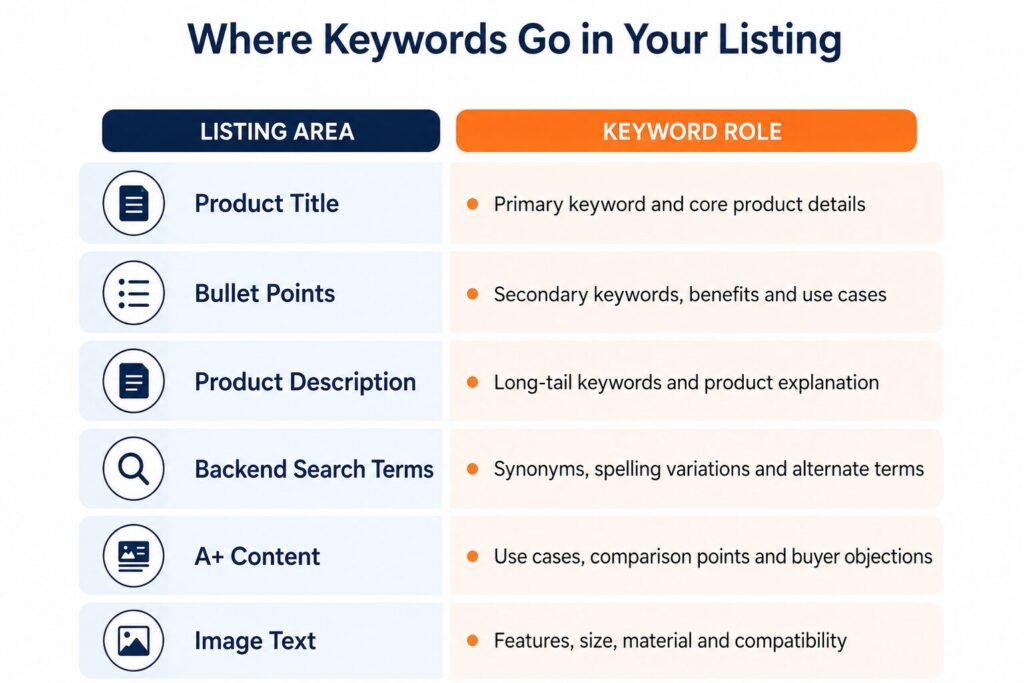
The product title should include the primary phrase and the most important product identifiers, such as product type, material, size, quantity, compatibility, or key feature. Bullet points should include secondary terms, benefits, and use-case phrases. This is where sellers explain why the product matters.
The product description should include long-tail phrases and fuller product context. It gives sellers space to explain who the product is for, how it works, and what problem it solves. Backend search terms should include relevant synonyms, spelling variations, alternative names, and extra phrases that do not fit naturally in visible copy.
A+ Content should explain use cases, comparison points, buyer objections, product benefits, and brand trust. Image text should highlight important features, size, material, compatibility, and problem-solution points.
Step 10: Optimize for Rufus and AI Search Context
This step is important for 2026 because Amazon shopping is becoming more conversational and use-case-driven.
Amazon says Rufus can search for products based on activity, event, purpose, and other use cases. Amazon also describes Rufus as an AI assistant that provides product recommendations and tailored answers based on conversational context.
This means sellers should not only optimize for short terms like water bottle or boot mat. They should also make the listing clear enough for intent-led and question-style searches. A Rufus-friendly keyword strategy should answer:
- Who is this product for?
- What problem does it solve?
- When should it be used?
- What material, size or compatibility details matter?
- What makes it different from similar products?
- What questions do buyers ask before purchasing?
| AI Search Insight: Rufus-friendly keyword research is not about adding a “Rufus keyword.” It is about giving Amazon clearer product context. |
Step 11: Build or Update the Listing Naturally
After mapping keywords, update the listing carefully. The goal is not to force in more terms, but to make the listing clearer, more relevant, and easier for shoppers to trust.
- Update the title: Use the primary keyword naturally and explain the product clearly. Avoid repeating the same phrase multiple times
- Improve the bullet points: Use each bullet for one clear benefit, feature, or use case. Add secondary keywords only where they fit naturally
- Rewrite the product description: Add long-tail keywords and explain the product in more detail, including who it is for, how it works, and what problem it solves
- Review backend search terms: Add relevant synonyms, spelling variations, and alternative names without unnecessarily repeating visible keywords
- Check A+ Content: Use this section to explain product benefits, use cases, comparison points, compatibility, material, size, quality, and buyer concerns
- Improve image text: Add short visual callouts for key features, product size, material, compatibility, and problem-solving benefits
- Keep the copy natural: Make sure the listing sounds helpful and readable, not keyword-stuffed
Step 12: Monitor Performance After Updates
After updating the listing, monitor performance with data. Search behavior changes constantly because of seasonality, new competitors, pricing changes, shopper trends, PPC performance, and Amazon algorithm updates.
If impressions increase but clicks stay weak, review the title, hero image, price, and review rating. The product may be visible, but not attractive enough in search results.
If clicks increase but purchases do not, review the offer, listing content, product images, A+ Content, and trust signals. Shoppers may be interested, but the listing may not be answering the final buying questions.
If PPC terms start converting strongly, consider adding them naturally to organic SEO. A search phrase that performs well in ads may deserve stronger placement in the title, bullets, description, backend fields, or A+ Content.
- Weekly: Review Sponsored Products Search Term Reports. Add converting search terms to campaigns, adjust bids and add wasted-spend terms as negative keywords.
- Monthly: Check Brand Analytics and Search Query Performance. Look for changes in search terms, click share, conversion share and emerging competitors.
- Quarterly: Do a full keyword and listing refresh. Update the listing for seasonal demand, new product features, competitor changes, review insights and new keyword trends.
Track Keyword Trends
Consumer language changes. A term that did not matter six months ago may become important because of a new trend, seasonal demand, or a shift in how shoppers describe the product.
Use keyword tools, PPC reports, Search Query Performance, and customer reviews to spot emerging phrases. This helps sellers stay ahead of competitors who set up their listings once and never update them.
Think in Keyword Clusters
Do not track keywords one by one. Keep a master keyword map organized by clusters.
For example, track groups like gift keywords, beginner keywords, eco-friendly keywords, pet-use keywords, compatibility keywords, or premium-quality keywords. This makes performance easier to understand. Instead of getting lost in hundreds of individual metrics, sellers can see which themes are driving results and which themes are underperforming.
A/B Test Listing Elements
If performance is not improving, test the elements shoppers notice first. Start with:
- Product title, especially the first 80 characters visible on mobile.
- Hero image, because it strongly affects click-through rate.
- First two bullet points, because they carry major buyer benefits.
- A+ Content layout, especially comparison charts, use-case sections and trust-building modules.
When available, use Manage Your Experiments to test changes. Small improvements to high-visibility areas can often have more impact than adding one more keyword to the backend.
| Performance Formula: Impressions → Clicks → Cart Adds → Purchases = Keyword Value Path |
Step 13: Repeat the Process Regularly
Amazon keyword research is not a one-time task. Search behavior changes. Competitors update listings. PPC data changes. Customer questions evolve. Seasonal demand shifts. Amazon search and AI shopping tools continue to develop.
For new products, review keyword data more often because early PPC and Search Query Performance can reveal opportunities quickly. For established products, monthly or quarterly reviews may be enough unless performance changes suddenly. A proper keyword review should include:
- New PPC search terms.
- New competitor keyword patterns.
- New customer review language.
- Search Query Performance changes.
- Ranking movement.
- Conversion changes.
- Seasonal keyword opportunities.
- Backend keyword improvements.
- Rufus-style question and use-case opportunities.
How PPC Data Improves Amazon Keyword Research
PPC data is one of the strongest keyword research sources because it shows how shoppers behave after seeing your product.
Use PPC as a Keyword Discovery Engine
Automatic campaigns and broad or phrase match campaigns are useful because they help sellers discover search terms they may not find manually.
An automatic campaign lets Amazon match your product with different search queries based on listing relevance and shopper behavior. After the campaign collects data, the Search Term Report shows which actual terms generated impressions, clicks, and orders.
A smart workflow looks like this:
- Run automatic and broad or phrase campaigns for discovery.
- Download Search Term Reports after enough data has been collected.
- Identify search terms that generated clicks and orders.
- Move converting terms into exact match campaigns.
- Add non-converting or irrelevant terms as negatives.
- Use strong PPC phrases to improve organic listing content.
This is the “harvest and refine” method. Discovery campaigns find the search terms, then sellers move proven converters into more controlled campaigns and organic SEO placement.
PPC Keyword Decision Chart
| PPC Result | What It Means | SEO Action |
| High clicks + high orders | Strong keyword | Add naturally to title, bullets, A+ Content or backend terms |
| High impressions + low clicks | Weak search appeal | Improve title, main image, price or reviews |
| High clicks + no orders | Poor conversion match or wrong intent | Review listing content or add as negative |
| Low impressions + strong orders | Hidden long-tail opportunity | Add to SEO and increase PPC support |
| High spend + no sales | Wasted traffic | Reduce bid, pause or add as negative keyword |
| Strong ROAS + low ACoS | Profitable search term | Prioritize in SEO and exact match campaigns |
Convert PPC Terms Into SEO Keywords
When a search term converts well in PPC, it has already proved buyer intent. That does not mean it should be stuffed everywhere, but it does mean sellers should review where it belongs.
If a Sponsored Products report shows that “RFID blocking card for wallet” converts well, that phrase may deserve placement in a bullet point, product description, A+ Content section, or backend search terms.
If a search term is highly relevant and central to the product, it may even deserve title placement. But if it is more specific or use-case based, it may work better in bullets, images, or A+ Content.
Use Poor PPC Terms
PPC data also shows which terms should not be prioritised.
If “RFID wallet” gets clicks but no sales for an RFID blocking card, shoppers may be expecting an actual wallet, not a card. In that case, the phrase may be too broad or mismatched.
That is useful information. It tells the seller not to force that term into the title or build too much SEO around it. Instead, the seller may add it as a negative keyword or use clearer listing language to avoid attracting the wrong shopper.
This is where PPC protects SEO from poor term decisions. A phrase that brings traffic but no sales can weaken conversion signals, waste ad spend, and confuse the listing strategy.
Use Negative Keywords
Negative keywords are an important part of keyword research because they show what your product should not rank or advertise for.
If a search term is clearly irrelevant, it should be blocked. If a term is partly related but keeps spending without sales, it may need a lower bid, more testing or a negative exact match.
| Search Term Type | PPC Result | Best Action |
| Clearly irrelevant term | Spend with zero sales | Add as negative phrase |
| Partly related exact query | Clicks but no orders | Add as negative exact or test lower bid |
| Relevant but weak term | Spend rising, no profit | Lower bid and monitor |
| Strong converting term | Orders with good ACoS | Add to SEO and exact match campaign |
This keeps campaigns cleaner and helps sellers focus on search terms that attract better shoppers. It also protects the listing from being optimized around weak or misleading keywords.
How to Use PPC Search Terms for SEO
Use this process:
- Run discovery campaigns: Start with automatic campaigns and broad or phrase match campaigns to collect real search term data.
- Download Search Term Reports: Review the report after enough data has collected. Look at impressions, clicks, spend, orders, sales, ACoS and ROAS.
- Identify converting search terms: Find search terms that generated orders or showed strong conversion potential.
- Move winners into exact match campaigns: Strong PPC terms should be isolated into exact match campaigns for better bid and budget control.
- Add strong terms to organic SEO: Use proven keywords naturally in the title, bullets, description, A+ Content, image text or backend search terms.
- Block wasted traffic
Add irrelevant or non-converting terms as negative keywords to stop wasted spend. - Review performance weekly: Search behavior changes. Keep reviewing reports so new opportunities and waste do not go unnoticed.
| PPC Keyword Research Formula: PPC Keyword Value = Relevance + Clicks + Orders + Profitability |
A keyword is not valuable just because it gets traffic. It becomes valuable when it attracts the right shopper, earns the click, converts into an order and supports profitable growth.
Common Amazon Keyword Research Mistakes
Many sellers do keyword research, but they do it in the wrong way.
- Chasing Search Volume Only: High-volume keywords look attractive, but they are not always the best choice. A keyword with lower volume and stronger intent can bring better conversions.
- Ignoring Buyer Intent: If the keyword does not match what the shopper wants, it will not help much. Search intent matters more than keyword count.
- Using the Same Keywords Everywhere: Repeating the same phrase in the title, bullets, description and backend fields does not make the listing stronger. It often makes the copy weaker.
- Skipping Backend Search Terms: Backend search terms are still useful for relevant synonyms and alternate phrases. They should not be ignored.
- Copying Competitors Blindly: Competitor listings can provide ideas, but they are not always optimized properly. Use competitor research carefully.
- Ignoring PPC Search Term Reports: PPC reports show real customer searches and performance. Ignoring them means missing some of the best keyword data available.
- Forgetting Long-Tail Keywords: Long-tail keywords often reveal stronger buying intent. Sellers who ignore them may miss profitable ranking opportunities.
- Never Updating Keywords: Search behavior changes. Competitors change. Product features change. Reviews reveal new language. Keyword strategy should improve over time.
Build a Keyword Strategy for 2026 That Helps Products Rank and Sell
Amazon keyword research is not about collecting as many keywords as possible. It is about finding the search terms that match real shopper intent and using them in the right place.
The strongest strategies combine Amazon search behavior, competitor research, keyword tools, Brand Analytics, Search Query Performance, PPC reports, and customer language. This gives sellers a clearer view of what shoppers search, what they click, what they buy, and what they ignore.
In 2026, sellers need to move away from keyword stuffing and toward keyword strategy. That means choosing relevant phrases, mapping them properly, validating them with performance data, and improving listings over time.
The sellers who win will not be the ones stuffing the most keywords into their listings. They will be the ones using research to build clearer, stronger, and more conversion-focused product pages.
Strong keyword research does not just help a product rank. It helps the product sell.
Frequently Asked Questions
1. What is Amazon keyword research?
Amazon keyword research is the process of finding the search terms shoppers use when looking for products on Amazon. These keywords help Amazon understand the product and help sellers improve listing relevance, visibility and ranking potential.
2. Why is keyword research important for Amazon SEO?
Keyword research is important because Amazon needs clear product relevance before showing a listing for shopper searches. Good keyword research helps sellers attract better traffic, improve listing clarity and support conversions.
3. What is the difference between short-tail and long-tail keywords?
Short-tail keywords are broad terms like “water bottle” or “backpack.” Long-tail keywords are more specific phrases like “leak proof gym water bottle with straw” or “waterproof travel backpack for laptop.” Long-tail keywords usually show clearer buying intent.
4. Where should Amazon keywords be placed?
Amazon keywords should be placed naturally across the product title, bullet points, product description, backend search terms, A+ Content and image text. Each keyword should have a clear purpose and placement.
5. Are backend keywords still important?
Yes. Backend keywords can help Amazon understand extra relevant search terms, synonyms and spelling variations that do not fit naturally into visible listing copy. Amazon’s own guidance states that the Generic Keyword attribute is limited to less than 250 bytes.
6. What are the best Amazon keyword research tools?
Popular Amazon keyword research tools include Helium 10, Jungle Scout, Data Dive, MerchantWords and AMZScout. These tools are useful for keyword discovery, competitor research and search volume estimates, but sellers should validate keyword opportunities with Amazon data and PPC performance.
7. How can PPC data help Amazon keyword research?
PPC data shows real shopper search terms, clicks, orders and wasted spend. Sellers can use converting PPC terms to improve listing SEO and use poor-performing terms as negative keyword opportunities.
8. How often should sellers update Amazon keywords?
Sellers should update keywords when data shows a clear reason, such as PPC results, ranking changes, seasonal trends, new competitor activity, review insights or Search Query Performance opportunities. Keyword updates should be strategic, not random.
Watch how we help sellers improve SEO and build stronger visibility:
Amazon Is Overcharging Sellers (Check This NOW)
Amazon PPC Keyword Research with Claude AI (2026) | Find Winning Keywords Fast
Amazon Listing Audit Guide 2026 | Turn Traffic into Sales
4 Costly Mistakes New Amazon Sellers Are Making in 2026 (You Need to Know)
Need Help With Amazon Keyword Research?
Amazon keyword research is not just a list-building task. It requires search data, competitor analysis, PPC validation, keyword mapping and ongoing listing improvement.
At Ecomclips, our team helps Amazon sellers build keyword strategies that improve visibility, ranking potential, and conversion performance. From keyword research and listing optimization to PPC strategy and A+ Content, we help brands create product pages that Amazon can understand and that shoppers can trust.
Ecomclips: Your Complete eCommerce Solution Under One Umbrella
At Ecomclips, we bring every eCommerce service you need under one roof — strategy, operations, design, marketing, and growth, all seamlessly connected to help your brand thrive across every marketplace.
Since 2012, we’ve been helping businesses of all sizes launch, scale, and dominate online. From Amazon, Walmart, eBay, and Etsy to Shopify and WooCommerce, our team of marketplace experts, designers, developers, and marketers works together to deliver measurable results.
Our services span the full eCommerce lifecycle:
- Account Setup & Product Listing Management: We handle registrations, compliance, and product data optimization across all marketplaces.
- Amazon Optimization Service: From keyword-rich titles and A+ content to PPC campaigns and storefront design, we craft listings that convert.
- Creative Design & Content Production: A+ visuals, infographics, brand stores, and product videos built to boost engagement.
- Advertising & PPC Management: Smart, data-driven ad strategies for Amazon, Walmart, and Google that maximize ROI.
- Web Development & Store Design: Shopify, WooCommerce, and Magento websites built for performance and conversion.
- Data Management & Automation: Streamlined product feeds, catalog syncing, and inventory control for effortless scalability.
- Customer Service & Order Fulfillment: End-to-end support that enhances customer satisfaction and builds long-term loyalty.
- Analytics & Growth Strategy: Real-time insights and ongoing optimization to ensure consistent, profitable growth.
Whether you’re launching a new store or managing multiple global marketplaces, Ecomclips acts as your single strategic partner, simplifying complexity and driving sustainable revenue growth.