
For most new Google Ads accounts, the best bidding strategy is Maximize conversions. If your cost per click runs too high on that strategy, a portfolio Target CPA strategy with bid limits gives you a middle ground. You keep the conversion focus, and you still put a ceiling on what you pay for a click.
A new advertiser recently asked a question that many people ask when they open a fresh account. They launched Search campaigns with Maximize conversions and exact match keywords, and their cost per click came in about three times higher than they expected. Then they switched to Maximize clicks with a cost per click cap, and their impressions and clicks dried up.
So which one should you pick? This guide walks through all three options, what to expect in your first month, and how to choose match types.
A quick note on the screenshots: The Google Ads screenshots come from an account that uses Australian dollars, so you will see amounts shown as A$.
Do you need conversion data to use Smart Bidding?
No, you do not need conversion data to start with Maximize conversions or Target CPA. Many advertisers think they must run Maximize clicks first to “feed” the account, but Google does not require that.
Google’s Smart Bidding guide lists the minimum conversions for each strategy.
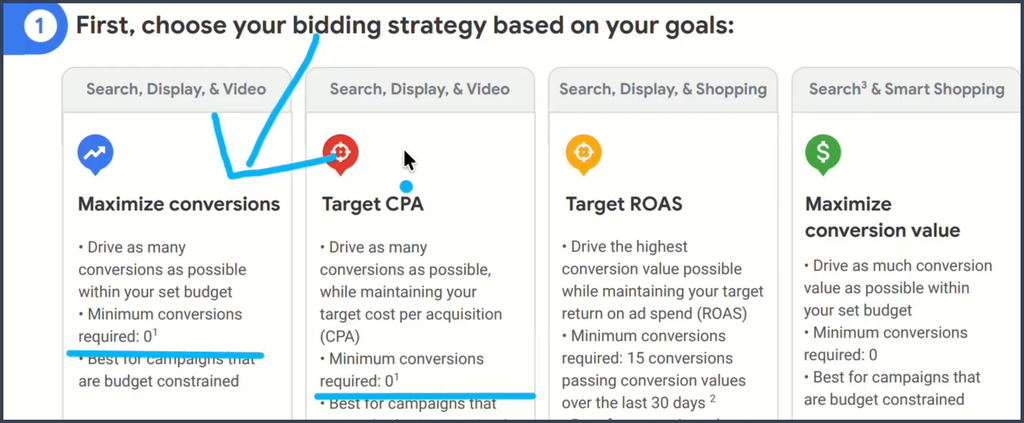
Both Maximize conversions and Target CPA show “Minimum conversions required: 0.” Google’s current Target CPA help page says the same thing: advertisers can start using Target CPA with no conversion history.
You do need one thing in place first. Google says you must set up conversion tracking to use Maximize conversions. Without it, Google has nothing to aim for. Make sure your tracking counts real leads, calls, or sales, not page views.
Why Maximize clicks often gives you weak results
Maximize clicks sets your bids to get as many clicks as possible within your budget. That sounds good for a new account, but clicks and customers are not the same thing.
With Maximize clicks, Google shows your ad to almost anyone who searches for your keyword, without looking for buying intent. Your ad can reach researchers, people looking for a competitor, and traffic that will never convert.
When you add a low cost per click cap, you make the problem worse in a different way. You lose the auctions where serious buyers compete, so you get fewer impressions and fewer clicks. That matches what the new advertiser saw: limited traffic and weak performance.
Google’s guide to picking a bid strategy pairs Maximize clicks with a traffic goal, not a conversion goal. So use it only when traffic is truly what you want. One common case is a brand campaign that only targets people who search for your exact business name.
Why Maximize conversions can cost more at the start
Maximize conversions uses Google’s AI to set a bid for each auction, and it tries to get as many conversions as possible within your budget. Google does not just look at the keyword. It also looks at signals about the person searching, such as whether they seem ready to buy.
That focus on buyers explains the high cost per click. Ready buyers draw the most competition, so their clicks cost more. Google also says Maximize conversions will try to fully spend your average daily budget.
A fresh account adds another problem. Google does not know which people click your ads, which ones convert, or what a normal cost per conversion looks like for you. It has to learn all of that from scratch.
Google calls this the Smart Bidding learning period. In our experience, a brand new account takes longer than a single learning period to settle. Plan for your first 30 to 45 days to cost more than the months that follow.
The third option: a portfolio Target CPA with bid limits
A portfolio Target CPA strategy gives you the best of both worlds. You keep Google’s focus on conversions, and you add a maximum and minimum cost per click, much like a cap on Maximize clicks.
Portfolio bid strategies live in the shared library, not inside one campaign. To find them, go to Tools, then Budgets and bidding, then Bid strategies.
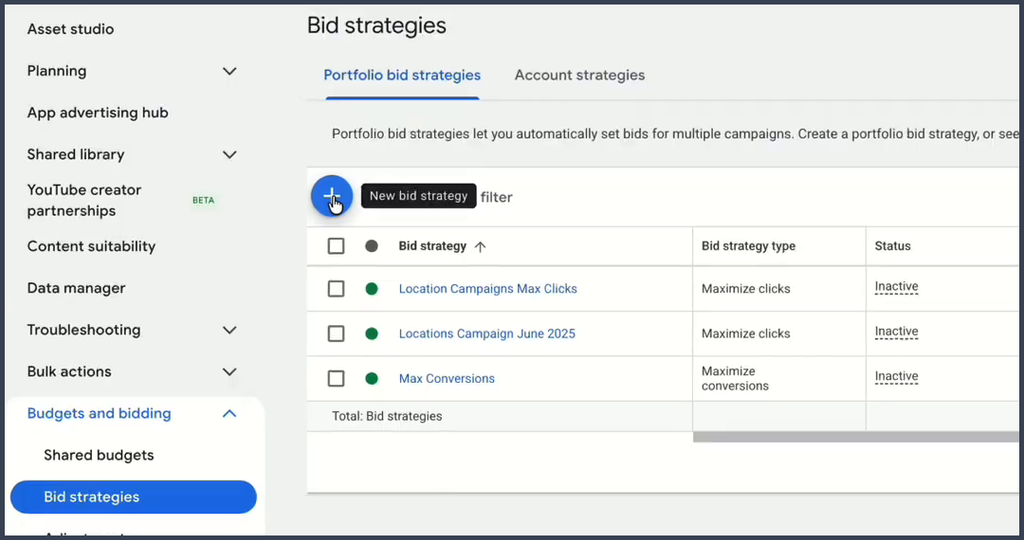
Click the blue plus button to create a new bid strategy. A menu opens with each strategy type.
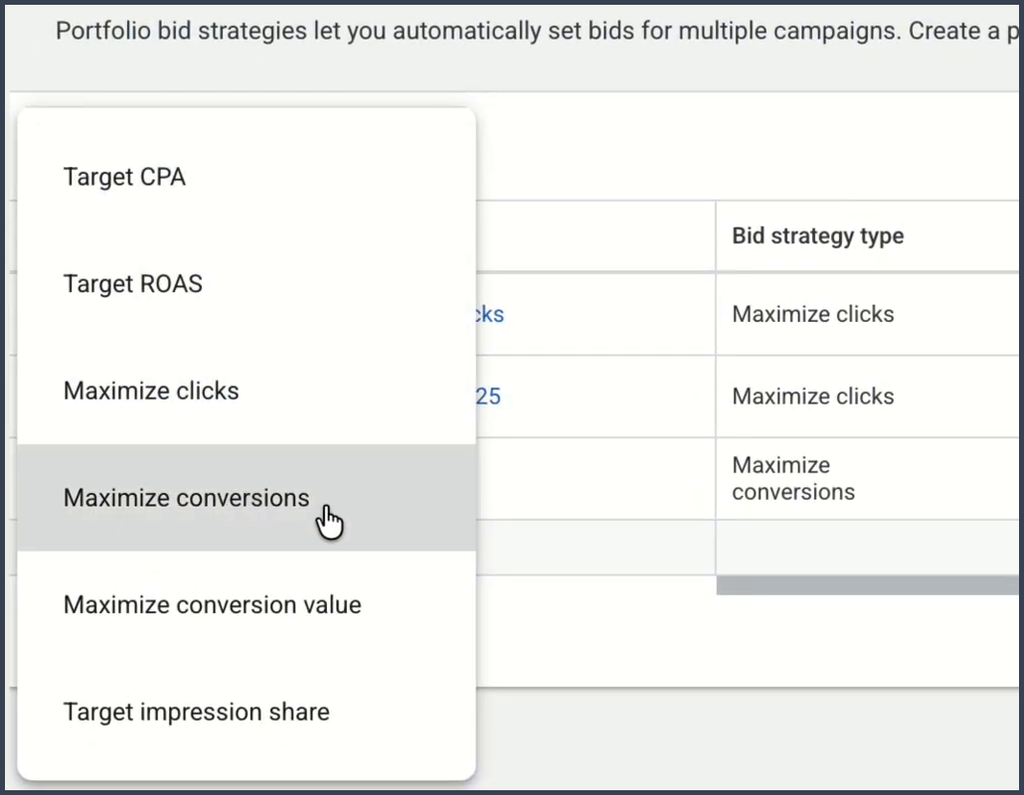
Choose Target CPA, not Maximize conversions. Note that since June 2026, Google calls the old “Maximize conversions with a Target CPA” setting simply “Target CPA.” The bidding works the same way.
Then follow these steps:
- Name the strategy and select the campaigns you want to include.
- Enter a realistic Target CPA based on what a lead or sale is worth to you.
- Open the advanced options.
- Set a maximum bid limit, the most you will pay for one click.
- Set a minimum bid limit if you want one.
- Click Save.
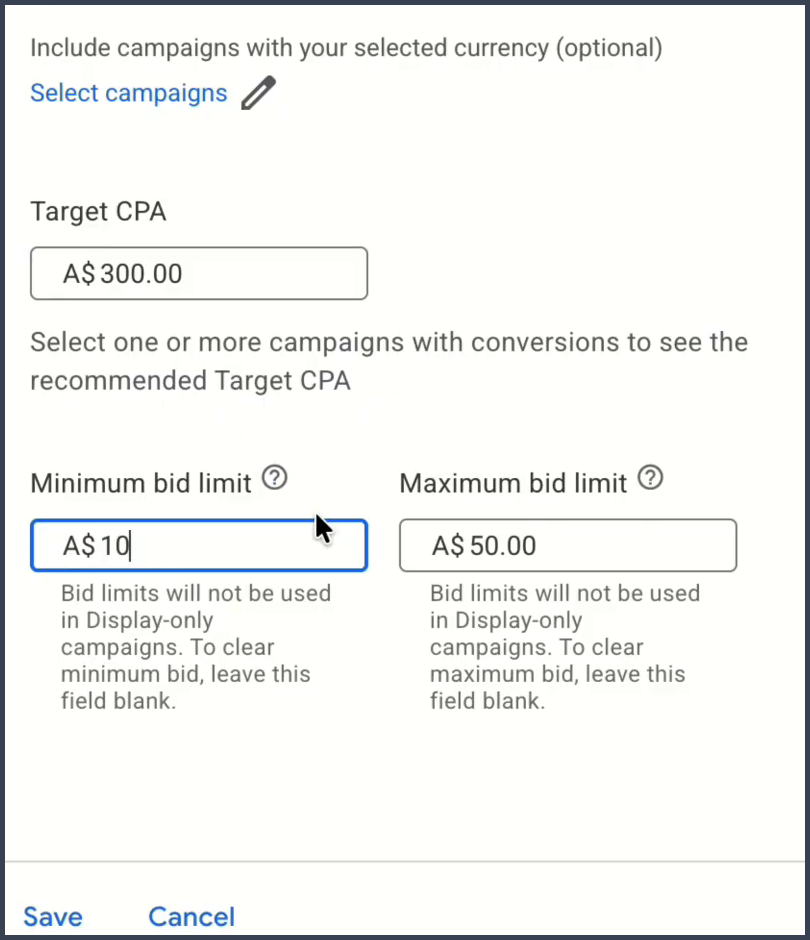
In this example, the target sits at A$300 per conversion. The maximum bid limit sits at A$50, so Google will not bid more than that for a click. The minimum bid limit sits at A$10.
To pick your numbers, check Keyword Planner for the typical cost per click in your market. If the average click costs around A$7, a A$10 minimum and a A$50 maximum give Google room to compete without running wild.
Use bid limits with care
Bid limits come with two catches you should know about:
- Google does not recommend them. Google says bid limits on Target CPA can restrict its automatic optimization and stop it from bidding the amount that best meets your target.
- They only work in a few places. Bid limits only apply to portfolio strategies, not standard ones, and only in Search Network auctions. Google also notes the minimum is not a hard floor.
So treat bid limits as a safety net for your first few weeks. Google’s portfolio help page describes a maximum limit as a way to prevent sudden cost per click spikes. Once conversions become steady, loosen or remove the limits and compare results.
What to expect in your first month
No bid strategy fixes the fact that a new account has no data. Whether you pick Maximize conversions or a portfolio Target CPA, Google still starts from zero. It does not even know whether your conversion is a form fill, a phone call, or a sale.
Expect your first month to cost more per lead than later months, and expect results to swing from day to day. A few accounts do great right away, but they are the exception.
Allow at least two to three weeks before you decide whether a new campaign is on the right track. Avoid big changes during that window, since each change can restart the learning.
Review your search terms every few days
Your search terms report is your best tool in the first few weeks. It shows the real searches that triggered your ads, so you can spot waste early.
To open it, go to Insights and reports, then Search terms.
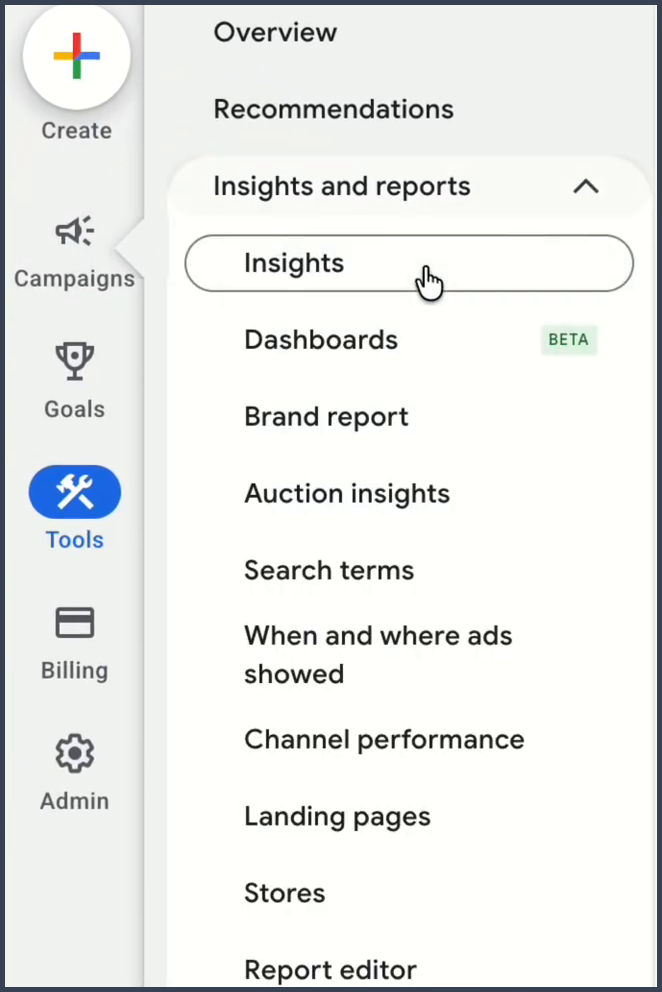
Go through the list line by line. Google explains each column in its search terms report guide.
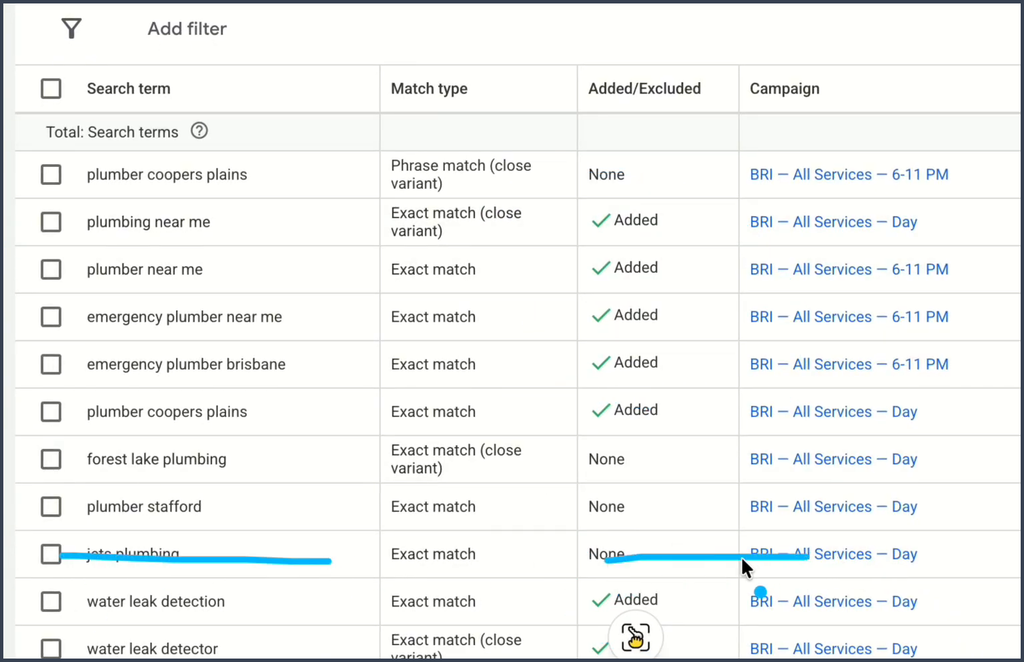
In this plumbing account, most terms fit the business, such as “plumber near me.” One term is a competitor’s business name, and it is marked to be removed.
For each search term, do one of three things:
- Add it as a keyword if it fits well and brings leads.
- Exclude it as a negative keyword if it does not fit, such as a competitor name or a job you do not offer.
- Leave it if it fits but needs more data.
Do this every few days in the first month. Each irrelevant search you block saves money and gives Google cleaner data to learn from.
How many conversions does Google need?
Google’s tips on measuring Smart Bidding performance suggest you judge results over a period with at least 30 conversions, or about 50 for Target ROAS. Google also talks about waiting for full conversion cycles.
You do not have to hit 30 or 50 conversions before Smart Bidding works. There is no minimum. Those numbers simply tell you when you have enough data to trust what you see.
A conversion cycle is the time from a person’s first click to their purchase. Picture a store that sells leather bags. A shopper clicks the ad, browses the bags, thinks it over, and buys about 10 days later. That 10 day window is one conversion cycle.
If your cycle runs 10 days, two to three cycles means 20 to 30 days. Wait that long before you make big decisions about the campaign.
If you get no conversions at all after that time, the bid strategy may not be the real problem. Check your targeting, your keywords, your ad groups, and your landing page.
Group campaigns with a portfolio strategy
A portfolio strategy can do more than set bid limits. It also lets several campaigns share one bid strategy, so Google optimizes them together toward a single target.
This helps a new account with low volume. Say one campaign gets 5 conversions in a month and another gets 20. In one portfolio, the strategy draws on all 25 instead of two small silos.
This works with Maximize conversions too, not just Target CPA. Group campaigns that chase the same goal and the same type of customer. Keep in mind that portfolio strategies do not work with Performance Max campaigns.
Should you use exact match only, or exact and phrase?
Use exact and phrase match together from day one. Exact match alone can choke your traffic, while a small amount of phrase match on your strongest terms keeps volume flowing.
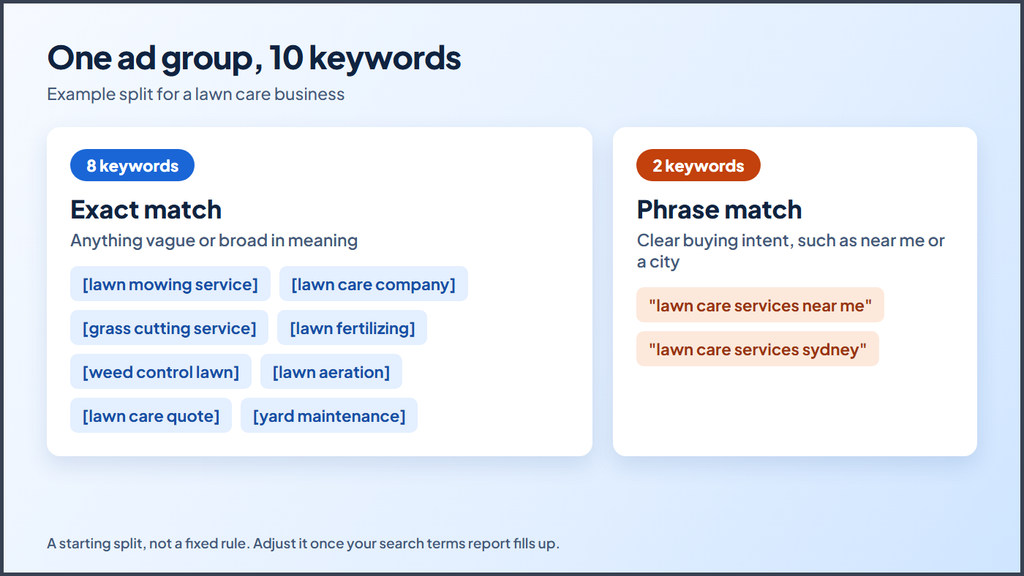
Google explains how each option works in its guide to keyword matching options. A simple split for a new ad group with 10 keywords looks like this:
| Match type | How many | Which keywords |
|---|---|---|
| Exact match | About 8 | Any keyword that is vague or could mean more than one thing |
| Phrase match | About 2 | Keywords with clear buying intent, such as “near me” or a city name |
For a lawn care company, “lawn care services near me” and “lawn care services Sydney” make strong phrase match picks. Both show a person who wants to hire someone now in a specific area.
How to lower your cost per click over time
Your cost per click will run higher at first, especially on keywords where people want to buy right now. Most advertisers bid on those terms, so the competition is strong.
You can bring those costs down by raising your quality. Google’s Quality Score looks at three things:
- Expected click through rate. How likely people are to click your ad.
- Ad relevance. How closely your ad matches the search.
- Landing page experience. How useful and relevant your page is.
Quality also shapes your Ad Rank, which decides where your ad shows. With strong ads and pages, you can often win better positions while you pay less per click than rivals with weaker ads.
Common mistakes in a new Google Ads account
Avoid these mistakes in your first few months:
- Starting with Maximize clicks to “build data.” Clicks do not teach Google who converts. Start with a conversion strategy instead.
- Judging results after a few days. Give a new campaign at least two to three weeks, and ideally two to three conversion cycles.
- Setting bid limits too tight. A very low maximum can block you from the auctions that matter.
- Skipping the search terms report. Waste builds up fast in a new account.
Your new account bidding checklist
Run through this list before and after you launch:
- Conversion tracking counts real leads or sales.
- Your Search campaigns use Maximize conversions or a portfolio Target CPA.
- Most keywords use exact match, with phrase match on your strongest terms.
- You check the search terms report every few days.
- You wait at least two to three weeks before you judge the campaign.
Start with conversions, then let the data guide you
The best Google Ads bidding strategy for a new account in 2027 is usually Maximize conversions. If your costs per click get out of hand, a portfolio Target CPA with bid limits gives you more control without giving up the focus on conversions.
Whichever you pick, expect your first month to cost more while Google learns. Keep your search terms clean, give each campaign time, and relax your limits once the data arrives.
Want help with your account? Contact us, and we can walk through your numbers with you.