
Thinking about selling on Temu? Before listing your first product, you need to know what it takes to stand out in a competitive marketplace.
For new and experienced sellers alike, success on Temu goes beyond finding products to sell. Choosing the right products, understanding customer demand, setting competitive prices, and managing fulfillment can make the difference between a struggling store and a profitable business. Without the right preparation, even a promising product can turn into a costly mistake.
In this guide, we’ll walk you through everything you need to know about selling on Temu, from seller registration and product research to listing optimization, pricing, shipping, and business growth, so you can make informed decisions before launching your store.

Is Temu the right marketplace for your business?
Temu can be worth testing if your products have clear customer value, your costs allow competitive pricing, and you can meet the delivery and service standards shown in your seller account. The marketplace may help a business reach shoppers who would not otherwise visit its own website. It can also provide seller tools for product management, orders, logistics, returns, and advertising.
The platform is not automatically suitable for every business. Price competition can be intense, and the cost of shipping, returns, packaging, promotions, and stock management can reduce the amount you keep from each sale. A product that sells frequently is not necessarily profitable.
| Potential advantages | What sellers should consider |
| Access to a large marketplace audience | Visibility and sales are not guaranteed; products still need to compete. |
| Seller tools for listings and orders | You must learn the workflow and monitor order deadlines. |
| Regional seller programs | Eligibility and available tools vary by country. |
| Promotional and advertising options | Discounts and ads can reduce contribution margin. |
| Integrated logistics options in some markets | Do not assume Temu stores or ships every seller’s inventory. |
A sensible approach is to launch with a small group of products, measure actual contribution profit, and expand only after the process is working.
What you’ll need before starting
Before you sign up for Temu Seller Center, gather these documents and account details. Temu’s US Seller Center states that applications are normally reviewed within one business day, although additional verification may extend the process. Having everything ready upfront can help avoid delays.
Required documents and accounts:
- Business license or sole proprietor registration (for business applicants; individual sellers may apply in supported markets).
- Active bank account or supported payout account matching the seller or business verification details, as required by your region.
- Tax ID or EIN for applicable US business sellers; VAT ID, business registration, and director identification documents where required for EU and UK sellers.
- Valid government-issued identification, such as a passport or driver’s license, where requested.
- Phone number and contact information.
- Proof of business or residential address, depending on your seller type and region.
- Product samples (if requested for specific categories or verification purposes).
Regional requirements differ significantly. US sellers may need an SSN or government-issued ID for individual verification and an EIN for business applications. EU and UK sellers may need to provide VAT registration, business registration, proof of address, and director identification documents, depending on their business structure and country.
Non-China sellers are no longer limited to traditional cross-border arrangements. Temu has expanded its seller programs into multiple markets, creating opportunities for eligible local businesses to join its marketplace. However, availability and registration requirements vary by country.
Step 1: Create Your Seller Account
Start at Temu’s official Seller Center. Select the country where your business is registered or where you legally reside. US sellers can use the US Seller Center, while eligible European sellers can register through the EU Seller Center. Available registration options depend on your location and seller type.
Follow these steps to create your account:
- Visit Temu Seller Center: Open the official seller registration portal for your country.
- Select Your Region: Choose the country where your business is registered or where you legally reside.
- Choose Your Seller Type: Select the appropriate option, such as individual, sole proprietor, partnership, or corporation, depending on the options available in your region.
- Create Your Login: Enter your email address or phone number and create a secure password.
- Complete the Registration Form: Provide the requested personal and business information.
- Submit Your Application: Review your information carefully before submitting it for verification.
The application form generally takes around 10–15 minutes to complete, depending on the information required. Once submitted, Temu reviews your application. The platform states that applications are normally reviewed within one business day, although additional verification may extend the process.
Step 2: Submit Required Documents
After account creation, you’ll move into document verification. This step confirms your identity, business details, and eligibility to sell on Temu.
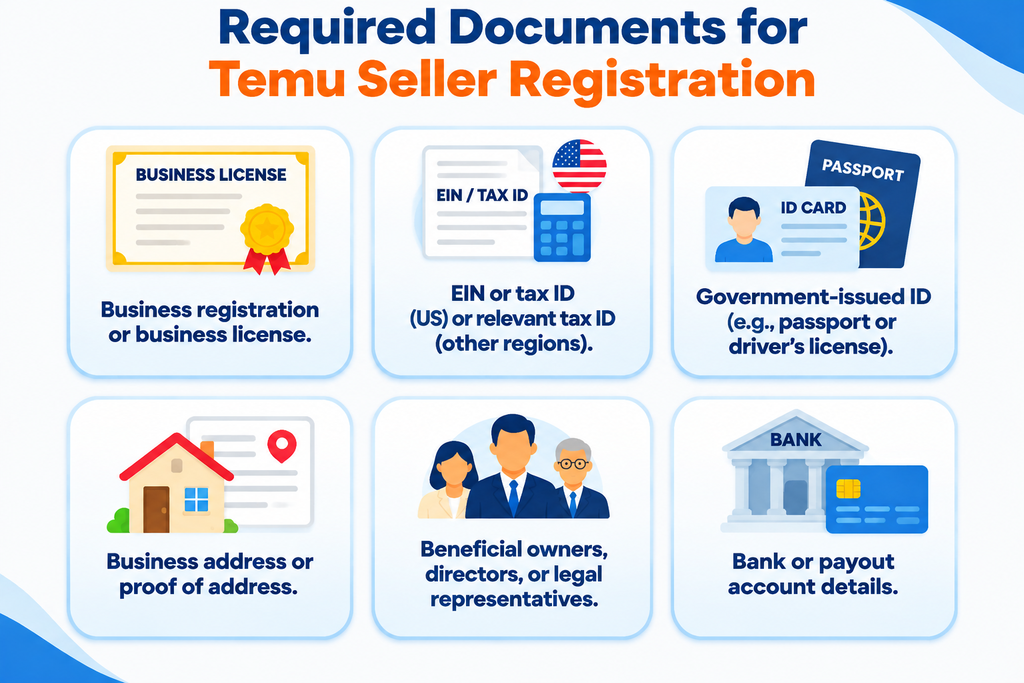
Prepare the documents requested for your seller type and region. These may include:
- Business registration certificate or business license.
- EIN for applicable US business applicants or the relevant local business registration or tax identification number.
- Government-issued identification, such as a passport or driver’s license.
- Registered business address or proof of residential address.
- Information about beneficial owners, directors, or legal representatives, where required.
- Bank or supported payout account details.
Regional requirements differ. US individual applicants may need personal identification, while business applicants must provide company registration details and an EIN. EU and UK sellers may need additional business, VAT, tax, address, and representative information depending on their country and business structure.
Follow these steps to complete document verification:
- Open the Verification Section: Navigate to the verification or business information section in your Seller Center.
- Select Your Applicant Type: Confirm whether you’re registering as an individual or a business.
- Upload Identification Documents: Submit the requested government-issued identification and business registration records.
- Provide Tax Information: Enter your EIN, VAT number, or other relevant tax details where required.
- Submit Address and Payout Details: Provide the requested business or residential address and supported payment account information.
- Review and Submit: Check that all information matches your supporting documents before completing verification.
Make sure all submitted information is accurate and consistent with your supporting documents. Pay particular attention to the legal business name and payout account details to avoid verification or payment issues.
Temu may also request additional product information, compliance certificates, product photographs, or other supporting documents for specific categories. Submit samples only if Temu specifically requests them.
Step 3: Set Up Your Seller Profile
Once your application is approved, complete your store setup through the Temu Seller Center. This is where you establish your storefront identity.
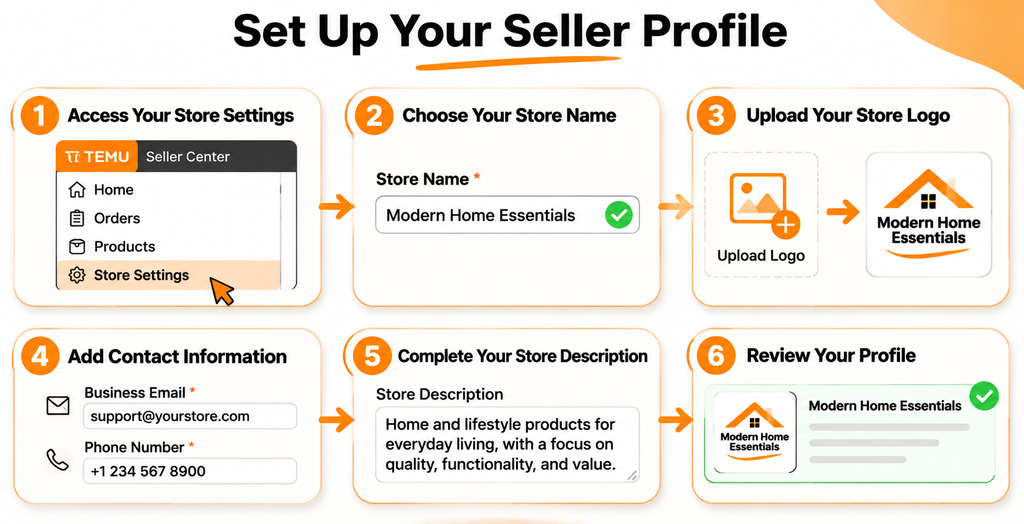
Add your store name, logo, and contact information. Choose a name that is professional, memorable, and relevant to your business. Avoid generic names such as “Electronics Store” or “Clothing Seller.” Instead, choose something more distinctive, such as “Modern Home Essentials” or “Tech Gadget Lab.”
Follow these steps to complete your store profile:
- Access Your Store Settings: Log in to Seller Center and navigate to your profile or store settings.
- Choose Your Store Name: Select a distinctive name that represents your business and product range.
- Upload Your Store Logo: Use a clear, professional logo that is easy to recognize.
- Add Contact Information: Provide the required business contact details for seller communications.
- Complete Your Store Description: If a description field is available, explain what you sell and what customers can expect from your products.
- Review Your Profile: Check your branding and business information before saving your changes.
Make sure your store name and branding do not infringe on existing trademarks or suggest an unauthorized connection with another brand. Follow the naming and branding rules displayed in your regional Seller Center.
Step 4: Create and Optimize Product Listings
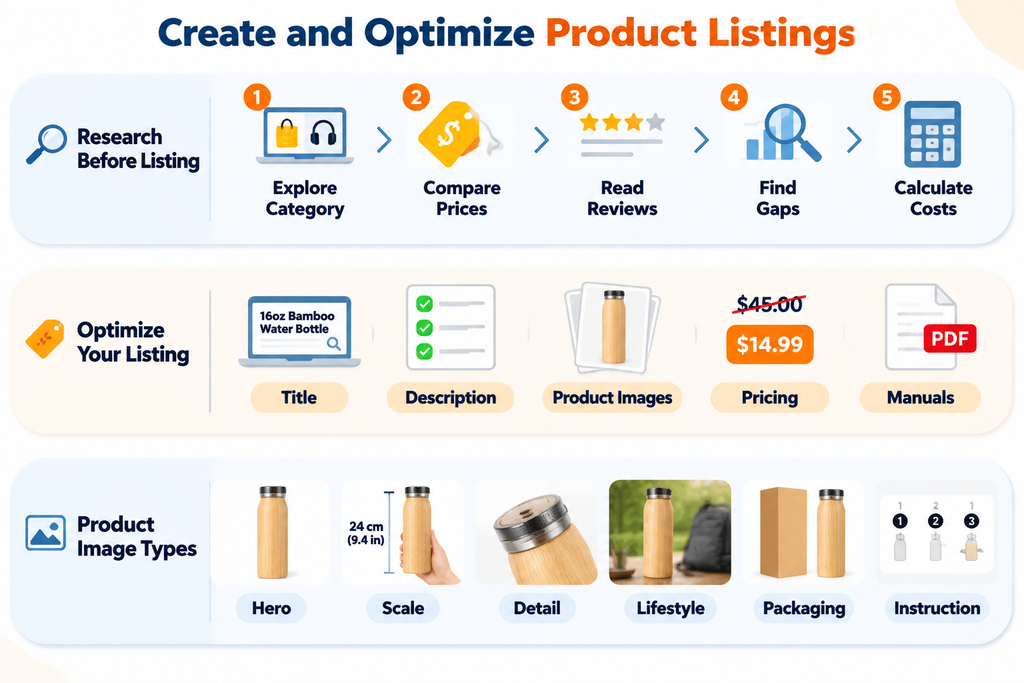
Before clicking the “Add Product” button, do your homework. Temu isn’t a “set it and forget it” platform; competitive products need accurate listings, attractive images, and strategic pricing.
Start by studying popular products, category bestsellers, and promotional deals. You’re not just looking for what sells—you’re looking for why it sells. Read customer reviews of competing products. If buyers repeatedly complain about poor packaging, confusing instructions, or inaccurate product dimensions, those issues could create an opportunity for your product to stand out.
How to Research Products Before Listing
Follow these steps before adding your products:
- Explore Your Product Category: Search Temu for products similar to yours and identify popular listings.
- Compare Competitor Prices: Examine the prices, product variations, bundles, and offers of competing sellers.
- Read Customer Reviews: Pay particular attention to negative reviews to identify common product complaints.
- Identify Market Gaps: Look for opportunities to improve product quality, packaging, instructions, or overall value.
- Calculate Your Costs: Consider sourcing, packaging, shipping, potential returns, and other selling expenses before deciding on your price.
Once you’re ready to list, focus on these important areas:
Titles That Match Buyer Searches: Your product title should combine relevant search terms with clear product information. Instead of simply writing “Bamboo Water Bottle,” try “16oz Reusable Bamboo Water Bottle for Gym, Travel & Everyday Use.” Place the main product keyword near the beginning and include important details such as size, material, quantity, or intended use. Avoid unnecessary keyword repetition.
Descriptions That Sell the Solution: Don’t just describe what a product has; explain how it benefits the buyer. Instead of simply saying a bottle is double-walled, explain how its insulation helps maintain drink temperature. Address common buyer questions about durability, cleaning, dimensions, compatibility, and package contents. Only include performance claims that you can verify.
High-Quality Product Images: Product images help shoppers understand exactly what they’re buying. Follow the image specifications displayed in your product category. Aim for a useful selection of images, including:
- The Hero Shot: A clear main image showing the product.
- The Scale Shot: Show the product beside a familiar object to communicate its actual size.
- The Detail Shot: Highlight important materials, textures, zippers, buttons, or other details.
- The Lifestyle Shot: Show the product in a realistic setting.
- The Packaging Shot: Display the items and accessories included in the package.
- The Instructional Shot: Explain assembly, usage, or important product information where relevant.
Six images can be a useful target, but it is not a universal six-image minimum. Always follow the current category-specific requirements.
Strategic Pricing: Competitive pricing can help your products attract attention. Temu’s listing system supports base prices and, where applicable, list prices. However, reference prices must be genuine and supported by accurate pricing information. Don’t inflate an original price simply to create a larger discount. Use your actual product costs, shipping expenses, and expected deductions to establish a sustainable selling price.
Product Manuals and Supporting Documents: For certain products, Temu may request user manuals, certificates, or additional compliance documents during listing. Where a product manual is required, follow the instructions for its format and language. Temu’s listing documentation specifies PDF manuals for the relevant guide-file submission process.
How to Add a Product to Temu
Once your product information and images are ready, follow these steps:
- Open Product Management: Navigate to the product management section of your Seller Center.
- Select Add Product: Start a new product listing.
- Choose the Correct Category: Select the category that best matches your product.
- Enter Product Information: Add the product title, description, specifications, and other required details.
- Add Product Variations: Configure available sizes, colors, quantities, and other variations where applicable.
- Assign SKUs: Give each product variation the correct stock-keeping unit (SKU) so orders can be identified and fulfilled accurately.
- Upload Product Images: Add your main image and supporting photographs according to the category requirements.
- Set Your Price: Enter your selling price and any permitted reference price.
- Enter Inventory Details: Provide accurate stock quantities and other required information.
- Review and Submit: Check every detail before submitting the listing for inspection.
Before submitting, double-check your product category, attributes, variations, SKU information, inventory quantities, and pricing. Incorrect product details or missing compliance documents can prevent a listing from being published.
Once submitted, your product may enter Temu’s inspection and review process. Approval times can vary. If a listing is rejected, review the specific error message, correct the relevant information, and resubmit it.
Step 5: Configure Fulfillment and Shipping
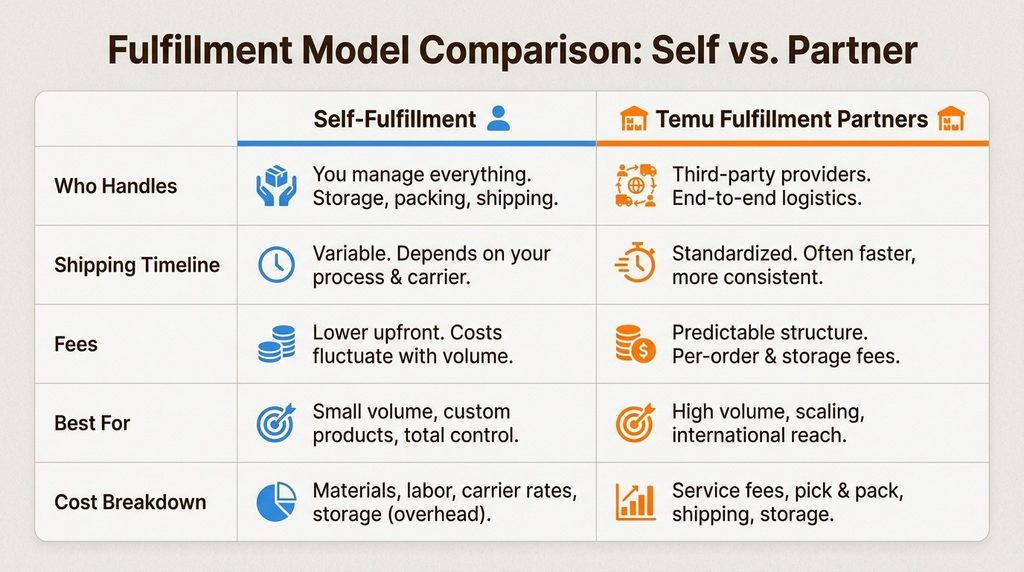
Your fulfillment decision directly affects your operating costs, delivery performance, and customer experience. Temu currently documents two primary shipping methods: Buy-Shipping and Self-Fulfilled Shipments.
1. Self-Fulfillment (Seller-Managed Shipping)
You handle the entire fulfillment process. This includes storing inventory, processing orders, packing products, arranging shipments, and providing tracking information.
Follow these steps when processing an order:
- Check the new order in your Seller Center.
- Confirm that the ordered product and variation are available in stock.
- Pick and pack the correct item securely.
- Arrange shipment through an eligible carrier.
- Add or synchronize the tracking information in Seller Center.
- Dispatch the parcel within the deadline displayed for that order.
This option is suitable for sellers who already have warehouse space or an established shipping operation.
The main advantage is greater control over inventory and the fulfillment process. However, you’re responsible for managing packaging, shipping arrangements, tracking updates, and applicable return procedures.
2. Buy-Shipping (Temu-Generated Shipping Labels)
Where available, you can purchase shipping labels through Temu’s Seller Center using supported logistics channels. This option provides access to recommended shipping services and simplifies parts of the shipping process.
The general process is:
- Open your unshipped orders in Seller Center.
- Select the order you want to process.
- Choose the Buy-Shipping option, if available.
- Confirm the parcel details, including weight and dimensions.
- Select an eligible shipping service and generate the shipping label.
- Print and attach the label to your package.
- Hand over the parcel to the designated carrier and monitor its tracking status.
Temu does not directly operate as a logistics provider. Instead, it offers integrated logistics solutions through supported shipping channels. Shipping costs, eligible carriers, and available services depend on your region and seller arrangement.
3. Third-Party Logistics (3PL)
You can also work with an independent fulfillment provider that stores your inventory, processes orders, and ships products on your behalf. This can help businesses handle larger order volumes without managing every warehouse operation themselves.
Before choosing a 3PL provider:
- Compare storage, picking, packing, and shipping charges.
- Check whether the provider can integrate with your Temu order workflow.
- Confirm its warehouse location and delivery coverage.
- Review its inventory tracking and order-processing capabilities.
- Understand how returns and damaged shipments are handled.
However, storage, picking, packing, and shipping charges will depend on the provider and service agreement. Do not assume that Temu automatically stores inventory in its own warehouses; use a warehouse program only if it is specifically offered and approved for your account.
Returns Management
Returns are an important part of marketplace selling. The applicable return period, refund procedures, shipping responsibilities, and eligible return conditions depend on the market, product category, and seller arrangement. Do not assume that a universal 90-day seller return policy applies to every account.
Follow these steps to prepare for returns:
- Configure your return address in Seller Center.
- Review the applicable return and refund policy for your region.
- Monitor return requests and respond within the required timeframe.
- Follow the platform’s instructions for handling returned products and refunds.
- Record return reasons to identify recurring product or packaging problems.
Consider building a financial reserve for refunds, returns, and damaged products based on your category and actual operating experience rather than relying on a fixed percentage.
Finally, configure inventory tracking and shipping templates, monitor new orders, and make sure tracking information is updated promptly. If possible, test your fulfillment workflow with a small batch of orders before expanding your product catalogue.
Choose the shipping method that best matches your inventory, operating capacity, and profit margins. Reliable fulfillment is essential to maintaining a healthy Temu store.
Choose between self-fulfillment for maximum control or Temu’s partners for easier scaling and logistics management.
Temu Pricing Strategy
Before submitting, you must set your pricing. Temu’s algorithm favors the lowest-priced items in a category, so your strategy should focus on high volume and psychological triggers.
- The Strikeout Price Psychology: Always list an MSRP (e.g., $50) alongside your actual selling price (e.g., $15). This “strikeout” triggers a perception of massive value, even if your margin is modest.
- Dynamic Competitive Pricing: Monitor bestseller lists and adjust daily. A $1 price cut can often triple your sales velocity, which in turn boosts your organic ranking.
- Profitability Math: Account for the 5-10% commission and your shipping costs (standard shipping is free for customers). Target categories like furniture or electronics where repeat purchase rates are 20-40% to offset initial acquisition costs.
Temu Commission & Fees
One of Temu’s biggest draws for Western sellers is the low entry barrier. Unlike Amazon or eBay, there are no listing fees and no monthly subscription costs.
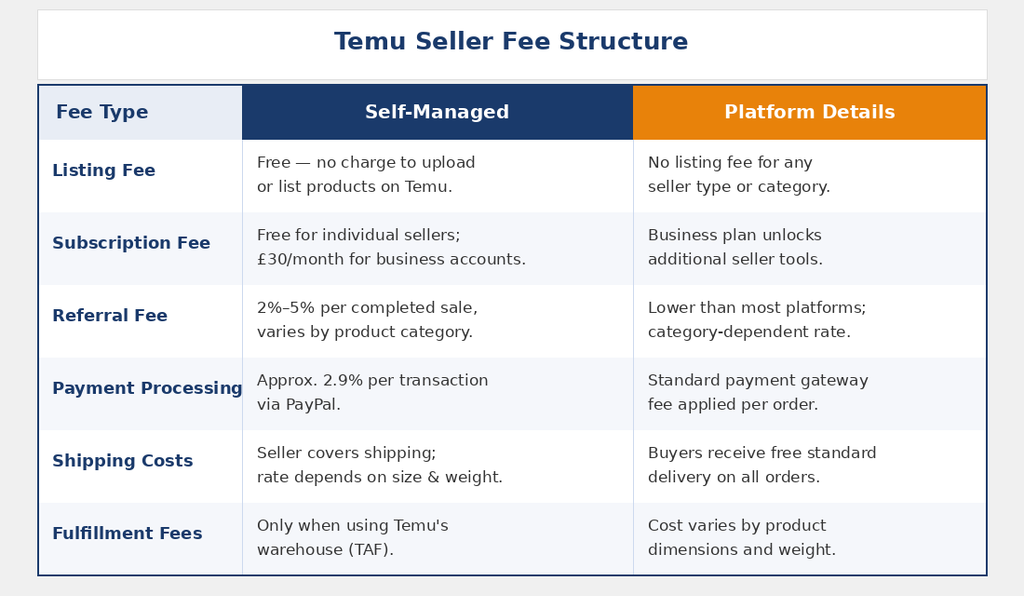
For example, on a $9.99 item with a 5% commission and a $1.00 fulfillment fee, your net revenue before product cost is approximately $8.49. This thin-margin, high-volume model requires precise tracking of your Cost of Goods Sold (COGS).
Tips for Selling Successfully on Temu
1. Respond Quickly to Customer Reviews
Address customer feedback promptly, especially negative reviews. Responding within 24–48 hours, where possible, helps resolve concerns, demonstrate good customer service, and build buyer trust.
2. Monitor Your Seller Performance Metrics
Regularly check delivery performance, order accuracy, cancellations, and customer satisfaction. Review your seller dashboard weekly to identify problems before they affect your store’s performance.
3. Plan for Returns and Refunds
Understand Temu’s return and refund policies before listing products. Consider potential return costs, damaged goods, and restocking expenses when calculating your profit margins.
4. Price Strategically Using Market Data
Research competing listings, compare product prices, and monitor sales performance before adjusting your prices. Avoid pricing too low without considering product costs, shipping, and other expenses.
5. Bundle Products to Increase Average Order Value
Offer relevant product combinations or multipacks to encourage customers to purchase more in one transaction. For example, you could offer two water bottles as a bundle instead of selling each separately.
6. Track Your Cost of Goods Sold Carefully
Calculate product costs, packaging, shipping, fulfillment fees, commissions, and other operating expenses. Make sure your selling price covers these costs while leaving enough room for profit.
7. Avoid Relying on Temu as Your Only Sales Channel
Consider expanding to other marketplaces and ecommerce platforms, such as Amazon, Etsy, and Shopify. Diversifying your sales channels helps reduce dependence on one platform and creates additional growth opportunities.
Frequently Asked Questions
Q1. How Much Does Temu Charge for Selling?
Temu generally offers sellers a commission-free or low-cost entry model, depending on their market and seller program. Additional costs may include shipping, fulfillment, and other applicable service fees.
Q2. Is It a Good Idea to Sell on Temu?
Yes, Temu can offer growth opportunities for sellers who use competitive pricing, choose suitable products, and manage fulfillment efficiently. However, profitability depends on product margins, competition, and operating costs.
Q3. Can a US Seller Sell on Temu?
Yes, US-based businesses can register through Temu’s local seller program. Sellers generally need valid business information, tax details, and an eligible bank account.
Q4. How Long Does It Take to Get Approved as a Temu Seller?
Seller approval time varies depending on application volume and document verification. Submitting complete and accurate information can help avoid unnecessary delays.
Q5. What Documents Do I Need to Sell on Temu?
Requirements depend on your country and seller type. Common documents include business registration, tax identification, proof of address, identification documents, and valid bank account information.
Q6. What Are Temu’s Fulfillment Options?
Temu generally supports seller-managed fulfillment and platform-supported fulfillment programs, depending on market eligibility. Available options determine who handles storage, packing, shipping, and delivery.
Q7. What Products Sell Best on Temu?
Popular categories include home and kitchen products, electronics accessories, fashion, beauty, and everyday essentials. Research bestseller listings, competitor pricing, and customer reviews to identify promising products in your niche.
Start selling on Temu today
You now have the roadmap: register with proper documentation, set up your profile, optimize your listings, and choose your fulfillment model. Visit Temu Seller Center and create your account. Your approval should come through in 1 to 3 business days; first listings can go live within 48 hours of approval.
Focus on categories with strong 20 to 40 percent repeat purchase rates initially: furniture, home goods, electronics, and practical everyday items. Avoid one-off niche products with no obvious repeat demand. Monitor your first 10 to 20 orders closely for customer feedback. Then iterate on pricing and images based on what you learn.
Treat Temu as part of a broader multi-channel strategy. The platform offers real revenue opportunity, but it’s most stable when paired with other sales channels. Start small, learn the rhythm of the marketplace, and scale once you’ve proven your ability to manage fulfillment quality and customer satisfaction.
Unlock Your Temu Store’s Growth Potential With Ecomclips
Building a successful Temu business takes more than listing products. From product research and listing optimization to competitive pricing, fulfillment, compliance, and order management, every detail matters. Ecomclips helps ecommerce brands optimize their marketplace operations, improve product visibility, and develop growth strategies focused on long-term profitability.
Watch practical ecommerce tutorials on the Ecomclips YouTube channel, explore expert insights on the Ecomclips Blog, and discover actionable tips to improve your Temu listings, manage marketplace operations, and grow your sales.
Explore our Ecommerce Growth Resources for more guidance on marketplace SEO, product optimization, pricing strategies, and fulfillment. Follow Ecomclips on Facebook and connect with us on LinkedIn for the latest ecommerce insights and marketplace growth strategies.
Ready to take your Temu business further? Contact us at info@ecomclips.com or book an appointment with our ecommerce experts to explore your next growth opportunities.