
Traffic brings shoppers to your Amazon listing. Conversion turns that traffic into revenue.
Sellers often focus heavily on rankings, keywords, and PPC, but attracting more visitors will not solve a listing that fails to convert. In many cases, the bigger opportunity is improving what happens after the click.
For example, increasing an ASIN’s conversion rate from 8% to 10% across 5,000 sessions can generate 100 additional units without adding more traffic. Amazon conversion rate optimization is about finding the friction that stops shoppers from buying and removing it.
In this guide, we explain how Amazon Conversion Rate Optimization works in 2026, which metrics matter, how to identify conversion problems, and what sellers should optimize first.
What Is Amazon Conversion Rate Optimization?
Amazon conversion rate optimization, or Amazon CRO, is the process of improving a product listing and overall buying experience so that a higher percentage of relevant shoppers complete a purchase.
It looks at what happens after a shopper discovers or clicks on a product. Sellers analyze factors such as product content, pricing, reviews, delivery, traffic quality and competing offers to understand what influences the customer’s decision to buy.
Effective CRO helps sellers make better use of existing traffic by identifying where shoppers lose interest, hesitate or leave the listing, and then improving those areas.
Why Sellers Need to Understand Amazon Conversion Rate Optimization
Amazon sellers invest heavily in SEO, PPC, and promotions to attract shoppers, but those efforts become less effective when visitors reach a product page and leave without buying.
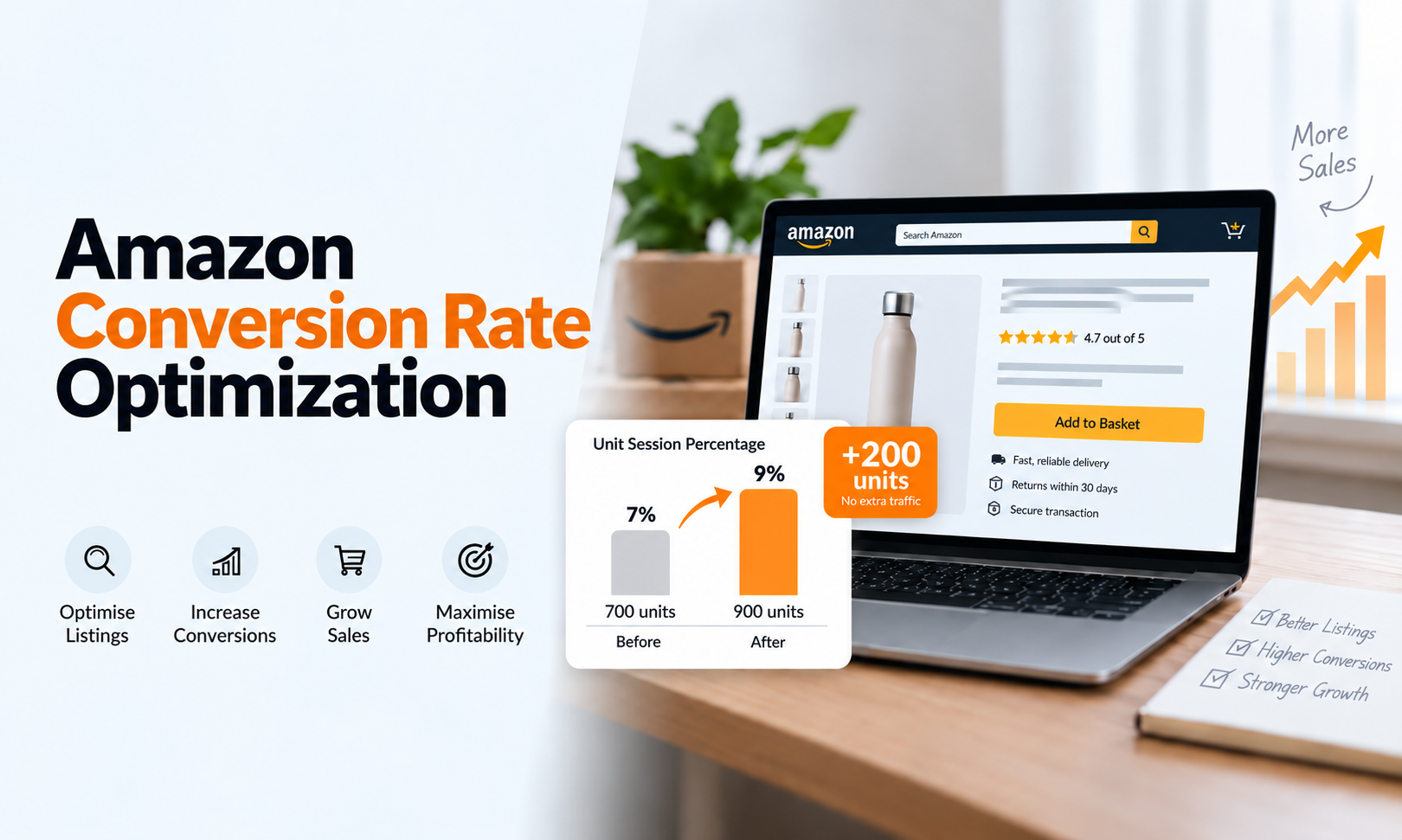
For example, suppose an ASIN receives 10,000 sessions per month and generates 700 units, giving it a 7% Unit Session Percentage. If the seller improves the buying experience and increases that figure to 9%, the same 10,000 sessions could generate 900 units, 200 additional units without increasing traffic.
This is why sellers need to understand whether weak sales are caused by a traffic problem or a conversion problem. If traffic is already strong, increasing advertising spend may not be the first priority. The seller may need to improve the listing or offer instead.
Some of the main factors that influence conversion include:
- Search intent and traffic quality
- Product images, title and content
- Price, promotions and Featured Offer
- Ratings, reviews and brand credibility
- Delivery, inventory and fulfilment
- Product information and compatibility
- Competitor offers and market positioning
CRO therefore asks a different question from traditional Amazon SEO.
How to Calculate Amazon Conversion Rate
Amazon sellers commonly use Unit Session Percentage as the product-level conversion metric.
The formula is: Unit Session Percentage = Units Ordered ÷ Sessions × 100
If an ASIN receives:
- 2,000 sessions
- 240 units ordered
Then: 240 ÷ 2,000 × 100 = 12% Unit Session Percentage
An Amazon representative has described Unit Session Percentage in Business Reports as the percentage showing how effectively product-page visitors turn into purchases.
One important detail is the word units.
If one shopper buys several units in the same session, all those units can contribute to Unit Session Percentage. For products frequently purchased in multiples, Unit Session Percentage therefore behaves differently from a pure customer-to-order conversion metric.
That is why sellers should understand exactly what metric they are looking at before comparing numbers.
Where to Find Conversion Data in Seller Central
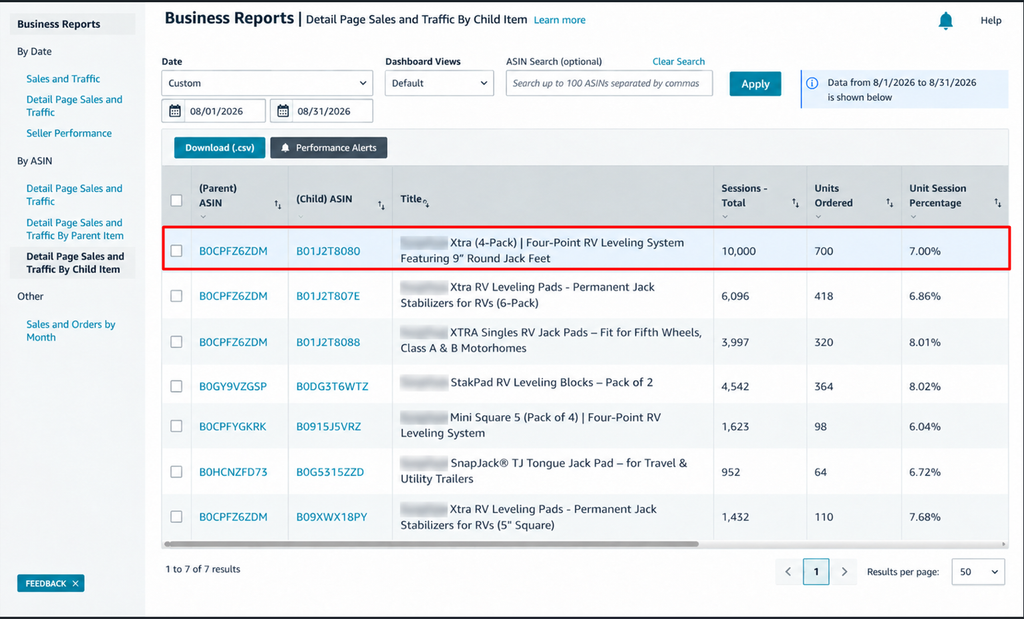
For product-level analysis, start with Seller Central Business Reports. This section provides the traffic, sales and conversion data needed to understand how individual ASINs are performing.
Depending on your account and marketplace interface, follow these steps:
- Log in to Amazon Seller Central and make sure you are viewing the correct marketplace for the product you want to analyze.
- Go to Reports from the main Seller Central menu and open Business Reports.
- Under the By ASIN section, select Detail Page Sales and Traffic. If you want to review individual variations separately, choose Detail Page Sales and Traffic by Child Item.
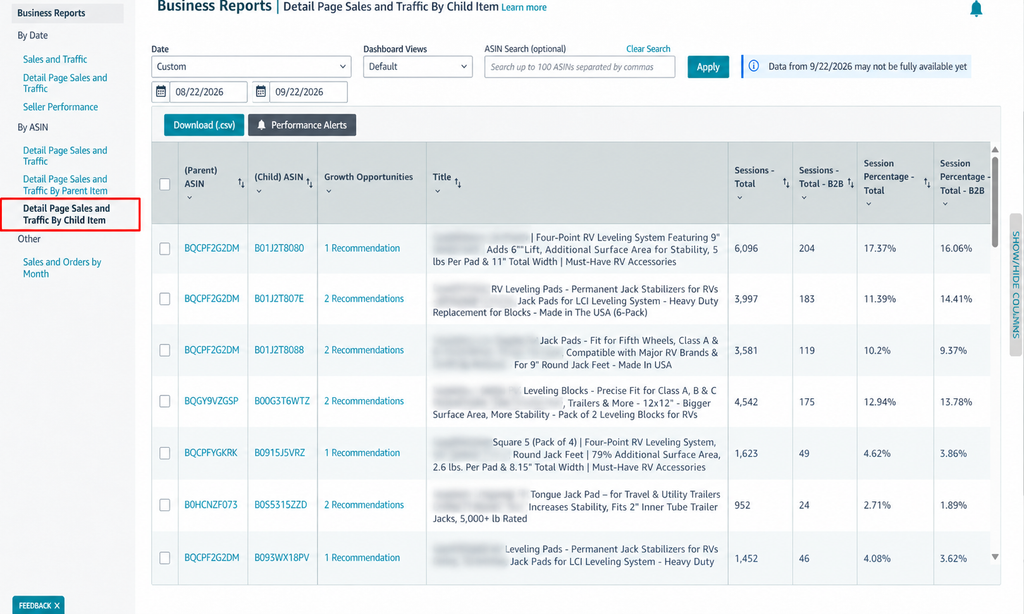
- Set the date range you want to analyze, such as the last 7, 30 or 90 days. Use the same date range when comparing performance across different periods.
- Use the ASIN search option or scroll through the report to find the specific product or variation you want to review.
- Review key metrics such as:
- Sessions
- Page Views
- Units Ordered
- Unit Session Percentage
- Ordered Product Sales
- Featured Offer Percentage
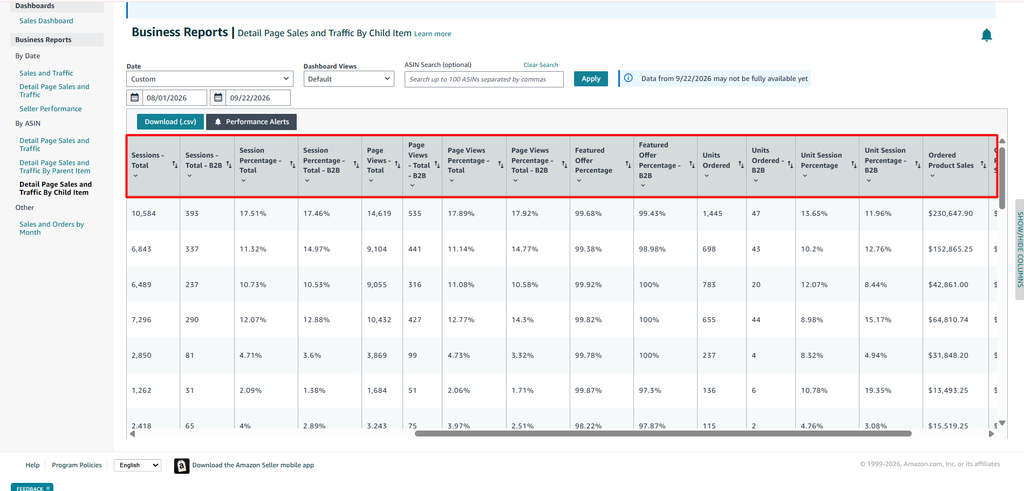
- Compare the same ASIN across different weeks or months to identify changes in traffic, conversion and sales performance.
- If you need deeper analysis, download the report as a CSV file so you can compare multiple ASINs and track performance more easily.
A conversion number becomes much more useful when you compare it with traffic, sales, pricing, advertising activity, Featured Offer performance, and recent changes made to the listing.
Amazon Conversion Rate vs Amazon PPC Conversion Rate
These two metrics should not be treated as interchangeable.
Product-level Unit Session Percentage looks at the relationship between sessions and units ordered around the listing. Advertising conversion measures what happens after ad engagement.
Amazon Ads currently uses the metric Purchase rate, previously referred to as conversion rate in Sponsored Products reporting. For sellers, Amazon defines it as ad-attributed purchases divided by ad-attributed clicks within the applicable attribution window.
That difference matters.
For example, suppose an ASIN receives 5,000 total sessions and generates 500 units ordered, giving it a 10% Unit Session Percentage.
At the same time, one Sponsored Products campaign receives 400 ad clicks but generates only 20 ad-attributed purchases, resulting in a 5% PPC purchase rate.
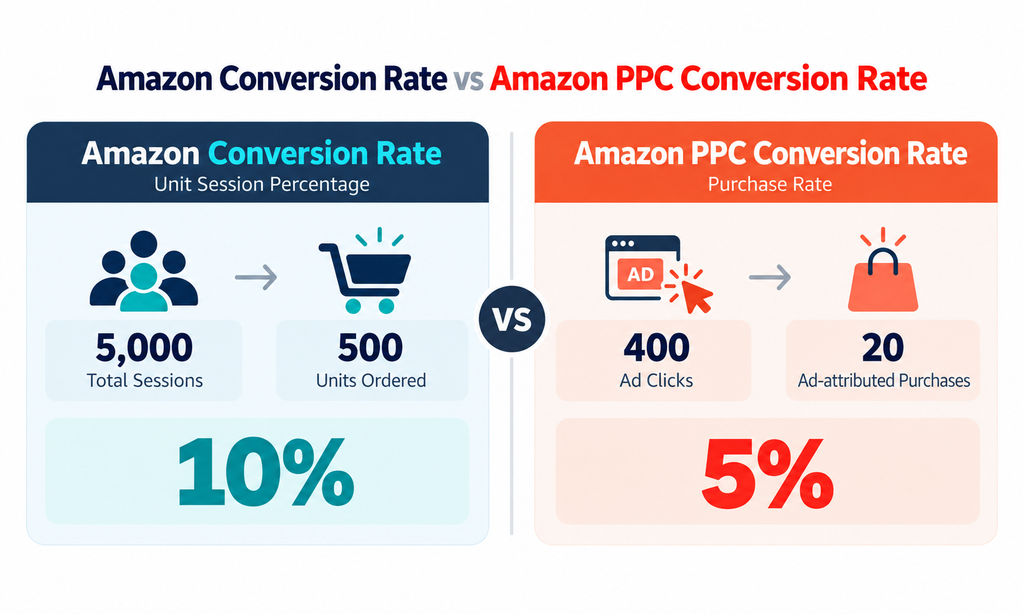
In this case, the product listing may still be converting reasonably well overall, while the advertising campaign is underperforming. The issue may be weak keyword targeting, broad search terms, or low-intent traffic rather than the product page itself.
The opposite can also happen. A branded PPC campaign may convert strongly because shoppers already know what they want, while the overall listing conversion rate remains weaker across broader organic and paid traffic.
Consider these separately:
1. Listing Conversion Rate Optimization: Is the overall product and offer converting visitors?
2. PPC Conversion Rate Optimization: Are the shoppers generated by specific ads and search terms converting?
A weak PPC conversion rate does not automatically mean the listing needs rewriting. The campaign may simply be attracting the wrong shoppers.
What Is a Good Amazon Conversion Rate in 2026?

There is no universal Amazon conversion rate that every seller should target.
Public Amazon seller guides often mention broad benchmarks such as 10%–15%, but these figures can be misleading when applied across every product, category, and traffic source.
Conversion can vary depending on factors such as:
- Product category and price
- Brand recognition and review strength
- Search intent and traffic source
- Seasonality and promotions
- Competition and product maturity
- Delivery speed and Featured Offer ownership
- Whether customers usually purchase multiple units
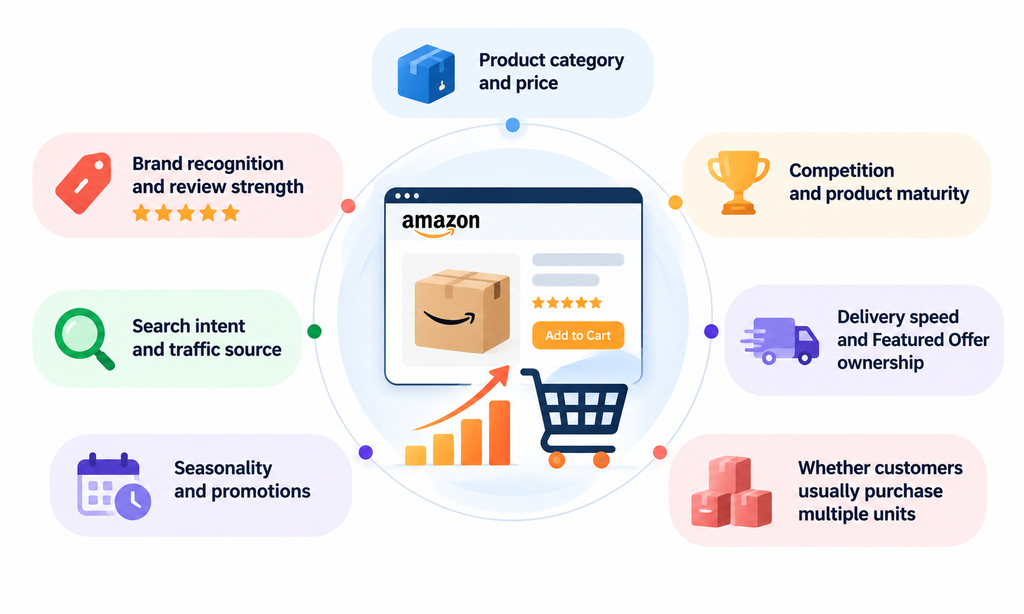
Amazon also notes more broadly that there is no single standard conversion rate that applies to every business or situation.
How to Benchmark Your Amazon Conversion Rate
Start with your own data before comparing your performance with broad industry figures.
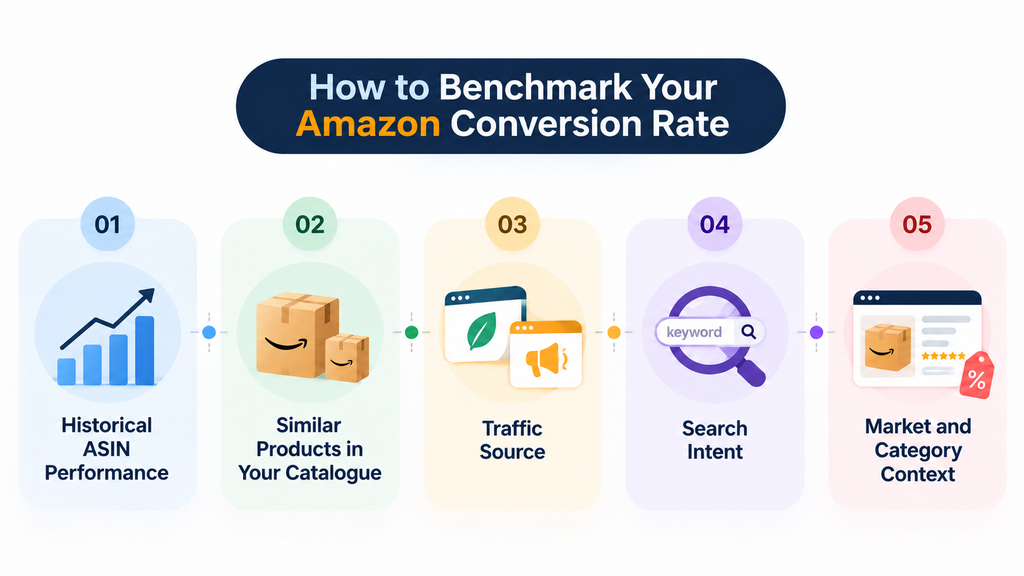
1. Historical ASIN Performance
Compare the same ASIN across similar periods. If conversion falls from 14% to 9% while traffic remains relatively stable, there may be a change in the listing, offer, competition or customer behaviour that needs attention.
2. Similar Products in Your Catalogue
Compare products with similar price points, audiences and buying patterns. This gives you a more realistic reference than comparing unrelated products from different categories.
3. Traffic Source
Review organic and advertising traffic separately where possible. PPC traffic can convert differently from organic traffic because targeting, keyword intent and campaign structure influence the quality of visitors reaching the listing.
4. Search Intent
A shopper searching for an exact brand, model or product type may be much closer to purchasing than someone using a broad category keyword. Search intent can therefore create large differences in conversion performance.
5. Market and Category Context
Compare your ASIN with genuinely similar competing products. Review differences in pricing, ratings, reviews, features, promotions, delivery and overall offer strength.
The most useful benchmark is not an arbitrary percentage. It is whether conversion is improving while traffic remains relevant and the sales generated remain profitable.
The Ecomclips Amazon Conversion Rate Optimization Framework
Random optimization makes it difficult to understand what actually improves performance. A structured conversion rate framework helps sellers identify problems, make focused changes and scale what works.
Conversion Rate Optimization Process Flow
1. Measure → 2. Diagnose → 3. Prioritise → 4. Optimise → 5. Experiment → 6. Scale
1. Measure:
Start by establishing a reliable performance baseline. Review sessions, Unit Session Percentage, sales, PPC performance, and other relevant metrics before making changes.
2. Diagnose:
Use the data to identify where shoppers are dropping out. The issue may come from traffic quality, search-result appeal, listing content, pricing, reviews, delivery or the offer itself.
3. Prioritise:
Once the problem is identified, determine which issue is likely to have the greatest impact on conversion. Address the most important weakness first rather than changing several areas at once.
4. Optimize:
Improve the specific area causing friction. This may involve product images, listing content, pricing, traffic targeting, fulfilment or the overall buying experience.
5. Experiment:
Test important changes and compare performance. A/B testing can help determine whether a new image, title, bullet point or A+ Content version performs better.
6. Scale:
Once the improvement produces stronger and more profitable conversion, increase qualified traffic through SEO, PPC and other growth channels.
Following this flow helps sellers avoid changing an entire listing simply because sales decline without first understanding what caused the problem.
How to Improve Amazon Conversion Rate in 2026
Improving Amazon conversion rate requires more than changing one part of the listing. Sellers need to look at the full buying journey, from the first search impression to the final purchase decision.
A stronger approach is to identify where shoppers are losing interest, then improve the specific elements influencing that stage. This may include search-result appeal, listing content, pricing, reviews, delivery, traffic quality or the overall offer.
1. Improve Search-Result Conversion First
Conversion begins before shoppers reach the product detail page. Customers often compare several products directly in Amazon search results before deciding which listing to open.
At this stage, only a limited number of elements are available to earn attention, including:
- Main image
- Visible title information
- Price
- Rating and review count
- Delivery information
- Promotions
- Amazon-generated merchandising elements
If competitors consistently win the click, improving lower-page content such as A+ Content will not solve the first problem. Sellers should first strengthen the elements shoppers see in search results.
Optimize the Main Image
The main image has two important functions: Accuracy + Attention
Shoppers should immediately understand what the product is while still finding the presentation clear and visually competitive.
Amazon’s photography guidance recommends having the product fill at least 85% of the image frame.
When reviewing the main image, check:
- Product scale and camera angle
- Unnecessary empty space
- Visibility on mobile
- Colour accuracy
- Visibility of included components
- Clarity at search-thumbnail size
Do not simply copy the visual style of the category leader. Look for ways to present the actual product more clearly while remaining compliant with Amazon image requirements.
Optimize the 2026 Title and Item Highlights
Amazon changed product-title presentation significantly in 2026.
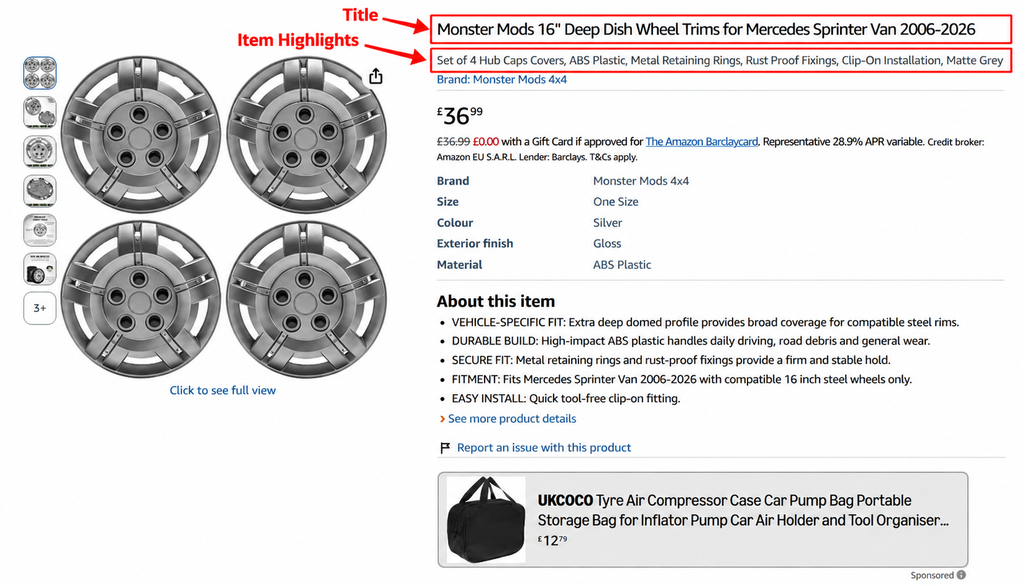
Beginning July 27, 2026, titles in non-media categories are required to contain 75 characters or fewer, including spaces. Amazon also introduced Item Highlights, providing up to 125 additional characters for information such as materials and recommended use cases.
Both the title and Item Highlights are searchable.
This means the title can no longer carry every keyword, feature, size, audience, and use case. Use it to establish immediate product identity and communicate the most important information first.
A practical title structure is: Brand + Product Type + Major Differentiator + Essential Variant Detail
Then use Item Highlights to provide supporting information that helps shoppers understand and compare the product.
Every word should contribute to product understanding, relevance or buying confidence.
2. Make the Image Stack Answer Buying Questions
Once shoppers reach the product detail page, secondary images should do more than make the listing look attractive. They should help customers understand the product, remove uncertainty, and support the buying decision.
A strong image stack should answer the questions shoppers are most likely to have before purchasing.
Start With the Questions Customers Need Answered
Before buying, shoppers may want to know:
- What exactly do I receive?
- How large is the product?
- Will it fit or work for my needs?
- How does it work?
- What material is it made from?
- What makes it different from similar products?
- What is included in the package?
- How difficult is installation or assembly?
Each image should answer one or more of these questions clearly rather than simply repeating information already shown elsewhere on the listing.
Build the Image Stack in a Logical Order
A practical image sequence may look like this:
- Clear product presentation
- Main customer benefit
- Dimensions or scale
- Key feature demonstration
- Real-world use case
- Compatibility or fit information
- Package contents
- Comparison or differentiation
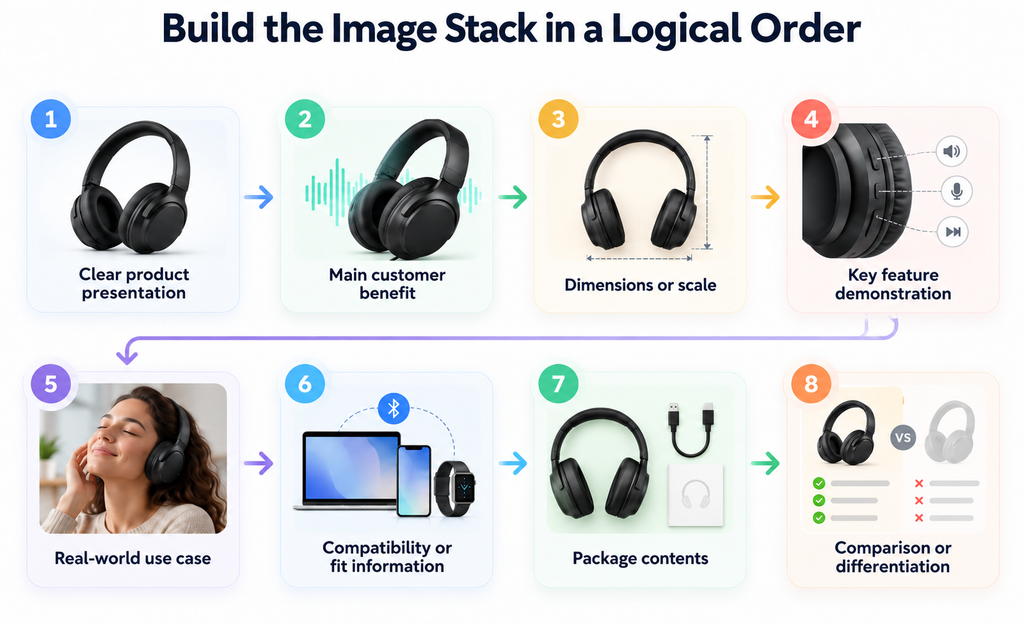
The sequence should move shoppers from basic product understanding to the information they need to feel confident about purchasing.
Match the Image Order to the Product
The best image sequence will vary by category.
For technical products, compatibility and fit may need to appear earlier. For furniture, dimensions and scale may be more important. Beauty products may need stronger emphasis on texture, application, and use. Bundles should clearly show everything included in the package.
Do not use the same image template for every ASIN. Build the image stack around the questions and concerns most relevant to that specific product and customer.
3. Use Product Video to Remove Uncertainty
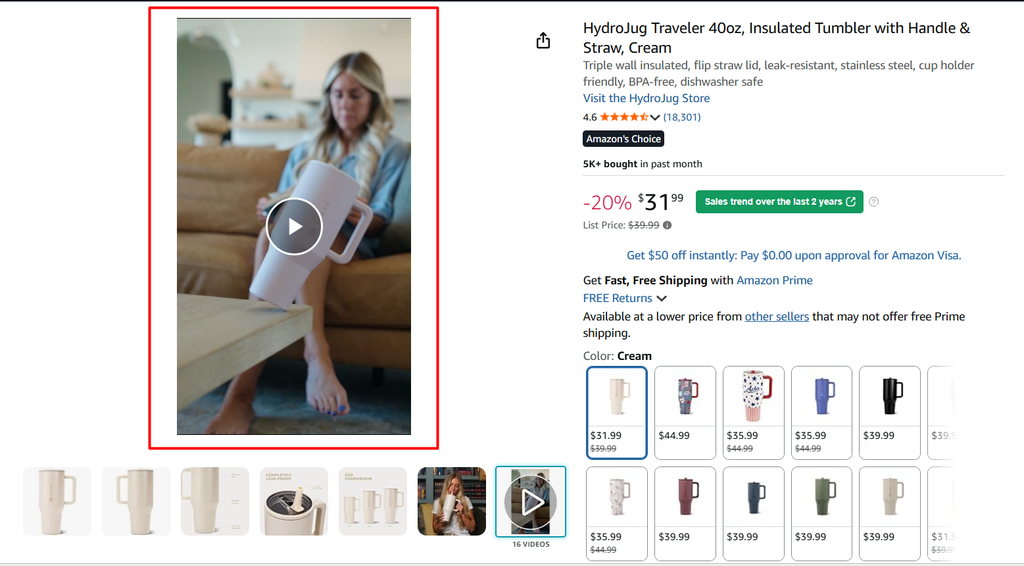
Some product details are difficult to communicate through static images alone. Video can give shoppers a clearer understanding of how the product looks, works, and performs in real situations.
Show What Images Cannot Explain Clearly
Product video is especially useful when customers need to understand:
- Movement or functionality
- Installation or assembly
- Product size and scale
- Texture or material
- Before-and-after use
- Application or setup
- Product mechanisms
- Multiple functions
- What is included in the box
Video should focus on the information that matters most to the buying decision.
Keep the Video Practical and Product-Focused
Amazon product videos do not need cinematic production to be effective. A short, clear demonstration can often provide more value than a highly polished brand video that offers little practical information.
For example, a 20-second video showing how a product installs, fits or operates can answer an important customer question immediately and reduce hesitation before purchase.
Use Video to Support Buying Confidence
The strongest product videos help shoppers understand the product before they order. They can demonstrate real-world use, clarify features and make complicated products easier to evaluate.
Amazon also supports shoppable video functionality, giving sellers another way to present useful product information during the shopping journey.
4. Turn Product Features Into Decision-Making Information
Many Amazon listings describe what a product has without explaining why those features matter to the customer. A specification may be accurate, but shoppers still need to understand how it affects their actual use of the product.
Move From Feature to Customer Value
Consider this example:
Feature: 304 stainless steel. This tells the shopper what the product is made from, but it does not explain the practical value.
A stronger version would be: 304 stainless-steel construction for durable everyday use and easier cleaning. The feature is still accurate, but the customer can immediately understand why it matters.
Use a Simple Conversion Copy Framework
Strong product content can follow this structure: Feature → Meaning → Customer Benefit → Evidence
For example:
- Feature: 20,000 mAh battery
- Meaning: Higher power capacity
- Customer Benefit: Longer use between charges
- Evidence: Supported charging specifications or tested usage information where accurate
This structure helps shoppers understand both the technical detail and the practical outcome.
Keep Claims Specific and Accurate
Do not exaggerate features or turn technical specifications into unsupported promises.
Instead, explain what the feature realistically means for the customer and support important claims with accurate product information where possible.
The strongest Amazon content does not force shoppers to translate specifications into benefits themselves. It makes the value clear, practical and easy to understand.
5. Use A+ Content to Increase Sales

A+ Content should do more than repeat bullet points with larger images. It should help shoppers understand the product in greater depth, compare options and build confidence before purchasing.
Use A+ Content to Add New Information
A+ Content is most useful when it expands on the information already shown above the fold.
Use it to explain:
- Why the product is different
- How the product works
- Important use cases
- Product construction
- Compatibility
- Brand credibility
- Product families
- Differences between models
- Frequently considered purchase factors
Each module should add something useful rather than simply restating the title, bullets or image text.
Match A+ Content to the Product
The structure should depend on what shoppers still need to understand.
If the product is already easy to understand, use A+ Content to strengthen differentiation, trust and brand credibility.
If the product is more technical, use it to explain how it works, compatibility, construction and key use cases.
If the brand offers several closely related products, use comparison modules to help shoppers choose the right model without leaving the brand.
Use A+ Content to Support Conversion
Amazon states that Basic A+ Content can increase sales by up to 8%, while well-implemented Premium A+ Content can increase sales by up to 20%, based on Amazon internal data.
These figures should be treated as potential outcomes rather than guaranteed results for every ASIN.
The important point is not simply to add A+ Content. It should make the buying decision easier by answering questions, highlighting differences and reducing uncertainty.
6. Optimize for Mobile-First Decision Making
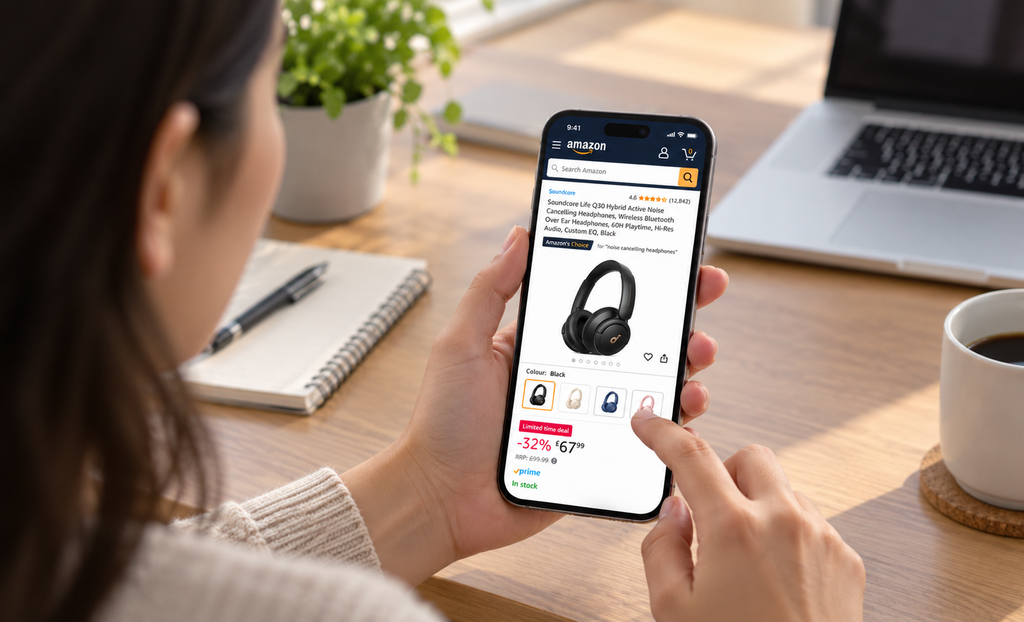
Amazon shoppers increasingly evaluate products on smaller screens, where space is limited and key information needs to be understood quickly. Amazon’s 2026 title changes also reinforce the importance of making product information easier to scan on mobile.
Sellers should therefore review listings on actual mobile devices rather than relying only on the desktop view in Seller Central.
Check What Shoppers See First
Focus on the elements that appear early in the mobile shopping experience:
- How much of the title is immediately visible
- Whether the main image remains clear at thumbnail size
- Whether important product details appear early
- Whether variations are easy to distinguish
- Whether price, ratings and offer information are easy to understand
Keep Secondary Images Mobile-Friendly
Infographic-style images may look strong on desktop but become difficult to read on a phone.
Check whether:
- Text remains readable without zooming
- Important information is not overcrowded
- Icons and callouts remain clear
- Product dimensions and comparison details are easy to understand
- The main message of each image can be understood quickly
Review A+ Content on Smaller Screens
A+ Content should also remain easy to follow on mobile. Large desktop layouts can become stacked or compressed when viewed on a smaller device.
Review whether:
- Headings remain readable
- Images still communicate clearly
- Comparison modules are easy to understand
- Important product benefits appear early
- The content does not require excessive scrolling to reach useful information
A listing that looks polished on a large monitor may become crowded or unreadable on a phone. Mobile-first CRO means making sure the most important information stays clear, visible and easy to understand on smaller screens.
Common Amazon CRO Mistakes
1. Chasing Universal Conversion Benchmarks: Comparing your conversion rate to industry averages without considering product category, pricing, or traffic quality.
2. Changing Too Many Listing Elements at Once: Updating images, titles, descriptions, and pricing simultaneously makes it difficult to identify what improves performance.
3. Assuming More Traffic Means More Sales: Increasing traffic without fixing conversion issues can lead to higher advertising costs and poor results.
4. Lowering Prices to Improve Conversion: Frequent discounts may reduce profit margins without addressing problems such as weak images, poor reviews, or irrelevant traffic.
5. Focusing Only on Listing Content: Ignoring other conversion factors, including product reviews, pricing, delivery speed, availability, and customer trust.
Frequently Asked Questions About Amazon Conversion Rate Optimization
Q1. What is Amazon conversion rate?
Amazon conversion rate measures the percentage of product-page activity that results in purchases, commonly tracked through Unit Session Percentage in Amazon Business Reports.
Q2. What is Unit Session Percentage on Amazon?
Unit Session Percentage measures units ordered relative to product-page sessions, calculated as (Units Ordered ÷ Sessions) × 100.
Q3. What is a good Amazon conversion rate?
A good Amazon conversion rate depends on product category, pricing, customer intent, reviews, traffic quality, seasonality, and competition rather than a universal benchmark.
Q4. How can I increase my Amazon conversion rate?
Improve your product images, titles, Item Highlights, A+ Content, pricing, reviews, delivery options, stock availability, and traffic targeting to increase conversions.
Q5. Does Amazon SEO affect conversion rate?
Yes, effective Amazon SEO attracts relevant shoppers with stronger purchase intent, helping improve conversion performance and reduce unqualified traffic.
Q6. Does conversion rate affect Amazon ranking?
Conversion and sales performance can influence Amazon search visibility, but no specific conversion percentage guarantees higher organic rankings.
Q7. Why did my Amazon conversion rate suddenly drop?
Conversion rates may decline due to changes in PPC targeting, competitor pricing, reviews, inventory, delivery speed, promotions, seasonality, or traffic quality.
Q8. Should I lower my price to improve conversion?
Not necessarily, as lowering prices may increase purchases but reduce profitability without addressing underlying conversion issues.
Q9. How often should I optimize my Amazon listing for conversion?
Monitor performance regularly and make data-driven improvements when sufficient traffic, testing results, or performance trends justify changes.
Q10. Can A+ Content improve Amazon conversion?
Yes, A+ Content can improve product understanding and customer confidence, with Amazon reporting potential sales increases of up to 8% for Basic A+ and 20% for Premium A+ Content.
Build Amazon Growth Around Conversion, Not Traffic Alone
Amazon conversion rate optimization is not just about improving images, titles, or listings. It focuses on understanding the complete customer buying journey, from product discovery to purchase.
Successful Amazon sellers analyze customer behavior, identify conversion barriers, and make data-driven improvements instead of relying on guesswork.
In 2026, the most effective CRO strategy follows a simple process:
Measure → Diagnose → Prioritize → Optimize → Experiment → Scale
Focus on improving weak points in the buying journey before increasing traffic. A well-optimized listing converts more qualified visitors into customers, supporting sustainable sales growth and profitability.
Scale Your Amazon Success With Ecomclips
Strong Amazon performance requires more than rankings or advertising. Sellers need the right combination of SEO, conversion optimization, listing quality, PPC, pricing, reviews, fulfillment, inventory management, and customer experience. Ecomclips helps brands identify conversion barriers, improve product-page performance, align advertising with organic strategy, and build sustainable Amazon growth focused on profitable sales.
Watch Amazon and ecommerce tutorials on the Ecomclips YouTube channel, explore practical seller resources on the Ecomclips Blog, and discover actionable strategies to improve your Amazon listings, keyword rankings, advertising performance, and conversion rates.
You can also explore our Amazon Seller Resources for more guidance on Amazon SEO, product listing optimization, PPC management, A+ Content, product research, and strategies to increase sales and profitability.
Follow the Ecomclips Facebook page and connect with Ecomclips on LinkedIn for more ecommerce insights, Amazon selling strategies, and marketplace updates.
Need help with Amazon SEO, listing optimization, conversion rate optimization, PPC advertising, or marketplace growth? Email info@ecomclips.com or book a consultation with our ecommerce experts.