

Amazon PPC search term reports provide valuable insights into where your advertising budget is generating sales and where it may be contributing to Amazon PPC wasted spend. However, large reports can be difficult and time-consuming to review manually, especially when an automatic campaign generates hundreds or thousands of customer queries.
Claude AI can help organize this raw data into clear, actionable categories, making Amazon PPC analysis faster and easier. Instead of spending hours sorting through search terms, advertisers can use AI to identify which terms to harvest, pause, optimize, or monitor. The goal is not to let AI manage your campaigns without oversight, but to use it as a tool to make your Amazon PPC management more efficient and informed.
Why the Amazon Search Term Report Deserves Attention
An Amazon search term report shows the customer queries that triggered your Sponsored Products ads. Reviewing this data is an important part of Amazon search term analysis because it can reveal which search terms generate sales, which receive clicks without converting, and which generate sales at an Amazon ACoS above your target.
Regular Amazon PPC search term analysis can also uncover new keyword opportunities that may not have been included in your original Amazon PPC keyword research. By analyzing actual customer search behavior, advertisers can make better decisions about keyword targeting, campaign structure, bids, and budget allocation.
The Four Key Decisions Behind Amazon PPC Search Term Analysis
A useful search-term review should lead to a clear set of actions:
- Harvest profitable search terms: Use Amazon PPC keyword harvesting to move proven search terms into more controlled manual campaigns.
- Pause or negate costly terms: Add relevant Amazon negative keywords when search terms continue to spend without generating purchases.
- Optimize high-ACoS terms: Adjust bids and targeting for converting terms where Amazon ACoS is above the desired level.
- Monitor low-activity terms: Keep an eye on search terms that have received some clicks but do not yet have enough data for a confident decision.
This structured approach makes Amazon PPC optimization more effective by turning a large dataset into a manageable list of campaign actions.
Use Claude AI to Analyze Your Amazon PPC Data

Manually reviewing hundreds or thousands of search terms can slow down the optimization process. Claude AI can help categorize search-term data into groups such as keywords to harvest, keywords to pause, terms that need optimization, and terms that should continue to be monitored.
For example, Amazon PPC keyword harvesting allows you to identify search terms that have already generated purchases and move them into exact or phrase-match campaigns. This can provide greater control over bids and budgets while helping separate proven keywords from broader discovery traffic.
On the other hand, Amazon PPC negative keywords can help reduce Amazon PPC wasted spend when search terms are irrelevant or continue to generate costly clicks without conversions.
A Search Term With No Sales Is Not Automatically a Negative Keyword
One important part of Amazon PPC analysis is avoiding decisions based on a single metric. A search term with no sales is not automatically a negative keyword.
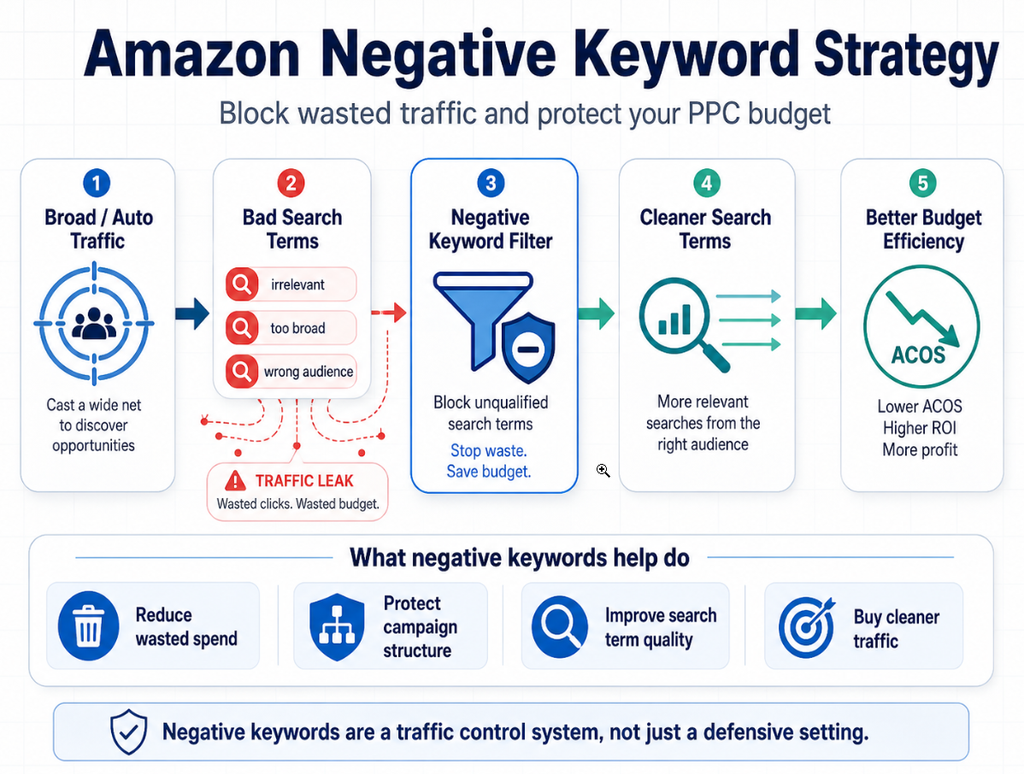
Before adding Amazon negative keywords, consider:
- Search-term relevance to the product
- Number of clicks
- Total spend
- Purchases and sales
- Current ACoS
- Product price and margins
- Campaign objective
- Amount of data available
A relevant keyword with only a few clicks may simply need more data, while a keyword that has accumulated significant spend without a purchase may require action.
This is where Claude AI can support your workflow without replacing human judgment. AI can help identify patterns and organize large amounts of data, but advertisers should review the recommendations against their product, profitability, inventory, and campaign goals.
Download an Amazon Search Term Report with Useful PPC Data
This workflow starts with data from an Amazon Sponsored Products automatic campaign or a manual campaign using broad or phrase match keywords. These campaign types can uncover valuable customer search terms beyond the exact keywords you are already targeting.
Choose a campaign with enough activity to generate meaningful data. The campaign with the highest ad spend is selected because it contains a larger volume of search-term data to analyze.
Export the Last 30 Days of Amazon Search Term Data
A 30-day Amazon search term report provides a useful window for identifying high-performing search queries, wasted ad spend, and new keyword opportunities. You can use a different date range when appropriate, but keep the timeframe consistent when comparing campaign performance over time.
How to Download an Amazon Search Term Report
Follow these steps to export your Amazon PPC search term data:
- Log in to your Amazon Ads account and open Campaign Manager.
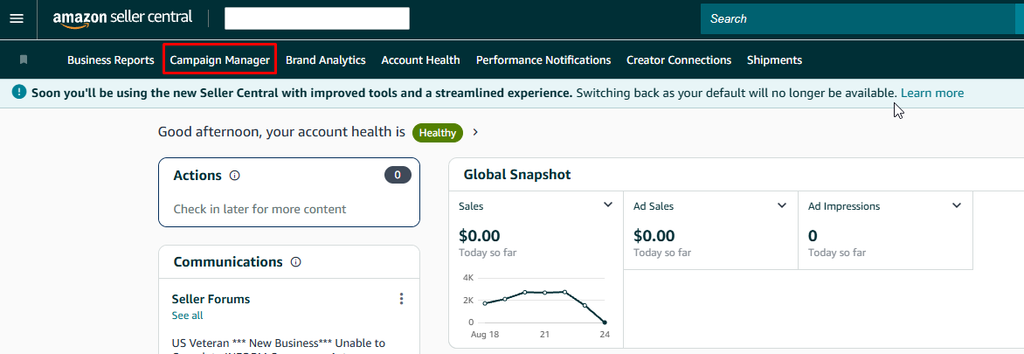
- Filter or sort your campaigns to find an automatic campaign or a relevant manual broad- or phrase-match campaign.
- Sort campaigns by Spend / Total Cost to identify campaigns with enough activity for meaningful analysis.
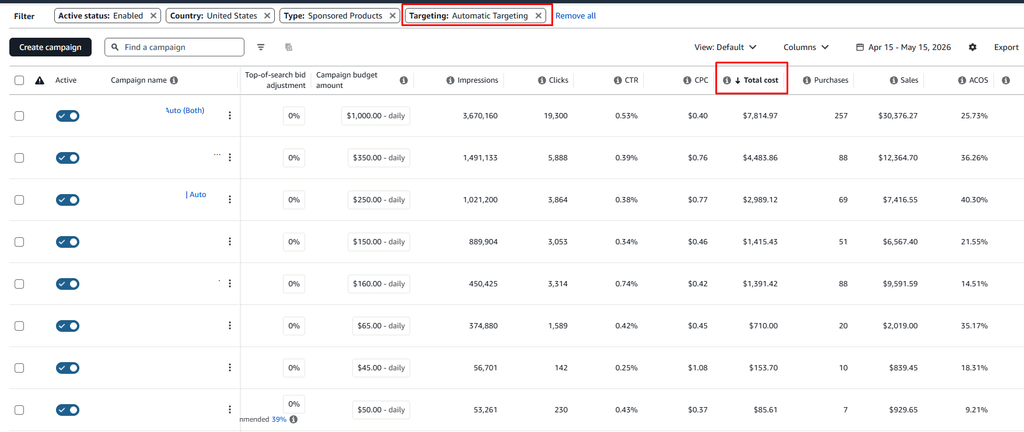
- Open the selected campaign and then choose the appropriate ad group.
- Select Search Term from the left-side navigation.
- Set the date range to the last 30 days.
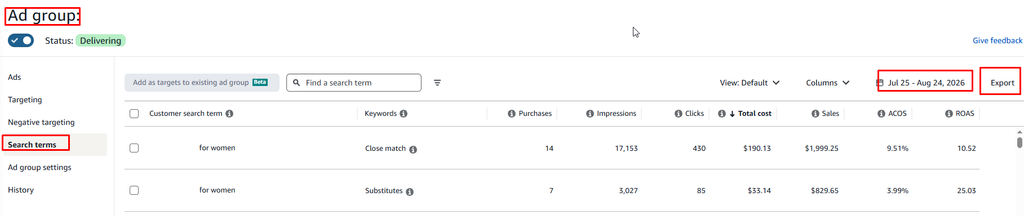
- Export and download the Amazon search term report for further analysis.
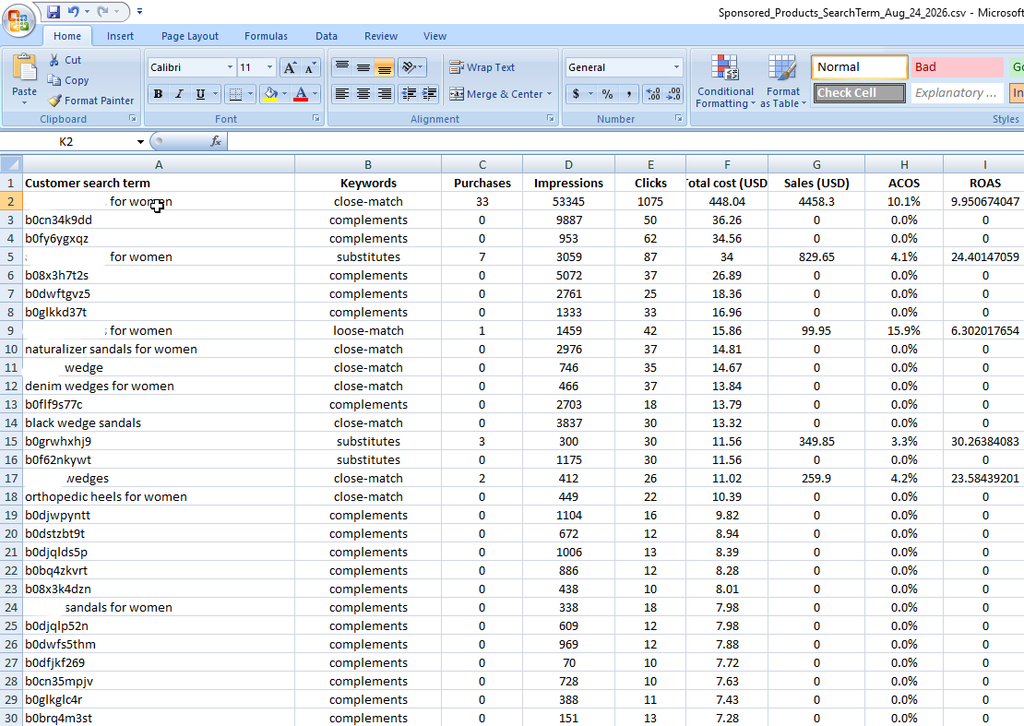
Why Amazon Search Term Reports Matter for PPC Optimization
Amazon search term reports can help you identify:
- High-converting customer search terms
- Search terms generating sales at a profitable ACOS
- Keywords that may deserve higher bids
- Search terms that should be added as exact-match keywords
- Irrelevant searches that may require negative keywords
- Areas where your Amazon PPC budget is being wasted
Amazon’s search-term reporting documentation notes that the report includes impressions that resulted in at least one ad click. This means the data primarily reflects search terms that have already generated advertising traffic, so keep that context in mind when evaluating Amazon PPC performance.
Once the report is downloaded, the next step is to analyze the search terms and determine which keywords to harvest, optimize, pause, or add as negative keywords.
Give Claude a Clear Amazon PPC Analysis Request
Uploading an Amazon PPC search term report without clear instructions can lead to a generic or unhelpful analysis. To get more useful results, tell Claude what the file contains, how you want the data categorized, and what actions you want to take from the analysis.
A well-written prompt gives Claude a specific task: turn your raw Amazon search term report into an organized Excel workbook with separate action tabs for keyword optimization.
Prompt to Organize an Amazon PPC Search Term Report
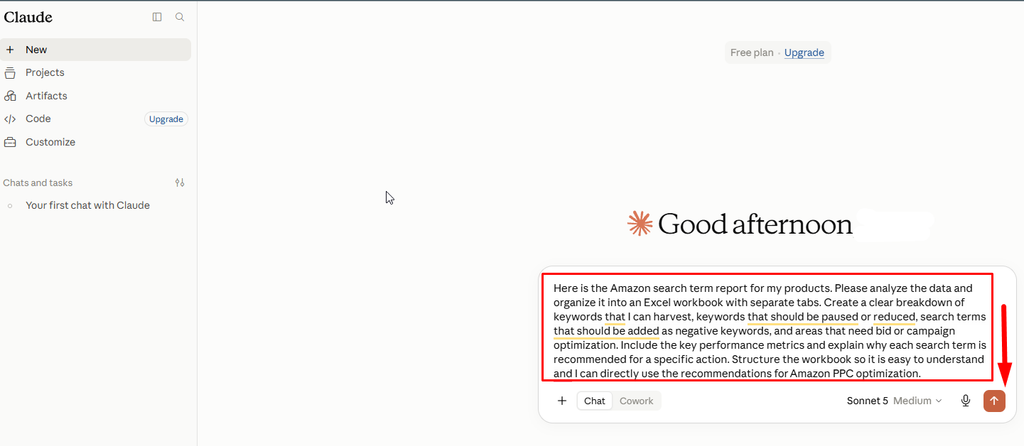
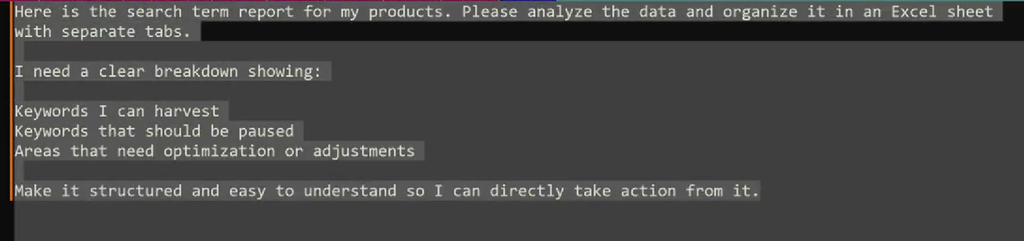
Use the structure shown in the Screenshot and adjust the instructions based on your campaign goals:
“Here is the Amazon search term report for my products. Please analyze the data and organize it into an Excel workbook with separate tabs. Create a clear breakdown of keywords that I can harvest, keywords that should be paused or reduced, search terms that should be added as negative keywords, and areas that need bid or campaign optimization. Include the key performance metrics and explain why each search term is recommended for a specific action. Structure the workbook so it is easy to understand, and I can directly use the recommendations for Amazon PPC optimization.”
This prompt tells Claude to analyze the attached Amazon PPC report, create a practical spreadsheet, separate recommendations into different tabs, and explain the reasoning behind each recommended action.
What Claude Can Help Identify
When analyzing an Amazon search term report, AI can help you quickly identify:
- High-converting keywords that may be ready for keyword harvesting
- Search terms with strong sales and efficient ACOS
- Keywords that may need higher or lower bids
- Poor-performing search terms that may need to be paused
- Irrelevant searches that could be added as negative keywords
- Search terms with high spend but few or no conversions
- New keyword opportunities for Amazon PPC campaigns
- Areas where campaign structure or targeting may need optimization
Clear instructions can make the resulting PPC keyword analysis easier to review and turn into actionable campaign changes. However, AI recommendations should support, not replace, your PPC strategy and judgment.
Upload the Amazon Search Term Report and Review the Results
Open Claude, paste your analysis prompt, attach the downloaded Amazon search term report, and submit the request. Claude can analyze the spreadsheet and organize the recommendations into an Excel workbook.
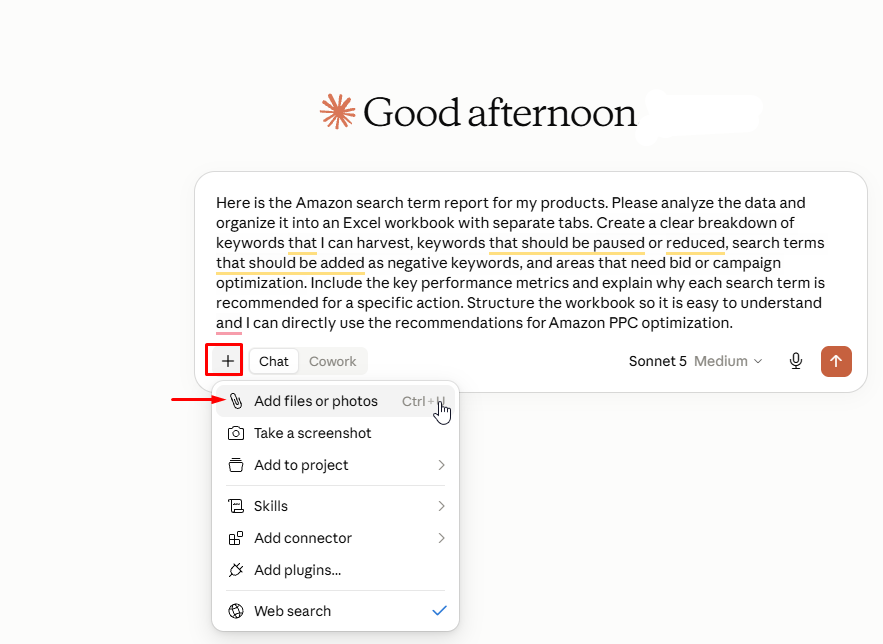
Before implementing any recommendation, review the underlying campaign data. AI can identify patterns and save time, but it does not automatically know your profit margins, inventory levels, product availability, seasonality, conversion goals, or target ACOS unless you provide that context.
For better Amazon PPC optimization, consider adding your target ACOS, profit margins, inventory status, and campaign objectives to the prompt. This gives Claude more context and can make its keyword recommendations more relevant to your advertising goals.
Start With the Amazon PPC Summary Before Reviewing Individual Tabs
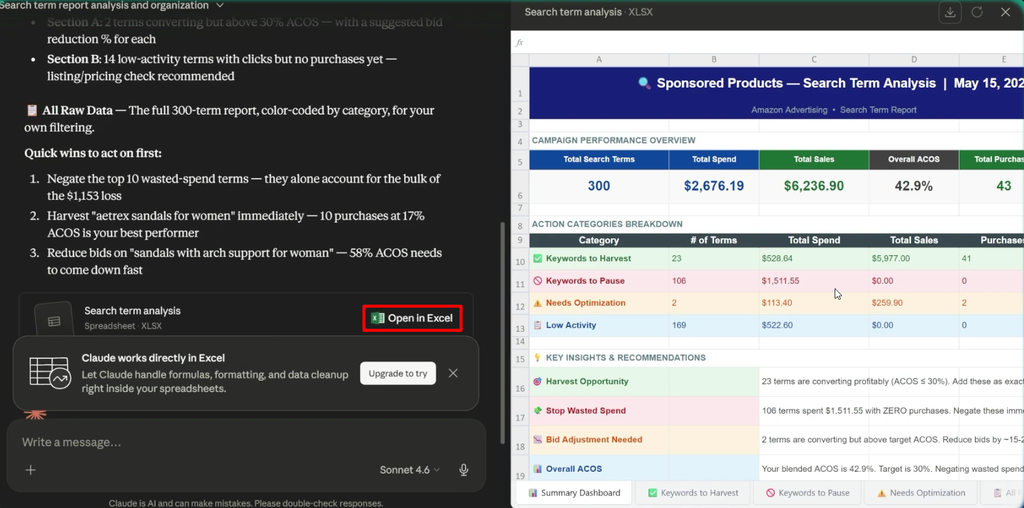
Once Claude finishes analyzing your Amazon PPC search term report, start with the summary tab before opening individual keyword or search-term tabs. The generated workbook here is titled “Sponsored Product Search Term Analysis.” Its first tab provides a quick campaign-level overview, helping you understand overall performance before diving into individual search terms.
Review Key Amazon PPC Metrics First
The example summary includes the following campaign-level metrics:
| Metric | Example Result |
| Total Search Terms | 300 |
| Total Spend | About $2.6K |
| Total Sales | About $6.2K |
| Overall ACOS | 42.90% |
| Total Purchases | 43 |
| Waste Spend | About $1.5K |
These numbers alone do not tell you which Amazon keywords should be harvested, paused, or optimized. However, they provide an important starting point for understanding campaign efficiency.
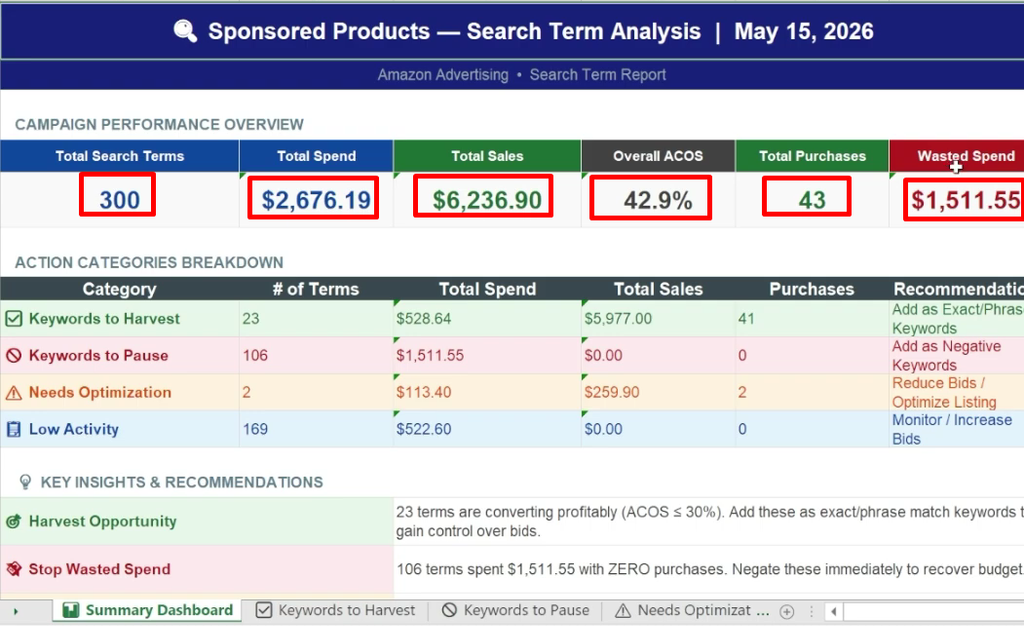
In this example, the campaign generated sales, but a significant portion of the advertising spend was identified as wasted PPC spend. This signals an opportunity to review search-term performance and improve budget allocation.
Use Search-Term Categories to Speed Up Amazon PPC Optimization
Instead of manually reviewing hundreds of rows, Claude can organize the Amazon search term report into action-based categories, such as:
- Keywords to Harvest – Search terms generating conversions that may be added as exact or phrase-match keywords.
- Keywords to Pause – Poor-performing terms that are spending budget without producing sufficient sales.
- Terms to Optimize – Search terms that may require bid, targeting, or campaign adjustments.
- Low-Activity Terms – Search terms that do not yet have enough data to justify a major change.
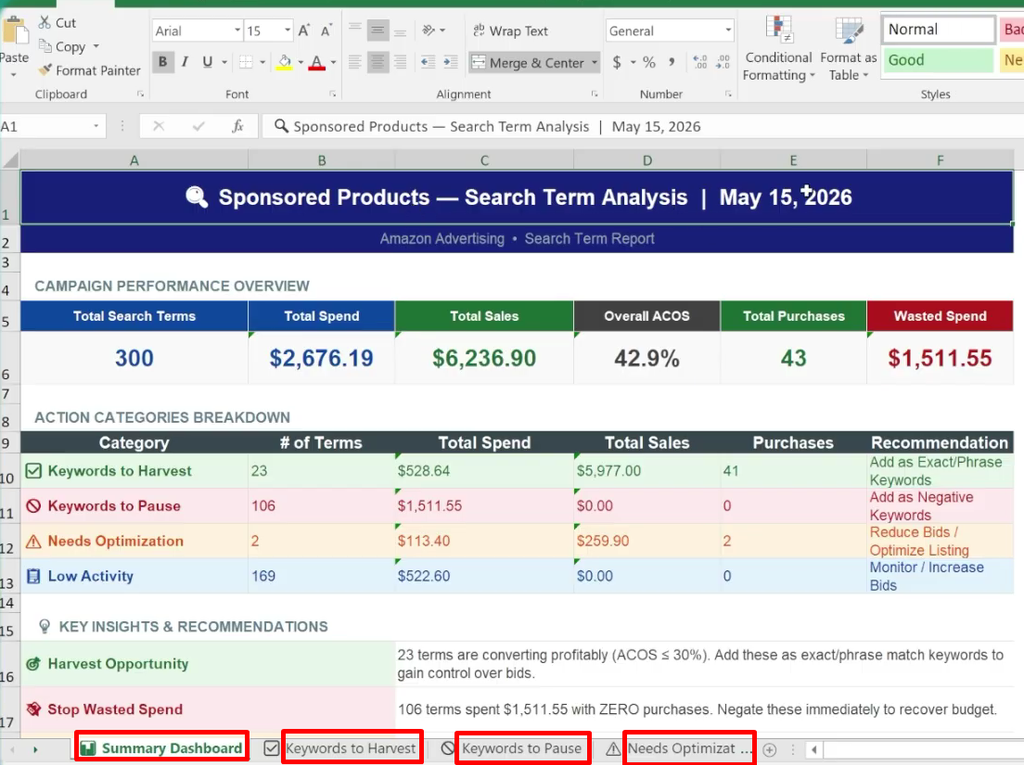
This structure turns a large Amazon PPC search term report into a shorter list of actionable decisions. Rather than reviewing every row in sequence, you can focus first on the keywords that have the clearest impact on ACOS, sales, conversions, and advertising spend.
Identify Profitable Keywords to Harvest
The spreadsheet can also provide written recommendations explaining why a search term belongs in a particular action category.
For example, the report analysis identified 23 search terms that were converting profitably and recommended adding them as exact- or phrase-match keywords. Harvesting these high-performing search terms can give advertisers greater control over keyword bids, targeting, and Amazon PPC campaign performance.
The key is to treat Claude’s recommendations as a starting point. Before making changes, compare each recommendation against your target ACOS, profit margins, conversion rate, inventory levels, and overall Amazon advertising strategy.
Harvest Profitable Search Terms Into Manual Amazon PPC Campaigns
Amazon PPC keyword harvesting is the process of taking customer search terms that have already generated purchases and adding them to a more targeted manual campaign. This is especially useful when analyzing an Amazon search term report from an automatic campaign or a manual campaign using broad or phrase match keywords.
The goal is simple: when a customer search term demonstrates sales potential, you can move it into a more controlled exact or phrase match campaign. This gives you greater control over bids, budgets, and keyword performance as part of your overall Amazon PPC optimization strategy.
Using Claude AI for Amazon PPC search term analysis can make this process faster by identifying search terms with conversions, efficient Amazon ACoS, and strong sales potential.
Review the Keyword to Harvest Tab
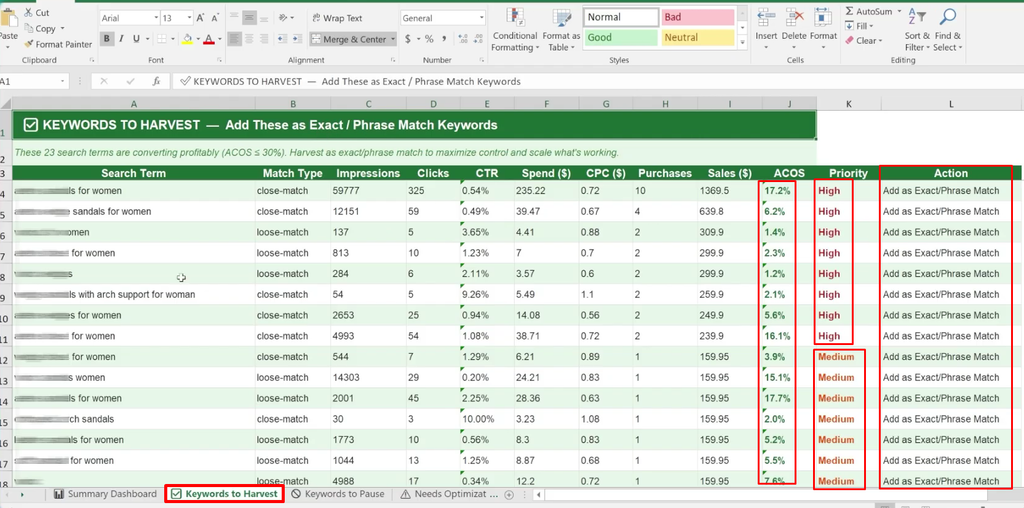
After completing your Amazon search term analysis, open the Keyword to Harvest tab in the generated workbook. This section should organize recommended search terms alongside the performance data you need to make an informed decision.
A useful Amazon PPC analysis may include:
| Field | Why It Matters |
| Original Match Type | Shows whether the search term came from an automatic, broad, or phrase campaign |
| Impressions | Shows how much visibility the search term received |
| Clicks & CTR | Shows how much traffic the term attracted and how effectively it generated clicks |
| Spend & CPC | Shows the cost of generating traffic |
| Purchases & Sales | Confirms whether the search term converted |
| ACoS | Helps determine whether sales met your target efficiency |
| Priority | Helps you review the strongest keyword harvesting opportunities first |
These metrics make it easier to evaluate search terms based on actual performance rather than relying on clicks or impressions alone.
Prioritize Profitable Amazon PPC Keywords
Start with search terms that have purchases and an acceptable ACoS based on your campaign goals. A high-priority keyword should demonstrate a combination of sales, conversions, and efficient advertising spend.
Medium-priority terms may also have potential, but they should receive a closer review before being moved into a dedicated manual campaign. Consider factors such as purchase volume, spend, conversion rate, product margins, and your target Amazon ACoS.
Move Winning Search Terms With a Purpose
Once a search term has demonstrated consistent performance, consider adding it to an exact or phrase match manual campaign. Set the bid based on how much control you want over that keyword and how it fits into your overall Amazon PPC management strategy.
Action: Review profitable search terms first, then consider adding qualified terms to exact- or phrase-match campaigns.
This process is the core of Amazon PPC keyword harvesting. It transforms customer search data from your Amazon search term report into targeted keywords that can be managed more precisely.
Use Amazon PPC Keyword Harvesting to Improve Campaign Control
Moving proven search terms into dedicated manual campaigns can make future Amazon PPC analysis easier. Instead of keeping all traffic in one broad discovery campaign, you can compare the performance of your newly harvested keywords against the original campaign.
This approach can also help you identify opportunities for:
- Amazon PPC keyword research based on real customer search behavior
- Better bid control for high-performing keywords
- Improved budget allocation across campaigns
- More focused Amazon PPC optimization
- Reduced Amazon PPC wasted spend from inefficient search terms
- Stronger keyword-level performance tracking
At the same time, not every search term with a purchase should automatically be harvested. Review the keyword’s ACoS, sales volume, profitability, inventory position, and campaign objectives before making changes.
How Claude AI Can Support Amazon PPC Keyword Harvesting
Claude AI can help analyze large Amazon search term reports and organize search terms into actionable categories. For example, it can identify potential keywords to harvest, terms that may need optimization, and search terms that could become Amazon PPC negative keywords.
The AI analysis should be used as a decision-support tool rather than an automatic replacement for Amazon PPC management. Your own profitability targets, inventory, seasonality, and advertising goals should always guide the final decision.
The result is a more structured Amazon PPC search term analysis process: discover promising customer queries, evaluate their performance, harvest proven keywords, and continuously optimize campaigns based on actual search-term data.
Stop Amazon PPC Wasted Spend Before It Grows
One of the most valuable uses of an Amazon search term report is identifying search terms that consume advertising budget without generating purchases. In this report example, the “Keyword to Pause” tab identified 106 search terms with zero purchases and approximately $1,511 in spend.
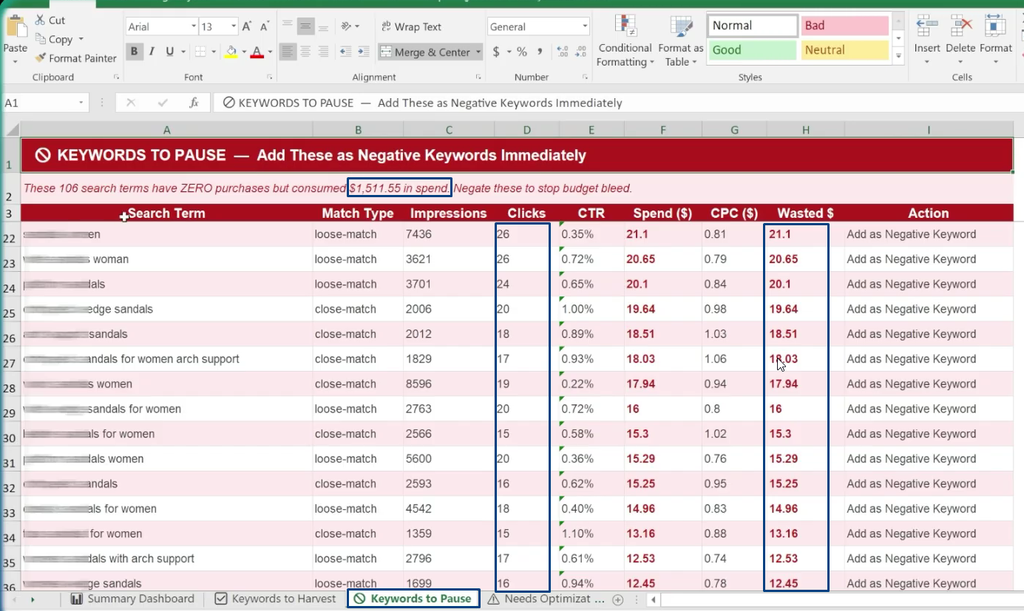
That represents a significant portion of the roughly $2.6K total spend in the report. The recommended action was to review these terms and, when appropriate, add them as Amazon negative keywords to prevent additional wasted spend.
This type of Amazon PPC search term analysis can help advertisers identify budget leaks and improve overall Amazon advertising optimization.
Look at Clicks and Spend Together
When performing an Amazon PPC analysis, do not evaluate search terms based on relevance alone. A keyword can be highly relevant to your product and still be an inefficient advertising target.
For example, some search terms in the analysis received substantial traffic without producing a purchase. Individual terms generated 20 clicks, while others received 16, 18, or 15 clicks. Some had already accumulated approximately 13–15 in spend without a single purchase.
This is where Amazon PPC performance analysis becomes important. If a search term continues to generate expensive clicks without conversions, allowing it to run indefinitely can increase Amazon PPC wasted spend and eventually push the keyword’s ACoS beyond a profitable level.
Key Metrics to Review
When evaluating potential Amazon PPC negative keywords, review:
- Clicks
- Impressions
- Spend
- CPC
- Purchases
- Sales
- ACoS
- Conversion rate
- Product price and profit margin
Looking at these metrics together provides a more reliable basis for Amazon PPC campaign optimization than using a single performance metric.
Confirm the Decision Before Adding Amazon PPC Negative Keywords
Before pausing a search term or adding it to your Amazon PPC negative keywords list, review the term in context.
- Confirm product relevance – Make sure the search term is actually relevant or irrelevant to the advertised product.
- Review traffic and spend – Check how many clicks the term generated and how much budget it consumed.
- Check conversions – Look at purchases and sales rather than clicks alone.
- Evaluate ACoS – Compare the term’s Amazon ACoS with your target and profitability.
- Choose the appropriate action – Add a suitable term as a negative keyword or pause the related keyword based on your campaign structure.
- Monitor performance – Review the campaign after making the change.
Avoid making Amazon PPC management decisions based on one metric alone. A high click count can mean something very different for a low-priced product compared with a higher-priced product.
Optimize Amazon PPC Keywords With High ACoS
Not every inefficient search term should be paused. Some search terms generate purchases but have an Amazon ACoS that is higher than your target.
These terms are different from non-converting keywords because they have already demonstrated buyer intent. The problem is advertising efficiency, not a complete lack of sales.
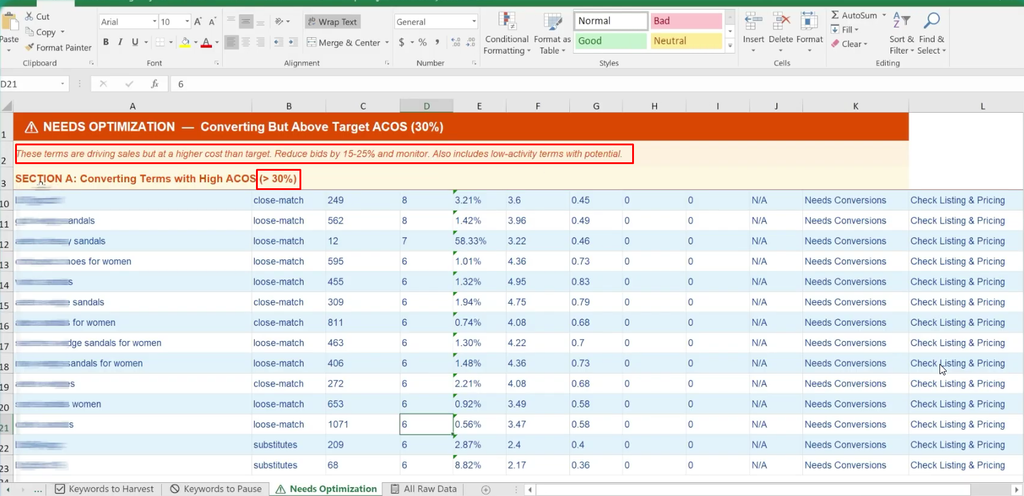
In the example, Claude identifies converting search terms with an ACoS above the 30% target. Instead of immediately removing these Amazon Sponsored Products keywords, the recommended approach is to reduce bids and monitor the results.
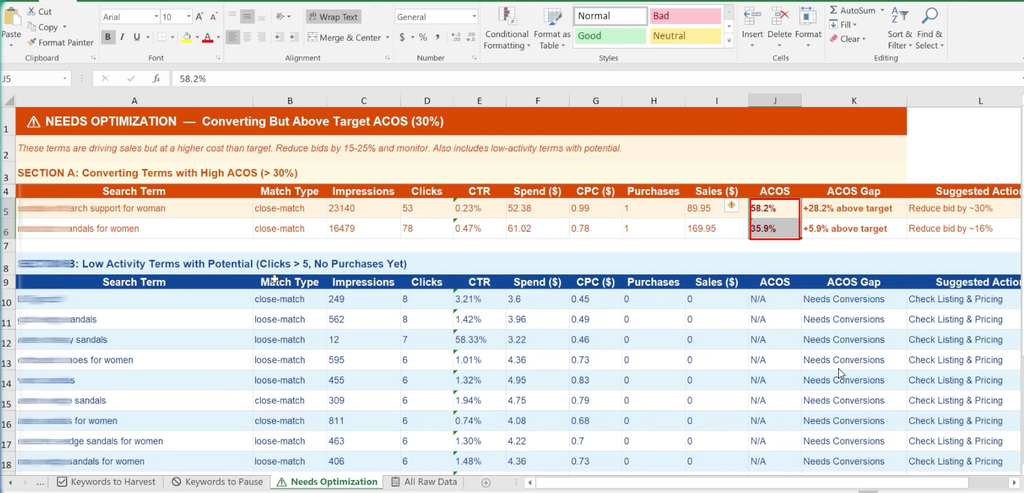
This is an important part of Amazon PPC ACoS optimization: preserve keywords that can generate sales while working to make their traffic more profitable.
Use Amazon PPC Bid Optimization to Lower Costs
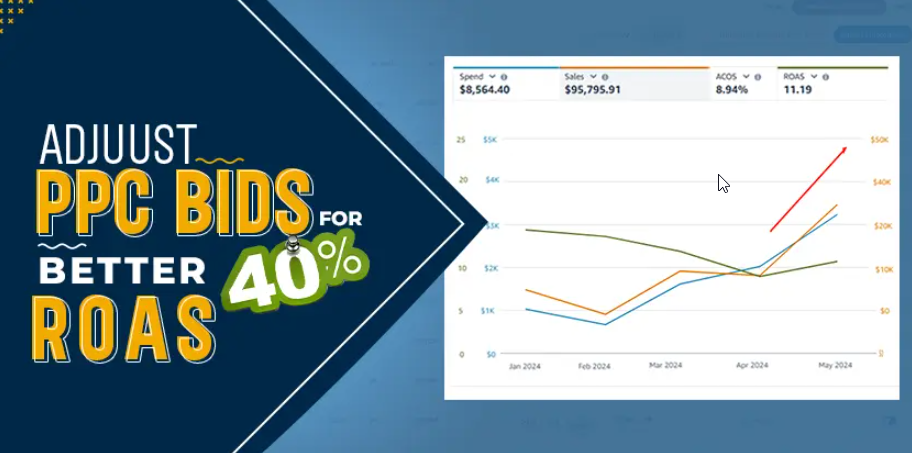
For search terms that convert but have an excessively high ACoS, the example recommends reducing bids by approximately 15%–25%.
Lowering the bid can reduce the cost of traffic while allowing the keyword to continue generating conversions. The exact adjustment should depend on your campaign goals, current CPC, conversion rate, profitability, and competitive environment.
After making a bid adjustment, continue monitoring:
- Clicks
- Spend
- CPC
- Purchases
- Sales
- ACoS
- Conversion rate
If the search term continues to generate sales at an acceptable cost, it may remain active. If the ACoS remains too high, another Amazon PPC bid optimization adjustment may be appropriate.
Treat Low-Activity Search Terms Differently
Not every keyword with no purchases should immediately become an Amazon PPC negative keyword.
Claude can also identify low-activity search terms that have received some traffic but do not yet have enough data to make a confident decision. These terms have more than five clicks but no purchases.
These keywords do not have enough evidence to enter the Amazon keyword harvesting list, but they may not belong in the pause category either.
Instead, consider:
- Keeping the term under observation
- Making a small bid adjustment
- Giving it more time to collect conversion data
- Moving it into a separate campaign for closer monitoring
- Reviewing its relevance and expected conversion potential
This approach helps prevent premature decisions based on insufficient data.
Use the Raw Data Tab to Verify Every Amazon PPC Recommendation
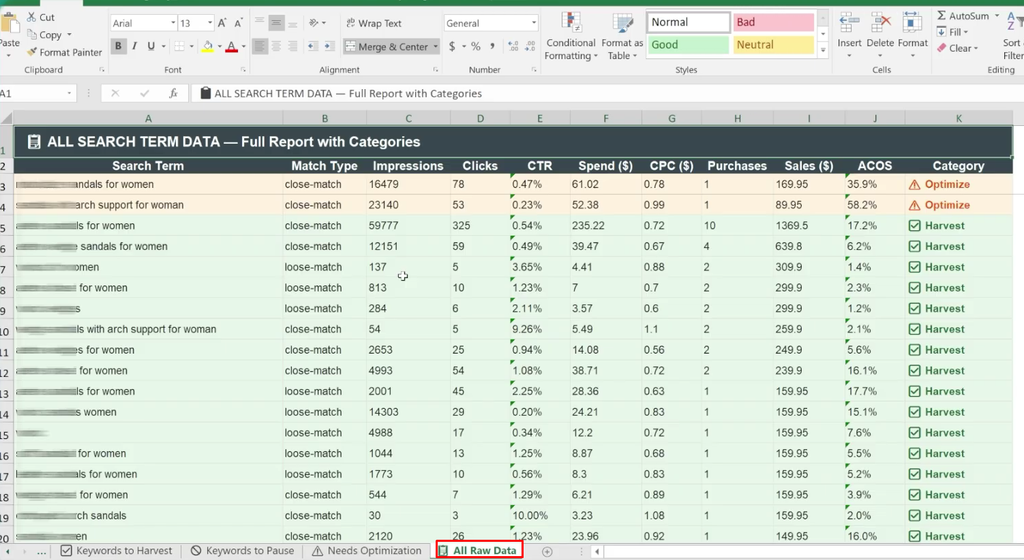
The raw data tab contains the complete Amazon search term report in one place. Use it to verify the recommendations generated by Claude AI, compare related search queries, and sort performance data by spend, sales, purchases, clicks, CPC, or Amazon ACoS.
Rather than treating an AI-generated workbook as a list of commands, use it as a practical Amazon PPC optimization action plan. Start by filtering the relevant category, review the underlying search-term data, and then decide which campaign change fits your advertising goals.
This verification step is an important part of Amazon PPC analysis with AI because AI can identify patterns quickly, but the final decision should account for your product margins, inventory, pricing, and campaign objectives.
Turn Your Amazon Search Term Report Into Three Action Queues
A large Amazon PPC search term report can be organized into three practical work queues:
1. Scale Profitable Search Terms
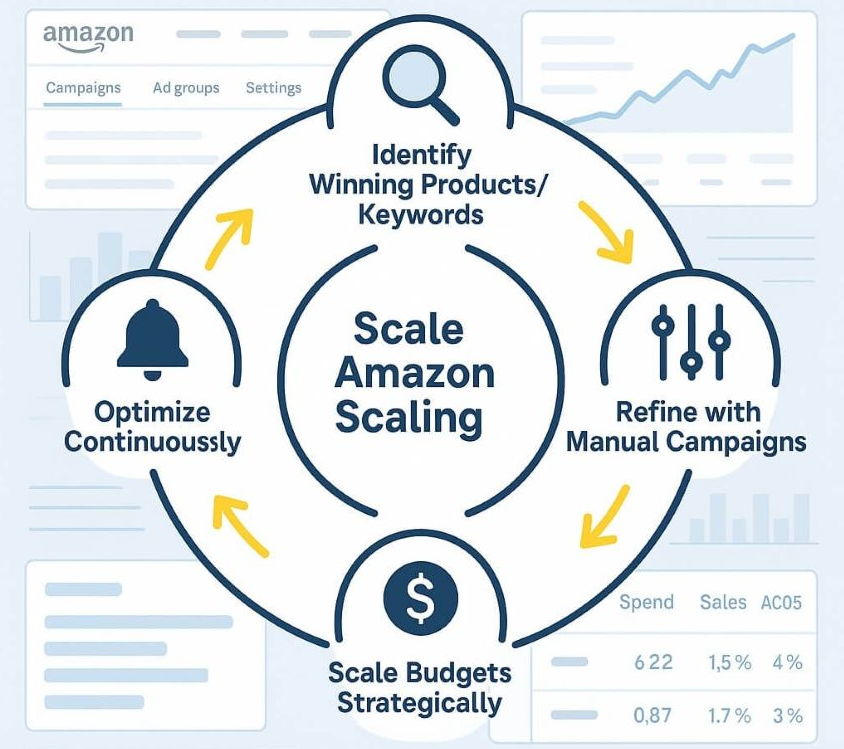
Identify search terms with purchases, strong sales, and an acceptable ACoS. These terms may be candidates for Amazon PPC keyword harvesting and can potentially be moved into dedicated exact- or phrase-match manual campaigns.
This creates greater control over bids and budgets for proven Amazon Sponsored Products keywords.
2. Stop or Reduce Amazon PPC Wasted Spend
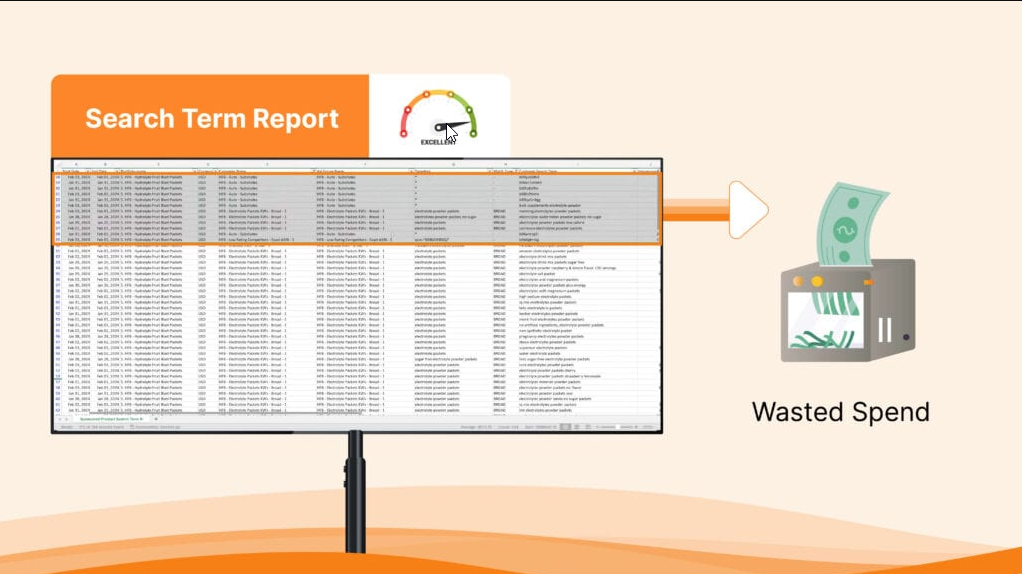
Find search terms that have accumulated significant spend and clicks without generating purchases. After reviewing the underlying data, relevant terms may be added as Amazon PPC negative keywords or paused according to your campaign structure.
This process can help reduce Amazon PPC wasted spend and improve overall budget efficiency.
3. Optimize and Monitor

The third group includes search terms that generate purchases but exceed your target Amazon ACoS, as well as terms that have received early traffic but do not yet have enough conversion data.
These terms may benefit from Amazon PPC bid optimization, additional monitoring, or further testing rather than immediate removal.
This three-queue approach turns a large spreadsheet into a clear list of actions and prevents your Amazon PPC analysis from becoming a report that you download, review once, and forget.
Make search-term data lead to action

A search term report is most useful when it drives a clear campaign decision. Claude AI can reduce the manual work of organizing large PPC exports, but the strongest results come from reviewing the recommendations against your own ACoS target, product price, and campaign goals.
Focus first on profitable terms that deserve more control and costly non-converting terms that need attention. With each new report, your Amazon PPC search term analysis can become a practical loop of discovery, adjustment, and comparison.
Conclusion
Effective Amazon PPC optimization starts with understanding how customers actually search for your products. By downloading an Amazon search term report, analyzing the data with Claude AI, and reviewing recommendations against the raw performance data, you can turn a large PPC report into a clear, actionable optimization plan.
Use Amazon PPC keyword harvesting to identify profitable search terms, add relevant Amazon PPC negative keywords to reduce wasted spend, and apply Amazon PPC bid optimization to keywords that generate sales but exceed your target Amazon ACoS. Organizing these insights into separate action categories makes Amazon PPC management more efficient and helps you focus on decisions that can have the greatest impact.
The real value of AI for Amazon PPC is not replacing your judgment. It is reducing the time spent sorting through hundreds of search terms so you can spend more time improving campaign strategy. Whether you are conducting Amazon PPC analysis with AI, performing Amazon PPC keyword research, or managing Amazon Sponsored Products, the same principle applies: use data to identify opportunities, verify the recommendations, make measured changes, and monitor the results.
By making Amazon PPC search term analysis a regular part of your workflow, you can continuously identify profitable keywords, control Amazon PPC wasted spend, improve campaign efficiency, and build a more scalable approach to Amazon advertising optimization.
Analyze smarter, optimize with purpose, and let your Amazon PPC data guide the next campaign decision.
More Amazon PPC resources from Ecomclips
For more Amazon advertising tutorials and updates, visit these Ecomclips resources:
- Watch new videos on the Ecomclips YouTube channel.
- Browse articles on the Ecomclips blog.
- Follow updates on the Ecomclips Facebook page.
- Connect through Ecomclips on LinkedIn.
Questions about an account review or a free audit can be sent to info@ecomclips.com.