
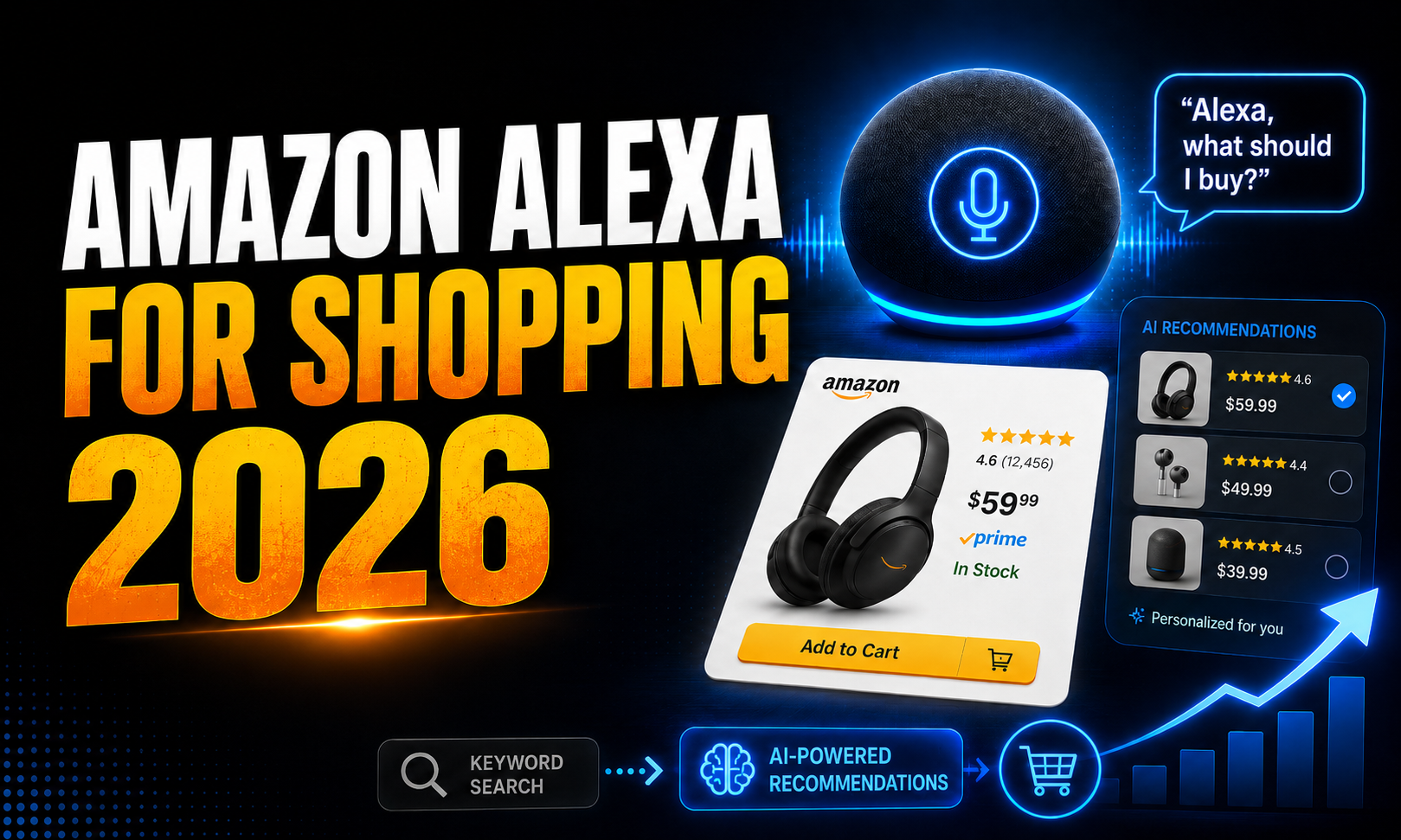
Amazon search is changing. It is becoming less about typing keywords and more about having a conversation.
On May 13, 2026, Amazon officially replaced Rufus with Alexa for Shopping. The new AI assistant helps customers ask questions, compare products, check price history, build carts and even plan future purchases.

For shoppers, it creates a faster, more personalized path from question to checkout. For sellers, it introduces a new challenge: products must be easy for Amazon’s AI to understand, compare, explain and confidently recommend.
So, what exactly has changed, and how can sellers prepare for this new era of AI powered Amazon shopping?
Meet Alexa for Shopping: Amazon’s Smarter Way to Buy
Alexa for Shopping is Amazon’s new generative and agentic AI shopping assistant.
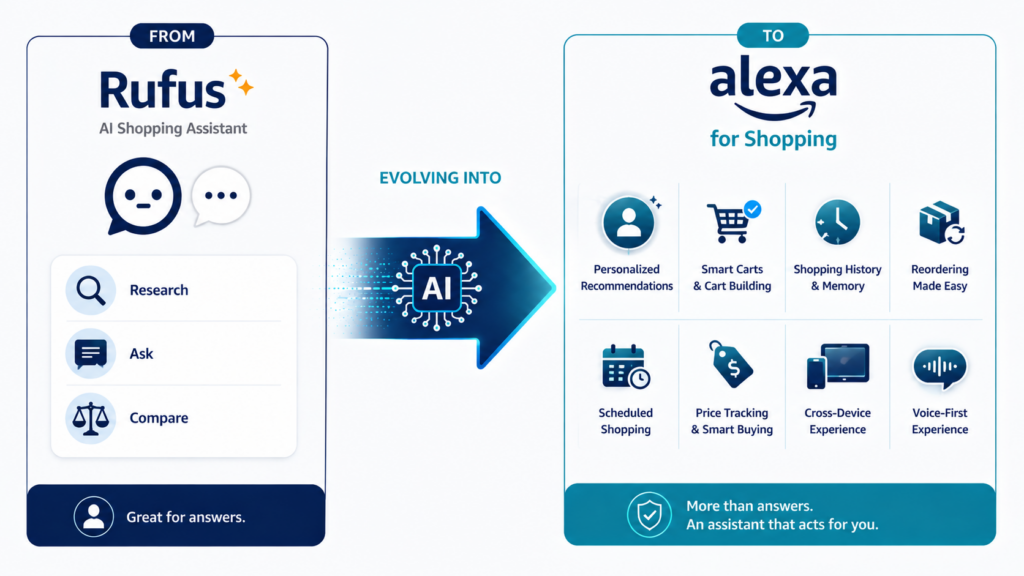
Amazon renamed Rufus as Alexa for Shopping and combined Rufus’s product expertise with the deeper personalisation and cross-device capabilities of Alexa+.
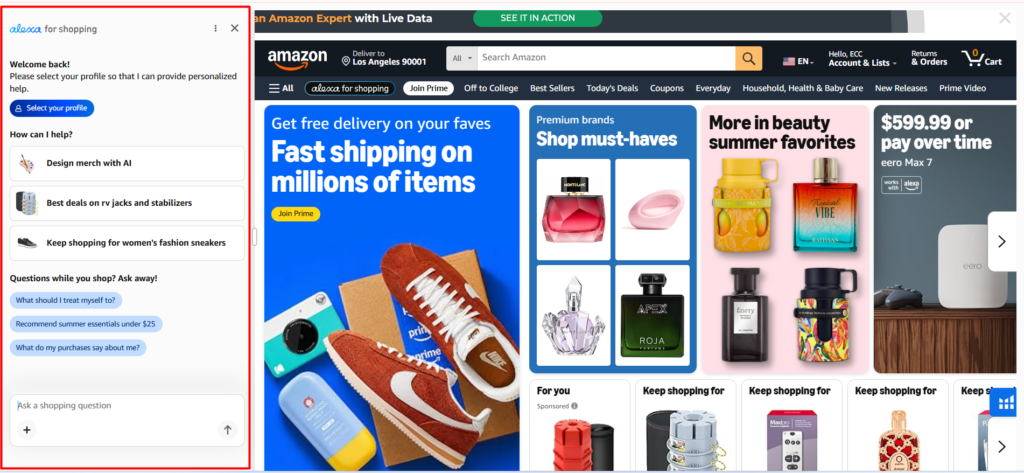
The assistant is available to signed-in US customers through Amazon.com, the Amazon Shopping app and compatible Echo Show devices. Customers do not need an Echo device or Prime membership to use Alexa for Shopping through Amazon’s website or mobile app.
Rufus mainly helped customers research products, ask questions and compare different options. Alexa for Shopping keeps those capabilities but adds more personalized and action-oriented features.
When Search Starts Thinking Like a Shopper
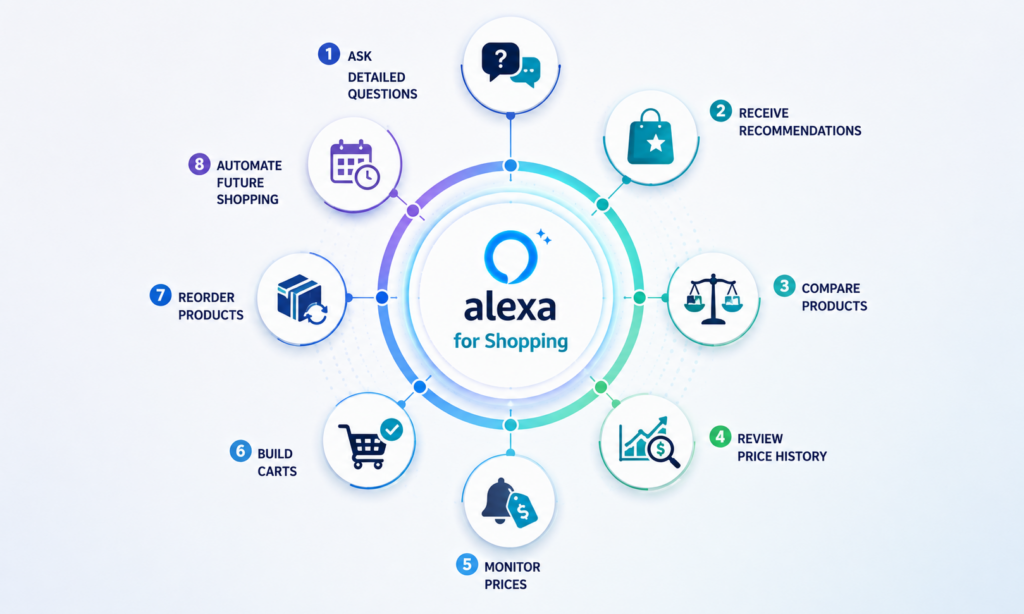
Alexa can help customers discover products, understand unfamiliar categories, compare alternatives, review price history, build shopping carts, reorder previous purchases and create recurring shopping instructions.
In eligible situations, it can also monitor a product’s price and complete the purchase when the price reaches an amount selected by the customer.
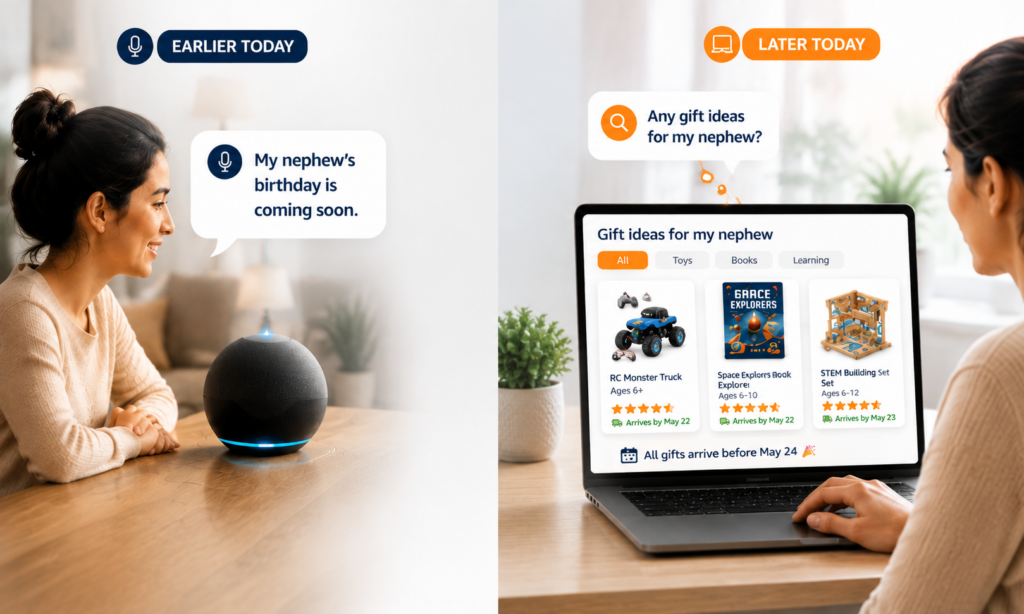
The assistant can use conversational context, shopping history and customer preferences to provide more relevant responses. A discussion that begins on an Alexa enabled device may later influence product suggestions inside the Amazon Shopping app. This transforms Amazon search into something much closer to a personal shopping conversation.
Instead of typing: Large washable dog bed
A customer might ask: Which washable orthopaedic bed would be comfortable for my senior golden retriever and fit inside a 42-inch crate?
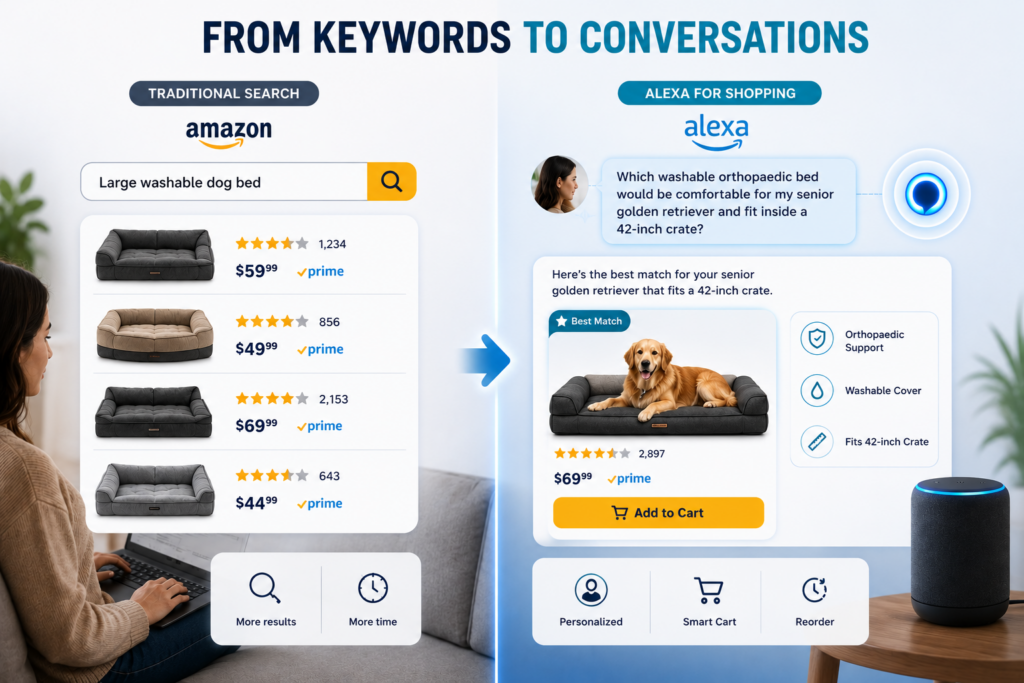
That question includes a product type, pet size, life stage, cleaning preference, comfort requirement, and exact compatibility need.
Alexa must understand all those details before deciding which products are most relevant. This is why complete and clearly structured product information is becoming increasingly important.
Amazon also reported in July 2026 that US customers using Alexa for Shopping spent more than 40% more per order on average than customers who did not use it.
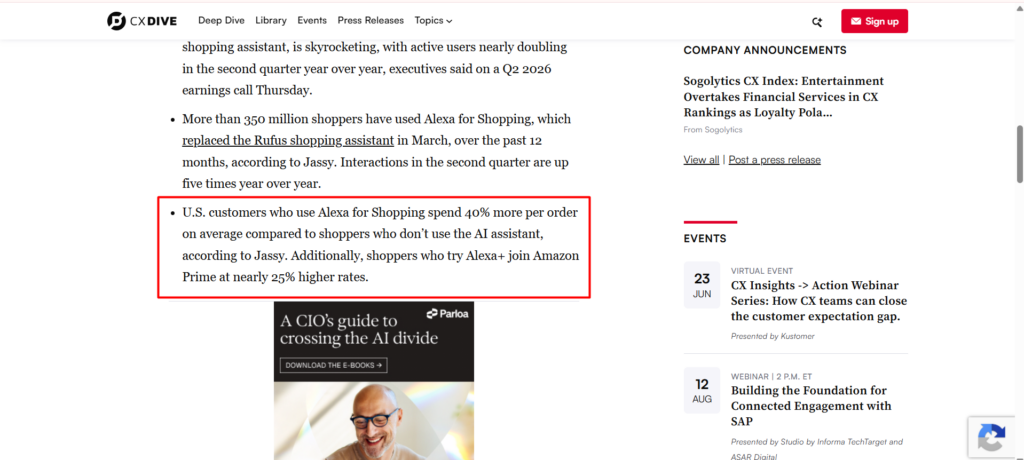
That does not prove that Alexa alone caused the higher spending. More active shoppers may simply be more likely to use the assistant. However, the figure shows how important AI-assisted shopping has become to Amazon’s retail strategy.
Why Amazon Is Bringing Shopping Under the Alexa Name
Rufus was designed specifically as a shopping assistant, while Alexa is already connected to Amazon’s wider ecosystem. By bringing the two together, Amazon can create a shopping experience that is more personal, connected and action oriented.
1. To Connect Shopping with Customer Preferences
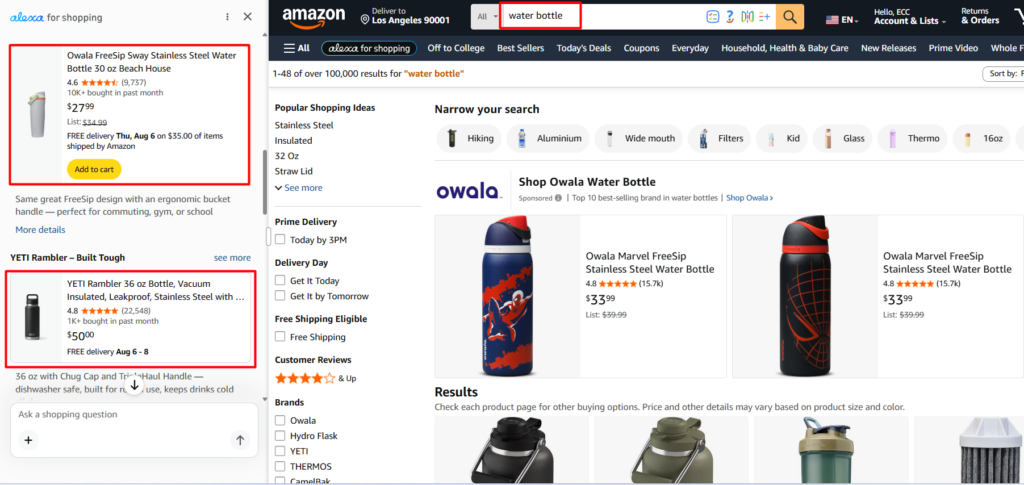
Alexa for Shopping can combine product research with a customer’s preferences, shopping activity and previous conversations.
Instead of treating every search as a new interaction, Alexa may use earlier information to understand what the shopper is looking for and provide more relevant recommendations.
2. To Continue the Conversation Across Devices
The assistant does not simply answer one question and disappear. It can remember context and continue helping the customer later across Amazon.com, the Amazon Shopping app and compatible Alexa devices.
For example, a customer may tell Alexa that their nephew’s birthday is approaching. A few weeks later, the customer can open Amazon and ask for gift ideas. Alexa for Shopping may use the earlier conversation to recommend age-appropriate products that can arrive before the birthday.
3. To Help Customers Solve Problems
Alexa can help customers find a solution even when they do not know the exact name of the product they need.
A shopper may describe a stain, upload a picture of a damaged item or explain a project they are planning. Alexa can interpret the problem and recommend products that may help solve it.
This moves Amazon search beyond direct product keywords and closer to understanding the customer’s real buying need.
4. To Use Amazon’s Wider Shopping Data
Amazon has a major advantage because Alexa for Shopping can draw from a wide range of information.
This may include Amazon’s product catalogue, product detail pages, customer reviews, community questions and answers, inventory availability, delivery information, shopping behaviour and selected information from across the wider web.
Together, these signals can help Alexa explain products, compare alternatives and recommend options that better match the customer’s situation.
5. To Make Conversational Shopping the New Normal
Amazon clearly expects conversational and agentic shopping to become a regular part of online buying.
Instead of typing a short keyword, browsing several listings and comparing products manually, customers can ask Alexa to understand their needs, explain the available choices and help complete the next step.
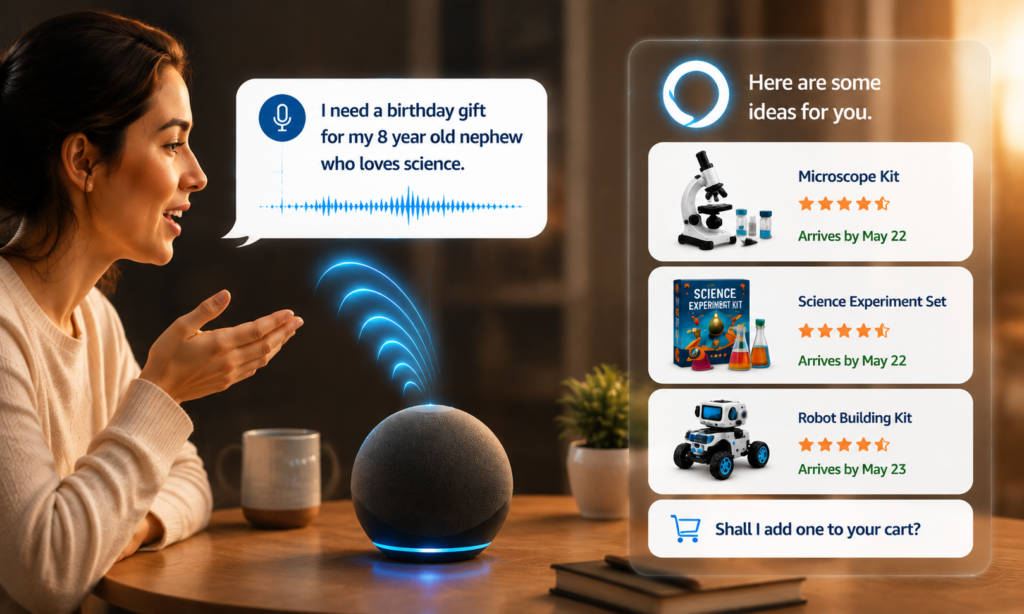
By bringing shopping under the Alexa name, Amazon is creating one connected assistant that can research, remember, recommend and act.
From Rufus to Alexa: What Shoppers Can Do Now
The name change may appear simple, but the overall Amazon shopping experience is becoming much broader.
1. Customers Can Ask Full Questions in Amazon Search
Customers can now enter complete questions directly into Amazon’s main search bar. They may ask:
- “What is a good skincare routine for men?”
- “Which coffee machine is easiest to clean?”
- “What equipment do I need for a home photography studio?”
Amazon can recognize that the customer is asking a question instead of entering a traditional product keyword. Alexa for Shopping may then provide product guidance, buying advice, recommendations or comparisons without requiring the customer to begin a separate conversation.
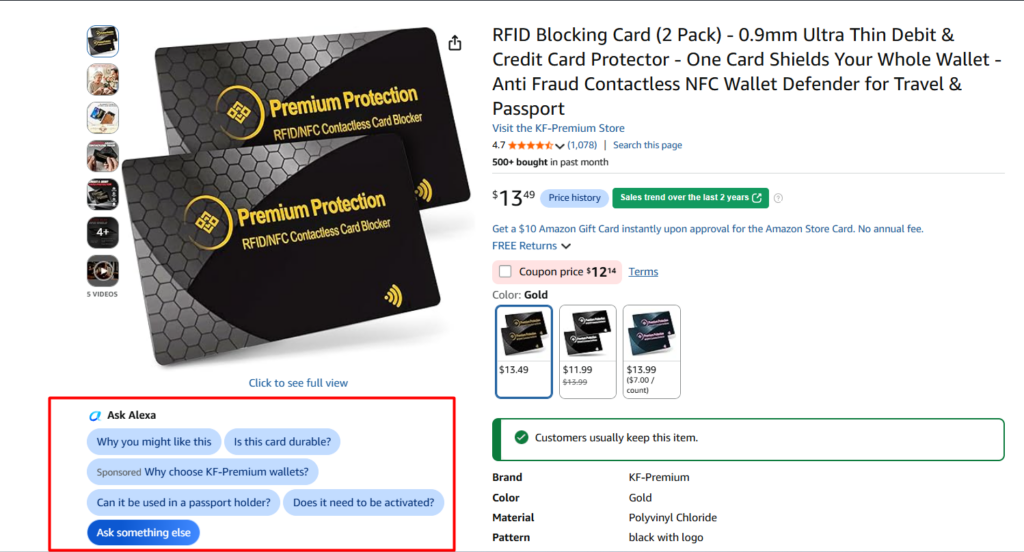
This does not mean traditional keywords are disappearing. Amazon still needs to understand what the product is.
2. AI Overviews Can Shape the Buying Decision
Alexa for Shopping can display AI-generated overviews above search results and on eligible product detail pages. These overviews may explain what a product category is, which features customers should consider and how different product options compare.
For example, a shopper searching for an air purifier may first see information about room coverage, filtration systems, noise levels and replacement filter costs. This can shape the customer’s buying criteria before they click a particular product.
For sellers, this creates an important question: Does your listing clearly address the features Alexa is teaching customers to evaluate?
A product may rank strongly for a keyword but still look incomplete if important information such as dimensions, compatibility, materials, capacity or intended use is missing.
3. Comparing Products Requires Fewer Clicks
Customers can select several products from Amazon search results and ask Alexa to compare them. Alexa may bring together information about product features, technical specifications, prices, ratings and customer review themes.
This allows shoppers to understand the most meaningful differences without opening and closing several product pages.
For sellers, vague marketing language becomes less useful. Claims such as “high quality,” “superior performance” or “perfect for everyone” do not give Alexa meaningful facts to compare.
For example:
- This bottle holds 32 ounces.
- This cover fits mattresses up to 14 inches deep.
- This charger works with iPhone 15 and later models.
- This power bank provides a 20,000 mAh battery capacity.
Clear facts make products easier for both Amazon and customers to evaluate.
4. Recommendations Can Be Personalized for Each Shopper
On selected product pages, customers may see a “Why you might like this” option.
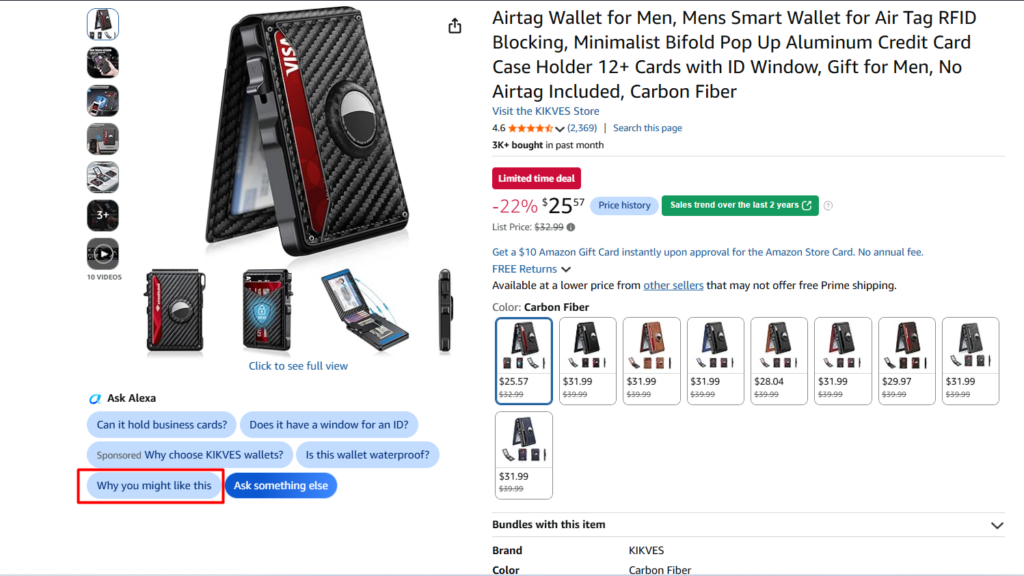
Alexa can explain why the product may suit that particular shopper based on their preferences and previous shopping behaviour. It may focus on affordability for one customer, compact size for another and material or compatibility for someone else.
This means two customers entering a similar query may receive different recommendations.
6. Customers Can View Up to One Year of Price History
Alexa for Shopping can show 30-day, 90-day and 365-day price history for eligible products.
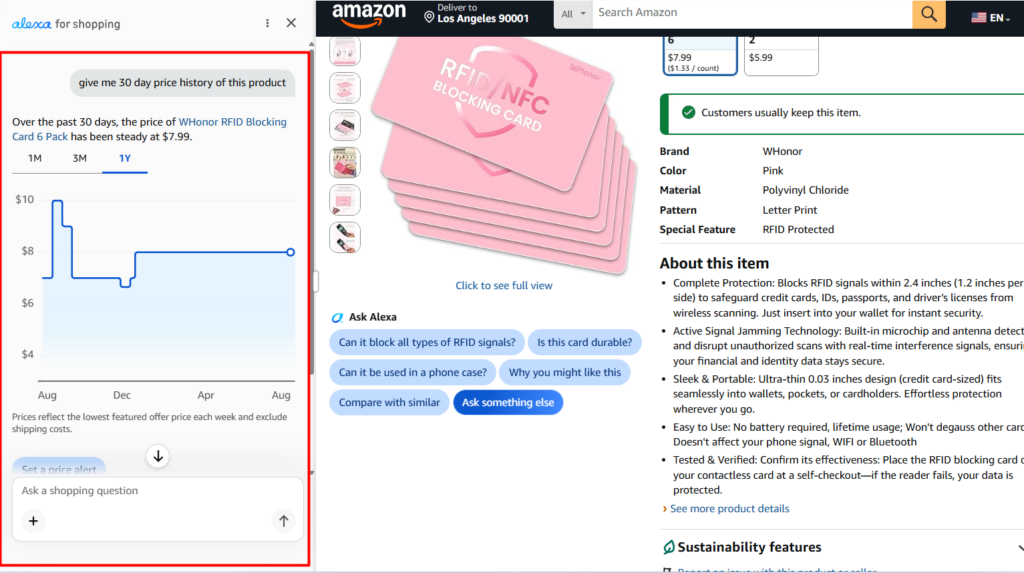
Customers may ask whether an item has recently been cheaper, whether the current offer represents a meaningful discount or how the price has changed over time. Amazon reported that more than 50 million customers had already checked product price history by May 2026.
This makes seller pricing patterns more visible. Frequent price changes, repetitive promotions and inflated reference prices may become easier to identify.
7. Alexa Can Monitor Prices and Buy Later
Customers can ask Alexa to notify them when a product reaches a particular price. For eligible purchases, customers may also instruct Alexa to buy the product when it falls below a selected amount.
Alexa can continue checking the price after the original shopping session and complete the eligible purchase using the customer’s saved payment and delivery details.
This creates a longer purchasing journey.
A shopper may discover a product today, create a price instruction and complete the purchase several days or weeks later without searching for the item again.
8. Scheduled Actions Can Manage Future Shopping
Scheduled Actions allow customers to create one-time or recurring shopping instructions.
A customer may ask Alexa to:
- Look for children’s snacks within a specific budget.
- Suggest birthday presents two weeks before an important date.
- Notify them when a favourite author releases a new book.
- Add cleaning products to the cart at regular intervals.
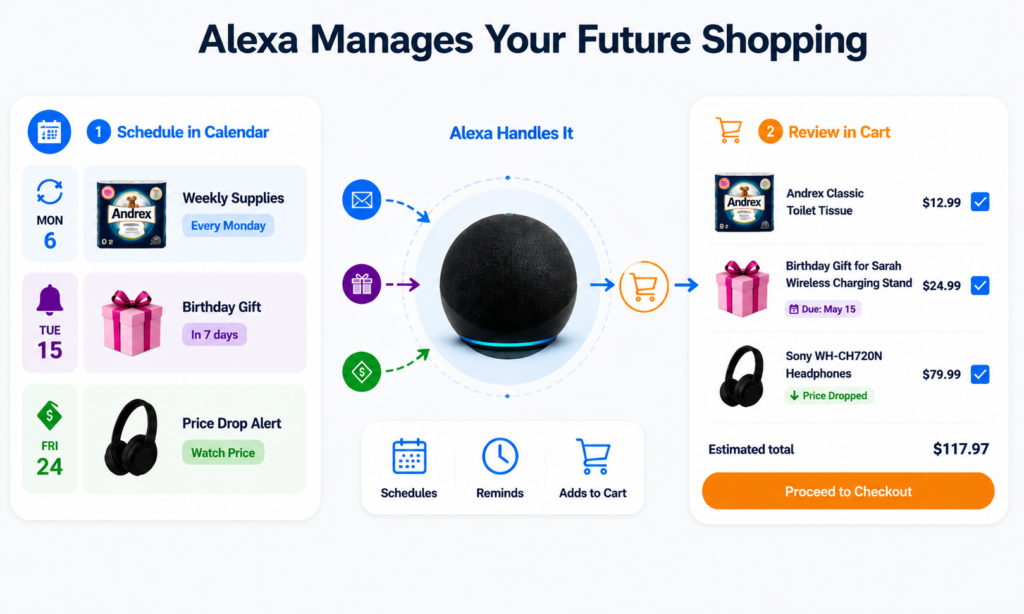
Alexa can research suitable products and then notify the customer or add relevant items to the cart for review.
Scheduled Actions are not exactly the same as Subscribe & Save. It is more flexible. They may involve searching, monitoring, recommending, comparing or adding products to the cart.
9. Alexa Can Rebuild Carts and Reorder Products
Customers can ask Alexa to add frequently purchased products to their cart or recreate a previous order.
Someone may say:
- Add the cleaning products I normally buy.
- Reorder the supplies I purchased for school last year.
- Add the ingredients we used when we made pumpkin pie.
Alexa can search previous purchases and may suggest an alternative when a previously ordered product is unavailable. For repeat-purchase products, a stockout may therefore cost more than one order.
10. Alexa Can Help Customers Shop Outside Amazon
Alexa for Shopping can surface products from external online stores through Amazon Shop Direct. Customers may visit the merchant’s website to complete the purchase.
For eligible products, Amazon’s Buy for Me feature can complete the purchase from another retailer using the customer’s Amazon payment and delivery information.
This means Amazon sellers may sometimes compete with products available outside the Amazon marketplace.
It also makes consistent brand information across Amazon, official websites and other retail channels more important.
When product names, dimensions, materials, model numbers or warranty details conflict, customers and AI systems may struggle to determine which information is correct.
How Alexa Changes the Rules of Amazon Listing Optimization
Alexa for Shopping does not replace the basic principles of Amazon optimisation.
Relevant keywords, correct categorisation, competitive pricing, strong images, positive reviews, product availability and conversion still matter.
The difference is that Amazon’s AI now needs enough information to understand the product within a specific customer context.
1. Structured Product Attributes Carry More Weight
Product attributes tell Amazon exactly what an item is and how it should be classified.
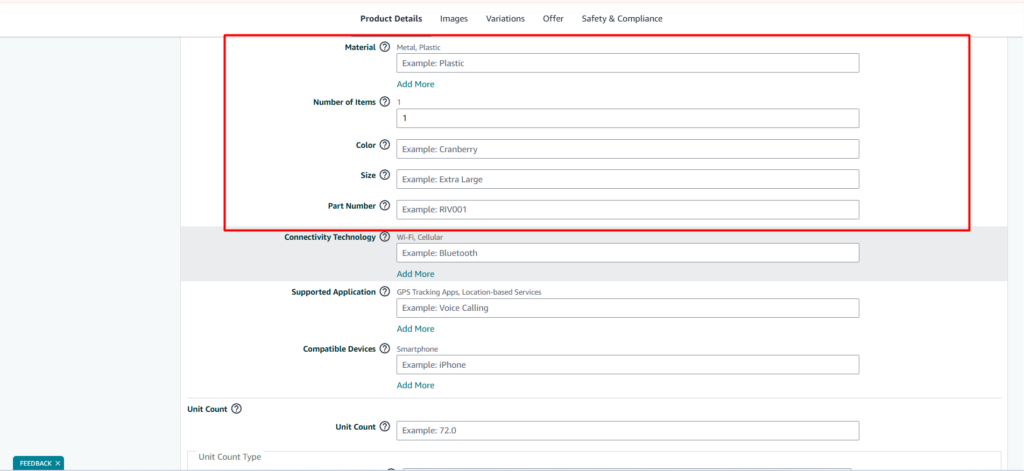
Depending on the category, these attributes may include:
- Material
- Dimensions
- Capacity
- Size
- Colour
- Compatibility
- Age range
- Power source
- Ingredients
- Care instructions
- Package quantity
- Included components
Every relevant missing attribute can leave an important customer question unanswered.
If Alexa is comparing three travel bags and one listing does not provide its capacity, that product may be more difficult to evaluate. Complete product attributes also support Amazon filters, category navigation and product comparison tools.
2. Bullet Points Should Explain, Not Repeat
Keyword rich bullet points can still support relevance, but keyword repetition should not make the listing difficult to read. A strong bullet usually begins with a clear product feature and then explains what it means for the customer.
For example:
REMOVABLE WASHABLE COVER: The zippered outer cover can be removed and machine washed, helping pet owners manage hair, dirt and everyday odours.
This is much stronger than:
PREMIUM DOG BED: Best dog bed for dogs, large dog bed, comfortable pet bed and quality dog sleeping bed.
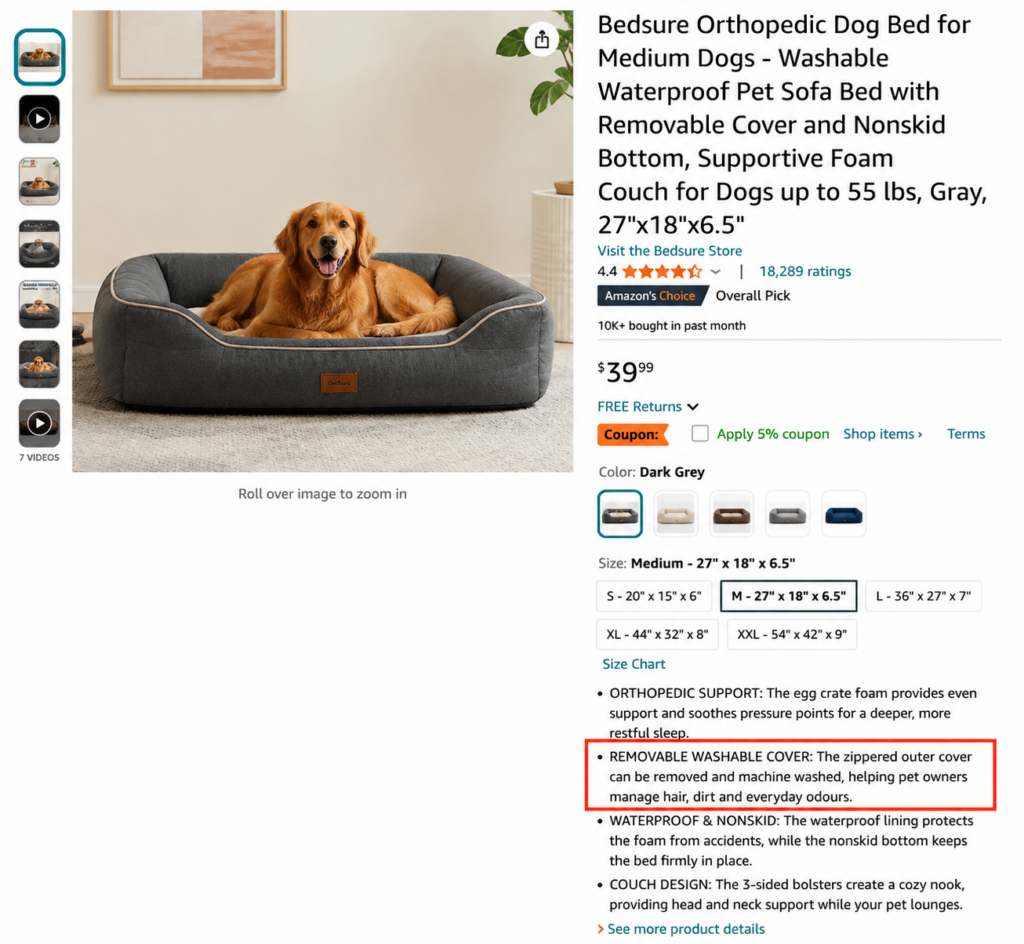
The first version gives Alexa a feature, mechanism, use case and customer benefit. The second mainly repeats keywords.
3. Product Titles Still Need to Be Simple
Do not turn the product title into a complete conversational paragraph. The title should still identify the product quickly and naturally.
A useful title structure is: Brand + Main Product Type + Important Feature + Size, Quantity or Compatibility
For example: PawRest Orthopaedic Dog Bed for Dogs, Washable Memory Foam Mattress, Grey
This title communicates the product type, intended audience, key feature, compatibility and colour without becoming a confusing wall of keywords.
4. A+ Content Should Work Like a Buying Guide
A+ Content can help customers understand product features, intended uses and differences across a brand’s product range. Instead of filling every module with general promotional claims, use A+ Content to answer questions that may not fit naturally inside the title or bullet points.
Useful A+ Content may explain:
- Product dimensions and fit
- Device or model compatibility
- Differences between product variations
- Installation and assembly steps
- Care and maintenance requirements
- Materials or ingredients
- Recommended users and situations
- What is and is not included
Amazon has not publicly confirmed that A+ Content receives a special Alexa ranking advantage.
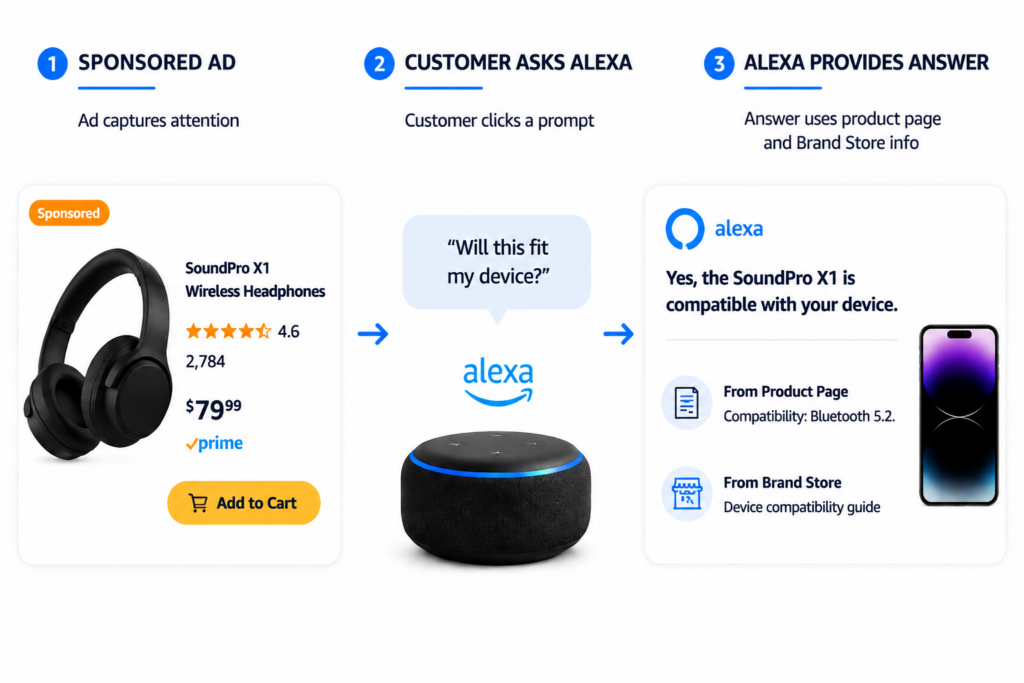
Amazon Ads confirms that Brand Store content and product detail page information can help generate relevant Sponsored Prompts.
5. Images Must Communicate the Important Details
A customer may first encounter a product through an Alexa recommendation or comparison and then visit the listing for confirmation. The image set should make the most important information easy to understand.
Useful images may show:
- Product scale
- Exact measurements
- Main features
- Included accessories
- Compatibility
- Installation or assembly
- Materials
- Realistic use cases
Avoid filling images with tiny writing, unsupported claims or decorative information that does not support the buying decision.
6. Review Themes Can Support or Weaken a Product Story
Amazon’s AI shopping assistant uses information from customer reviews and community questions and answers when helping shoppers research and compare products.
Reviews may reveal whether customers agree with the listing’s claims about sizing, comfort, durability, ease of use, assembly, packaging or compatibility. This does not mean one negative review will automatically destroy a product’s visibility.
When customers frequently say an item runs small, improve the sizing information. When they misunderstand what is included, add a clear package-content image. When they repeatedly praise an unexpected use case, consider adding that use case to the listing when it is accurate and permitted.
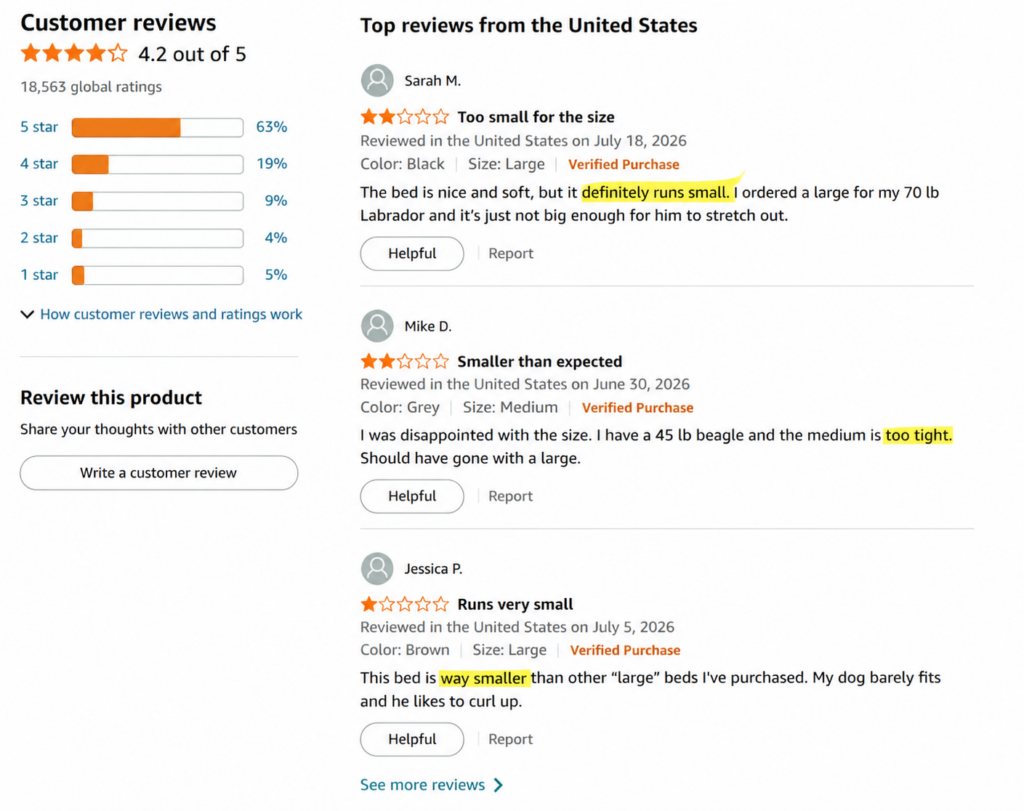
The objective is not to control customer comments. It is to improve the product and listing based on real customer experiences.
How Is Conversational Shopping Changing Amazon Advertising?
Advertising is becoming part of Amazon’s new conversational shopping experience.
Amazon Ads says existing Sponsored Products and Sponsored Brands campaigns can appear during relevant Alexa for Shopping interactions without requiring completely separate campaigns. Amazon has also introduced Sponsored Products Prompts and Sponsored Brands Prompts, which allow shoppers to ask questions and receive AI-powered answers about products and brands.
These prompts act like digital product assistants, helping customers explore information that may not be immediately visible on a listing.
Amazon made these prompts generally available in the US on March 25, 2026. Advertisers can review prompt activity through the Amazon Ads Console, and clicks follow the campaign’s existing cost-per-click model.
For sellers, this creates a new advertising opportunity. An ad may no longer simply drive a shopper to a product page, it may start a conversation.
Customers may ask questions such as:
- Will this fit my device?
- Is it suitable for sensitive skin?
- How long will one package last?
- What makes this model different?
The quality of Alexa’s answers depends on the quality of the product information available. Sellers should ensure listings contain accurate compatibility details, clear variations, complete attributes and strong product information.
Advertisers should continue monitoring key metrics such as ACoS, TACoS, click-through rate, conversion rate and new-to-brand sales. However, remember that changes in advertising performance can also come from pricing, competition, seasonality, reviews, inventory and delivery factors.
What Sellers Need To Do Now?
Amazon sellers do not need to abandon their existing strategy and start again. They need to make their product information clearer, more complete and easier for both customers and Amazon’s AI to understand.
1. Begin with Your Most Valuable ASINs
Start with products generating the highest sales, advertising spend or future growth potential. Review every relevant product attribute. Confirm that dimensions, materials, quantities, ingredients, compatibility and package contents are correct. Check whether the title, bullets, images, description and A+ Content communicate the same information.
A customer should not see one measurement in the bullet points and a different measurement in the image gallery.
2. Replace Vague Claims with Real Information
Remove empty marketing statements and replace them with specific, supportable details.
Instead of saying: Made with premium materials.
Explain: Made with a stainless-steel interior designed to resist everyday staining and odours.
Instead of saying: Perfect for travel.
Explain: The folding design measures 12 inches when closed and fits inside most standard carry-on bags.
Specific details help customers make decisions and give Alexa clearer information to use.
3. Build Content Around Real Customer Questions
Review customer support messages, product reviews, return reasons, community questions and advertising search terms. Identify concerns that appear repeatedly. Then answer those concerns naturally throughout the listing.
Do not force full questions into every bullet point. The listing should still sound clear, polished and human.
4. Make Your Product Easier to Compare
Open the listings of your closest competitors and compare the information each one provides.
- Can customers understand why your product is different?
- Do you provide exact specifications?
- Does the listing explain which type of user or situation the product is best suited for?
- Are important limitations clear?
Alexa can compare products quickly. Your listing should ensure that comparison is based on complete facts rather than assumptions.
5. Study Your Long-Term Pricing Pattern
Review how frequently your product price has changed over the last year. Consider whether regular discounting is teaching customers to wait for another promotion. Make sure every discount is genuine, sustainable and supported by your profit margins.
However, customers need to understand why your product provides stronger value when it costs more than competing options.
6. Strengthen the Repeat Purchase Journey
For consumable and replenishable products, review Subscribe & Save eligibility, available pack sizes, quantity information and typical usage periods.
Make it easy for customers to understand how long the product may last and when they may need another one.
Pet supplies, household essentials, personal-care items, cleaning products, pantry goods and office supplies may be particularly suitable for recurring shopping behaviour.
7. Test Your Products Through Conversational Searches
Use Alexa for Shopping as a real customer would. Test broad category questions, product comparisons, specific use cases, compatibility questions and pricing concerns.
Try questions such as:
- “What should I consider before buying this type of product?”
- “Which product is suitable for a beginner?”
- “Compare this product with the leading alternative.”
- “Is this item easy to clean?”
- “Will this product fit a specific device?”
- “What do customers commonly mention about this product?”
Then review the response.
- Is it accurate?
- Does Alexa understand the product’s strongest benefit?
- Is important information missing?
- Does the product appear generic in the comparison?
- Are customer reviews exposing a weakness the listing does not address?
Use Alexa’s answers as a listing-quality audit rather than a guaranteed ranking report.
Beyond the Search Box: Where Amazon Shopping Is Heading
Alexa for Shopping is not just Rufus with a new name. It represents a bigger shift in how customers discover products and move toward purchase.
The traditional journey starts with a keyword search, followed by browsing listings, comparing options and making a decision.
The AI-powered journey is different. Customers can describe a need, ask questions, compare products, check pricing and move closer to checkout through one conversation.
This makes product discovery faster, but it does not remove the importance of the fundamentals. Customers still care about price, delivery, images, reviews, brand trust and product quality.
Sellers should also avoid chasing unconfirmed Alexa ranking tricks. Amazon has not published a separate Alexa ranking formula, and no single change can guarantee AI recommendations.
The strongest approach remains simple:
- Provide complete and accurate product information.
- Use keywords naturally.
- Answer real customer questions.
- Maintain competitive pricing and availability.
- Build genuine customer trust.
The brands that succeed will not be those using the most AI language. They will be the brands whose products are easiest for Amazon to understand, Alexa to explain and customers to trust.
Prepare Your Amazon Business for AI Shopping with Ecomclips
Preparing for Alexa for Shopping requires more than adding a few conversational phrases to a product listing. Catalogue data, keywords, titles, bullet points, images, A+ Content, pricing, advertising and customer feedback must all work together.
At Ecomclips, our services span the full Amazon selling lifecycle:
- Amazon Account Setup and Catalogue Management: We handle product setup, variation structures, category data, compliance requirements and catalogue corrections.
- Amazon Listing Optimisation: We create keyword-rich, customer-focused titles, bullet points, descriptions and backend search terms designed for both traditional search and AI-assisted product discovery.
- A+ Content and Creative Design: We develop informative A+ Content, product infographics, comparison visuals, Brand Stores and videos that help customers make confident buying decisions.
- Amazon Advertising and PPC Management: We manage Sponsored Products, Sponsored Brands, Sponsored Display and ongoing campaign optimisation to improve visibility and advertising returns.
- Review and Customer Insight Analysis: We examine review themes, customer questions and return reasons to identify missing information, listing weaknesses and product opportunities.
- Analytics and Growth Strategy: We connect search visibility, traffic, advertising, conversion and sales performance to support long-term account growth.
Alexa for Shopping is changing how customers discover and evaluate products, but the final goal remains the same: helping the right shopper find the right product with enough confidence to purchase it.
Contact us today at info@ecomclips.com or book an appointment with our e-commerce experts to prepare your Amazon listings for the next generation of AI-driven shopping.
Common Questions Sellers Are Asking About Alexa for Shopping
Q1. When Did Alexa for Shopping Replace Rufus?
Amazon replaced Rufus with Alexa for Shopping on May 13, 2026, combining Rufus’s shopping intelligence with Alexa+ personalisation and memory.
Q2. Do Customers Need Amazon Prime?
No. Signed-in US customers can use Alexa for Shopping through Amazon.com and the Amazon Shopping app without Prime membership or an Echo device.
Q3. Is Alexa for Shopping Available Outside the United States?
Currently, Amazon’s announcement focuses on US customers. Sellers should check marketplace-specific updates as availability expands.
Q4. Can Sponsored Products Appear in Alexa Conversations?
Yes. Existing Sponsored Products and Sponsored Brands campaigns may appear in relevant Alexa for Shopping conversations through Sponsored Prompts.
Q5. What Is the Difference Between Alexa for Shopping and Buy for Me?
Alexa for Shopping helps customers research, compare and manage shopping tasks. Buy for Me completes eligible purchases from external retailers.
Q6. Are Amazon Keywords Still Important?
Yes. Keywords still matter, but sellers must also provide clear context through attributes, use cases, specifications and benefits.
Q7. Does Alexa Use Customer Reviews?
Yes. Amazon says Alexa for Shopping uses customer reviews and community questions and answers to help shoppers research products.
Q8. Does Alexa Use A+ Content?
Amazon has not confirmed a specific A+ Content ranking impact, but it remains valuable for educating customers and explaining product differences.
Q9. Can Alexa Purchase Products Automatically?
For eligible products, Alexa can monitor prices, complete purchases, add items to carts and support Scheduled Actions.
Q10. What Performance Metrics Should Sellers Monitor?
Sellers should track traffic, conversion, Search Query Performance, advertising metrics, reviews, returns, Sponsored Prompts and sales trends.
Make Your Products Easy to Understand and Trust
Amazon Alexa for Shopping is making product discovery more personal, conversational and action-oriented. Customers can ask what to buy, understand why a product suits them, compare it with alternatives, review its price and move towards a purchase with fewer manual steps.
For sellers, this creates a significant opportunity. A complete and trustworthy listing gives Amazon more useful information to work with.
A vague or inconsistent listing gives Alexa more reasons to overlook the product or explain it poorly. Do not optimize only for a search box. Optimize for the questions customers ask, the comparisons they make and the confidence they need before they buy.