

You’ve done everything right. Your product images look great. Your bullet points are polished. You’ve even run ads. But somehow, your product still isn’t showing up when shoppers ask Amazon’s AI a question like “what’s the best protein shaker for the gym?” or “which wireless earbuds stay in during a run?”
Sound familiar? Here’s what most sellers don’t realize: Amazon’s search game changed quietly but completely. The old approach was simple: stuff your listing with keywords, optimize your title, and hope the algorithm picks you up. That still matters, but it’s no longer enough.
In 2026, Amazon’s AI shopping assistant Rufus is answering millions of shopper questions every day. It doesn’t just read your title and bullets. It digs into your Q&A section, your reviews, your A+ content everything. And if your Q&A is thin, vague, or ignored? Rufus skips you. Completely.
In this guide, you’ll learn exactly what Amazon Q&A optimization is, why it matters more than ever in 2026, and how to build a step-by-step strategy that helps you rank higher, convert better, and get recommended by Amazon’s AI, even in the most competitive categories.
What is Amazon Q&A Optimization?
Amazon Q&A optimization is the process of strategically managing the Questions & Answers section on your Amazon product listing, so it helps both real shoppers and Amazon’s AI systems understand exactly what your product does, who it’s for, and why it’s the right choice.
Every Amazon product listing has a Q&A section where customers can ask questions and sellers (or other buyers) can answer them. Simple enough. But most sellers treat this section like a customer service inbox, answer when you remember, keep it brief, move on.
That’s a mistake that’s costing them rankings.
Here’s the shift: Amazon used to rank products mainly based on keywords in titles, bullets, and backend search terms. If a shopper typed “yoga mat,” Amazon matched products with “yoga mat” in their listing.
But in 2026, shoppers don’t just type keywords. They ask questions:
- “Which yoga mat is best for carpet?”
- “What’s a good protein powder for weight loss under $40?”
- “Can this stroller fit in a small car trunk?”
Now, with Amazon generative search, every question and answer becomes data that Amazon uses to decide:
- Should your product appear in search?
- Should AI recommend your product?
That’s a major shift. Amazon’s AI, especially Rufus reads your Q&A to find the answers. If your Q&A contains natural, specific, well-written answers that address these kinds of questions, you get surfaced. If it doesn’t, your competitor does.
- Old SEO: Keywords in title + bullets = ranking signal.
- New AI-driven SEO: Keywords + natural language Q&A + review sentiment + listing depth = ranking signal.
Q&A optimization is the piece most sellers are missing and in 2026, it’s one of the highest-leverage things you can do for your listing.
How Amazon Q&A Optimization Improves Product Ranking
You might be wondering: does the Q&A section actually affect my ranking? The short answer is yes, in multiple ways. Here’s exactly how.
1. Improves Keyword Relevance
Amazon’s algorithm doesn’t just look at your title and bullets to decide what searches your product is relevant for. It evaluates the full depth of information on your detail page, including Q&A.
When your Q&A contains naturally written answers that include specific phrases, use cases, and contexts, you’re essentially signaling relevance for dozens of search queries you never had to stuff into your bullets.
For example: if your wireless earbuds listing has Q&A answers that mention “sweat resistant during workouts,” “stays in during running,” “secure fit for exercise,” and “works with gym playlists,” Amazon’s system sees your product as highly relevant for exercise-related earbuds searches. A competitor who only mentions these things once in their bullets? Less so.
Think of Q&A as bonus keyword real estate, except instead of forced, repeated keywords, it’s natural language that reads well and ranks well.
2. Increases Conversion Rate
Here’s something powerful: Q&A answers pre-sell your product before the customer even reads your bullets.
When a hesitant shopper scrolls down and sees their exact concern already answered, clearly, specifically, helpfully — their trust in your product goes up. Their hesitation drops. And they’re far more likely to click “Add to Cart.”
Imagine a customer looking at a portable blender. They like the product, but they’re unsure about one thing: “Is it quiet enough to use early in the morning?” If there’s no answer, they hesitate… and might leave.
But if your Q&A says:
“Yes, this blender is designed for low-noise operation. Most customers use it in apartments or early mornings without disturbing others. It produces around 50–60 dB of sound, similar to a normal conversation.”
Data backs this up. Listings with rich, specific Q&A sections consistently outperform thin ones on conversion. In one home and kitchen product account, expanding from 4 to 18 substantive Q&As correlated with a 9% lift in conversion rate. That’s not a small number; that’s a significant improvement from one section of your listing.
Every unanswered question in a shopper’s mind is a reason not to buy. A well-optimized Q&A section eliminates those objections before they can lose you the sale.
3. Rufus AI Recommends Your Product
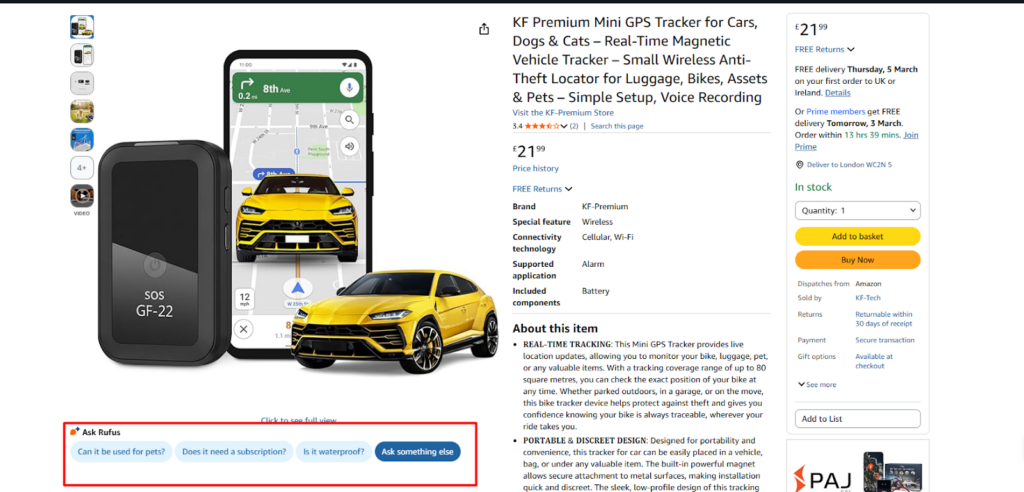
This is the big one in 2026. Amazon’s AI shopping assistant Rufus is actively pulling Q&A content to answer shopper queries and the products it pulls from are the ones that get recommended.
When someone asks Rufus “which blender is quietest for apartment use?”, Rufus scans listings for Q&A answers that mention noise levels, apartment-friendly use, quiet operation and surfaces the products with the richest, most specific answers.
If your blender’s Q&A has an answer like “This blender runs at around 65 decibels — much quieter than most models we’ve tested. Multiple customers in apartments have mentioned they use it early mornings without disturbing neighbors,” you’re in the conversation. If your Q&A is empty or has only a vague “It’s pretty quiet!” — you’re not.
In categories like baby products, kitchen appliances, pet supplies, and fitness equipment, Rufus recommendations are now a serious traffic driver. Optimizing your Q&A is how you get in front of those shoppers.
4. Builds Buyer Trust
Trust is the invisible currency of Amazon conversions. Shoppers don’t know you. They can’t touch your product. They’re making a purchase decision based entirely on what they read on your listing.
A Q&A section with thorough, honest, helpful answers signals something critical: this brand knows their product and cares about their customers. That perception directly influences purchase decisions.
Even more importantly, answers that acknowledge limitations honestly — “This isn’t designed for heavy-duty professional use, but for everyday home cooking it’s excellent” — actually build more trust than overly promotional answers. Shoppers can tell when they’re being sold to versus genuinely helped.
Rufus seems to favor this too. AI recommendation systems are more likely to recommend products with clear, specific, use-case-focused answers than products that claim to be perfect for everything.
What is Amazon Rufus AI and How It Uses Q&A?
If you haven’t heard of Rufus yet, here’s what you need to know — because it’s reshaping how products get discovered on Amazon.
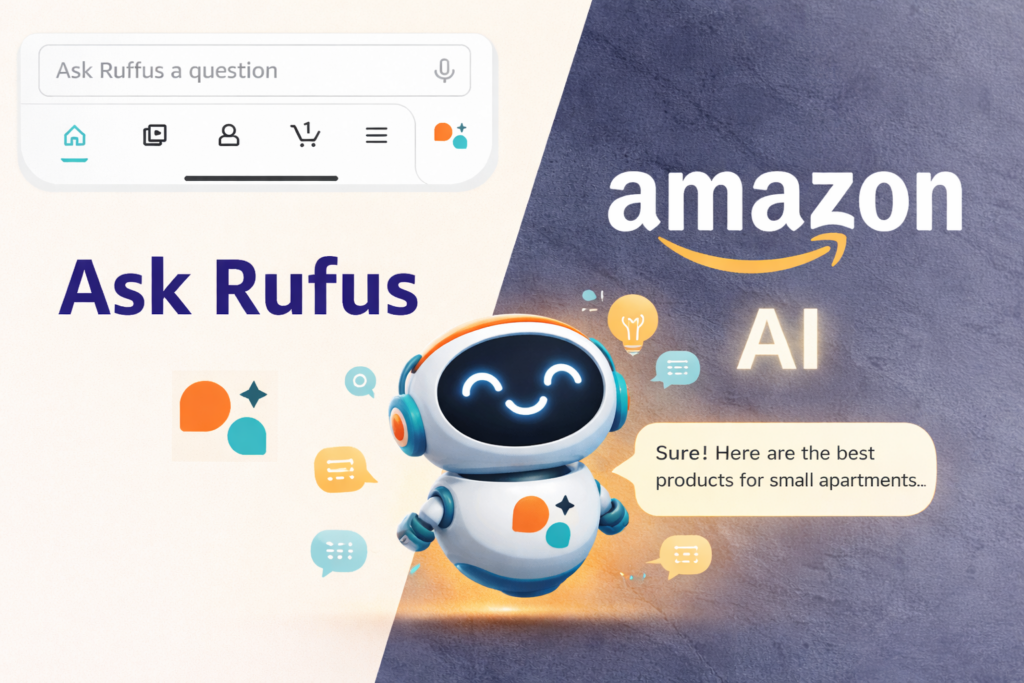
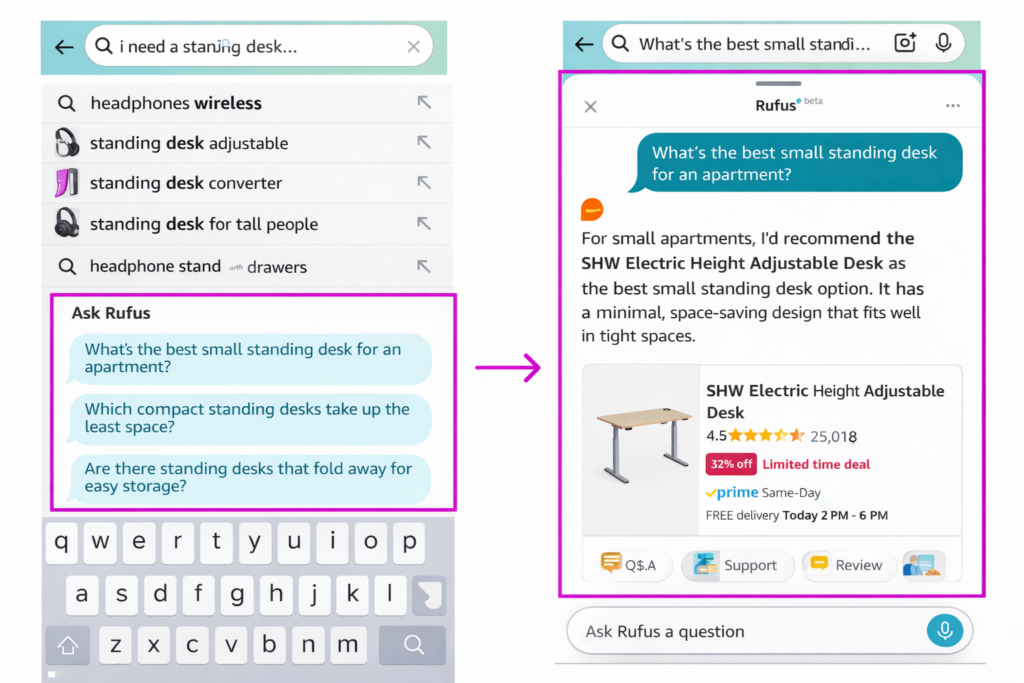
Amazon Rufus is Amazon’s AI-powered shopping assistant, built directly into the Amazon app and website. Instead of typing keywords into the search bar, shoppers can now ask Rufus natural questions like:
- “What’s a good gift for a 5-year-old who loves dinosaurs?”
- “Which running shoes are best for flat feet?”
- “I need a standing desk for a small apartment – what do you recommend?”
Rufus then reads through product listings, including titles, bullets, descriptions, A+ content, customer reviews, and Q&A sections and generates a personalized answer, often recommending specific products by name.
Here’s the key thing to understand: Rufus doesn’t just match keywords. It understands context and intent.
So when someone asks “which coffee maker is best for someone who travels a lot?”, Rufus isn’t just looking for listings with “travel” in the title. It’s looking for listings where the Q&A, reviews, and content collectively communicate that the product is compact, portable, easy to pack, and works with different power sources. It synthesizes all of that information and makes a recommendation.
This is called retrieval-augmented generation — a fancy way of saying Rufus retrieves the best information from across your listing, combines it with its understanding of the shopper’s question, and generates an answer.
What does this mean for you as a seller?
It means the more high-quality, use-case-specific, natural-language content you have across your listing — especially in Q&A, the more likely Rufus is to see your product as the right match for shopper queries.
Products with sparse, generic Q&A get passed over. Products with rich, specific, well-organized Q&A get recommended, even over products with stronger sales histories.
Rufus is still rolling out more broadly in 2026, but it’s already influencing significant traffic in categories like electronics, home goods, baby products, pet supplies, health, and apparel. Getting your Q&A right now gives you a compounding advantage as Rufus becomes the default way millions of shoppers discover products.
Why Most Amazon Sellers Fail at Q&A Optimization
Here’s the honest truth: most sellers completely waste their Q&A section. Not because they’re bad at selling — but because they don’t know what Q&A is actually for in 2026.
- Generic One-Word Answers: Thin or generic answers are the most common mistake. A customer asks “Is this safe for sensitive skin?” and the seller answers, “Yes.” That’s it. One word. That answer helps nobody — not the shopper trying to decide, and definitely not Rufus trying to understand what your product is good for.
- Ignoring Customer Intent: Ignoring customer intent is the second failure point. Sellers answer the literal question but miss the underlying worry. When someone asks “How long does the battery last?”, they’re usually really asking “Is this going to die on me in the middle of something important?” A great answer addresses both: “Battery lasts approximately 14 hours of continuous use. Most customers charge it overnight and use it all day without needing to recharge.”
- Outdated Q&A That No Longer Reflects Buyer Needs: Not updating Q&A regularly is a slow, invisible killer. Your product evolves. Customer concerns shift. New use cases emerge. But sellers set their Q&A once and forget it for years — leaving outdated, incomplete, or irrelevant answers sitting there doing nothing.
- Treating Q&A as Customer Support: Treating Q&A as pure customer service is perhaps the biggest strategic miss. When a question comes in, sellers think: answer it and move on. But every question is actually data — a signal about what’s missing from your listing, what your customers are worried about, and what search terms you could be ranking for. Sellers who treat Q&A as a chore miss all of that intelligence.
The result? A Q&A section that looks like it exists but does absolutely nothing for rankings, conversions, or AI visibility.
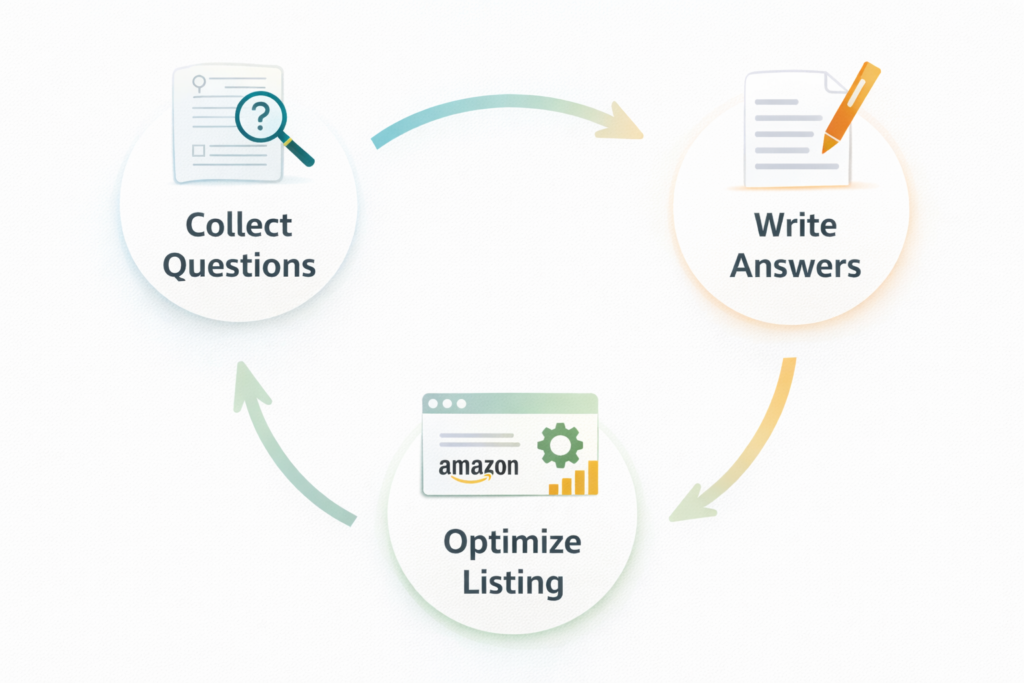
Step-by-Step Amazon Q&A Optimization Strategy
Ready to actually fix this? Here’s a practical, actionable strategy you can start using this week.
Step 1: Collect Customer Questions
Before you write a single word, you need to know what questions your customers are actually asking. Don’t guess — mine for it.
- Start with your own Q&A section: Look at every question that’s been asked. Group them by theme: sizing, compatibility, ingredients, durability, use cases, comparisons. This is your baseline.
- Then dig into competitor Q&A: Go to your top 3–5 competitors’ listings and read their Q&A sections carefully. What are customers asking them? What concerns keep appearing? These are the questions your potential customers have too — and if you answer them better, you win the comparison.
- Mine your reviews: both yours and competitors’. Reviews are a goldmine of natural customer language. Look for phrases like “I wasn’t sure if…” or “I wish I’d known…” or “I was worried about…” — those are the objections and questions that weren’t answered pre-purchase.
- Use Reddit and Google’s “People Also Ask”: Search your product category on Reddit and see what questions come up in threads. Google your product type and check the “People Also Ask” box — those questions are exactly what shoppers are typing and asking.
- Check Amazon’s own search suggestions: Start typing your product category into Amazon’s search bar and see what auto-completes. Each suggestion is a real query real shoppers are using. These belong in your Q&A.
Build a master list of 30–50 questions. Then prioritize the top 15–20 that represent the widest range of use cases, concerns, and buyer personas.
Step 2: Write High-Converting Answers
Now here’s where most sellers go wrong even when they do put in effort. The answer quality matters as much as the questions themselves.
The golden rule: never write an answer that leaves a shopper with more questions.
Here’s the framework for every answer you write:
- State the answer directly in the first sentence
- Add context — who it’s for, when it works, what the limitation is
- Include natural keywords without forcing them
- Use specific details — numbers, dimensions, compatibility specs, real-world examples
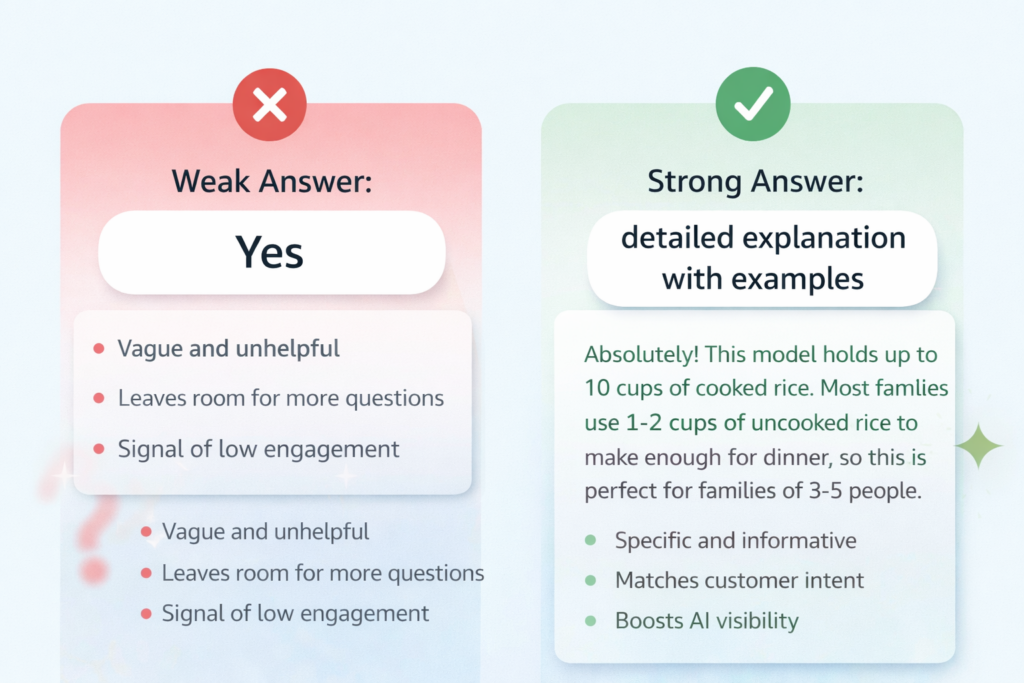
Let’s compare a weak answer vs. a strong one:
Question: “Does this fit in a small apartment?”
Weak answer: “Yes, it’s compact.”
Strong answer: “Absolutely — this was designed with small spaces in mind. It measures 12 x 8 x 10 inches, so it fits easily on a standard kitchen counter without taking over your workspace. Quite a few customers in studio apartments and dorms mention using it daily. It’s also lightweight enough to store in a cabinet between uses if needed.”
See the difference? The strong answer helps the human shopper make a confident decision AND gives Rufus multiple hooks to match this listing against queries about apartment-friendly products, small kitchen appliances, compact design, studio apartments, and more.
Write at least 2–3 sentences per answer. Use conversational language. Mention specific use cases. Be honest about limitations; it builds trust. And avoid anything that sounds like a marketing pitch. These are answers, not ads.
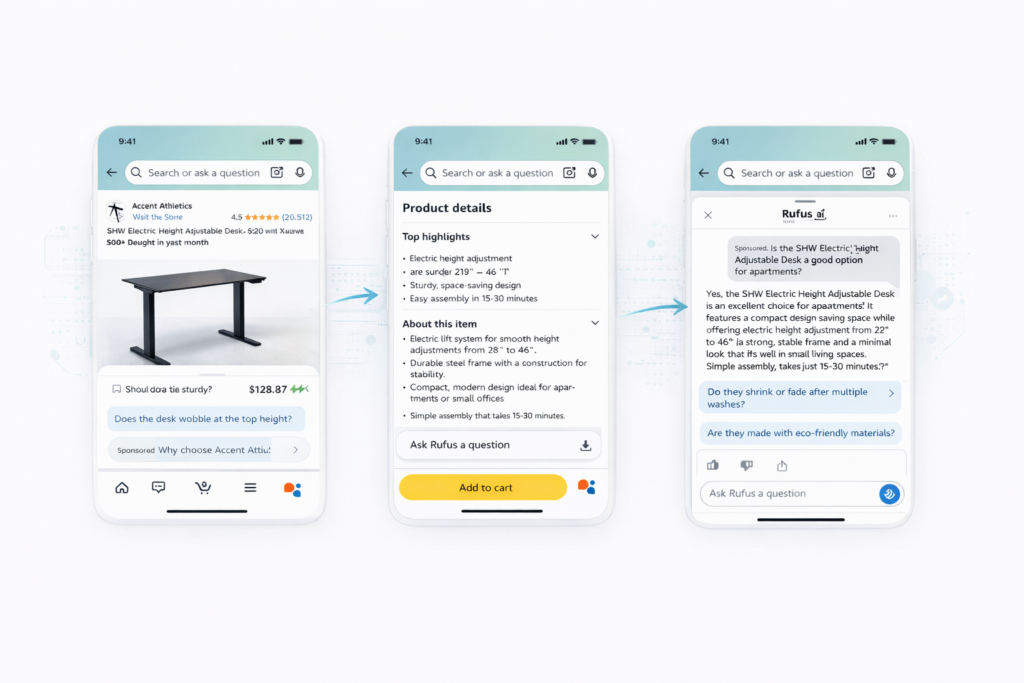
Step 3 – Optimize Your Listing Using Q&A Insights
Here’s where Q&A becomes a full listing improvement tool, not just a standalone section.
After you’ve collected and analyzed your questions, ask yourself: why are customers asking these in the first place?
If five people are asking whether your product fits in a standard-sized bag, that question should never need to be asked — because the answer should already be obvious from your listing. If it’s not, your bullets and images are failing to communicate something important.
Update your bullet points to address the most common Q&A themes. Use the actual language customers used in their questions — not marketing language. Real customer phrasing is what other real customers search for and connect with.
Update your images to answer visual questions. Sizing questions? Add a size comparison image. Compatibility questions? Add an infographic showing what it works with. Set up questions? Add a step-by-step visual guide.
Improve your A+ content by addressing the objections that appear most frequently in Q&A. If customers are worried about durability, your A+ content should include durability proof. If they’re confused about how to use a feature, your A+ content should include a “how it works” module.
The goal is a listing where Q&A, bullets, images, and A+ content all reinforce the same information in complementary ways. When every part of your listing tells a consistent story, Rufus gets a complete, clear picture of what your product does and recommends it accordingly.
Best Practices for Writing Amazon Q&A Answers
Let’s get tactical. These are the specific writing practices that separate Q&A that performs from Q&A that gets ignored.
1. Use Conversational Keywords (Voice Search Optimization)
Shoppers search conversationally in 2026. They ask Rufus questions the way they’d ask a friend — not the way they’d write a professional product description.
Your answers need to include both conversational phrases AND precise terminology. For example, a great answer about a dog food might sound like: “Most picky eaters do really well with this formula. It’s a grain-free chicken recipe — no artificial flavors — which tends to work better for dogs that reject other kibbles. The 30lb bag typically lasts about six weeks for a medium-sized dog.”
That answer naturally contains keywords like “grain-free,” “chicken recipe,” “picky eaters,” “no artificial flavors,” and “30lb bag” — all in a completely natural, readable format. That’s exactly what Rufus looks for.
2. Be Specific and Context-Based
Vague answers are invisible to AI systems. If your product works in specific situations, name them. If it fits certain dimensions, state the numbers. If it’s compatible with certain devices, list them.
“Works for most people” tells Rufus nothing. “This is best suited for beginners to intermediate players. The shorter shaft length makes it easier to control but limits power for competitive play. Most customers under 5’8″ find it very comfortable” — now Rufus knows exactly who to recommend this to.
Specificity builds AI confidence in your product’s relevance to specific use cases.
3. Mention Use Cases and Limitations
Great Q&A answers describe the who, what, when, and where of your product — not just what it is. “This is perfect for…” and “This isn’t ideal for…” are both valuable statements. Use both.
Answers that acknowledge limitations honestly earn more trust from shoppers AND from Amazon’s AI systems. Rufus doesn’t recommend products that claim to be everything to everyone — it recommends products that clearly and credibly solve specific problems.
4. Avoid One-Word Answers
This seems obvious, but it’s worth saying directly: one-word answers — “Yes,” “No,” “Sure,” “Definitely” — are worse than no answer at all. They waste the opportunity, signal low engagement to Amazon’s systems, and leave the shopper with nothing useful.
Every question deserves at least two to three sentences. If you can’t think of what to add beyond “yes,” think about why the answer is yes, who it’s good for, and what context makes it true. That’s your answer.
How to Measure the Impact of Amazon Q&A Optimization
You’ve optimized your Q&A. Now how do you know if it’s actually working? Here’s what to track.
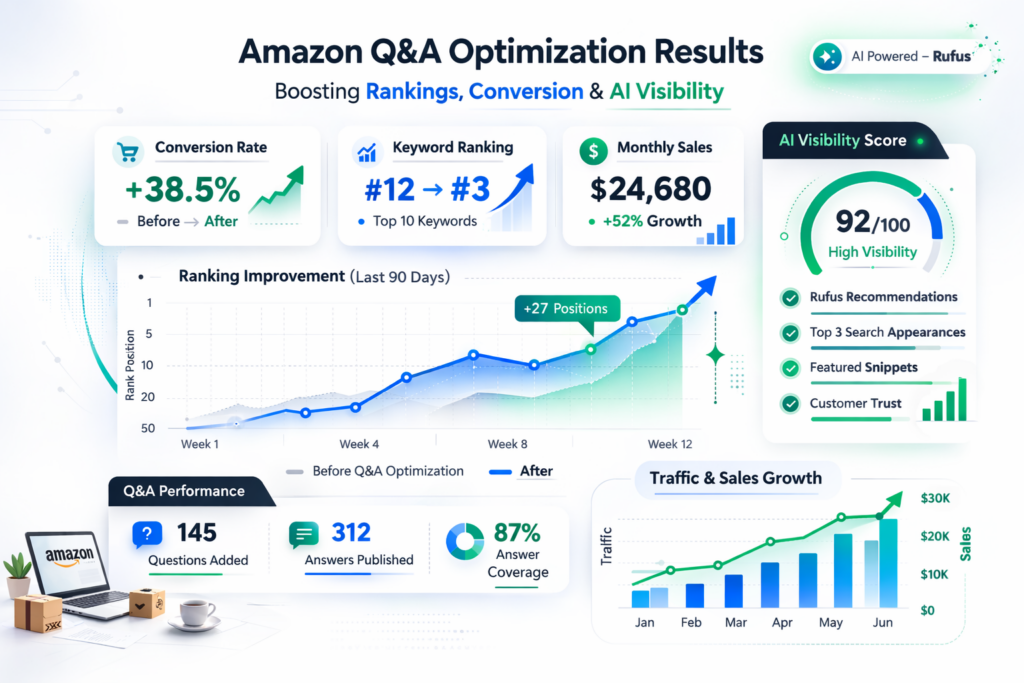
Conversion rate improvement is your most direct signal. After making significant Q&A updates, track your conversion rate over the next 30–60 days. Expect to see gradual improvement — not overnight changes. A 5–15% improvement in conversion after systematic Q&A optimization is a realistic and meaningful outcome.
Ranking improvement for use-case and problem-based searches is another key metric. Use rank tracking tools to monitor where your product appears for category queries like “best [product] for [use case].” If your Q&A now covers a use case it didn’t before, your ranking for related queries should improve.
Rufus visibility checks are a new must-have in your monthly reporting. Pick 5–10 queries that represent your core customer use cases and literally ask Rufus those questions in the Amazon app. Document whether your product appears in the response. This is a leading indicator — you’ll often see Rufus visibility improve before it shows up in traditional ranking metrics.
Customer engagement signals — like the number of new questions being asked, whether your answers are being marked helpful, and whether Q&A-related complaints are decreasing — are softer but still useful signals that your content is resonating.
Set up a simple monthly Q&A audit. It doesn’t need to be complicated: document your Q&A coverage, run your Rufus visibility checks, and note conversion rate trends. That’s enough to show you whether the effort is paying off.
Pro Tips to Generate More Q&A for Your Listings
Waiting for customers to organically submit questions can be painfully slow — especially on newer listings. Here’s how to accelerate your Q&A content in a compliant, ethical way.
1. Proactively add FAQs through Amazon’s A+ FAQ module: Amazon lets you add a structured FAQ section through A+ content, which Rufus can also read. Use this to cover the most important questions upfront — sizing, compatibility, usage instructions, care instructions, common concerns. This complements your community Q&A and gives you more control over the framing.
2. Use customer support data: Your support tickets, chat logs, and email inquiries are a perfect source of real customer questions. Compile the most frequently asked questions from your support channels and post them — along with detailed answers — to your Q&A section. These are 100% real questions from real customers, so they’re completely compliant and highly relevant.
3. Run internal product workshops: Get your product team together and spend an hour asking: “What does every customer need to know before buying this?” and “What questions do we get asked most often?” The answers to those questions should become Q&A entries on your listing.
4. Use AI tools to generate FAQ candidates: AI tools can help you brainstorm questions based on your product specs and category. But before posting anything, cross-reference against real customer language to make sure the questions reflect genuine concerns, not just plausible-sounding ones.
Never fabricate fake questions, incentivize customers to post specific questions, or post Q&A content that doesn’t reflect legitimate customer concerns. Amazon’s policies are clear on this, and the goal here is genuinely helping customers — just proactively rather than reactively.
How Q&A Optimization Reduces Returns and Increases Sales
Here’s a benefit most sellers completely overlook: a great Q&A section doesn’t just bring more customers in — it brings in better-matched customers who are far less likely to return your product.
Think about why most returns happen. The product didn’t fit the way the customer expected. It wasn’t compatible with something they needed it to work with. It was designed for a different use case than what they had in mind. In almost every case, the return was caused by a mismatch between customer expectation and product reality.
A well-optimized Q&A section eliminates those mismatches before purchase.
When a customer reads a clear, honest, specific answer about your product’s dimensions, compatibility, intended use case, and limitations — and then decides to buy — they’re buying with accurate expectations. They’re not going to be surprised. They’re not going to be disappointed. And they’re not going to return it.
Better expectation setting = fewer returns = better seller metrics = better ranking. It’s a direct line.
Beyond that, customers who buy with accurate expectations are more likely to leave positive reviews. They got exactly what they thought they were getting. That’s the best setup for a happy customer — and happy customers talk.
Meanwhile, your Q&A section is acting as a free, always-on focus group. Track which questions keep appearing. Those patterns reveal exactly where your listing is failing to communicate clearly. Fix the root cause in your bullets and images, and you’ll see both your Q&A question volume drop (because the information is now obvious upfront) and your return rate decline.
Future of Amazon SEO: From Keywords to AI Conversations
Let’s zoom out for a moment, because this is bigger than just Q&A.
What’s happening on Amazon right now is a fundamental shift in how products get discovered. For years, Amazon SEO meant keyword density — stuffing your title and bullets with exact-match terms and hoping the A9 algorithm picked them up. That era isn’t gone, but it’s no longer sufficient.
Shoppers are increasingly comfortable having conversations with AI. They ask questions. They describe their situation. They explain what they need rather than searching for a product name. Rufus is designed for exactly this behavior — and it’s getting smarter, faster.
The brands winning visibility in 2026 are the ones who thought ahead. They didn’t just optimize for keywords — they built rich, natural, use-case-specific content across every surface of their listing. Their Q&A, reviews, bullets, and A+ content all tell a consistent story. When Rufus reads their listing, it gets a complete, clear picture.
The brands losing ground are the ones clinging to old-school keyword tactics and ignoring the conversational layer. They’re optimizing for a version of Amazon search that’s becoming less relevant every month.
Natural language is the new keyword. The way your customers talk about your product — the phrases they use in questions, the words they put in reviews, the contexts they describe — those are your ranking signals for the next generation of Amazon SEO.
Early adopters of Q&A optimization have a compounding advantage. Every month of rich Q&A content is another month of signals feeding Amazon’s AI about what your product is good for. The gap between optimized and unoptimized listings will only grow wider as generative search expands.
The time to build this foundation is now — before your competitors figure it out.
How to Win Amazon Rankings in 2026 Using Q&A Optimization
Amazon Q&A optimization used to be background noise. In 2026, it’s one of the most powerful ranking levers available to sellers — and most of your competitors are still ignoring it.
Here’s the bottom line: Rufus is answering millions of shopper questions every day, and the products it recommends are the ones with rich, specific, helpful Q&A content. If your Q&A section is thin, vague, or outdated, you’re invisible in those conversations — no matter how good your product actually is.
The strategy isn’t complicated. Collect the questions your customers are actually asking. Write specific, honest, keyword-natural answers that speak to real use cases. Feed the insights back into your bullets, images, and A+ content. Measure the results. Repeat.
Your action step this week: Pull up your top 5 ASINs and audit their Q&A sections. How many questions do they have? How complete and specific are the answers? How well do they cover your different customer types and use cases? Then open the Amazon app and ask Rufus your top 5 customer questions. See if your products come up.
The gap between where you are and where you could be — that’s your opportunity.
At EcomClips, we help Amazon sellers build smarter listing strategies that work with the algorithm, not against it. If your Q&A needs a full audit, or you want help building a systematic optimization plan for your catalog, we’re here to help.
Frequently Asked Questions (FAQs)
Q. Does Amazon allow sellers to answer their own Q&A?
Yes, absolutely. Amazon not only allows but actively encourages brand owners registered under Amazon Brand Registry to answer customer questions on their listings. What matters is that your answers are honest, helpful, and actually address the question being asked.
Q. How fast should I reply to Amazon questions?
Aim to respond within 24 to 48 hours. Fast responses signal active brand engagement to both shoppers and Amazon’s systems. When questions sit unanswered for days, other customers sometimes step in with their own answers — which may be inaccurate and difficult to correct later.
Q. Can poor Q&A hurt my ranking?
Yes, in a few ways. Vague or one-word answers waste valuable content real estate and give Amazon’s AI nothing to work with. Defensive or evasive answers can increase shopper hesitation and reduce conversion. And leaving questions completely unanswered is arguably worse than no Q&A at all — it signals inactivity and leaves the door open for inaccurate community answers.
Q. How many Q&A should a product have?
There’s no magic number, but a well-optimized listing typically has at least 10–20 answered questions covering a range of use cases, buyer personas, and common concerns. What matters more than the number is the coverage — do your Q&As address the different types of customers who buy your product? Do they cover the most common hesitation points?
Q. Does Q&A affect Amazon SEO directly?
Not in a direct, publicly confirmed way — Amazon doesn’t publish exactly how Q&A feeds into its algorithm. But Q&A contributes to the depth and richness of information on your detail page, which is a factor in how Amazon’s systems evaluate product relevance. More importantly, Q&A directly feeds Rufus AI’s understanding of your product, which now influences a significant portion of product discovery.
Q. How does Rufus AI use Q&A?
Rufus reads your entire product listing — including Q&A, reviews, bullets, and A+ content — to answer conversational shopper queries. When a shopper asks Rufus a question like “which air fryer is best for a family of four?”, Rufus scans listings for content that addresses family-sized cooking, capacity, ease of use, and similar themes.
Q. Can I add my own FAQs to Amazon listings?
Yes, through two main channels. First, as a brand owner, you can directly answer questions posted in the community Q&A section. Second, Amazon’s A+ Content module includes an FAQ section that lets you proactively publish questions and answers in a structured format.
Q. What type of answers increase conversion?
The answers that convert best share a few qualities: they’re specific rather than vague, they address the actual concern behind the question (not just the surface question), they include honest acknowledgment of limitations, and they use natural language rather than promotional language. Answers that mention specific numbers, dimensions, compatibility details, and real-world use cases perform best.
Watch how we help sellers to protect their Amazon Business:
Amazon’s Rufus AI Prompts: The Future of Sponsored Products Optimization
Your Amazon Listing Is Losing Money
Amazon Brand Growth Secrets: Use Customer Data To Boost Sales Fast!
Amazon AI Update 2025: Why Sellers Are Losing Ranking Overnight
Amazon Listing Image Masterclass: How Top Sellers Boost CTR & Conversions
How Ecomclips Helps Amazon Sellers Win with Q&A Optimization
Amazon sellers today are no longer competing only on keywords or ads. With the rise of Rufus AI and generative search, Amazon now evaluates how well your listing answers real customer questions. Your Q&A section is no longer optional — it directly impacts your visibility, ranking, and conversion rate.
A weak or outdated Q&A makes your product invisible in AI-driven recommendations. A strong, well-optimized Q&A helps your product appear in more searches, builds trust, and increases sales.
That’s where Ecomclips supports you — helping you turn your Q&A into a strategic growth tool instead of a neglected section.
- Strategic Q&A Audit and Gap Analysis: We audit your existing Q&A section to identify missing questions, weak answers, and gaps in customer intent coverage. We also analyze competitor listings to uncover opportunities where your product can outperform.
- Customer Intent and Question Research: We collect real customer questions from Amazon listings, reviews, search suggestions, Google “People Also Ask,” and forums. This ensures your Q&A reflects actual buyer language and real search behavior — not assumptions.
- High-Converting Answer Writing: We write detailed, natural, and use-case-driven answers that improve both SEO and AI visibility. Each answer is designed to reduce hesitation, build trust, and help Amazon’s AI understand exactly where your product fits.
- Listing Optimization Using Q&A Insights: We use Q&A data to improve your entire listing. Bullet points, descriptions, images, and A+ content are updated using real customer language, ensuring consistency across your listing and stronger ranking signals.
- Rufus AI Visibility Optimization: We structure your Q&A to align with conversational queries and problem-based searches, increasing your chances of appearing in Rufus recommendations and AI-driven search results.
- Ongoing Monitoring and Optimization: Customer behavior and Amazon’s AI systems evolve constantly. We continuously update your Q&A, track new questions, and refine answers to maintain performance and stay ahead of competitors.
Contact us today at info@ecomclips.com or book an appointment with our e-commerce experts to start selling smarter on both marketplaces.
Ecomclips: Your Complete eCommerce Solution Under One Umbrella
At Ecomclips, we bring every eCommerce service you need under one roof — strategy, operations, design, marketing, and growth, all seamlessly connected to help your brand thrive across every marketplace.
Since 2012, we’ve been helping businesses of all sizes launch, scale, and dominate online. From Amazon, Walmart, eBay, and Etsy to Shopify and WooCommerce, our team of marketplace experts, designers, developers, and marketers works together to deliver measurable results.
Our services span the full eCommerce lifecycle:
- Account Setup & Product Listing Management: We handle registrations, compliance, and product data optimization across all marketplaces.
- Amazon Optimization Service: From keyword-rich titles and A+ content to PPC campaigns and storefront design, we craft listings that convert.
- Creative Design & Content Production: A+ visuals, infographics, brand stores, and product videos built to boost engagement.
- Advertising & PPC Management: Smart, data-driven ad strategies for Amazon, Walmart, and Google that maximize ROI.
- Web Development & Store Design: Shopify, WooCommerce, and Magento websites built for performance and conversion.
- Data Management & Automation: Streamlined product feeds, catalog syncing, and inventory control for effortless scalability.
- Customer Service & Order Fulfillment: End-to-end support that enhances customer satisfaction and builds long-term loyalty.
- Analytics & Growth Strategy: Real-time insights and ongoing optimization to ensure consistent, profitable growth.
Whether you’re launching a new store or managing multiple global marketplaces, Ecomclips acts as your single strategic partner, simplifying complexity and driving sustainable revenue growth.