

One small change and suddenly your profits are gone. Amazon keeps adjusting its fees throughout the year, and if you don’t fully understand how they work, these costs can quietly eat away at your margins.
But don’t worry. In this blog, we’ll break down every Amazon seller fee you need to know in 2025, from account fees to hidden charges, plus proven strategies to avoid overpaying. By the end, you’ll know exactly where your money is going, and how to keep more of it in your pocket.
Amazon Seller Account Fees
Before you sell a single product, Amazon requires you to choose between its two seller account plans – Individual or Professional. Each comes with different costs and benefits, and choosing the wrong one can cost you more than you think. Many new sellers mistakenly believe this choice depends on whether they’re a business or an individual seller, but in reality, it’s all about sales volume and features. Understanding how these account fees work is the first step to building a profitable Amazon store.
To sell on Amazon, you first need a seller account. There are two plans to choose from:
- Individual Plan – No monthly fee, but $0.99 per item sold.
- Professional Plan – $39.99/month flat fee, but no per-item fee.
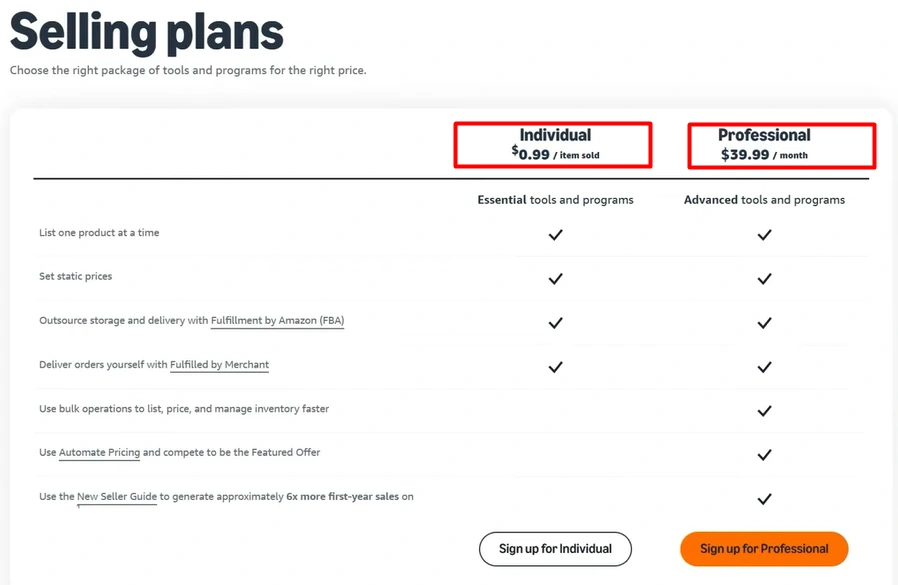
Rule of thumb: If you sell more than 40 items per month, the Professional plan is more cost-effective. It also unlocks advanced features like promotions, coupons, PPC advertising, and bulk listing tools.
Pro Tip: Start with the Individual plan while testing products. Once you’re selling consistently, upgrade to Professional so that $39.99/month works in your favor.
Amazon Referral Fees
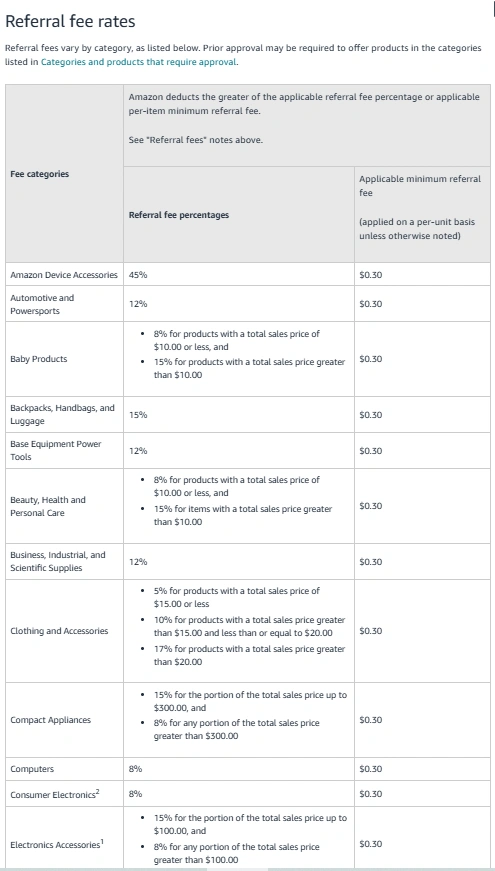
Referral fees are one of the most important costs on Amazon because they apply to every sale you make. This is essentially Amazon’s commission for letting you use their platform. While it usually averages around 15%, it can vary widely depending on your category. For new sellers, referral fees can be confusing because they’re calculated on the final sale price, not the original listed price. This means discounts and promotions directly affect how much Amazon charges you. Knowing how referral fees work – and how to reduce them – is key to protecting your profit margin.
For example, selling a $35.99 snorkel mask means a referral fee of about $5.40. If you run discounts or coupons, the fee is calculated on the reduced price, not the original.
Money-Saving Tip: Certain categories allow reduced referral fees as low as 5%. If eligible, you can also use Amazon’s Brand Referral Bonus, which cuts referral fees by up to 30% when you bring external traffic to Amazon.
Amazon FBA vs. FBM Fees
When selling on Amazon, you must choose between two fulfillment methods, FBA (Fulfilled by Amazon) and FBM (Fulfilled by Merchant). Each option changes how your products reach customers and how much you pay in fees. Picking the right model is crucial because it directly impacts your profit margins, workload, and scalability.
Here’s a breakdown of how FBA and FBM compare:
| Aspect | FBA (Fulfilled by Amazon) | FBM (Fulfilled by Merchant) |
| Who Handles Shipping | Amazon stores, packs, ships products | Seller stores, packs, and ships directly |
| Customer Service & Returns | Amazon handles all support and returns | Seller must handle support, refunds, and returns |
| Fees | FBA fees (based on weight/size) + storage fees + referral fees | No FBA fees, only referral fees; seller covers shipping costs |
| Prime Badge | Eligible for Prime delivery → Higher conversion rates | Not automatically Prime eligible (unless enrolled in Seller Fulfilled Prime) |
| Storage | Amazon warehouse space (charged monthly + extra for long-term storage) | Seller manages own storage (may rent warehouse or use 3PL) |
| Scalability | Easier to scale since Amazon handles logistics | Limited by seller’s own resources and fulfillment capacity |
| Profit Margins | Lower margins due to FBA fees but higher sales potential from Prime | Higher margins if shipping is cheap, but fewer sales without Prime |
| Best For | Sellers with lightweight, fast-moving products who want scale & Prime access | Sellers with bulky, low-margin, or custom products where FBA costs too much |
Thinking About Hiring an Amazon Expert?
Ecomclips’ Partners Achieve an Average 85% Profit Increase!
Amazon FBA Fees with Latest Updates for 2025
Hidden Amazon Fees Sellers Often Miss
Most sellers know about referral fees, account plans, and fulfillment charges. But what really surprises sellers, and eats away at profits – are the hidden fees Amazon rarely talks about. These costs can quietly add up month after month if you’re not paying attention. From storage surcharges to low inventory penalties, understanding these hidden fees is critical if you want to scale without losing money. The good news? Once you’re aware of them, you can plan smarter and avoid unnecessary charges.
Many sellers stop at account, referral, and fulfillment fees – but Amazon has several “hidden” charges that can eat away profits.
1. Storage Fees
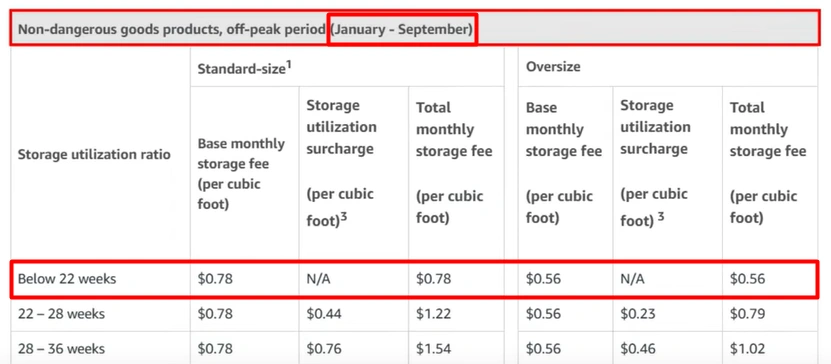
When you use Fulfillment by Amazon (FBA), Amazon stores your products in its warehouses until they are sold. But that convenience comes at a cost, known as monthly storage fees. These charges depend on the size of your product, the category it falls under, and the time of year.
- January–September: For standard-size products, Amazon charges $0.78 per cubic foot. This means if your products take up 10 cubic feet of space, you’ll pay around $7.80 per month during this period.
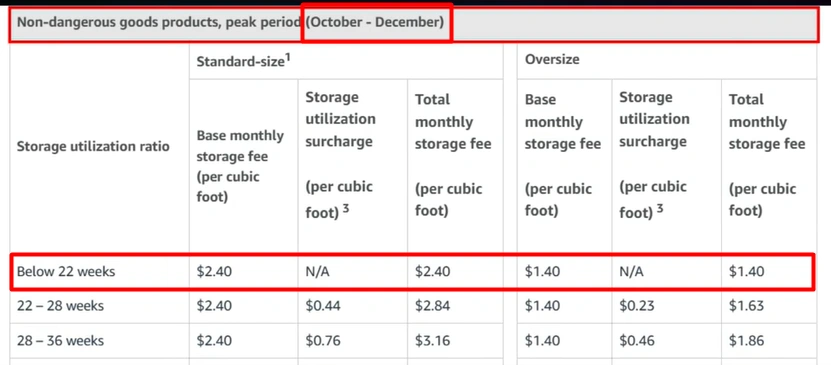
- October–December (Holiday Season): Fees jump to $2.40 per cubic foot because demand for storage skyrockets during the holiday rush. Amazon increases prices since many sellers flood warehouses with stock for Black Friday, Cyber Monday, and Christmas.
- Dangerous Goods: Items classified as hazardous (like certain skincare products with alcohol, chemicals, or flammables) carry even higher storage rates because they require special handling and safety measures.
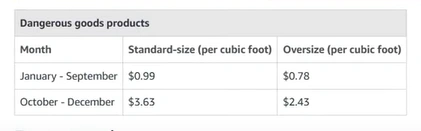
Why it matters: If you overstock during Q4, you can end up paying 3x higher storage fees, which can quietly eat away at your profits.
Pro Tips to Save on Storage Fees
- Forecast Accurately: Use sales data or Amazon’s tools to order the right stock for Q4.
- Use FBA Calculator: Check storage + FBA costs before placing orders.
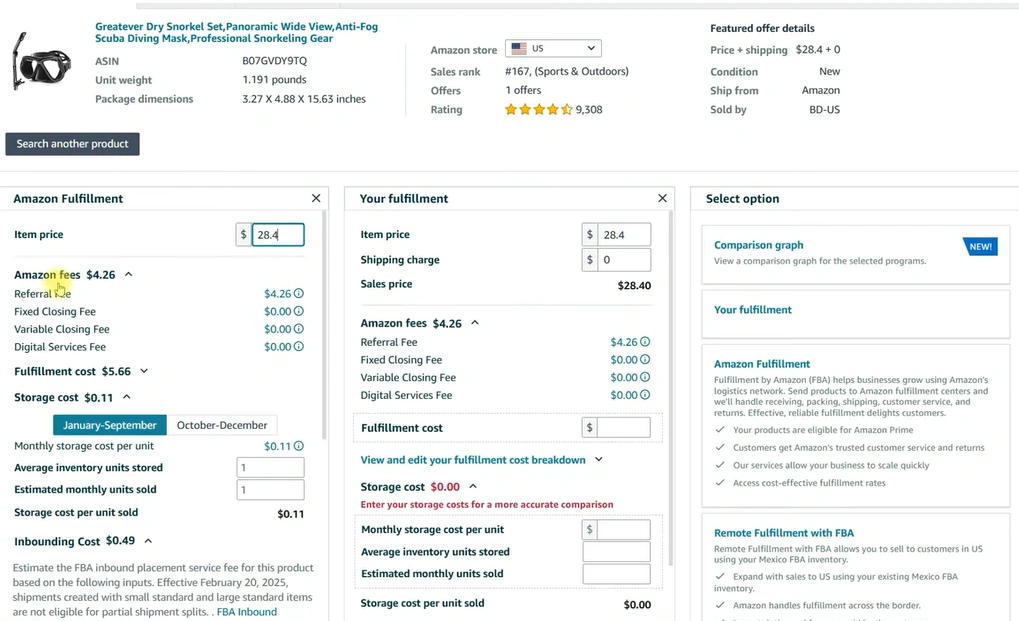
- Send Stock in Batches: Ship smaller lots (e.g., 300–400) instead of bulk.
- Track Inventory Age: Avoid 180+ day aged stock to skip extra fees.
- Use 3PL Warehouse: Keep bulk inventory outside Amazon and restock as needed.
Key Takeaway: Storage fees can triple in Q4, plan smart to protect profits.
2. Aged Inventory Surcharges (Long-Term Storage Fees)
When your inventory sits too long in Amazon’s warehouses, aged inventory surcharges (also called long-term storage fees) apply. These fees are designed to push sellers to move products quickly and free up warehouse space.
- 181–210 Days: You’ll start paying $0.50 per cubic foot for stock sitting longer than 6 months.
- 365+ Days: If products remain for a year or more, the fee skyrockets to $6.90 per cubic foot (or even higher depending on product type).
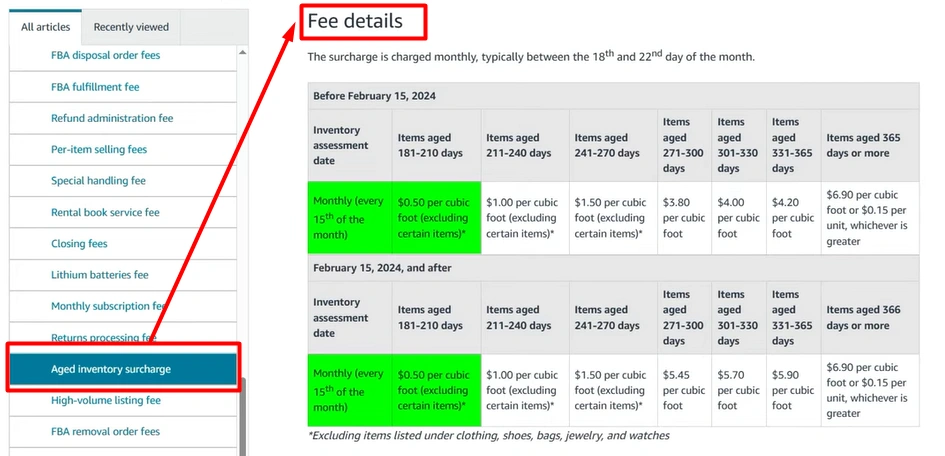
Why it matters: These costs add up fast. For example, if you have bulky or slow-moving products, you could end up paying more in fees than you actually profit from sales.
How to Avoid Aged Inventory Fees:
- Monitor Inventory Age: Regularly check your Inventory Age report in Seller Central.
- Run Promotions: Use discounts or coupons to sell off slow stock before fees hit.
- Create Removal Orders: Remove excess items before the 180-day mark.

- Use Liquidation Programs: If a product won’t sell, Amazon lets you liquidate it at a small recovery rate instead of paying huge storage fees.
Don’t let products collect dust. Plan inventory carefully, sell fast, or remove stock before the surcharge timeline.
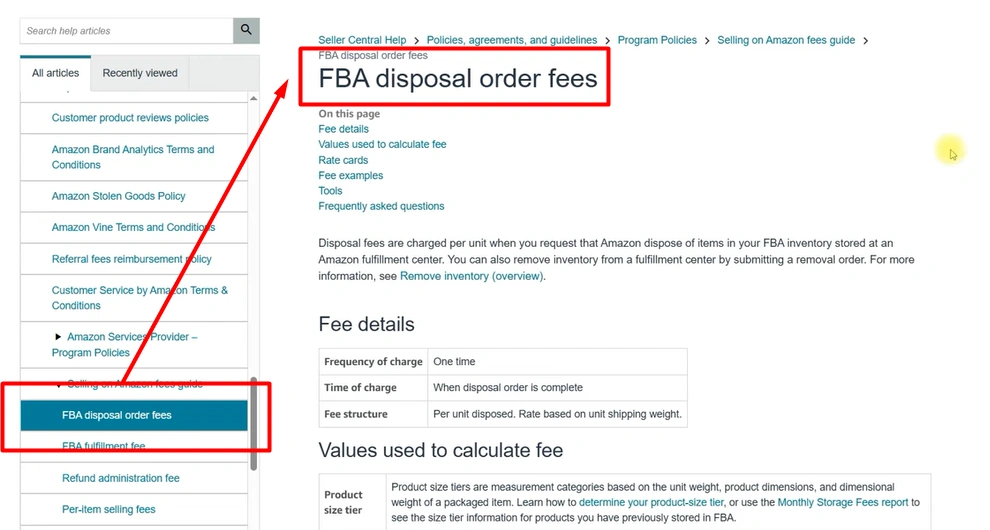
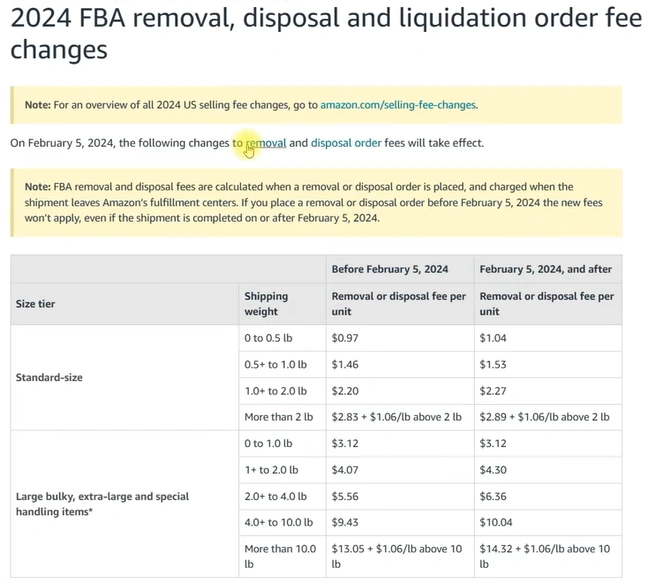
3. Removal & Disposal Fees
- Removal orders: ~$0.14 per unit (small standard size).
- Can take up to 90 days to process.
- Disposal also comes with fees if you don’t want inventory back.
4. Low-Inventory Fee
Introduced in 2024: Sellers with low stock may be charged up to $1.11 per unit because sparse inventory makes it harder for Amazon to distribute products quickly.

Exemptions:
- First 365 days for new sellers.
- First 180 days for new FBA products.
- Products with fewer than 20 weekly sales.
Exemption for Low-Inventory-level Fee of Amazon FBA
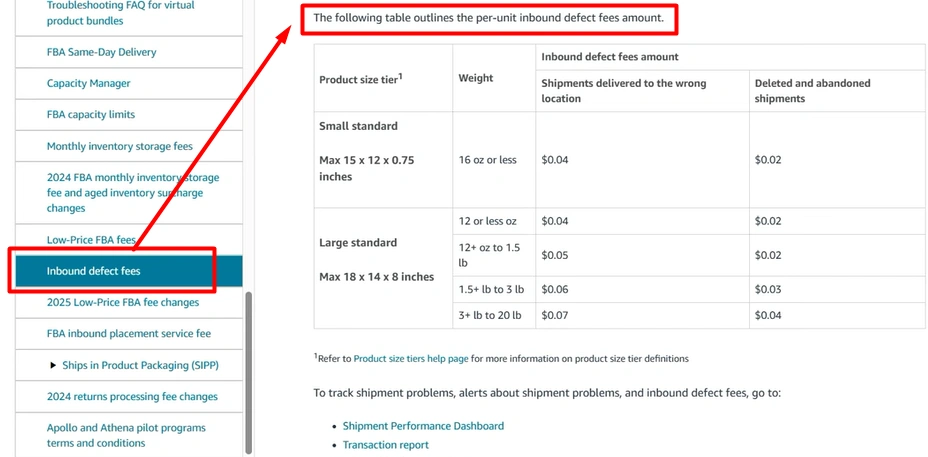
5. Inbound Defect Fee
Applies when shipments don’t follow Amazon’s prep/labeling rules.
- Sending stock to the wrong warehouse = $0.04 per unit.
- Amazon applying labels for you = $0.55 per unit.
- Repeated mistakes = higher penalties.
6. Inbound Placement Service Fee
Starting April 15, 2024, Amazon introduced the Inbound Placement Service Fee. This fee applies when you send products to Amazon FBA warehouses, depending on how many warehouses your inventory is split into.
- 1 Warehouse Only: You’ll pay $0.16–$0.68 per unit.
- 2–3 Warehouses: Costs drop to $0.12–$0.23 per unit.
- 4+ Warehouses: Free (no inbound placement fee).
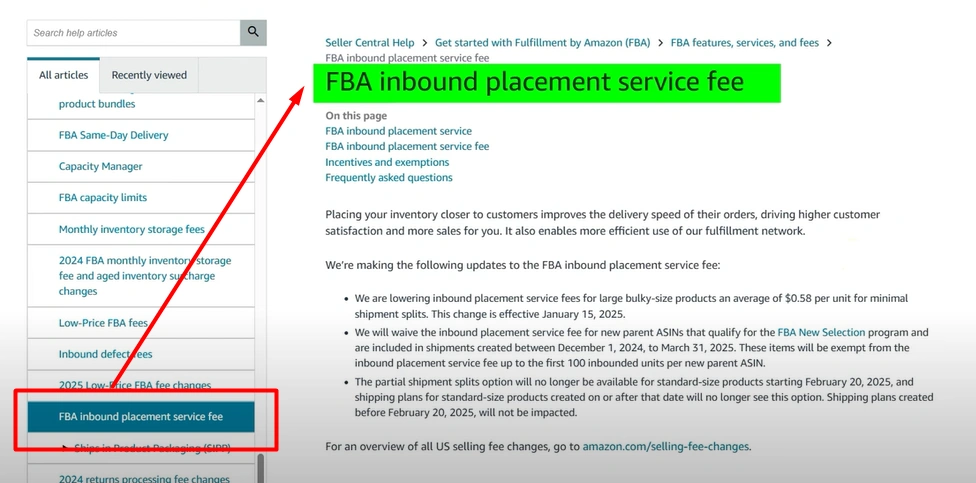
Before 2024, Amazon used to split your stock across its warehouses at no extra cost. Now, if you prefer convenience and ship to just one location, you’ll pay extra. The more warehouses you use, the less you pay.
How to Reduce Costs:
- Ship to Multiple Warehouses: If possible, use 3–4 warehouses to avoid or reduce fees.
- Check Your Shipping Plan: Always review the cost breakdown in Seller Central before confirming your shipment.
- Plan Ahead: Work with your supplier or freight forwarder to prepare shipments according to Amazon’s requirements, so you can split efficiently.
In short: If you ship all stock to one location, expect higher fees. Splitting across multiple warehouses saves money and ensures faster delivery to customers.
7. Return Processing Fee
Starting June 2024, Amazon introduced a Return Processing Fee for products that have a high return rate compared to their category average. This fee is Amazon’s way of pushing sellers to improve product quality and listing accuracy.
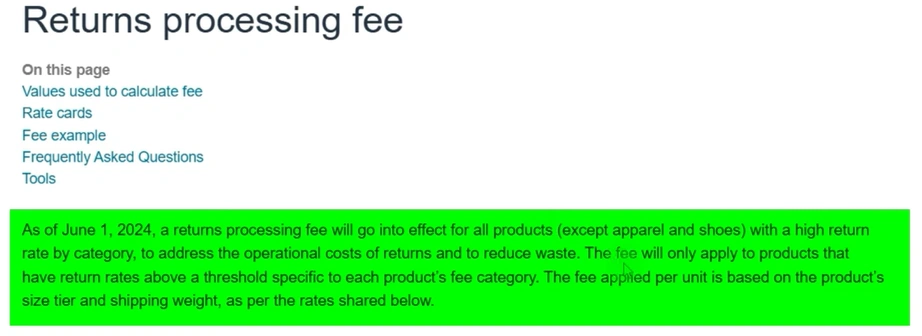
Fee Breakdown:
- Small standard-size items: $1.65 per return
- Large standard-size items: $3.69 per return
- Extra-large or bulky products: Can go as high as $157 per return3
Tips to Reduce Return Fees
- Improve Listing Accuracy → Write crystal-clear titles, bullet points, and descriptions. Use high-quality images that show dimensions, materials, and real product use.
- Quality Control → Inspect inventory before sending to Amazon to reduce defective units.
- Set Realistic Expectations → Highlight product limitations (e.g., “not waterproof”) to prevent unhappy buyers.
- Track Return Reasons → Use your Amazon dashboard to see why customers are returning items, then fix those problems.
- Offer Guides & Instructions → Adding user manuals or setup videos reduces “user error” returns.
How to Reduce Amazon Fees in 2025
Here’s the part sellers love—Amazon has actually introduced ways to lower certain fees and even reward sellers who optimize their operations. This means that while some fees are unavoidable, others can be minimized with the right strategy. For example, packaging adjustments, joining incentive programs, or driving traffic from outside Amazon can all save you money. By learning these tricks, you’re not just avoiding losses—you’re actually turning Amazon’s system into an advantage for your business.
Despite all these costs, Amazon has also introduced ways for sellers to save money:
- Fulfillment Fee Reductions: Some categories saw cuts of $0.20–$0.61 per unit.
- $10 & Under Discount: Extra $0.77 off per small item sold under $10.
- SIPP (Ships in Product Packaging): If your product can ship in its own box safely, you can save $0.04–$1.32 per unit while boosting branding visibility.
- Amazon New Seller Incentives: Up to $1200 in Vine credits, $100 shipping credits, $400 inbound placement credits, and up to 10% bonus on your first $50,000 sales.
- Brand Referral Bonus: Drive external traffic, and Amazon reduces referral fees (up to 30% savings).
10 Hidden Amazon FBA Fees Draining Your Profits & How to Avoid Them
Key Takeaways
Amazon fees in 2025 are more complex than ever. Between referral fees, fulfillment costs, hidden storage charges, and new penalties, staying profitable requires planning ahead. But sellers who use Amazon’s incentives and optimize packaging, pricing, and inventory management can actually reduce their costs.
At the end of the day, knowledge = profit. The more you understand how fees work, the more you can keep your margins healthy.
Frequently Asked Questions (FAQs)
1. What is the biggest difference between FBA and FBM fees?
The biggest difference lies in who manages logistics. With FBA (Fulfilled by Amazon), you pay extra fees for Amazon to handle storage, packing, shipping, customer service, and returns. These fees vary based on product size and weight, but you gain access to Prime shipping, which boosts sales. With FBM (Fulfilled by Merchant), you don’t pay FBA fees—only the referral fee (usually 8–15%), but you are responsible for shipping, handling, and storage. Essentially, FBA gives convenience and reach, while FBM gives you cost control.
2. Is Amazon FBA always more expensive than FBM?
Not necessarily. While FBA fees add up, especially for large or heavy products, it often results in higher sales volume because of the Prime badge and faster delivery. For small, lightweight, and fast-moving products, FBA can actually be more cost-effective since Amazon handles everything at scale. On the other hand, FBM can be cheaper if your product is bulky, oversized, or has slim margins where FBA fees would eat too much into profits.
3. Can I switch between FBA and FBM later?
Yes. Sellers can change fulfillment methods at any time. Amazon allows you to create two offers for the same product—one FBA and one FBM—so you can test both. Many experienced sellers use a hybrid strategy: fast-moving items go through FBA for convenience and scale, while oversized, seasonal, or low-margin products are handled via FBM. This flexibility allows you to optimize fees and logistics based on product performance.
4. What hidden fees do most Amazon sellers miss?
Many sellers only focus on referral and fulfillment fees, but Amazon has several hidden charges that can reduce profits:
- Storage fees – Charged monthly, with higher rates in Q4 (Oct–Dec).
- Aged inventory fees – Applied to items stored longer than 180 days.
- Low-inventory fees – New as of 2024, charged if you consistently hold too little stock in FBA.
- Inbound defect fees – If shipments don’t follow Amazon’s prep rules.
- Return processing fees – For categories with high return rates (e.g., apparel).
If you don’t actively track these, they can eat into your margins silently.
5. How can I reduce Amazon fees?
There are several smart strategies:
- Optimize packaging → Keep products small and light to qualify for cheaper FBA tiers.
- Use SIP (Ship in Product Packaging) → Save per-unit fees if products can be shipped in their own packaging.
- Manage inventory wisely → Avoid overstocking (storage fees) and understocking (low-inventory fees).
- Leverage Brand Referral Bonus → Drive traffic from outside Amazon (e.g., Instagram, email campaigns) to reduce referral fees by up to 30%.
- Negotiate with suppliers → To prep, label, and barcode products before sending them to FBA – this avoids Amazon’s unplanned service fees.
6. What’s better for new sellers – FBA or FBM?
For most beginners, FBA is the better choice. It’s easier to manage since Amazon takes care of logistics, returns, and customer service. It also provides access to Prime customers, which can drastically increase conversions. However, if your product is oversized, heavy, fragile, or has low margins, FBM may be the smarter choice to protect profits. Some new sellers even test both models before committing fully.
7. Do I still pay referral fees if I use FBM?
Yes, referral fees are mandatory for both FBA and FBM. This fee is Amazon’s commission for selling on their platform and is typically between 8–15% of the selling price depending on the product category. Whether you fulfill orders yourself (FBM) or let Amazon do it (FBA), you cannot avoid referral fees. The difference is that with FBM, you won’t pay FBA fulfillment/storage fees—but you will still pay for your own shipping and returns.
How Ecomclips Can Help
Managing Amazon fees while running your store can feel overwhelming. That’s where Ecomclips comes in. With 12+ years of experience helping sellers grow and scale, we know how to navigate Amazon’s complex fee structure, cut unnecessary costs, and maximize profitability.
Reach out at info@ecomclips.com and claim your free listing audit to get started. Let’s build your brand profitably, together.
Ready to Start Growing Your Brand?
Ecomclips’ Partners Achieve an Average 85% Profit Increase!