
There are two main reasons why your products might not be performing well on Walmart Marketplace — even if they’re amazing.
Reason one: your listings are invisible. If your product is buried on page three of Walmart search results, no one’s going to find it. No visibility means no traffic, and no traffic means no sales.
Reason two: even if shoppers are finding your listing, they might not be clicking “Add to Cart.” That means your product detail page isn’t optimized to convert views into purchases.
The good news? Both of these problems can be fixed with the right Walmart SEO strategy and listing optimization techniques.
In this guide, we’ll walk through everything you need to know — step-by-step — to rank your product on page 1, boost conversions, and build a sustainable Walmart business.
Walmart SEO Tutorial 2025: Rank on Page 1 & Boost Sales Fast
Table of Contents
- Step 1: How to Rank Higher on Walmart Search Results
1.1 Do Proper Keyword Research
1.2 Optimize Your Walmart Product Title
1.3 Write an Optimized Description
1.4 Fill Out All Product Attributes
1.5 Analyze Competitor Listings
1.6 Run Walmart Ads for Faster Visibility - Step 2: Fixing Engagement & Conversion Problems
2.1 Optimize Your Main Product Image
2.2 Add Rich Media (Walmart A+ Content)
2.3 Use Promotions and Discounts
2.4 Collect and Manage Reviews
2.5 Optimize Your Pricing Strategy - Bonus: Common Walmart SEO Mistakes to Avoid
- Final Thoughts: Rank Smart, Sell Fast
- Call to Action: Grow Your Walmart Store with Ecomclips
Step 1: How to Rank Higher on Walmart Search Results
Let’s start with visibility. Imagine you’re selling coffee mugs on Walmart. If your mug is sitting on page 2 or 3 of the results, you might as well not exist. Nobody scrolls that far.
The goal is to make your listing appear on the first page of Walmart search results — and for that, you need powerful keyword optimization and well-structured product content.
Do Proper Keyword Research
Keyword research is the foundation of Walmart SEO. Without it, you’re basically throwing darts in the dark.
Use tools like Helium 10, DataSpark, WallySmarter, or Walscout to find high-volume, low-competition Walmart keywords.
For example, if you sell vitamin supplements for men, plug that into your research tool. You’ll see which keywords are trending, which ones have the highest search volume, and what competitors are ranking for.
You can also grab ideas straight from Walmart’s own search bar. Start typing your product name — Walmart will show you auto-suggestions based on real buyer searches. Those are your goldmine keywords.
Pro Tip: Combine your main keyword (e.g., “vitamin supplements”) with long-tail modifiers (like “for men over 40” or “energy boost”) to target specific buyer intent.
Optimize Your Walmart Product Title
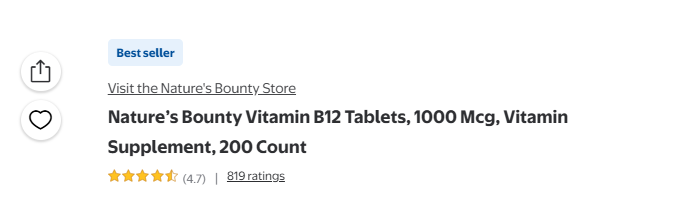
Your product title is the first element Walmart’s algorithm (and shoppers) look at. So it needs to be clear, keyword-rich, and compliant.
Follow Walmart’s title guidelines — ideally between 50 to 75 characters, even though the max limit is 200. Don’t stuff keywords unnaturally; focus on clarity and readability.
Here’s a simple format you can follow:
[Brand Name] + [Main Keyword] + [Key Feature] + [Product Type/Quantity]
Example:
PureBlend Vitamin B12 – Energy Support Tablets for Men – 120 Count
Write an Optimized Description
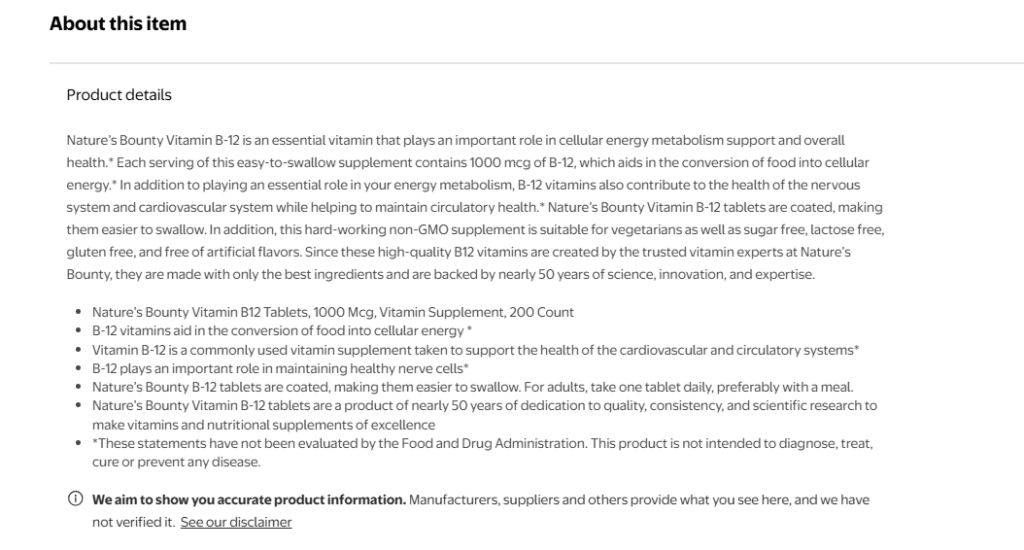
Your product description isn’t just a sales pitch — it’s an SEO powerhouse. Walmart uses this content for keyword indexing, so every word matters.
Include both primary and secondary keywords naturally throughout the text. Keep it at least 150 words long, and make it easy to read.
Highlight 3–10 key features and benefits in bullet points. Use persuasive but factual language — show shoppers how your product solves their problem.
Example: Instead of saying “High quality vitamin supplement,” say “Formulated to support natural energy production and immune strength throughout the day.”
Fill Out All Product Attributes
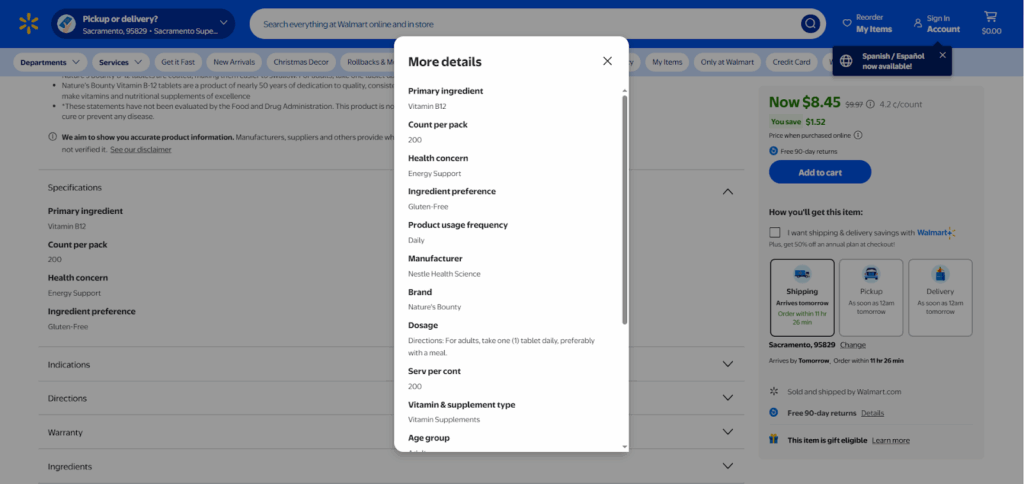
Attributes are the structured details that describe your product — size, color, count, material, etc. They might seem minor, but they’re actually crucial for ranking.
When shoppers filter results on the left sidebar (like “Size” or “Count”), Walmart shows only the listings that have those fields filled correctly.
Incomplete attributes = lower visibility.
So, make sure to fill out every relevant field. You can even spy on top-selling competitors to see which attributes they’re using successfully.
Bonus Tip: Use Walmart’s Category Template to cross-check required attributes before uploading your listing.
Analyze Competitor Listings
Never guess what’s working — study it.
Look at the best sellers in your category. Analyze their titles, descriptions, pricing, images, and Walmart A+ content (also called rich media).
You’ll start noticing patterns — maybe they use lifestyle photos, maybe they highlight a key benefit right at the top. Learn from what’s performing and adapt it for your brand.
This isn’t copying; it’s competitive intelligence.
Run Walmart Ads for Faster Visibility
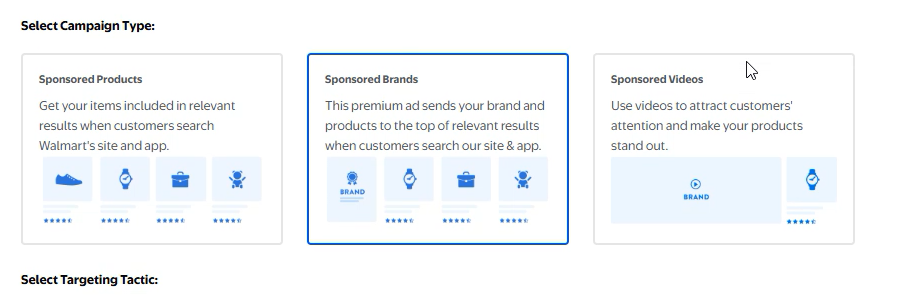
Even with great SEO, organic ranking takes time. That’s where Walmart Advertising comes in.
You can launch Sponsored Search, Sponsored Brand, or Sponsored Video campaigns directly from Seller Central.
- Sponsored Search: Best for beginners. Targets keywords automatically or manually.
- Sponsored Brand: Promotes your brand logo and multiple products together.
- Sponsored Video: Uses short clips to grab attention mid-scroll.
Running ads helps your products appear on top of search results — giving you instant visibility while your organic rank builds up.
For a deeper dive, check out our full guide on Walmart Ads on Ecomclips.com.
Step 2: Fixing Engagement & Conversion Problems
Now that shoppers can find your product, the next question is: will they buy it?
That’s where conversion optimization comes in.
Optimize Your Main Product Image
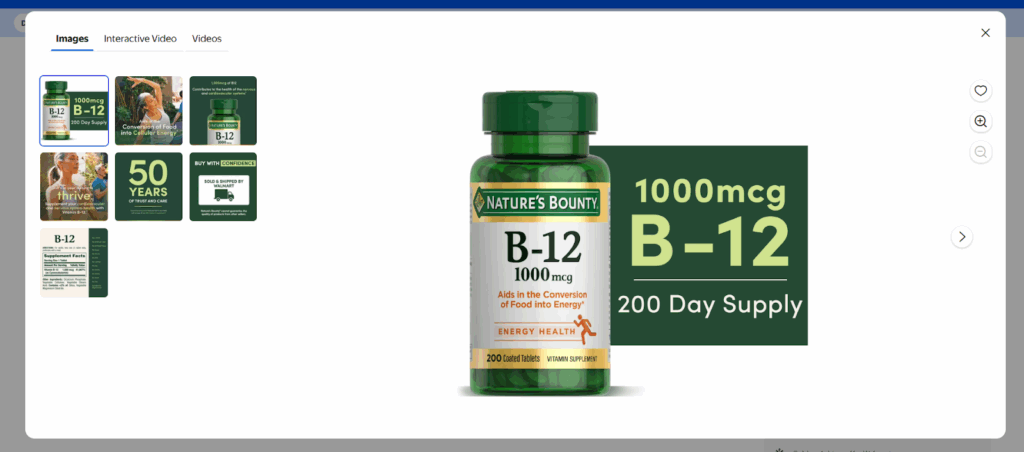
Your main image is your digital storefront. It’s the first thing shoppers notice — and it can make or break your click-through rate.
Follow Walmart’s image guidelines carefully:
- Use a white background
- Upload at least 4–5 high-resolution images (1000×1000 px minimum)
- Show the product clearly, without distractions
Unlike Amazon, Walmart allows you to use detail cards — small graphics on your main image that highlight benefits or features. Use this smartly to stand out.
Example: If you sell protein powder, you can mention “25g Protein Per Serving” or “Sugar-Free Formula” directly on the main image card.
Add Rich Media (Walmart A+ Content)

Walmart calls its enhanced content section Rich Media. It’s similar to Amazon’s A+ Content — and it’s your secret weapon for higher conversions.
Rich Media allows you to include:
- Comparison charts
- Lifestyle photos
- Keyword-rich descriptions
- Infographics
It doesn’t just look good — the text here is also crawlable, meaning Walmart’s search algorithm can read and index your keywords.
Adding professional A+ content can increase conversions by up to 30–50%, because shoppers trust visuals more than text alone.
Need help setting this up? The Ecomclips creative team has helped thousands of sellers craft A+ visuals that drive clicks and sales. Check it out at ecomclips.com/services.
Use Promotions and Discounts
See that little strikethrough price on Walmart listings? That’s called a Strikethrough Promotion, and it’s a proven attention-grabber.
Example:
Was $9.00 – Now $7.00
That small change triggers urgency — buyers feel they’re getting a deal, and that psychological nudge can massively improve conversions.
To create one:
- Go to Walmart Seller Center → Pricing → Promotion
- Click Create Promotion
- Set your discount type, offer details, and time period
- Hit save — and you’re live
Use these strategically during peak sales seasons like Q4 or back-to-school time.
Collect and Manage Reviews
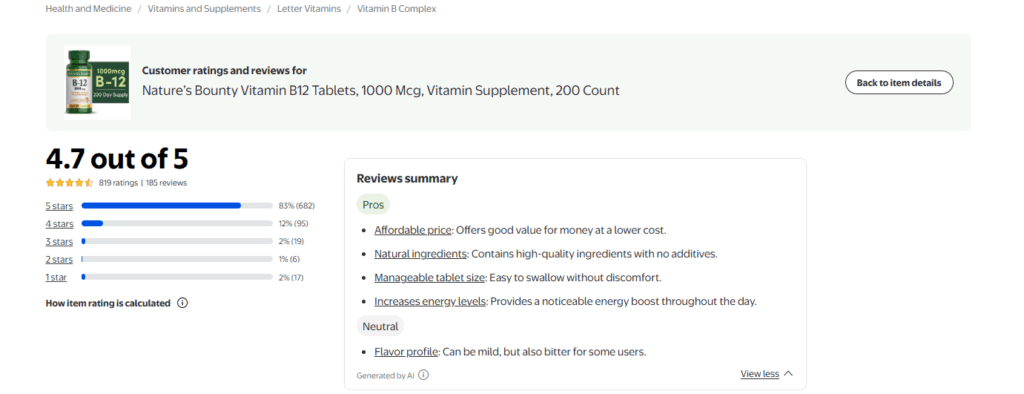
When was the last time you bought something online without checking reviews? Exactly. Reviews are your social proof — and they heavily influence Walmart’s ranking algorithm.
To get consistent positive reviews:
- Deliver fast shipping
- Match your product description accurately
- Offer responsive customer service
Walmart automatically emails customers after a purchase asking for reviews, so focus on customer satisfaction.
Avoid overpromising in your listings. When expectations match reality, you’ll naturally collect good feedback.
Optimize Your Pricing Strategy
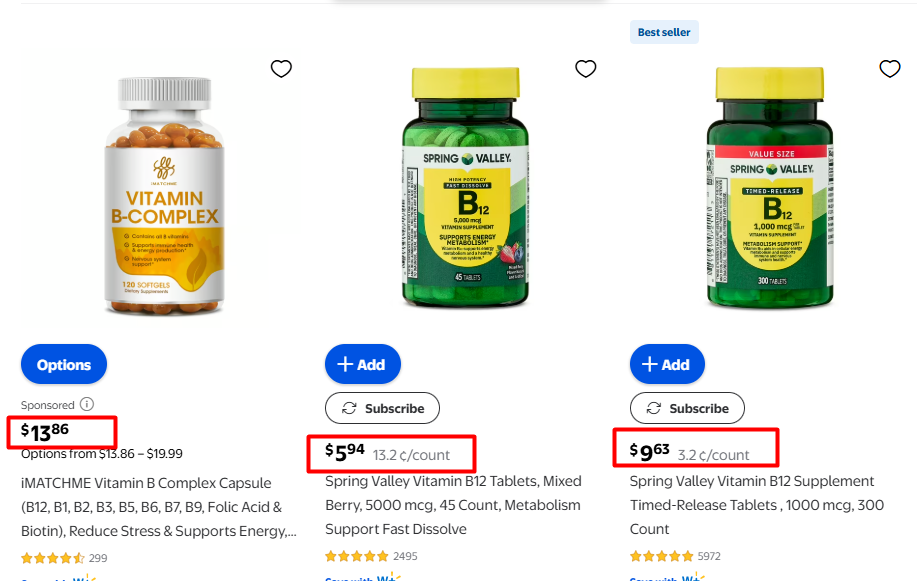
Pricing isn’t just about profit — it’s also a ranking factor on Walmart.
Walmart’s algorithm prioritizes listings with the lowest landed price (product + shipping). Even if your base price is low, high shipping can still push you out of visibility.
To stay competitive:
- Use repricing tools
- Track your Buy Box status
- Consider Walmart Fulfillment Services (WFS) for better shipping rates
WFS can also help you win the Buy Box more often, as Walmart trusts its own fulfillment network.
And yes, psychological pricing works — $19.97 looks more appealing than $20.
Keep it competitive, but don’t race to the bottom. Balance visibility with profitability.
Bonus: Common Walmart SEO Mistakes to Avoid
- Keyword stuffing – Walmart’s algorithm is smarter than you think. Keep your content natural.
- Ignoring attributes – Missing fields kill your visibility in filtered search.
- Skipping backend search terms – Always fill them with relevant keywords.
- Weak visuals – Blurry, inconsistent images drive bounce rates.
- Inconsistent pricing – Frequent price changes can reduce ranking stability.
Avoid these, and you’ll already be ahead of most sellers.
Final Thoughts: Rank Smart, Sell Fast
We’ve covered the major pillars that decide whether your Walmart listing ranks or disappears into the void:
✅ Keyword research & optimization
✅ Strong titles and descriptions
✅ Complete attributes
✅ Rich visuals and A+ content
✅ Competitive pricing and reviews
If you implement even half of these strategies, you’ll start seeing measurable improvements in traffic, visibility, and conversions.
But managing SEO, ads, pricing, and visuals while running your business? That’s a lot to juggle.
That’s why Ecomclips exists.
With over 15 years of hands-on ecommerce experience, we help Walmart sellers optimize their listings, create stunning visuals, and grow their sales fast — the smart way.
🚀 Ready to Rank on Page 1 of Walmart?
Let’s make it happen.
👉 Visit Ecomclips.com
📧 Or email us directly at info@ecomclips.com
We’ll handle your Walmart SEO, content, and advertising — so you can focus on running your business.
Ecomclips: Turning Your Walmart Store into a Revenue Machine.