

The Target/Target Plus (Target+) Marketplace Ads Report is a valuable resource for advertisers looking to fine-tune their PPC Ads and drive meaningful results. It provides a clear breakdown of how your Target Ads perform within various Target Campaigns, highlighting key metrics across Target PPC Ad placements.
When used strategically, this report becomes the foundation for effective Target/Target Plus (Target+) Optimization. By identifying what’s working and where adjustments are needed, you can enhance targeting precision, reduce wasted spend, and improve overall campaign performance.
Running PPC Ads on Target Plus (Target+) Marketplace is a fantastic way to boost your product visibility, increase conversions, and reach your ideal audience. But just launching Target Plus Marketplace campaigns isn’t enough; what truly drives growth is how well you analyze your campaign performance and optimize accordingly.
In this blog, we’ll walk you through a comprehensive guide on how to analyze Target/Target Plus (Target+) Marketplace Ads Reports, covering campaign data, reporting parameters, and actionable strategies to maximize your PPC ads ROI.
1. Target Plus (Target+) Marketplace PPC Ads Report Analysis
Managing Target and Target Plus (Target+) Marketplace PPC ads effectively requires regular performance reviews, and one of the most powerful tools for this is the Target Ads Report. This report provides deep insights into how your PPC ads, specifically those under Target Ads and Target Campaigns, are performing, helping you make data-driven decisions to boost profitability.

2. Why the Target Plus Marketplace Ads Report Matters?
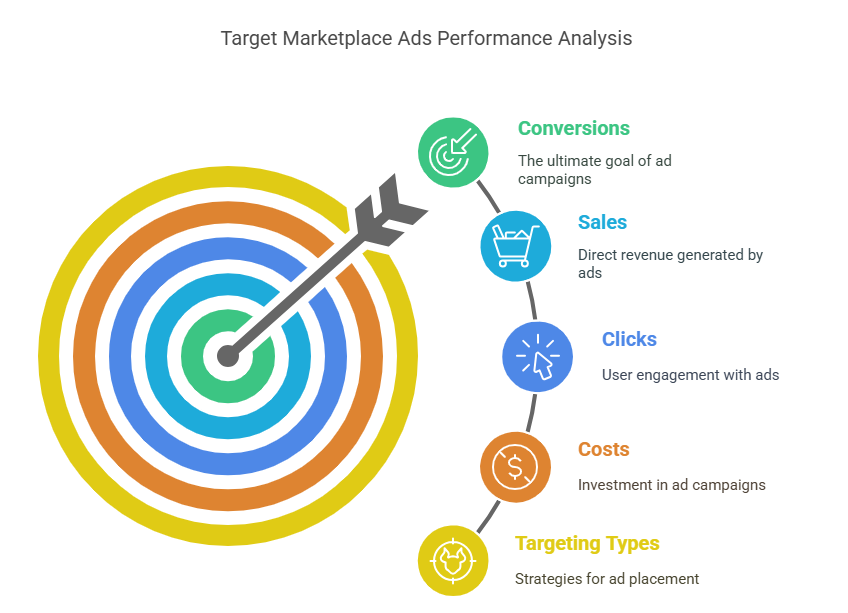
The Target Marketplace Ads Report breaks down the performance of your ads based on targeting types, such as item-wise targeting (ads aimed at specific product pages) and category targeting (ads targeting broader product categories). Unlike other ad types like Sponsored Products, which often rely on keywords, Target Marketplace Ads focus on precise product or category placements. This report reveals which targets are driving conversions and which are draining your budget without results.
For example, if you’re using ASIN targeting to advertise on a competitor’s product page, the report will show clicks, sales, and costs tied to that specific target. By analyzing this data, we can pinpoint what’s working and where your Target PPC Ads need adjustment.
3. Target Plus (Target+) Marketplace PPC Dashboard Navigation
Once you log in to your Target Plus (Target+) advertising portal, head over to the “Manage Ads” section. Here you can filter data by date ranges (e.g., last 30 days) to assess high-level metrics like:
- Impressions
- Clicks
- Spend
- Attributed Sales
To dive deeper, navigate to the Reports tab and use the Roundel Media Studio template to begin your analysis. Using the Target Plus (Target+) Marketplace Ads Report, we follow a structured process for Target Ads Optimization to maximize efficiency.

4. Download Target Plus (Target+) Ads Reports
Follow these steps to pull the complete Target Marketplace Ads Report for your Target PPC Ads.
Choose the Right Template
Once you login to the Roundel Kiosk, you can see the options named as Campaigns at the Top bar, right after that you can see Reports, here you can click and go to access the PPC Ads data.
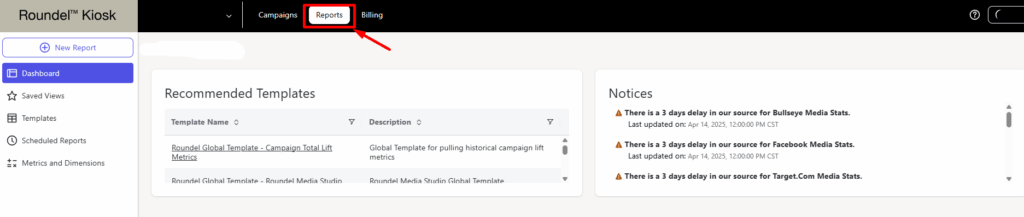
- In Manage Ads → Reports → Templates, select the Roundel Global Product Performance (or Media Studio) template.
- This template contains all four report types you need for a full campaign audit.

Filter by Brand, Category, or Campaign
- If you manage multiple brands, pick the correct Brand from the dropdown.
- Optionally, narrow it down by category or specific Target Plus (Target+) marketplace campaigns to focus on a subset of ads.
- If you only advertise one brand, you can leave these filters blank.
Access the PPC Report Data Tab
Once you’ve selected the right template, it’s time to dive into the actual data that drives decisions. This is where the magic happens. Switch to the Data tab to unlock four powerful report types that offer insights across different levels of performance; these reports help you understand not just what’s working, but why it’s working.
- Weekly Performance – Track how your campaigns trend over time.
- Device & Page Type Breakdown – Understand where conversions are happening (mobile web, desktop, etc.).
- Product Performance – Analyze how each product performs individually.
Line Item Performance – Get granular with category- or placement-level data.
Customize Your Metrics & Dimensions
- Click into each report type and select the metrics you care about—e.g., Attributed Total Units, Clicks, Spend, ROAS.
- Choose a primary Dimension, such as Campaign Name or SKU/Product ID, to segment your data.
- Apply a Date Filter (for example, “Event Date between 2025‑03‑18 and 2025‑04‑17”) to capture exactly the timeframe you need.
Download or Email the Reports
- Hit Export, then choose either Direct Download or Send via Email/Cloud.
- For large files, emailing the report is faster—the system will package all four CSVs into a single ZIP.
- Unzip on your end to access each report type and import into your analysis tool of choice.
With these steps, you’ll have a complete set of Target Marketplace Ads Reports in hand, ready for Target Plus (Target+) Ads Optimization and data‑driven decision making.

5. Target Plus (Target+) Ads Report: Device & Page Type Breakdown
In this section of the analysis, we will walk you through a crucial report that helps identify where you’re winning in terms of conversions by device and page type. This allows for a precise analysis of where conversions are coming from, whether from mobile users, desktop users, or specific types of pages. Here’s how we got this report:
- Accessing the Report: I used the “Device & Page Type Breakdown”
- Applying Filters: To narrow down the insights, we applied specific filters, including:
- Device type filter to separate mobile and desktop traffic
- Page type filter to view performance across different areas of the site
- Conversion metrics to focus specifically on sales or desired actions.
What Does the Data Show?
The performance by device type reveals key insights into how shoppers interact with Target’s platform—and where advertisers should focus their attention. By analyzing the sales breakdown across mobile app, mobile web, and desktop, we can better understand user behavior and optimize campaigns accordingly. Here’s a breakdown of the results:
- Mobile App (combined iOS + Android): The app traffic generated over 1M in sales. This indicates that the mobile app is a strong driver of conversions. This could be due to the seamless shopping experience, better visibility of promotions, or the convenience of app-based shopping.
- Mobile Web: The mobile web accounted for 379K sales. While this is a significant amount, it’s lower than the app traffic, suggesting that users on the web are still engaged, but potentially face more friction (e.g., slower load times or less intuitive navigation) compared to the app.
- Desktop Web: Desktop web traffic generated 121K in sales. Although this is the smallest segment, it’s still important. Users on desktops might be making higher-value purchases, conducting research, or reviewing multiple product options before committing to a sale.
Why is Target Plus (Target+) PPC Device-Wise Data Important?
This report helps refine your decision-making by identifying exactly where your wins are coming from and showing how well your strategy is working across different devices and types of pages. If most of your revenue is coming from the app, consider increasing placement bids for that channel. Optimize your creative and budget allocation accordingly. By analyzing the breakdown of conversions across device and page types, you can:

- Optimize your strategy: Understand where to focus more of your marketing spend or efforts. If the mobile app is driving the most conversions, you might want to invest more in app-based ads, promotions, or features.
- Tailor your content: Ensure that your website or product pages are optimized for the devices most used by your customers—this includes having mobile-friendly designs or desktop-centric features.
- Refine your targeting: Adjust your ad targeting to align with the devices and pages where you’re seeing the most success, and potentially reconsider budgets for underperforming segments.

6. Target Plus (Target+) Ads Report Analysis: Line Item Performance
Before we deep dive into the Target Plus (Target+) Marketplace Ads Report Analysis for Line Item Performance, let’s first understand what a line item is.
A line item refers to an individual media placement or ad grouping within a campaign, often aligned to a specific product set, category, or targeting strategy. It helps track performance at a more detailed level than the overall campaign. You can think of it like an Ad Group in Amazon PPC Ads, where similar products or targeting types are grouped together for better control and analysis.
In this section, we’ll dive into your line item report to analyze how different product categories are performing. This is crucial to understand where your budget is being well-spent and where improvements can be made.
How We Analyzed the Target Plus (Target+) PPC Data:
- Accessing the Report: We first accessed the line item performance report from the Target platform. This report shows sales data broken down by each product category, giving insight into which categories are driving the most revenue.
- Applying Filters: We applied filters to sort the products based on performance, specifically focusing on:
- Highest to lowest performers: This gives a clear view of which categories or products are doing well.
- Lowest to highest performers: Reversing the sort allows us to spot underperforming products that need further attention.
By sorting products with zero or low sales, we can easily identify those that might need a review. Low sales might indicate problems with:
- Product visibility
- Uncompetitive pricing
- Irrelevant targeting
- Insufficient budget allocation

Underperforming Products Despite Budget Allocation:
Some products might still show low performance even though there is a budget allocated to them. This highlights the need for a more granular review of each product’s settings to optimize its chances of success.
For low-performing line items, consider the following adjustments:
- Budget Re-evaluation: Assess whether your budget allocation is sufficient for the products or if it’s spread too thin across multiple items.
- Placement and Targeting Settings: Review your ad placements and audience targeting. Sometimes, products perform poorly due to a mismatch between the audience and the ad’s placement.
- Dedicated Campaigns: If certain products are underperforming, create separate campaigns for them. This allows for more granular control over the budget, targeting, and bidding strategies. By focusing on these underperformers, you can ensure they receive the attention they need to thrive.
Identifying and addressing low-performing products allows for optimization opportunities. By making informed decisions on budget allocation and refining your strategy for these products, you’ll be able to better allocate resources, maximize return on ad spend (ROAS), and ultimately improve sales across all categories.
7. Target Plus (Target+) Marketplace Ads Report Analysis: Product Performance Analysis
This section dives into your Product Performance Report—the ultimate tool for SKU‑level insights in your Target Marketplace Ads Report. By examining individual product identifiers (SKUs), you can pinpoint which items are driving sales and which need a strategy refresh.
How We Pulled the Report
- Navigate to Manage Ads → Reports → Templates in the Target Plus (Target+) portal.
- Select the “Product Performance” template under your Brand’s report options.
- Set your date range and choose dimensions such as SKU/Product ID.
- Pick key metrics: Total Units Sold, Clicks, Spend, ROAS.
- Export the CSV or email it for deeper analysis.
Applying Filters & Sorts
- Date Filter: Event date between your chosen start and end.
- Dimension: SKU/Product ID.
- Metrics: Units Sold, Clicks, Spend, ROAS.
- Primary Sort: Descending by Units Sold (to find bestsellers).
- Secondary Sort: Ascending by Units Sold (to surface zero‑sales SKUs).
Key Insights from the Data
- Top Sellers: SKUs with the highest units sold; your strongest performers under the current Target Plus (Target+) PPC Ads.
- High Clicks, Low Conversions: Products drawing clicks but not closing sales. Signals a need for Target Ads Optimization: revisit imagery, descriptions, or bid levels.
- Zero‑Sales SKUs: Items with impressions and clicks yet no purchases. Perfect candidates for separate test campaigns or budget adjustments.
To maximize efficiency, increase budgets and bids on top-selling SKUs to capitalize on their momentum and drive further growth. For low-ROAS SKUs, consider reworking their ad creatives or pausing them altogether to redirect budget toward better-performing products.
It’s also helpful to segment your campaigns by performance tier: allocate high budgets and aggressive bids to top performers, assign a limited spend to a test group for new or experimental SKUs, and apply lower budgets or conservative bids to underperformers, pausing them if necessary until further optimization is done.
8. Why Data-Driven Decisions Matter!
Analyzing your Target Plus (Target+) Marketplace Ads Reports isn’t just about gathering numbers; it’s about turning insights into action. By monitoring reports consistently and adjusting strategy based on key metrics, you can:
- Optimize your Target Plus (Target+) PPC Ads spend
- Scale profitable campaigns
- Reduce wasted budget on underperformers
- Maximize ROI with precision targeting
After pulling and analyzing the key reports from Roundel Media Studio, here are the top takeaways that can immediately impact your retail media performance. These aren’t just insights; they’re action points to refine your strategy.
- Split Campaigns Strategically: Group campaigns by category or SKU performance to gain better control over budget and optimization.
- Leverage Roundel Media Studio Templates: Use pre-built templates to pull essential reports without starting from scratch.
- Prioritize Device & Page Insights: Analyze which platforms (mobile, desktop, app) are converting best, then adjust placements accordingly.
- Deep Dive Into Line Item & Product Data: Identify where your spend is going, what’s working, and what’s underperforming—then reallocate budgets based on real performance.
9. FAQs About Target and Target Plus (Target+) PPC Ads
In this section, we’ll cover some key and commonly misunderstood questions about Target Marketplace and Target Plus PPC ads—essential knowledge for both new and experienced sellers. Whether you’re just getting started or scaling your brand on Target, understanding the nuances of how PPC works, the difference between Target and Target Plus, and how to get approved is crucial. These FAQs will help clear up confusion, avoid common pitfalls, and ensure you’re on the right track to running profitable ad campaigns on the platform.
a) What is the Difference Between Target and Target Plus (Target+)?
If you’re exploring eCommerce opportunities with Target, it’s important to understand the difference between Target and Target Plus. While both operate under the Target.com domain, they function quite differently when it comes to who can sell, how products are managed, and what control brands have. Here’s a simple breakdown to help you see the key distinctions:
| Feature | Target (Target.com) | Target Plus (Target+) |
| Definition | Target.com is Target’s main online platform where they sell both in-store and online inventory. | Target Plus is a curated, invite-only third-party marketplace that allows select brands to sell directly on Target.com. |
| Seller Type | Only Target (first-party) sells directly to customers. | Third-party sellers can list and sell their products directly to consumers. |
| Access | Open to the public for shopping. Not open to external sellers. | Not open to all sellers — invite-only program for trusted brands and high-quality partners. |
| Fulfillment | Fulfilled by Target using its own supply chain and stores. | Fulfillment is managed by the third-party seller (though they must meet Target’s shipping and service standards). |
| Brand Control | Target controls pricing, listings, and inventory. | Third-party brands have more control over product listings, pricing, and inventory. |
| Advertising Options | Run by Target’s in-house marketing. | Target Plus sellers can advertise through Roundel (Target’s media network), but options may be limited compared to Target-owned inventory. |
b) What is Target and the Target Plus (Target+) Marketplace?
Target is one of the largest retail chains in the U.S., offering customers a wide range of products both in-store and online. Target Plus (Target+), on the other hand, is a curated third-party marketplace that allows select sellers to list their products alongside Target’s own inventory on Target.com.

Unlike open marketplaces such as Amazon or Walmart, Target Plus is invitation-only. Sellers must meet strict criteria to be approved, but those who join benefit from Target’s trusted brand reputation, loyal customer base, and streamlined fulfillment and marketing opportunities.
While both Target and Target Plus operate under the Target.com domain, their operations differ significantly:
- Target: Products are sold and fulfilled by Target directly.
- Target Plus: Products are sold by third-party partners and fulfilled either by the seller or through Target’s fulfillment options.
c) How Do Target Plus (Target+) PPC Ads Work?
To advertise on Target Plus, you must first become an invited Target Plus Partner. Requirements include:
- A business presence in the U.S.
- Competitive pricing across sales channels
- A strong brand and seller reputation
Once you’re in, you can leverage various PPC ad formats powered by Roundel™, Target’s in-house media agency.
Ad Auction Style
Target Plus currently uses a first-price auction model, meaning if you bid $5 and win, you pay the full $5 — regardless of the second-highest bid. This model can drive up costs quickly, unlike platforms like Amazon that use second-price auctions.
💡 Pro Tip: We recommend starting your bids at approximately 30% below your maximum budget, then increasing gradually based on performance to avoid unnecessary overspending.
Search Result Placements
Visibility on search results is key. Target Plus offers both organic and paid placements on search and browse pages. A strong combination of optimized listings and smart bidding can help you appear in both positions, effectively doubling your exposure and increasing the chance of conversions.
Device Targeting Limitations
Currently, sellers cannot choose device-specific targeting (mobile vs. desktop). To adapt, analyze ad performance data to see where your conversions are happening and design creatives with that in mind.
Ad Match Type: Exact Match Only
Target Plus only supports exact-match keyword targeting. While this ensures highly relevant traffic, it also limits visibility for broader or misspelled search terms.
👉 Be sure to:
- Conduct detailed keyword research
- Monitor competitors
- Use historical data to refine your targeting
Targeting Options
Target Plus offers several targeting layers, including:
- Keyword targeting
- Category targeting
- Product detail page (PDP) targeting
Note: There is no competitor targeting available — which can be a double-edged sword. You can’t target their listings, but they also can’t target yours.
Ad Approval Process
Unlike Amazon, ad approvals are not instant. Keyword campaigns and revisions are typically reviewed 3–4 times per day, so expect a delay of a few hours for changes to take effect.
d) What Media or Apps Are Used to Run PPC Ads on Target Plus?
Target Plus PPC ads are powered by Roundel™, Target’s advertising platform. Ads can run across:
- Target.com and the Target mobile app
- Off-site networks like Google, Facebook, Instagram, Pinterest
- Programmatic display and video ads
- Sponsored product placements within search and browse results
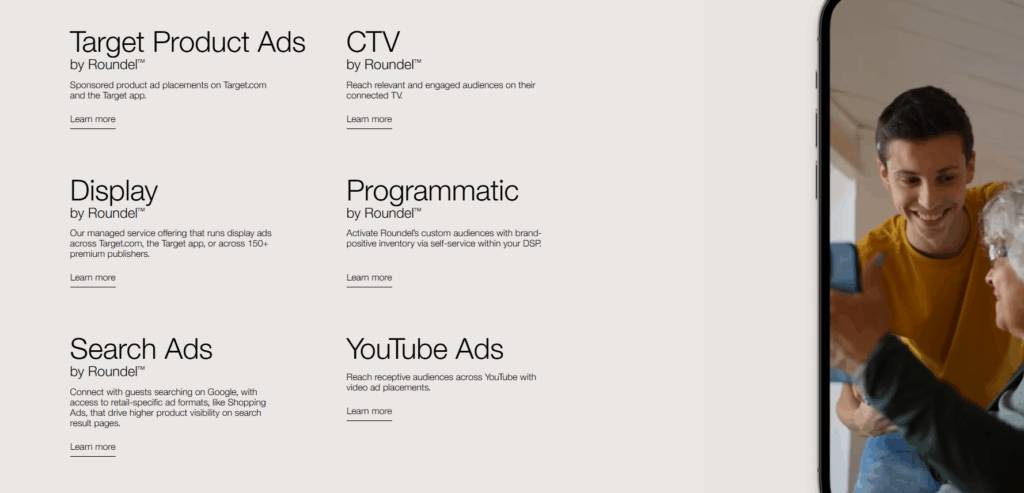
Roundel helps deliver a full-funnel media strategy that includes awareness, consideration, and conversion-focused campaigns — all connected to Target’s proprietary shopper data.
e) What Is Interest-Based Advertising on Target/Target Plus?
Interest-Based Advertising (IBA), also called online behavioral advertising, is a strategy where ads are shown based on your browsing and shopping behavior.
Target uses third-party advertising partners to:
- Serve tailored ads on and off Target.com
- Analyze ad performance
- Measure attribution and shopper engagement
These companies may collect:
- Non-identifiable data: browser type, session data, ad clicks, etc.
- Identifiable data: static IP addresses
Tools used for IBA include cookies, pixels, and tracking beacons.
Opting Out
You can opt out of IBA by visiting the Digital Advertising Alliance (DAA) Choices Page and managing your preferences per device/browser.
f) How Much Is the Commission Rate for Selling on Target.com?
Target Plus sellers pay a referral commission between 5% to 15%, depending on the product category. This rate is comparable to Amazon’s Vendor Central fees and in many cases, lower than other marketplaces.
To check your specific fees, Target provides a Referral Fee dashboard within the seller portal where you can view category-specific rates and any special terms applicable to your account.
Insights!
To wrap it up, the Target Marketplace Ads Report is more than just a performance summary; it’s a roadmap for strategic growth. By digging into device performance, line item details, and product-level insights, advertisers can uncover what’s working and what needs fine-tuning. Whether it’s reallocating budget to high-performing SKUs or adjusting bids on underperforming categories, each data point brings you one step closer to a more efficient and profitable campaign.
In today’s competitive marketplace, relying on assumptions won’t cut it. Success lies in data-driven optimization and constant iteration. Make the Target Ads Report your go-to tool for smart decisions, better targeting, and maximizing your PPC ROI.
By leveraging the right strategies, sellers can effectively optimize their Target Plus advertising campaigns, boost visibility, and drive higher conversions—leading to stronger profitability. If you’re facing challenges navigating Target or Target Plus PPC, we’re here to help. Take advantage of a free consultation and a detailed audit of your current setup to uncover new growth opportunities.
Want to scale your brand on Target.com? Get in touch with Ecomclips today—we specialize in helping marketplace sellers grow with a mix of PPC expertise and marketplace strategy. Whether you’re just getting started or looking to maximize ROI from your existing campaigns, our team is here to support you every step of the way.
We also offer free store and account audits tailored for Target Plus sellers, covering everything from ad performance to product visibility. Simply reach out to us at info@ecomclips.com for personalized guidance and actionable insights to elevate your presence on Target.
For any further questions or support, feel free to drop a comment or email us directly. We’re committed to helping you thrive on Target’s fast-growing eCommerce platform!