Introduction:
Launching a Shopify store has never been easier. With just a few clicks, anyone can set up a digital storefront, add products, and start receiving orders. But turning that store into a well-oiled, profit-generating machine? That’s where most new sellers run into trouble—especially when it comes to shipping and fulfillment.
At Ecomclips, we’ve worked with thousands of Shopify businesses over the years, and there’s one question we hear time and time again:
“How do I handle Shopify shipping the right way?”
It’s a valid question—because while building a store is simple, maintaining it successfully requires far more than a good product and nice design. Many sellers take their first few orders with excitement, only to be overwhelmed by the logistical challenges that follow.
Suddenly, shipping becomes a daily struggle:
- Orders are delayed.
- Packages go missing.
- Inventory sync issues lead to overselling.
- And fulfillment eats up five hours a day.
All while customers grow increasingly frustrated.
Here’s the truth: Shipping and fulfillment aren’t just back-end tasks—they’re core components of your customer experience. Get them wrong, and you risk losing customers, racking up refunds, and damaging your brand. But get them right, and your store can scale efficiently, your customers stay happy, and your time is freed up to focus on growth.
In this comprehensive guide, we’ll walk you through everything you need to know to build a Shopify store that ships fast, fulfills smoothly, and grows like clockwork. Whether you’re a first-time seller or looking to improve your existing workflow, this article will give you the tools, strategies, and confidence to master shipping and fulfillment—once and for all.
In this guide we will cover-
- Introduction: Why Shipping and Fulfillment Are the Backbone of Your Shopify Store
- Top 5 Shopify Shipping Mistakes New Sellers Make
- Step 1: Set Up Your Shopify Shipping Profile the Right Way
- Step 2: Choosing the Right Fulfillment Method for Your Store
- Step 3: Set Up Returns and Refund Policies on Shopify
- Advanced Tips for Shopify Shipping in 2025
- Your Shopify Shipping & Fulfillment Checklist
- Common Questions Shopify Sellers Ask Us
- Ecomclips Can Help You Build a Shipping Machine
- Conclusion: Build a Shopify Store That Ships Like Clockwork
Also you can watch this on our youtube channel. Click this- https://www.youtube.com/watch?v=6edCJBXRCdE
Top 5 Shopify Shipping Mistakes New Sellers Make
Before we walk you through the step-by-step setup for a successful Shopify shipping strategy, it’s important to understand the most common pitfalls that trip up new sellers. At Ecomclips, we’ve seen these mistakes again and again—small missteps that snowball into serious problems. Fortunately, once you know what to look out for, they’re easy to avoid.
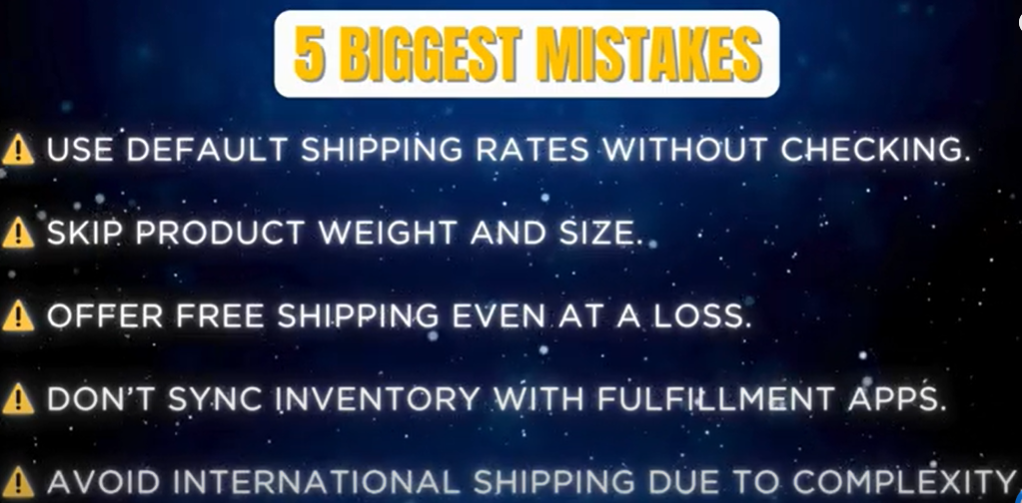
- Relying on Shopify’s default shipping rates without reviewing or adjusting them
These preset rates rarely match your actual shipping costs, which can lead to undercharging, overcharging, or confused customers at checkout. - Skipping product weights and dimensions
This might seem like a small detail, but it’s essential. Without this data, Shopify (and any connected shipping apps) can’t calculate the correct fees—resulting in unexpected costs or delivery issues. - Offering free shipping on every item without considering margins
While free shipping can boost conversions, applying it universally without adjusting product pricing can quickly cut into your profits. - Not syncing inventory with fulfillment apps
When your Shopify store and fulfillment partners aren’t properly integrated, it can cause delays, overselling, or backorders—leading to a poor customer experience. - Avoiding international shipping altogether
Many sellers assume it’s too complicated or risky. But with the right setup and tools, going global is easier than ever—and can significantly increase your market reach.
The good news? All of these mistakes are completely fixable. In the following sections, we’ll guide you through how to set up your Shopify shipping settings, choose the right fulfillment method, and streamline your logistics—step by step.
Step 1: Set Up Your Shopify Shipping Profile the Right Way
Shopify won’t handle shipping automatically. You need to set it up smartly. Here’s how.
Go to: Settings > Shipping and Delivery
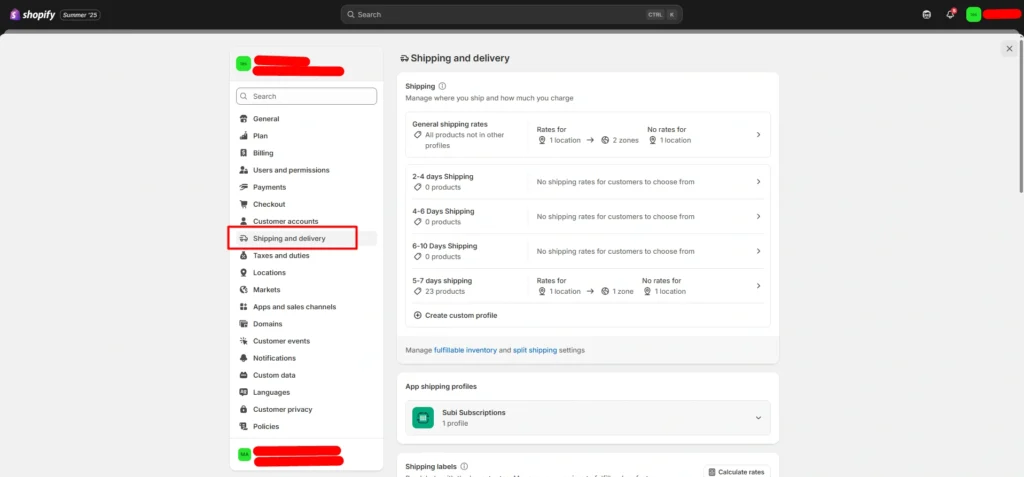
This is the command center for your shipping strategy. Here you can:
- Create custom shipping profiles
- Control where you ship
- Set shipping rates (flat, free, or calculated)
- Define zones (domestic or international)
Create Your First Shipping Profile
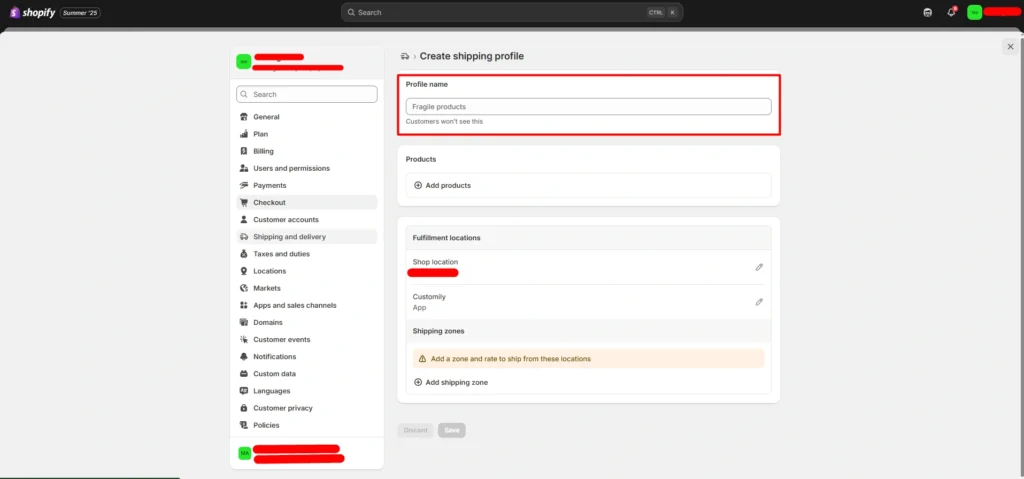
- Click “Create Custom Profile”
- Give it a name (e.g., “Standard Products”)
- Add the products you want to assign this profile to
- Select your Shop Location
- Set your Shipping Zones (e.g., U.S., Canada, Europe)
- Add a Flat Rate or choose Carrier-Calculated Rates
Pro Tip:
- A flat rate means the shipping price stays the same—no matter the order size.
- Carrier-calculated rates change in real-time based on weight, location, and service (UPS, USPS, etc.)
Make sure to add accurate product weights and dimensions. Shopify uses these to estimate costs.
Step 2: Choosing the Right Fulfillment Method for Your Store
Fulfillment isn’t one-size-fits-all. You have three main options, and your choice depends on your product type, order volume, and growth stage.
1. Self-Fulfillment (DIY Order Fulfillment)
With self-fulfillment, you handle every step yourself, including:
- Packing orders carefully
- Printing and applying shipping labels
- Shipping products directly to customers
Ideal for: Small sellers, handmade products, and beginners.
Benefits:
- Low upfront cost
- Full control over packaging and shipping
Drawbacks: - Time-consuming process
- Difficult to scale as order volume grows
Helpful tools:
- Thermal label printers for fast label printing
- Shopify Shipping to purchase and manage shipping labels from your dashboard
2. Third-Party Logistics (3PL) Fulfillment
A 3PL provider stores your inventory and handles packing, shipping, and delivery tracking for you. Popular 3PL companies include:
- ShipBob
- Amazon Multi-Channel Fulfillment (MCF)
Pros:
- Saves you valuable time
- Easily scales with your business growth
- Provides better customer experience through reliable shipping
Cons:
- Monthly storage and service fees
- Less control over packaging customization
Recommended for: Sellers processing 50+ orders per month looking to scale efficiently.
3. Print-on-Demand (POD) Fulfillment
Perfect for custom, made-to-order products such as T-shirts, mugs, and posters. POD providers print and ship items only after a sale is made. Leading POD apps include:
- Printful
- Printify
Advantages:
- No upfront inventory investment
- Ideal for creatives and merchandise stores
Disadvantages:
- Lower profit margins due to printing costs
- Longer fulfillment times compared to traditional shipping
Best suited for: Merch stores, artists, and creators focusing on personalized products.
Step 3: Set Up Returns and Refund Policies on Shopify
Returns aren’t fun—but they’re necessary. A clear, fair return policy builds trust and protects your brand.
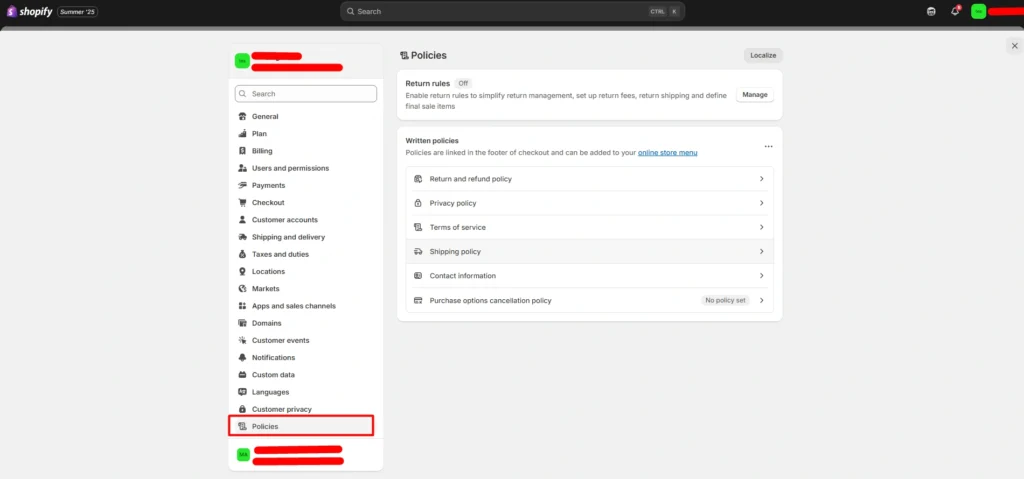
How to Add a Return Policy on Shopify:
- Go to Settings > Policies
- Click on Return and Refund Policy
- Write your policy clearly
What to Include:
- Timeframe for returns (e.g., “within 30 days”)
- Conditions (e.g., “unworn, original packaging”)
- Who pays for return shipping
- How refunds are processed
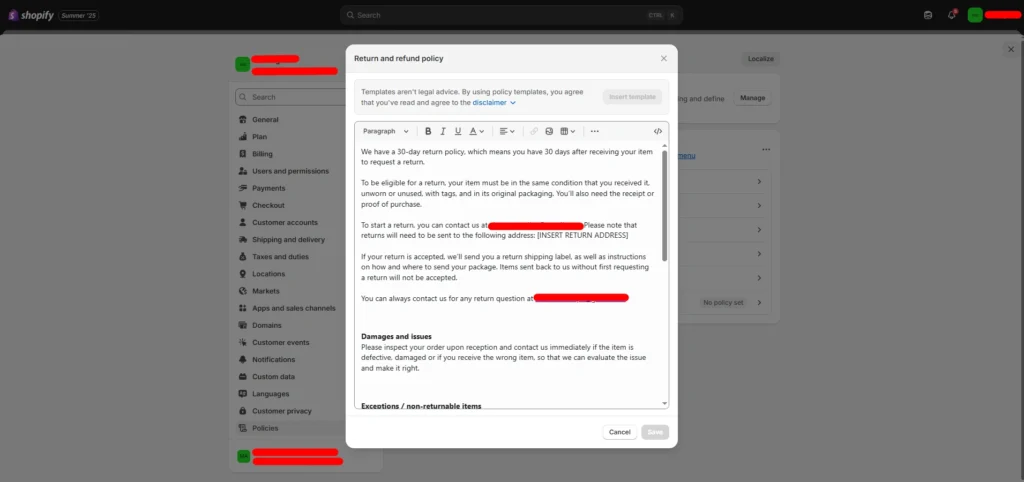
Pro Tip: Add this policy page to your footer menu so customers can find it easily.
Advanced Tips for Shopify Shipping in 2025
Sync Shipping with Inventory Management
Use apps like ShipStation, ShipHero, or Shopify Fulfillment Network to:
- Auto-update inventory
- Route orders to the right warehouse
- Track orders in real-time
This prevents delays and boosts efficiency.
Don’t Fear International Shipping
Many Shopify sellers avoid global shipping—but you’re leaving money on the table.
- Use carrier-calculated rates for accuracy
- Offer flat international shipping for simplicity
Use HS codes and set up customs info properly
Apps like Zonos and Easyship can help automate the international process.
Offer Multiple Shipping Options
Give your customers flexible shipping choices to improve satisfaction and increase conversions. Offering options like standard, expedited, free shipping, and local pickup lets shoppers pick what fits their needs and budget.
Give your customers choices:
| Shipping Method | Delivery Time | Cost to Customer |
| Standard Shipping | 5-7 Days | Free / Flat Rate |
| Expedited Shipping | 2-3 Days | Carrier Rate |
| International | 7-21 Days | Based on region |
Your Shopify Shipping & Fulfillment Checklist
✅Add accurate product weights and sizes
✅ Create custom shipping profiles
✅ Offer at least two shipping methods
✅ Choose the right fulfillment model (Self, 3PL, or POD)
✅ Set up clear return and refund policies
✅ Test shipping rates before going live
✅ Monitor fulfillment performance weekly
FAQ: Common Questions Shopify Sellers Ask Us
Q: Can I offer free shipping and still make a profit?
Yes—just include shipping costs in your product price. Or offer free shipping over a certain cart value (e.g., “Free Shipping over $50”).
Q: Should I use Shopify Shipping or a third-party app?
Shopify Shipping works great for small to mid-size stores. For advanced needs or higher volume, try ShipStation, Easyship, or ShippingEasy.
Q: How do I avoid delayed orders?
- Sync inventory across apps
- Monitor low-stock alerts
- Choose reliable fulfillment partners
Ecomclips Can Help You Build a Shipping Machine
Shipping and fulfillment don’t have to be stressful. At Ecomclips, we help you:
- Set up Shopify shipping settings
- Integrate 3PLs like ShipBob or Amazon
- Automate fulfillment
- Handle returns professionally
- Scale without chaos
If you’re confused, stuck, or just want experts to take over—we’re here.
📩 Reach us anytime at info@ecomclips.com
Conclusion: Build a Shopify Store That Ships Like Clockwork
You can have the best products in the world. But if your shipping is broken?
Customers will leave. Refunds will pile up. Reviews will crash.
The good news? You now know how to fix it.
Set up your shipping profiles right. Choose the best fulfillment model for your business. Create a smart return policy. And if you need help, Ecomclips is just a click away.
Let’s build a Shopify store that ships fast, fulfills perfectly, and grows like crazy in 2025.