
Introduction: The Hidden Impact of Negative Reviews
Did someone just drop a negative review on your Amazon listing and suddenly your sales dipped overnight? You’re not alone. Studies show that a single 1-star review can cause conversion rates to plummet, even if you have dozens of 5-star reviews. The truth is, reviews are one of the most powerful trust signals on Amazon. But here’s the good news: not every negative review has to stay on your listing forever. Some can be removed, and others can be flipped into positive experiences that strengthen your brand. In this blog, we’ll walk you through practical steps to handle negative reviews, Amazon’s rules for removal, and proven strategies to generate more positive reviews.
Amazon’s Review Guidelines: When Can a Review Be Removed?
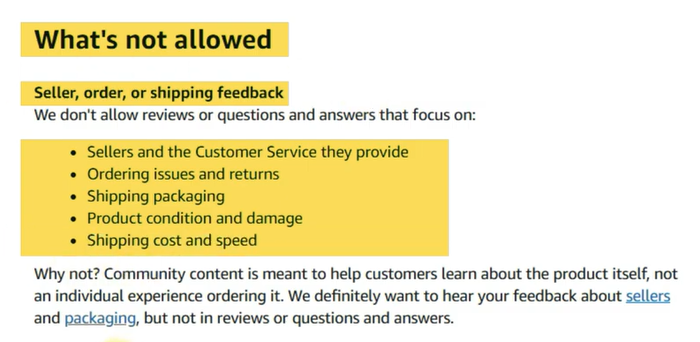
Before you rush to report a bad review, you need to know Amazon’s rules. Amazon only removes reviews that violate community guidelines. That means if someone just didn’t like your product, it stays. But if the review contains prohibited content, you can request its removal. Reviews can’t be about shipping, customer service, returns, pricing, or availability. They must be in supported languages (English and Spanish on Amazon US), and they cannot include spam, private information, profanity, hate speech, sexual content, or external links. By carefully checking these conditions, you can identify which reviews are eligible for removal and file a report directly in Seller Central.
How to Monitor and Report Reviews Effectively
Manually monitoring reviews is one of the most overlooked tasks in Amazon selling. Negative reviews can quickly drag down your average rating, hurt keyword rankings, and discourage buyers from purchasing your products. Since Amazon only removes reviews that break their strict guidelines, sellers must stay vigilant. By consistently monitoring reviews and reporting violations, you can protect your reputation and ensure higher conversion rates.
Steps to Monitor and Report Reviews:
- Access Product Reviews in Seller Central
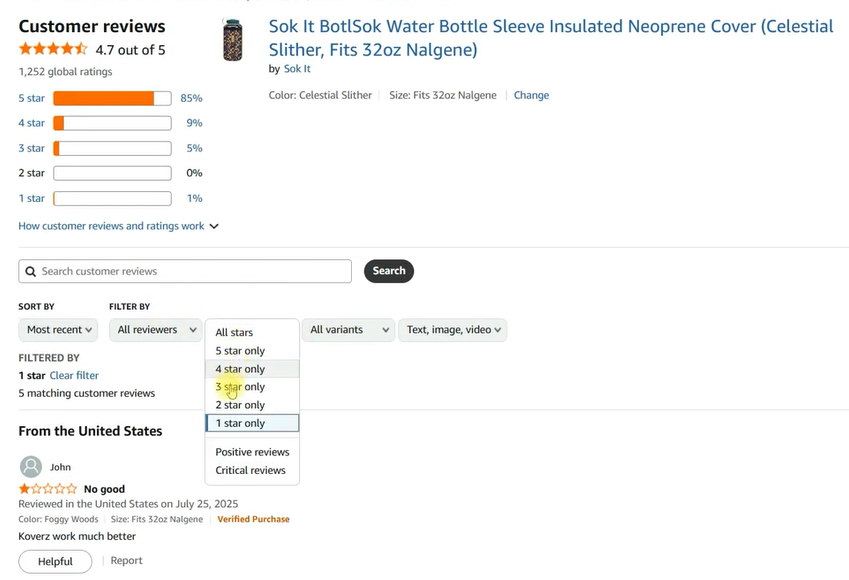
Head over to your Product Reviews section in Seller Central and filter reviews by 1-star, 2-star, and 3-star ratings. These are the reviews most likely to harm your reputation and sales. Regularly checking this section ensures you can spot and address issues before they escalate.
- Identify Guideline Violations
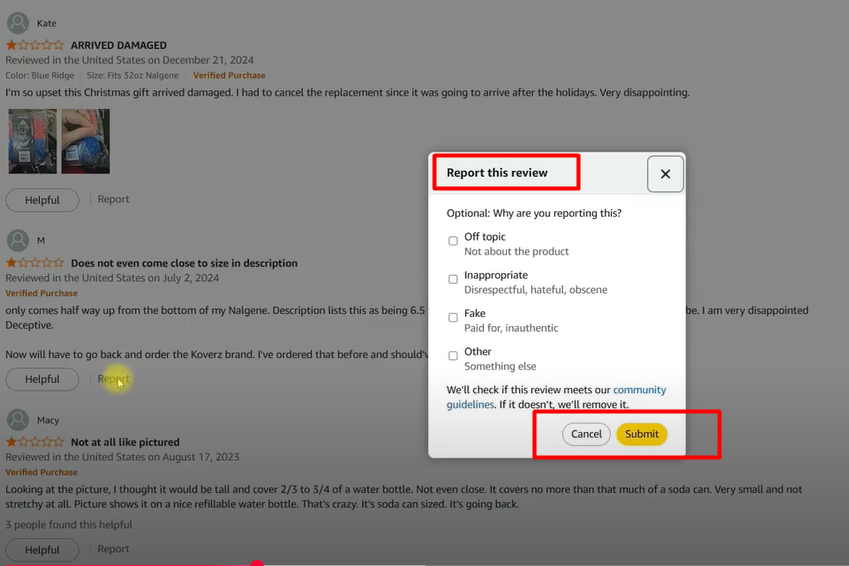
Amazon will not delete reviews just for being negative, but they will remove those that break rules. Look out for mentions of shipping delays, pricing comparisons, customer service issues, profanity, or unsupported languages. These reviews fall outside product feedback and can be flagged for removal. - Report Problem Reviews
If you find a review that violates Amazon’s policies, click the Report option next to the review. Select the most accurate reason for the violation (e.g., spam, external links, or customer service complaints). Amazon’s moderation team will review the case and remove the review if it fits the criteria.
- Use Review Tools for Efficiency
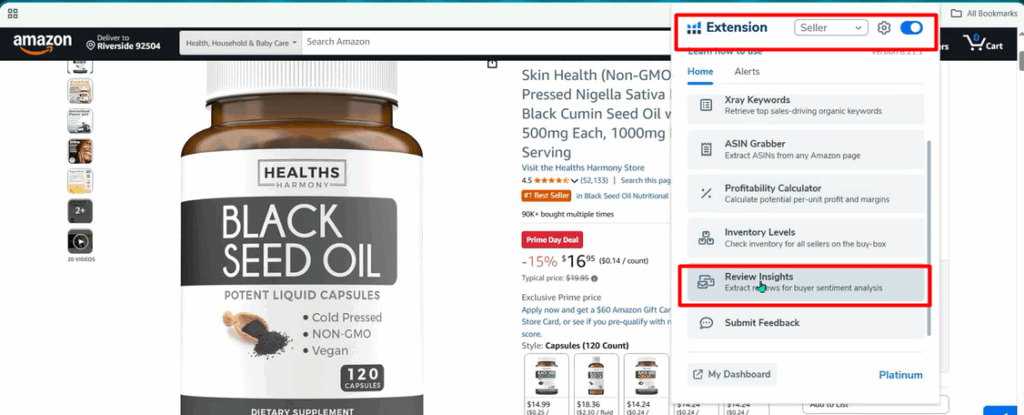
Manually checking reviews can be time-consuming, especially if you manage multiple ASINs. Tools like Helium 10 Review Insights allow you to filter reviews by rating and date range, showing you only the most recent negative ones. This helps you save time and focus on reviews that matter most.
- Make Monitoring a Routine
Reviews impact your brand trust and sales velocity, so consistency is key. If your product gets a high number of reviews, check them daily; otherwise, weekly monitoring may be enough. By making review checks part of your workflow, you’ll quickly catch violations and prevent bad reviews from dragging down your overall score.
Amazon SEO Secrets EXPOSED: How to Rank Higher Without More Reviews!
Thinking About Hiring an Amazon Expert?
Ecomclips’ Partners Achieve an Average 85% Profit Increase!
The Customer Reviews Page: A Game-Changer for Brand Registered Sellers
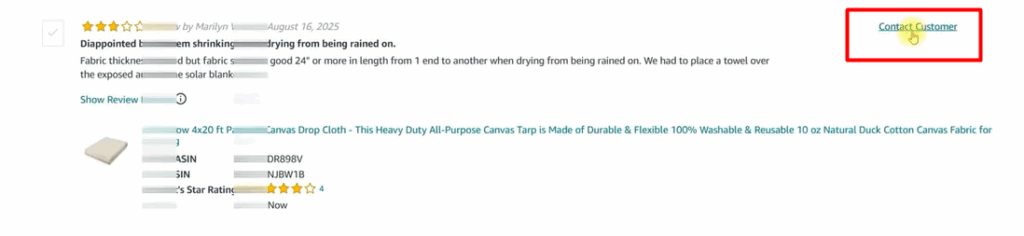
Amazon recently launched the Customer Reviews page under the Brands tab in Seller Central. This feature is a game-changer for brand-registered sellers because it allows you to view all reviews in one place, filter by star rating, and most importantly, reach out to unhappy customers directly. While Amazon prohibits asking for review removal or offering incentives, you can send a polite, personalized message addressing the issue. By showing genuine care and offering solutions like refunds or replacements, many sellers see 10–20% of customers update their reviews from negative to positive. Fast responses are key—reach out quickly to maximize your chances.
How To Remove Negative Reviews On Amazon
Pro Tips for Turning Negative Experiences Into Positive Reviews
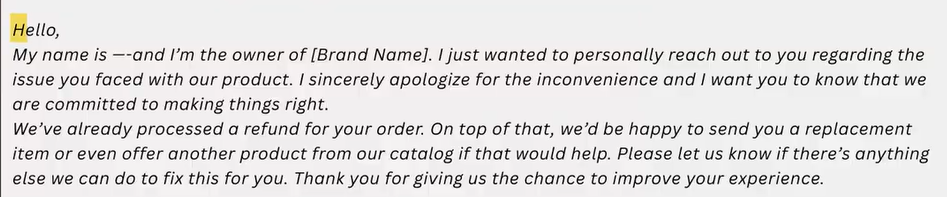
Responding to a bad review isn’t about damage control—it’s about building trust. Instead of sending a generic template, write a personalized message acknowledging the issue. Offer a replacement, refund, or an alternative product to solve their problem. Customers who feel valued often update their review or become repeat buyers. Remember, timing matters—reach out within days of the review being posted. The sooner you act, the higher your chances of converting a dissatisfied customer into a brand advocate.
Don’t Forget Seller Feedback
Many sellers obsess over product reviews but forget that seller feedback also influences their overall account health and Buy Box performance. Buyers can leave feedback about your shipping, service, or overall experience. Just like reviews, seller feedback has rules: Amazon removes feedback containing profanity, private information, or product reviews disguised as seller comments. Regularly check the Feedback Manager in Seller Central and file removal requests when necessary. Maintaining both strong product reviews and seller feedback ensures long-term account health.

How to Proactively Generate More Positive Reviews
The best defense against negative reviews is a steady flow of positive ones. Here’s how:
- Deliver on Your Promise: Ensure your product matches the listing images and description.
- Upgrade Packaging: Branded, protective, and professional packaging creates a premium feel.
- Customer Service: Respond quickly to buyer inquiries and solve issues politely.
- Use Amazon’s “Request a Review” Feature: This is 100% compliant and boosts review volume.
- Follow Up Professionally: Send polite buyer-seller messages without asking for reviews directly.
- Enroll in Vine: For brand-registered sellers, Vine can generate early, authentic reviews.
When you combine these strategies, you create a system where positive reviews naturally outnumber negative ones.
FAQs: Handling Negative Reviews on Amazon
Q1. Can I ask a customer to delete or change their review?
No, Amazon strictly prohibits sellers from asking customers to delete, edit, or change reviews in exchange for incentives. This includes offering refunds, replacements, or discounts in return for altering feedback. The only exception is when you respond to a customer through the Customer Reviews tool in Seller Central, where you may offer a refund or replacement as goodwill. However, you cannot request review modification in that message. Violating this rule can put your account at risk of suspension.
Q2. How long does it take for Amazon to remove a reported review?
When you report a review that violates Amazon’s guidelines, the typical response time is 24–48 hours, but it may take up to a week depending on the complexity of the case. Amazon’s moderation team carefully examines the reported content before deciding. If approved, the review will be removed from your listing, and you will receive a confirmation. If rejected, you may resubmit with clearer reasoning or additional evidence.
Q3. What should I do if a competitor leaves fake reviews?
Fake or malicious reviews from competitors are unfortunately common. If you suspect a competitor has left such feedback, report it immediately under Amazon’s Community Guidelines. Provide any supporting evidence you have, such as screenshots, suspicious patterns (multiple negative reviews in a short time), or connections to competitor ASINs. While Amazon doesn’t guarantee removal without proof, they do take review manipulation very seriously, and reporting increases your chances of getting them deleted.
Q4. How many positive reviews do I need to offset one negative review?
Amazon has updated its review calculation system and no longer relies on a simple star average. This means that one 1-star review can weigh more heavily than before, requiring multiple 5-star reviews to rebalance your rating. While the exact algorithm is undisclosed, sellers often need at least 5–10 fresh positive reviews to counter the effect of a single negative one. This is why consistently encouraging organic reviews is crucial for long-term success.
Q5. Is the Vine program worth it?
Yes, Amazon’s Vine program can be very valuable, especially for new product launches. It allows trusted Amazon reviewers (Vine Voices) to test your product and leave authentic feedback. While there is a fee for enrollment, Vine reviews carry credibility, boost early sales, and establish trust quickly. For sellers who are brand registered and want to build momentum, the Vine program is one of the safest and most effective ways to gather legitimate reviews at the start.
Conclusion: Turn Reviews Into a Growth Strategy
Negative reviews may feel like a setback, but with the right strategy, they can actually strengthen your business. By monitoring reviews consistently, requesting guideline-based removals, responding with empathy, and generating a steady flow of positive feedback, you’ll build a resilient brand on Amazon. Remember, reviews aren’t just ratings, they’re insights into how your customers experience your brand. The faster you respond and the more proactive you are, the stronger your reputation will be.
At Ecomclips, we’ve helped thousands of Amazon sellers manage reviews, optimize listings, and scale profitably. Whether it’s handling reviews, boosting sales, or building a brand customers trust, we’ve got your back. Reach out at info@ecomclips.com for a free consultation today.
Ready to Start Growing Your Brand?
Ecomclips’ Partners Achieve an Average 85% Profit Increase!