
Every year, Prime Day sees a huge surge in orders, and most sellers fail to deliver on time, leading to customer dissatisfaction. Even experienced sellers face late shipments, overwhelmed carriers, and frustrated buyers leaving negative reviews.
The truth is, delays happen. What separates sellers who survive from those who suffer is how quickly and strategically they respond.
In this guide, we’ll show you why delays occur, what actions you can take immediately, and how to protect your account and your reputation, so that Prime Day can be a boost – not a headache.
Table of Contents:
- Understanding Prime Day Delivery Delays
- Why Do Prime Day Delivery Delays Happen?
- How Prime Day Delivery Delays Can Wreck Your Seller Account
- The Psychology of Angry Customers — Why Reviews Turn Negative
- What Sellers Should Do When Prime Day Delivery Delays Happen
- For FBM Sellers — How to Keep Orders Moving During Peak Chaos
- For FBA Sellers — How to Manage Delays You Can’t Control
- How to Manage Prime Day Delivery Delays the Smart Way
- How to Prevent Amazon Shipping Delays in the Future
- Win Back Customer Trust After a Prime Day Delay
- Conclusion — Turn Prime Day Pressure into Long-Term Loyalty
Understanding Prime Day Delivery Delays
Prime Day isn’t just another sales event; it’s a logistical marathon. Even the most prepared sellers can run into bottlenecks.
During these peak days, FBA centers and shipping carriers handle millions of orders, which can overwhelm systems, slow processing, and delay deliveries. FBM sellers also face challenges like stock shortages, courier limitations, or sudden spikes in demand.
The key takeaway: delays aren’t always your fault. Understanding where the hold-up comes from, whether FBA processing, carrier issues, or your own inventory, is the first step to fixing the problem and protecting your account.
The Real Reason Prime Day Delays Happen
Prime Day brings a massive surge of orders, and even the most prepared sellers can experience delays. Several hidden factors contribute to this, including FBA warehouses becoming overwhelmed, shipping carriers handling too many packages simultaneously, and fulfillment centers struggling to keep up under the pressure of millions of orders. Data shows that delivery-related negative feedback increases by 32% during Prime events, highlighting the importance of timely shipments.
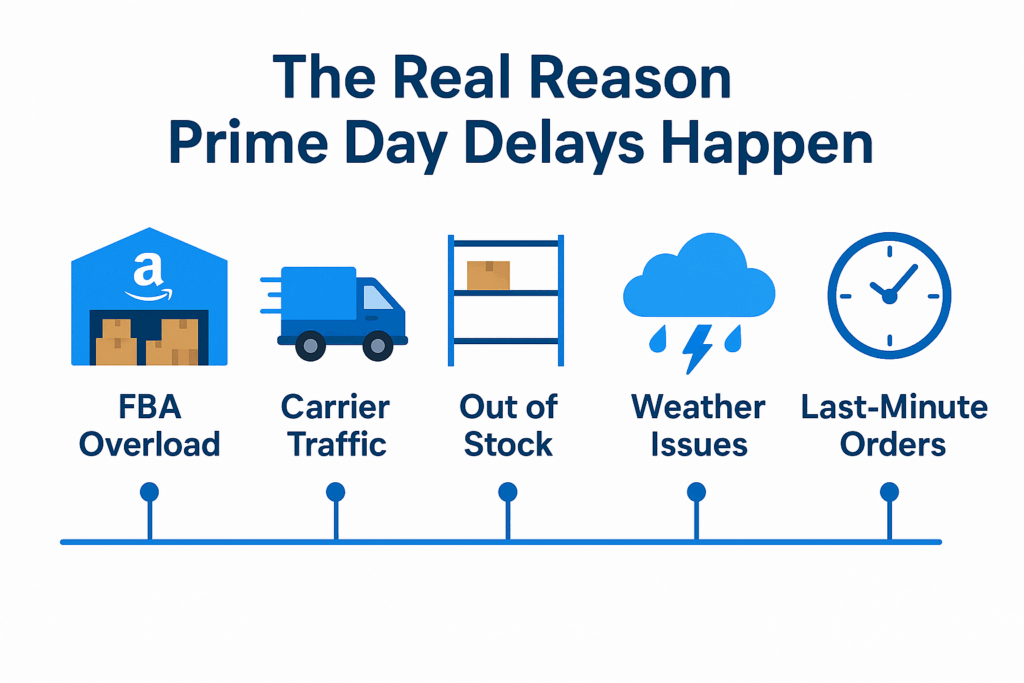
Here’s a list of factors behind Amazon Prime Day delivery delays:
- Busy FBA Warehouses: Fulfillment centers get overloaded with the sudden surge of orders.
- Shipping Delays: Delivery services can slow down while handling a huge volume of packages.
- Out of Stock: Running out of stock or mismanaged inventory can cause shipping delays.
- Last-Minute Order: Customers placing orders in the final hours can strain fulfillment capacity.
- Packing Mistakes: Even small mistakes in labeling or packaging can slow down shipments.
- Weather & External Disruptions: Unpredictable factors like storms or transportation strikes impact delivery times.
- FBM Challenges: Sellers who handle their own shipping face more risk of delays than FBA sellers.
- Technical Glitches – System errors or listing mistakes can slow down order processing and shipping.
How Prime Day Delivery Delays Can Wreck Your Seller Account
Delays in deliveries don’t just upset buyers—they can seriously harm your seller account by lowering your metrics, damaging your ratings, and putting your account health at risk. Knowing how these delays impact your account helps you take action before small issues turn into major problems.
- Late Shipment Rate Impact: Delayed orders increase your late shipment rate, a key performance metric monitored by Amazon.
- Buy Box Eligibility: Falling behind on deliveries can hurt your chances of winning the Buy Box, reducing sales opportunities.
- Account Health Risk: Late shipments can trigger policy warnings and put your account at risk of suspension or restrictions.
- Customer Feedback: Delays lead to negative reviews and lower seller ratings; sellers see up to 28% more negative feedback during Prime events.
- Order Cancellations and Refunds: Customers may cancel or request refunds, further affecting your account metrics and revenue.
- Snowball Effect: One missed promise can escalate into multiple issues, making it harder to maintain a healthy, high-performing account.
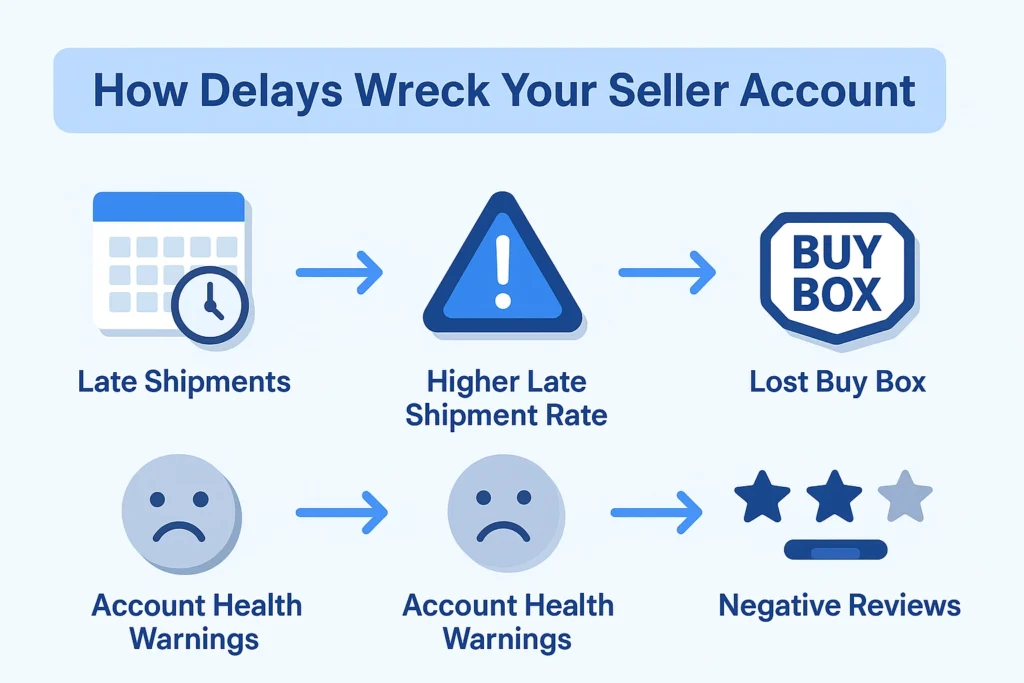
Every missed delivery promise hurts more than a single order; it damages buyer trust, ranking potential, and your overall account reputation.
Thinking About Hiring an Amazon Expert?
Ecomclips’ Partners Achieve an Average 85% Profit Increase!
The Psychology of Angry Customers — Why Reviews Turn Negative
Customers don’t always respond to delays rationally—they react emotionally. Even a small delivery hiccup can feel like a broken promise, turning trust into frustration and resulting in negative reviews. Once that trust is shaken, buyers are quick to leave poor feedback, even if the issue was temporary or beyond your control.
- Feeling of Broken Trust: Customers feel let down when delivery promises aren’t met, making them question the seller’s reliability.
- Impatience and Frustration: Waiting longer than expected triggers emotional responses, often leading to harsher feedback.
- Blaming the Seller: Even if delays are out of your control, buyers often hold the seller responsible.
- Fear of Missing Out: Late deliveries during high-demand events like Prime Day make customers anxious about missing deals or gifts.
- Perception of Neglect: Customers interpret a lack of proactive communication or updates as poor service, which often prompts negative reviews.
When deliveries get delayed, most customers don’t think about logistics, carrier overload, or Prime Day chaos; they think, “Why didn’t my order arrive on time?”
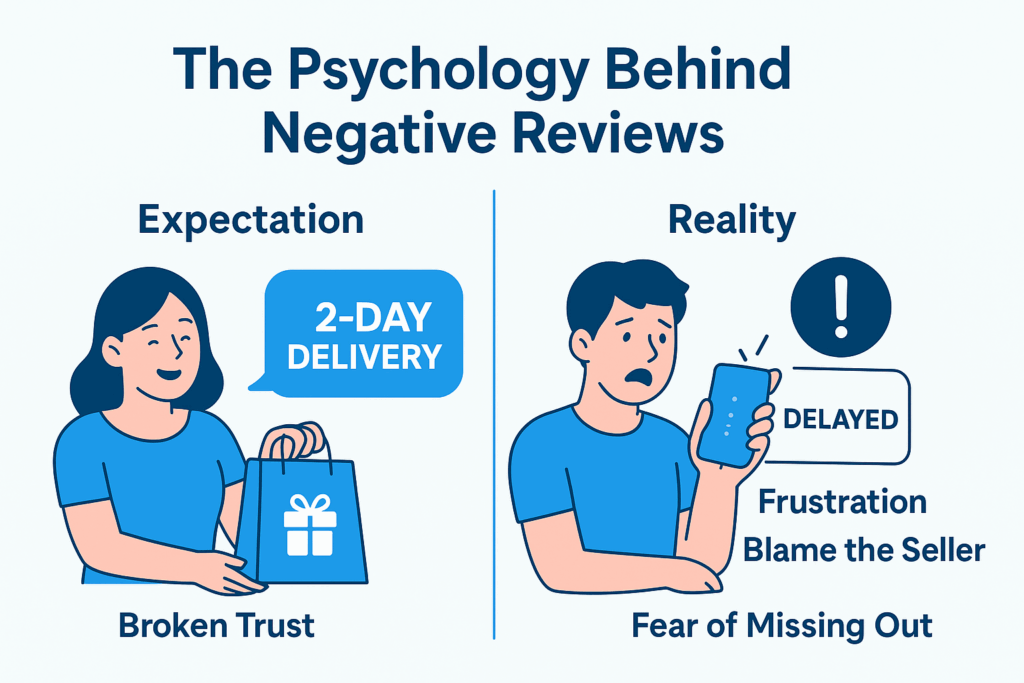
That emotional reaction is what often turns a small delay into a negative review.
On Amazon, customers buy with expectation and urgency. They trust delivery promises. So when that trust breaks, frustration takes over — even if the delay wasn’t your fault.
Here’s what typically happens:
- Expectation gap: The customer was promised 2-day delivery, but sees “Delayed” in tracking.
- Emotional response: Disappointment quickly turns into anger or blame.
- Public reaction: They leave a 1-star review to “warn others,” even before the item arrives.
Pro Tip: Transparency calms emotion. A quick, honest message explaining the situation — with an updated delivery date — can prevent many negative reviews before they happen.
Remember: customers don’t expect perfection; they expect communication. The more you show care, the less they’ll punish you for what’s out of your control.
What Sellers Should Do When Prime Day Delivery Delays Happen
Even the most prepared sellers can face delivery hiccups during Prime Day. Acting quickly can protect your metrics, prevent negative reviews, and keep buyers happy. Here’s an immediate action plan:
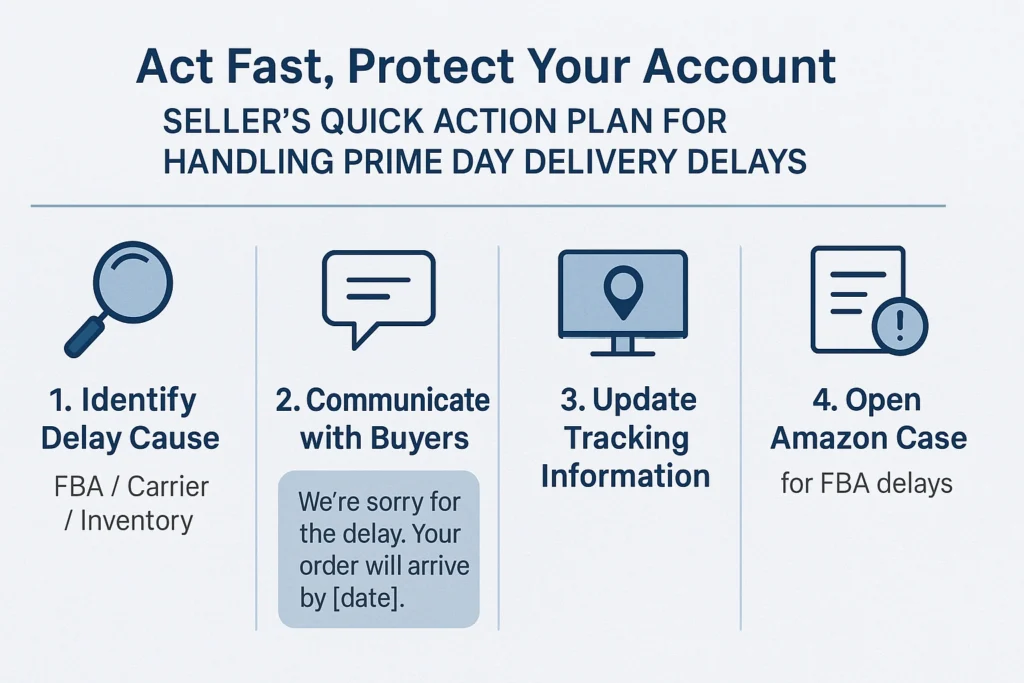
When delays hit, it’s easy to panic — but what you do in the next few hours can make all the difference. A calm, proactive response can protect both your seller metrics and your customer trust.
Here’s your quick action plan:
- Identify the cause of the delay: Check whether it’s an FBA backlog, carrier issue, or inventory restock delay. Knowing the source helps you respond correctly.
- Communicate early with customers: Don’t wait for them to reach out first. Send a short, polite message explaining the delay and providing a new estimated delivery date.
Example:
“Hi [Customer Name], we’re experiencing a short delay due to Prime Day shipping volume. Your order is on the way and will arrive by [new date]. Thank you for your patience!”
- Keep tracking updated: Make sure tracking numbers are valid and reflect real-time status. Amazon monitors this closely, and inaccurate tracking can trigger late shipment flags.
- Open a case with Amazon (for FBA sellers): If the delay is caused by Amazon’s fulfillment center, open a case immediately. Amazon may take responsibility — and even remove related negative feedback if it’s their fault.
- Stay professional in all communication: Even if customers get frustrated, respond calmly and show empathy. Tone matters more than you think; it can turn a 1-star review into a thank-you message.
Don’t overpromise. It’s better to give an honest delivery estimate than risk missing another date.
For FBM Sellers — How to Keep Orders Moving During Peak Chaos
Handling your own fulfillment during Prime Day can get hectic, but staying organized helps prevent delays and negative reviews. Here’s how FBM sellers can keep orders on track:
- Prioritize Express Couriers: For regions experiencing delays, use faster shipping options to ensure timely delivery.
- Sync Order Tracking with Your Carrier: Keep your tracking information up-to-date so both you and your customers can monitor shipments in real time.
- Avoid False Shipment Confirmations: Only mark orders as shipped when the package is actually on its way to prevent penalties and frustrated buyers.
- Upgrade Shipping Method: If possible, switch to a faster shipping service (e.g., from standard to expedited or overnight) to reduce delivery time. For FBM, contact your carrier directly to upgrade shipping for urgent orders.
- Monitor Orders Regularly: Go to Orders → Manage Orders and sort by pending or unshipped to prioritize urgent shipments.
- Set Notifications for Delays: Use software or Amazon alerts to get notifications if packages are delayed or undelivered.
Set a cutoff time for same-day shipping. It’s better to fulfill slightly fewer orders correctly than rush and risk penalties for late shipments
For FBA Sellers — How to Manage Delays You Can’t Control
Even with Fulfillment by Amazon, delays can happen due to warehouse bottlenecks or shipping issues outside your control. Here’s how FBA sellers can handle these situations effectively:
- Report Fulfillment Slowdowns: If you notice delays at Amazon fulfillment centers, open a case with Seller Support to notify them and get guidance.
- Request Feedback Removal: If negative reviews result from Amazon-caused delays, you can request removal through Seller Central. Documentation and timestamps are essential.
Pro Tip: “Amazon will often remove negative feedback if it’s FBA’s fault, but only if you provide clear proof.” Keep all communication and tracking records to support your case.
How to Manage Prime Day Delivery Delays the Smart Way
Handling Prime Day delivery delays isn’t just about reacting quickly, it’s about managing the situation strategically to protect your performance and customer trust. Smart sellers know how to turn stressful situations into chances to strengthen their brand image.
Combine proactive communication with real-time monitoring
Don’t wait for complaints to pile up. Use your Account Health Dashboard and Brand Dashboard to spot early signs of negative feedback or delivery issues. The sooner you act, the easier it is to calm frustrated customers before they leave reviews.
Keep customers informed
A simple, polite message like:
“Your order is on its way, but due to high Prime Day traffic, it may arrive slightly later than expected. We appreciate your patience!”
— can turn potential anger into understanding.
Respond publicly and professionally
When negative reviews appear, don’t panic — respond with empathy. A short, sincere reply shows other buyers that you’re responsible and attentive. Many customers care less about the delay itself and more about how you handle it.
Track performance metrics during the recovery period
Watch your Late Shipment Rate, On-Time Delivery Rate, and Order Defect Rate closely. These metrics influence your Buy Box eligibility and account standing.
Turn customer feedback into insight
Use this data to improve next time — whether it’s adjusting restock timing, diversifying carriers, or improving communication templates.
The smartest sellers treat post-Prime Day recovery like a campaign, they monitor, adjust, and communicate until performance returns to normal. Every proactive message today prevents a potential 1-star review tomorrow.
How to Prevent Amazon Shipping Delays in the Future
Preventing delays before they happen is the best way to protect your metrics and customer trust. By planning, you can navigate high-traffic events like Prime Day without last-minute chaos:
- Early Inventory Planning: Forecast and stock your products 4–6 weeks ahead to avoid running out during peak sales.
- Hybrid Fulfillment: Use both FBA and FBM to ensure orders keep moving even if one fulfillment method faces issues.
- Redundant Carriers & Warehouses: Work with multiple shipping partners and store inventory in different locations to prevent bottlenecks.
- Set Realistic Handling Times: Avoid over-promising by setting shipping times you can reliably meet.
- Monitor Inventory Levels Daily: Track stock to prevent overselling and last-minute shortages.
- Use Predictive Tools & Analytics: Tools like SoStocked or Forecastly can forecast demand spikes and flag potential delays.
- Prepare Backup Shipping Options: Keep a list of alternative couriers for regions prone to delays.
Pro Tip: “Preventive logistics is your best brand insurance.” Planning ahead protects both your account health and customer satisfaction.
Win Back Customer Trust After a Prime Day Delay
Even with the best preparation, delays can happen. How you handle the situation after the delivery is just as important as preventing it. Rebuilding trust quickly can turn frustrated buyers into loyal customers:
- Offer Goodwill Gestures: Send small compensations like discounts, coupons, partial refunds, or personalized thank-you notes to show you value the customer.
- Post-Delivery Follow-Ups: Check in after the order arrives to confirm satisfaction and address any lingering issues.
- Apologize Transparently: A sincere apology acknowledging the delay goes a long way in calming frustrated buyers.
- Resolve Complaints Promptly: Respond quickly to messages or negative feedback to demonstrate accountability.
- Highlight Improvements: Inform customers about steps you’ve taken to prevent future delays.
- Encourage Honest Feedback: Invite customers to share their experience and show you’re listening to improve service.
A delay handled with empathy can become a loyalty moment. When customers see that you care enough to make things right, they remember your brand for the right reasons, not the late delivery.
Delays can occur on major sales days, such as Amazon Prime Day, but how you handle them defines your brand. However, knowing how to manage Prime Day logistics is a key factor in protecting your business and safeguarding your seller account.
By planning inventory, tracking shipments in real-time, communicating proactively with buyers, and addressing delays promptly, you can minimize negative feedback, maintain a healthy account, and keep your buyers satisfied. Every thoughtful message, follow-up, and goodwill gesture strengthens your brand and turns a challenging Prime Day into an opportunity for long-term loyalty.
FAQs — Managing Prime Day Delivery Delays
Q. Why do Prime Day delivery delays happen even with FBA?
Prime Day causes a surge in orders that can overwhelm fulfillment centers, carriers, and warehouses. Even small bottlenecks or system lags can delay shipments. Planning inventory 4–6 weeks in advance helps minimize risk.
Q. Can late shipments hurt my Amazon seller account?
Yes. Late deliveries impact your Late Shipment Rate, Buy Box eligibility, Account Health, and customer feedback. One missed promise can escalate into policy warnings or poor ratings.
Q. How should I communicate with buyers if an order is delayed?
Notify customers as soon as you anticipate a delay using Amazon-approved templates. Be transparent, update tracking, and offer compensation if appropriate (e.g., coupons or shipping upgrades) to maintain trust.
Q. What can FBA sellers do if delays are out of their control?
Report fulfillment slowdowns to Amazon, update tracking, and request feedback removal for delays caused by FBA. Document every step as proof to protect your metrics and reviews.
Q. How do I prevent Prime Day delays in future years?
Forecast inventory 4–6 weeks ahead, use hybrid fulfillment strategies (FBA + FBM), and build redundancy with multiple carriers or warehouses. Preventive logistics is the key to avoiding last-minute chaos.
How Ecomclips Helps You Succeed On Prime Day
At Ecomclips, we help sellers handle the high-pressure moments of Amazon sales events, including Prime Day, turning potential chaos into growth opportunities. Our team ensures your products stay visible, your orders stay on track, and your account metrics remain healthy.
- Account & Inventory Management: We manage your listings, variations, and inventory across marketplaces, keeping everything accurate and up-to-date so you avoid delays or mismanaged orders.
- Marketplace-Specific Optimization: From Amazon SEO and A+ content to Walmart listing best practices, we optimize titles, bullet points, images, and backend keywords to match each platform’s algorithm and shopper behavior, boosting conversions even during peak sales events.
- Advertising & Promotions: Our experts handle Sponsored Products, Sponsored Brands, Walmart Ads, coupons, and deals to drive traffic and maximize ROI, all while ensuring your ads and campaigns align with your delivery and fulfillment capacity.
- Performance Monitoring & Analytics: We track order performance, delivery metrics, sales trends, and competitor activity, providing actionable insights to prevent delays, reduce negative feedback, and protect your account health.
With Ecomclips, sellers can focus on growing their business while we manage the logistics, optimization, and proactive strategies needed to survive and thrive during high-traffic events like Prime Day.
Contact us today at info@ecomclips.com or book an appointment with our e-commerce experts to start selling smarter on both marketplaces.
Watch how we guide sellers to protect their accounts during Prime Day:
One Bad Amazon Review Can Change Everything! Delete Negative Reviews in 2025
Fix Bad Amazon Reviews Without Breaking the Rules
Amazon Prime Day 2024 – Maximize Sales with Exclusive Discounts and Coupons
Prime Exclusive Discount Setup 2023 | Amazon Prime Day to Boost Your Amazon FBA Business
Amazon Is Spying on You (and Prime Day’s Almost Here) | Ecomclips Insights – 06/25
Ecomclips: Your Complete eCommerce Solution Under One Umbrella
At Ecomclips, we bring every eCommerce service you need under one roof — strategy, operations, design, marketing, and growth, all seamlessly connected to help your brand thrive across every marketplace.
Since 2012, we’ve been helping businesses of all sizes launch, scale, and dominate online. From Amazon, Walmart, eBay, and Etsy to Shopify and WooCommerce, our team of marketplace experts, designers, developers, and marketers works together to deliver measurable results.
Our services span the full eCommerce lifecycle:
- Account Setup & Product Listing Management: We handle registrations, compliance, and product data optimization across all marketplaces.
- Amazon Optimization Service: From keyword-rich titles and A+ content to PPC campaigns and storefront design, we craft listings that convert.
- Creative Design & Content Production: A+ visuals, infographics, brand stores, and product videos built to boost engagement.
- Advertising & PPC Management: Smart, data-driven ad strategies for Amazon, Walmart, and Google that maximize ROI.
- Web Development & Store Design: Shopify, WooCommerce, and Magento websites built for performance and conversion.
- Data Management & Automation: Streamlined product feeds, catalog syncing, and inventory control for effortless scalability.
- Customer Service & Order Fulfillment: End-to-end support that enhances customer satisfaction and builds long-term loyalty.
- Analytics & Growth Strategy: Real-time insights and ongoing optimization to ensure consistent, profitable growth.
Whether you’re launching a new store or managing multiple global marketplaces, Ecomclips acts as your single strategic partner, simplifying complexity and driving sustainable revenue growth.
Ready to Start Growing Your Brand?
Ecomclips’ Partners Achieve an Average 85% Profit Increase!