
Jewelry SEO is the work of making a jewelry store easy for Google, and now for AI search tools, to find, understand and trust, so shoppers searching for rings, necklaces or gifts land on your pages. This guide explains it from A to Z, the way you would explain it in a video walkthrough. For each of the eight steps you will see what the step is, which keywords to use and where, why it works and how it is done on a real store. It is written for jewelry brand owners and marketers, so no technical background is needed. By the end you will understand how SEO for jewelry websites works, what good work looks like at every stage and how to judge it. Each step also points to deeper guides for the details.
How to Use This Guide
SEO is a chain, and every link has to hold. A beautiful collection page cannot rank if Google cannot index it. A perfectly indexed page will not sell if the product photos load slowly and look blurry. A fast, well-written page still struggles if nobody trusts the store. That is why this guide moves in a fixed order, and why each step builds on the one before it.
| Step | What you do | The question it answers |
|---|---|---|
| 1. Keyword research | Find the exact searches your customers make and give each page one of them | What are people typing, and which page should answer it? |
| 2. Collection pages | Turn category pages into the pages that rank for broad searches | How do shoppers browse? |
| 3. Product pages | Make every product page clear, unique and trustworthy | What makes a shopper click Add to cart? |
| 4. Images | Help Google understand your photos and keep pages fast | How is jewelry found visually? |
| 5. Content and blog | Answer research-stage questions and build topic depth | How do we reach shoppers before they are ready to buy? |
| 6. Technical SEO | Make sure Google can crawl, index and load everything | Can Google actually reach and read our pages? |
| 7. Link building | Earn mentions from trusted websites | Why should Google trust us over a bigger store? |
| 8. AI citations | Become a source that AI tools quote | How do we appear in AI answers? |
You do not need to finish one step perfectly before you touch the next. If time is limited, work in this order, and fix any serious technical problem the moment you find it, because technical faults quietly hold back everything else.
Key Terms in Plain English
SEO has its own vocabulary. Here are the words you will meet in this guide, explained simply. You can come back to this table whenever a term feels unfamiliar.
| Term | What it means |
|---|---|
| SEO (search engine optimization) | Improving a website so it appears higher in search results for the right searches |
| Search results page | The page Google shows after someone searches |
| Keyword | A word or phrase someone types into a search box |
| Search intent | The reason behind a search: to learn, compare, buy or find a brand |
| Crawling and indexing | Google finding your pages, then storing them in its library so they can be shown |
| Ranking | The position your page takes in the results |
| Organic traffic | Visitors who arrive from unpaid search results |
| Collection page | A category page that lists products, such as Chains or Earrings |
| Title tag and meta description | The headline and the short summary shown for your page in search results |
| Alt text | A short written description of an image, used by screen readers and search engines |
| Internal link | A link from one page of your site to another page of your site |
| Backlink | A link to your site from another website |
| Anchor text | The clickable words of a link |
| Canonical tag | A line of code that tells Google which address is the official one for a page |
| Structured data (schema) | Extra code that labels facts on a page, such as price and availability, so machines can read them |
| Core Web Vitals | Three measurements of page speed, responsiveness and visual stability |
| Google Search Console | Google’s free tool that shows how your site performs in search |
| AI citation | A link to your page inside an AI-written answer |
How Search Engines Decide What to Show
Before the steps, it helps to understand what you are working with. When someone searches for gold hoop earrings, Google does not scan the whole internet live. It consults a huge stored library of pages, called the index, and picks the pages most likely to satisfy that person. Three jobs happen behind the scenes.
Job 1: Crawling. Google runs programs, called crawlers or Googlebot, that follow links from page to page and fetch what they find. If a page has no links pointing to it and is not in your sitemap, the crawler may never see it.
Job 2: Indexing. After fetching a page, Google reads it, works out what it is about and decides whether it deserves a place in the library. Pages can be left out if they are duplicates, very thin or low in quality.
Job 3: Ranking. When someone searches, Google sorts the indexed pages that could answer the query. It weighs hundreds of signals, but they fall into three groups that are easy to remember.
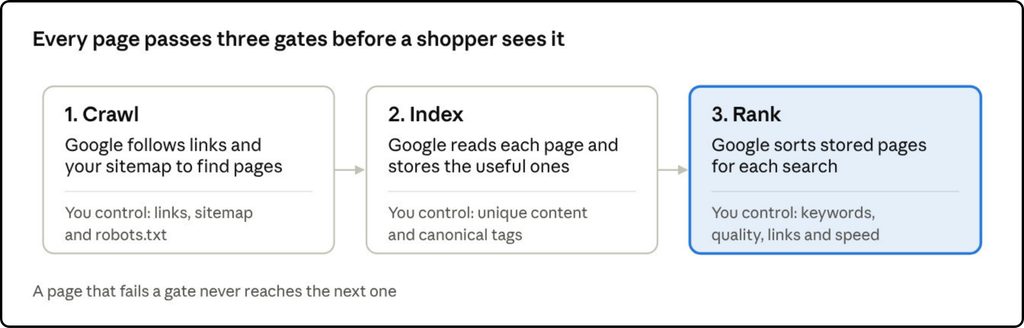
Think of the three jobs as gates: a page that fails one never reaches the next.
| Group | The question Google is asking | What you control |
|---|---|---|
| Relevance | Does this page match what the searcher wants? | Keywords, content, page type, headings, images |
| Quality and trust | Can this page and this site be trusted? | Original content, expertise, reviews, policies, links from other sites |
| Experience | Is the page easy and pleasant to use? | Speed, mobile layout, stable design, clear navigation |
Think of Google as a very well-read shop assistant. A customer asks for a gold necklace for their mum. The assistant points to the shelf that matches best (relevance), recommends the brand with a good reputation (trust) and avoids sending the customer to a shop that is slow, confusing or half closed (experience). Every step in this guide improves at least one of those three groups.
Two more points will save you confusion later.
First, ranking happens per page, not per website. Google does not rank your jewelry store as a whole. It ranks your gold necklaces collection page for one search and your care guide for another. That is why we give every page exactly one job.
Second, nobody can guarantee a position. Results change, competitors improve and Google updates its systems. What you can do is remove obstacles and give each page the strongest possible case. Every recommendation here improves your odds; none of them buys a ranking.
Our Example Store: A Typical Online Jewelry Shop
To keep every step practical, this guide follows one imaginary store from start to finish. It is not a real business. It is a typical online jewelry shop, built from features that most stores share, so you can watch each idea applied in a realistic setting. We will simply call it the example store.
| Feature | The example store |
|---|---|
| Focus | 14k gold jewelry for men and women, plus a small sterling silver range |
| Platform | Shopify |
| Catalog | About 300 products |
| Main menu | Chains, Pendants & Necklaces, Earrings, Bracelets, Silver, Blog |
| Themed collections | Crosses, Zodiac, Tree of Life, Love |
| Best sellers | Cuban link chains and cross pendants |
| Promises | Free shipping and a 30-day return window |
| Current situation | Good products and photos, a small blog, plenty of visits from social media and very few from Google |
At the end of each step you will find a section called The example store in practice, where we apply the step to this shop, often with a simple before-and-after comparison. Watching one store improve step by step makes it much easier to see how the pieces fit together.
Why Jewelry SEO Is Different
General ecommerce advice works for jewelry, but four features of the category change how you apply it. If you understand the reason behind each one, you will make better decisions than any checklist can give you.
1. Customers spend more and need more proof. Someone buying a phone case decides in a minute. Someone buying a gold chain or an engagement ring may spend days comparing stores. They check metal purity, read reviews, look for hallmarks or certificates and try to judge whether the store is real. For purchases where real money is at stake, search engines tend to favor sites that show clear signs of trustworthiness. In practice, your About page, policies, contact details, author names and reviews are not extras. They are ranking and conversion material, and we return to them in Steps 3, 5 and 7.
2. People shop with their eyes. A jewelry search often begins with a picture: a Pinterest board, an Instagram post or a photo uploaded to Google Lens. People also browse Google Images to find styles. Unlike a store that sells bolts or batteries, your photos are a traffic source as well as a sales tool. Step 4 covers how to make them work for you.
3. Demand follows the calendar. Searches for gifts surge before Valentine’s Day, Mother’s Day, Black Friday and the holidays, and engagement and wedding searches have their own seasons. Google needs time to find, index and trust new content, so a page published the week before a holiday often misses the peak. The practical lesson is to plan seasonal pages two to three months ahead. Step 5 shows how.
4. Catalogs are full of look-alikes. One ring can come in five metals, ten sizes and three stones, and a store may carry dozens of similar rings. Left alone, these create near-duplicate pages that compete with one another and leave Google unsure which one to rank. Good jewelry ecommerce SEO gives every page a distinct job and handles variants with care. Steps 1, 3 and 6 show how.
Keep these four in mind. When a later recommendation feels fussy, one of them is usually the reason.
Step 1: Do Keyword Research for Each Page Type
Keyword research answers one question: what words do your customers actually type, and which page of your store should answer each one? Do it badly and you will write pages nobody searches for. Do it well and every page you build has an audience waiting for it.
Step 1 at a glance
| Item | Detail |
|---|---|
| Goal | Know exactly which searches to target, and which page of the store owns each one |
| Keyword types used | Short-tail and mid-tail for collections, long-tail for products and blog posts |
| Where the keywords go | A mapping sheet first, then titles, headings, URLs, text, image labels and link text |
| Tools | Semrush or Ahrefs, Google Search Console, the Google results page |
| Typical effort | One to two days for a first map, then a quarterly review |
What a keyword really is
A keyword is any word or phrase someone types, or says, into a search box. “Gold necklaces” is a keyword. So is “how to clean gold jewelry at home”. Keywords are not magic words you sprinkle over a page. They are a window into what the person wants, and your job is to read that window correctly and build the page that fits.
Short-tail, mid-tail and long-tail keywords
Keywords come in three rough sizes, and understanding them unlocks the rest of this step.
| Type | Typical length | Jewelry example | What the searcher wants | Competition |
|---|---|---|---|---|
| Short-tail (head) | 1 to 2 words | gold necklaces, diamond rings | To browse the whole category | Very high |
| Mid-tail | 2 to 3 words | women’s gold necklaces, lab-grown diamond rings | To browse a narrower slice | High to medium |
| Long-tail | 4 or more words | 14k gold paperclip chain necklace 18 inch | To find or buy something very specific | Lower |
Length is only a guide. What really separates the three is how specific the intent is. “Gold necklaces” could mean a chain for a man, a pendant for a baby or a bridal set. “14k gold paperclip chain necklace 18 inch” leaves no doubt.
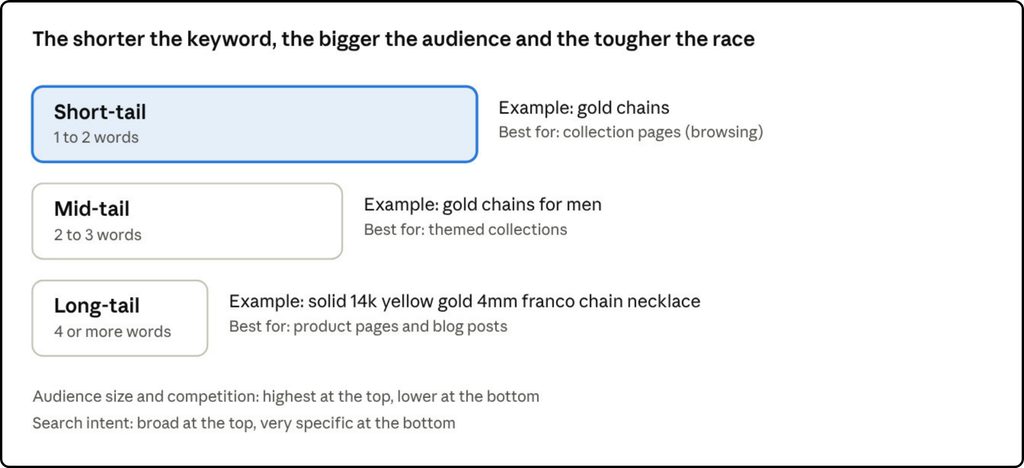
Collection pages aim at the top two rows, while products and posts own the bottom row.
Why we use short-tail keywords for collection pages
This is the part many guides skip, so here is the full reasoning.
- Short-tail searches match how people browse. Someone who types “gold necklaces” has not chosen a style yet. They want to see options. A collection page, which shows many products with filters, is exactly the right answer. A single product page would be too narrow, and a blog post would not let them shop.
- Google already shows collection pages for these searches. Search “gold necklaces” and the first page is mostly category pages from stores. That is Google telling you which format it believes people want. Matching the format makes ranking possible, and mismatching it makes ranking close to impossible.
- One broad page can serve many related searches. Google does not rank a page for a single keyword only. A strong “gold necklaces” page can also appear for “women’s gold necklaces”, “gold chain necklaces” and dozens of similar phrases, because they mean roughly the same thing. One clear short-tail target gives you a single strong page instead of ten weak ones.
- The traffic potential is large. Short-tail terms usually have the highest search volume in the category, so even a modest position can send meaningful numbers of shoppers who are already in a buying mood.
- It keeps the site organized. One short-tail keyword per collection gives your site a clean structure: gold necklaces, gold earrings, gold rings. That structure is easy for shoppers to navigate and easy for Google to understand.
Why short-tail keywords take time, and what to do about it
Short-tail keywords are also the hardest to win, because every large retailer wants them. A new store should not expect to reach the top for “diamond rings” within weeks. That does not make the strategy wrong. It changes how you pursue it:
- Start with the narrower mid-tail version of each collection (for example “lab-grown diamond rings” before “diamond rings”) and widen the target as your site grows.
- Support each collection with guides and blog posts that link to it, which builds topic depth (Step 5).
- Earn links and mentions from trusted sites (Step 7).
- Keep the collection page better than the ones that rank today: clearer, more helpful and faster.
Why we use long-tail keywords for product pages and blog posts
Long-tail keywords work the opposite way, for equally logical reasons.
- Product pages need specific intent. Someone searching “emerald-cut sapphire ring white gold” is close to buying. A product page that matches those details can win that sale. If you used the broad collection keyword on every product, hundreds of pages would compete for the same phrase.
- Blog posts answer questions, not browsing needs. Phrases like “how to clean gold jewelry” or “14k vs 18k gold” are long-tail by nature, and they signal a person who is learning or deciding.
- Competition is lower and intent is clearer, so smaller sites can win here earlier. Many long-tail searches also convert well because the visitor already knows what they want.
The best strategy uses all three sizes, each on the page type that suits it.
Search intent: the idea behind every keyword
Intent is the reason behind a search. Four types matter for jewelry.
| Intent | What the person wants | Jewelry example | Best page |
|---|---|---|---|
| Informational | To learn | how to clean gold jewelry | Blog post or guide |
| Commercial investigation | To compare before buying | hollow vs solid gold chain, 14k vs 18k gold | Comparison guide or collection page |
| Transactional | To buy | 14k gold cuban link chain, gold cross pendant | Collection or product page |
| Navigational | To find a specific brand or site | a brand name plus chains | Homepage or the matching collection |
The simplest test is to search the keyword yourself and look at the first page. If it shows store category pages, build a collection page. If it shows articles, write an article. If it shows individual products, use a product page. The results page tells you what Google believes the intent is.
How to find jewelry SEO keywords, step by step
Here is the process, shown with a tool such as Semrush and with the example store. Ahrefs and similar tools work in much the same way.
- Write a seed list. Start with what you sell: necklaces, earrings, rings, bracelets, gold, silver, diamond. Add materials, stones, styles and occasions.
- Enter each seed in the keyword tool. In Semrush this is the Keyword Magic Tool. It returns thousands of related phrases.
- Read the key columns. Volume estimates monthly searches. Keyword difficulty estimates how hard a phrase is to rank for. Intent labels the likely reason for the search. These numbers are estimates, so use them to compare keywords with each other rather than to predict exact traffic.
- Filter. Narrow the list to a volume and difficulty range that suits your site’s current strength, and use the intent filter to separate shopping phrases from learning phrases.
- Check the real results. For each promising keyword, open Google and look at who ranks and what type of page they use. This is the most important step, and the one beginners skip.
- Study competitors. Enter two or three competitor domains and see which keywords bring them traffic that you are missing.
- Mine your own data. In Google Search Console, find queries that already show your site, especially those where you sit on page two. They are the cheapest wins you will find.
- Collect questions. Gather People Also Ask questions and customer questions for your blog and FAQ content.
Keyword mapping: one keyword, one page
Once you have a list, assign each keyword to exactly one page in a simple sheet. This is called keyword mapping, and it prevents the most common self-inflicted problem in ecommerce: two of your own pages fighting for the same search.
| Keyword | Type | Intent | Page | Page type |
|---|---|---|---|---|
| gold chains | Short-tail | Browse | /collections/chains | Collection |
| gold cross pendants | Mid-tail | Browse | /collections/cross-pendants | Collection |
| zodiac necklaces | Mid-tail | Browse | /collections/zodiac-necklaces | Collection |
| solid 14k yellow gold 4mm franco chain necklace | Long-tail | Buy | One product page | Product |
| hollow vs solid gold chains | Long-tail | Compare | A new blog post (proposed) | Blog post |
Notice how each page type owns a different kind of phrase: the broad phrase belongs to a collection, the very specific one to a single product and the comparison to a blog post. The addresses are examples, and the blog post is a proposed one.
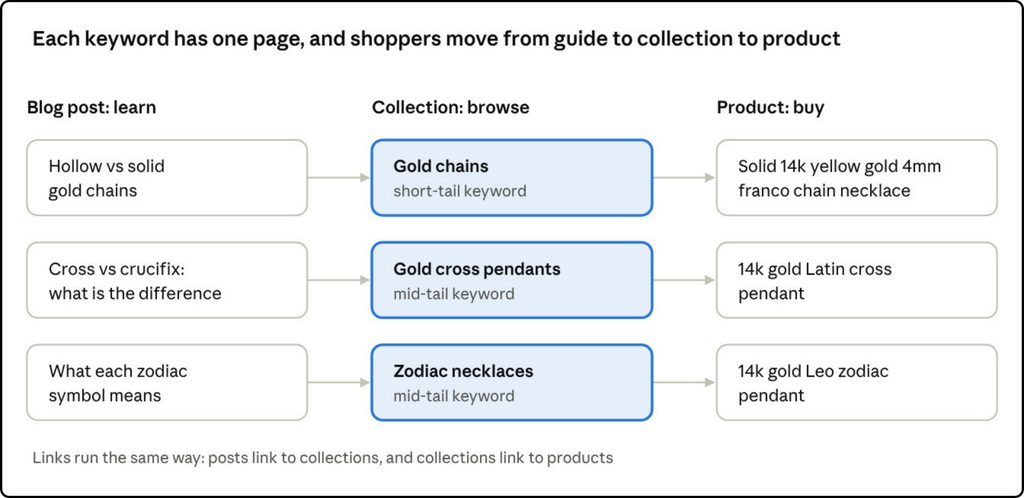
Read each row from left to right: a shopper learns from the post, browses the collection and buys from the product.
Where each keyword goes: a placement guide
Finding the right keyword is half the job. The other half is placing it in the right spots, once and naturally. The table below follows three keywords through three page types, so you can see exactly where each one appears. The addresses are examples.
| Where | Collection page: “gold chains” | Product page: “solid 14k yellow gold 4mm franco chain necklace” | Blog post: “hollow vs solid gold chains” |
|---|---|---|---|
| Title tag | 14k Gold Chains | Cuban, Franco & Rope | Your Brand | Solid 14k Yellow Gold 4mm Franco Chain Necklace | Your Brand | Hollow vs Solid Gold Chains: Which Is Worth It? |
| URL | /collections/chains | /products/solid-14k-yellow-gold-4mm-franco-chain-necklace | /blogs/blog/hollow-vs-solid-gold-chains |
| H1 heading | 14k Gold Chain Necklaces | Solid 14k Yellow Gold 4mm Franco Chain Necklace | Hollow vs Solid Gold Chains: What Is the Difference? |
| First 100 words | The keyword once, in a short intro that describes the range | Material, width and style in the opening lines | The direct answer to the question, with the keyword in the first sentence |
| Subheadings | Related phrases, such as Cuban link chains and how to choose chain width | None needed; use a spec list instead | Questions such as What is a hollow chain? and Which lasts longer? |
| Body text | Variations and related terms, such as gold necklace chains and chain length | Details buyers ask about: weight, clasp, finish and care | Examples, a comparison table and links to related guides |
| Image file name and alt text | A description of the photo, such as “Solid 14k yellow gold Cuban link chain necklace, front view” | The same pattern for every photo of the product | A short description of any chart or photo |
| Links pointing to the page | From the homepage, menu and guides, using “14k gold chains” or a close phrase | From the collection grid and from guides | From the chains collection and related posts |
Why this works. Every one of these places is a clue about what the page is for. A title, a heading, an address and an opening paragraph that all point to the same topic make Google confident about the page, and they tell a shopper at a glance that they are in the right place. When the clues disagree, for example a title about chains on a page that talks about pendants, Google has to guess.
Three rules keep it natural.
- Put the primary keyword in the four key spots: the title tag, the H1, the URL and the first 100 words. These are the places Google and shoppers look first.
- Let variations and related phrases carry the rest. Google understands that “gold chains”, “gold chain necklaces” and “14k chains” are close in meaning, so you do not need to repeat the exact words. Use the variations in subheadings and body text where they fit.
- Read it aloud. If a sentence sounds odd because a keyword was pushed in, rewrite it. Repeating a keyword unnaturally, known as keyword stuffing, makes a page worse for people and does not help it rank. There is no magic number of times to use a keyword. Clear, helpful writing that covers the topic is the goal.
The example store in practice
Let’s put Step 1 to work on the example store. We start by opening its main menu, because a menu is a keyword map in disguise. Each main item, such as Chains, Pendants & Necklaces, Earrings and Bracelets, is a natural short-tail target. The themed collections, such as Crosses, Zodiac and Tree of Life, are mid-tail targets, because people search for them by meaning and tradition, for example cross pendants or zodiac necklaces. The product catalog then gives us the long-tail layer: a product title like “Solid 14k Yellow Gold 3mm Franco Chain Necklace” already contains the purity, metal, width and style that buyers type.
Here is what we do next, in order:
- Open the keyword tool and research each collection’s main keyword and its close variations. Record them in the mapping sheet.
- Search each keyword in Google and look at the first page. If store category pages appear, a collection page is the right tool.
- List the questions the catalog raises but the site does not yet answer, such as the difference between a cross and a crucifix, or between a hollow and a solid gold chain. Each question becomes a blog post in the sheet.
After this one working session, the store has a clear plan for about forty pages, and no two of them chase the same keyword.
Deeper guides:
- Collection Page Keyword Research for Jewelry Websites
- Product Page Keyword Research for Jewelry Websites
- Blog Keyword Research for Jewelry Websites: Finding Topics That Rank
Step 2: Optimize Your Jewelry Collection Pages
Collection pages are usually the most valuable SEO pages on a jewelry store. They match the searches people make before they have chosen a product, and one good ranking can send a steady stream of shoppers into a page that shows forty products at once.
Step 2 at a glance
| Item | Detail |
|---|---|
| Goal | Turn category pages into pages that rank for broad searches and move shoppers on to products |
| Keywords used | One short-tail or mid-tail primary keyword per collection, plus a few close variations |
| Where they go | Title tag, H1, URL, intro text, bottom text and internal link text |
| Tools | Google Search Console, a keyword tool, a site crawler |
| Typical effort | Two to three hours per collection, starting with the highest-revenue ones |
Why collection pages work
A collection page has two audiences with two different needs. Shoppers need a grid of photos, prices and filters so they can browse quickly. Google needs words, because it is a system that reads text. A bare grid of product names and prices tells Google very little about what the page is for. A few paragraphs of helpful, honest text tell it exactly which search the page should answer, and they also help shoppers who are unsure what to choose.
Most stores build the grid and stop. The stores that add useful text, clean titles and good internal links give Google much more to work with, which is why this step often produces the fastest visible gains.
Anatomy of a strong collection page
Here is the page from top to bottom, with the reason behind each element.
| Element | What to do | Why it matters |
|---|---|---|
| Title tag | Put the main keyword near the front, in about 60 characters | It is the clickable headline in search results and a strong relevance signal |
| Meta description | Write about 150 to 160 characters with a real benefit | It does not change rankings directly, but it influences whether people click |
| URL | Keep it short and readable, such as /collections/gold-hoop-earrings | Clear URLs are easy to understand and easy to share |
| H1 heading | Use one H1 that matches the keyword in natural words | It confirms the topic for visitors and for Google |
| Short intro (above the grid) | 50 to 100 words that explain what the collection is | It confirms relevance without pushing products down the screen |
| Filters and sorting | Offer filters for metal, stone, price and style | They help shoppers, but they can also create duplicate URLs (see Step 6) |
| Product grid | Use clear product names and consistent images | This is where visitors turn into buyers |
| Bottom content | 200 to 400 words of guidance for choosing | It adds depth, answers questions and supports related keywords |
| Internal links | Link to related collections and guides | It helps Google discover pages and helps shoppers keep exploring |
| FAQ | Add four to eight real questions | It answers doubts at the moment of decision |
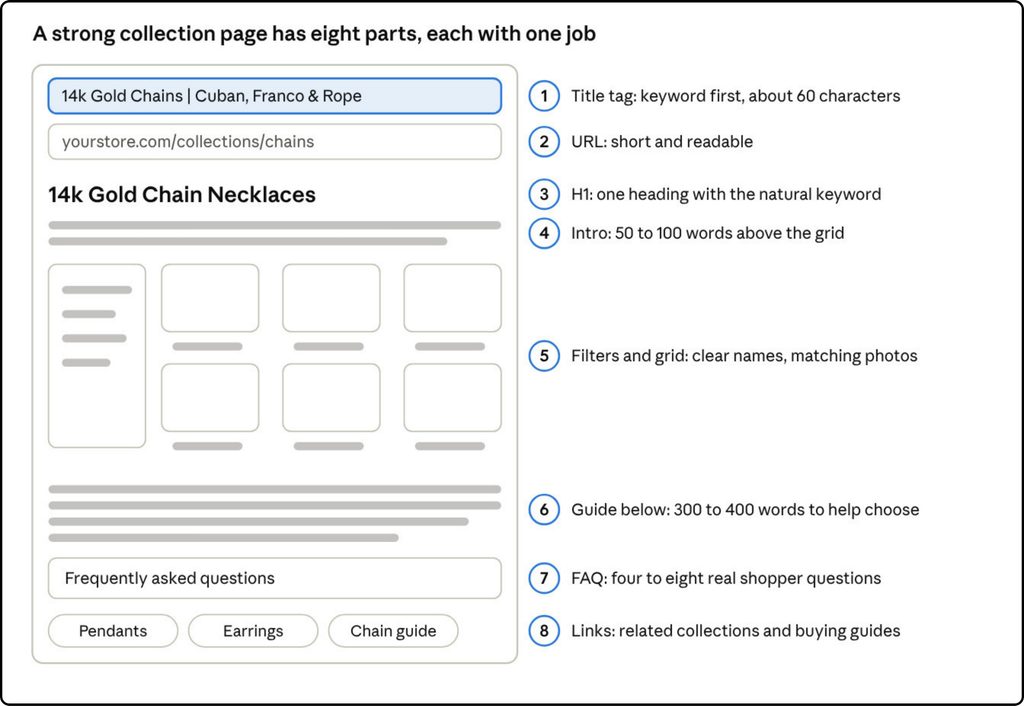
The numbers on the page match the rows of the table above.
How to write the intro above the grid
Keep it short, because shoppers came to see products. Say what the collection contains, name one or two useful details and mention a real benefit. For example:
Shop 14k gold chain necklaces in Cuban, Franco, rope, mariner, paperclip and more, with sterling silver options too. Widths run from a delicate 1 mm to a bold 6.5 mm, so you can choose a fine chain for a pendant or a heavier link to wear on its own. Every order ships free and comes with a 30-day money back return window.
That paragraph uses the keyword once, naturally, and it tells a shopper something useful. Notice what it avoids: it does not repeat the keyword in every sentence, and it does not say “high quality” without proof.
How to write the content below the grid
The text under the grid is where you show expertise. Think about what a good salesperson would tell a customer standing at the counter. For a hoop earrings collection, a useful outline would be:
- What the collection includes and who it suits
- How to choose the size (diameter) and thickness
- Closure types, such as huggie, latch-back and hinged
- A short note on 14k versus 18k gold, with a link to your full comparison guide
- Care tips
- Links to related collections, such as gold studs and gold chain bracelets
Write for a person first. If a paragraph exists only to repeat the keyword, delete it.
Titles and meta descriptions
A simple formula works well for titles: main keyword + a short benefit or differentiator + brand. For example: “14k Gold Chains | Cuban, Franco & Rope | Your Brand”, which comes to about 51 characters. For descriptions, write one sentence that says what the visitor will find and one that gives a reason to click, such as free shipping, hallmarked gold or an easy return window.
Why these lengths? Search results show a limited width, so text beyond about 60 characters in a title or about 160 in a description is often cut off. Google may also rewrite either one if it thinks another phrase fits the search better. A clear draft simply gives it a strong starting point. Every collection needs its own title and description, because identical ones on many pages make them hard to tell apart.
URLs: short, clear and stable
A URL like /collections/gold-hoop-earrings is easy to read and tells Google what the page is about. Long strings of filters and IDs do neither. Choose the URL once. If you change it later, search engines must relearn the page, and you will need a 301 redirect from the old address to avoid losing what you have earned.
Internal linking: how Google finds and ranks your pages
Google finds pages by following links, and it treats pages that receive many links from within your site as more important. That makes internal links one of the most powerful tools you fully control.
- Link your top collections from the homepage and main menu, because those are the most visited and most trusted pages on your site.
- Link related collections to each other. A diamond rings page should point to engagement rings, and an engagement rings page should point to wedding bands.
- Use descriptive anchor text. The words of a link tell Google what the target page is about, so “gold hoop earrings” is better than “click here”.
- Keep the structure shallow. Any product should be reachable within three clicks of the homepage, for example Homepage, then Earrings, then Gold Hoop Earrings, then the product.
- Link from guides to collections. When a blog post helps someone choose hoops, it should send them to the hoops collection.
A note on filters
Filters help shoppers narrow a long list, but each filter combination can generate its own web address. Most of those pages should stay out of Google’s index, while a few that match real searches, such as “emerald rings”, deserve to become proper collection pages. Step 6 explains how to tell the difference and how to set it up.
The example store in practice
Now let’s open the Chains collection page of the example store. Picture a typical page: a slogan-style title, a one-word heading and a grid of products that runs across 25 pages, with no text at all. Here is what we change, and why.
| Element | Before | After |
|---|---|---|
| Title tag | “Upgrade Your Look with Our Chains & Necklaces” | “14k Gold Chains | Cuban, Franco & Rope | Your Brand” |
| Meta description | “Explore our collection of pendants, earrings, chains and bracelets. Shop today!” | “Shop 14k gold chains in Cuban, Franco, rope and mariner styles, from 1 mm to 6.5 mm. Free shipping and 30-day returns.” |
| H1 heading | “Chains” | “14k Gold Chain Necklaces” |
| Text on the page | None | A 60 to 80-word intro above the grid and a 300 to 400-word buying guide below it |
| Internal links | Only the main menu | Links to related collections and to the chain buying guide |
Why do these changes matter? The old title opens with a slogan, so Google has to guess what the page is for, while the new one says it in the first words. The old description could belong to any page on the site, while the new one names the chain types and widths and gives two reasons to click. The one-word heading tells a shopper almost nothing, and the new text gives both the shopper and Google something real to read.
None of this needs a redesign. A keyword-led title, a sharper description and about 400 words of helpful text can be added in a few hours, and the same pattern can then be repeated for earrings, bracelets and the themed collections. The store’s promises, free shipping and the 30-day return window, belong in that text too, because they answer doubts that shoppers have while they browse.
Deeper guides:
- How to Optimize Jewelry Collection Pages to Rank and Convert
- Jewelry Collection Page Content: What to Write and Where to Put It
- Collection Page Title Tags and Meta Descriptions, Page URL for Jewelry Stores
- Internal Linking and Category Structure for Jewelry Collection Pages
Step 3: Optimize Your Jewelry Product Pages
If collection pages catch shoppers who are browsing, product pages catch shoppers who are nearly ready to buy. They also pick up the long-tail searches that collection pages are too broad to answer. A product page has one job: give a careful buyer every answer they need to say yes.
Step 3 at a glance
| Item | Detail |
|---|---|
| Goal | Give a nearly-ready buyer every answer they need, and match specific long-tail searches |
| Keywords used | One long-tail phrase per product: material, width or size, style and product type |
| Where they go | Product title, URL, opening lines of the description, image alt text and Product structured data |
| Tools | Google’s Rich Results Test, Search Console, the product data sheet |
| Typical effort | 20 to 30 minutes per product page for a thorough rewrite |
Why product pages work
Nobody can touch a ring or feel the weight of a chain online. The page has to replace that experience with information, and it has to do it for two audiences at once. The shopper wants to know what it is made of, how big it is, how it looks on a real person and what happens if it does not fit. Google wants the same facts, stated clearly, so it can match the page to specific searches. Fortunately, both audiences want the same thing: clear, specific and honest information. Writing for the shopper is, in most cases, writing for Google.
Anatomy of a strong product page
| Element | What to do | Why it matters |
|---|---|---|
| Product title | Include material, product type, a distinguishing detail and size | Specific titles match specific searches |
| URL | Short and descriptive | Easy to understand and stable over time |
| Photos | Several angles, scale shots and on-model images | Shoppers judge jewelry visually (see Step 4) |
| Price and availability | Clear and current | Buyers and Google both rely on them |
| Description | A short opening, then a spec list | It answers questions and supports long-tail keywords |
| Size guide and care | Link to a chart and give care advice | It reduces returns and doubt |
| Shipping and returns | State them plainly on the page | A high-value purchase needs reassurance |
| Reviews | Show real customer reviews and photos | Social proof builds trust |
| Structured data | Add Product markup | It helps Google read price, stock and ratings |
Product titles that match real searches
A strong title follows a simple pattern: material + product type + a distinguishing detail + size or variant. “14k Gold Paperclip Chain Necklace, 18 inch” tells a shopper and Google exactly what the item is. “Elegant Necklace” tells them nothing, and it will never match a search such as “14k gold paperclip chain necklace”.
Writing product descriptions that do the work
Most stores either leave the supplier’s text or write a few vague lines. Both leave sales and rankings on the table. Compare the two versions below. (The numbers are only an example.)
| Weak | Strong |
|---|---|
| Beautiful paperclip necklace. Perfect for every occasion. High quality and elegant. A must-have for your jewelry box. | This 14k solid gold paperclip chain necklace is 18 inches long with a 2 mm link width, so it sits just below the collarbone and layers easily with a pendant. It has a lobster-claw clasp and weighs about 3.2 grams. Solid 14k gold does not tarnish or flake like plated jewelry, so it suits daily wear. Clean it with mild soap and warm water. It arrives in a gift box with a hallmark certificate. |
The strong version answers the buyer’s questions in order: size, look, fit, material, durability, care and what arrives. It also contains the phrases people search for, without forcing them.
A few rules make this repeatable:
- Put the most important facts in the first two lines, because many shoppers read nothing else.
- Follow the short paragraph with a spec list covering metal, purity, stone, dimensions, weight and closure.
- Never rely on supplier text alone. The same words appear on many other stores, so Google has little reason to prefer yours.
- Write for the shopper’s doubts. If customers often ask about sizing, put the sizing answer on the page.
Variants: one product or many pages?
A ring that comes in ten sizes and three metals should usually be one product page with options, not thirty pages. Separate pages for every variant create near-duplicates that split ranking strength and confuse Google. Create a separate product only when the design genuinely differs, for example a different stone cut or setting. Step 6 explains how canonical tags support this.
Structured data: labels for search engines
Structured data is extra code on the page that labels facts in a way machines can read without guessing. Product markup labels the name, image, price, currency, availability, brand and, when you have genuine reviews, the rating. Because Google can read those labels directly, it can show richer results in search, such as price and availability, and it becomes more confident about what the page sells.
A minimal example looks like this:
{
“@context”: “https://schema.org”,
“@type”: “Product”,
“name”: “Solid 14k Yellow Gold 3mm Franco Chain Necklace, 20 inch”,
“image”: “https://example.com/images/franco-chain-necklace.jpg”,
“description”: “Solid 14k yellow gold 3mm Franco chain necklace, 20 inches, with a lobster claw clasp.”,
“brand”: { “@type”: “Brand”, “name”: “Example Jewelry Co.” },
“offers”: {
“@type”: “Offer”,
“priceCurrency”: “USD”,
“price”: “389.00”,
“availability”: “https://schema.org/InStock”
}
}
The price and image address above are illustrative. A real page must use its own current price, availability and image.
Most Shopify themes and WordPress SEO plugins produce markup like this automatically. Your job is to check it, not to write it from scratch. Test a few product pages in Google’s Rich Results Test, and make sure the price and availability in the code match what the shopper sees. Markup that disagrees with the page can lose eligibility for rich results.
Trust: the quiet conversion factor
For a high-value purchase, a shopper decides partly on whether the store feels real. Show genuine reviews and customer photos, state your return window, shipping time and warranty on the page, mention hallmarks or certificates for gold and diamonds, and make contact details easy to find. These signals support both conversions and the trust group of ranking signals from earlier.
What to do when a product sells out
Do not delete the page the moment stock runs out. If the item will return, keep the page live and offer a back-in-stock notice. If it is gone for good, redirect the address to the closest replacement or the parent collection. Step 6 covers the details.
The example store in practice
Next we open a product page of the example store and ask the same question we asked about the collection page: does this page answer a careful buyer, and does it match a specific search?
We begin with the title. Suppose the store’s chains are titled simply “Franco Chain” or “Gold Chain Necklace”. Changing them to the pattern from earlier gives “Solid 14k Yellow Gold 3mm Franco Chain Necklace, 20 inch”. That one title tells a shopper the purity, metal, width, style and length, and it matches the long-tail phrases people actually type. Then we rewrite the description in the order a buyer asks questions: what it is, how big it is, how it looks, what it is made of, how to care for it and what arrives in the box.
A catalog like this also runs into two situations worth planning for:
- Look-alike products. The same chain style often exists in several widths, such as 2.5, 3, 3.5 and 4 mm, each listed as its own product. Every page then needs a clear job. Either combine the widths as options on one product page, or make each page distinct with width-specific details, such as how it looks on the neck, which pendants it carries and what it weighs, and give each page its own target phrase.
- Reviews at product level. Suppose the store has collected hundreds of reviews overall, but its product pages show none. Placing reviews on each product page adds trust at the exact moment shoppers decide, and it gives Product markup genuine ratings to describe.
We do the work in stages. Sort the catalog by revenue, rewrite the top 20 best sellers first, and add 20 more each month.
Deeper guides:
- How to Write SEO-Friendly Jewelry Product Descriptions
- Product Schema for Jewelry: How to Get Rich Results
- Jewelry Product Titles, URLs and Variants: Optimization Guide
Step 4: Optimize Images for Google Search and Google Lens
Images sell jewelry, and they also bring traffic. People find rings and earrings through Google Images and Google Lens, and a photo is often the first thing a shopper judges. Image SEO has three jobs: help search engines understand each photo, keep pages fast even with large, detailed pictures, and keep the photos good enough to sell.
Step 4 at a glance
| Item | Detail |
|---|---|
| Goal | Make photos understandable to Google, fast to load and good enough to sell |
| Keywords used | The product’s own words (material, style, product type) in file names and alt text, never stuffed |
| Where they go | File name, alt text, nearby caption or text, and structured data |
| Tools | An image compression tool, PageSpeed Insights, Google Lens for testing |
| Typical effort | A few minutes per product once a routine exists |
Why image SEO works
Google has become good at recognizing what is in a picture, but it still relies heavily on text clues around the image to be sure. Those clues include the file name, the alt text, the words on the page near the photo, any caption and the structured data that describes the product. When those clues agree with each other and with what the picture shows, Google can confidently match your photo to a search such as “rose gold solitaire engagement ring”.
Google Lens works a little differently. A shopper points a camera at a ring or uploads a screenshot, and Lens looks for visually similar products. Sharp photos from several angles, taken on clean backgrounds, give it more to match.
There is also a speed reason. Images are usually the heaviest files on a jewelry page. If they are oversized, the page loads slowly, which hurts the experience group of ranking signals and also loses sales. So good image work helps visibility and conversion together.
Step by step: how to optimize jewelry images
1. Plan the photo set. For every product, aim for a clean shot on a plain background, a close-up of the detail (stone, clasp, engraving), a lifestyle or on-model image that shows scale and, where it helps, a short video. Consistent backgrounds and lighting make your collection grid look professional.
2. Name the file before uploading. Rename IMG_4821.jpg to something descriptive such as rose-gold-solitaire-engagement-ring.jpg. Use lowercase words separated by hyphens. This is one of the easiest signals to provide, and it takes seconds if you do it as part of your upload routine.
3. Write alt text. Alt text is a short written description of the image. It helps people who use screen readers, it shows when an image fails to load and it gives search engines a reliable clue. Describe what is visible, mention the product type once and keep it under roughly 125 characters.
| Image | Weak alt text | Strong alt text |
|---|---|---|
| Main product photo | ring | Rose gold solitaire engagement ring with a 1 carat round diamond |
| Detail photo | best cheap gold ring buy now sale ring gold | Close-up of the six-prong setting on a rose gold solitaire ring |
| On-model photo | image of necklace | Woman wearing an 18 inch gold paperclip chain necklace |
| Decorative divider | beautiful jewelry background | (leave the alt text empty) |
The weak examples show the usual errors: too vague, stuffed with keywords or filled with filler words such as “image of”. Decorative images that add no information should have empty alt text, so screen readers skip them.
4. Choose the right size and format. Export each image at the largest size it will actually be displayed, plus a larger version for high-density screens, not at the full size from your camera. Use modern formats, WebP or AVIF, which are much smaller than JPEG at similar quality. Start compression around a medium-high quality level and compare the result at full zoom, because jewelry buyers examine sparkle and fine detail. If the sparkle looks dull, raise the quality a little.
5. Load images wisely. Lazy loading delays images that are off screen until the shopper scrolls near them, which speeds up the first view. Use it for images lower on the page, but never for the main product photo or hero banner, because those need to appear first. Always set a width and height, so the layout does not jump while images load.
6. Help Google find the images. Place each image on a crawlable page using a standard image tag, put useful words near it (the product name, a caption where it fits) and include the product image in your Product structured data. If you also use Google Merchant Center, your product images can appear in shopping surfaces too.
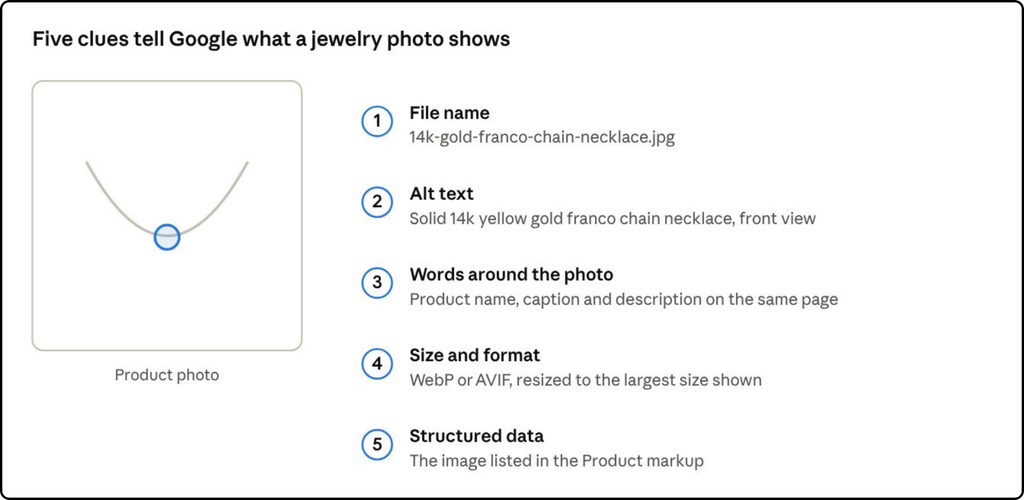
When all five clues agree, Google can match the photo to the right searches.
The example store in practice
Let’s see how the example store handles its photos. Imagine the files are named like IMG_4821.jpg and most images have no alt text. A simple routine fixes that, and it works for every new upload too:
- Name each file with hyphens between descriptive words, for example 14k-gold-3mm-franco-chain-necklace.jpg.
- Use one alt text pattern: metal, product, key detail and view. For example: “Solid 14k yellow gold franco chain necklace, front view”.
- Apply the pattern first to the main image of each best seller, then to the detail and lifestyle shots.
- Confirm that the main image of each template is not lazy-loaded, then check the result in PageSpeed Insights.
After the routine, the collection pages load faster and every photo tells Google exactly what it shows.
Deeper guides:
- Jewelry Image SEO: How to Optimize Product Photos for Google
- Alt Text for Jewelry Images: Examples and Best Practices
- How to Compress Jewelry Images Without Losing Quality
- Optimizing for Google Images and Google Lens for Jewelry
Step 5: Build a Content and Blog Strategy
Product and collection pages catch people who are ready to shop. A blog catches the many more people who are still thinking, and it builds the trust and topic depth that make your commercial pages stronger. Without it, a store competes in only one place, and that is where the biggest brands are strongest.
Step 5 at a glance
| Item | Detail |
|---|---|
| Goal | Reach shoppers who are still researching, and build depth on every topic the store sells |
| Keywords used | Informational and comparison long-tail phrases, and full questions |
| Where they go | Post title, H1, URL, opening answer, subheadings and FAQ questions |
| Tools | A keyword tool, People Also Ask, Search Console, a content calendar |
| Typical effort | One to two posts a month for a small team |
Why a blog works
Every jewelry purchase follows a journey with three broad stages.
| Stage | What the shopper is thinking | Example search | Best content |
|---|---|---|---|
| Awareness | I want to understand something | how to clean gold jewelry | Guides and how-to posts |
| Consideration | I am comparing choices | 14k vs 18k gold, lab-grown vs natural diamonds | Comparisons and buying guides |
| Decision | I am ready to pick and buy | gold hoop earrings | Collection and product pages |
A store with only decision-stage pages meets the shopper last, when they have usually already formed a favorite. A blog meets them at the start, answers their questions and gives them a reason to remember your name. Along the way, each post can link to a collection, which sends relevance and visitors to the pages that earn revenue.
Choose topics that connect to products
Good blog topics come from the same sources as your keywords (Step 1), plus the questions customers actually ask in chat, email and reviews. Group them into themes so the blog does not become a random pile.
| Topic theme | Example posts | Links to |
|---|---|---|
| Materials and gemstones | 14k vs 18k gold, lab-grown vs natural diamonds | Fine jewelry and diamond collections |
| Buying guides | How to choose an engagement ring setting, ring size guide | Ring collections |
| Care | How to clean gold jewelry, how to store silver | Related collections and care products |
| Style | How to layer necklaces, spring jewelry trends | Necklace, earring and bracelet collections |
| Gifts and occasions | Mother’s Day gift guide, anniversary gifts by year | Gift collections |
| Craft and brand | How our rings are made, where our diamonds come from | About page and best sellers |
Map every post to one target keyword and one collection, so it has a clear job from the start.
Plan a calendar and a realistic pace
Because demand follows the calendar, list the key dates for your market and plan seasonal posts two to three months before them. A Mother’s Day guide published in March has time to be found and trusted. The same guide published a week before the holiday usually misses the peak. Fill the rest of the year with evergreen posts such as material guides, care guides and sizing help. A pace you can keep matters more than a big burst: two good posts a month, held for a year, beats ten posts in one month followed by silence.
How to write a post that can rank
- Answer the question near the top, then add detail. Readers and Google both prefer a clear answer early.
- Use clear headings that match how people phrase the question.
- Show real expertise, with an author name, credentials and original photos where you can.
- Link to the most relevant collection, and to one or two related posts.
- Let length follow the question. A simple how-to may need 800 words, a full buying guide 2,000 or more. Length alone is not a ranking factor.
Where the keyword goes in a blog post
| Place | What to do | Example for “hollow vs solid gold chains” |
|---|---|---|
| Title tag and H1 | Put the keyword early and promise a benefit | Hollow vs Solid Gold Chains: Which Is Worth It? |
| URL | Keep it short, using the keyword words only | /blogs/blog/hollow-vs-solid-gold-chains |
| Opening sentence | Give the direct answer straight away | A solid chain is gold all the way through, while a hollow chain has an empty center, so it is lighter and costs less but dents more easily. |
| Subheadings | Use questions or comparison labels | What is a hollow chain? Which lasts longer? Which should you buy? |
| FAQ | Add the People Also Ask style questions | Are hollow gold chains worth it? |
| Internal links | Link to the collection with descriptive text | Browse our 14k gold chains |
FAQ sections: why they help and how to use them
An FAQ section answers the small, specific questions that stop people from buying: Can I resize this ring? Will it tarnish? How long is shipping? It works because it removes doubt at the exact moment of decision, and because short direct answers are easy for readers and AI tools to quote. Collect questions from customer support, reviews, People Also Ask and Search Console, then answer each in the first sentence. Place the FAQ below your main content on collection pages, product pages and posts. Note that Google now shows FAQ rich results only for a small set of sites, so write FAQs to help readers and answer engines, not to win a special search listing.
Topical authority: depth beats scattered posts
Imagine two bookshops. One has a single book about gold jewelry. The other has a whole shelf: types of gold, how to clean it, how to buy it, what affects the price. If you wanted advice, you would trust the second one. Search engines reason in a similar way. When a site covers one subject completely, with connected pages that support one another, it looks more credible on that subject than a site with a few scattered posts.
The practical method is called a content cluster. You create one broad pillar page (such as the guide you are reading) and a set of focused pages that each go deep on one subtopic and link back to the pillar. For gold jewelry, the cluster might include posts on karats, solid versus plated gold, cleaning, hallmarks and buying advice, all linked to the gold collections. Linking works in both directions: the pillar links to every cluster page, each cluster page links back to the pillar, related posts link to each other, and posts link to the collections they help sell.
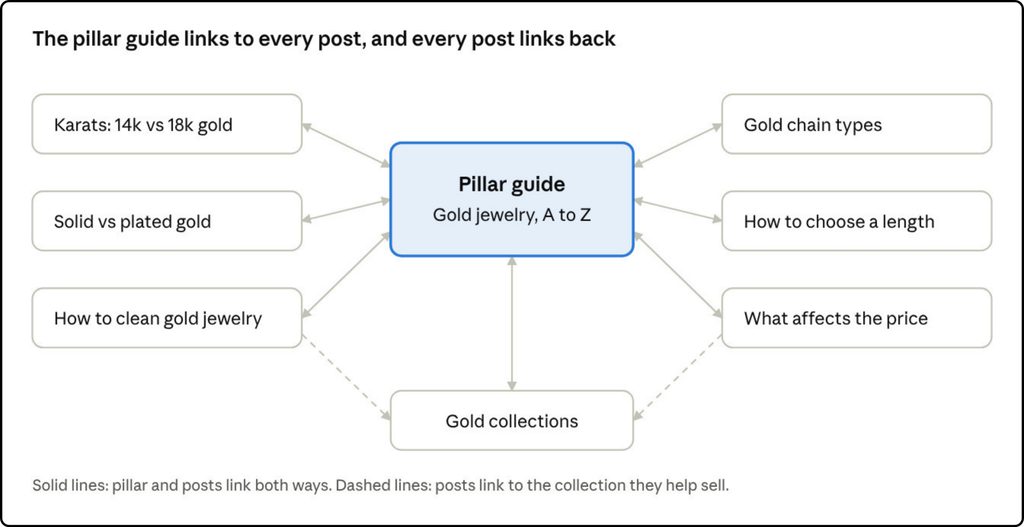
Every post also reaches the collection it helps sell, so guides feed shoppers into the shop.
Refresh old posts instead of letting them decay
Facts age, trends move and competitors improve, so a post that ranked well last year can slip. Refreshing it, by updating the facts, improving the structure, adding new examples and fixing links, often produces a faster gain than writing a new post, because the page already has history and links. Review posts every six to twelve months, start with those that are declining or close to the first page, keep the same URL and update the visible date only when the changes are real.
The example store in practice
The example store’s themed collections point straight to content clusters. People who browse Crosses, Zodiac or Tree of Life are often buying for meaning, faith or tradition, and they ask questions before they buy. Each theme can support a pillar and a handful of focused posts that link back to the matching collection.
| Theme | Example posts | Links to |
|---|---|---|
| Crosses and crucifixes | Cross vs crucifix: what is the difference; Latin, Orthodox and Armenian crosses explained; how to choose a cross pendant size | Crosses collection |
| Zodiac | What each zodiac symbol means; how to choose a zodiac pendant as a gift | Zodiac collection |
| Gold chains | Chain types explained (Cuban, Franco, rope, mariner); how to choose chain width and length; hollow vs solid gold chains | Chains collection |
| Gold basics | What 14k gold means; how to clean and care for 14k gold | The main gold collections |
| Gifts and occasions | Valentine’s gifts; religious gifts for holidays and milestones; gift guides for men | Love, Crosses and Chains collections |
The store already has a blog in its main menu, so the calendar and the first clusters can be built there. Occasion posts go live two to three months before each date, and every post carries a short FAQ and a link to at least one collection.
Deeper guides:
- Jewelry Blog Content Strategy: Topics, Calendar, and Publishing Plan
- How to Write FAQ Sections for Jewelry Pages and Blogs (People Also Ask and FAQ Schema)
- Topical Authority and Content Clusters for Jewelry Websites
- How to Update and Refresh Old Jewelry Blog Posts
Step 6: Fix Technical SEO Problems
Think of your website as a physical shop. Good products, clear signs and friendly staff do not help if the door is locked, the lights flicker or three identical entrances confuse visitors. Technical SEO is the work of making sure the shop is open, easy to enter and quick to walk through, for Google as well as for people.
Step 6 at a glance
| Item | Detail |
|---|---|
| Goal | Make sure Google can reach, read and load every important page |
| Keywords used | None directly. Technical SEO protects the pages that carry your keywords |
| Where the work happens | Sitemap, robots.txt, canonical tags, redirects, speed and mobile settings |
| Tools | Google Search Console, PageSpeed Insights, a site crawler |
| Typical effort | One to two weeks for a first audit and fixes, then monthly checks |
Why technical SEO comes first in importance
Every earlier step assumes that Google can reach your pages, read them and load them without trouble. If it cannot, the best keyword research and the best copywriting will never be seen. The good news is that most jewelry stores face the same short list of problems, and most of them are fixable in a few focused sessions. Whether you use Shopify or WordPress, the same four areas matter: crawling and indexing, speed, duplicates and basic site health.
Area 1: Crawling and indexing
Remember the three jobs from earlier: crawl, index, rank. This area makes sure the first two work.
- The XML sitemap is a list of the pages you want Google to know about. It helps new collections and products get discovered faster. It should include only pages that load correctly and that you want indexed, not cart pages, filter pages or redirects. Most Shopify stores generate one automatically at /sitemap.xml, and WordPress SEO plugins such as Yoast SEO or Rank Math do the same.
- The robots.txt file tells crawlers which parts of the site they may visit. It should block things like cart and checkout pages, and it must never block your collections, products, images or the CSS and JavaScript files Google needs to display your pages. A single wrong line, such as a leftover rule from a test site, can hide an entire store.
- Google Search Console is the free tool that shows what Google sees. Verify your site, submit the sitemap and open the Pages report. It lists which pages are indexed and gives a reason for each page that is not.
Here is a five-minute health check you can do today. Open the Pages report and look at the reasons pages are not indexed. “Crawled, currently not indexed” usually means Google visited but did not find the page valuable enough, which points to thin or duplicate content. “Blocked by robots.txt” or “Excluded by noindex” means a rule is stopping the page, which is a problem only if you wanted it indexed. Then use the URL Inspection tool on your top collection and two products, to confirm they are indexed and see which version Google chose.
Area 2: Speed and Core Web Vitals
Core Web Vitals are three measurements of how a page feels to a real visitor. Each answers a plain question.
| Metric | The plain question | Jewelry example | Good score |
|---|---|---|---|
| Largest Contentful Paint (LCP) | How quickly does the main content appear? | The hero image or main ring photo shows up | 2.5 seconds or less |
| Interaction to Next Paint (INP) | How quickly does the page react when I tap? | Choosing a ring size or opening a filter responds instantly | 200 milliseconds or less |
| Cumulative Layout Shift (CLS) | Does the page jump around while loading? | The Add to cart button stays put instead of sliding down | 0.1 or less |
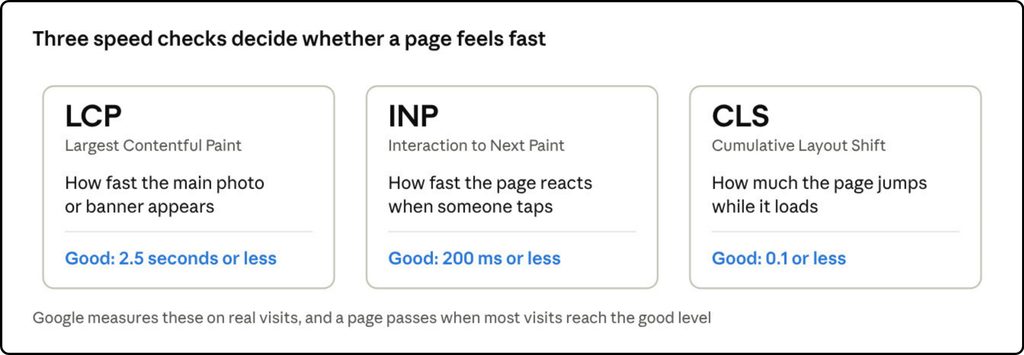
A page that stays inside all three limits feels fast to shoppers and to Google.
Speed matters because slow, unstable pages lose shoppers before they see the product, and Google includes page experience among its signals. Content relevance still matters more, so treat speed as something that supports your rankings and protects your sales.
On jewelry stores, the same causes appear again and again, and so do the fixes:
- Oversized images. Resize and compress them, and use WebP or AVIF (Step 4).
- Too many apps and plugins. Review every app, remove those you do not use and delay chat widgets and pop-ups until after the page loads.
- Layout jumps. Set a width and height for every image and reserve space for banners and review widgets.
- Weak hosting (mostly WordPress). Use good hosting, page caching and a content delivery network.
Test one page from each template, meaning the homepage, a collection, a product and a post, with PageSpeed Insights, and check the Core Web Vitals report in Search Console for real-visitor data. Fixing a template fixes every page that uses it.
Area 3: Duplicate content and canonical tags
Duplicate content means the same or nearly the same content can be reached at more than one address. Google generally does not punish ordinary duplicates. It simply groups them and chooses one version to show. The risk is that it chooses a version you did not want, splits ranking strength across several addresses or wastes time crawling pages that add nothing.
Jewelry stores create duplicates naturally. One paperclip necklace can be reached at /products/paperclip-necklace, at /collections/necklaces/products/paperclip-necklace and at a version with a variant parameter for the 20-inch length. To a shopper, that is one product. To Google, it can look like three pages.
The fix is a canonical tag, a line of code that names the official address of a page. Think of it as telling Google: “If you find this content at several addresses, this is the one that counts.” It is a strong hint rather than a command, so all your other signals, including internal links and the sitemap, should point to the same official address.
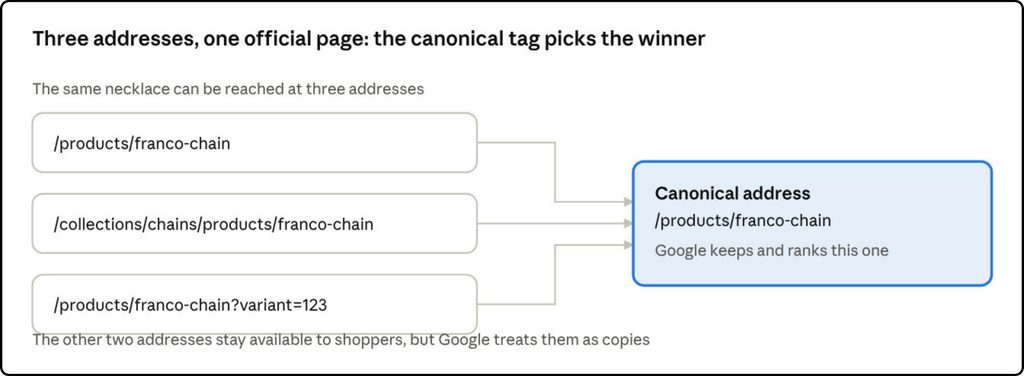
The canonical tag is how you tell Google which address counts.
| Situation | Best fix |
|---|---|
| One page reachable at several addresses | Canonical tag pointing to the main address |
| An old or retired address | 301 redirect to the new or closest address |
| A page that helps shoppers but should not appear in search (sort pages, internal search) | noindex tag |
| Look-alike pages that should each rank | Rewrite each so it has its own purpose |
| Several weak pages on one topic | Merge them and redirect the old addresses |
Filters follow the same logic. Most filter combinations, such as sorting by price, should stay out of Google’s index. A filter that matches a real search, such as “emerald rings”, should instead become a proper collection page with its own title, text and links. One rule prevents a common mistake: do not block a page in robots.txt if you want Google to see its canonical or noindex tag, because Google cannot read a tag on a page it is not allowed to visit.
Area 4: Redirects, mobile and security
- Out-of-stock and discontinued products. If an item is temporarily unavailable, keep the page live and offer a back-in-stock notice. If it is gone for good, 301 redirect it to the closest replacement or the parent collection, so shoppers and link value are not lost.
- Redirect chains. Make every redirect go straight to the final address, not through several hops.
- Mobile. Most jewelry browsing happens on phones, so test the menu, filters, gallery and checkout on a real phone.
- HTTPS and one domain version. Serve the site over HTTPS and choose one version of your domain, with or without www, redirecting the other.
Shopify and WordPress: where the work differs
| Area | Shopify | WordPress with WooCommerce |
|---|---|---|
| Hosting and speed | Managed hosting and CDN included, so focus on the theme and apps | You choose hosting, caching and CDN |
| Sitemap | Created automatically | Created by an SEO plugin |
| Canonical tags | Added by the theme, so verify them | Added by an SEO plugin, so check filters and parameters |
| Main risk | App bloat and theme code | Slow hosting, plugin conflicts and setup mistakes |
The example store in practice
The example store runs on Shopify, so hosting, the sitemap and many technical basics are handled by the platform, and the work is mostly checking. Here is the short audit we would run, in order:
- Product web addresses. Products are often linked under collection paths, such as /collections/chains/products/…. Use the URL Inspection tool to confirm that each one names its main /products/… address as the canonical version, and that internal links use one consistent form.
- Pagination and filters. A collection with 25 pages needs each page to keep its own canonical address, and filter and sort combinations to stay out of the index.
- Speed. Picture an announcement bar, a reviews badge and many product images on the main pages. Check that the bar has reserved space, so it does not push the page down as it loads, and review the apps that add scripts.
- Search Console. Submit /sitemap.xml, open the Pages report and read the reasons pages are not indexed, starting with the collections and best sellers.
Deeper guides:
- Technical SEO for Jewelry Ecommerce Sites (Shopify and WordPress)
- Site Speed and Core Web Vitals for Jewelry Stores
- Duplicate Content and Canonical Issues in Jewelry Stores
- XML Sitemaps, Robots.txt and Indexing for Jewelry Sites
Step 7: Build Links and Authority
You can write the best pages in the category and still rank below a bigger store, because Google also asks whether anyone else vouches for you. Links from other websites are the main way to answer that question.
Step 7 at a glance
| Item | Detail |
|---|---|
| Goal | Earn mentions from trusted, relevant sites so Google trusts the brand |
| Keywords used | The brand name and descriptive phrases as link text, with exact keywords used sparingly |
| Where they go | Anchor text on other sites, and on your own internal links |
| Tools | Semrush or Ahrefs, Google Search Console, outreach emails |
| Typical effort | A few hours each week, judged over months |
Why links work
Google was built on a simple idea: when a respected website links to another site, it is a vote of confidence. A link from a well-known style magazine or a trusted wedding blog says that someone with a real audience thought your store was worth mentioning. Many such votes, from sources that make sense for jewelry, make your site look established. Links also send visitors directly, so a good link can bring shoppers even without any ranking benefit.
Not all links are equal. A few links from relevant, trusted sites are worth far more than hundreds from unrelated or low-quality ones. A good link has four qualities:
- Relevance: the linking site covers jewelry, fashion, weddings, gifting or style.
- Trust: it is a real site with real content and an audience.
- Editorial placement: the link sits naturally inside useful content, not in a list of paid links.
- Natural wording: the link text describes the page or uses your brand name, instead of repeating the same keyword every time.
Route 1: Create link-worthy assets
People link to pages that are useful or unusual. Size charts, birthstone charts, gemstone and metal guides, care guides and original data or surveys all give other writers something worth citing. This route works because it turns your content into the reason for the link, so you are offering value instead of asking for a favor. Publish the asset, then tell the sites most likely to use it.
Route 2: Guest posts
A guest post is an article you write for another website, with a link back to yours. It works because it puts your expertise in front of an audience that already cares about the subject. Choose fashion, lifestyle, wedding, gifting and gemology blogs with genuine readers, pitch a specific topic that helps their audience and keep the writing as strong as your own site’s. Poor guest posts published in bulk can do more harm than good.
Route 3: Influencer and blogger outreach
Creators and bloggers can feature your jewelry in reviews, gift guides and style posts. The goal is a link on their website or blog, not only a tag on social media. Choose people whose style and audience fit your products, send pieces they would genuinely like and make the link easy by sharing product details, images and the right page to point to. An example of a short, respectful pitch:
Hi Sam, I read your post on layering delicate necklaces and loved the tip about mixing chain lengths. We make solid 14k gold paperclip chains in 16, 18 and 20 inches, and I think they would suit that post. I would be glad to send one for you to try, with no obligation. If you like it, a mention would mean a lot, and I can share photos and details. Thank you for considering it.
It is personal, specific and easy to answer.
Which pages should receive links
Spread links across pages that matter commercially: your top collections, your pillar guide, your link-worthy assets and your brand pages. Do not send every link to the homepage.
Anchor text: which words to use
Anchor text is the clickable wording of a link, and it is where keywords enter link building. The words tell Google what the target page is about, so they matter. But real websites rarely link with exact keywords, and a profile where every link says the same keyword looks arranged. A healthy mix looks like this.
| Type | What it looks like | How to use it |
|---|---|---|
| Brand name | Your Brand | The most natural form, and usually the largest share |
| Descriptive or page title | our guide to hollow vs solid gold chains | Common for guides and assets, and also natural |
| Partial match | 14k gold chain necklaces | Sometimes, when it fits the sentence |
| Exact match | gold chains | Rarely, because repeating it everywhere looks manipulative |
| Generic | click here, this store | Occasionally, since it happens naturally |
| Plain address | https://www.yourbrand.com | Common in citations and credits |
On other websites you rarely control the wording, so concentrate on earning the link and let the mix form naturally. On your own site you do control it, so use descriptive, keyword-rich anchor text for internal links, such as “14k gold chains” pointing to the chains collection. That is one of the simplest and safest keyword tactics available.
What to avoid
Google treats links created mainly to manipulate rankings as spam. Avoid buying links, private blog networks, large-scale link swaps, mass directory submissions and the same exact keyword as anchor text everywhere. If you send free products or pay for a placement, the link should be marked with the proper attribute (rel=”sponsored” or rel=”nofollow”) and you should follow the advertising disclosure rules of your country, such as the FTC guidelines in the United States. Link building is slow, so judge it over months, not days.
The example store in practice
The example store has natural material for link-worthy assets. A gold chain guide covering types, widths and lengths could include a neckline chart. A 14k gold guide could explain what 14k means and how to read hallmarks. Meaning-based guides, such as cross types or zodiac symbols, suit faith, gifting and lifestyle blogs that write for exactly those shoppers. A genuine story, such as where the jewelry is made or how it is finished, gives journalists a human angle.
Outreach targets that fit this catalog include faith and family bloggers who publish gift guides, men’s style writers who cover Cuban and rope chains, zodiac and astrology bloggers and local lifestyle publications. An easy first move is to search for the brand name to find mentions without links, and to run a reverse image search on the best-selling product photos to find sites using them without credit.
Deeper guides:
- Link Building for Jewelry Websites: 10 Strategies That Work
- Guest Posting for Jewelry Brands: How to Find and Pitch Sites
- Influencer and Blogger Outreach for Jewelry Backlinks
Step 8: Get Cited in AI Search
Shoppers now ask full questions in Google’s AI features, ChatGPT and Perplexity, such as “Is 14k gold good for everyday wear?” or “What is the difference between lab-grown and natural diamonds?”. The tool writes an answer and usually shows a few links to the sources it used. If your store is one of those sources, your brand appears at the exact moment someone is researching. That is what an AI citation is.
Step 8 at a glance
| Item | Detail |
|---|---|
| Goal | Become a source that AI tools quote when shoppers ask questions |
| Keywords used | Full question phrases and the brand name |
| Where they go | Question-style headings, first-sentence answers, the About page and structured data |
| Tools | AI search tools for a monthly check, Search Console, analytics |
| Typical effort | A monthly check of 15 to 20 questions, plus updates to key pages |
How AI answers work, in plain terms
AI answer tools combine two jobs. First they find pages that seem relevant to the question, much as a search engine does. Then they read passages from those pages and write a summary, linking to some of the pages they drew from. Nobody outside these companies knows the exact rules for choosing sources, and the rules change, so no honest guide can promise a citation. What we can say is that these tools prefer pages that are easy to find, easy to understand and easy to trust.
There is good news in that. Google has said that its AI features use the same index as normal search, with no special markup required, so a page that is indexed and eligible to appear in search results can also be used there. In other words, Steps 1 to 7 are the foundation. Step 8 adds a stronger focus on clarity, identity and proof.
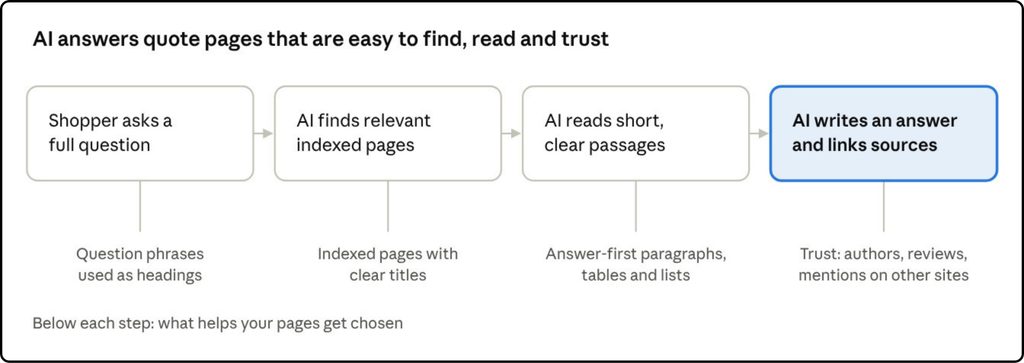
Steps two to four are where your pages can win a citation.
Why clear answers get quoted
An AI tool is looking for a passage it can lift with confidence: a definition, a comparison, a short list of steps. A page that buries the answer in the seventh paragraph of a long story is harder to use than a page that states it in the first sentence under a clear heading. Compare these two:
| Hard to quote | Easy to quote |
|---|---|
| Gold has been treasured for thousands of years, and many customers wonder about the many types available today, so let us explore the topic together… | Is 14k gold good for everyday wear? Yes. 14k gold is 58.3 percent pure gold, mixed with other metals that make it harder, so it resists scratches and bending better than 18k or 24k gold and suits daily wear. |
The second version answers first, uses a clear question as a heading and gives a fact that is easy to check. You can write the rest of the post in your own style, as long as the key answers are clear.
Six practical tactics
1. Write answer-first. Under each question-style heading, give a short, direct answer, then add detail. Use tables for comparisons and numbered lists for steps.
2. Make your brand easy to recognize. Machines build a picture of who you are from the information they find. Use the same business name, description, contact details and social profiles across your website and the web, and have a clear About page. Adding Organization structured data states these facts directly. This work is often called entity SEO: helping machines understand that your brand is one distinct, real business.
3. Prove your expertise. Show author names and credentials, certifications, hallmark and sourcing details, original photos and honest reviews. These are the same trust signals that help people decide to buy.
4. Earn mentions beyond your site. Press features, guest posts, reviews and community discussions teach AI tools that your brand is mentioned by others, not only by itself. This is why Step 7 also supports Step 8.
5. Keep facts current. Out-of-date prices, policies and product details make a page less useful and less safe to quote. Review key pages regularly, as covered in Step 5.
6. Keep your content readable by machines. Put important text in normal HTML, not only inside images or content that loads after a click. Check that robots.txt does not accidentally block pages you want used. Some companies run their own crawlers, such as OpenAI’s GPTBot and OAI-SearchBot, PerplexityBot and Google-Extended, and you can allow or block them. Blocking some of them can reduce your visibility in those tools, so make that choice deliberately after reading each company’s documentation.
Structured data such as Product, Organization and Article markup helps machines read your pages accurately. It is useful, but it is not a guarantee of citation.
How to check your AI visibility
You cannot see a ranking report for AI answers the way you can for search, so use a simple manual routine once a month.
- Write a list of 15 to 20 questions your customers ask, drawn from your keyword research and customer service.
- Ask each question in the main AI tools you care about.
- Record what happens. Note whether your brand is mentioned, whether your pages are cited and which competitors or publications are cited instead.
- Study the winners. Look at how the cited pages answer the question and what yours lacks.
- Watch your analytics. In Google Analytics, look for visits from AI tools in your referral sources, and note which pages receive them.
Answers vary by person, location and day, so look for trends across many questions instead of reacting to a single result.
The example store in practice
The example store’s catalog suggests exactly the kind of questions shoppers put to AI tools: “What is the difference between a cross and a crucifix?”, “Is 14k gold good for everyday wear?”, “Are hollow gold chains worth it?” and “What does a zodiac pendant mean?”. Each one can become an answer-first section on a guide page, with a clear heading and a direct answer in the first sentence.
Next we check the brand’s basic facts: a store name, an address, a phone number and email, free shipping, a return window and any quality promises. To help machines connect them, the store adds Organization structured data, keeps the same business details on every profile (Facebook, Instagram, Pinterest and X), and publishes an About page that tells the workshop and sourcing story with named authors. A monthly check of 15 to 20 key questions in the main AI tools then shows whether the brand is cited, and which pages win when it is not.
Deeper guides:
- Jewelry SEO for AI Search: AI Overviews, ChatGPT and Perplexity in 2027
- How to Get Your Jewelry Brand Cited by AI Answer Engines
- Structured Data and Entity SEO for Jewelry Brands
Putting It All Together: A 90-Day Roadmap
Eight steps can feel like a lot. This plan spreads them over about three months, and it works for a small team. Adjust the pace to your resources, but keep the order.
| Period | Focus | Output |
|---|---|---|
| Weeks 1 and 2 | Foundation | Search Console verified, sitemap submitted, technical check done, keyword map built (Steps 1 and 6) |
| Weeks 3 to 6 | Revenue pages | Top four to six collections rewritten, top 20 products improved, images fixed on those pages (Steps 2, 3 and 4) |
| Weeks 7 to 10 | Content | Content themes chosen, first four to six posts published with FAQs, internal links added (Step 5) |
| Weeks 11 to 13 | Authority and visibility | First link assets published, outreach started, first AI visibility check done (Steps 7 and 8) |
| Week 13 | Review | Results compared with the starting point, the next quarter planned |
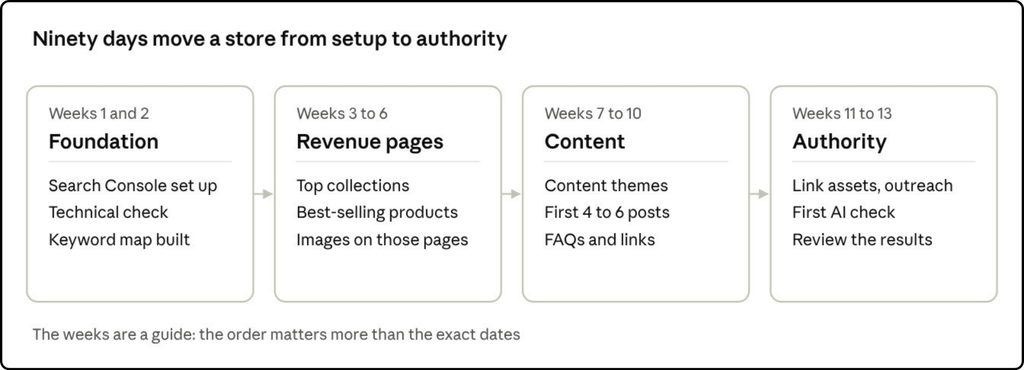
Adjust the pace to your team, but keep the order.
After day 90, repeat the cycle: extend the work to the next group of collections and products, add more posts to each cluster, refresh older content and keep earning links.
How to Measure Results
SEO is slow, so measure in a way that tells you what is working without causing panic about weekly ups and downs.
| What to track | Where to find it | What it tells you |
|---|---|---|
| Impressions and clicks | Google Search Console | Whether your pages are being found and chosen |
| Average position of key keywords | Google Search Console | Whether rankings are improving |
| Indexed pages and errors | Search Console Pages report | Whether Google can reach your pages |
| Core Web Vitals | Search Console and PageSpeed Insights | Whether speed and stability are improving |
| Organic sessions | Google Analytics 4 | How much search traffic arrives |
| Revenue and conversions from organic search | Google Analytics 4 or your store dashboard | Whether traffic is turning into sales |
| New referring websites | A backlink tool such as Semrush or Ahrefs | Whether your authority is growing |
| AI mentions and citations | Your monthly manual check | Whether you appear in AI answers |
Look at the numbers monthly and make decisions quarterly. Because jewelry sales are seasonal, compare each period with the same period a year earlier, not only with the month before. Most stores see early movement within three to six months and stronger results in six to twelve, though timing depends on competition, site age, content quality and links.
Jewelry SEO Checklist
Use this list to audit a jewelry store against the eight steps. Work from the top, and tick an item only when you have actually checked it.
☐ Every collection, product and blog post has one mapped primary keyword, and no two pages share the same one
☐ Collections target short-tail or mid-tail keywords, while products and posts target long-tail keywords
☐ Collection pages have an intro, bottom content, a unique title and description, a short URL and links to related collections
☐ Product pages have specific titles, original descriptions with a spec list, clear shipping and return details and genuine reviews
☐ Product structured data is present and matches what shoppers see
☐ Images have descriptive file names, alt text, modern formats and sizes that match the display, and the main image is not lazy-loaded
☐ Content themes, a calendar and a realistic publishing pace are in place, with seasonal posts planned two to three months ahead
☐ Posts and key pages answer questions first and include short FAQs
☐ Each content cluster links the pillar, the cluster posts and the matching collections in both directions
☐ The sitemap is submitted, robots.txt is clean and key pages are indexed
☐ Core Web Vitals pass on mobile for the main templates
☐ Canonical tags, redirects and filter pages are handled
☐ Relevant links and mentions are growing, and outreach follows the rules and disclosure requirements
☐ Brand details and structured data are consistent, and AI visibility is checked monthly
Common Mistakes to Avoid
Most jewelry SEO problems come from a handful of habits. Each one below links back to the step where you can fix it.
- Choosing keywords without checking the results page. If Google shows articles and you build a collection page, the page will struggle however well it is written (Step 1).
- Using one keyword on many pages. Your own pages end up competing, and none of them wins (Steps 1 and 3).
- Leaving supplier descriptions on the best sellers. Google has no reason to prefer your copy over everyone else’s (Step 3).
- Treating images as decoration. Oversized files slow the page, and unlabeled photos give Google no clues (Step 4).
- Publishing posts with no link to any collection. The traffic arrives but nothing guides it toward a sale (Step 5).
- Ignoring technical faults for months. A blocked page or a slow template quietly holds back all the work above it (Step 6).
- Buying links or sending identical outreach to hundreds of sites. The short-term gain can cost you your rankings (Step 7).
- Expecting results in weeks, or judging only by rankings. Track traffic, sales and brand visibility together, and give changes time (the measurement section).
Jewelry SEO FAQ
What is jewelry SEO? It is the practice of improving a jewelry website so it appears in search engines and AI answers for the searches your customers make, and so those visitors trust the store enough to buy.
Why target short-tail keywords on collection pages if they are so competitive? Because they match how people browse, because Google already shows collection pages for them and because one strong page can rank for many related phrases. Start with narrower mid-tail versions if the short-tail term is out of reach, and build toward it with supporting content and links.
Should product pages target short-tail keywords too? No. A product page should target the specific long-tail phrase that describes that item. Using the broad keyword would make many pages compete with your collection page.
How many keywords should one page target? One primary keyword, plus a few close variations that mean the same thing. Google will usually rank the page for many related searches without extra effort.
Do I need a blog to rank a jewelry website? In most cases yes, because a blog reaches shoppers who are still researching and builds the topic depth that supports your collections.
Is Shopify or WordPress better for jewelry SEO? Both can rank well. Shopify handles hosting and basics for you, while WordPress with WooCommerce gives more control and more responsibility. How well you do the work matters more than the platform.
Can a small jewelry store compete with large retailers? Yes, by focusing on a narrower range, showing real expertise and covering that range more completely and honestly than larger sites do. Compete on depth and trust, not on breadth.
Will AI search replace SEO? Not in the foreseeable future. AI tools rely on pages that are findable, clear and trusted, which is what SEO builds. The work you do for search also supports AI visibility.
What should I do first if I only have an hour a week? Verify Search Console and fix any indexing or speed problem it shows, then improve one collection page a week, starting with the one that earns the most revenue.
Where to Go From Here
SEO for jewelry websites is not one trick. It is a sequence: understand what customers search for, give every page one clear job, make those pages helpful and trustworthy, remove technical obstacles and earn the mentions that prove you are real. Start with the keyword map, work through the steps in order and use the deeper guides under each step when you need the detail. Done steadily, this is how you rank a jewelry website that people find, trust and buy from.