
The best Google Ads strategy for low conversion volume lead gen pools your data, tracks one clear goal, and matches your bidding to the number of leads you actually get. You do not need a huge budget to make this work. You need a simple account that gives Google enough signal to learn from.
Many lead generation accounts bring in 10 or 20 leads a month. A roofer, a law firm, or a B2B software company can build a solid business on those numbers. But most advice assumes you have hundreds of conversions to work with.
In this guide, you will learn how to:
- Tell whether your account has a low volume problem
- Fix your tracking so you can trust your numbers
- Pick one conversion goal that gives you enough data
- Combine campaigns so your data stops getting split up
- Choose a bid strategy that fits your lead count
- Judge your results without reacting to random swings
What counts as low conversion volume in Google Ads?
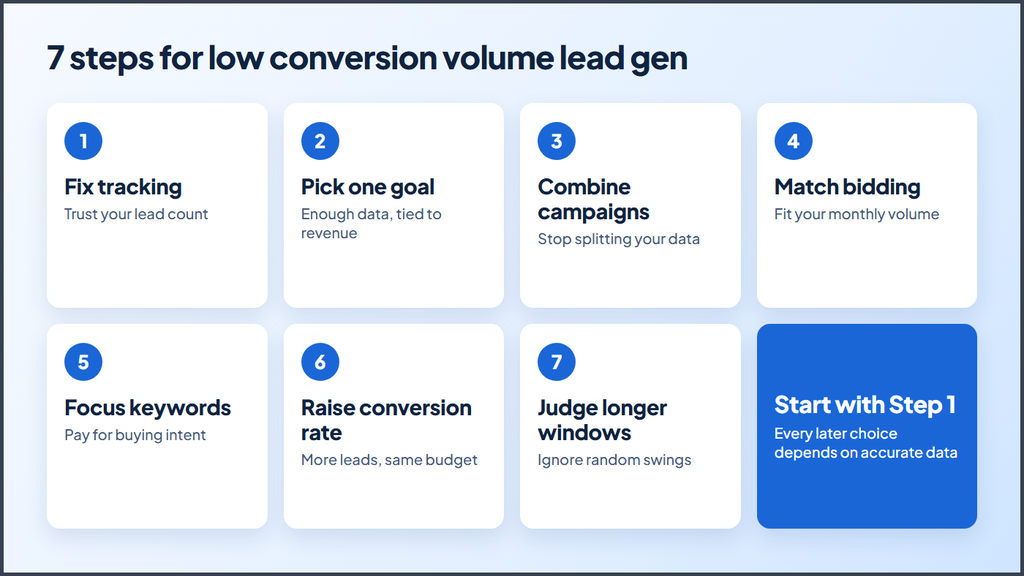
Low conversion volume in Google Ads usually means fewer than 30 conversions per month across the campaigns that share a goal. Google does not publish one official cutoff for every account, but its help pages give you two useful markers.
- 15 conversions in 30 days: Google tells lead advertisers to make sure a goal generated at least 15 conversions in the last 30 days at the account level.
- 30 conversions in 30 days: Google suggests you measure Target CPA results over at least 30 conversions or a similar long window.
If you fall below these numbers, you can still run profitable ads. You just need to change how you build and judge your account.
Why does low volume hurt lead gen campaigns?
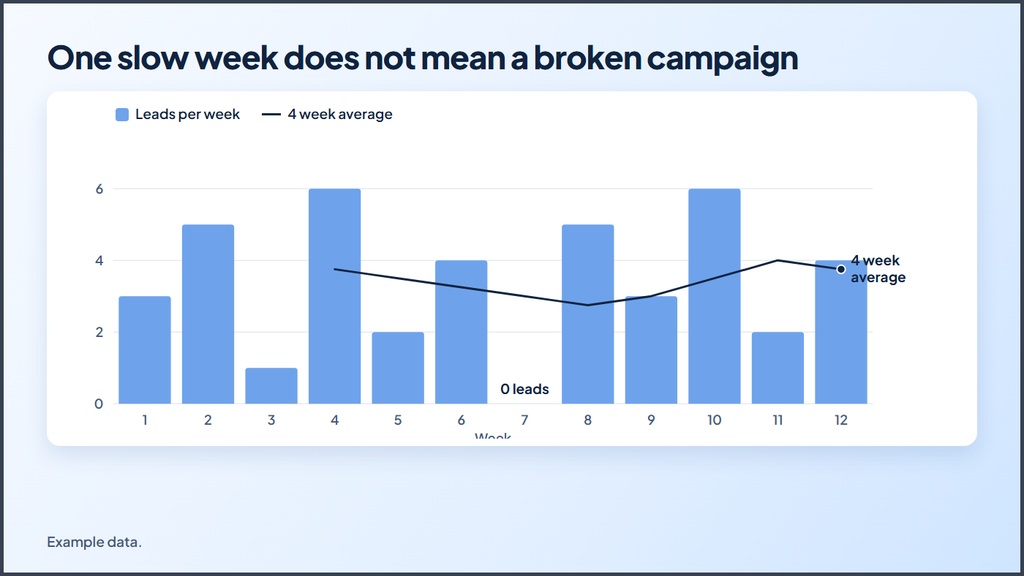
Low volume hurts lead gen campaigns because a small sample makes your data unreliable, and bad data leads to bad decisions. One extra lead can make a keyword look like a winner. One slow week can make a good campaign look broken.
Most advertisers then make the problem worse with a few common habits:
- They split their data. Ten campaigns with two leads each teach Google very little.
- They set tight limits. A very low target can stop your ads from entering auctions.
- They change too much. Weekly target changes give the system no time to settle.
- They count weak actions. Page views and button clicks inflate the numbers but do not bring in sales.
The steps below fix each of these habits, starting with the one that affects everything else.
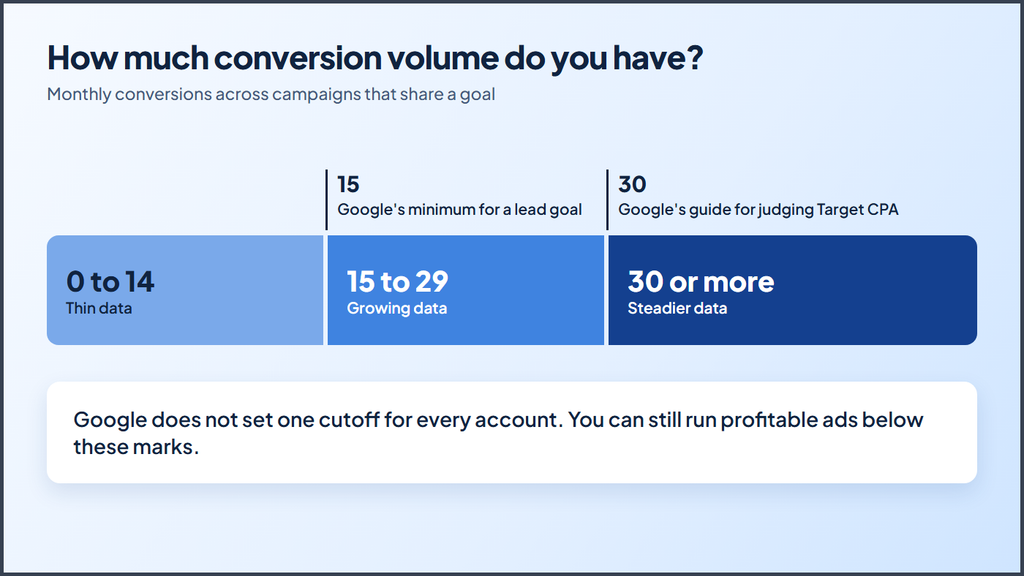
Step 1: Fix your conversion tracking
Fix your tracking before you touch bids or budgets. When you only get 15 leads a month, a few false conversions can throw off your whole account.
Run through this quick audit:
- Submit a test form and confirm that Google Ads records one conversion.
- Check that a page refresh does not count that lead a second time.
- Track phone calls if customers call you. Add call assets so people can reach you from the ad.
- Compare your Google Ads lead count against your CRM for the last 30 days.
- Remove spam and repeat leads from your counts where you can.
Next, review your conversion goals. Google Ads sorts conversion actions into two types. Primary actions count toward bidding, and secondary actions only show up for reporting. Set your real leads as primary. Set softer actions, like a brochure download, as secondary.
Send lead quality back to Google
A form fill does not tell Google whether that person became a customer. Enhanced conversions for leads closes that gap. It uses hashed data from your lead form, such as an email address, to match later sales back to your ad clicks.
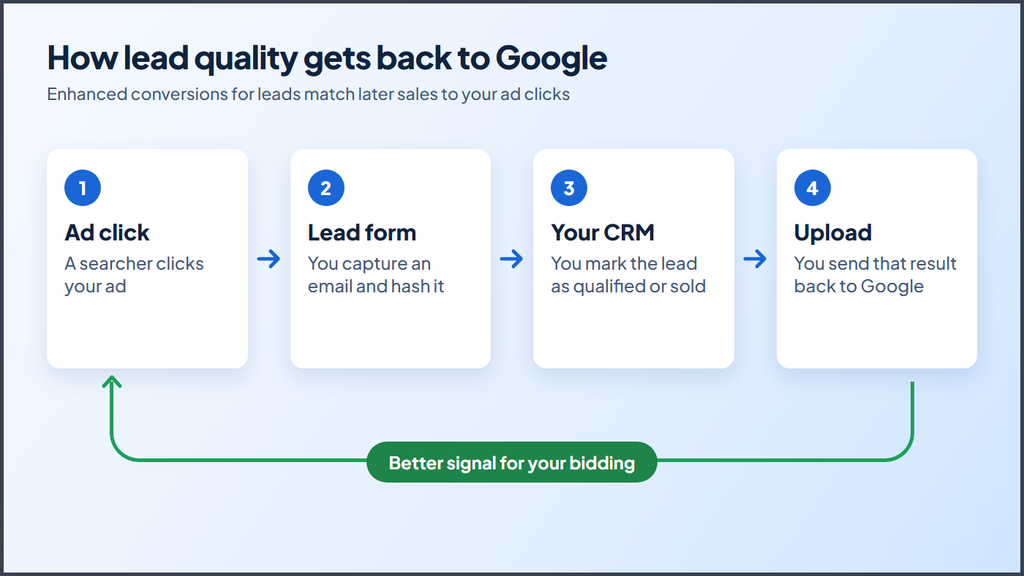
Google recommends that you upload this data regularly, ideally daily. Update your privacy policy and check your consent rules before you send customer data.
Step 2: Pick one conversion goal with enough data
Choose one goal that happens often enough to teach the system and still connects to revenue. Google advises you to avoid mixing goals from different stages of your lead to sale journey. It also suggests a goal that happens within seven days of the click when possible.
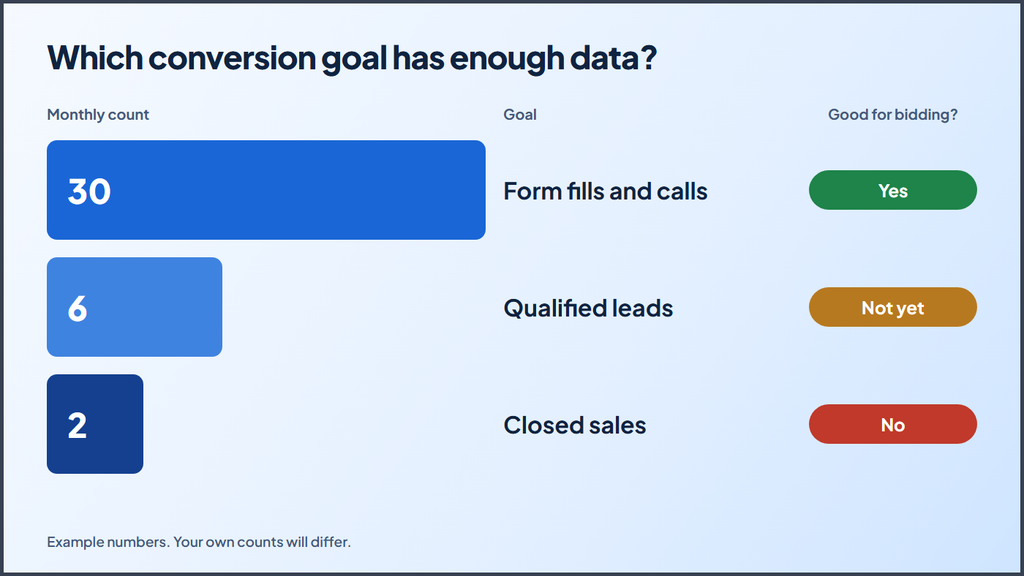
This creates a real tradeoff. Let’s look at an example with made up numbers:
| Goal | Monthly count | Good for bidding? |
|---|---|---|
| Form fills and calls | 30 | Yes |
| Qualified leads | 6 | Not yet |
| Closed sales | 2 | No |
A sale is the best signal, but two sales a month cannot teach a bidding system much. Form fills give you more data, but some of them will be poor leads.
Here is a simple way to choose:
- Under 15 qualified leads a month: Bid on all real leads, and track qualified leads as a secondary action.
- 15 or more qualified leads a month: Test bidding on qualified leads.
- Long sales cycle: Pick the earliest stage that still shows real buying intent, such as a booked call.
Step 3: Combine your campaigns and ad groups
Combine campaigns that sell the same service to the same area. Google says to consolidate ad groups and campaigns where possible so you pool your conversion data into larger sets.
Compare these two setups on a $3,000 monthly budget:
| Setup | Daily budget per campaign | Leads per campaign per month |
|---|---|---|
| 6 small campaigns | About $16 | About 5 |
| 2 focused campaigns | About $50 | About 15 |
These figures assume a $100 cost per lead, and they show why focus matters. Both setups spend the same money, but the second gives each campaign three times the data.
Follow these rules when you combine:
- Keep campaigns separate only when budgets, locations, or offers truly differ.
- Group ad groups by service, not by each small keyword variation.
- Match each ad group to one landing page.
- Pause keywords with no clear buying intent before you merge them.
Some advertisers need separate campaigns for a good reason, such as two service areas with different budgets. In that case, a portfolio bid strategy lets several campaigns share one bid strategy.
Step 4: Match your bid strategy to your volume
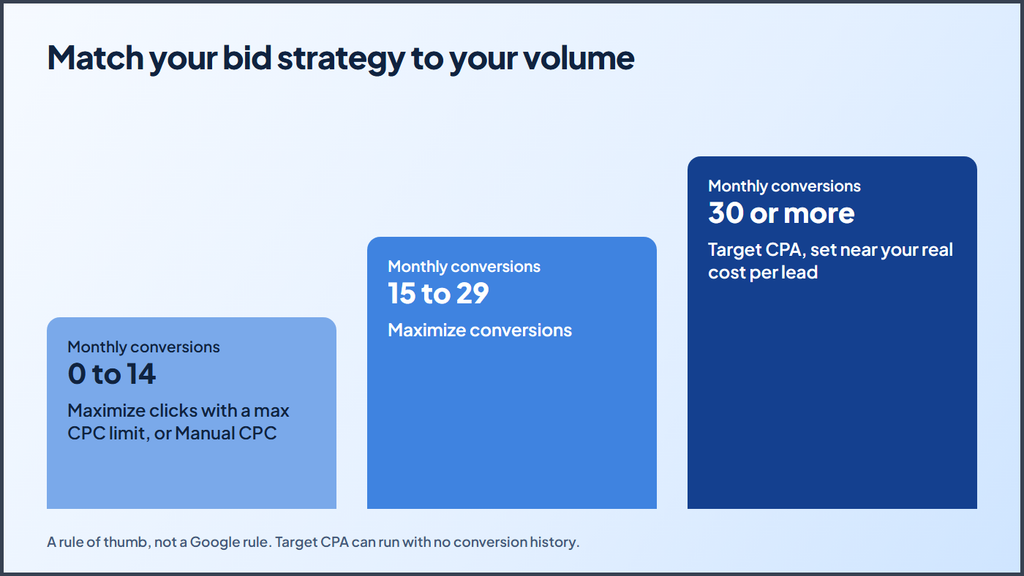
Choose your bid strategy based on how many reliable conversions you get each month. The ranges below serve as a rule of thumb, not a Google rule.
| Monthly conversions | Starting strategy | Why it fits |
|---|---|---|
| 0 to 14 | Maximize clicks with a max CPC limit, or Manual CPC | Gives you traffic and search data while you build history |
| 15 to 29 | Maximize conversions | Learns from your leads without a strict cost limit |
| 30 or more | Target CPA | Holds costs close to a goal you set |
Each option comes with tradeoffs:
Maximize clicks works well for new campaigns or traffic goals. It does not chase leads, so your keyword list has to do the work. Set a maximum CPC limit so one expensive click does not drain your budget.
Maximize conversions tries to get the most conversions while it spends your budget. It needs working conversion tracking. Since it aims to spend the full budget, set your budget at a level you can live with.
Target CPA can run with no conversion history, so treat the 30 conversion mark as a guide. Set your first target near your real cost per lead. Google warns that a target that is too low can cost you clicks and lead to fewer total conversions. If you pay $120 per lead today, a $60 target will likely shrink your traffic.
Step 5: Focus your keywords on buying intent
Spend your limited budget on searches from people who want to hire or buy now. A small account cannot afford to pay for research searches and hope some of them convert.
Start with terms that show clear intent:
- Strong: “emergency roof repair near me” or “payroll software pricing”
- Weak: “how to fix a roof leak” or “what is payroll software”
Use exact and phrase match for your core terms, since they give you more control. Google’s guide notes that exact match gives you the most control and reaches the fewest searches. If your exact match terms run out of traffic, add phrase match next. Test broad match only after your tracking works and your account shows steady leads.
Then check your search terms report each week. Add poor matches as negative keywords, such as “free,” “jobs,” “salary,” or “DIY.” In a small account, a few wasted clicks can cost you a whole lead.
Step 6: Raise your conversion rate
Raising your conversion rate gives you more data without a bigger budget. If you move from 3% to 6% on the same traffic, you double your leads and double the signal that Google gets.
Focus on these landing page and ad changes first:
- Match your headline to the search term and the ad.
- Place your phone number and form above the fold.
- Cut your form down to the fields you really need.
- Add proof, such as reviews, licenses, or client results.
- Make the page load fast on a phone.
- Offer a clear next step, such as a free quote or a booked call.
Test one big change at a time. With low traffic, small changes like a new button color will take months to show a clear result.
Step 7: Judge results over longer windows
Judge your account over longer windows, because short windows mostly show noise. Google suggests you evaluate over two conversion cycles or two weeks, whichever is longer. For low volume accounts, a 30 to 90 day view often works better.
Follow these habits:
- Leave out recent days. Leads that take time to convert will not show up right away.
- Limit target changes. Google advises against several target changes within one conversion cycle.
- Expect some learning. Major changes can trigger a learning status, which Google says never lasts more than seven days. Results can take longer than that to settle.
- Watch your CRM. Track cost per qualified lead and cost per sale, not just cost per form fill.
Should low volume accounts use Performance Max?
Most low volume accounts should start with Search before they add Performance Max. Search shows you the terms people use and puts your budget in front of active buyers.
Performance Max can still work once your tracking is solid and your Search campaigns have proven your offer. Google suggests a staged approach for lead gen. You map your lead to sale journey, include smaller actions at first, and then move toward higher value actions as your data grows.
When should you use value based bidding?
Use value based bidding once you can give different leads different dollar values. A commercial roof job may be worth far more than a small repair, and value based bidding lets you tell Google that.
Google says you should measure at least two unique values across at least two different actions. If you cannot assign values yet, Google recommends Target CPA for qualified or converted leads.
Your monthly checklist
Use this list to keep your account on track:
- Compare Google Ads leads with your CRM.
- Remove false or duplicate conversions.
- Review search terms and add negative keywords.
- Check cost per qualified lead over the last 90 days.
- Pause or merge campaigns that collect very little data.
- Test one landing page change.
- Review your bid strategy if your lead count moved into a new range.
Start with your data, then scale
A good Google Ads strategy for low conversion volume lead gen does not try to copy what big accounts do. It gives you clean tracking, one clear goal, fewer campaigns, and a bid strategy that fits your real numbers.
Start with Step 1 this week, because every later decision depends on accurate data. Then combine your campaigns and give them time to learn. As your lead count grows, you can move to stricter bidding and better lead signals.
Want help with your account? Contact us, and we can walk through your numbers with you.
More Google Ads resources from Ecomclips
For more Amazon advertising tutorials and updates, visit these Ecomclips resources:
- Watch new videos on the Ecomclips YouTube channel.
- Browse articles on the Ecomclips blog.
- Follow updates on the Ecomclips Facebook page.
- Connect with Ecomclips on LinkedIn.
Questions about an account review or a free audit can be sent to info@ecomclips.com.