Many Amazon sellers struggle with product research. They scroll through TikTok trends, pay for expensive tools, and still end up launching products that don’t sell. But what if I told you Amazon already provides the data you need to find profitable products, for free?
Enter Product Opportunity Explorer. This powerful tool shows you exactly what products people are searching for and which niches have untapped potential. Today, we’ll break down how to use it to spot winning products that 90% of sellers miss.
Getting Started with Product Opportunity Explorer
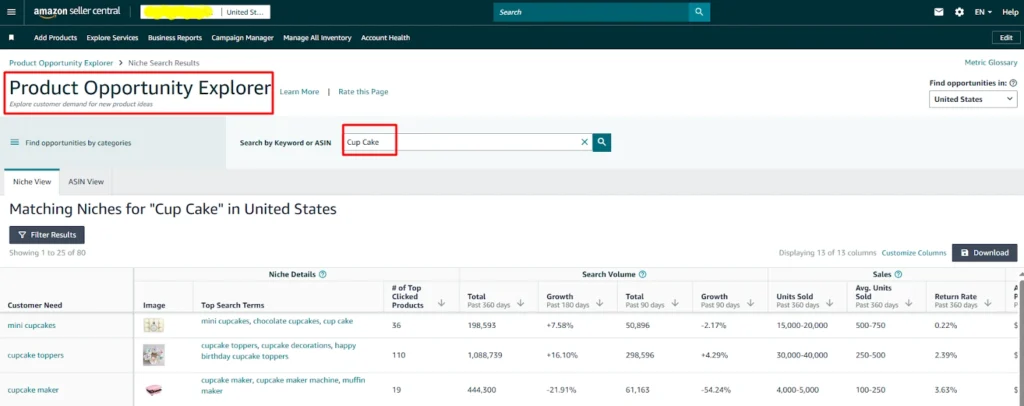
To start, log in to your Seller Central dashboard. From the menu, scroll down to Growth and click on Product Opportunity Explorer. This opens a new page with the tool’s interface.
At the top, you’ll see the Product Opportunity Explorer title. In the search bar, type a keyword related to the product you’re considering — for example, “cupcake stand.” If it appears at the top, that’s a great sign: the product has solid demand.
Amazon organizes results around customer needs, which are groups of related search terms showing what shoppers are actively looking for. Clicking on the top search term will take you to the keyword view, where you can analyze crucial metrics like search volume, click share, average price, and more.
Analyzing Keyword Data
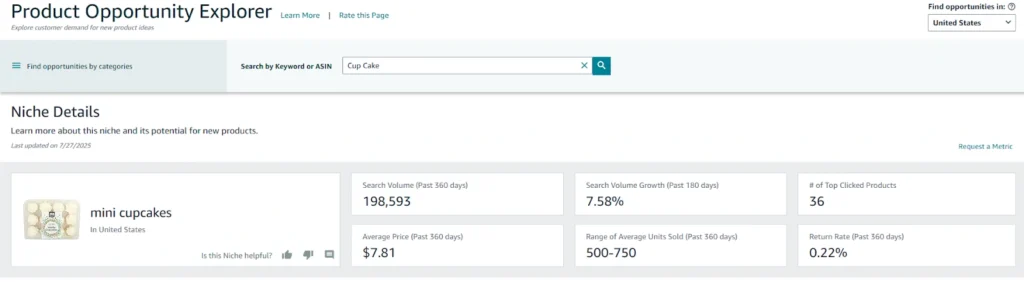
he Keyword View inside Product Opportunity Explorer is where the real decision-making happens. This is the section that tells you whether your product idea is backed by solid market demand or just a passing trend. It compiles search data, related keywords, and trend insights in one place, making it easier to see the bigger picture. By analyzing this data, you can understand how many people are actively looking for your product, how competitive the niche is, and whether it has steady or seasonal demand. This is also where you’ll spot hidden opportunities — keywords with good traffic but less competition. Understanding these numbers is the first step to making smarter product decisions, avoiding costly mistakes, and setting your launch up for success.
The keyword view gives you the numbers you need to validate demand:
- Total search volume over the past 12 months (divide by 12 for a monthly average).
- Related keywords that may have smaller traffic but still strong demand.
- Trends over 90 or 180 days, which are especially useful for seasonal products.
For example, a cupcake stand may peak in spring and summer, so short-term dips in search volume are normal. Understanding these trends helps you anticipate demand and plan your launch effectively.
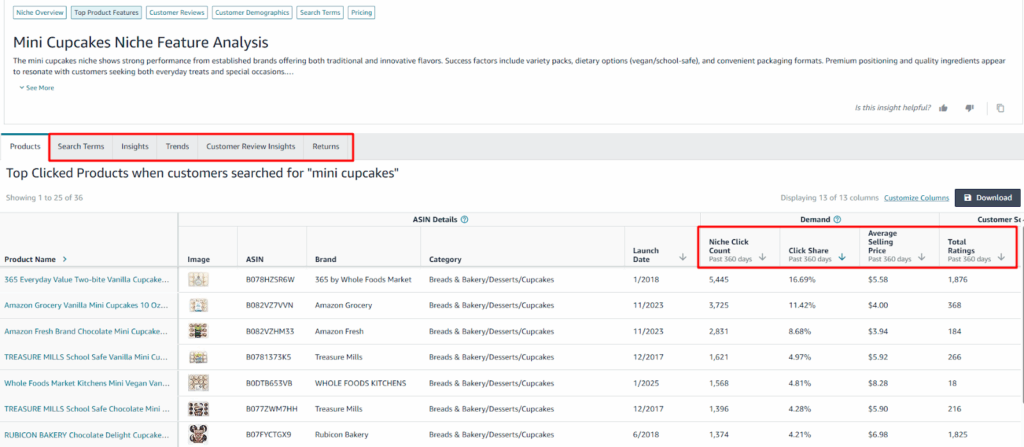
Assessing Competition with the Products Tab
The Keyword View inside Amazon’s Product Opportunity Explorer is one of the most powerful tools for sellers who want to make data-driven decisions. This section consolidates all the key information about how shoppers are searching for products, giving you a clear picture of demand, competition, and trends. By analyzing this data, you can see not only how many people are actively looking for a particular product, but also which related keywords are being searched and how interest changes over time. Seasonal products, for example, may have spikes in certain months, and the Keyword View allows you to anticipate those peaks and valleys.
It also highlights opportunities that many sellers miss, like keywords with strong demand but lower competition, giving you a chance to stand out in the market. By paying attention to metrics like total search volume, search trends over 90 or 180 days, and related keywords, you can better understand shopper behavior and make informed decisions about what to sell. This isn’t just about guessing or following trends — it’s about using real Amazon data to validate your product ideas and avoid costly mistakes.
Learning to read and interpret this data effectively can save you time, reduce risk, and increase your chances of launching a successful product. The Keyword View turns insights into actionable strategies, helping you spot niches that 90% of sellers overlook. By understanding demand, competition, and trends, you gain the confidence to invest in products that have proven market potential rather than hoping your launch succeeds by luck.
Tracking Trends and Conversion Rates
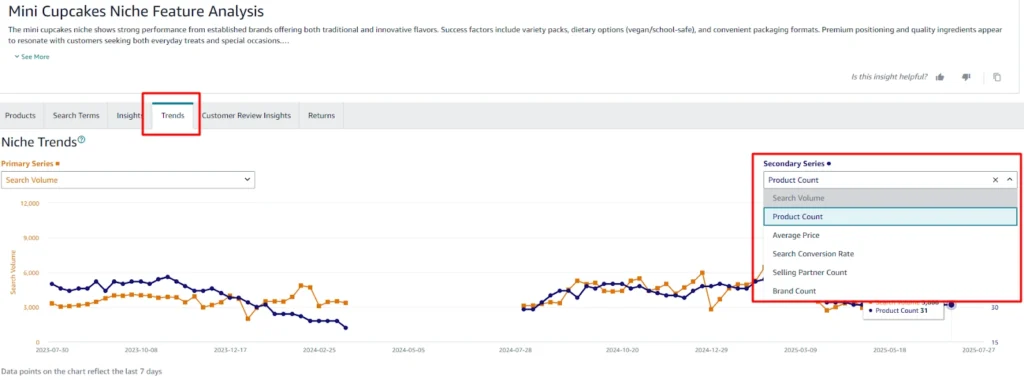
The Trends tab shows search volume, click volume, and conversion rates over the past year. For seasonal products like cupcake stands, you can clearly see when demand peaks and slows.
Look at product count trends too. A rising number of products can indicate increasing competition, often from overseas sellers, but it can also signal growing demand. Pay attention to average price trends as well — rising prices can mean healthy margins.
Customer Review Insights: The Real Goldmine
The Trends tab in Amazon’s Product Opportunity Explorer is where you can track how a product’s popularity evolves over time. It shows search volume, click volume, and conversion rates over the past 12 months, giving you a complete picture of shopper behavior. For seasonal products like cupcake stands, this tab is especially useful because it lets you see exactly when demand peaks and when it slows, allowing you to plan your launch and marketing strategy around those cycles. You can also track product count trends,
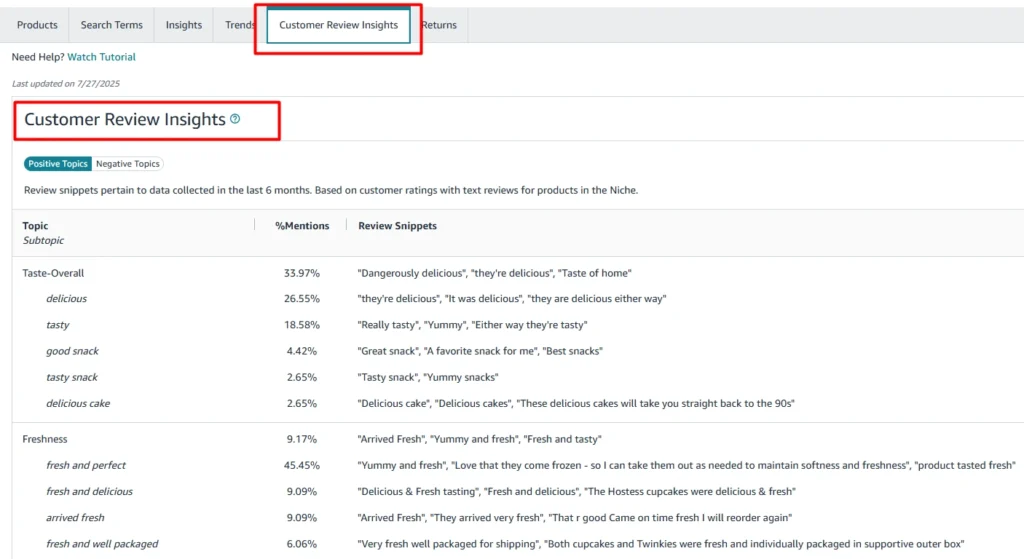
The Customer Review Insights tab summarizes common topics from both positive and negative reviews, saving you time and effort.
- Positive reviews often mention ease of assembly and product design.
- Negative reviews reveal pain points like flimsy materials, poor instructions, or cheap appearance.
These insights give you a competitive edge. By designing a sturdy, easy-to-assemble product with clear instructions, you can meet customer needs better than competitors, earn great reviews, and rank faster without relying on hacks or influencer marketing.
From Research to Launch
Once you’ve found a promising product, the next step is launching it effectively. That involves listing setup, A+ content, PPC campaigns, and ranking strategies.
At Ecomclips, we help brands grow on Amazon with 12 years of experience and a team of experts. Whether you’re starting out or scaling fast, we provide the strategy, support, and results you need to succeed.
Build a product that solves customer pain points from day one. This naturally leads to better reviews, faster ranking, and less reliance on gimmicks or expensive ads.
Key Takeaways
- Use Product Opportunity Explorer to identify high-demand products.
- Analyze keywords, trends, click share, and reviews to assess potential and competition.
- Seasonal dips are normal; look at long-term trends.
- Customer reviews reveal actionable insights for creating a standout product.
- Launch with a strong strategy, focusing on solving customer pain points.
Launching a successful Amazon product isn’t about guessing — it’s about data, insight, and execution. With the right approach, you can find untapped niches, create products customers love, and grow your brand sustainably.Need help launching your next winning product, Ecomclips is here? Contact us at info@ecomclips.com. With our expertise, your success is just a strategy away.