
Selling on Amazon becomes far more effective when product variations are set up correctly. Variations not only improve customer experience but also consolidate reviews, enhance visibility, and increase conversion rates. However, if done incorrectly, they can create messy catalogs, duplicate listings, and unnecessary complications.
This guide explores the three primary methods to add and manage Amazon product variations, as well as best practices for creating parent-child relationships within listings.
Table of Contents:
| 1. Introduction |
| 2. What Is a Variation Listing on Amazon? |
| 3. Why Variations Matter on Amazon |
| 4. Method 1: Adding Variations While Creating a New Listing |
| 5. Method 2: Adding Variations to an Existing Listing |
| 6. Method 3: Merging Standalone Listings Into a Variation Family |
| 7. Best Practices for Variation Management |
| 8. Common Mistakes to Avoid |
| 9. FAQs About Amazon Variation Listings |
| 10. Final Thoughts |
What Is a Variation Listing on Amazon?
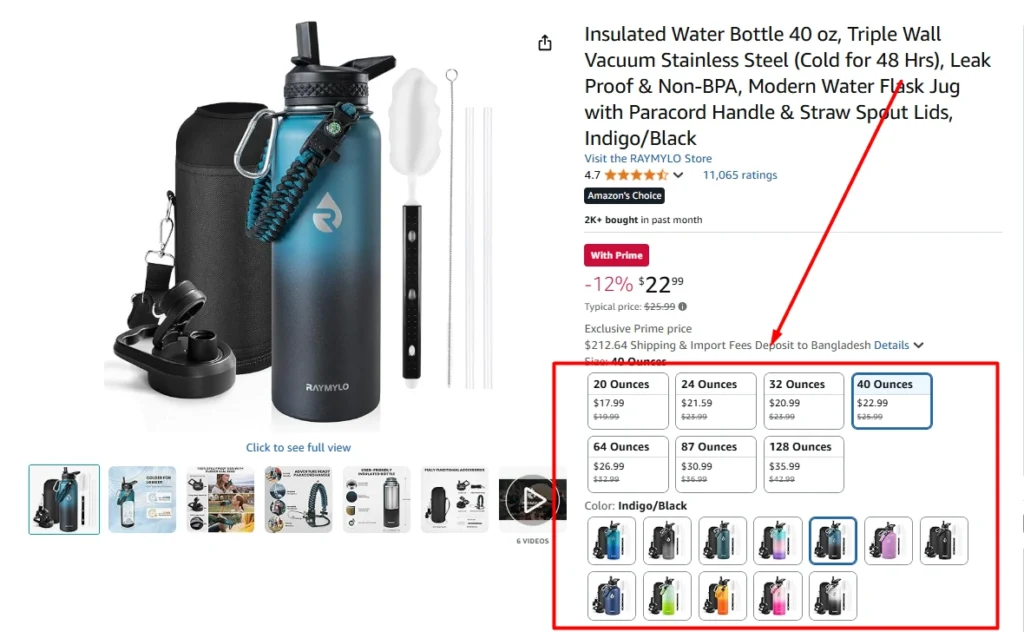
A variation listing on Amazon, often called a parent-child listing, is a way to group similar products together under one main product page. Instead of having separate listings for each size, color, or style, variations allow all options to appear in a single place. For example, a water bottle available in two sizes (10oz and 20oz) and two colors (blue and orange) can be displayed under one parent listing with four child variations.
This setup improves the shopping experience because customers don’t need to search multiple times to find the exact option they want. It also helps brands consolidate reviews, increase click-through rates, and look more professional. From Amazon’s perspective, variation listings reduce clutter in the catalog and make product categories easier to navigate. For sellers, they provide better ranking opportunities, simplify ad campaigns, and create stronger customer trust.
A parent-child variation is essentially:
- Parent listing: A non-buyable placeholder that connects all variations.
- Child listings: The individual, buyable SKUs (size, color, flavor, etc.).
In short, variation listings are not just about choice—they are about visibility, conversion, and customer satisfaction.
Why Variations Matter on Amazon
One of the most overlooked elements in Amazon catalog management is the variation setup. Many sellers either skip it entirely or set it up incorrectly, which leads to scattered listings and lost sales. Variations matter because they give customers an easy way to explore different sizes, colors, or styles without leaving the page. Instead of searching again and again, shoppers can make their decision faster and with more confidence. This smooth experience increases trust and can directly improve conversion rates. For brands, correct variation management also means all reviews are combined under one parent, which strengthens social proof and ranking. In today’s competitive Amazon landscape, variation optimization is not just a nice-to-have—it’s essential for growth.
For sellers, well-structured variations:
- Consolidate reviews across all variations
- Improve search relevance and CTR
- Reduce catalog clutter
- Boost cross-selling opportunities
- Simplify advertising campaigns
Setting up variations correctly from the beginning is critical, as editing or merging later can be more complex.
Method 1: Adding Variations While Creating a New Listing
When launching a new product, the best time to think about variations is during the listing creation process. Setting up the variation family early ensures that the catalog is structured correctly from the beginning, which avoids future complications. Most sellers make the mistake of skipping this step, only to struggle later when they want to add a new size, color, or feature.
Starting with a parent-child setup saves hours of work down the road. Beyond efficiency, it also signals to Amazon’s system that the catalog is organized properly, which helps improve indexing. This method is ideal for private-label sellers who want clean, scalable listings that will support growth.
Steps to Add Variations in a New Listing:
- Log in to Seller Central → Catalog → Add a Product.
- Select the option to create a listing from a blank form.

- Fill in the required product details such as title, category, and item type keyword.
- Check the “Variation” box, even if variations are not yet planned. This ensures flexibility for future updates.
- Select variation attributes based on category (e.g., size, color, style).

- Add variation details such as SKUs, UPCs/GTINs, prices, and product images for each child product.
- Submit the listing to finalize the parent-child relationship.
Pro Tip: Once a parent SKU is created, variation themes cannot be changed. Always choose the correct attributes (size, color, flavor, etc.) from the start.
Method 2: Adding Variations to an Existing Listing
Sometimes products evolve. A seller may start with one or two variations but later decide to expand their catalog with new sizes, flavors, or colors. That’s where adding variations to an existing listing becomes necessary. This method helps keep all variations grouped together without starting from scratch. It is especially useful for seasonal products or expanding product lines, where new options are introduced over time. However, this approach requires careful handling, since modifying an existing listing that wasn’t originally designed for variations can get messy. Still, when done properly, it’s a powerful way to scale without creating duplicate listings.
If a product listing is already active, variations can still be added. This is commonly required when launching new product sizes or colors after the initial listing.
Steps to Add Variations to an Existing Listing:
- Navigate to the parent listing → Edit → Variation tab.
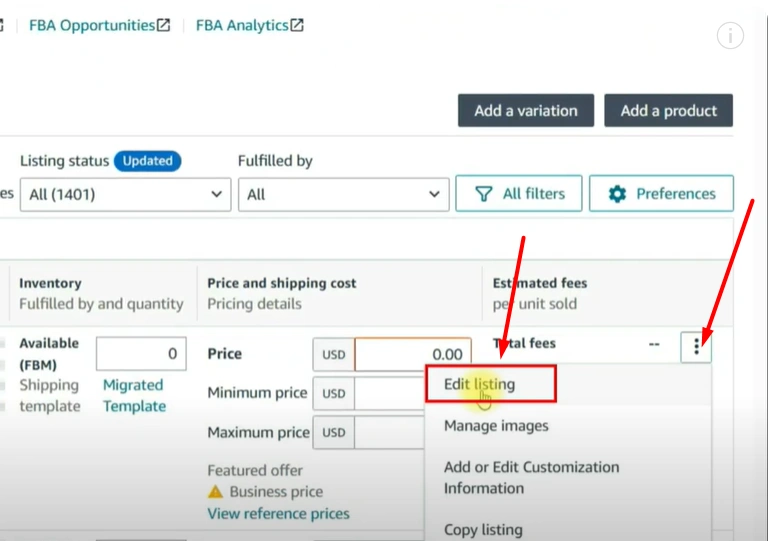
- Add the new variation attribute (e.g., a new size or color).
- Fill in required details such as condition, price, SKU, and barcode.
- Submit changes.
This method works well for adding new variations but can become messy if the listing was not initially created as a parent-child structure.
Method 3: Merging Standalone Listings Into a Variation Family
For sellers who already have multiple standalone listings, merging them into a variation family is often the smartest move. Standalone listings spread out reviews, weaken rankings, and make it harder for customers to find all available options. By combining them into one parent-child structure, brands can consolidate visibility and create a stronger overall presence on Amazon. This process can be more complex than adding new variations, but it delivers huge benefits. A single, well-structured variation family looks more professional, encourages upselling, and boosts customer trust. This method is often necessary for brands that scaled quickly without a clear catalog plan and now need to tidy up their listings for better performance.
In many cases, multiple standalone listings exist for similar products. These can be merged into a single parent listing for better visibility and customer experience.
Thinking About Hiring an Amazon Expert?
Ecomclips’ Partners Achieve an Average 85% Profit Increase!
There are three ways to do this:
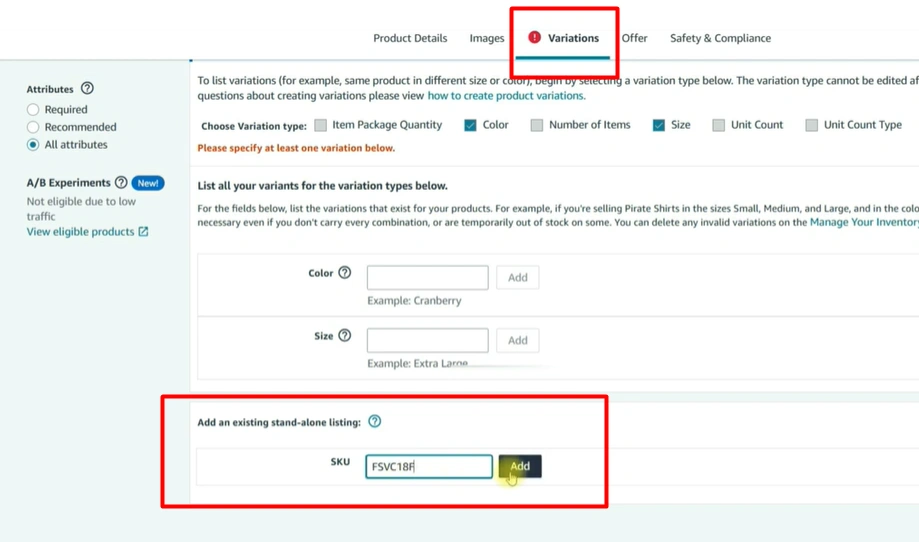
Option 1: Add a Standalone Product to an Existing Parent Listing
- Go to the parent listing and open the Variation tab.
- Enter the SKU of the standalone product under “Add existing listing”.
- Amazon merges the standalone product into the parent variation family.
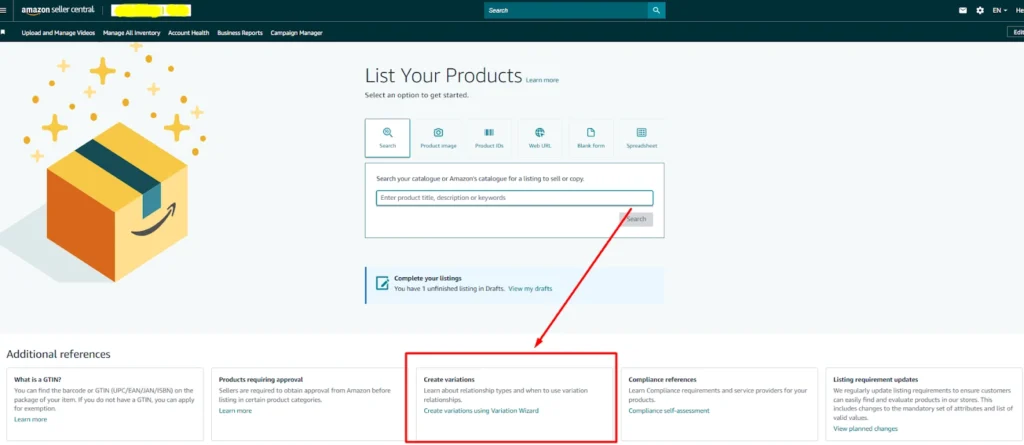
Option 2: Use the Variation Wizard – Add to Existing Family
- Go to Add Products → Create Variations Using Wizard.
- Choose “Add or Update an Existing Variation Family”.
- Enter the parent ASIN, then fill in details for the new child listing.
- Download the auto-generated template, review, and re-upload to complete the process.
Option 3: Create a New Variation Family from Multiple Standalone Listings
- Download the category template for the relevant product type.
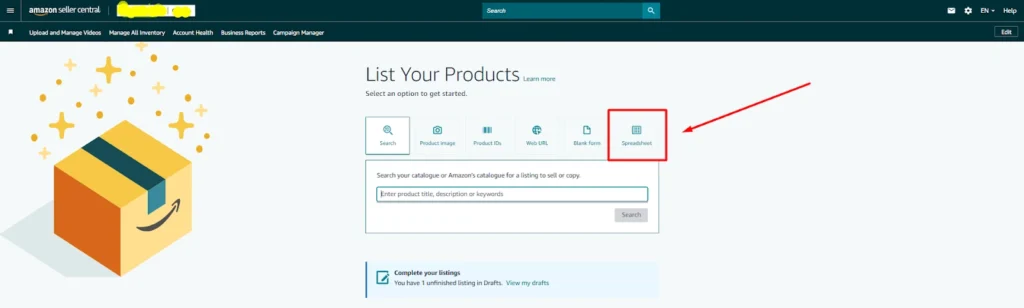
- Assign a parent SKU and map all child SKUs under it.
- Fill in variation details (size, color, relation type = parent/child).
- Upload the completed file in Seller Central.
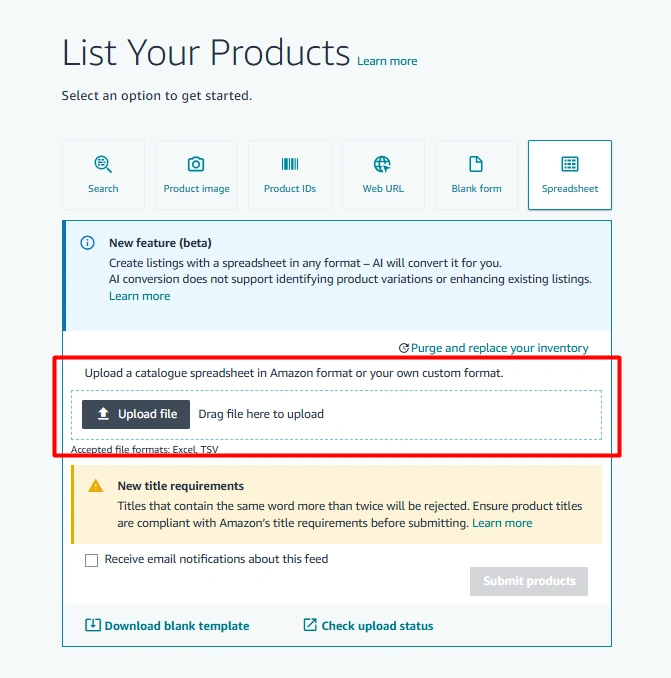
- Amazon creates a new parent-child relationship linking all standalone listings.
This option is more advanced but necessary when no parent listing exists.
Best Practices for Variation Management
Setting up variations correctly is only the first step. Long-term success depends on maintaining a clean, optimized catalog that works for both customers and Amazon’s algorithm. Best practices around barcodes, product images, and review consolidation make a big difference in performance. Following these guidelines ensures that the catalog not only looks professional but also ranks better in search results. For private-label sellers, mastering these details can mean the difference between a listing that struggles and one that dominates the Buy Box.
To avoid catalog issues and ensure maximum performance, follow these best practices:
- Plan variations in advance and always enable the variation box during listing creation.
- Use GS1 barcodes for each child product to maintain compliance.
- Upload unique images for every color or style to improve customer trust.
- Avoid mixing unrelated products under one parent ASIN; only true variations should be grouped.
Common Mistakes to Avoid
Many sellers underestimate how damaging variation mistakes can be. Something as simple as grouping unrelated products under one parent can result in suppressed listings or policy violations. Other errors, like using the same UPC across multiple variations, confuse Amazon’s system and create catalog conflicts. Even neglecting to upload separate images for different variations can frustrate customers and hurt conversion rates. Understanding the common pitfalls helps sellers avoid unnecessary issues and ensures their catalogs stay compliant and customer-friendly.
- Skipping the variation option during listing creation.
- Using one UPC for multiple variations.
- Grouping unrelated products (e.g., water bottles + yoga mats) under a single parent.
- Neglecting to update images for each variation type.
- Overwriting parent listings instead of creating proper child SKUs.
FAQs About Amazon Variation Listings
1. How many variations can a parent listing have?
Amazon allows up to 2,000 child SKUs under a single parent listing. However, it’s recommended to keep the number manageable (10–50 variations) for a better shopping experience and easier catalog management.
2. Does variation listing improve Amazon SEO?
Variation listings don’t directly improve indexing since most text inside images and variation names doesn’t count for ranking. However, they boost conversion rates and CTR, which signals relevance to Amazon’s algorithm and indirectly helps organic rankings.
3. Can unrelated products be added under one parent listing?
No. Amazon’s policy requires that only true variations (such as size, color, or flavor) be grouped under a parent listing. Mixing unrelated items (e.g., a yoga mat and a water bottle) can lead to listing suppression or account warnings.
4. Can variations share the same UPC?
No. Each child variation must have its own unique GS1 barcode/UPC. Using the same UPC for multiple variations can create catalog errors and compliance issues.
5. Can variations help reduce returns?
Yes. Clear variation listings with proper images, size guides, and usage details help customers make informed decisions. This reduces confusion and directly lowers return rates.
6. What’s the difference between parent and child listings?
- Parent Listing: A non-buyable placeholder that organizes variations into one family.
- Child Listings: The actual buyable products that differ by attributes (size, color, style, flavor, etc.).
7. Are variations available for all categories?
Not all. Variation themes differ by category. For example, apparel allows size, color, and style, while home products may allow pack count, size, and material. Sellers must choose from the variation themes Amazon provides for each category.
Watch the full variation listing details video here: https://youtu.be/eNfJAHgwWxg?si=sVANXPVlkUckPVWG
Final Thoughts
Amazon product variations are powerful tools for improving visibility, customer experience, and sales performance. Setting them up correctly at the start saves significant time and prevents catalog complications later.
Whether creating a new listing, updating an existing one, or merging standalone products into a variation family, following the right process ensures smooth catalog management. For brands managing large catalogs or struggling with complex merges, expert support can simplify the process. Agencies with deep experience in Amazon listing management, like Ecomclips, help sellers build optimized catalogs, manage variations, and unlock growth potential.
Ready to Start Growing Your Brand?
Ecomclips’ Partners Achieve an Average 85% Profit Increase!