
Introduction
Every Amazon seller dreams of outranking competitors, boosting conversions, and growing sales—without endlessly throwing money into PPC campaigns. But what if you could uncover your competitors’ weaknesses and turn them into your opportunities?
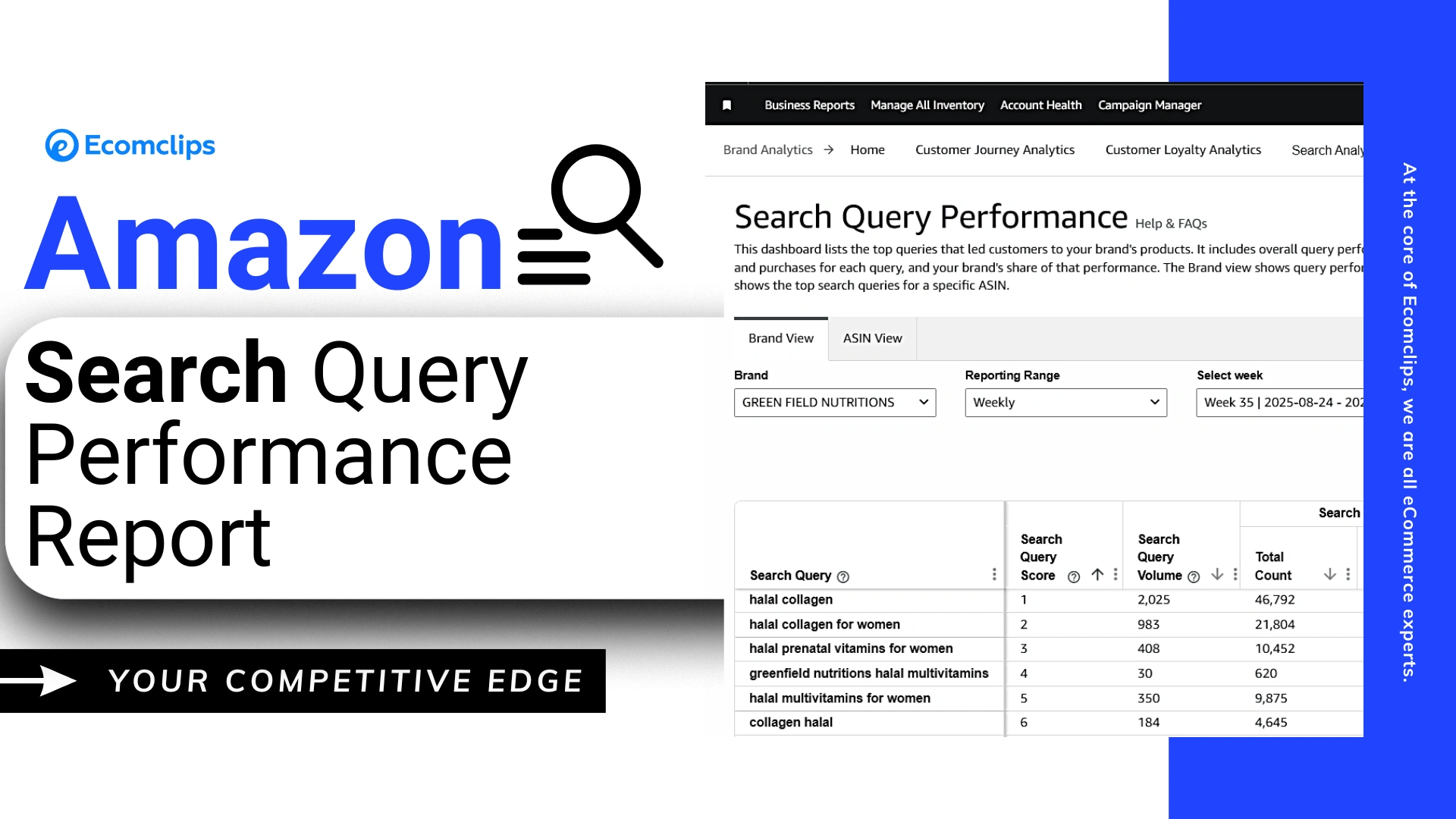
Enter Amazon’s Search Query Performance Report—a powerful tool hidden inside Seller Central that gives you rare visibility into impressions, click-through rates (CTR), and conversion rates (CVR). By learning how to interpret this data correctly, you can identify where your listings fall short and take strategic action to steal sales directly from your competitors.
In this guide, we’ll break down step-by-step how to use the report, highlight real examples, and explain why CTR has become the #1 Amazon ranking factor in 2025.
Table of Contents:
| 1. Introduction |
| 2. What Is the Amazon Search Query Performance Report? |
| 3. Why CTR Matters More Than Ever |
| 4. Step-by-Step: How to Use the SQPR to Steal Sales |
| 5. Optimize Your Main Image (The Secret Weapon) |
| 6. Refine Titles and Keywords |
| 7. Amazon Ranking Factors in 2025 |
| 8. Best Practices for Using SQPR to Beat Competitors |
| 9. Frequently Asked Questions (FAQs) |
| 10. Conclusion |
What Is the Amazon Search Query Performance Report?
Amazon provides a variety of analytics tools to help sellers make smarter decisions, but few are as powerful as the Search Query Performance Report (SQPR). This report allows you to see how your listings perform at a keyword level, not just in terms of sales, but also in terms of visibility and shopper engagement.
By comparing your brand’s data against the wider market, you gain valuable insights into which keywords are bringing you traffic, which ones are underperforming, and where competitors are outperforming you. Instead of guessing why sales are slipping, the SQPR gives you hard evidence to guide your next move.
Ultimately, this report acts as a blueprint for optimization—showing you exactly where your opportunities lie.
Amazon’s Search Query Performance Report (SQPR) is available under Brand Analytics in Seller Central. This report provides sellers with insights into:
- Impressions – how many shoppers saw your listing in search results.
- Clicks – how many shoppers clicked on your product.
- Purchases – how many sales resulted from those clicks.
By comparing your brand’s performance to the overall market, you can see where you’re winning—and where competitors are taking sales from you.
Increase Amazon Market Share By 35% with Search Query Performance (SQP) Report
Why CTR Matters More Than Ever
On Amazon, success isn’t just about being seen—it’s about being clicked. That’s why Click-Through Rate (CTR) has become such a crucial ranking factor in 2025. High impressions mean nothing if shoppers don’t feel compelled to click on your product.
Amazon’s algorithm rewards listings that attract clicks because it signals relevance to customer searches. If your CTR is higher than your competitors, Amazon assumes your product better satisfies shopper intent and boosts your ranking. On the flip side, a low CTR can bury even the best products at the bottom of search results.
Understanding and improving CTR is no longer optional—it’s the difference between dominating search results and getting lost in the crowd.
Step-by-Step: How to Use the SQPR to Steal Sales
The SQPR isn’t just a data dump—it’s a strategic tool that, when used correctly, can directly increase your sales. By walking through the report step-by-step, you can uncover where you’re winning and where you’re leaking traffic to competitors.
From accessing the report to creating benchmarks and identifying weak spots, this process helps you see Amazon’s algorithm through a new lens. The more you analyze and act on these insights, the more control you’ll gain over your visibility and conversions.
Let’s break down the process so you can start applying it to your own brand.
1. Access the Report
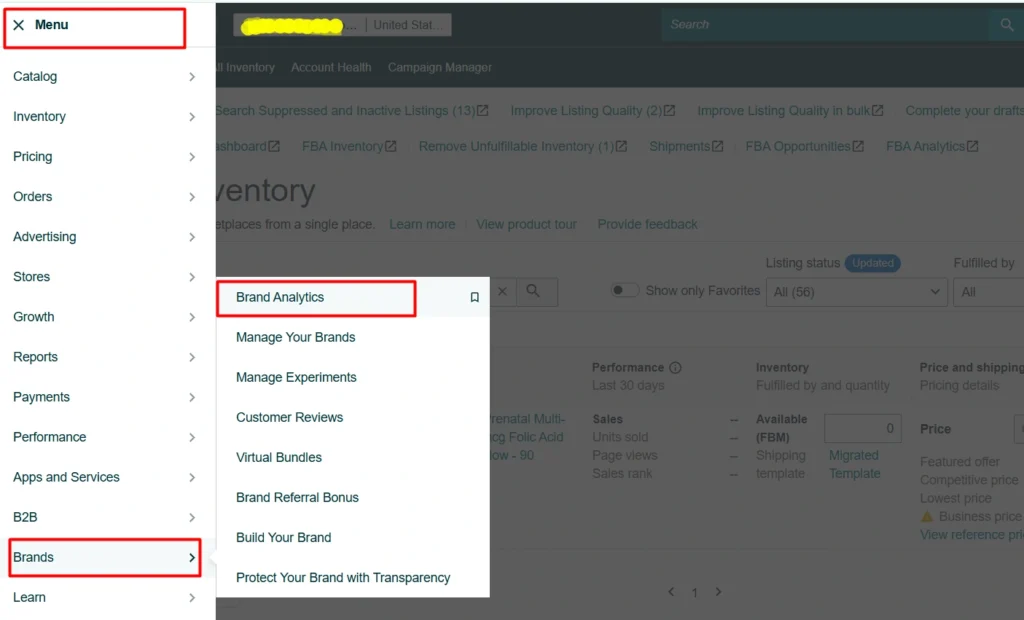
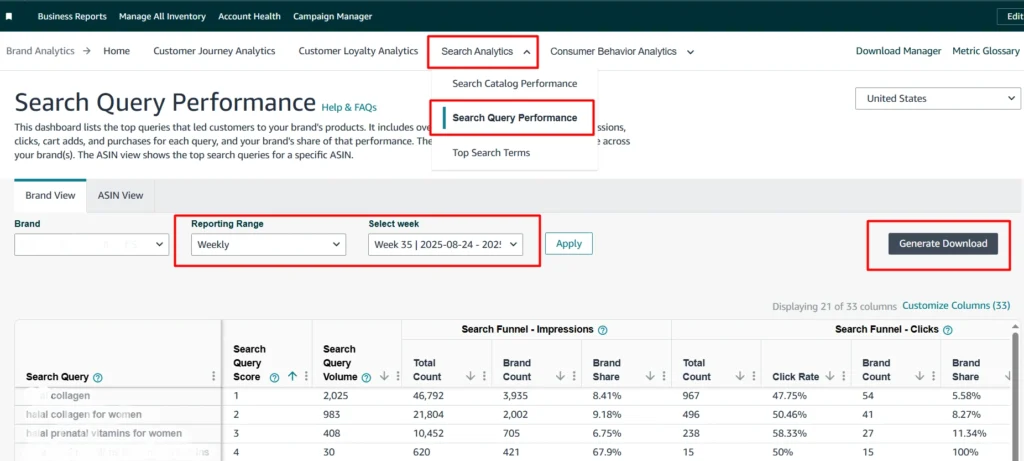
- Log in to Seller Central → Brands → Brand Analytics → Search Query Performance.
- Select monthly view to capture trends over time.
- Apply filters for the current and past month to compare performance.
2. Benchmark Your Metrics
Export the report and clean it in Google Sheets. Focus on four critical metrics:
- Your CTR vs. Market CTR
- Your CVR (Conversion Rate) vs. Market CVR
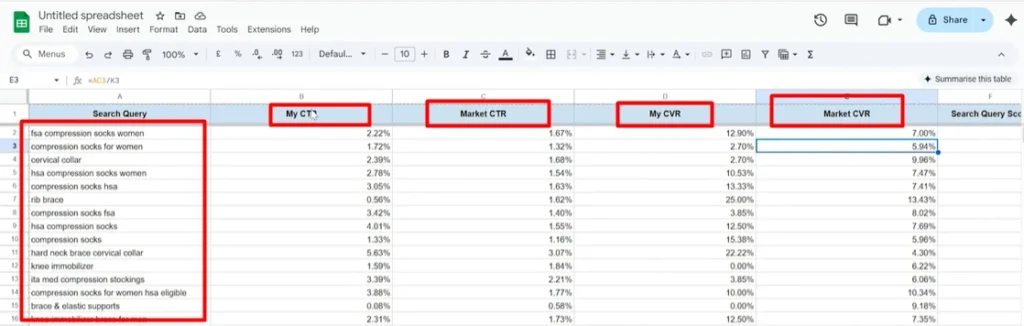
This side-by-side view acts as your competitive scoreboard.
Thinking About Hiring an Amazon Expert?
Ecomclips’ Partners Achieve an Average 85% Profit Increase!
3. Identify Weak Spots
Look for keywords where:
- Your CTR is lower than the market CTR → Your images, titles, or listings aren’t attracting clicks.
- Your CVR is lower than the market CVR → Shoppers click, but don’t buy.
Amazon Search Query Performance Dashboard: What is it & How to Use it with PPC data?
4. Optimize Your Main Image (The Secret Weapon)
Your main image is the single most important element influencing your Click-Through Rate (CTR) on Amazon. It’s the very first thing shoppers see when scrolling through search results, and in most cases, it determines whether they’ll click on your product or a competitor’s. A high-quality main image can literally triple your clicks—without increasing your ad spend. That’s why it’s often referred to as the “secret weapon” for boosting sales.
When analyzing your Search Query Performance Report (SQPR), low CTR compared to the market average usually points to one thing: your main image isn’t capturing enough attention. Unlike product descriptions or bullet points—which only matter after a click—the main image is your ticket to getting noticed in the first place. If your CTR is lower than the competition, this is the first area to optimize.
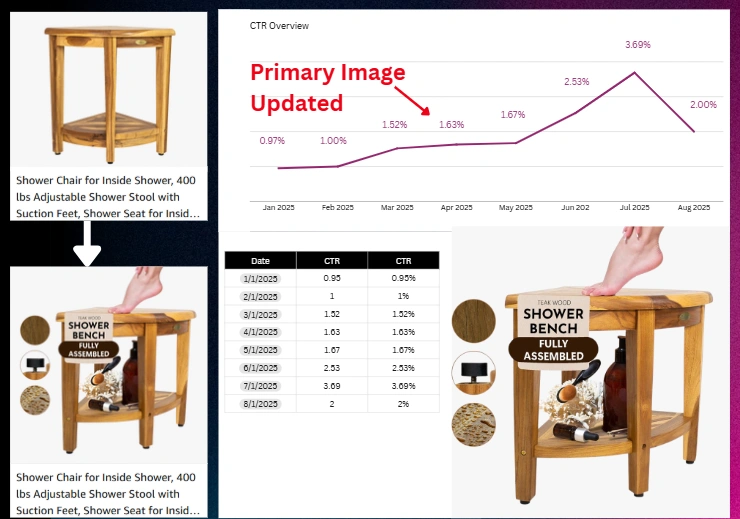
Elements of a High-Converting Main Image
- Clarity and Quality – Use a high-resolution image with a pure white background. The product should be sharp, well-lit, and clearly visible without distractions.
- Keyword Integration – Where appropriate, overlay subtle but clear keyword-focused text (e.g., “Fully Assembled Shower Bench”) to reinforce benefits that matter most to shoppers.
- Lifestyle Appeal – Whenever Amazon’s guidelines allow, include lifestyle elements or graphical enhancements that show how the product is used. This makes the product relatable and easier to imagine in a customer’s daily life.
- Differentiation – Compare your image with top-ranking competitors. If all products look the same, find a visual angle or design element that makes your listing stand out.
- Compliance – Ensure your design still follows Amazon’s image guidelines to avoid suppression or policy violations.
How to Start Optimizing Your Main Image
- Run A/B tests with different image variations using Amazon’s Manage Your Experiments tool.
- Research competitor images for your main keywords and note what stands out.
- Use professional graphic design to incorporate subtle keyword overlays or lifestyle appeal.
- Continuously track CTR improvements through the Search Query Performance Report to measure impact.
Optimizing your main image is one of the fastest, cheapest, and most effective ways to steal clicks from competitors. Once you’ve secured the click, you can focus on conversion rate improvements—but without clicks, conversions never happen.
5. Refine Titles and Keywords
While your main image is the top driver of clicks, your product title plays a crucial supporting role in attracting shopper attention and improving visibility. Titles impact both Click-Through Rate (CTR) and Amazon SEO, making them one of the most powerful elements of your listing. A strong title communicates relevance and trust at a glance, giving shoppers confidence to click while signaling Amazon’s algorithm that your product deserves higher placement.
The Search Query Performance Report (SQPR) can help you identify which keywords are driving impressions but not clicks. By integrating these high-CTR keywords strategically, you can align your listing with customer intent while avoiding clutter or keyword stuffing. Titles should remain clean, scannable, and structured to highlight your most important features and benefits. To stay competitive, continuous refinement through A/B testing ensures you discover which title variations perform best and deliver long-term sales growth.
Key Practices for Optimizing Titles
- Insert high-CTR keywords identified in the SQPR.
- Keep titles concise and scannable for better shopper engagement.
- Avoid keyword stuffing that confuses readers and lowers CTR.
- Highlight core attributes and benefits in a logical flow.
- Test multiple versions with A/B testing for measurable results.
- Refine continuously using CTR and conversion data insights.
Amazon Ranking Factors in 2025
Amazon’s algorithm is constantly evolving, and in 2025 the focus has shifted more than ever toward customer engagement signals. No longer is it enough to simply generate impressions—Amazon now prioritizes listings that attract clicks, convert effectively, and build consistent sales momentum. These factors collectively determine how well your products rank in search results and how visible they are to potential buyers. Understanding them allows you to optimize your listings in a way that aligns with both shopper behavior and Amazon’s algorithm.
Core Ranking Priorities in 2025
- CTR (Click-Through Rate): Higher CTR tells Amazon your listing is relevant and appealing, which directly improves ranking.
- CVR (Conversion Rate): Strong conversions show that your product delivers what shoppers expect, signaling high customer satisfaction.
- Impressions & Sales History: Sustained visibility and consistent sales performance help build long-term ranking stability.
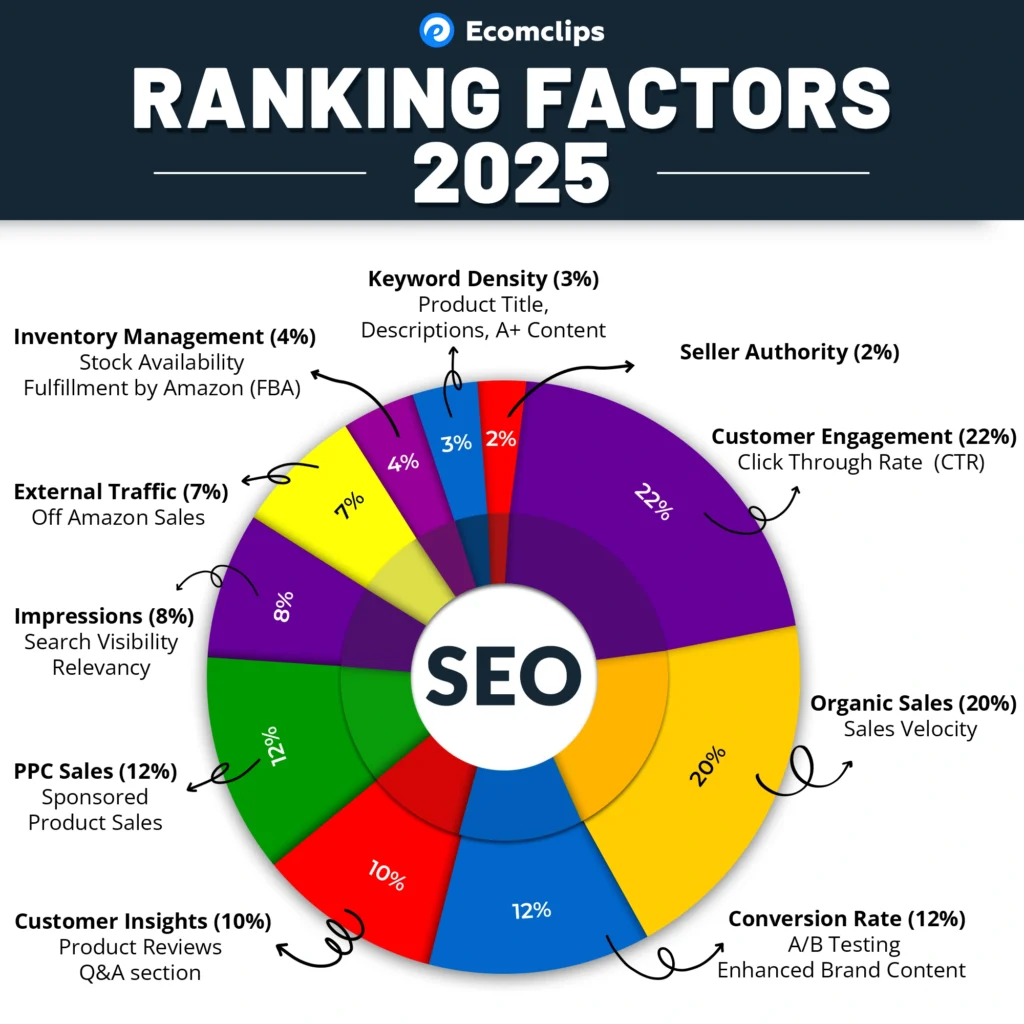
This is why the Search Query Performance Report (SQPR) is such a valuable tool—it highlights exactly where you are underperforming in CTR or CVR compared to the market, so you can take targeted action to improve and climb the rankings.
Best Practices for Using SQPR to Beat Competitors
- Track Monthly Trends – Monitor shifts in CTR/CVR to spot performance dips early.
- Focus on Low-CTR Keywords – Update images and titles where you’re underperforming.
- Leverage Competitor Weaknesses – Target keywords where competitors have low conversion.
- Run Micro Tests – Small changes (image swaps, title tweaks) can yield massive gains.
- Document Improvements – Keep before-and-after data to measure ROI.
Frequently Asked Questions (FAQs)
1. What is the Amazon Search Query Performance Report (SQPR)?
The SQPR is a tool available in Amazon Brand Analytics that provides keyword-level insights into impressions, clicks, and purchases. It helps sellers understand how their listings perform compared to the overall market.
2. Why is CTR so important for Amazon ranking in 2025?
Click-Through Rate (CTR) is now considered the top ranking factor because it shows Amazon how relevant and attractive your listing is. The higher your CTR, the more Amazon promotes your product in search results.
3. How can I improve my CTR without spending more on ads?
The fastest way is to optimize your main image and product title. Small changes such as adding keyword overlays, improving design, or refining titles can significantly increase clicks.
4. What role does Conversion Rate (CVR) play in ranking?
CVR signals customer satisfaction. If shoppers click and buy, Amazon sees your product as trustworthy and rewarding to shoppers, which improves organic ranking.
5. Can I use the SQPR to track my competitors?
Yes, indirectly. While you can’t see competitor listings specifically, you can compare your CTR and CVR against the overall market performance to identify where competitors are outperforming you.
6. How often should I review the SQPR?
It’s best to review the report monthly. Regular analysis helps you spot trends, identify weak points early, and make timely optimizations.
7. Is it better to focus on CTR or CVR first?
Start with CTR, because without clicks you won’t generate conversions. Once you’re driving traffic, shift focus to improving CVR to maximize sales from those clicks.
Conclusion
Amazon success isn’t about relaunching products or spending more on ads—it’s about using the right data. The Search Query Performance Report reveals where you’re losing clicks and conversions, and how to fix it. By focusing on CTR and CVR, you can systematically steal sales from your competitors and climb the rankings, without extra PPC spend.Need help analyzing your report or optimizing your listings?
Email us at info@ecomclips.com for a free pre-audit. At Ecomclips, we put sellers first and help you scale your business in an increasingly competitive Amazon marketplace.
Ready to Start Growing Your Brand?
Ecomclips’ Partners Achieve an Average 85% Profit Increase!