
If your Amazon listings don’t include video yet, you’re leaving conversions on the table.
Amazon listing videos are already helping top-performing sellers stand out and convert more shoppers. As buying behavior becomes increasingly visual and attention spans get shorter, images and bullet points alone are no longer enough to earn trust. Buyers want to see how a product works, understand its value instantly, and feel confident before clicking Add to Cart.
In this guide, we break down how Amazon listing videos actually influence buyer behavior, why they play a crucial role in ranking and conversions, and how you can create video content that turns casual browsers into paying customers.
Table of Contents:
| Why Amazon Listing Videos Are No Longer Optional |
| What Are Amazon Listing Videos and Where Do They Appear? |
| Do Amazon Listing Videos Increase Sales? The Data Behind Conversions |
| Why Amazon Listing Videos Build Trust and Improve Buyer Confidence |
| Types of Amazon Product Videos That Convert Best |
| Amazon Listing Video Requirements and Guidelines (Updated) |
| How to Create Amazon Listing Videos That Actually Convert |
| Amazon Listing Videos and SEO: How Videos Help You Rank Higher |
| Common Amazon Listing Video Mistakes Sellers Should Avoid |
| How Many Amazon Listing Videos Should You Add to a Product Listing? |
| Turning Amazon Product Videos Into a Conversion Machine |
Why Amazon Listing Videos Are No Longer Optional
If shoppers can’t see how your product works, they’re far less likely to buy it.
Over 40% of online shoppers say they prefer learning about a product through video rather than text or images. Yet many Amazon sellers still treat listing videos as optional.
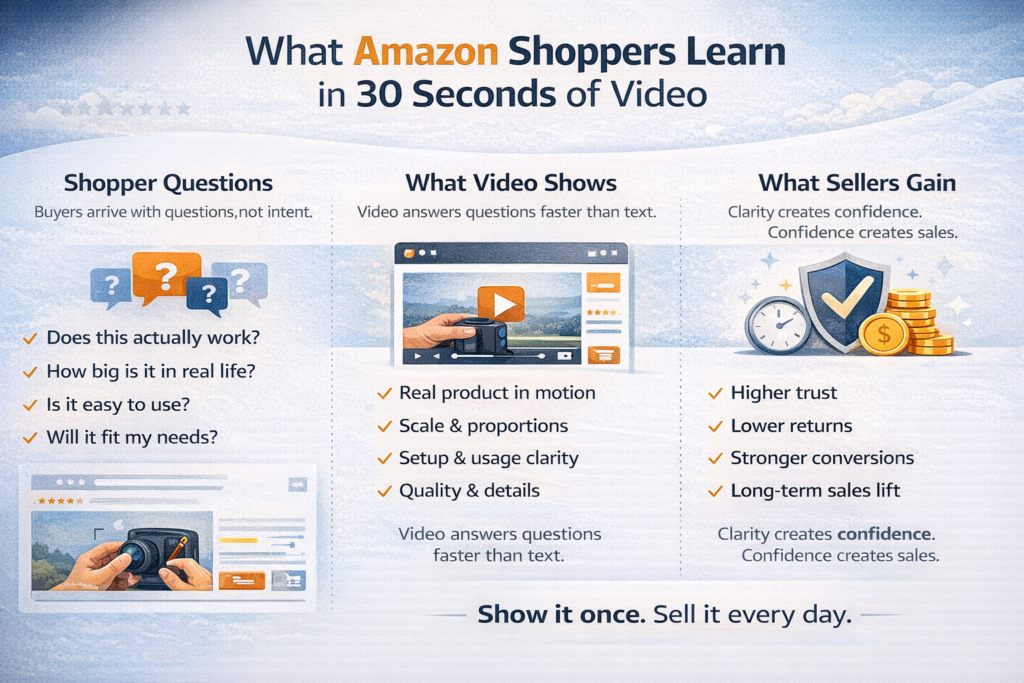
Here’s the reality: Amazon listing videos help shoppers see how your product works, reduce hesitation, and feel confident before buying. By answering common questions visually, videos improve click-through rate, boost conversions, and build buyer trust.
So, what are Amazon listing videos? They’re short, product-focused videos on your product page that demonstrate usage, benefits, and real-world application.
And do they increase sales? Yes. By reducing hesitation and increasing engagement, listing videos help turn browsers into buyers and give your product a clear edge over competitors relying only on static images.

Where Amazon Listing Videos Appear on a Product Page
Your Amazon listing video isn’t limited to one spot on your product page.
They show up across several high-visibility areas on Amazon, each serving a different purpose in the buyer journey.
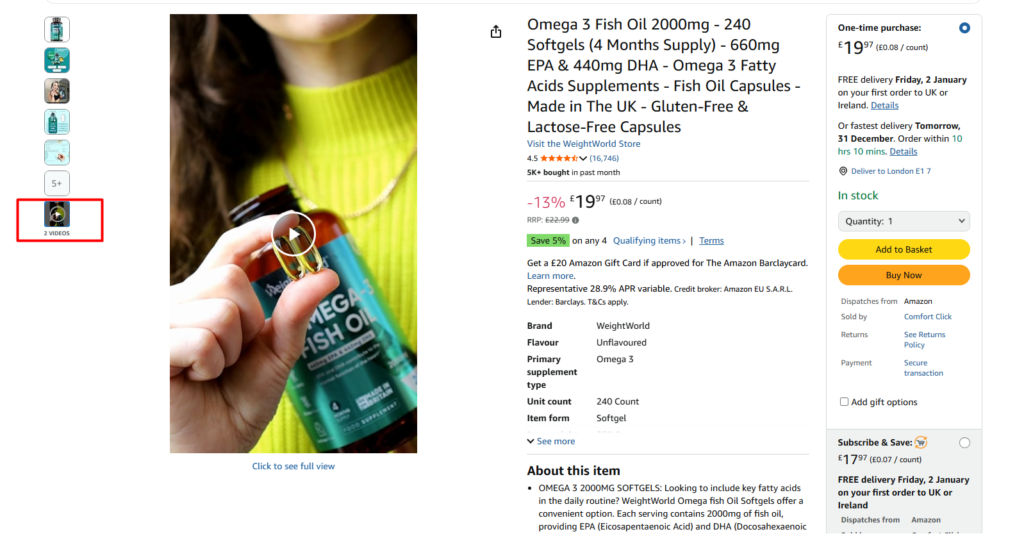
Image Block: When you upload a video to your product listing, it appears under the main product images. Clicking the thumbnail opens a larger player, allowing shoppers to quickly see the product in action before buying.
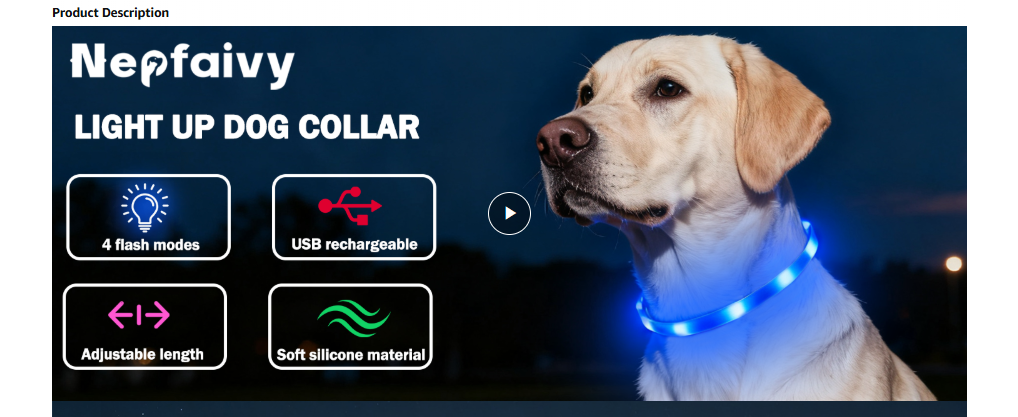
A+ Content: Videos added to A+ Content appear down the product page, below the main images and description. These videos open within the page and help explain features in more detail, answer deeper questions, and reinforce confidence before buying.
Amazon Storefront: When you upload videos to your Amazon Storefront, they appear across brand pages and product collections, helping shoppers explore your catalog and understand your brand.
Sponsored Brands Video Ads: When you run Sponsored Brands Video Ads, your video appears directly in Amazon search results.
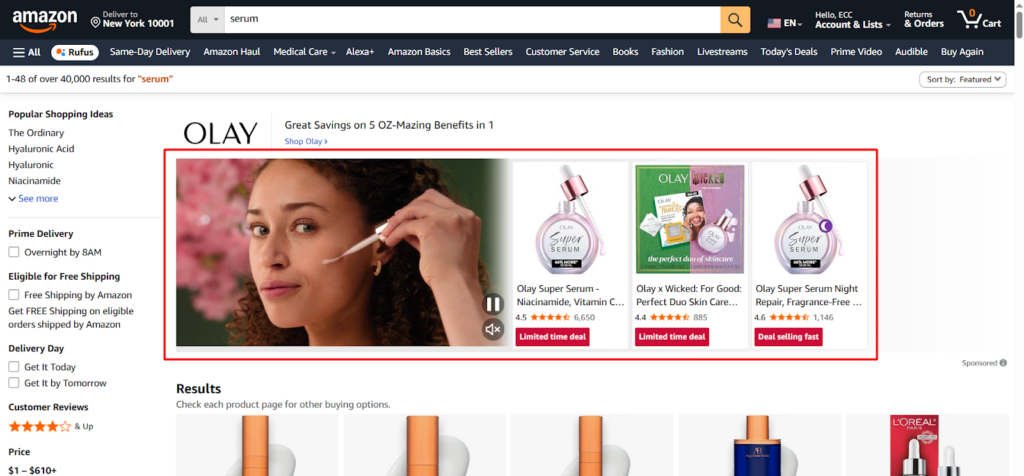
Understanding where your Amazon listing videos appear helps you create content that supports each stage of the buying journey.
Thinking About Hiring an Amazon Expert?
Ecomclips’ Partners Achieve an Average 85% Profit Increase!
Types of Amazon Listing Videos That Convert Best
Not all Amazon listing videos perform the same.
Shoppers visit your product page with different questions in mind, which is why high-converting listings use multiple video types—each designed to guide buyers closer to a purchase.
Product Demo Videos: Product demo videos show exactly how your product works. They highlight key features, functionality, and ease of use, helping shoppers understand what they’re buying within seconds.
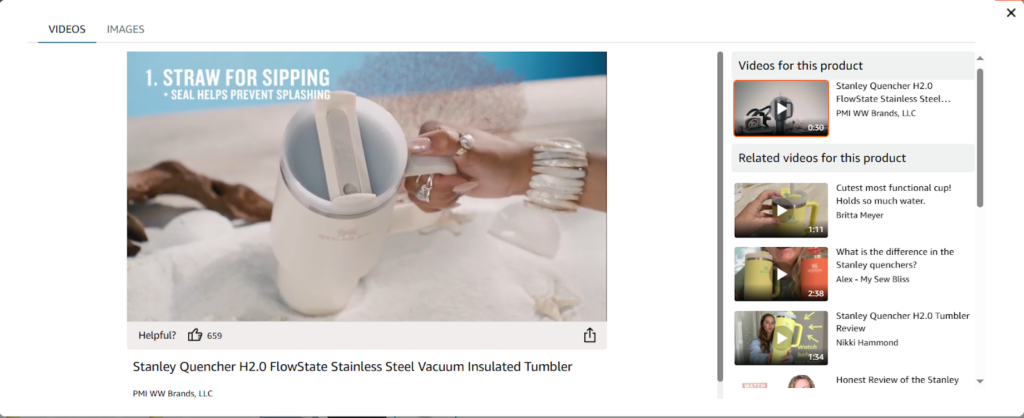
Lifestyle Videos: Lifestyle videos show your product being used in real-life situations. They help shoppers imagine how the product fits into their daily routine, making the purchase feel more personal and relatable.
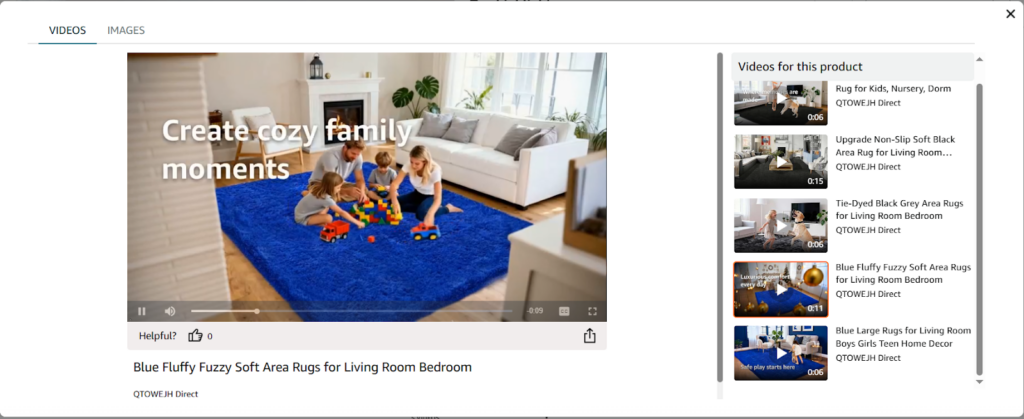
Problem–Solution Videos: These videos start by highlighting a common problem your target customer faces, then demonstrate how your product solves it.
Unboxing Videos: Unboxing videos show what customers receive when they order your product, including packaging, accessories, and first impressions.
Comparison Videos: Comparison videos subtly highlight why your product is a better choice than alternatives, without directly calling out competitors.
Brand Story Videos: Brand story videos focus on who you are, why your brand exists, and what makes it trustworthy. These are best placed in A+ Content or Storefronts rather than the main image block.
Using a combination of these video types helps answer buyer questions at every stage of the journey.
Together, they increase engagement, build confidence, and turn interested shoppers into buyers.
Expert Secrets: How to Create Amazon Listing Videos That Actually Convert
Creating an Amazon listing video is easy. Creating one that actually converts is where most sellers struggle.
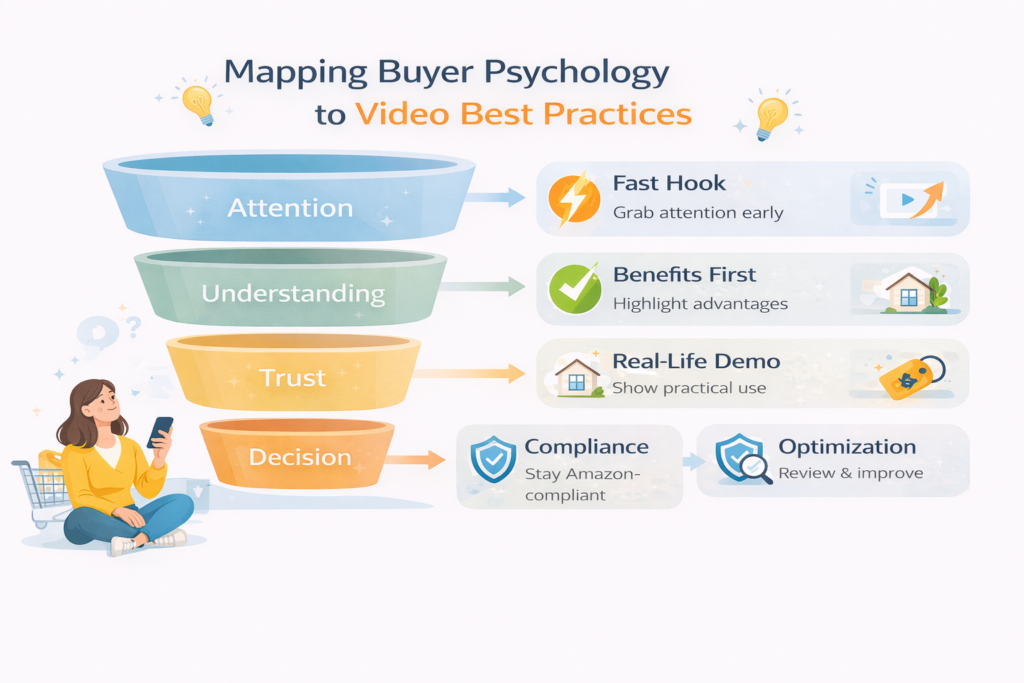
A high-performing Amazon listing video strategy isn’t about flashy visuals—it’s about clarity, relevance, and buyer psychology. Below are proven expert principles that show you how to create Amazon product videos that turn views into sales.
1. Hook Attention in the First 3 Seconds
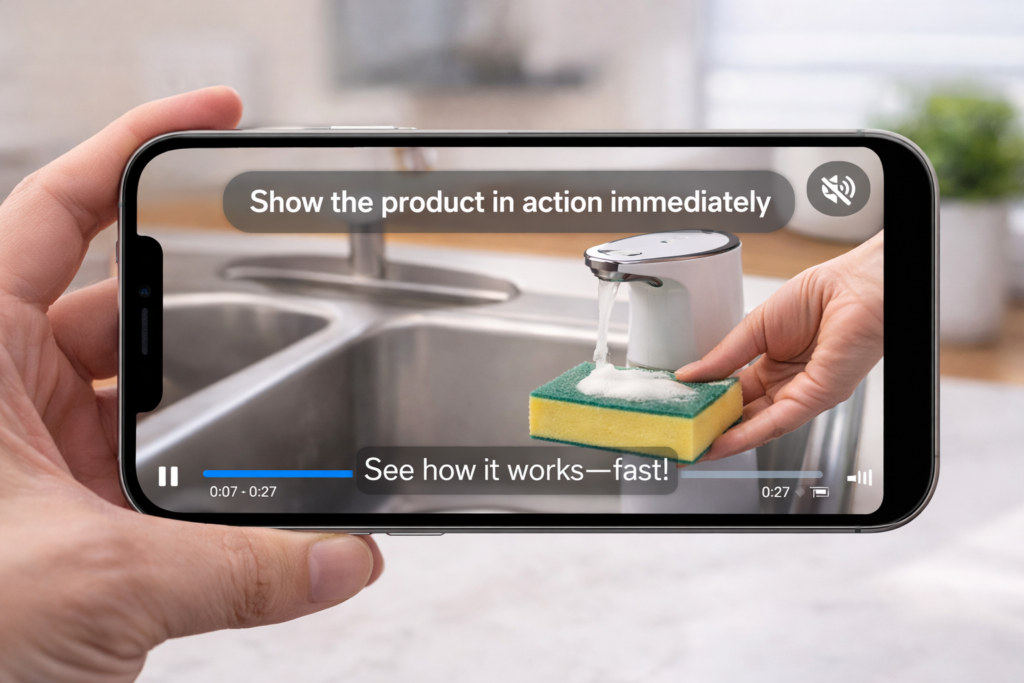
Amazon shoppers scroll fast. If your video doesn’t grab attention immediately, it gets skipped. Start with the product in action or the main benefit—not a logo or intro screen.
Example:
Instead of opening with your brand logo, show the product solving the main problem right away (e.g., a spill being cleaned instantly or a device turning on with one click).
If the first few seconds don’t spark interest, the rest of the video won’t matter.
2. Show the Benefit Before the Feature
Shoppers care about outcomes, not specifications. Lead with what the product helps them achieve, then support it with features.
For example, show how the product saves time, solves a problem, or improves daily life before explaining how it works.
Buyers care about why it helps, not just how it works.
3. Design for Sound-Off Viewing
Most Amazon product videos are watched without sound, especially on mobile. Use captions, on-screen text, and clear visuals so your message lands even when audio is muted.
Example:
Add short text overlays like “30-second setup” or “No tools needed” while showing the action.
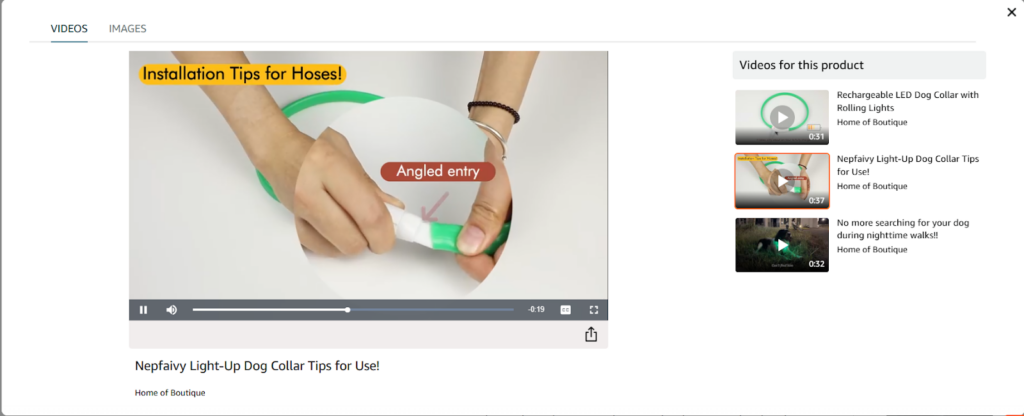
4. Use Real-Life Scenarios, Not Just Studio Shots
Perfect studio visuals look polished, but real-world usage builds trust. Show hands using the product, everyday environments, and natural scenarios that shoppers can relate to.
5. Keep It Short, Clear, and Purposeful
Aim for under 90 seconds, with most value delivered early. Focus on one clear goal: showing how the product works and why it’s worth buying.
Example:
A 30–45 second demo showing setup, use, and result often converts better than a long explanation.
Every second should move the shopper closer to confidence.
6. Highlight Details With Close-Ups and Angles
Use close-up shots to show textures, materials, size, and quality—things customers can’t feel online. Combine these with wider shots to show scale and usage.
Clear visuals reduce uncertainty and returns.
7. Match Video Messaging With Listing Keywords
Your video should visually support the same keywords used in your title and bullet points. This alignment reinforces clarity, improves trust, and supports overall listing performance.
8. Stay Amazon-Compliant but Persuasive
Avoid pricing, promotions, exaggerated claims, or competitor mentions. Focus on honest demonstrations and clear benefits instead.
Amazon rewards listings that educate—and shoppers trust them more.
9. Test, Review, and Improve Over Time
High-converting Amazon videos aren’t one-and-done. Review performance, watch-time, and engagement, then update or add videos as your listing evolves.
Optimization is an ongoing advantage most sellers ignore.
How to Upload a Product Video in Amazon Seller Central
To upload an Amazon product video, log in to Seller Central, go to the Catalog tab, and select Upload & Manage Videos.
- Log in to Amazon Seller Central
- Go to the Catalog tab
- Click Upload & Manage Videos
On the next screen, click the Upload Video button. You’ll then be asked to choose how you want to assign the video under ASINs.
If your brand is enrolled in Amazon Brand Registry, select Brand. This allows you to upload one video and assign it to up to 300 related ASINs.
If you’re not enrolled in Brand Registry, select Non-brand. In this case, you can assign the video to one ASIN only.
Once uploaded and approved by Amazon, the video will appear on your product listing and other eligible placements.
Common Mistakes Sellers Make With Amazon Listing Videos
Even sellers who use Amazon listing videos often sabotage their results without realizing it. Simply adding a video isn’t enough—how the video is made and structured matters just as much.
Here are the most common mistakes that prevent listing videos from converting:
- Long intros before showing the product: Starting with logos, animations, or slow build-ups causes shoppers to scroll past. Buyers want to see the product in action immediately.
- Over-branding instead of selling benefits: Focusing too much on brand messaging and not enough on how the product helps the customer reduces engagement. Benefits should always come first.
- Ignoring mobile-first viewing: Most Amazon shoppers browse on mobile. Videos that rely on tiny text, audio-only explanations, or slow pacing often fail on smaller screens.
- Uploading only one generic video: One video can’t answer every buyer question. High-performing listings use multiple videos to address different concerns like usage, quality, and comparison.
- Using low-quality visuals or unclear angles: Poor lighting, shaky footage, or unclear close-ups make it hard for shoppers to understand the product and can hurt trust.
Amazon shoppers want clarity, not commercials. The best-performing listing videos are simple, focused, and designed to help buyers decide faster—not impress them with flashy production.
Turning Amazon Listing Videos Into a Sales Machine
Amazon listing videos are no longer optional—they’re one of the most powerful tools sellers have to increase conversions, build trust, and stand out in competitive marketplaces.
- Amazon Listing Videos Matter: Videos are no longer a nice-to-have on Amazon. They are a core part of modern listings, helping sellers increase conversions and stay competitive.
- Videos Help Buyers Trust Your Product: By showing how a product works in real life, videos reduce confusion, answer questions instantly, and help shoppers feel confident before buying.
- Think of Videos as a Long-Term Investment: A strong product video keeps working long after it’s uploaded. It supports conversions, engagement, and ads without requiring ongoing spend.
- Videos Improve Overall Listing Performance: Well-made videos increase time on page, reduce hesitation, and strengthen key signals Amazon uses to evaluate listing quality.
- Review Your Current Product Listings: Audit your listings to see where videos are missing, outdated, or not clearly showing product benefits and usage.
- Focus on Videos Designed to Convert: Add videos that highlight benefits, real-life use, and product quality—not just branding or features. If creating effective Amazon listing videos feels confusing or time-consuming, expert support can help you get results faster.
- Use Videos to Build a Sales Engine: When done right, Amazon listing videos consistently turn views into buyers and help your listings perform better over time.
Start by reviewing your existing listings and identifying where video can remove buyer hesitation and improve clarity. With the right strategy, Amazon listing videos don’t just support sales—they scale them.
Frequently Asked Questions (FAQ):
Q. Are Amazon listing videos free?
Yes. Uploading Amazon listing videos is free. Once you’re eligible, you can add videos to your product listings without any additional cost from Amazon.
Q. Do I need Brand Registry for Amazon listing videos?
Brand Registry is not mandatory, but it unlocks more flexibility. Brand-registered sellers can assign one video to up to 300 ASINs, while non-brand sellers can assign a video to one ASIN only.
Q. How long does Amazon take to approve listing videos?
Amazon usually reviews and approves listing videos within 24 to 72 hours, although approval times may vary depending on content and compliance.
Q. Can videos be added to existing Amazon listings?
Yes. Amazon listing videos can be added to existing product listings at any time, as long as the ASIN is eligible and the video follows Amazon’s guidelines.
Q. Do Amazon listing videos work for low-ticket products?
Yes. Listing videos are effective even for low-priced products because they reduce hesitation, improve clarity, and help shoppers make faster decisions.
Q. Can Amazon listing videos improve PPC performance?
Yes. High-converting listing videos often improve PPC results by increasing conversion rates, which can lead to better ad efficiency and lower cost per conversion.
Q. What is the ideal length for an Amazon listing video?
The ideal length is 30–90 seconds. The most important information should appear within the first 5–10 seconds to capture attention.
Q. Can I upload more than one video to an Amazon listing?
Yes. Amazon allows multiple videos per listing. High-performing listings typically use several videos to address different buyer questions.
Q. What video format does Amazon accept?
Amazon accepts common formats such as MP4 and MOV, with high-resolution visuals and clear audio. Videos must follow Amazon’s content guidelines.
Q. Can I use the same video for Sponsored Brand Ads and listings?
Yes. Many sellers reuse videos for both Sponsored Brands Video Ads and product listings, though the video should be optimized for conversion once traffic arrives.
Q. Do Amazon listing videos help with SEO and ranking?
Videos don’t directly change keyword rankings, but they improve engagement and conversion rates—signals Amazon’s algorithm uses to evaluate listing performance.
Q. Why does Amazon reject listing videos?
Common reasons include pricing or promotional claims, exaggerated benefits, competitor mentions, poor video quality, or non-compliant text overlays.
Q. Can Amazon listing videos reduce product returns?
Yes. By clearly showing size, usage, and functionality, videos help set accurate expectations and reduce misunderstandings that lead to returns.
Q. How often should I update my Amazon listing videos?
Videos should be reviewed periodically. Update them if buyer questions change, performance drops, or the product is improved or updated.
How Ecomclips Helps Brands Win With High-Converting Amazon Listing Videos
At Ecomclips, we help brands turn Amazon listing videos into a powerful conversion engine. As shopper behavior becomes more visual and attention spans shorten, video is no longer optional—it’s a core driver of trust, engagement, and sales. Our team combines strategy, creativity, and Amazon expertise to ensure your videos don’t just look good, but actually convert.
We don’t believe in one-size-fits-all content. Every video we create is designed to align with buyer intent, Amazon’s platform rules, and your specific product goals—so your listings perform better at every stage of the buyer journey.
What We Do:
- Amazon Listing Video Strategy: We identify the right video types for your product—demos, lifestyle, problem-solution, or comparison—to match buyer intent and maximize conversions.
- Conversion-Focused Video Creation: From scripting to final delivery, we create videos that hook attention fast, show benefits clearly, and build buyer confidence without violating Amazon policies.
- A+ Content & Storefront Video Integration: We place videos strategically across your listing, A+ Content, and Storefront to support discovery, education, and decision-making.
- Mobile-First Video Optimization: Our videos are designed for sound-off viewing and mobile shoppers, where most Amazon purchases happen.
- Performance Review & Optimization: We monitor engagement, watch-time, and listing performance to continuously improve results and keep your videos effective over time.
With Ecomclips, your Amazon listing videos become more than visual content—they become a long-term sales asset. We handle the strategy, creation, and optimization, so you can focus on scaling your brand and staying ahead of the competition.
Watch how we help Amazon sellers boost conversions with strategic listing videos →
Boost Amazon Sales with Stunning Product Videos I Ultimate Guide for Your Amazon Listing Video
Amazon Sponsored Products Ads Explained : Auto vs Manual Campaigns for More Sales
Amazon Image Optimization in 2026: The #1 Mistake Sellers Make
Amazon Listing Image Masterclass: How Top Sellers Boost CTR & Conversions
Amazon SEO Secrets EXPOSED: How to Rank Higher Without More Reviews!
Ecomclips: Your Complete eCommerce Solution Under One Umbrella
At Ecomclips, we bring every eCommerce service you need under one roof — strategy, operations, design, marketing, and growth, all seamlessly connected to help your brand thrive across every marketplace.
Since 2012, we’ve been helping businesses of all sizes launch, scale, and dominate online. From Amazon, Walmart, eBay, and Etsy to Shopify and WooCommerce, our team of marketplace experts, designers, developers, and marketers works together to deliver measurable results.
Our services span the full eCommerce lifecycle:
Account Setup & Product Listing Management: We handle registrations, compliance, and product data optimization across all marketplaces.
- Amazon Optimization Service: From keyword-rich titles and A+ content to PPC campaigns and storefront design, we craft listings that convert.
- Creative Design & Content Production: A+ visuals, infographics, brand stores, and product videos built to boost engagement.
- Advertising & PPC Management: Smart, data-driven ad strategies for Amazon, Walmart, and Google that maximize ROI.
- Web Development & Store Design: Shopify, WooCommerce, and Magento websites built for performance and conversion.
- Data Management & Automation: Streamlined product feeds, catalog syncing, and inventory control for effortless scalability.
- Customer Service & Order Fulfillment: End-to-end support that enhances customer satisfaction and builds long-term loyalty.
- Analytics & Growth Strategy: Real-time insights and ongoing optimization to ensure consistent, profitable growth.
Whether you’re launching a new store or managing multiple global marketplaces, Ecomclips acts as your single strategic partner, simplifying complexity and driving sustainable revenue growth.
Ready to Start Growing Your Brand?
Ecomclips’ Partners Achieve an Average 85% Profit Increase!