

Your product is great, but no one is finding it on Amazon — why?
You’ve spent months sourcing the perfect product. Your photos are professional, your price is competitive, and your inventory is ready. But here’s the hard truth: if you haven’t done proper Amazon keyword research, your listing might as well be invisible.
70% of Amazon shoppers never scroll past page one. Amazon’s algorithm now analyzes your entire product ecosystem — title, bullets, backend terms, reviews, Q&A, A+ Content, and external signals. It interprets context, measures engagement, and predicts which products solve customer problems.
Search results are dynamically curated, personalized, and driven by behavioral signals rather than keyword density alone. Success requires more than stuffing high-volume keywords into your title. You need data analysis, competitive intelligence, and strategic thinking around keyword clustering, customer intent, and algorithmic context.
In this guide, we’ll walk you through everything you need to know about Amazon keyword research — from understanding what keywords are, to finding the right ones, to placing them strategically in your listing.
Why Most Amazon Sellers Fail to Rank
Imagine pouring hours into your Amazon product listing, only to realize that no one is finding it. The root cause? Skipping keyword research — the most essential step to getting noticed.
Here are the biggest mistakes we see:
- No keyword research at all: Many sellers write their listings based on what sounds good to them, not what customers are actually searching for. They use industry jargon or creative language that doesn’t match real search behavior.
- Guessing keywords: Some sellers throw in words they think buyers might use, without validating search volume or relevance. This approach wastes valuable character space in your title and bullets.
For example, A seller is trying to sell a bluetooth speaker. They use keywords like “wireless speaker,” “bluetooth sound,” and “cool music speaker” without checking how many people are searching for these terms.
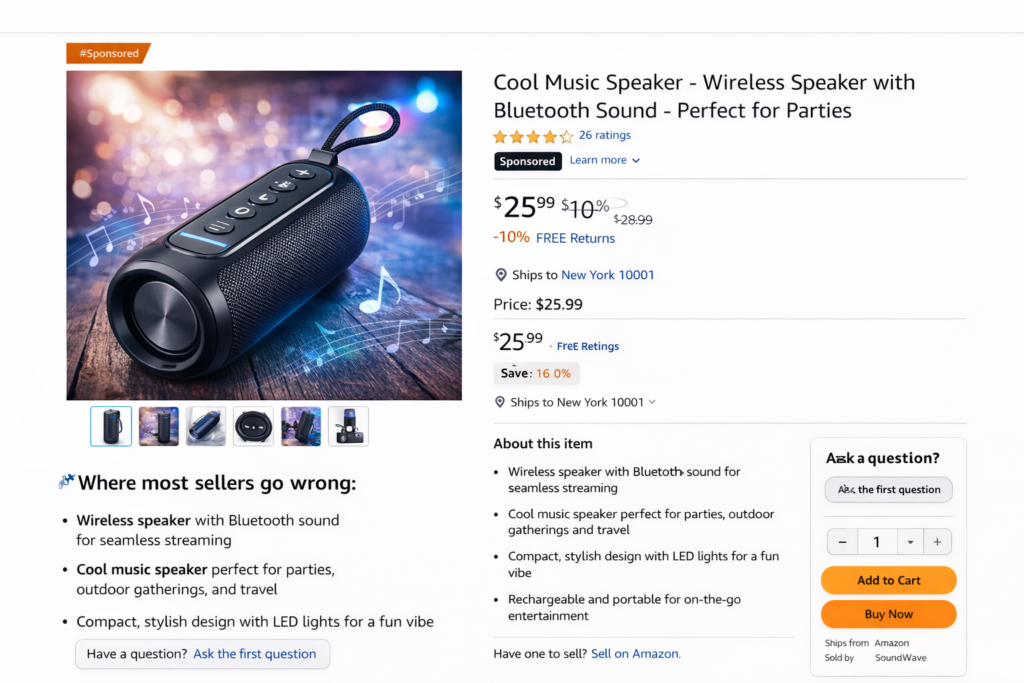
Problem: While some of these might seem relevant, the seller hasn’t validated if these terms have high search volume or buyer intent. For instance, “cool music speaker” may not be a common search term compared to “portable bluetooth speaker”.
Result? Wasted space in the title and bullets, lower chances of ranking.
- Copying competitors blindly: While competitor research is important, simply copying their keywords without understanding context can backfire. Your competitor might be ranking despite their keywords, not because of them.
- Using only generic keywords: Targeting broad, high-competition keywords like “water bottle” without long-tail variations makes it nearly impossible to rank, especially for new sellers.
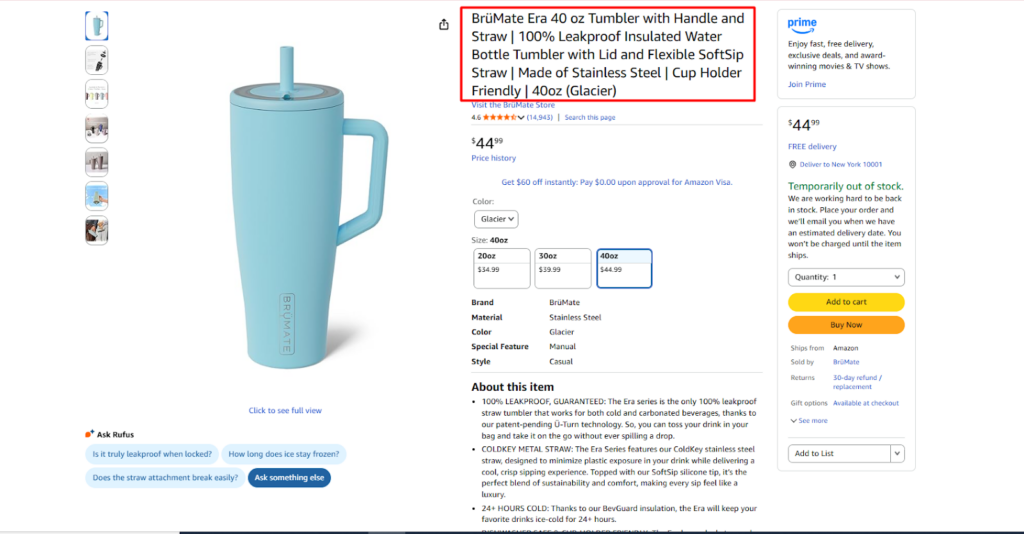
Example of Long Tail Keywords in Title
For example, a seller is listing a premium insulated tumbler like the one shown above. Instead of targeting validated, high-intent search terms, they rely on vague or generic keywords such as “stylish cup,” “cool drink tumbler,” or “everyday travel mug” without checking actual search demand.
The Problem: While these phrases may sound appealing, they don’t align with how shoppers search on Amazon. Customers are far more likely to type specific queries like “40 oz insulated tumbler with handle,” “leakproof tumbler with straw,” “cup holder friendly travel tumbler,” or “stainless steel water tumbler 40oz.”
By failing to use intent-driven keywords that reflect size, material, features, and use case, the listing misses valuable indexing opportunities. Even with strong images, high reviews, and a premium brand, Amazon struggles to surface the product for the searches that actually lead to purchases.
The result: Wasted title and bullet space, reduced visibility in search results, and slower ranking growth—despite having a competitive product.
What Happens Without Proper Keywords
The consequences of poor keyword research compound quickly:
- No impressions: If Amazon doesn’t know what your product is, it won’t show it to anyone. You’ll see minimal traffic in your search term reports.
- Low click-through rate: Even if you get impressions, irrelevant keywords mean irrelevant traffic. People won’t click because your product doesn’t match their search intent.
- Poor conversion: Wrong keywords attract wrong customers. Someone searching for “glass water bottle” won’t buy your plastic one, no matter how good your listing is.
- Wasted PPC spend: Running ads without proper keyword research burns through your budget while generating few sales. You’re bidding on keywords that don’t convert.

Without the right keywords, you’re not just invisible on Amazon — you’re actively wasting time, money, and opportunities.
How Amazon’s A9 / A10 Algorithm Uses Keywords
Understanding how Amazon’s search algorithm works helps you appreciate why keyword research matters so much.
Relevance is the foundation: Amazon’s algorithm needs to match customer searches with relevant products. It determines relevance primarily through the keywords in your listing — your title, bullet points, description, and backend search terms.
Imagine a customer searches for “vitamin C serum for dark spots” on Amazon. Amazon looks for listings whose keywords clearly match that intent. A serum listing that includes phrases like “vitamin C serum,” “dark spot correcting serum,” “brightening facial serum,” or “vitamin C face serum for hyperpigmentation” in the title, bullet points, description, or backend search terms will be considered highly relevant.
Now compare that to a listing that only uses vague language such as “skin glow serum” or “daily skincare essence.” Even if the product actually contains vitamin C and targets dark spots, Amazon’s algorithm has less confidence that it solves the shopper’s problem because the keywords don’t directly reflect the search.
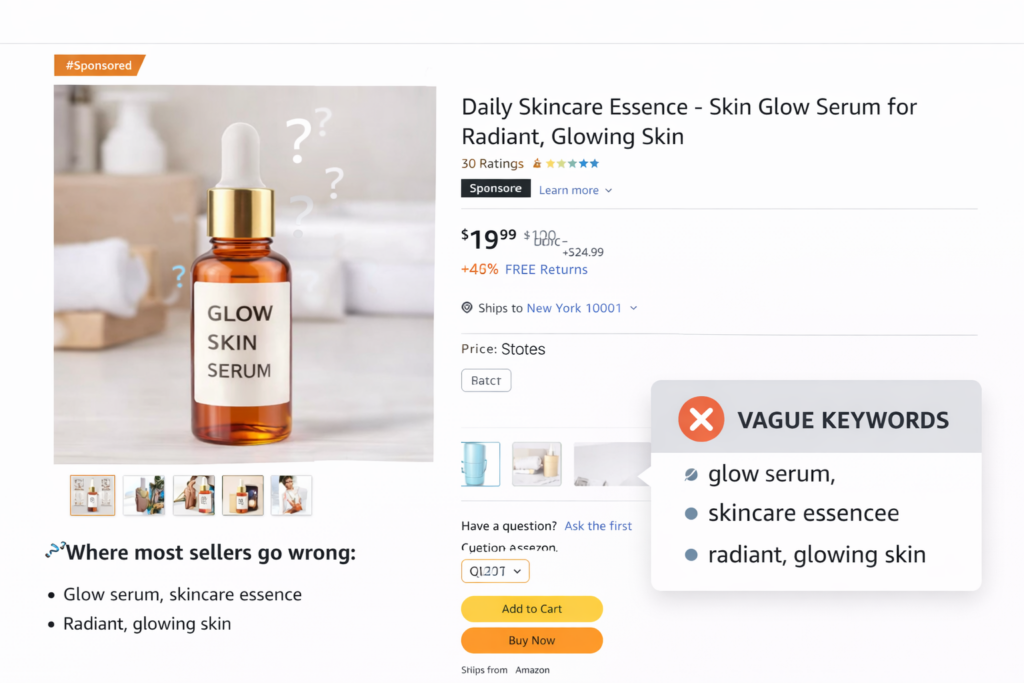
Indexing determines visibility: When you include a keyword in your listing, Amazon indexes your product for that search term. If a keyword isn’t indexed, you literally cannot rank for it, no matter how relevant your product is.
Buyer intent drives rankings: Amazon prioritizes keywords that indicate purchase intent. The algorithm learns which search terms lead to conversions and rewards listings that perform well for those keywords.
Sales velocity matters: While keywords get you in the game, sales history keeps you ranking. Products that convert well for specific keywords gradually climb in rankings, creating a positive feedback loop.
Thinking About Hiring an Amazon Expert?
Ecomclips’ Partners Achieve an Average 85% Profit Increase!
What Is Amazon Keyword Research?
Amazon keyword research is the process of discovering and analyzing the actual search terms that potential customers type into Amazon’s search bar when looking for products like yours.
It’s not about guessing or brainstorming. It’s about uncovering data-driven insights into customer behavior, search volume, competition levels, and purchase intent.
Think of it this way: every keyword represents a question or need. Your job is to identify which questions your product answers, then optimize your listing to appear when those questions are asked.
Types of Amazon Keywords You Must Know
Not all keywords are created equal. Understanding the three main types helps you build a comprehensive keyword strategy.
Primary Keywords
Your primary keyword is the main search term that best describes your product. It typically has the highest search volume and represents the core of what you’re selling.
For example, if you sell insulated water bottles, your primary keyword might be “water bottle” or “insulated water bottle.” This keyword should appear in your title, preferably near the beginning. Primary keywords face the most competition but also drive the most traffic when you rank for them.
Secondary keywords
Secondary keywords are variations and closely related terms that describe your product from different angles.
Using our water bottle example, secondary keywords might include: “stainless steel water bottle,” “reusable water bottle,” “gym water bottle,” or “sports water bottle.”
These keywords often have moderate search volume and competition. They’re essential for capturing different customer perspectives and search behaviors.
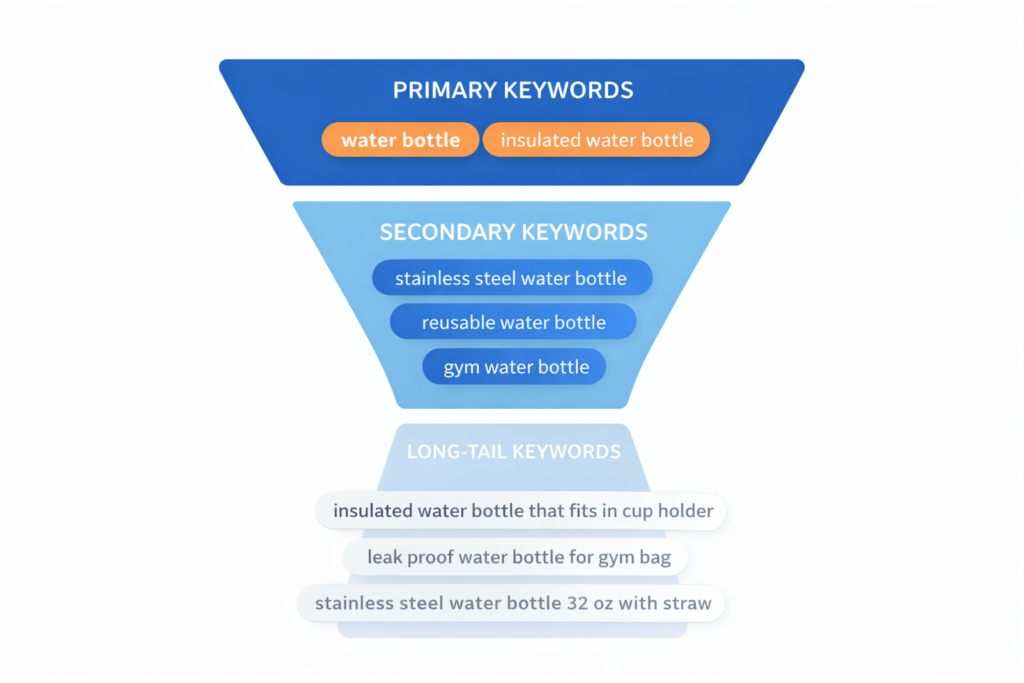
Long-tail keywords
Long-tail keywords are longer, more specific phrases that typically have lower search volume but higher conversion rates.
Examples include: “insulated water bottle that fits in cup holder,” “leak proof water bottle for gym bag,” or “stainless steel water bottle 32 oz with straw.”
These keywords face less competition, making them easier to rank for, especially when you’re just starting. Better yet, shoppers using long-tail keywords often know exactly what they want and are ready to buy.
Step-by-Step Amazon Keyword Research Process
1. Understand Your Product and Target Audience
Every successful Amazon keyword research strategy begins with a deep understanding of both your product and who’s buying it. This foundation determines which keywords will actually drive conversions rather than just empty clicks.
Define Your Product’s Core Value
Start with a thorough analysis of what makes your product unique. What advantages does it offer over competitors? Each feature, benefit, and solution translates into potential keyword opportunities. Ask yourself these questions:
- How does this product make the user’s life easier?
- What specific pain points does it address?
- What jobs is the customer hiring this product to do?
If you sell a joint supplement, the job might be “reduce joint pain” or “maintain mobility while aging.” If you sell snack containers, the job might be “organize kids’ snacks for school” or “portion control for meal prep.”
Create Detailed Buyer Personas
Understanding your target audience means knowing their demographics, behavior patterns, motivations, and goals. The more specific you get, the easier it becomes to find keywords that match their search behavior. Consider:
- Age range and life stage
- Primary use cases for your product
- Problems they’re actively trying to solve
- Language and terminology they naturally use
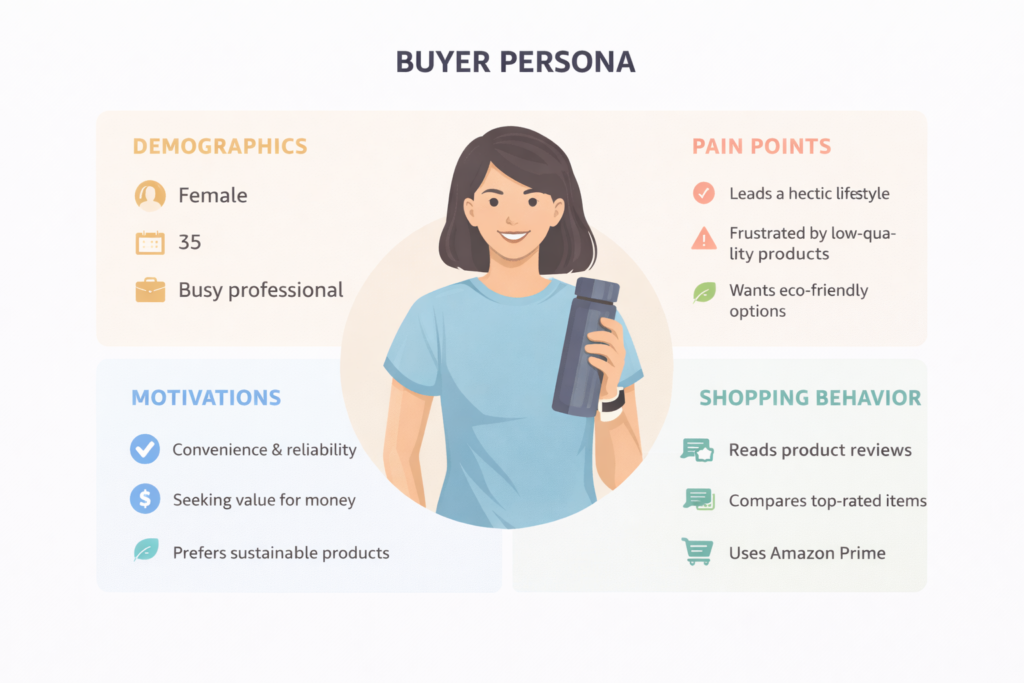
If your product is an eco-friendly water bottle, your target audience might include environmentally conscious consumers, outdoor enthusiasts, fitness advocates, or parents looking for safe kids’ products. Each segment uses a different language and searches differently.
Align Your Language with Customer Language
This is crucial: you must speak the way your customers speak, not the way you or your manufacturer speaks. Technical specifications matter less than how buyers describe their needs.
An eco-friendly water bottle buyer might search for:
- “sustainable water bottle”
- “BPA-free water bottle”
- “reusable water bottle for gym”
- “insulated bottle keeps drinks cold”
- “water bottle that doesn’t leak in bag”
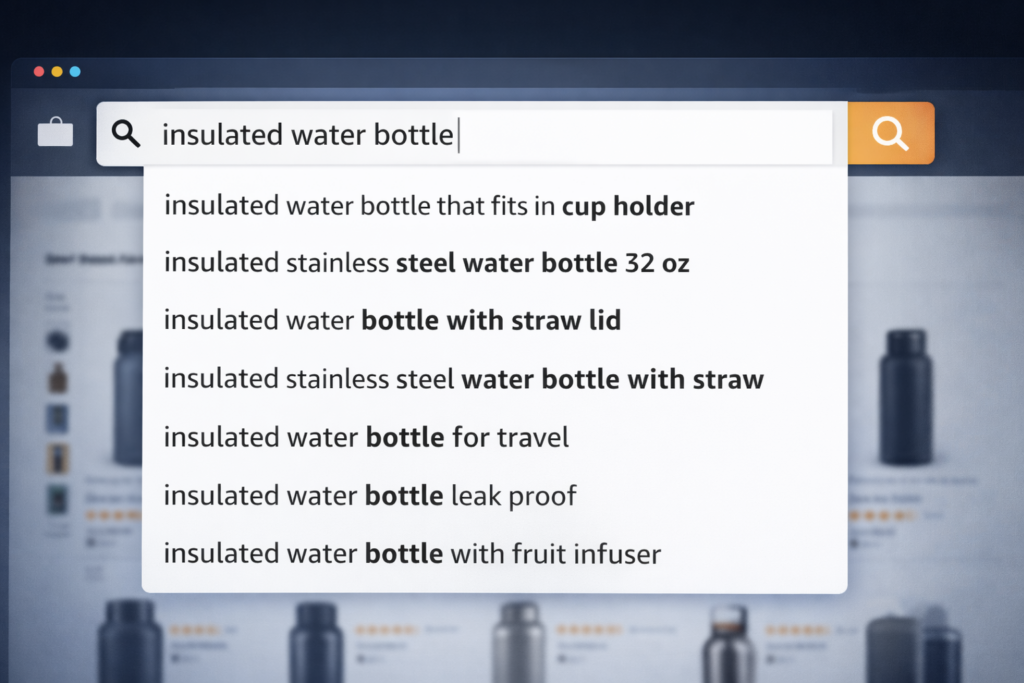
Notice these phrases focus on benefits, use cases, and problem-solving rather than technical specs.
Map Problems to Query Types
For each core job your product does, map multiple query formats that customers might use:
- Question-style queries: “what helps with joint pain,” “how to keep water cold all day,” “best yoga mat for sweaty hands”
- Comparison queries: “glucosamine vs turmeric for joints,” “stainless steel vs plastic water bottle,” “yoga mat vs exercise mat”
- Transactional queries: “buy joint supplement for runners,” “eco friendly water bottle free shipping,” “non-slip yoga mat”
Amazon’s AI increasingly surfaces products that show evidence of solving these jobs across your listing copy, reviews, and Q&A. These problem statements inform both your traditional keyword strategy and your generative engine optimization approach.
2. Identify Seed Keywords
Seed keywords are the broad foundation terms that closely relate to your product’s main category or function. They serve as starting points for discovering more specific, profitable keywords that will actually drive sales.
What Makes a Good Seed Keyword: Think of seed keywords as the broad strokes outlining your product market. They should be:
- Directly relevant to your core product category
- Broad enough to generate related keyword ideas
- Aligned with how customers naturally describe your product type
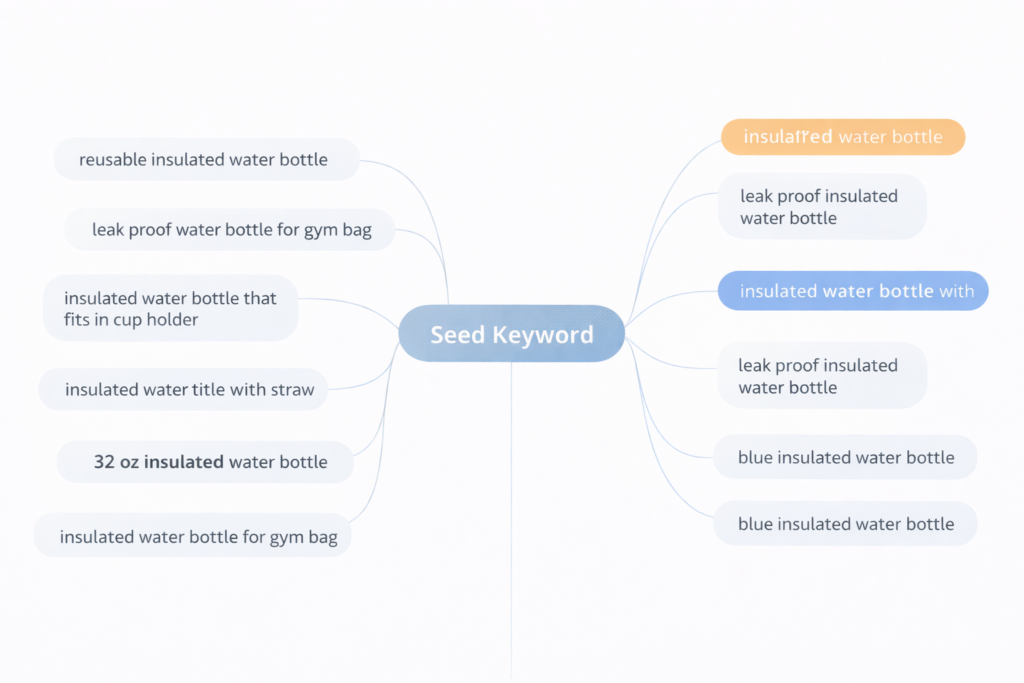
If you sell natural skincare products, your seed keywords might include “natural skincare,” “organic face cream,” “eco-friendly skincare,” or “chemical-free moisturizer.”
These terms typically have significant search volume on Amazon while staying closely aligned with your core offering. They’re not meant to be your final keyword targets — they’re springboards to more specific opportunities.
Three Categories of Seed Keywords: Structure your initial seed list around three dimensions:
- Core product terms (what it is): The basic category and product type names. “Yoga mat,” “water bottle,” “cutting board,” “joint supplement.”
- Problem/benefit phrasing (what it does): How customers describe the solution or outcome. “Pain relief,” “stay hydrated,” “meal prep,” “eco-friendly living.”
- Attribute clusters (distinctive features): Material, target audience, use case, or key differentiators. “Bamboo,” “for kids,” “for hot yoga,” “travel-sized.”
Combining these three categories creates a comprehensive foundation for your keyword research.
Where to Build Your Seed List: Pull seed keywords from multiple authoritative sources:
- Amazon Brand Analytics: If you’re brand-registered, the keyword phrase reports show exactly what customers search for in your category, including click share and conversion share data.
- Search term reports: Export data from your Sponsored Products and Sponsored Brands campaigns. These show actual queries that led to clicks and purchases.
- Competitor ASIN reverse lookups: Use tools like Helium 10 Cerebro or DataDive to see which keywords your top competitors rank for organically.
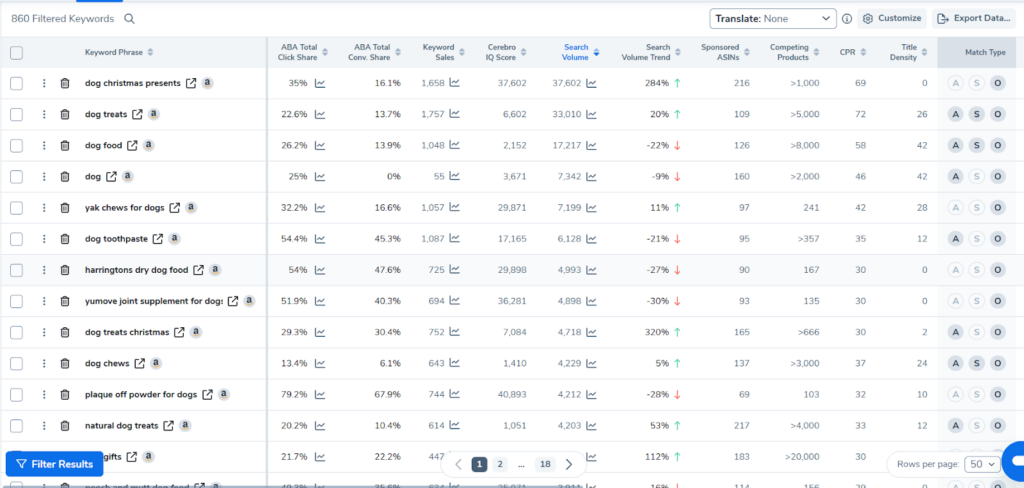
Keyword Research using Cerebro
- Amazon autocomplete: Start typing seed terms in the search bar and note the suggestions. These reflect real, popular searches.
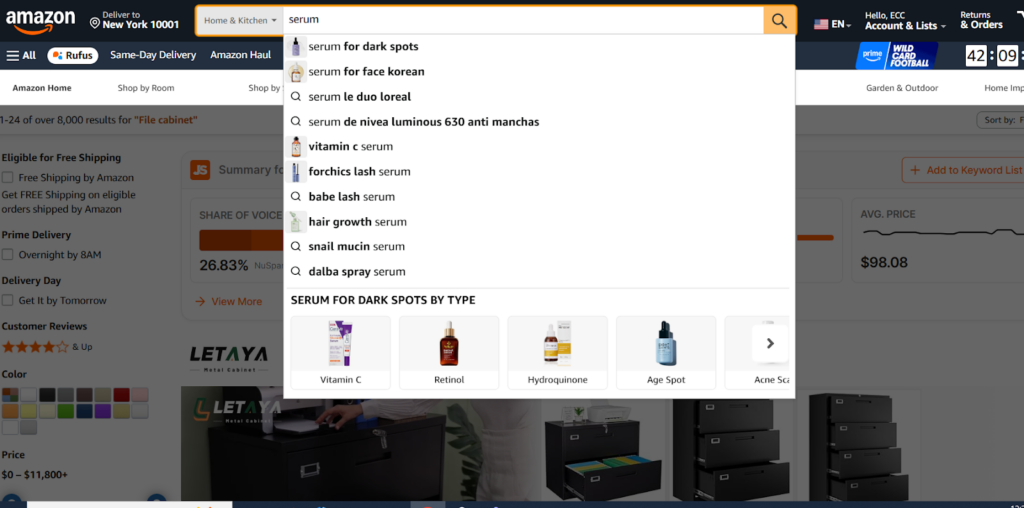
- Customer reviews and Q&A: Read competitor reviews and questions to understand the language actual buyers use when discussing products like yours.
Aim for 10 to 20 seed terms per product covering your broad category, key benefits, and primary use cases. These become inputs for keyword research tools and Amazon-native reports in later steps.
3. Leverage Amazon Autocomplete
Amazon’s autocomplete feature provides direct insight into what customers are actually searching right now. When you type a seed keyword into the search bar, the suggestions that appear are based on real search patterns from millions of shoppers.
These aren’t random suggestions. They reflect actual customer behavior and provide a reliable signal about relative search volume and buyer intent on Amazon.
How Autocomplete Reflects 2026 Search Reality
Amazon’s search results now include more curated modules than ever: “Overall Pick,” “Highly Rated,” “Top Reviewed for [Attribute],” and “Trending Now” badges that affect how frequently certain queries actually surface products.
When using autocomplete, check both desktop and mobile results. Mobile layouts emphasize modules and badges more heavily, which changes which autocomplete terms translate to real visibility and clicks.
Prompt Patterns That Surface High-Intent Keywords: Use these specific patterns to find valuable keyword variations:
1. [seed keyword] for [use case]: “yoga mat for hot yoga,” “water bottle for hiking,” “cutting board for meat”
2. best [seed keyword]: “best joint supplement,” “best insulated water bottle,” “best non-slip yoga mat”
cheap/affordable [seed keyword]: Indicates price-conscious shoppers: “cheap yoga mat,” “affordable organic skincare”
3. [seed keyword] vs [alternative]: Comparison queries: “yoga mat vs exercise mat,” “glass vs stainless steel water bottle”
4. is [seed keyword] good for [use case]: Question format: “is turmeric good for joint pain,” “is bamboo good for cutting boards”
Question-style queries matter increasingly as Amazon’s AI search handles conversational searches more effectively. These phrases should inform your A+ content and Q&A strategy, not just your keyword list.
Mining Autocomplete Systematically: Don’t just type one seed keyword and call it done. Try multiple approaches:
- Type each seed keyword and record all suggestions
- Add single letters after your seed keyword (a-z) to uncover different variations
- Add numbers (1, 2, 3, for sizes or quantities)
- Try plural and singular forms
- Test with and without brand names
4. Analyze Competitor Listings
Your top competitors have already invested time and money figuring out which keywords work in your category. Analyzing their listings reveals proven keyword opportunities and helps you identify gaps in your own strategy.
What to Examine in Competitor Listings
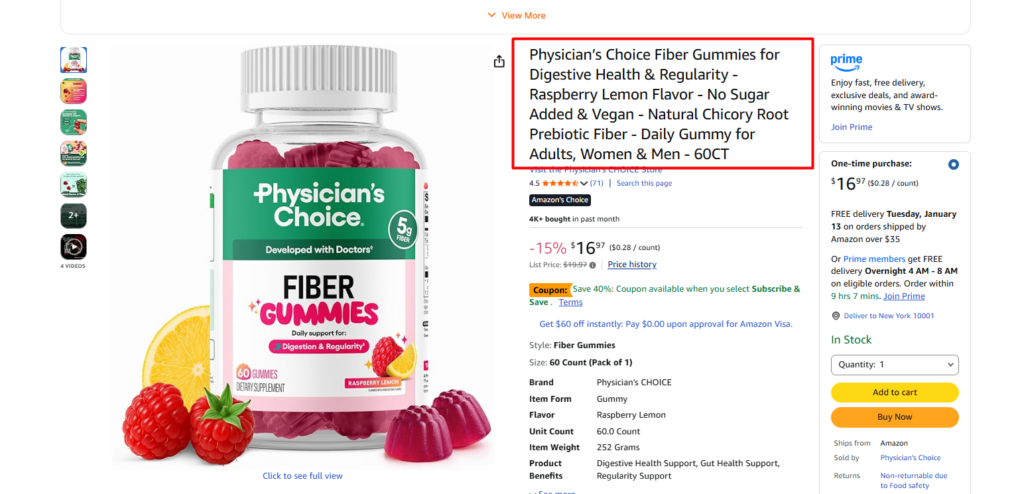
- Product titles: Note the structure and keyword placement. Successful competitors typically front-load their most important keywords to capture both customer attention and algorithmic favor. Pay attention to which features and benefits they emphasize.
- Bullet points: Prime real estate for conversion-focused keywords. Analyze how competitors naturally integrate keywords while highlighting product benefits. Notice which features get mentioned first and how they frame value propositions.
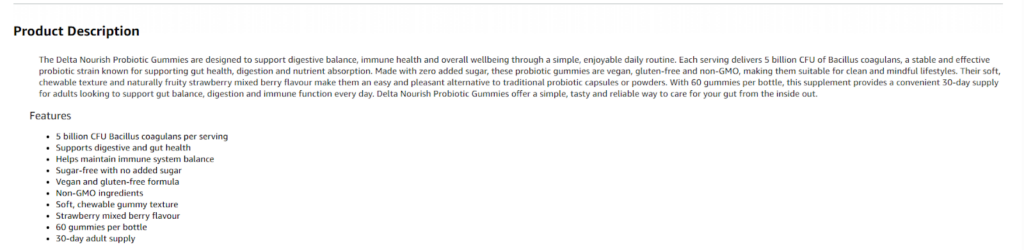
- Product descriptions: Additional space for supporting keywords and storytelling. Look for thematic keywords, problem-solving language, and how they address customer pain point
- A+ Content: This is where competitors showcase their brand story and address deeper customer questions. Note which use cases they highlight and how they structure content around customer needs.
- Customer questions and answers: Reveals the specific phrases and questions actual customers ask. This is direct insight into customer language and concerns you should address.
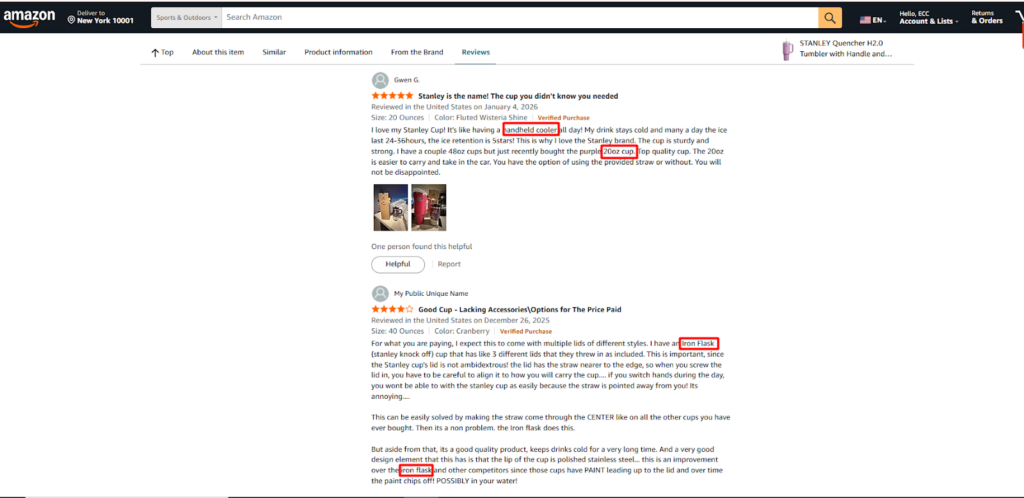
- Customer reviews: A goldmine for keyword ideas, especially the everyday language buyers use to describe products and their experiences. Look at both positive and negative reviews for feature mentions and benefit language.
Identifying Which Competitors to Analyze
Don’t just analyze the biggest brands with thousands of reviews. Focus on:
- Page one organic rankings: Products ranking organically (not just through ads) for your target keywords
- Similar price points: Competitors in your price range, rather than premium or budget extremes
- Similar product attributes: Products that actually compete with yours in features and benefits
- Recent success stories: Newer listings that have climbed rankings quickly
Analyze 5-10 competitors to get a comprehensive view without overwhelming yourself with data.
Track Curated Placements and Module Appearances
In 2026, it’s not enough to just rank on page one. Note which competitors consistently appear in curated modules: “Overall Pick,” “Top Reviewed,” “Amazon’s Choice,” or category-specific badges.
These placements signal that Amazon’s algorithm has identified these products as strong matches for specific query intents. Reverse-engineer their listings to understand:
- Which keyword themes do they emphasize
- How their images and content align with customer problems
- What their reviews consistently mention
- How their Q&A addresses common concerns
Validate with Brand Analytics Data
Don’t rely solely on what you see in competitor listings. Pair your analysis with Amazon Brand Analytics keyword phrase reports to confirm which queries actually drive click share to top competitors.
This validation step reveals whether keywords appearing in competitor titles are actually performing, or if they’re ranking for different reasons (reviews, sales history, external traffic).
Use Competitor Analysis to Find Your Differentiation
As you analyze competitors, ask:
- What keywords are they targeting that we’re missing?
- What customer problems are they addressing that we haven’t emphasized?
- Where are the gaps in their messaging that we could fill?
- Which long-tail keywords might they be ignoring?
Your goal isn’t to copy competitors exactly — it’s to understand the competitive landscape and find your unique positioning within it.
Step 5: Use Professional Amazon Keyword Research Tools
Manual research provides valuable insights, but professional keyword tools dramatically accelerate the process and surface data you simply cannot obtain manually. The right tools provide search volume, competition metrics, trend analysis, and reverse-ASIN intelligence that separate guesswork from strategy.
Helium 10
Best for: Comprehensive keyword research with industry-leading reverse-ASIN capabilities
Helium 10 remains the most popular all-in-one Amazon keyword research tool for good reason
Magnet: Generates thousands of relevant keywords based on a seed term, showing Amazon search volume, competing products, and related keyword ideas. Use this for initial keyword discovery.
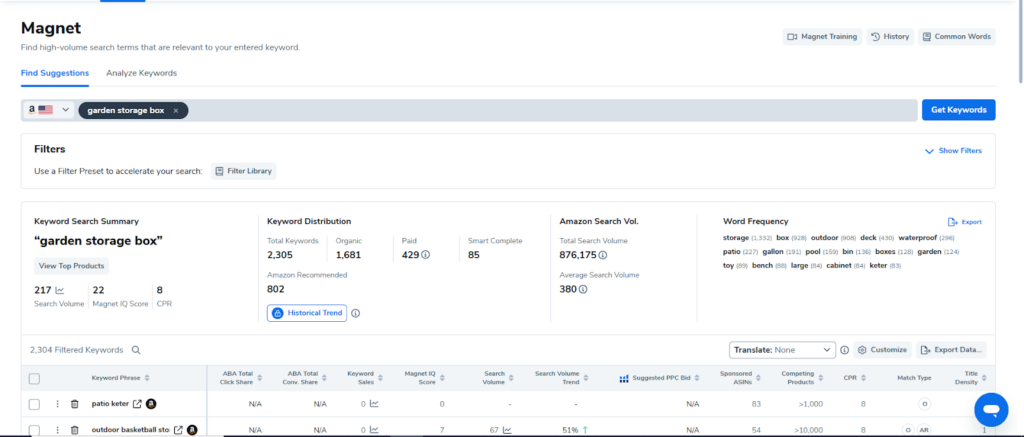
Cerebro: The gold standard for reverse-ASIN research. Enter up to 10 competitor ASINs and see which keywords they rank for organically, their positions, estimated search volume, and ranking difficulty. This is how you uncover hidden opportunities your competitors are already capitalizing on.
Keyword Tracker: Monitors your rankings over time for specific keywords, helping you measure the impact of optimization efforts.
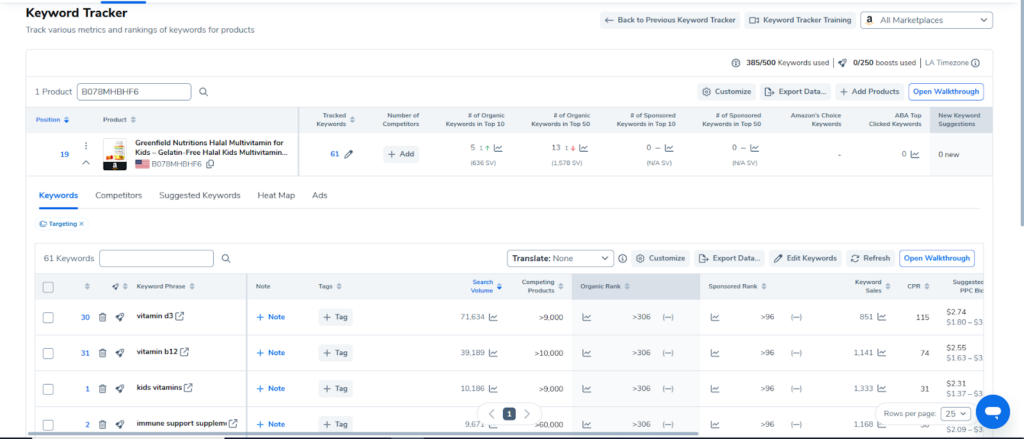
Jungle Scout
Best for: Comprehensive seller toolkit with solid keyword features
Jungle Scout offers an integrated platform that combines product research with keyword optimization:
- Keyword Scout: Uncovers relevant keywords with metrics including search volume, estimated sales per month, exact and broad match data, and competition levels.
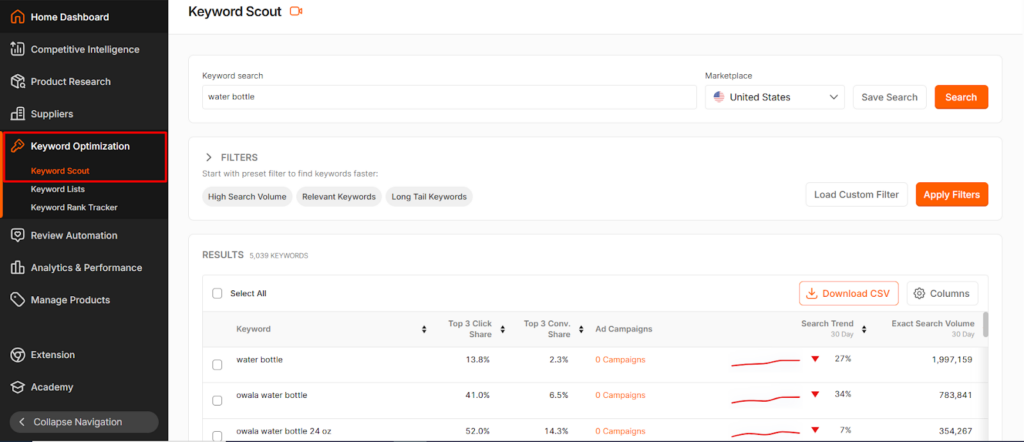
- Keyword Rank Tracker: Monitors how your positions change over time for specific keywords, with alerts when significant ranking changes occur.
- Opportunity Finder: Identifies niche keywords where you might rank more easily, particularly useful for new products.
- Competitor analysis: Built-in features for reverse-ASIN lookup and tracking competitor keywords.
ZonGuru
Best for: AI-powered listing generation integrated with keyword research
ZonGuru differentiates itself through AI-assisted workflows:
- Keywords on Fire: Identifies trending and high-opportunity keywords before they become saturated, helping you stay ahead of market shifts.
- AI listing builder: Integrates keyword research directly into listing creation, automatically suggesting where keywords should be placed for maximum impact.
- Love-Hate analysis: Analyzes competitor reviews to surface what customers love and hate, translating sentiment into keyword opportunities.
Useful if you want keyword research and listing optimization in a single, streamlined workflow.
Semrush Amazon Keyword Magic Tool
Best for: Cross-channel keyword intelligence and brands running both Amazon and DTC strategies
- Broad keyword database: Helps you understand how off-Amazon search behavior relates to Amazon queries, useful for understanding full customer journey.
- Question-based keyword clustering: Identifies question format searches that work well in A+ content and Brand Stores.
- Competitive domain analysis: See which keywords your competitors are targeting on their DTC sites, which often reveals product positioning insights.
Best used as a supplement to Amazon-specific tools rather than your primary research platform.
Amazon’s Native Tools
Don’t overlook Amazon’s own data sources:
- Search Query Performance: Available in Seller Central, shows how your ASINs perform for specific queries, including impressions, clicks, and conversions.
- Brand Analytics: For brand-registered sellers, provides official search frequency rank, click share, and conversion share data for top search terms.
- Search Term Reports: From your advertising campaigns, shows exactly what customers searched before clicking your ads and purchasing.
These tools provide authoritative, first-party data directly from Amazon’s systems. Use them to validate findings from third-party tools.
Google Tools as Supplementary Sources
Google Keyword Planner and Google Analytics aren’t Amazon tools, but they offer supplementary value:
- Google Keyword Planner reveals how people search for your product category on Google, with some overlap to Amazon behavior
- Google Analytics shows which keywords drive traffic to your DTC site, and some translate to Amazon searches
- Google Shopping data illuminates product attributes and features customers care about
That said, Amazon search volume and Google search volume don’t correlate perfectly. Search intent differs significantly between platforms. Use Google tools for additional perspective, not as primary sources for Amazon keyword strategy.
Mining Your Own Search Term Reports
Your search term report from Amazon ads campaigns is one of your most valuable keyword sources. It tells you exactly what customers searched before clicking your ad and, more importantly, which searches led to actual purchases.
Export these reports regularly from Seller Central and:
- Identify high-converting search terms to add to your organic keyword strategy
- Find new long-tail variations you hadn’t considered
- Discover negative keywords (high spend, low conversion) to exclude
- Validate whether keywords in your listing are actually driving sales
AI as a Research Accelerator
In 2026, a complete first-pass keyword map can be generated in 10-15 minutes using an AI assistant combined with seed terms and competitor ASINs. AI tools excel at:
- Initial keyword ideation and clustering
- Identifying themes and patterns across large datasets
- Suggesting question-format queries for A+ content
- Organizing keywords by intent type
However, always validate AI-generated keywords against real Amazon search data and Brand Analytics. AI gives you speed and creative suggestions; your keyword research tools give you accuracy and performance data. Use AI for ideation and organization, then verify opportunities with data before committing to a strategy.
6. Prioritize Long-Tail Keywords
Long-tail keywords are longer, more specific phrases that attract targeted, ready-to-buy shoppers. While they have lower individual search volume than broad keywords, they’re less competitive and typically convert at significantly higher rates because they match specific buyer intent.
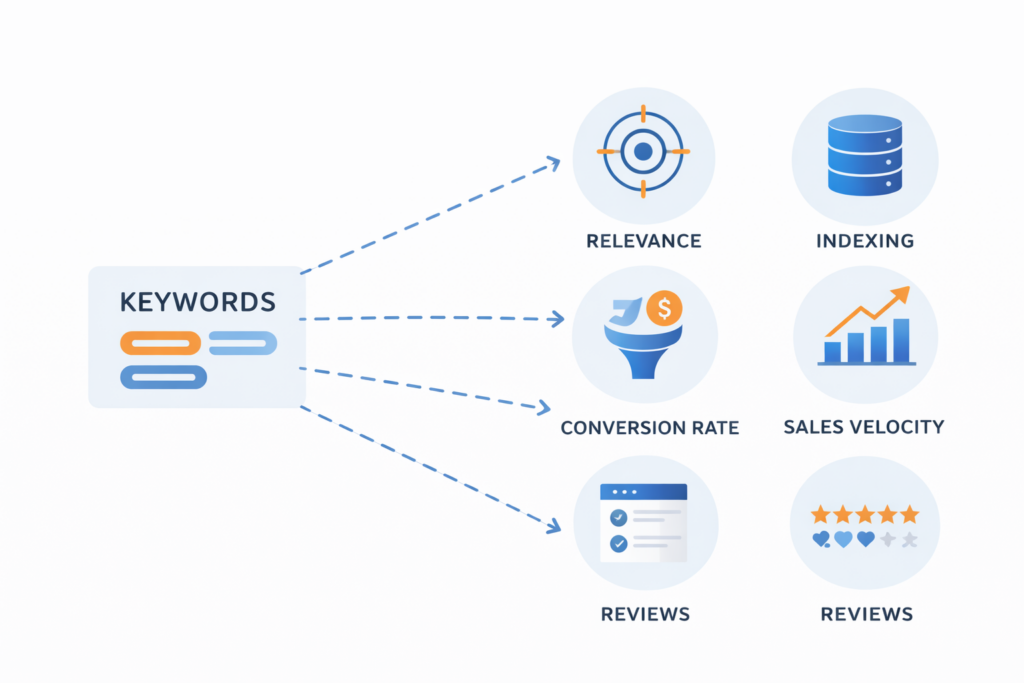
Why Long-Tail Keywords Matter More in 2026
Broad keywords like “yoga mat” face brutal competition from established brands with thousands of reviews. As a newer seller, ranking for these terms is nearly impossible initially and wastes your optimization efforts.
Long-tail keywords like “eco-friendly non-slip yoga mat for hot yoga” face far less competition. Fewer products target this exact phrase, and shoppers using it know precisely what they want. They’re not browsing — they’re ready to buy.
Long-Tail Keywords Reveal Buying Stage: Keyword length and specificity often indicate where someone is in their purchase journey:
- Broad searches = research mode: “yoga mats,” “joint supplements,” “water bottles”
- Medium-tail = consideration stage: “non-slip yoga mat,” “turmeric joint supplement,” “insulated water bottle”
- Long-tail = ready to buy: “6mm thick cork yoga mat for hot yoga,” “organic turmeric supplement 500mg,” “40oz insulated water bottle with straw”
Prioritize long-tail keywords for your title, bullets, and PPC campaigns because these shoppers convert at higher rates. Their purchase intent is clear and immediate.
Think in Keyword Clusters: Don’t treat long-tail keywords as isolated terms. Group them by core problem, benefit, or attribute:
Eco-friendly cluster:
- “eco-friendly non-slip yoga mat”
- “sustainable yoga mat natural rubber”
- “biodegradable yoga mat”
Grip/performance cluster:
- “non-slip yoga mat for hot yoga”
- “grippy yoga mat for sweaty hands”
- “textured surface yoga mat”
Size/thickness cluster:
- “extra thick yoga mat 6mm”
- “large yoga mat for tall people”
- “oversized yoga mat 72 inch”
Each cluster should appear somewhere across your listing: title, bullets, description, A+ content, and ideally reinforced in reviews and Q&A. This creates comprehensive topical coverage that Amazon’s algorithm recognizes and rewards.
Anticipate Conversational and Question-Based Queries
Amazon’s AI-powered search increasingly handles conversational and question-style queries. Shoppers type complete questions or use natural language phrases:
- “what’s the best yoga mat for beginners”
- “how thick should a yoga mat be”
- “which water bottle keeps drinks cold longest”
- “is bamboo or plastic better for cutting boards”
These queries are perfect for:
- A+ Content sections that answer common questions
- Brand Store educational pages
- Seeded Q&A responses
- Backend keywords (stripped of question words)
Include natural-language phrases in your content, not just rigid keyword strings. Write conversationally in bullets and A+ content to match how customers actually search and think.
How to Find and Validate Long-Tail Keywords
Research systematically:
- Use your keyword tool’s long-tail filters (typically 4+ words)
- Look for decent search volume (even 100-500 monthly searches matter)
- Prioritize low competition scores
- Focus on phrases that precisely describe features, benefits, and use cases
Check autocomplete variations:
- Type seed keywords + modifiers (for, with, best, cheap, reviews)
- Note all long-tail suggestions
- Test question formats
Mine competitor reviews:
- Customers often use long-tail language when describing their experience
- “This yoga mat is perfect for hot yoga because it doesn’t slip even when I’m sweating” reveals “yoga mat for hot yoga” and “yoga mat doesn’t slip when sweaty”
Integrate naturally: Work long-tail keywords into your listing without making copy awkward or keyword-stuffed. Readability and customer experience matter as much as keyword placement.
Track performance: Monitor which long-tail keywords drive traffic, clicks, and conversions. Double down on winners and test new variations of underperforming themes.
The Long-Tail Conversion Advantage: Long-tail keywords typically have:
- Higher conversion rates: Specific intent means higher purchase likelihood
- Lower cost-per-click: Less competition means lower PPC costs
- Better profitability: Lower acquisition cost with similar order value
- Faster ranking potential: Achievable page one positions even with limited reviews
Build your initial ranking momentum with long-tail keywords, then gradually expand into more competitive medium-tail and broad terms as your sales history and reviews accumulate.
7. Analyze Keyword Relevance and Filter
Not every keyword with search volume belongs in your listing. Relevance determines whether traffic converts into sales or bounces, wasting your ad spend and hurting your algorithmic standing.
Why Irrelevant Keywords Hurt More Than They Help
Using irrelevant keywords might temporarily increase impressions, but it leads to:
- Poor conversion rates: Customers clicking your listing for irrelevant queries won’t buy, signaling to Amazon that your product doesn’t match that search intent.
- Wasted advertising budget: Every click on an irrelevant keyword costs money while producing no sales.
- Algorithmic penalties: Amazon’s algorithm tracks behavioral signals. High impressions with low clicks, or high clicks with low conversions, tell Amazon your listing isn’t relevant for those keywords. Your visibility for those queries decreases over time.
- Bad customer experience: Shoppers who land on your listing expecting something different feel misled, which can result in negative reviews or increased returns.
Behavioral Relevance Matters Most
If shoppers consistently click your listing for a specific keyword but don’t convert, Amazon reduces your visibility for that query over time. This is behavioral relevance in action. Use your search term report and Brand Analytics to identify these problem keywords:
- High impressions but low clicks = your title or image doesn’t match the query
- High clicks but low conversions = your product doesn’t actually solve what the query implies
Consider removing these keywords from frontend or backend placement if they’re fundamentally misaligned with what you actually sell.
The Keyword Relevance Checklist
For each keyword you’re considering, ask three questions:
1. Does this accurately describe the product?
If someone searches this term and finds your product, will it match their expectations? If you sell a plastic water bottle, “glass water bottle” is irrelevant regardless of search volume.
2. Is there evidence across the listing that we deliver on this promise?
Check that your images, bullets, reviews, and A+ content support the claim. If you’re targeting “leak-proof water bottle,” you need clear visual and textual evidence of this feature.
3. Do our metrics support keeping it?
Look at actual performance data: CTR, conversion rate, and sales from this keyword. If metrics are consistently poor, the keyword doesn’t belong in your strategy.
If you can’t answer yes to all three questions, that keyword should be deprioritized or removed regardless of its search volume.
Category and Audience Alignment: Keywords must also align with:
- Category fit: Don’t try to rank in categories where you don’t belong. Amazon’s algorithm penalizes category mismatches.
- Target audience match: A keyword might be technically accurate but attract the wrong audience. “Budget yoga mat” attracts price-conscious shoppers who might leave negative reviews if your mat is actually premium-priced.
- Use case alignment: If your water bottle isn’t designed for hot liquids, don’t target “coffee travel mug” even if it has high search volume.
Handle Branded Keywords Strategically
Your own branded keywords (your brand name and specific product names) are highly relevant by definition. Always include them in your title and backend.
Also defend them in PPC. Competitors may bid on your branded keywords in Amazon ads, stealing traffic from shoppers specifically looking for you. Bidding on your own brand terms is often worth the spend to maintain visibility.
Competitor-branded keywords are a gray area. You generally cannot use other brands’ names in your visible listing copy (Amazon’s policies prohibit this). Some sellers add them to backend search terms, but this is risky and often doesn’t work well since Amazon’s algorithm recognizes brand searches as high-intent for specific products.
Create a Tiered Keyword System
Not all relevant keywords deserve equal treatment:
- Tier 1 – Core keywords: Highest relevance, decent volume, evidence of conversion. These go in your title and first two bullets.
- Tier 2 – Supporting keywords: Good relevance, moderate volume or competition. These go in remaining bullets and description.
- Tier 3 – Long-tail and niche: Lower volume but highly specific. These go in A+ content and backend terms.

Tier 4 – Watch list: Potentially relevant but unproven. Test in PPC before adding to organic listing.
This tiered approach ensures you’re prioritizing character count and prominence for keywords that actually drive business results.
8. Map Keywords to Search Intent
Search intent is the underlying goal behind a query. Understanding whether customers are seeking information, comparing options, or ready to buy immediately determines which keywords you prioritize and, critically, where you use them in your Amazon ecosystem.
- Informational intent: Searches looking for information first, not products. Examples: “best yoga mats for beginners,” “how to choose a water bottle,” “benefits of turmeric for joints.”
These shoppers are in research mode. They’re learning about their options and building a consideration set. Your product might not be purchased immediately, but appearing in these searches builds awareness.
- Comparative intent: Searches comparing options or evaluating alternatives. Examples: “yoga mat vs exercise mat,” “stainless steel vs plastic water bottle,” “glucosamine vs turmeric for joint pain.”
These shoppers are closer to buying but are evaluating choices. They’re narrowing their options and looking for differentiation.
- Transactional intent: Ready-to-buy searches with clear purchase intent. Examples: “buy eco-friendly yoga mat,” “best turmeric supplement with black pepper,” “40oz insulated water bottle with straw.”
These shoppers know what they want and are ready to click “Add to Cart.” These are your highest-value keywords.
How Intent Mapping Changed in 2026
Amazon’s algorithm now blends intent types more fluidly than ever before. It pulls from Q&A, customer reviews, and Brand Store content to answer informational and comparative queries directly in search results.
The algorithm doesn’t just show products — it shows answers. This means:
- Informational queries often surface products with strong A+ content, detailed Brand Stores, or helpful Q&A sections that address the question being asked.
- Comparative queries are increasingly answered through “Overall Pick” modules, “Top Reviewed for [Attribute]” badges, and curated carousels that help customers compare options.
- Transactional queries still function more traditionally, showing products optimized for specific features and attributes mentioned in the query.
Strategic Placement by Intent Type: Your keyword placement should map to intent. For informational keywords:
- Use in A+ Content sections that educate and inform
- Build Brand Store pages around common questions (“How to Choose,” “Benefits,” “Comparison Guide”)
- Seed Q&A with helpful answers that naturally include these phrases
- Create comparison charts and educational graphics
Don’t waste title or bullet space on purely informational keywords. They belong in educational content surfaces.
For comparative keywords:
- Use in bullet points that highlight differentiators
- Feature in A+ Content comparison modules
- Address directly in Brand Store pages
- Respond to in Q&A sections
- Consider for Sponsored Brands campaigns with educational headlines
For transactional keywords:
- Front-load in your title
- Feature prominently in first two bullet points
- Use in backend search terms
- Prioritize in Sponsored Products campaigns
- Target with exact and phrase match in PPC
Align Amazon Ads Strategy with Intent
Your advertising approach should match the intent of keywords you’re targeting:
Informational intent:
- Sponsored Brands with educational headlines: “Learn How to Choose the Right Yoga Mat”
- Link to Brand Store educational pages, not directly to products
- Use video ads that demonstrate benefits
- Lower conversion expectations; focus on awareness and brand building
Comparative intent:
- Sponsored Brands Video showing your product vs. alternatives
- Top of Search placements where shoppers are actively comparing
- Highlight unique differentiators in ad creative
- Moderate conversion expectations; these shoppers are evaluating
Transactional intent:
- Exact and phrase match Sponsored Products for high-intent terms
- Aggressive bidding on ready-to-now that you understand the theory, let’s walk through the practical process of finding the right keywords for your product.
9. Optimize Your Amazon Listing: Keyword Placement & More
Every keyword you’ve researched needs a strategic home in your product listing. Here’s where they go for maximum visibility:
2026 Amazon Listing Standards
Amazon has tightened guidelines for titles in many categories, often capping them at 200 characters. Ensure your title complies to avoid suppression. Always refer to the category style guide in Seller Central.
Amazon now uses more curated search result modules (like “Overall Pick,” “Amazon’s Choice,” and “Top Reviewed for [Attribute]”). Reviews, ratings, and content quality play a crucial role in whether you appear in these featured placements.
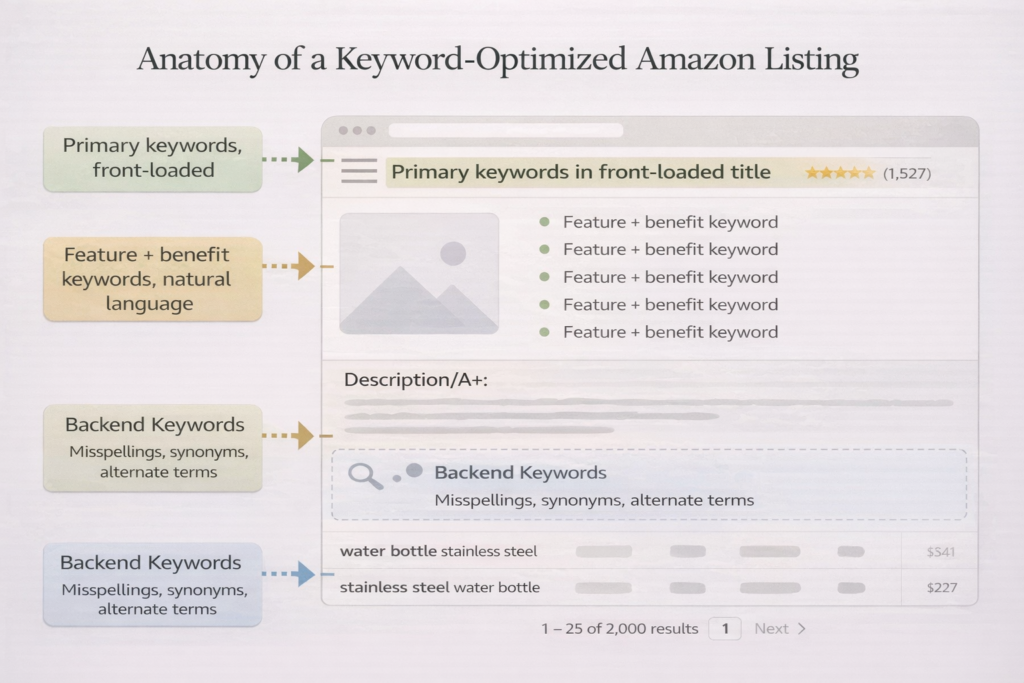
Where Keywords Go: Mapping Keywords to Listing Sections
- Title: Front-load your most important keywords — typically, primary keywords and core product features.
- Bullet Points: Use feature + benefit keywords and natural language to highlight what your product does best.
- Description / A+ Content: Integrate long-tail keywords and problem-solving language. This section allows you to go deeper into the use cases and benefits of your product.
- Backend Search Terms: Use for misspellings, synonyms, and alternate terms. These keywords don’t appear on your public listing but are indexed by Amazon.
10. Monitor and Adjust Your Strategy: Stay Ahead of the Curve
Amazon’s search behavior is constantly changing. Seasonality, market shifts, and algorithm updates impact keyword performance.
- Weekly: Review your search term reports from Amazon ads. Adjust bids, add converting terms to your campaigns, and remove low-converting keywords.
- Monthly: Check Brand Analytics keyword phrase data and search performance reports. Watch for emerging competitors and keyword shifts.
- Quarterly: Perform a full listing review and keyword refresh. Update for new features, seasonal changes, or market shifts.
Track Keyword Trends: Stay Ahead of Your Competitors
Use your keyword research tool to identify emerging keywords. Consumer language evolves, and phrases that didn’t exist six months ago may now be driving significant search volume. Stay current with trends to beat competitors who set and forget their listings.
Instead of tracking hundreds of individual keywords, group them into keyword clusters:
- Eco-friendly terms
- Beginner terms
- Feature-based terms (e.g., “non-slip,” “lightweight”)
This makes it easier to see which themes drive results and identify underperforming clusters.
A/B Testing Priorities: Fine-Tuning for Better Results
Given the engagement-focused search results, here’s where to test first:
- Titles (especially the first 80 characters visible on mobile)
- Hero images
- First two bullet points
- A+ content layouts
Use Amazon’s Manage Your Experiments when available. Small changes to these high-visibility elements can often move the needle more than adding one more keyword to your backend.
Frequently Asked Questions
1. How many keywords should I include in my Amazon listing?
There’s no fixed number, but aim to place your most important keywords naturally across the title, bullets, description/A+, and backend terms. Relevance matters more than volume because Amazon rewards keywords that bring buyers who actually convert.
2. What’s the difference between frontend and backend keywords?
Frontend keywords are visible in your title, bullets, description, and A+ content, so they must read naturally for shoppers. Backend keywords are hidden in Seller Central and are best used for synonyms, misspellings, and alternate phrasing you don’t want in your copy.
3. How often should I update my Amazon keywords?
Review performance weekly using search term reports and adjust bids/targets based on what converts. Do a deeper refresh every quarter to keep up with seasonality, competitor changes, and evolving search language.
4. Do Amazon keywords work differently than Google keywords?
Yes—Amazon searches are usually purchase-driven, so high-intent terms tend to outperform informational phrases. Google tools can inspire ideas, but you should validate keywords using Amazon-specific data before relying on them.
5. Should I use the same keywords in my PPC campaigns and organic listings?
Your best-converting PPC search terms should be added to your listing so you can rank organically and improve relevance. Use auto and broad campaigns to discover new converting terms, then move winners into exact match and your front-end copy.
6. How do I know if a keyword is too competitive to target?
Check page one results: if top listings have huge review counts and strong brands, it may be expensive to rank early. Start with long-tail keywords, you can win faster, then expand into competitive terms after you build conversion and reviews.
7. Can I use competitor brand names as keywords?
You should not place competitor brand names in your listing copy or backend terms because it can trigger suppression or policy issues. You can test bidding on competitor brand terms in PPC, but results vary and usually require a controlled budget.
8. What are seed keywords and why do they matter?
Seed keywords are broad category-level terms that describe what your product is and what it does. They help you expand into hundreds of long-tail variations through tools, autocomplete, and competitor research.
9. How do I check if my listing is indexed for a keyword?
Use the Amazon search format: keyword + your ASIN and see if your product appears. If it doesn’t show up, Amazon likely isn’t indexing you for that term yet.
10. Where should my main keyword go in the listing?
Put your primary keyword near the start of the title and support it naturally in the first two bullets. This improves both indexing and shopper clarity without making your copy sound stuffed.
11. Do I need to repeat the same keyword multiple times?
No. Amazon generally doesn’t reward repeating identical keywords across sections. It’s better to use variations, synonyms, and long-tail phrases that cover different shopper intents.
Watch our in-depth video guide on Amazon here:
AMAZON PREMIUM A+ CONTENT TUTORIAL
Amazon Halloween Sales Strategy 2025
Amazon CTR Hacks: Boost Sales with Better Main Images
Win Big on Amazon with This Premium Product Strategy
How I Got My Amazon Product Recommended by ChatGPT
Ecomclips: Your Complete eCommerce Solution Under One Umbrella
At Ecomclips, we bring every eCommerce service you need under one roof — strategy, operations, design, marketing, and growth, all seamlessly connected to help your brand thrive across every marketplace.
Since 2012, we’ve been helping businesses of all sizes launch, scale, and dominate online. From Amazon, Walmart, eBay, and Etsy to Shopify and WooCommerce, our team of marketplace experts, designers, developers, and marketers works together to deliver measurable results.
Our services span the full eCommerce lifecycle:
- Account Setup & Product Listing Management: We handle registrations, compliance, and product data optimization across all marketplaces.
- Amazon Optimization Service: From keyword-rich titles and A+ content to PPC campaigns and storefront design, we craft listings that convert.
- Creative Design & Content Production: A+ visuals, infographics, brand stores, and product videos built to boost engagement.
- Advertising & PPC Management: Smart, data-driven ad strategies for Amazon, Walmart, and Google that maximize ROI.
- Web Development & Store Design: Shopify, WooCommerce, and Magento websites built for performance and conversion.
- Data Management & Automation: Streamlined product feeds, catalog syncing, and inventory control for effortless scalability.
- Customer Service & Order Fulfillment: End-to-end support that enhances customer satisfaction and builds long-term loyalty.
- Analytics & Growth Strategy: Real-time insights and ongoing optimization to ensure consistent, profitable growth.
Whether you’re launching a new store or managing multiple global marketplaces, Ecomclips acts as your single strategic partner, simplifying complexity and driving sustainable revenue growth.
Ready to Start Growing Your Brand?
Ecomclips’ Partners Achieve an Average 85% Profit Increase!