

While most sellers spend hours perfecting titles and bullet points, they often overlook one of Amazon’s most powerful ranking tools — backend search terms.
On Amazon, no matter how great your product is, it won’t sell if customers can’t find it. Even the best product can get buried without the right keywords. That’s where Amazon SEO becomes your secret weapon.
Many sellers assume these hidden keywords don’t matter anymore, or worse, they misuse them. Backend Search Terms allow your listing to appear in more long-tail searches, capture alternate keywords, and reach customers who might never find you otherwise.
In this post, we’ll break down exactly what sellers get wrong about Amazon backend search terms, explain why they still matter in 2025, and show you exactly how you can optimize listings the right way for higher rankings, conversions, and organic sales.
Table of Contents:
| 1. Understanding the basics of Amazon Backend Search Terms |
| 2. Why Most Sellers Overlook the Power of Amazon Backend Keywords |
| 3. How Ecomclips Transformed Performance Through Backend Search Optimization |
| 4. Backend Keyword Mistakes That Kill the Revenue of Sellers |
| 5. How Ecomclips’ Strategic Framework Transforms Backend Optimization |
| 6. How to Manage Backend Keyword Optimization, Planning, and Monitoring |
| 7. Alt Text Tips for Stronger Amazon Backend Keywords |
| 8. How to Use Backend Search Terms to Transform Your Business |
| 9. FAQs: Questions Sellers Ask About Amazon Backend Search Terms |
Understanding the basics of Amazon Backend Search Terms
Amazon backend search terms are the hidden keywords that sellers add in the backend of their product listings to help Amazon’s algorithm better understand what the product is about. Unlike the visible keywords in your titles, bullet points, and descriptions, these terms don’t appear to customers — but they directly influence where and how often your product appears in search results.
Let’s take a folding chair as an example:
Your visible listing content might include direct, descriptive phrases like: “Lightweight Folding Chair for Camping, Outdoor, and Home Use.”
Your backend keywords could include hidden variations such as:
“portable chair,” “foldable seat,” “camp chair,” “metal folding chair,” “event seating,” “picnic chair,” “travel chair,” “space-saving chair.”
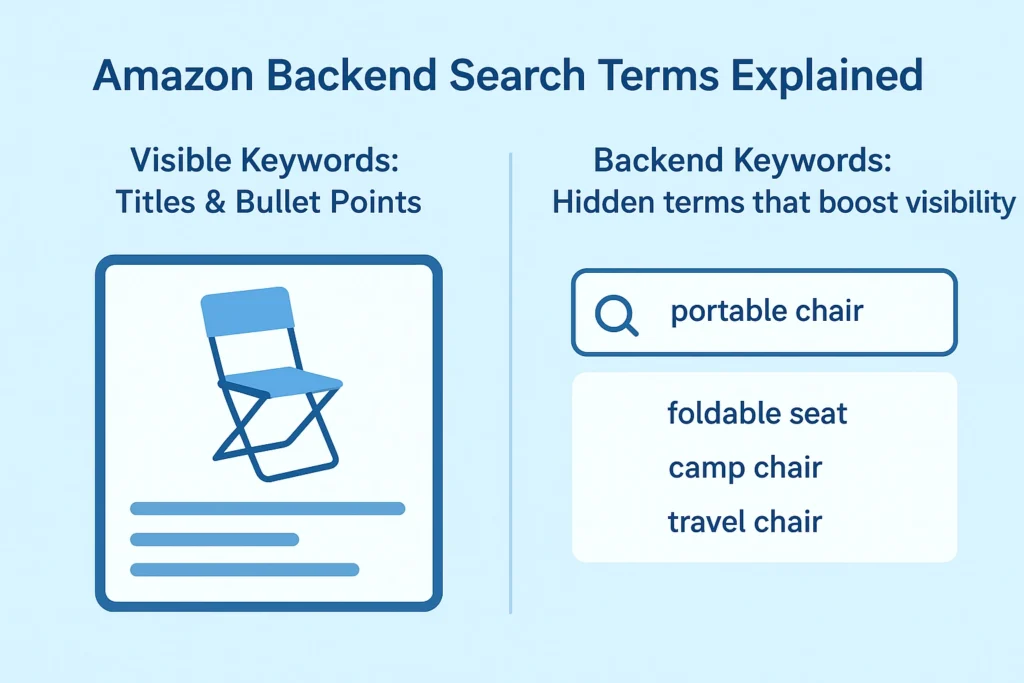
These terms help Amazon’s A9/A10 algorithm understand that your product is relevant to multiple related searches — not just “folding chair.” So, when a customer types in “lightweight camp chair” or “portable metal chair,” your listing has a much higher chance of appearing in the search results.
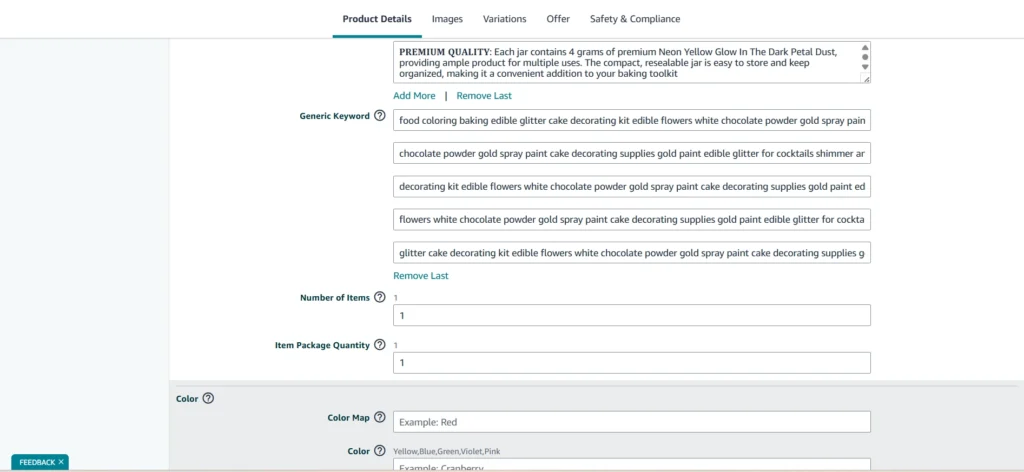
Maximize Search Term Characters in Product Listing
In short, backend keywords allow you to capture more search traffic without overstuffing your visible title or confusing your shoppers.
Why Most Sellers Overlook the Power of Amazon Backend Keywords
Despite the huge potential of Amazon backend search terms, many sellers completely overlook or misuse them — often without realizing it.
- Misunderstanding Amazon’s Algorithm: A large number of sellers assume the algorithm relies only on visible keywords and sales data, not realizing that backend terms help Amazon connect listings with alternate, long-tail, and misspelled search queries.
- Front-End Keywords Matter: Most sellers pour all their energy into optimizing titles, bullet points, and descriptions, but often forget that backend keywords act as the “silent booster”.
- Lack of Knowledge About Keyword Tools: Effective backend optimization requires proper keyword research tools like Helium 10, Jungle Scout, or Brand Analytics.
- Treating Backend SEO as an Afterthought: Many sellers treat backend fields as optional — something to “fill in later.” In reality, backend optimization is a low-effort, high-return strategy.
By understanding how Amazon truly reads and ranks listings — both front-end and backend — sellers can turn this overlooked SEO area into a steady engine for long-term growth.
Thinking About Hiring an Amazon Expert?
Ecomclips’ Partners Achieve an Average 85% Profit Increase!
How Ecomclips Transformed Performance Through Backend Search Optimization
When Ecomclips optimized backend search terms for a client in the Home & Living category (specializing in ergonomic folding chairs), the business saw dramatic improvement in organic visibility and overall profitability. Despite having quality products and reviews, their listings struggled due to unoptimized backend keywords and repetitive front-end content.
After a comprehensive backend keyword strategy, the brand achieved measurable performance gains within 60 days.
Before Optimization:
| Metric | Performance |
| Click-Through Rate (CTR) | 1.8% |
| Conversion Rate | 7.2% |
| Monthly Impressions | 42,000 |
| Monthly Revenue | $12,800 |
| Average Order Value (AOV) | $32 |
| Organic Ranking (Primary Keyword) | #38 |
| Advertising Cost of Sales (ACoS) | 34% |
After Optimization (60 Days Later):
| Metric | Performance (After) | Growth |
| Click-Through Rate (CTR) | 4.5% | ↑ +150% |
| Conversion Rate | 12.1% | ↑ +68% |
| Monthly Impressions | 109,000 | ↑ +160% |
| Monthly Revenue | $28,200 | ↑ +120% |
| Average Order Value (AOV) | $39 | ↑ +21.8% |
| Organic Ranking (Primary Keyword) | #7 | ↑ +31 positions |
| Advertising Cost of Sales (ACoS) | 22% | ↓ –12 pts (More Efficient) |
Transformation Summary
After Ecomclips’ strategic optimization, these changes were visible:
- The listing appeared in over 150% more search queries, including new long-tail variations.
- Organic ranking improved from page 4 to the top 10 results, dramatically increasing exposure.
- Monthly revenue grew by over 120%, with conversion and CTR hitting all-time highs.
- Advertising costs dropped by 35%, improving overall ROI.
Strategies Used by Ecomclips:
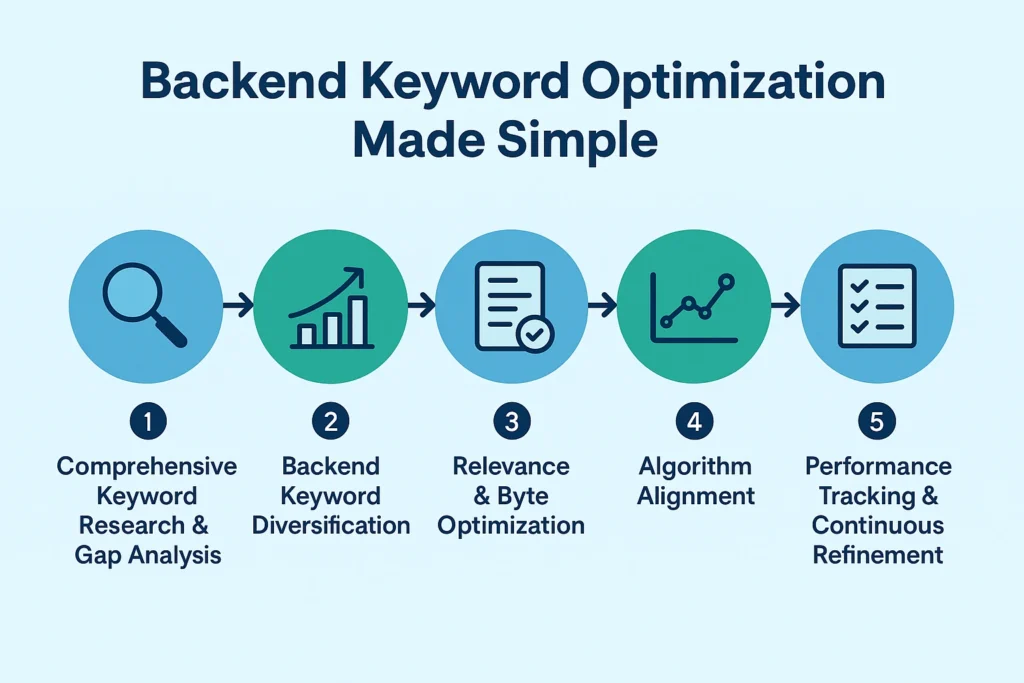
- Comprehensive Keyword Research & Gap Analysis: Leveraged Helium 10, Brand Analytics, and Data Dive to identify untapped search terms and competitor keyword opportunities.
- Backend Keyword Diversification: Expanded reach using variations like “portable folding seat,” “event chair,” “camping stool,” “space-saving chair,” and “travel folding seat.”
- Relevance & Byte Optimization: Filled all 250 bytes with high-impact, non-duplicated, and policy-compliant keywords. Removed stop words, symbols, and redundant phrases.
- Algorithm Alignment: Matched backend keyword sets with front-end listing content and PPC keywords to strengthen listing relevance signals.
- Performance Tracking & Continuous Refinement: Reviewed data weekly using Amazon Brand Dashboard — fine-tuning keywords based on impression trends and search query performance.
Within two months, Ecomclips turned a low-visibility product into a top-performing listing:
- +160% increase in organic visibility
- +150% growth in CTR
- +120% revenue increase
- –12% reduction in ACoS
- Ranked in the Top 10 search results for major category keywords
Backend search term optimization isn’t just about filling empty fields — it’s about unlocking visibility, efficiency, and profitability. With Ecomclips’ data-driven approach, sellers can transform backend SEO into a core driver of sustainable Amazon growth.
Backend Keyword Mistakes That Kill the Revenue of Sellers
Many sellers unknowingly sabotage their listings by making these common mistakes. Here are the top mistakes to avoid:
- Keyword Stuffing or Repeating Terms: Some sellers cram backend fields with hundreds of repeated keywords or phrases already used in their titles and bullet points.
Example: A listing with “folding chair” mentioned 10 times in both visible and backend fields.
Why it hurts: Amazon’s algorithm reads this as spammy and redundant, ignoring extra keywords and wasting valuable byte space.
- Using Irrelevant or Unrelated Keywords: Trying to rank for every trending term might seem smart, but it confuses Amazon’s algorithm, such as adding “gaming chair” or “office desk” to a “folding chair” listing.
- Adding Brand Names or Competitor Terms (Policy Violation): Including other brands’ names or competitor ASINs in backend keywords violates Amazon’s Listing Policy.
Example: A seller adds “IKEA” or “Coleman” to their backend keywords.
- Ignoring Byte Limits: Amazon’s backend keyword limit is 250 bytes per listing, not 250 characters.
Why it hurts: You lose keyword visibility and waste research effort.
- Including Stop Words (and, for, the, with, etc.): Common filler words eat up byte space without adding SEO value. For example, writing “chairs for camping and outdoor use.”
- Forgetting Plural/Singular Variations: Amazon often treats singular and plural words differently.
Example: Adding “folding chair” but forgetting “folding chairs.”
- Leaving Fields Blank or Unchanged for Months: Some sellers skip backend fields altogether or fail to revisit them after major algorithm updates.
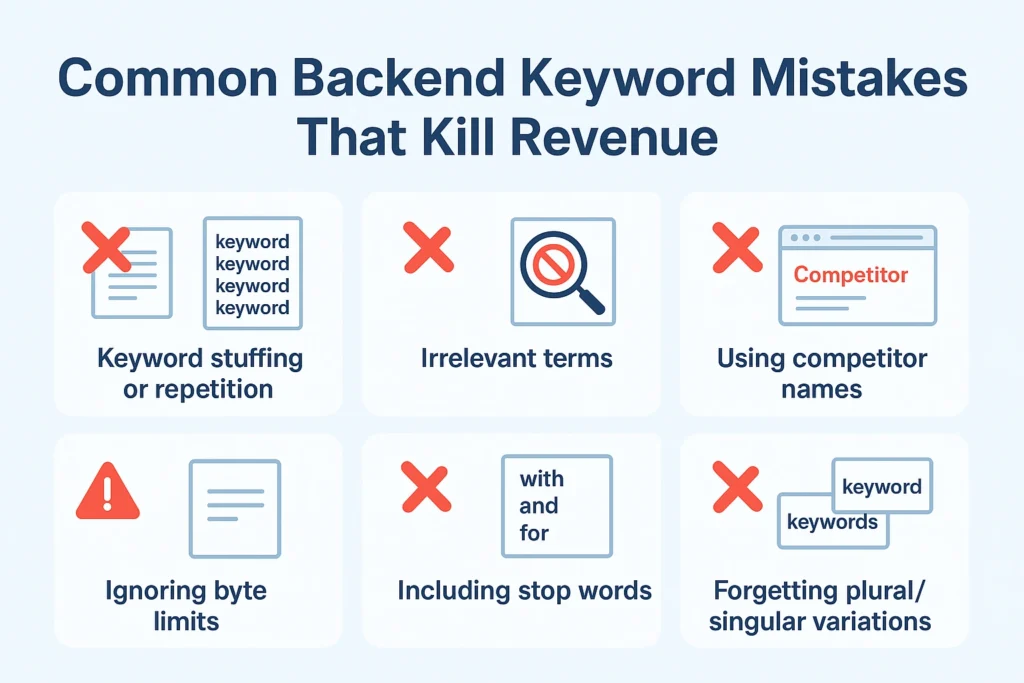
Neglecting to update or utilize backend fields can cause listings to lose visibility over time as search trends evolve. Regularly reviewing and refreshing these fields keeps your products relevant, discoverable, and competitive in Amazon’s ever-changing marketplace.
How Ecomclips’ Strategic Framework Transforms Backend Optimization
Most Amazon sellers fail to fully leverage backend search terms — not because they don’t care, but because they lack structure. Here’s how these mistakes impact performance — and how Ecomclips’ proven framework fixes them.
- Relying on Guesswork Instead of Research:
Impact: Sellers often use random or “gut-feel” keywords without analyzing volume or competition, leading to poor ranking and minimal impressions.
Ecomclips’ Fix: We use data-driven tools like Helium 10, Data Dive, and Amazon Brand Analytics to identify high-intent, low-competition keywords, ensuring every backend term drives real visibility.
- Ignoring Buyer Intent and Relevance:
Impact: Listings attract the wrong audience, increasing clicks but lowering conversions — ultimately hurting the listing’s performance score and ranking.
Ecomclips’ Fix: Our team maps backend keywords directly to buyer intent. For example, for a folding chair, we focus on “camping seat” and “portable event chair” — not “office chair” or “gaming seat.”
- Repetitive or Narrow Keyword Usage:
Impact: Sellers rely on the same few keywords across titles, bullets, and backend fields, missing long-tail and regional searches that make up 60%+ of Amazon queries.
Ecomclips’ Fix: We diversify keyword sets with synonyms, plural/singular forms, and long-tail variations, maximizing reach without repetition.
- Using Restricted or Competitor Keywords:
Impact: Including brand names or misleading claims risks policy violations, listing suppression, or account suspension.
Ecomclips’ Fix: Our compliance team audits every keyword set, removing unsafe or policy-violating terms while keeping relevance high — ensuring safe, scalable optimization.
- Disconnected Front-End and Backend SEO:
Impact: Sellers treat backend SEO separately from titles, bullets, and ads — confusing Amazon’s algorithm about listing relevance.
Ecomclips’ Fix: We create a unified keyword strategy that aligns backend search terms with front-end copy and PPC campaigns, reinforcing product visibility across all touchpoints.
- “Set It and Forget It” Mentality
Impact: Over time, outdated backend keywords stop performing, leading to declining impressions, ranking drops, and wasted traffic potential.
Ecomclips’ Fix: We conduct regular performance reviews using Search Query Performance Reports and Brand Analytics, refreshing low-performing keywords and keeping your listing in top-tier visibility.
By fixing these seven critical backend SEO mistakes, Ecomclips helps brands:
- Improve organic visibility by 100–160%,
- Boost conversion rates up to 70%, and
- Reduce ad spend dependency by keeping listings relevant and visible organically.
- Backend optimization isn’t just a field to fill — it’s a revenue engine when managed strategically.
How to Manage Backend Keyword Optimization, Planning, and Monitoring
Successful backend search term optimization isn’t just about adding the right keywords once — it’s about building a repeatable system that tracks, analyzes, and improves performance over time. Ecomclips follows a structured approach to ensure that every keyword continues to drive measurable growth.
1. Build a Keyword Management Sheet: Start by maintaining a centralized keyword tracking sheet for all your ASINs. This helps you organize backend terms by product, track performance history, and avoid duplication across listings.
2. Set a Regular Review Schedule: Review your keywords monthly or quarterly, depending on your product category’s competitiveness.
3. Measure Performance with Key Metrics: To track real progress, monitor your impressions, click-through rate, average order value, and conversion. Use Amazon Brand Analytics, Search Query Performance Reports, and Helium 10 to capture these insights accurately.
4. Align Backend Keywords with PPC Data: Identify high-converting ad keywords and add them to your backend fields to strengthen organic ranking.
Pro Tip: Ecomclips helps sellers set up custom backend keyword tracking dashboards that combine keyword data, PPC reports, and sales metrics — turning backend optimization into a measurable, growth-focused process.
5. Use Alt Text in Content: Add keyword-rich alt text (descriptive image labels) when uploading visuals in A+ content or product listings.
Example: Instead of “chair image,” write “lightweight folding chair for camping and events.”
Alt Text Tips for Stronger Amazon Keywords
Alt text is often overlooked in Amazon listings, but when used strategically, it can quietly boost your product’s SEO both within Amazon and across external search engines like Google. While backend search terms operate behind the scenes, Alt text complements them by optimizing the visual side of your content.

ALT Text on Amazon A+ Content
How to Add and Optimize Alt Text in Amazon
You can add Alt text when uploading A+ Content or Brand Story modules through Seller Central. Keep these best practices in mind:
- Use relevant, descriptive keywords that match customer search intent.
- Keep it under 100 characters to ensure clarity and readability.
- Avoid keyword repetition or unnatural phrasing — write like you’re describing the image to a person.
- Align Alt text with your backend search terms and front-end content for algorithmic consistency.
Alt text helps Amazon’s A10 algorithm associate your listing with more relevant search queries — even if those keywords don’t appear in visible copy. When combined with backend search terms, Alt text creates an extra layer of semantic relevance, helping your product surface in both Amazon and Google searches.
How to Use Backend Search Terms to Transform Your Business
Backend search terms may seem like a small technical detail, but when managed strategically and consistently, they can become a long-term growth engine for your Amazon business.
Consistent backend keyword refinement builds long-term ranking stability — helping your products maintain visibility even as competition increases. Each update signals to Amazon’s algorithm that your listings are active, relevant, and continuously optimized for customer intent.
For example, one of our clients — a home décor brand — saw a 30% increase in organic sales within six weeks simply by restructuring backend fields. By removing irrelevant keywords, adding high-intent long-tail phrases, and aligning backend data with front-end listings, their organic ranking improved across multiple product categories.
When used strategically, backend keywords become more than just a technical SEO element — they become part of a larger brand visibility strategy.
FAQs: Questions Sellers Ask About Amazon Backend Search Terms
Q1. What exactly are Amazon Backend Search Terms?
Amazon backend search terms are hidden keywords added to a product listing’s backend in Seller Central. They help Amazon’s algorithm understand your product better and match it with more customer searches — even if those words don’t appear in your title or bullet points.
Q2. Why do backend keywords matter for Amazon SEO?
Backend search terms expand your listing’s visibility by covering alternate phrases, synonyms, and long-tail keywords. When optimized correctly, they help your product appear in more relevant searches, driving higher impressions, clicks, and organic sales.
Q3. How are backend keywords different from visible keywords?
Backend keywords are invisible to customers but read by Amazon’s A9/A10 algorithm to enhance discoverability. They don’t affect how your listing looks, but they significantly impact how often it shows up in search results.
Q4. How can backend search terms increase my sales?
By including alternative search phrases that customers use, backend keywords bring in additional traffic that might otherwise miss your listing.
Q5. How many backend keywords can I add?
Amazon allows up to 250 bytes (not characters) in the backend search term field. Exceeding that limit means Amazon will ignore any extra text beyond the limit — so it’s important to use space efficiently with relevant, non-repetitive terms.
Q6. Can I use brand names or competitor keywords?
No. Adding competitor brand names or ASINs in backend search terms violates Amazon’s policy and can lead to listing suppression or account warnings. Always use generic, descriptive, and compliant keywords instead.
Watch how we help new sellers launch successfully-
He Spent $10,000 on Amazon and Couldn’t Sell a Thing 😭 | Don’t Be Mr. Gated Garry!
Amazon SEO Secrets in 2025: Backend Search Terms That Skyrocket Your Sales!
Amazon Long Tail Keywords Research | How to Find Low Competition Keywords for Amazon Advertising
Amazon SEO in 2025 | Fix Your Amazon Ranking Fast | Simple Guide to What Works
Amazon Keyword Research Strategy 2025: Steal Your Competitors Keywords and 5X Your Sales
How Ecomclips Helps You Succeed with Amazon Backend Keyword Optimization
Optimizing Amazon backend keywords is one of the most effective ways to increase visibility, organic traffic, and revenue. That’s where Ecomclips comes in. Our expert team transforms backend search terms into a powerful growth engine for your business.
- Backend Keyword Audit & Strategy: We start by auditing your listings to uncover missed keyword opportunities, duplicates, or irrelevant terms. Using advanced tools like Helium 10, Brand Analytics, and Data Dive, we identify high-volume, low-competition keywords that align perfectly with your products and buyer intent.
- Optimization & Implementation: Our team refines and optimizes your backend fields — removing redundant or non-compliant keywords, filling byte limits efficiently, and ensuring every term adds measurable search value.
- Performance Tracking & Data Insights: Ecomclips continuously tracks keyword performance using key metrics such as impressions, CTR, conversion rate, and organic ranking. We analyze what’s working and update your backend strategy regularly to maintain consistent growth and search visibility.
- Advertising Alignment & Keyword Expansion: We bridge the gap between your PPC campaigns and backend keywords. By identifying top-performing ad terms, we strengthen organic rankings — reducing ad dependency and improving ROI.
- Ongoing Optimization & Compliance: Ecomclips ensures your backend keyword strategy stays compliant, relevant, and effective. We update listings periodically to reflect the latest trends and marketplace data.
With Ecomclips, backend keywords aren’t just technical data — they become part of your strategic growth system. We help sellers turn underperforming listings into high-ranking, high-revenue products by combining data, SEO expertise, and continuous refinement.
Contact us today at info@ecomclips.com or book an appointment with our e-commerce experts to start selling smarter on both marketplaces.
Ecomclips: Your Complete eCommerce Solution Under One Umbrella
At Ecomclips, we bring every eCommerce service you need under one roof — strategy, operations, design, marketing, and growth, all seamlessly connected to help your brand thrive across every marketplace.
Since 2012, we’ve been helping businesses of all sizes launch, scale, and dominate online. From Amazon, Walmart, eBay, and Etsy to Shopify and WooCommerce, our team of marketplace experts, designers, developers, and marketers works together to deliver measurable results.
Our services span the full eCommerce lifecycle:
- Account Setup & Product Listing Management: We handle registrations, compliance, and product data optimization across all marketplaces.
- Amazon Optimization Service: From keyword-rich titles and A+ content to PPC campaigns and storefront design, we craft listings that convert.
- Creative Design & Content Production: A+ visuals, infographics, brand stores, and product videos built to boost engagement.
- Advertising & PPC Management: Smart, data-driven ad strategies for Amazon, Walmart, and Google that maximize ROI.
- Web Development & Store Design: Shopify, WooCommerce, and Magento websites built for performance and conversion.
- Data Management & Automation: Streamlined product feeds, catalog syncing, and inventory control for effortless scalability.
- Customer Service & Order Fulfillment: End-to-end support that enhances customer satisfaction and builds long-term loyalty.
- Analytics & Growth Strategy: Real-time insights and ongoing optimization to ensure consistent, profitable growth.
Whether you’re launching a new store or managing multiple global marketplaces, Ecomclips acts as your single strategic partner, simplifying complexity and driving sustainable revenue growth.
Ready to Start Growing Your Brand?
Ecomclips’ Partners Achieve an Average 85% Profit Increase!