Introduction
One of our Amazon clients came to us, frustrated. Their listings had high traffic but painfully low conversions. Plenty of clicks. Very few purchases.
After a detailed audit, we found the root of the problem — it wasn’t the price, product, or even the reviews.
In 2025, Amazon’s marketplace is more competitive than ever. If your A+ content isn’t optimized for engagement, trust-building, and conversion, you’re losing money.
This guide will show you how to stop that from happening.
Whether you’re a beginner or seasoned seller, this blog will teach you exactly what works right now in A+ Content — with visual examples, pro tips, and conversion-focused strategies that are crushing it for brands in 2025.
Table of Contents:
| What is A+ Content? (2025 Edition) |
| Why A+ Content Matters More Than Ever |
| Brand Story: The Foundation of Trust |
| Basic A+ vs Premium A+ Content – What’s the Difference? |
| Best Practices for Basic A+ Content |
| Advanced Techniques for Premium A+ Content |
| Comparison Charts that Convert |
| Design Tips: Color, Layout, and Visual Strategy |
| SEO Optimization for A+ Modules |
| Interactive Elements: Videos, Carousels, and Hotspots |
| Top A/B Testing Tactics for A+ Content |
| Common Mistakes to Avoid in 2025 |
| Proven Case Study: Before and After A+ Optimization |
| Conclusion: Your Next Step Toward Better Conversions |
1. What is A+ Content? (2025 Edition)
A+ Content (formerly known as Enhanced Brand Content for third-party sellers) is the visual-rich section below the fold on Amazon listings. It lets brand-registered sellers tell their story, show off product features, and connect emotionally with customers.
In 2025, it’s no longer a “nice-to-have.”
It’s a must-have weapon for serious Amazon sellers.
Key Functions of A+ Content:
- Replace boring bullet points with compelling visuals.
- Build brand trust with story, mission, and purpose.
- Educate shoppers about product features in seconds.
- Improve conversion rates significantly.
With competition fiercer than ever, the brands dominating Amazon aren’t just selling — they’re storytelling. And A+ Content is their favorite medium.
2. Why A+ Content Matters More Than Ever
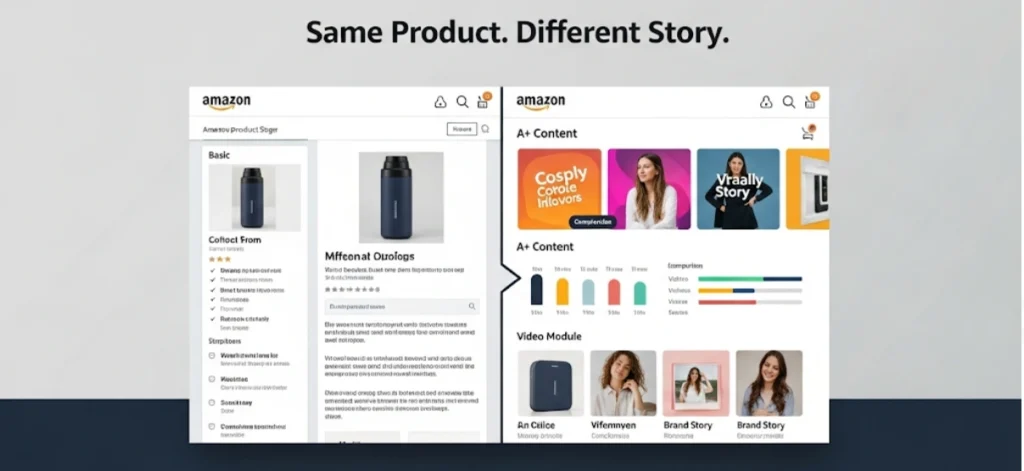
Amazon shoppers in 2025 are smart, impatient, and visual.
They rarely read full bullet points or analyze titles line-by-line. Instead, they scroll — fast. And A+ Content is where they pause… if it’s engaging.
Here’s what A+ Content impacts directly:
- Conversion Rate (CR)
- Session Value
- Bounce Rate
- Add-to-Cart Ratio
According to Amazon’s own reports, good A+ Content can boost conversions by 3–10% on average. But we’ve seen even higher numbers with the right strategy.
This is not just about graphics. It’s about communication, psychology, and positioning. That’s why you need to get it right — right now.
3. Brand Story: The Foundation of Trust
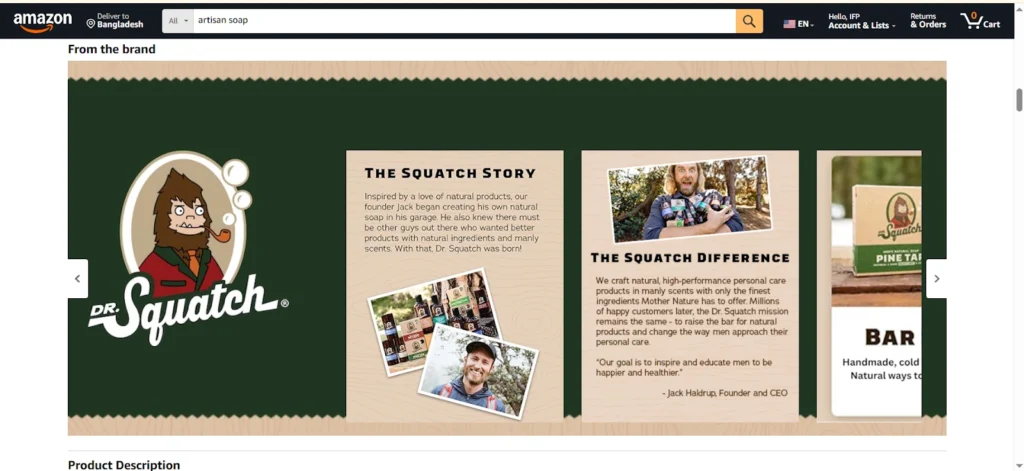
Before a shopper believes in your product, they need to believe in you.
That’s what the Brand Story module is for — and in 2025, it’s the first thing you should build once you’re in Amazon’s Brand Registry.
Why It Works:
People don’t buy products — they buy from people they trust.
Your Brand Story should tell:
- Who you are
- Why you started
- What is your mission is
- Why your product exists
- How you different from the generic options
Tip:
Use visuals to connect emotionally.
Stock images won’t cut it. Show your real team, your workspace, or even behind-the-scenes production shots. Make it feel human.
Example that works:
Take a look at Neuriva’s Brand Story:
They use lifestyle shots, mission statements, and trust-building messaging that feel premium.
Want this module? You’ll need:
- A registered trademark
- To be enrolled in the Amazon Brand Registry
Once enrolled, the Brand Story option will appear in your A+ Content Manager as “Brand Story.” Use it. Strategically.
4. Basic A+ vs Premium A+ Content – What’s the Difference?
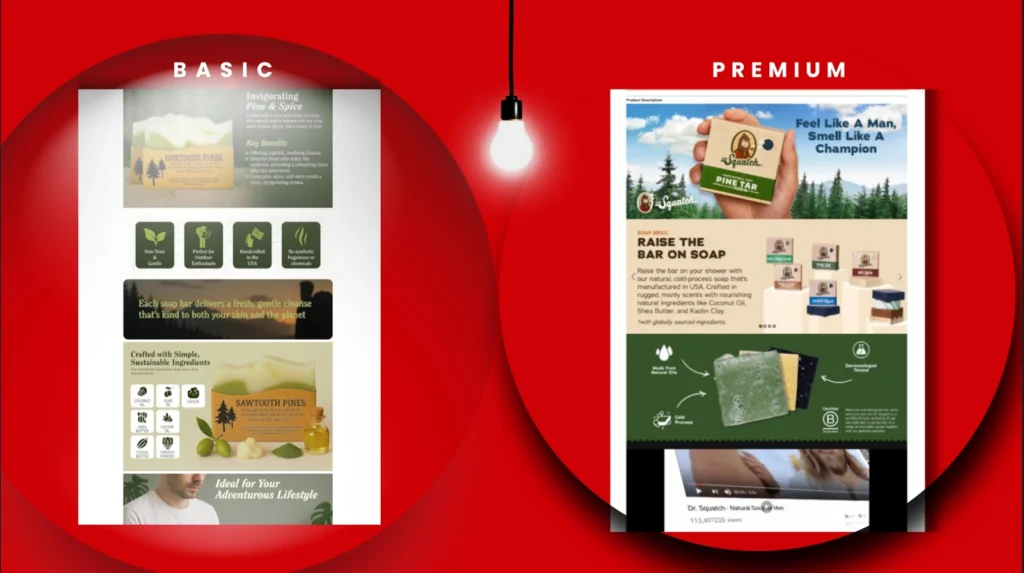
Amazon offers two A+ Content tiers:
- Basic A+ (available to all Brand Registered sellers)
- Premium A+ (unlocked with additional performance)
Let’s break it down.
| Feature | Basic A+ | Premium A+ |
| Max Modules | 5 | 7 |
| Video Support | ❌ | ✅ |
| Image Carousel | ❌ | ✅ |
| Hover Hotspots | ❌ | ✅ |
| Q&A Section | ❌ | ✅ |
| Infographic Support | ✅ | ✅ |
Premium Eligibility (as of 2025):
- Must have a Brand Story
- Must submit 15 approved A+ modules in the last 12 months
- Must be Brand Registered
If you’re not eligible for Premium, don’t worry. Basic A+ can still convert like crazy with the right layout, color strategy, and copywriting — and we’ll show you how next.
5. Best Practices for Basic A+ Content
You have 7 modules. Use all of them.
Module Strategy:
- Banner Image – Lead with product and logo
- Infographic – Highlight 3 key benefits visually
- Lifestyle Image – Show the product in real-world use
- Trust Badges – FDA Approved, Organic, Lab Tested
- Testimonial or Review – Real quote with image
- Comparison Chart – Clear contrast with your other products
- Brand Story Reminder – Reinforce mission + values
Golden Rules:
- Visual First – Let the images do the talking
- Text Minimalism – 30-40 words max per block
- Mobile Optimization – Always preview in mobile layout
- Consistency – Use your brand colors, font style, and tone
Don’t cram text inside images — Amazon may reject them, and they don’t convert well anyway.
6. Advanced Techniques for Premium A+ Content
If you’re eligible, Premium A+ is your secret weapon in 2025.
It offers larger image real estate, video modules, interactive design, and enhanced engagement features that help shoppers stick around longer.
Here’s what you should do with it:
- Full-Width Banner with logo and product USP
- Video Demonstration: unboxing, how-to, or story
- Image Carousel: multiple angles, features, lifestyle
- Hover Hotspots: break down technical features
- Q&A Section: proactively handle common objections
- Conversion Module: trust badges, customer logos, guarantees
Add an image carousel + interactive hotspots to show product dimensions or features like materials, certifications, or care instructions. The longer they interact, the more likely they are to convert.
7. Comparison Charts That Convert
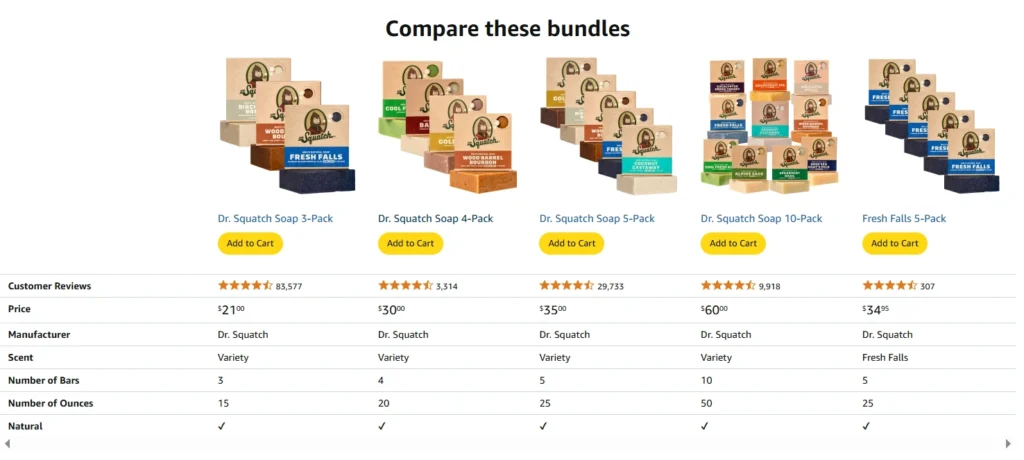
This module is non-negotiable in 2025.
Amazon shoppers today are comparison shoppers by default. They want to know how your product stacks up against alternatives — not just in terms of price, but in features, value, and credibility. If your listing doesn’t clearly communicate those differences, most buyers will click away to find one that does.
A well-crafted comparison chart can instantly highlight why your product is the smarter choice. Instead of letting shoppers do the mental math, you lay it out for them — clearly and confidently.
Start by choosing three to five of your product’s most important features. These could be things like size options, ingredient quality, eco-friendliness, warranty coverage, or extra accessories. Then, show how your product checks every box — while subtly pointing out what competitors lack.
Keep your language concise and benefits-focused. Use visual cues like green checkmarks and clear icons to make each point easy to digest at a glance. If Amazon allows it, include price ranges to illustrate the value you offer in relation to other brands.
To further boost trust and drive conversions, highlight any third-party certifications, such as FDA approval or eco-certification. Don’t forget to mention value-adding benefits like a money-back guarantee, product variations, or bundle options — these small details can be the deciding factor for a hesitant shopper.
Ultimately, this module helps remove confusion and gives shoppers the confidence to choose your product. It’s not just about comparison — it’s about clarity and trust.
8. Design Tips: Color, Layout, and Visual Strategy
Your A+ Content is your brand billboard. Every color, shape, and visual cue tells a story.
Design Checklist:
✅ Use your brand palette
✅ Align typography across modules
✅ Balance white space for clean reading
✅ Never overcrowd with visuals
✅ Add call-to-action graphics (like “Try It Now”)
Visual Examples That Work:
- Background color blocks for each benefit
- Icons for feature breakdowns
- Circle-cropped images to humanize your brand
- Clean font (e.g., Open Sans, Roboto) for legibility
9. SEO Optimization for A+ Modules
Important Note: Text inside A+ Content is not indexed by Amazon’s A9 algorithm. But that doesn’t mean SEO isn’t important.
Why?
Google does index A+ Content. And conversion affects rankings.
What You Can Do:
- Use target keywords in image alt-text (add them in the backend)
- Reinforce brand + product name in headers
- Include high-converting copy elements:
- “Clinically Proven”
- “Free Shipping”
- “Risk-Free Trial”
- “Saves Time & Money”
10. Interactive Elements: Videos, Carousels, and Hotspots
In 2025, static images no longer cut it.
Today’s Amazon shoppers demand interaction. They want to see how the product works, feel its value through design, and experience it virtually before they ever click “Buy Now.”
That’s where interactive A+ Content becomes your biggest advantage, especially if you’re using Premium A+.
Add Product Videos
Videos bring your product to life.
- Show real people using it
- Demonstrate key benefits in action
- Answer common questions visually
- Include branding and voice-over to reinforce messaging
SEO Tip: While the video transcript isn’t indexed by Amazon, it is by Google. Add a clear product name and keyword-rich description when uploading.
Use Image Carousels
Instead of stuffing all features into one image, carousel sliders let you break them into parts. For example:
- Slide 1: Main feature with large image
- Slide 2: Technical spec
- Slide 3: Lifestyle application
- Slide 4: Safety or warranty info
Each slide focuses on one strong message — keeping attention longer.
Interactive Hotspots
This cutting-edge feature lets users hover over areas of your product image and receive small pop-ups with key information.
For example, a shoe image might have hotspots for:
- Breathable mesh
- Memory foam
- Reinforced heel
- Vegan materials
These micro-moments engage customers without overwhelming them with paragraphs.
11. Top A/B Testing Tactics for A+ Content
How do you know your A+ is actually converting?
You test it.
In 2025, A/B testing is one of the most underutilized growth hacks for Amazon sellers.
Here’s how to do it right.
What You Can Test:
- Image layout: vertical vs. horizontal modules
- Infographic colors: brand-themed vs. neutral
- Copy tone: technical vs. emotional
- Lifestyle photos: people-focused vs. product-focused
- CTA styles: buttons vs. phrases
Tools to Use:
- Manage Your Experiments inside Amazon Brand Registry
- Splitly (for more advanced external tracking)
- Listing Dojo (for split-testing pricing + content)
Run each test for 2–4 weeks. Focus on conversion rate as your primary KPI, and make one change at a time.
Pro Tip: Even a 1% increase in CR can translate to tens of thousands in revenue over time.
12. Common Mistakes to Avoid in 2025
With so many A+ tools and modules, it’s easy to overdo or misuse them. Here are the top mistakes sellers still make in 2025 — and how you can avoid them:
Overcrowding With Text
Images aren’t for reading. Keep it visual. Use 3–5 words max on visuals, and rely on surrounding text modules for explanations.
Ignoring Mobile Optimization
Most Amazon traffic comes from mobile. If your layout only looks good on desktop, you’re leaving conversions on the table.
Using Stock Photos
Customers can smell inauthenticity. Use custom lifestyle imagery with real people, real lighting, and real settings.
Skipping Comparison Charts
Buyers compare — so help them. Skipping this module means lost the opportunity to upsell or cross-sell your other products.
Clashing Brand Colors
Don’t go rainbow. Stick to 2–3 branded colors maximum. Maintain clean lines, white space, and visual hierarchy.
13. Proven Case Study: Before and After A+ Optimization
Client: Wellness Supplement Brand
Category: Nootropics & Cognitive Enhancers
Monthly Clicks: 25,000
Conversion Rate (Before): 7.2%
Conversion Rate (After A+ Upgrade): 13.6%
Issues Before:
- No Brand Story
- Generic lifestyle stock photos
- No comparison chart
- Dense blocks of text in every image
Fixes We Implemented:
- Created custom Brand Story module with real team photos
- Shot product lifestyle images with models and a clean background
- Redesigned layout with infographic modules
- Added Premium A+ modules (carousel, video, Q&A)
- A/B tested three CTA styles before finding a winner
The Result:
- CR increased by 88%
- Product hit #1 Best Seller Badge in its sub-category
- Earned “Amazon’s Choice” tag within 90 days
This transformation didn’t require re-inventing the product. It only required rethinking how the product was presented.
And that’s the power of A+ Content done right.
14. Conclusion: Your Next Step Toward Better Conversions
Let’s recap the key takeaways from this 2025 A+ Content strategy guide:
✅ Start with your Brand Story – Authenticity sells
✅ Use all 7 modules in Basic A+ – And upgrade to Premium when possible
✅ Incorporate videos, carousels, and hover hotspots – They increase dwell time and clarity
✅ Design visually and communicate quickly – Don’t bury your value in blocks of text
✅ Split test everything – Layout, images, CTAs, tone
✅ Always include a comparison chart – It’s your upsell weapon
✅ Avoid common mistakes – No stock photos, text-heavy layouts, or brand inconsistencies
Final Thought:
In 2025, Amazon rewards sellers who earn trust through storytelling, not just sellers with good products.
So, if your A+ Content isn’t making a powerful visual argument for your brand — it’s not doing its job.
But don’t worry — that’s what we’re here for.
Need Help Creating A+ Content That Converts?
We’ve helped thousands of sellers like you earn Amazon’s Choice and Best Seller badges through A+ content that doesn’t just look good — it performs.
With over 12 years of eCommerce experience, we:
- A/B test your content
- Design custom visuals
- Craft conversion-ready layouts
- Handle compliance and image guidelines
📧 Want a FREE audit?
Email us: info@ecomclips.com
We’ll review your current A+ setup and show you how to optimize it for 2025.
Let your listings do the selling — while we do the building.
The End
Powered by Ecomclips – Your partner in Amazon growth.
FAQs– Your Quick Guide to Mastering A+ Content in 2025
What is A+ Content, and who can use it?
A+ Content is a customizable product detail section available to Brand Registered Amazon sellers. It lets you enhance your listings with lifestyle images, brand storytelling, comparison charts, and more.
If you’re not Brand Registered yet, that’s your first step. Once you’re in, you can access Basic A+ — and eventually unlock Premium A+ with consistent use.
How much can A+ Content really improve conversion rates?
On average, sellers see a 3% to 10% boost in conversions — but we’ve worked with brands that achieved over 88% growth, just by redesigning their A+ strategy.
Think of A+ like your digital storefront window. Make it impressive, and shoppers will walk in (and buy).
Is Premium A+ Content worth the effort?
Absolutely — if you’re eligible.
Premium A+ unlocks:
- Full-width banners
- Video modules
- Image carousels
- Hover hotspots
- Q&A section
These tools increase engagement, improve time on page, and reduce bounce rates. It’s especially effective for technical products, supplements, beauty, and electronics.
Can I use the same A+ layout for all my products?
Technically, yes. Strategically? No.
Each product has a different audience, value proposition, and emotional driver. A+ Content should reflect that. For example:
- A supplement may focus on trust, ingredients, and testimonials
- A kitchen tool may need visual demonstrations and comparison charts
Do keywords in A+ Content help with Amazon SEO?
Not directly — Amazon doesn’t index A+ text for ranking.
However, A+ influences buyer behavior, and higher conversions do impact your organic ranking. Also, Google does index A+ Content, so keyword-rich alt text and captions are still beneficial.
What should I include in my comparison chart?
Stick to 3–5 key differentiators like:
- Size
- Ingredients/materials
- Features
- Price points
- Who it’s for (e.g. beginner vs. pro)
Use clean icons, green checkmarks, and simple language. Keep it glanceable.
How often should I update my A+ Content?
At least once every 6 months, or:
- When you launch a new version of the product
- If you’re seeing low conversion rates
- When you rebrand or update your visual identity
- After a competitor improves theirs (stay ahead!)
And don’t forget to A/B test regularly.
Can A+ Content be rejected by Amazon?
Yes — and it happens more than you’d think.
Common reasons:
- Too much text in images
- Spelling or grammar errors
- Prohibited claims (e.g., “best cure” or “guaranteed results”)
- Unregistered trademarks or logos
- Unrelated lifestyle imagery
Always follow Amazon’s A+ Content Guidelines. Or let pros like Ecomclips handle compliance for you
How do I get help designing high-converting A+ Content?
That’s where we come in.
At Ecomclips, we:
- Audit your current listing for FREE
- Provide content strategy + layout recommendations
- Design branded, mobile-optimized A+ modules
- Handle Amazon approval from start to finish
Just email us at 📧 info@ecomclips.com, and we’ll take it from there.
What’s the one thing I should fix today in my A+ Content?
Add a comparison chart.
It’s fast, impactful, and often overlooked. It builds trust, reduces friction, and increases cart confidence.
Don’t let shoppers wonder what makes your product better. Show them.