
Yes, adding too many keywords is bad for most Google Ads accounts, especially when you start with a small budget. A long list spreads your clicks so thin that no keyword collects enough data to tell you what works.
Many advertisers think more keywords means more reach. They paste a thousand terms into one campaign and hope Google sorts it out. That approach usually burns through the budget and leaves a report full of keywords with one click each.
The better approach sounds backward: less is more. In this guide, you will learn:
- Why a big keyword list hurts small budgets
- How a few keywords usually drive most of your results
- How to find and remove keywords that waste money
- How to group keywords into themed ad groups
- When an ad group has too many keywords
Why is adding too many keywords bad for Google Ads?
Adding too many keywords is bad because your budget can only buy a set number of clicks, and a long list splits those clicks into tiny pieces. Each keyword then has too little data for you to judge it.
It helps to know what does not happen. Google says that keywords in the same account do not compete with each other in the auction. Only one of your keywords can trigger an ad for a given search. Google also says keywords with low search volume have no negative impact on your account.
So Google does not penalize you for a long list. The real damage comes from four places:
- Thin data. Your clicks spread across hundreds of terms, so you cannot tell winners from losers.
- Weak focus. Your budget goes to terms you never meant to prioritize.
- Loose ads. One ad has to speak to many different searches, so it fits none of them well.
- Messy management. You spend hours on a list where most rows never matter.
How a big keyword list burns a small budget
A big keyword list burns a small budget because the math does not work. Picture a lab testing company that offers 500 different tests. It wants to advertise every test, and it wants to spend $50 a day.
If an average click costs $5, that budget buys about 10 clicks a day, or about 300 clicks a month. Split across 500 keywords, each keyword gets less than one click a month. Many keywords will never show up at all.
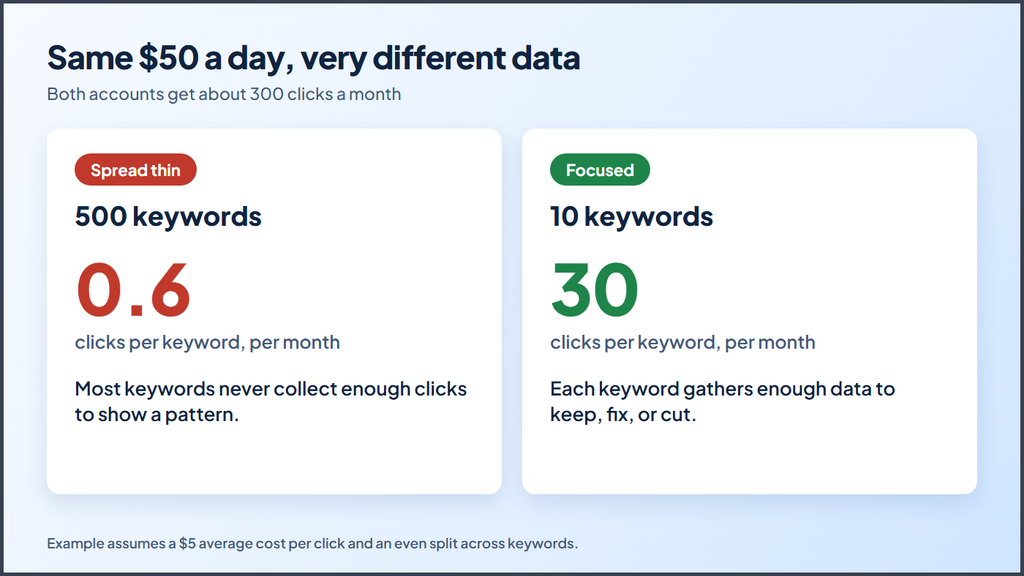
After 30 days, that company would look at a report full of keywords with one click and no conversions. It would have no momentum and no clear next step.
Now picture the same $50 spent on the 10 tests people search for most. Each keyword gets about 30 clicks a month. That is still a small sample, but it shows you which terms bring leads, which need a better ad, and which to cut.
A few keywords usually drive most of your results
In most accounts, a small group of keywords drives most of the conversions. You may know this pattern as the 80/20 rule, where 20% of the effort produces 80% of the results. In Google Ads, the split often runs closer to 90/10.
Here is a real ad group from one account. It spent $80,687.54 over 30 days and brought in 3,124 conversions.
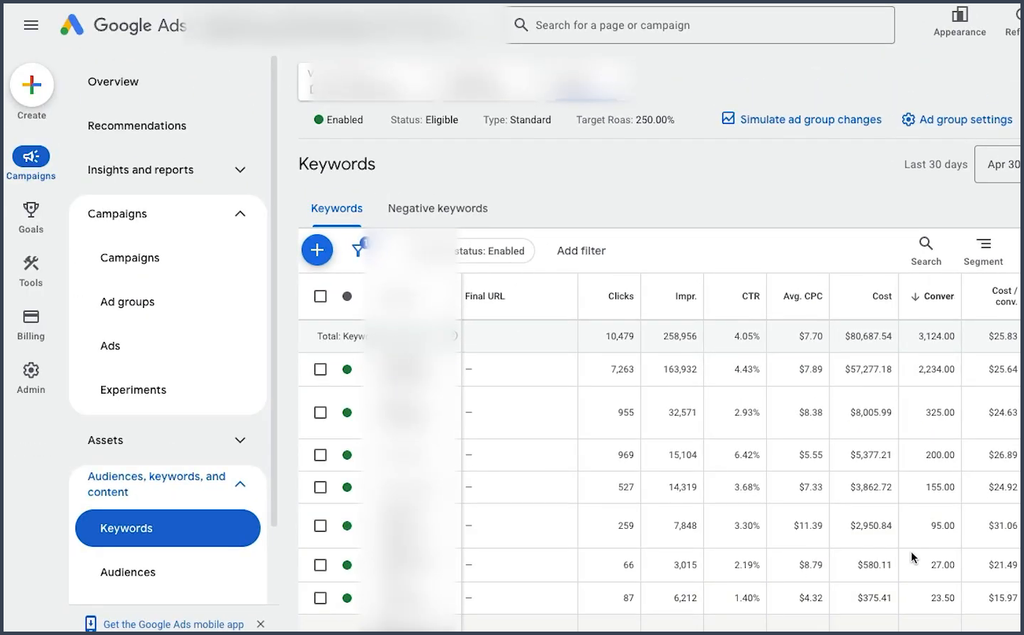
That ad group held about 55 keywords. Yet one keyword brought in 2,234 conversions on its own. The next three brought in 325, 200, and 155.
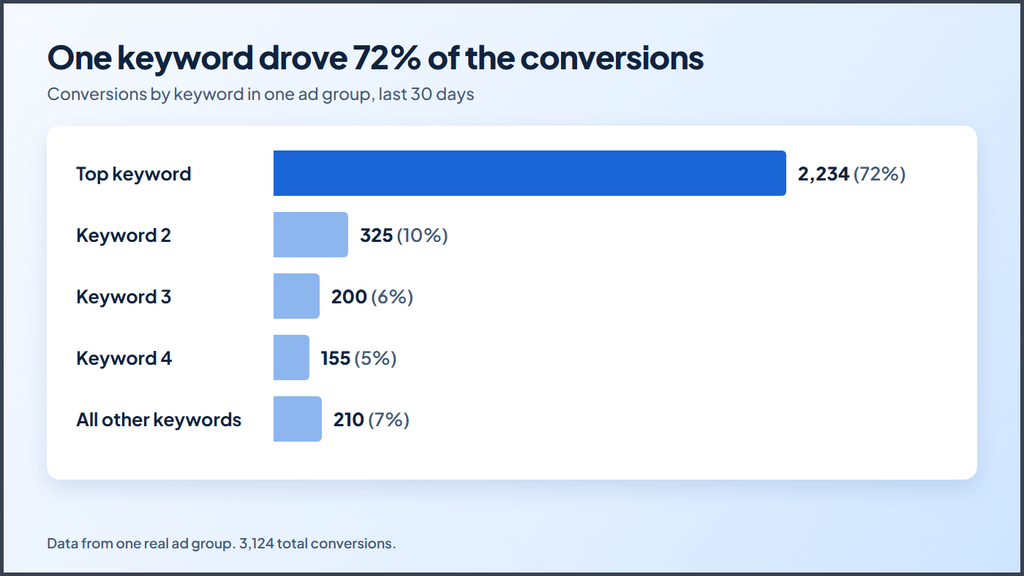
Four keywords drove 93% of all conversions. Every other keyword in the group added up to about 7%.
A second account shows the same thing on a smaller scale. One keyword brought in about €10,500 in revenue in an account that made about €50,000 in total. A single, focused term did a fifth of the work.
You can call these terms your core keywords or your money makers. Every account has them, and your first job is to find them.
How to find keywords that waste money
Scroll past your top keywords in that same report, and you will usually find rows like these.
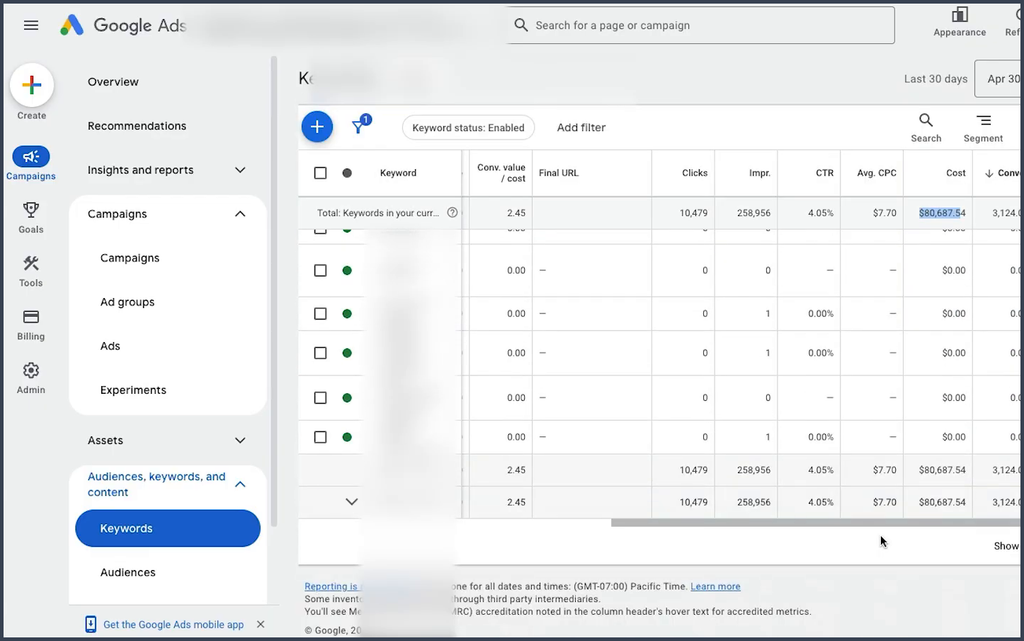
These keywords show zero clicks or a handful of impressions over 30 days. They add nothing except clutter. Use this process to clean them up:
- Open your keyword report and set the date range to the last 30 to 90 days.
- Sort by conversions from high to low.
- Mark the keywords that drive most of your results. Leave them alone.
- Look for keywords with clicks and spend but no conversions. Pause the ones that clearly do not fit.
- Check the keyword status column for terms marked “Low search volume.” They will not run until search activity picks up, so you can remove them to tidy the list.
- Remove duplicates. If two keywords match the same searches, only one can trigger your ad anyway.
Be careful with keywords that have very few clicks. A keyword with five clicks and no sales may simply need more time. A keyword with 100 clicks and no sales gives you a much better reason to act.
How many keywords should you start with?
Start with a short list of your most valuable search terms, often 5 to 15 per theme, instead of every term you can think of. There is no perfect number, but a focused start almost always beats a giant list on a small budget.
Follow these steps to build your first list:
- Pick your core services. List the two or three things that make you the most money.
- Find your seed terms. Use Keyword Planner to find the main ways people search for each service.
- Choose your match types. Learn how exact, phrase, and broad match work. A single phrase match keyword can cover many close searches, so you do not need hundreds of variations.
- Launch and collect data. Give your core terms enough budget to gather real clicks.
- Expand with momentum. Check your search terms report to find new terms that already convert. Add the best ones as keywords, and add the poor ones as negative keywords.
This way, you grow your list based on proof, not guesses. Each new keyword earns its place.
Does broad match make a long list unnecessary?
Broad match makes a long list even less necessary. Google’s guide to keyword matching options explains that broad match reaches the widest range of related searches. One broad match keyword can show your ad for many searches you never typed into your list.
That reach cuts both ways. It saves you from listing every variation, but it can also pull in searches you do not want. If you use broad match, pair it with conversion tracking, a firm budget, and a weekly review of your search terms. Keep the keyword list short and let the search terms report show you what to block.
Group your keywords into themed ad groups
Group your keywords into small ad groups, each built around one clear theme. Google recommends that you pick a narrow theme for each ad group and use keywords related to that theme.
Some advertisers call this the single themed ad group method, or STAG. Here is how it looks for a plumbing company.
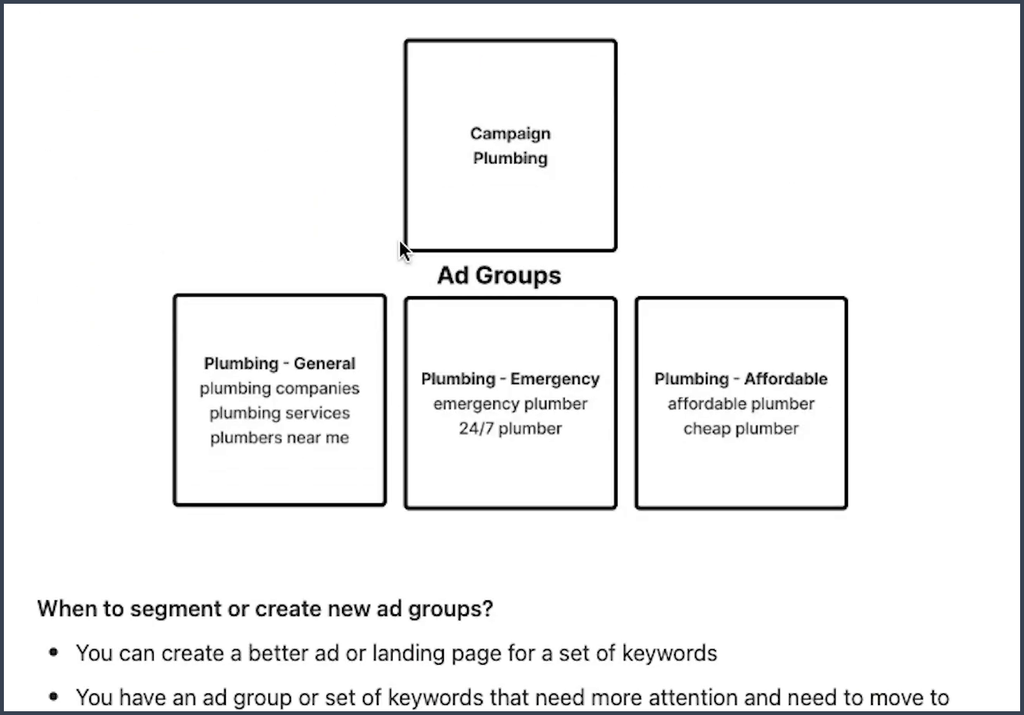
The campaign holds three ad groups:
| Ad group | Example keywords | What the ad should say |
|---|---|---|
| General | plumbing companies, plumbing services, plumbers near me | Licensed plumbers for any job |
| Emergency | emergency plumber, 24/7 plumber | Fast help, day or night |
| Affordable | affordable plumber, cheap plumber | Upfront prices and deals |
Many people throw all of these keywords into one ad group. They write emergency, budget, and general headlines into one responsive search ad and expect Google to match the right headline to each search. That rarely works as well as a themed setup.
Themed ad groups give you three clear benefits:
- Sharper ads. You can write ads that speak to one need, such as fast emergency service.
- Better landing pages. You can send emergency searches to an emergency page and price shoppers to a pricing page.
- Easier management. You can see which theme performs best and move budget toward it.
Tighter ads and pages also help your Quality Score, which looks at ad relevance, expected click through rate, and landing page experience.
What is the 20 keyword rule?
The 20 keyword rule is a simple check that many advertisers use: when an ad group gets close to 20 keywords, stop and ask whether it should be split. It is a rule of thumb, not a Google rule.
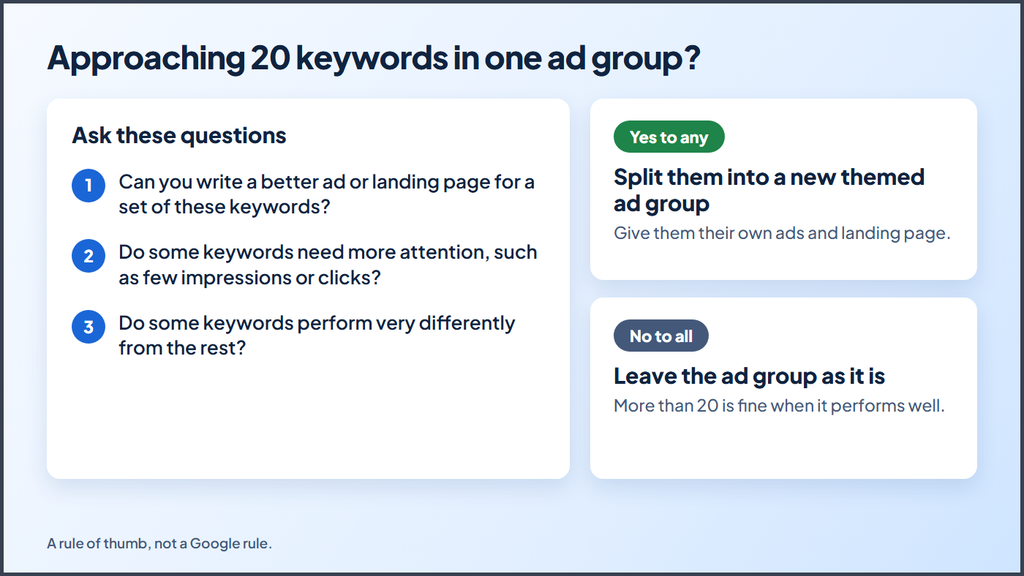
When an ad group nears 20 keywords, ask these questions:
- Can you write a better ad or landing page for a set of these keywords?
- Do some keywords need more attention, such as few impressions or clicks?
- Do some keywords perform very differently from the rest?
If you answer yes to any of them, move that set into its own themed ad group. If you answer no to all of them, leave the ad group as it is.
Plenty of strong ad groups hold more than 20 keywords. If one performs well and you cannot write a better ad or page for any part of it, splitting it would only add work. The number simply tells you when to take a closer look.
Can you have too few keywords?
Yes, you can have too few keywords if your list misses how real people search for your service. A plumber who only bids on “plumber” may miss people who search for “water heater repair” or “drain cleaning near me.”
The fix is not a giant list. Instead, cover each core service with a few strong terms, then watch your search terms report for gaps. When the same useful search shows up again and again, add it as a keyword or give it its own ad group. That way, your list grows only where real demand exists.
Signs you have too many keywords
Watch for these warning signs in your account:
- Most of your keywords have fewer than 10 clicks in the last 30 days.
- One ad has to cover very different needs, such as emergency repairs and low prices.
- Many keywords show “Low search volume” or zero impressions.
- You cannot explain why most of your keywords are in the account.
- Your budget runs out before your best keywords get their share.
If you see two or more of these signs, it is time to trim and regroup.
Common mistakes when you cut keywords
Cutting keywords helps, but cutting the wrong way can hurt your results. Avoid these common mistakes:
- Cutting too fast. Judge each keyword over at least 30 days, and longer if it gets few clicks.
- Deleting instead of pausing. Pause keywords first, so you keep their history and can turn them back on.
- Removing your brand terms. Brand keywords often show low volume but convert at a high rate.
- Ignoring assisted results. Some keywords start the journey even when another keyword gets the final conversion.
- Forgetting the search terms. A keyword with no conversions may still match searches that do convert under another keyword.
Make one round of changes, then give the account a few weeks to settle before the next round.
Start small, then grow with proof
Adding too many keywords will not get your account penalized, but it will scatter your budget, blur your data, and make your ads less relevant. A short list of strong keywords gives you clear answers much faster.
Start with your core terms, group them into tight themes, and let real data tell you what to add next. When an ad group nears 20 keywords, take a closer look. Over time, you will build an account that stays clean, focused, and profitable.
Want help with your account? Contact us, and we can walk through your keywords with you.
More Google Ads resources from Ecomclips
For more Amazon advertising tutorials and updates, visit these Ecomclips resources:
- Watch new videos on the Ecomclips YouTube channel.
- Browse articles on the Ecomclips blog.
- Follow updates on the Ecomclips Facebook page.
- Connect with Ecomclips on LinkedIn.
Questions about an account review or a free audit can be sent to info@ecomclips.com.