
You can drive unlimited traffic through Amazon PPC and still lose money if your listing fails to convert. Many sellers face the common issue of Amazon PPC clicks but no sales, where campaigns generate traffic but fail to deliver results. This often leads to frustration around Amazon PPC not converting, even when keywords seem highly relevant.

The reality is, Amazon ads getting clicks but no sales usually point to deeper issues beyond targeting, such as weak listings, poor pricing, stock problems, or strong competition on the product page. These factors directly contribute to a low Amazon PPC conversion rate, which signals to Amazon that your product may not be the best match for shoppers. Effective Amazon PPC optimization starts by fixing what happens after the click, not just adjusting bids or keywords. By identifying these gaps and applying the right solutions, you can turn wasted spend into profitable growth and significantly improve your campaign performance.
Why Amazon PPC Clicks Without Sales Drain Your Budget Fast
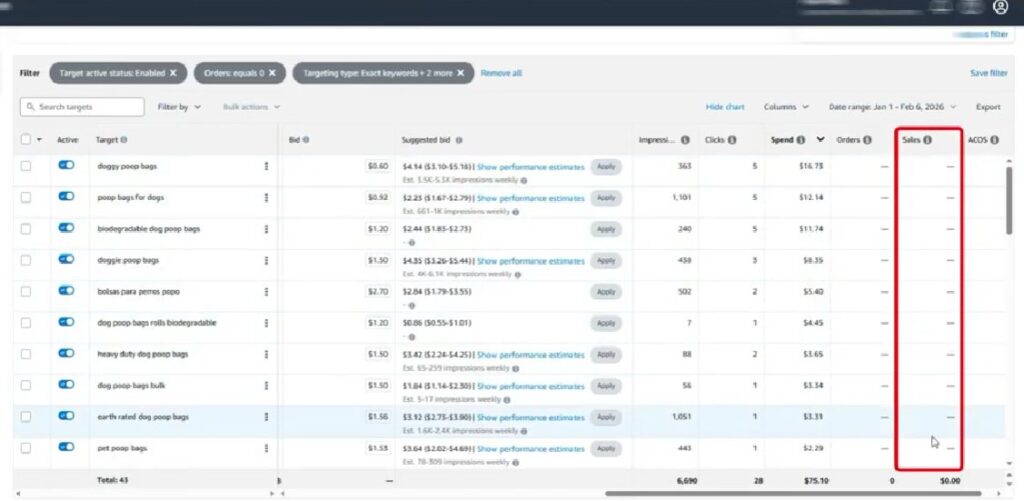
Many sellers believe that if a keyword is relevant, sales should follow automatically. That sounds logical, but Amazon advertising does not work that simply.
A shopper can click your ad for many reasons. Your main image may look interesting. Your price may seem worth checking. Your product may appear in a strong ad placement. The keyword may match part of the shopper’s search. Or the shopper may simply want to compare options before buying.
But a click does not mean purchase intent is strong enough.
After clicking, the shopper still evaluates your product page. They compare your price, reviews, images, delivery promise, coupon, product details, variations, and competing offers. If those elements do not create enough confidence, the shopper leaves and your PPC budget takes the hit.
This is why Amazon PPC clicks, but no sales can become so damaging. You are paying for traffic, but that traffic is not turning into revenue.
The PPC Leak Cycle
When ad clicks do not convert, it usually means the problem is not only inside the campaign. The leak often happens after the click.
The shopper was interested enough to visit your product page, but something stopped them from placing an order. That “something” could be:
- Weak product images
- Unclear bullet points
- Poor pricing
- Low reviews
- Missing product details
- Stock problems
- Wrong variation selection
- Slow delivery promise
- Stronger competitors on the product page
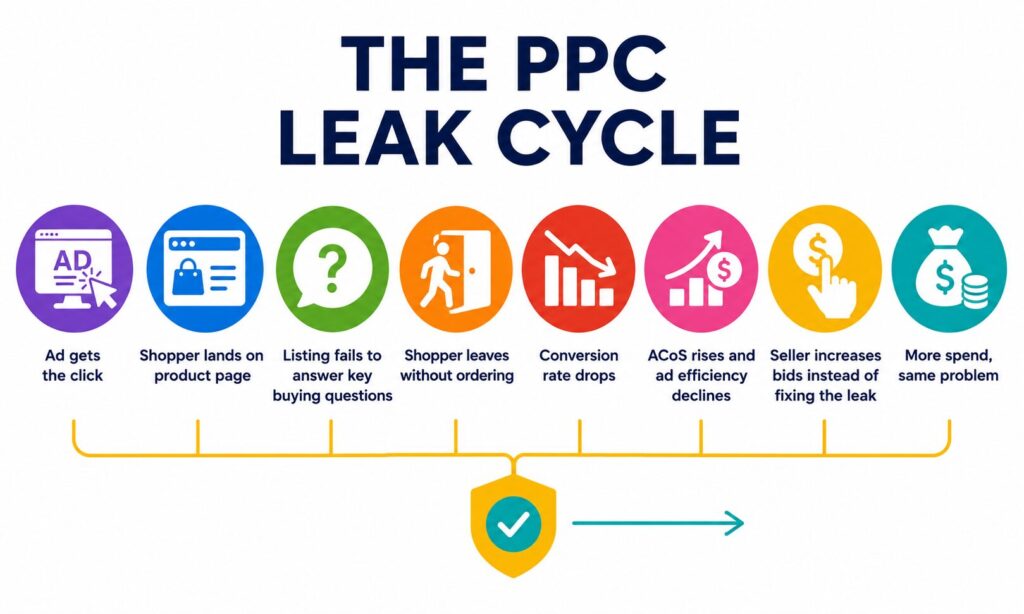
When shoppers leave without buying, your conversion rate drops. As conversion rate drops, ACoS can rise. When ACoS rises, your campaign becomes less efficient. Sellers often respond by increasing bids, hoping more traffic will fix the problem.
That is usually the wrong move.
If the listing is not converting, higher bids only send more paid traffic into the same broken funnel. The smarter move is to identify the leak, fix the product-page experience, and then scale the campaign once conversion improves.
When ad clicks do not convert, sellers often get trapped in this cycle:
PPC Funnel: Where Sales Usually Break
Amazon PPC does not fail at one single point. It usually breaks somewhere inside the funnel.
A shopper may see your ad, click on it, and land on your product page. That means your campaign has done its first job: it created visibility and interest. But if the shopper leaves without buying, the issue is no longer just about traffic. It is about conversion.
In most cases, the break happens after the click. The shopper compares your product image, price, reviews, delivery options, product details, and competing offers. If your listing does not build enough confidence, the shopper moves on.
This creates a damaging cycle:
- Shoppers click but do not buy
- Ad spend increases without enough sales
- Conversion rate drops
- Amazon receives weaker performance signals
- Keyword ranking and ad efficiency can decline
- Sellers spend more, but visibility and profitability do not improve
That is why effective Amazon PPC optimization requires a deeper look at the full funnel, not just campaign settings. Sellers need to review what happens after the click and identify where shoppers lose confidence.
In short, high traffic with low sales does not always mean your campaign is broken. It often means the conversion path is leaking. Fixing those leaks is the key to turning paid traffic into profitable growth.
Amazon PPC Funnel
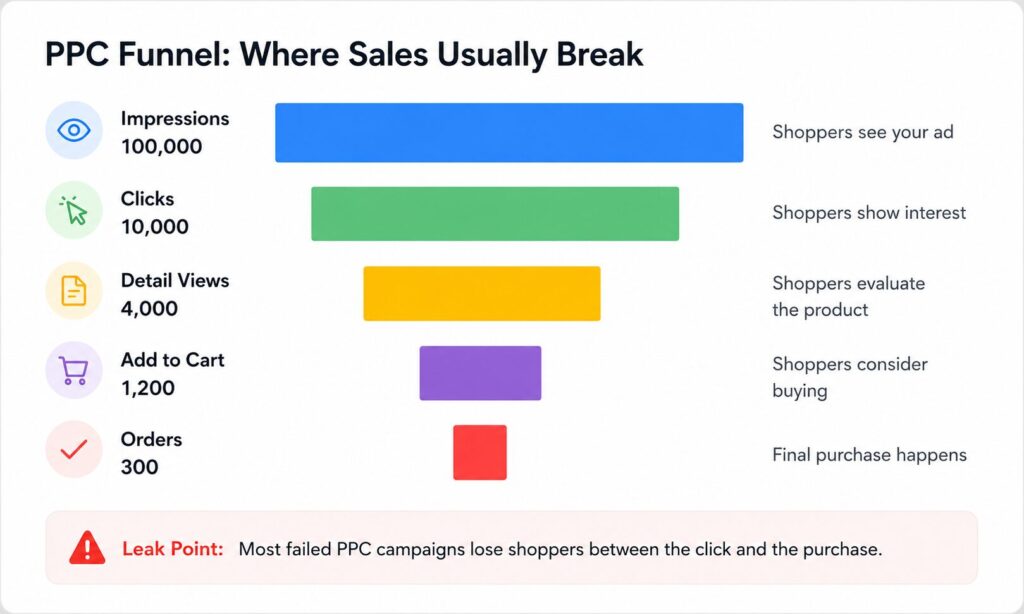
If impressions and clicks look healthy but orders are weak, your main issue is not visibility. It is a conversion.
Quick Diagnosis Table: What the Problem Usually Means
| What You See | What It Usually Means | What to Check First |
| High clicks, no sales | Traffic is coming in, but the offer is not converting | Listing, price, reviews, images, competitors |
| High CTR, low conversion | Ad appeal is strong, but product page confidence is weak | Main image, bullets, A+ Content, price, reviews |
| Low clicks, low sales | Ad is not attracting attention | Main image, title, bid, placement, keyword relevance |
| High spend, high ACoS | Campaign is paying for traffic that is not profitable | Search terms, bids, conversion rate, margin |
| Sales drop suddenly | Something changed after performance was stable | Stock, Buy Box, price, reviews, competitor activity |
Before changing everything in your ad account, identify where the buyer journey is breaking.
1. Relevant Keywords Fail When Buyer Intent Doesn’t Match
One of the biggest PPC mistakes is assuming that a relevant keyword is always a profitable keyword.
A keyword can be technically related to your product but still attract the wrong shopper.
For example, imagine you sell vitamin D drops for babies and target the keyword vitamin D drops. The keyword is relevant, but it is too broad. Adults searching for vitamin D drops may click your ad, realize the product is for infants, and leave without buying.
That is not a keyword relevance problem. It is a buyer intent problem.
Buyer intent is the reason behind the search. If your ad targets the keyword but misses the intent, clicks can increase while sales stay flat.
Broad Keywords Attract the Wrong Audience
Broad, high-volume keywords often bring in traffic, but not always the right traffic. This is one of the most common Amazon PPC poor conversion reasons.
For example, a seller targets vitamin D drops, but the product is vitamin D drops for babies. The keyword is relevant, yet the shopper’s intent is too broad. Plenty of adults may search for vitamin D drops, click the ad, and then leave when they realize the product is meant for infants.
If you target a general keyword for a highly specific product, shoppers may click out of curiosity but leave when the product doesn’t match their needs. This mismatch leads to a low conversion rate, which signals poor performance to Amazon’s algorithm.
| Keyword Type | Example | Buyer Intent | Risk |
| Broad keyword | Vitamin D drops | General research or mixed audience | Too many irrelevant clicks |
| More specific keyword | Baby vitamin D drops | Clearer product need | Better traffic quality |
| High-intent keyword | Vitamin D drops for newborns | Strong purchase intent | Higher conversion potential |
If you’re wondering why Amazon PPC is not converting, this is often the answer: your keywords are attracting the wrong audience.
Why This Hurts Your Campaign Performance
When the wrong shoppers land on your listing, performance starts to weaken. You may still get clicks, but those clicks do not turn into orders.
This can lead to:
- Lower conversion rates
- Higher wasted ad spend
- Weaker campaign efficiency
- Poorer performance signals to Amazon
- Lower visibility over time
This is why proper Amazon PPC optimization should include intent-based targeting, not just keyword matching.
How to Fix It
To improve targeting quality:
- Move strong search terms from auto or broad campaigns into phrase and exact match campaigns
- Lower bids on broad keywords that spend without converting
- Use negative keywords to block irrelevant traffic
- Separate campaigns by shopper intent
- Compare keyword performance against actual orders, not just clicks
- Improve your listing content so it matches the exact shopper expectation
Following a structured Amazon PPC troubleshooting guide will help you identify mismatched intent early and fix it before it drains your budget.
2. Stock and Variation Issues Can Break a Good Keyword
Sometimes your keyword is right, your bid is reasonable, and your product is relevant, but the shopper still does not buy.
Why? Because the exact variation they expected is unavailable or hard to find.
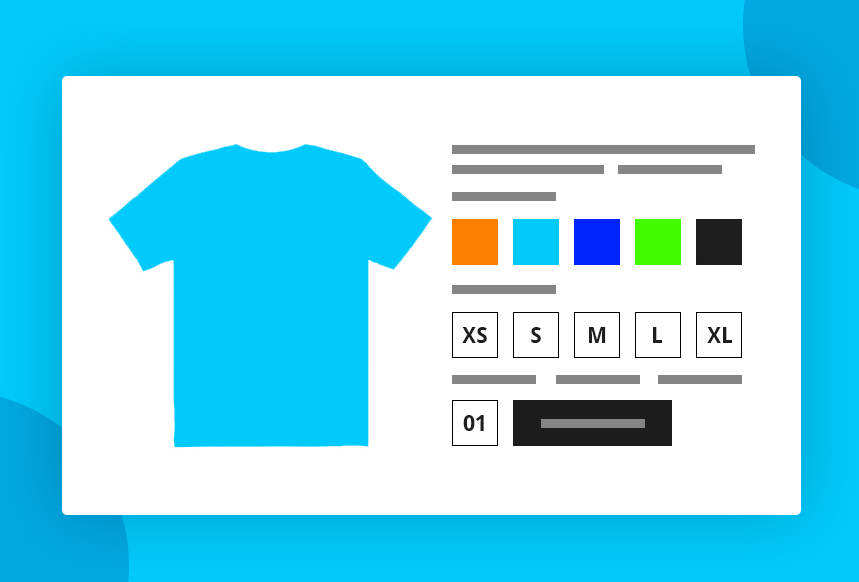
For example, you may target vitamin D drops 10,000 IU, and your listing may include that variation. But if the 10,000 IU option is out of stock and only the 5,000 IU version is available, shoppers may click expecting one dose, land on another, and leave. This can also happen in automatic campaigns when Amazon matches the ad to a variation that does not fully meet the shopper’s intent.
From the shopper’s point of view, the product did not match what they expected. From Amazon’s point of view, the click did not convert. Either way, performance suffers.
Even a strong keyword can fail if your stock or variation setup does not match shopper expectations. If shoppers click an ad for a specific size, color, pack count, flavor, or dosage but that option is unavailable, they are unlikely to keep searching your listing.
This creates a poor post-click experience, lowers your conversion rate, and wastes ad spend, even when the original keyword was highly relevant.
Common Variation Leaks
| Problem | What Happens | Result |
| Targeted variation is out of stock | Shopper cannot buy what they searched for | Lost conversion |
| Wrong variation appears first | Shopper gets confused | Higher bounce rate |
| Variations have different intent | One ad group targets multiple shopper needs | Poor traffic alignment |
| Weak variation images | Shopper cannot quickly compare options | Lower confidence |
How Variation Mismatch Hurts Performance
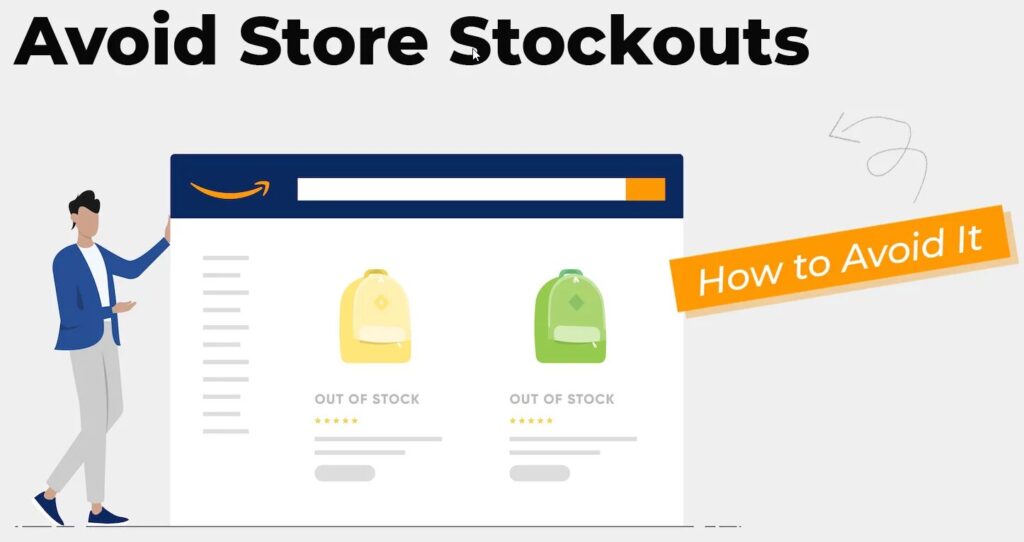
When shoppers land on the wrong variation:
- They do not find what they searched for
- They leave without buying
- Conversion rate drops
- Ad spend becomes less efficient
- Amazon receives weaker performance signals
This is why sellers can see strong clicks but weak sales, even when the keywords seem accurate.
From Amazon’s perspective, the reason behind the missed sale is not always clear. It mainly sees that shoppers clicked but did not convert. Over time, this can hurt ad efficiency, keyword performance, and visibility.
Common Causes of This Problem
- Targeted variation is out of stock
- The wrong variation is shown in the ads
- Multiple variations with different intent grouped under one ad set
- Broad targeting without matching exact product attributes
These issues are major contributors to why Amazon PPC is not converting, even with relevant traffic.
How to Fix Stock and Variation Issues
To resolve these problems, focus on better alignment between keywords, variations, and availability:
- Make sure advertised variations are in stock
- Separate campaigns by size, color, flavor, dosage, pack count, or key attribute
- Pause or reduce bids for out-of-stock variations
- Check which variation appears when shoppers click the ad
- Keep product titles and images clear for each variation
A strong keyword cannot save a broken variation experience. If shoppers click for one thing and land on another, the sale is already at risk.
3. Hidden Conversion Killers After the Click
Your ad’s job is to win the click. Your listing’s job is to win the order.
In Amazon PPC, getting the click is only half the battle. What happens after the click often determines whether your campaign succeeds or wastes budget. Shoppers may arrive on your product page, but if the page does not build enough trust, they will leave without buying.
Even when your targeting is correct, poor conversion is often caused by post-click factors such as pricing, reviews, product images, trust signals, and the overall listing experience. These issues are not always visible in keyword reports, but they can quietly reduce sales and weaken campaign performance
Your Product Page Does Not Answer Buyer Questions
If your product detail page does not answer the shopper’s questions quickly, your PPC campaign will struggle, no matter how good the targeting looks.
Product Page Conversion:
| Listing Element | What It Should Do | Why It Matters |
| Main image | Show the product clearly and professionally | Drives clicks and first impression |
| Secondary images | Explain benefits, size, use, and comparison | Reduces uncertainty |
| Bullet points | Answer the buyer’s top questions | Helps shoppers decide faster |
| A+ Content | Build trust and show product value visually | Improves engagement |
| Video | Demonstrate real use and product quality | Helps shoppers imagine ownership |
| Reviews | Provide social proof | Reduces buying hesitation |
| Coupon or offer | Create perceived value | Can lift conversion |
If your product page leaves shoppers with unanswered questions, they will not wait. They will compare another listing.
How to Fix It
- Rewrite bullets around benefits, not only features.
- Add clear comparison images.
- Use A+ Content to answer objections.
- Add video if the product needs demonstration.
- Show size, use case, quantity, ingredients, material, warranty, or compatibility clearly.
- Make the offer easy to understand.
- Improve image quality before increasing PPC spend.
Your Price Is Not Competitive Enough
One of the most overlooked factors in PPC performance is pricing consistency. Today’s shoppers compare products quickly, and they can often spot when a price feels unstable or unusually high.
If your price changes too frequently, it can create doubt. Shoppers may hesitate, wait for a better deal, or choose a competitor with a more stable offer.
This can hurt conversion even when your ads are bringing in the right traffic. Instead of increasing bids, sellers should first check whether pricing is helping shoppers feel confident, or giving them a reason to leave.
Why Pricing Stability Matters
| Pricing Pattern | Shopper Perception | Impact on Conversion |
| Frequent price changes | “This price seems high right now.” | Lower trust, fewer conversions |
| Steady everyday pricing | “This feels fair and consistent.” | Higher trust, better conversion |
| Deep event-based discounts | “This is a real deal.” | Short-term sales boost |
| Small ongoing coupons | “I’m getting extra value.” | Consistent conversion lift |
How Pricing Affects PPC Performance
Unstable pricing creates confusion and reduces confidence, which leads to:
- Amazon PPC has high clicks and low sales
- Increased bounce rate after ad clicks
- Poor signals to Amazon’s algorithm
- Declining keyword performance over time
Pricing is one of the most important post-click factors because it directly affects trust. Even strong traffic can fail to convert if the shopper feels the price is unclear, too high, or inconsistent.
How to Fix It
To overcome these Amazon PPC problems and solutions, focus on building pricing trust:
- Maintain stable pricing to build buyer confidence
- Use planned discounts during major events, such as seasonal sales
- Add small coupons to improve perceived value without constant price changes
- Compare your price with top competitors regularly
- Make sure your listing clearly explains the value behind your price
A strong PPC troubleshooting process should always include pricing. If the price does not support the shopper’s decision, even the best ad traffic can struggle to turn into sales.
Competitors Can Steal Sales on Your Own Detail Page

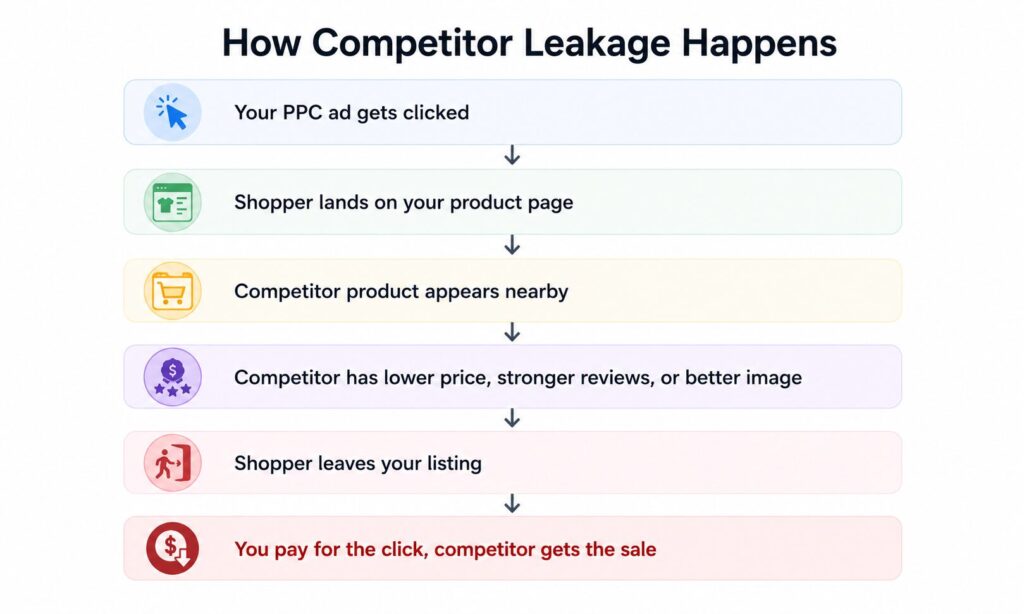
Even with strong keywords and competitive pricing, your campaigns can still lose sales if competitor ads appear on your product detail page. This is one of the most overlooked post-click leaks.
When shoppers click your ad, they land on your listing with buying intent. But if they immediately see a cheaper product, a better-reviewed item, or a stronger offer from a competitor, they may leave your page and buy elsewhere.
That means you paid for the click, but another seller earned the sale.
This type of leakage can quietly hurt performance. Your campaign may still generate traffic, but the final purchase goes to a competitor because their offer looks more attractive at the decision point.
To reduce this risk, monitor your product detail pages regularly. Check which competitor ads appear, compare their price and reviews, and strengthen your own offer with better images, clearer content, coupons, and defensive PPC campaigns. Protecting your detail page helps ensure your ad spend supports your sales, not someone else’s.
How Competitor Leakage Happens
How to Reduce Competitor Leakage
- Run defensive Sponsored Products campaigns on your own ASINs
- Use Sponsored Brands or Sponsored Display where appropriate
- Improve your main image and offer so that competitors look less attractive
- Monitor your detail pages regularly
- Compare your reviews, pricing, coupons, delivery, and content against competitors
Defensive PPC is not just about brand protection. It helps keep high-intent shoppers inside your own ecosystem.
Weak Listing Content Can Cost You Sales: Optimize Your Amazon Product Pages
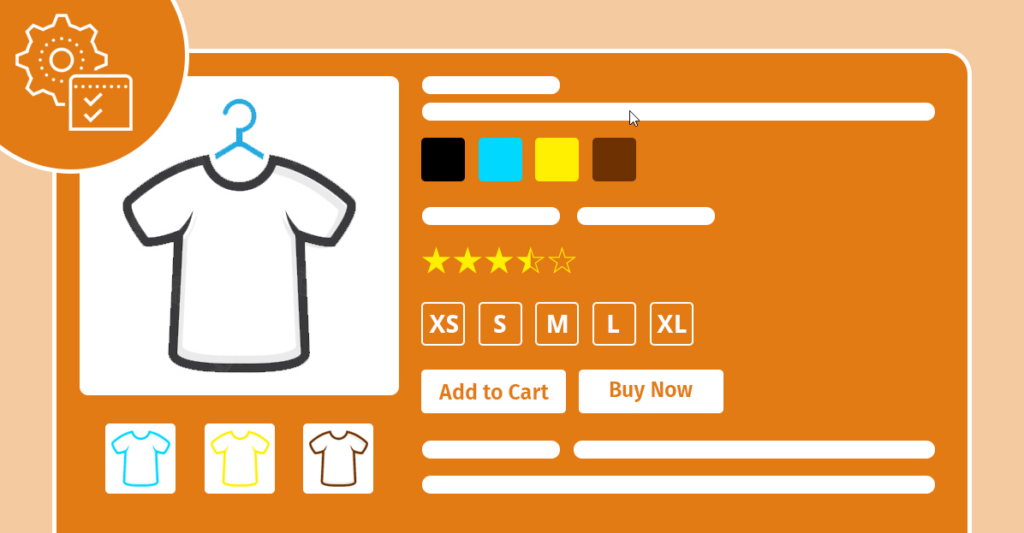
Even when your product is high-quality, reviews are strong, pricing is competitive, and stock levels are healthy, a weak listing can still stop shoppers from buying. The traffic may be there, but the product page must give buyers enough confidence to complete the purchase.
Common weak spots include:
- Main images that do not clearly show the product or communicate its biggest selling point
- Feature images that explain specifications but fail to highlight real customer benefits
- Bullet points that miss important details shoppers care about
- Thin A+ Content that does not build trust or answer buying objections
- Missing or weak videos that fail to show the product in real use
Even if a competitor sells a similar product at a similar price, the listing that explains value faster often wins the sale. Strong product page optimization helps shoppers understand what the product is, why it is useful, and why they should choose it over competing options.
The goal is simple: make the buying decision easier. Clear images, persuasive bullets, helpful A+ Content, strong reviews, and a confident offer can turn paid traffic into real revenue instead of lost clicks.
How to Fix Amazon PPC Clicks But No Sales
When performance drops, many sellers immediately blame the keyword. But once you look beyond targeting, the real problem often becomes clearer.
If your ads are getting clicks but not enough orders, the issue usually happens after the shopper lands on your product page. Your campaign may be bringing traffic, but the listing has to convince shoppers to buy.
The goal is to improve the parts of the shopping experience that influence the final decision: your images, pricing, reviews, product content, offer clarity, stock availability, and competitor positioning.
Rebuild Your Product Page for Higher Conversions
Your product detail page is one of the biggest drivers of PPC success. Even strong campaigns can struggle if the listing does not answer buyer questions quickly or build enough trust.
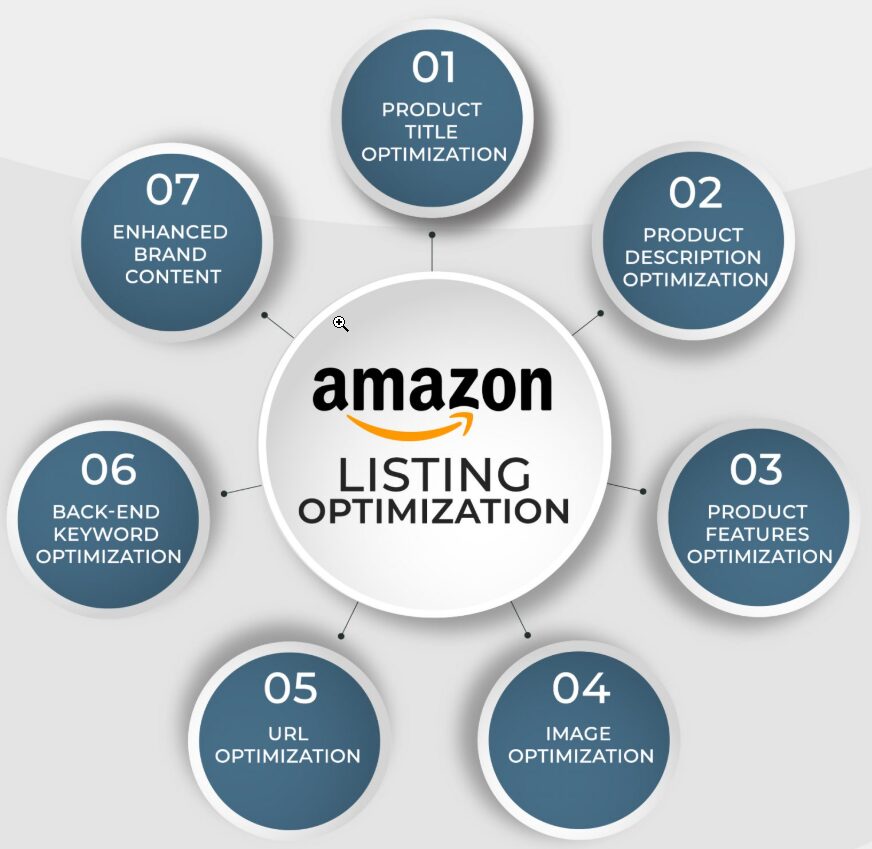
Key Areas to Improve:
- Main Image: Make sure it clearly shows the product and communicates value at first glance.
- Bullet Points: Highlight benefits, important features, and decision-making details shoppers care about.
- A+ Content: Use it to build trust, explain the product visually, and answer common objections.
- Video Content: Show the product in use so shoppers can better understand quality, size, function, or results.
- Offer Clarity: Make it easy for shoppers to understand what they are getting and why it is worth buying.
Remember: Amazon sends traffic to your page, not your keyword.
Fix Your Pricing Strategy
Pricing can silently make or break your PPC performance. Even when your ads bring in the right shoppers, they may hesitate if your price feels too high, inconsistent, or less attractive than competing offers.
Frequent price changes can also reduce trust. Shoppers may wonder if they should wait for a better deal, compare other listings, or choose a competitor with a clearer offer.
Best Practices:
- Keep pricing stable to build buyer confidence
- Use strategic discounts during key sales periods instead of changing prices constantly
- Add coupons when you want to improve perceived value without creating price instability
- Compare your price regularly with top competitors
- Make sure your listing clearly explains why your product is worth the price
Consistent pricing helps shoppers feel more confident. When your offer feels fair, clear, and trustworthy, your paid traffic has a better chance of turning into sales.
Run Defensive PPC Campaigns
One smart way to protect your ad spend is by running defensive campaigns. These campaigns help keep shoppers focused on your products instead of letting competitors capture traffic from your own detail pages.
Defensive campaigns can help you:
- Protect your listing from competitor ads
- Reduce traffic leakage on your product page
- Keep interested shoppers within your brand ecosystem
- Improve the return from traffic you already paid for
You can support this strategy with:
- Sponsored Products to target your own ASINs or brand-related terms
- Sponsored Brands to guide shoppers toward your brand store or product range
- Sponsored Display to retarget shoppers who viewed your product but did not buy
Defensive PPC is not just about protecting your brand. It is about making sure the traffic you pay for has a better chance of turning into your own sales, not your competitor’s.
Lower Bids Before Fixing Conversion Issues
If your ACoS is high and sales are low, increasing bids is usually not the first solution. That mistake can make wasted spend grow even faster.
Before scaling your budget, step back and identify why shoppers are not converting.
Instead of raising bids too soon:
- Lower bids on keywords that spend without sales
- Pause or reduce budget on poor-performing targets
- Review your listing, pricing, reviews, and competitor position
- Fix the conversion issue first
- Scale again only after performance improves
A higher bid can improve visibility, but it cannot fix a weak product page. If shoppers are clicking and leaving, more traffic will only send more buyers into the same problem.
Important: Strong conversion performance can help your campaigns become more efficient over time. Poor conversion, on the other hand, can limit how well your ads perform, even when you are spending more.
Improve Keyword Targeting & Intent
Many Amazon PPC problems and solutions come down to targeting the wrong audience.
The keyword may look relevant, but the shopper behind that search may not be ready to buy your exact product.
For example, a broad keyword can bring in people who are researching, comparing, or looking for a different variation. That traffic may generate clicks, but it often fails to produce orders.
To improve targeting quality:
- Review search term reports regularly
- Move converting search terms into manual campaigns
- Use negative keywords to block irrelevant traffic
- Separate campaigns by buyer intent
- Focus more budget on keywords that actually lead to orders
- Avoid judging performance by clicks alone
The goal is not to reach everyone. The goal is to reach shoppers who are most likely to buy.
Use the Right Match Types
Understanding Amazon broad vs phrase vs exact match is key to fixing messy campaigns.
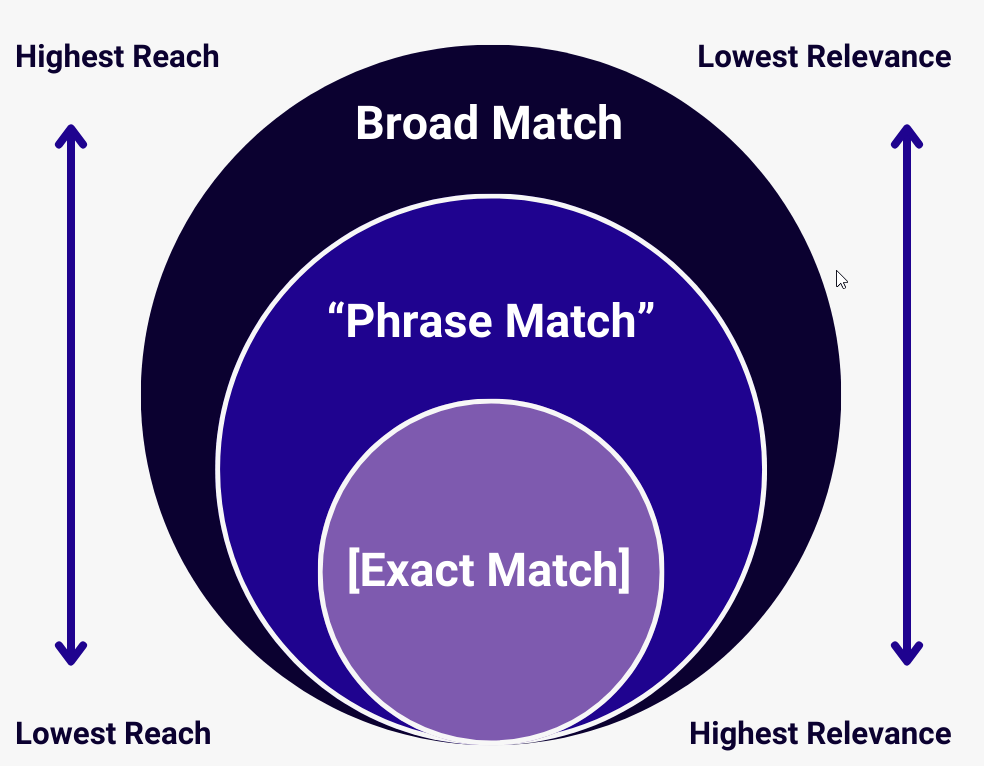
- Broad Match: Good for discovery, but can cause irrelevant traffic
- Phrase Match: Better control and intent alignment
- Exact Match: High conversion but limited reach
| Match Type | Best Use | Risk |
| Broad Match | Discovering new search terms | Can attract irrelevant or mixed-intent traffic |
| Phrase Match | Better control while still allowing keyword discovery | Still needs regular search term review |
| Exact Match | Targeting proven, high-intent keywords | Lower reach compared with broad or phrase |
If you’re struggling with Amazon PPC CTR high low conversion, switch from broad/auto to phrase match to refine traffic quality.
Broad match and auto campaigns can uncover search terms, but they can also pull in traffic with mixed intent. If your clicks are high and sales are low, phrase match can help tighten control.
Phrase match often filters out some of the looser traffic while still giving you room to discover longer search terms. That makes it a better bridge between wide-open discovery and exact targeting.
Before moving hard into long-tail keywords, check whether people are searching for them at all. The video mentions tools like Jungle Scout and Helium 10 for validating search volume. That step helps prevent another common mistake, chasing precise keywords that barely get any traffic.
Validate Keyword Demand Before Scaling
Before going deep into long-tail keywords, validate search volume using tools like Jungle Scout or Helium 10.
This prevents targeting keywords that:
- Have low traffic
- Don’t convert
- Waste ad spend
How to Diagnose Amazon PPC Clicks But No Sales
If your Amazon PPC campaigns are getting clicks but not sales, treat it as a symptom, not the disease. The real issue is usually somewhere between targeting, product-page clarity, offer strength, and competition.
Quick Diagnosis Checklist
1. Check Buyer Intent: Clicks without sales often happen when your keywords attract browsers instead of buyers. Review your search terms and focus on keywords that show clear purchase intent.
2. Check Listing Conversion Quality: Look at your images, title, bullet points, A+ Content, video, price, reviews, coupon, and delivery promise. If shoppers click but do not buy, your listing may not be building enough confidence.
3. Check Pricing and Competitor: Compare your offer with the top organic and sponsored competitors. If competitors have better reviews, lower prices, stronger coupons, or clearer content, shoppers may choose them after clicking your ad.
4. Check Stock and Variations: Make sure the exact variation being advertised is available and easy to select. A shopper who clicks for one product type but lands on another is unlikely to convert.
5. Check Search Term Reports: Find search terms that spend without sales. Add negatives, reduce bids, or restructure campaigns based on buyer intent.
6. Fix Before Scaling: Do not increase bids until the conversion issue is fixed. Scaling a leaking campaign usually makes the leak more expensive traffic and improve Amazon PPC ROI optimization.
Final Thoughts
Amazon PPC clicks but no sales is not just an advertising issue. It is a full-funnel problem.
Your campaign may be bringing traffic, but your product page must turn that traffic into orders. If your keywords attract the wrong shoppers, your listing lacks trust, your price feels weak, your reviews fall behind competitors, or your variations are confusing, your PPC performance will suffer.
The solution is not always to increase bids. The solution is to fix the leak.
Start with search term reports. Check buyer intent. Audit your product page. Compare your offer against competitors. Fix stock and variation issues. Add negative keywords. Improve listing quality. Then scale your campaigns once conversion improves.
The hardest part of Amazon PPC is not getting traffic. It is turning that traffic into profitable sales.
FAQs
1. Why is my Amazon PPC getting clicks but no sales?
Your Amazon PPC may be getting clicks but no sales because your ads are attracting the wrong shoppers or your product page is not converting. Common causes include weak buyer intent, poor images, high pricing, low reviews, stock issues, variation mismatch, and strong competitors.
2. Should I increase bids if my Amazon PPC has clicks but no sales?
Usually, no. If clicks are not converting, higher bids can waste more money. Fix your listing, pricing, reviews, search terms, and product-page experience before increasing bids.
3. What does high CTR but low conversion mean in Amazon PPC?
High CTR but low conversion usually means your ad is attractive enough to earn clicks, but the product page is not convincing enough to earn orders. Check your images, price, reviews, bullets, A+ Content, and competitor offers.
4. How do I reduce wasted spend in Amazon PPC?
You can reduce wasted spend by reviewing search term reports, adding negative keywords, lowering bids on non-converting targets, improving listing quality, checking pricing, and separating campaigns by buyer intent.
5. Can a weak Amazon listing ruin PPC performance?
Yes. PPC can drive traffic, but the listing must convert that traffic. Weak images, unclear bullets, poor reviews, high pricing, missing product information, or weak A+ Content can cause clicks without sales.
6. What is a good Amazon PPC conversion rate?
A good Amazon PPC conversion rate depends on category, price, competition, reviews, and product type. Instead of focusing only on one fixed number, compare your PPC conversion rate with your organic conversion rate and your top competitors.
7. How often should I check Amazon PPC search term reports?
You should review search term reports regularly, especially if your campaign is spending money without enough sales. For active campaigns, weekly review is usually a good starting point.
Where to get help if your ad spend keeps leaking
If you’re stuck with high spend, low sales, or rising ACoS, Ecomclips offers a free audit to help find the weak spot. That review can look at campaign setup, product issues, bidding, placements, and keyword targeting, so the problem gets defined before more money goes out the door.
You can contact the team at info@ecomclips.com. You can also learn more strategies from the Ecomclips blog, browse the Ecomclips YouTube channel, check the company’s LinkedIn page, follow updates on Facebook, or visit Boostontime for the related brand presence.
The hardest part of Amazon PPC is not getting traffic. It’s turning that traffic into sales. When post-click performance improves, the numbers usually start moving in your favor again.
If your campaigns keep getting clicks without orders, don’t rush to blame the keyword. Fix what the shopper sees after the click, and the ad account often follows.