

You’re spending thousands on Amazon ads. Your product reviews are solid. Traffic is flowing to your listing. But sales? They’re nowhere near where they should be.
Here’s the uncomfortable truth: Your listing is broken.
After auditing over 100 Amazon listings, one pattern emerges with startling clarity – most sellers aren’t failing because their products are inferior. They’re failing because their listings don’t convert. While you’re blaming the Amazon algorithm, PPC costs, or market saturation, the real culprit is staring you in the face: a listing that doesn’t know how to sell.
In this comprehensive guide, we’ll dissect what separates high-converting Amazon listings from the 70% that fail at the first hurdle – the main image. You’ll discover the optimization strategies that actually move the needle, from image psychology to hidden SEO opportunities most sellers completely ignore.
Why Your Amazon Listing Optimization Strategy Fails Before It Begins
Your Amazon listing has exactly two jobs: get the click, then get the buy.
Most sellers fail at step one.
The average shopper on Amazon isn’t reading – they’re scrolling, glancing, deciding in microseconds. Your main image has approximately 0.3 seconds to communicate value, trustworthiness, and relevance. Miss that window, and it doesn’t matter how well-crafted your bullet points are or how competitive your pricing is.
Here’s what’s happening: You already have traffic (either organic or paid), decent reviews, and possibly even a superior product compared to competitors. But your listing is communicating none of this effectively. The result? Buyers scroll past, click on competitors, and your advertising dollars evaporate.
The most damaging part? Most sellers never test their listings. They set it up once, maybe make minor tweaks, and then wonder why conversions plateau.
Amazon Main Image Optimization: Where 70% of Page One Listings Fail
Let’s start with the most critical element of your listing – the main image.
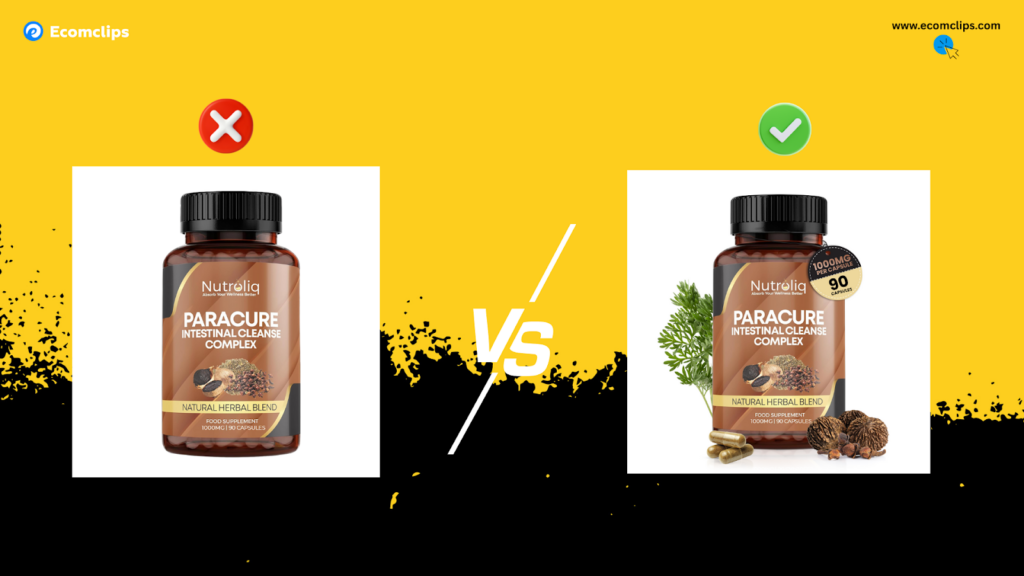
Consider two white pillow listings on page one. The first shows a simple white pillow on a white background. Clean, yes. Clickable? Not particularly. There’s no context, no differentiation, nothing to make a scrolling buyer pause.
The second listing shows the same white pillow, but with strategic text overlays highlighting key purchase drivers: “Synthetic Down,” the exact dimensions, and a “Made in USA” badge.
Same product. Dramatically different communication.
The Psychology Behind High-Converting Product Images
Buyers aren’t thinking about you when they scroll Amazon. They’re asking themselves:
- Is this exactly what I need?
- Will this solve my specific problem?
- Can I trust this seller?
- What makes this different from the listing above it?
Your main image must answer these questions before they read a single word.
Amazon product photography isn’t just about making your product look pretty—it’s about strategic communication. Every element in that main image should serve a purpose:
- Clear product presentation: The product should dominate the frame with professional lighting
- Strategic text overlays (where allowed): Key differentiators like material, size, certifications
- Trust signals: Badges for certifications, country of origin, or quality markers
- Natural context: Props or staging that look authentic, not artificially inserted
The “Floating Badge” Mistake That Gets Listings Suppressed
Here’s a critical detail many sellers overlook: Amazon’s image guidelines prohibit images that look manipulated or fake. That clever hang tag you Photoshopped onto your pillow? If it looks like it’s floating in space rather than naturally attached to the product, your listing can get flagged or suppressed.
The solution is simple—make everything look natural. If you’re adding tags, shadows, or context elements, they need to appear as they would in real life. This tiny detail can mean the difference between a converting listing and one that gets buried in search results.
Amazon Listing Images: The Unsung Heroes of Conversion
Your main image gets the click. Your secondary images close the sale.
Think about the mental journey of an Amazon shopper scrolling through your image gallery:
- Will this fit my space?
- What size do I actually need?
- Is this going to be difficult to use or maintain?
- What’s the quality really like?
The Image Sequence Strategy That Answers Every Question
Professional Amazon product listing services understand that your image gallery follows a psychological sequence:
Image 2-3: Lifestyle Context
Show the product in its natural environment. For a pillow, that’s on a couch or bed. For kitchen tools, that’s in a real kitchen. This helps buyers visualize ownership and imagine the product in their life.
Image 4-5: Size and Variation Clarity
Display different sizes with clear labels. Use comparison shots with common objects to establish scale. Remove all ambiguity about dimensions.
Image 6-7: Feature Highlights
Create infographic-style images that call out specific benefits: “No Feathers, No Smell, No Mess” or “Cruelty-Free Certified.” Use icons that are immediately recognizable at a glance.
Why Most Buyers Never Read Your Bullet Points
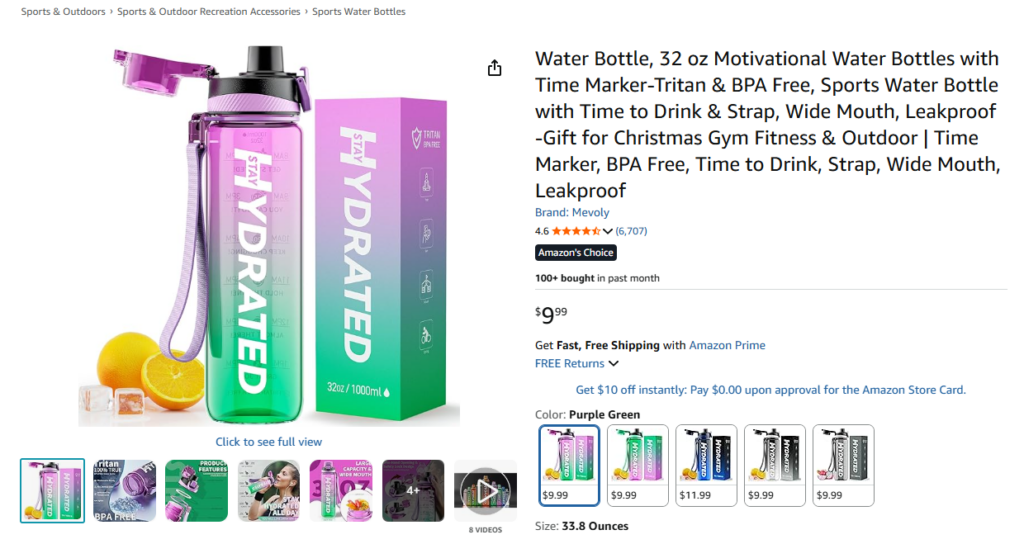
Here’s the reality: Text is for the Amazon algorithm. Images are for humans.
According to eye-tracking studies, most mobile shoppers (who make up the majority of Amazon traffic) scroll through images and barely glance at text. They’re not carefully reading your five bullet points. They’re looking, skimming, and deciding—often in under 10 seconds.
This means your listing must function perfectly even if someone reads nothing at all. Your images carry the entire burden of persuasion.
Amazon Brand Story: The Trust-Building Opportunity Most Sellers Waste
Scroll past the main images and bullet points, and you’ll encounter the Brand Story section—a feature most sellers either ignore entirely or fill with generic product shots.
This is a catastrophic missed opportunity.
What Separates Amateur Listings from Professional Brands
When done correctly, your Amazon Brand Story accomplishes two critical objectives:
1. Trust Establishment
Buyers stop seeing you as a random third-party seller and start perceiving you as a legitimate brand. This psychological shift dramatically increases purchase confidence.
2. Cross-Sell Opportunities
By showcasing your broader product ecosystem, you increase customer lifetime value and create opportunities for follow-up purchases.
The amateur approach: Fill the Brand Story with more product images, essentially duplicating what’s already visible above.
The professional approach: Use the first card to introduce your brand narrative—when you started, what problem you set out to solve, how you’ve grown. Throughout subsequent cards, establish brand values and visual identity before introducing complementary products.
Consider two approaches:
Approach A: Six cards showing different angles of the same pillow, maybe with some generic lifestyle shots.
Approach B: Card one establishes the brand founding story and mission. Cards two through four highlight brand values (sustainability, quality standards, customer focus). Cards five and six introduce complementary products (pillow protectors, sheet sets) that enhance the primary purchase.
Which creates more trust? Which drives higher lifetime value? The answer is obvious, yet most sellers still choose Approach A.
Thinking About Hiring an Amazon Expert?
Ecomclips’ Partners Achieve an Average 85% Profit Increase!
Amazon A+ Content Optimization: The Hidden SEO Goldmine
Think of A+ Content (Enhanced Brand Content) as your product description on steroids—images, formatted text, comparison charts, lifestyle photography, all presented in an visually engaging layout.
But here’s what most sellers don’t realize: If you can highlight the text in your A+ Content, Amazon can read it. That means it’s indexable. That means it impacts your SEO.
The Smart Seller’s A+ Content Strategy
Amateur sellers treat A+ Content as pure visual design—pretty pictures with minimal text that sounds like marketing fluff.
- Human persuasion: Benefits-focused copy that addresses objections and builds desire
- Algorithm optimization: Strategic keyword placement that improves search visibility
The key is maintaining readability. You’re not keyword stuffing—you’re writing helpful, informative content that naturally incorporates the terms customers actually search for.
For example, instead of writing: “Our premium pillow provides comfort.”
Write: “This hypoallergenic down alternative pillow delivers hotel-quality comfort for side sleepers and back sleepers, with adjustable loft that maintains its shape wash after wash.”
Notice the natural incorporation of search terms—hypoallergenic pillow, down alternative pillow, pillow for side sleepers, adjustable loft pillow—all within readable, benefit-focused copy.
Better understanding equals better ranking. Better ranking means more impressions. More impressions compound over time into significantly more sales.
Amazon Comparison Charts: The Conversion Tool You’re Probably Ignoring
If you sell variations—different sizes, different pack quantities, different models—comparison charts are non-negotiable.
Why Comparison Charts Are Conversion Rate Multipliers
Here’s what happens without a comparison chart: A customer lands on your listing, sees you offer multiple options, but isn’t sure which one fits their needs. They click over to a competitor to compare. Many never return.
Here’s what happens with a strategic comparison chart: The customer sees all their options clearly laid out, understands the differences, and makes a confident purchase decision—all without leaving your listing.
The psychology is simple: Reduce friction, increase conversion. Every additional click required to make a decision is an opportunity for the customer to abandon their purchase.
A well-designed comparison chart:
- Clearly displays all variation options
- Highlights key differentiators (size, material, features)
- Includes visual elements (icons, checkmarks) for quick scanning
- Guides the customer toward the right choice for their needs
The 100-Character SEO Hack Hiding in Plain Sight
Here’s a optimization technique that 90% of sellers completely miss: alt text for images.
Every image in your listing can include up to 100 characters of alt text. Amazon reads this text. It contributes to your search ranking. And most sellers leave it completely empty.
Think about that—you’re uploading six, seven, eight images, each one representing an opportunity to improve your SEO, and you’re throwing that opportunity away by leaving the alt text field blank.
How to Write Effective Amazon Image Alt Text
Primary keyword + specific image description + key product feature
For example:
- Image 1: “White down alternative pillow queen size hypoallergenic main product”
- Image 2: “Adjustable loft pillow lifestyle bedroom side sleeper position”
- Image 3: “Pillow size comparison chart queen king standard dimensions”
Each alt text serves the algorithm while accurately describing the image content. Over time, this small optimization compounds into measurably better search visibility.
Is it tedious? Yes. Does it matter? Absolutely.
Amazon Listing Keywords: Beyond Basic Optimization
Let’s address the elephant in the room: Everyone talks about keyword optimization, but most sellers implement it poorly.
You’ve probably heard the basics:
- Include keywords in your title
- Load them into your bullet points
- Fill out the backend search terms
But here’s what separates amateur keyword optimization from professional strategy:
Strategic Keyword Placement Hierarchy
Tier 1: Title
Your highest-value keywords belong here. These carry the most SEO weight and are the first text Amazon’s algorithm evaluates.
Tier 2: Bullet Points
Secondary keywords and long-tail variations. These should read naturally while incorporating search terms customers actually use.
Tier 3: A+ Content
Contextual keywords woven into persuasive copy. This is where you can be more conversational while still maintaining keyword density.
Tier 4: Backend Search Terms
Misspellings, synonyms, alternative phrasings that don’t fit naturally into customer-facing content.
Tier 5: Image Alt Text
The overlooked opportunity we discussed earlier. Descriptive keywords that enhance image indexing.
The amateur approach treats all keyword real estate equally. The professional approach prioritizes placement based on algorithmic weight and user experience.
Why “Already Optimized” Listings Still Underperform
“My listing is already optimized.”
This might be the most dangerous sentence in Amazon selling.
Maybe your listing is technically optimized—keywords in place, images uploaded, bullet points filled out. But here’s the real question: Is it optimized because you think it is, or because customers are actually buying?
Sales are the only truth. Everything else is theory.
The Compound Effect of 1% Improvements
Even a 1% improvement in conversion rate compounds dramatically over time:
- 1% better conversion on 1,000 monthly sessions = 10 additional sales
- At $30 average order value = $300 additional monthly revenue
- Over 12 months = $3,600
- Over 3 years = $10,800
And that’s from a single 1% improvement. Now imagine optimizing your main image (2% lift), improving your image sequence (3% lift), adding strategic A+ content (2% lift), and implementing comparison charts (1.5% lift).
Those “small” optimizations compound into transformational revenue growth.
The Real-World Impact of Amazon Listing Design
Let’s examine a tangible example: soap listings.
Listing A: A plain bar of soap on a white background. No packaging, no context, no story.
Listing B: The same soap, but displayed in its packaging with ingredient callouts, scent description, and usage context clearly visible.
Same product. Same price point. Dramatically different communication.
Buyers don’t read first—they see first. How you show your product matters exponentially more than most sellers realize.
What Buyers Are Really Thinking When They View Your Listing
Step into the mind of your customer for a moment. They’re not thinking about you, your brand story, or how much effort you put into your listing.
They’re thinking:
- Is this for me?
- Does this actually solve my problem?
- Is this the right choice compared to everything else I’m seeing?
Remember: Page one is a battlefield. Dozens of competitors are fighting for the same customer’s attention. Your listing needs to cut through the noise instantly, or you’ve already lost.
This requires brutal honesty about your current listing:
- Would YOU click on your main image over your competitors’?
- Do your secondary images answer every question a hesitant buyer might have?
- Does your A+ Content build desire and trust, or just take up space?
- Is your brand story generic filler, or does it create genuine connection?
The Step-by-Step Amazon Listing Optimization Roadmap
Feeling overwhelmed? Don’t be. You don’t need to fix everything simultaneously.
Here’s your prioritized action plan:
Phase 1: Main Image Optimization (Week 1)
- Audit your current main image against top competitors
- Identify strategic text overlays or badges to add (if compliant)
- Invest in professional photography if your current image looks amateur
- A/B test new main image variations
Phase 2: Image Gallery Enhancement (Week 2-3)
- Create lifestyle context shots showing product in use
- Develop infographic images highlighting key features
- Add size comparison visuals
- Ensure every image answers a specific customer question
Phase 3: A+ Content Overhaul (Week 4-5)
- Write keyword-rich content that reads naturally
- Design layouts that guide the eye and build desire
- Include comparison charts for variations
- Add brand story elements that build trust
Phase 4: Hidden SEO Implementation (Week 6)
- Write strategic alt text for every image
- Optimize backend search terms
- Review title and bullet points for keyword opportunities
- Implement any remaining compliance-friendly optimizations
Phase 5: Testing and Iteration (Ongoing)
- Monitor conversion rate changes
- A/B test variations of high-impact elements
- Analyze customer questions and reviews for optimization insights
- Continuously refine based on performance data
Small improvements stack over time. That’s how real, sustainable growth happens.
Frequently Asked Questions
How often should I update my Amazon listing?
Monitor your listing performance monthly and make data-driven updates quarterly. However, if you notice significant drops in conversion rate or if competitors launch superior listings, act immediately rather than waiting for your scheduled review. Seasonal products may require more frequent updates to stay relevant.
Can I use text overlays on my Amazon main image?
Amazon’s image requirements prohibit most text on main images, with exceptions for necessary product information that’s part of the physical product or packaging. However, secondary images allow text overlays for feature highlights and infographics. Always review Amazon’s current image guidelines, as policies evolve, and when in doubt, consult with Amazon seller support or work with experienced listing optimization professionals.
What’s the ideal number of images for an Amazon listing?
Amazon allows up to nine images for most categories, and professional sellers typically use all available slots. Each image should serve a specific purpose like demonstrating use, showing scale, highlighting features, or building trust. Quality matters more than quantity, but if you have fewer than six high-quality, purposeful images, you’re likely leaving conversions on the table.
How do I know if my listing needs optimization?
Compare your conversion rate to category benchmarks, which typically range between 10-15% for well-optimized listings. If you’re below 10%, optimization is critical. Other warning signs include high traffic but low sales, strong PPC impressions but poor click-through rates, or customers frequently viewing your listing but purchasing from competitors. Customer questions and negative reviews often reveal optimization opportunities you’re missing.
Should I hire a professional for Amazon listing optimization?
If you’re experiencing stagnant sales despite adequate traffic, if you lack design and copywriting expertise, or if your time is better spent on other business priorities, professional optimization services typically deliver ROI that far exceeds their cost. The decision ultimately depends on your current performance, available time, skill level, and growth goals. Many successful sellers use professionals for initial optimization then maintain it in-house.
What’s the difference between SEO optimization and conversion optimization?
SEO optimization focuses on helping Amazon’s algorithm understand and rank your product, primarily affecting visibility and traffic. Conversion optimization focuses on persuading human visitors to purchase, primarily affecting sales from existing traffic. The most effective listings excel at both, using keyword-rich content that satisfies the algorithm while persuasive images and copy that convert browsers into buyers. Neither works optimally without the other.
How long does it take to see results from listing optimization?
Initial changes to images and content typically show impact within 48-72 hours as Amazon’s algorithm reindexes your listing. However, meaningful traffic and conversion improvements usually take 2-4 weeks to stabilize and measure accurately. SEO-focused changes like improved backend keywords and alt text may take 4-8 weeks to show full impact as Amazon’s search algorithm gradually adjusts your ranking for relevant terms.
Conclusion: Your Listing Is Your Silent Salesperson
Every single day, your Amazon listing is either making you money or costing you opportunity.
It’s working 24/7, representing your brand to thousands of potential customers. The question is: Is it representing you well?
Most sellers set up their listing once and hope for the best. The top performers treat their listings as living, breathing sales tools that require continuous refinement and optimization.
The difference between a mediocre listing and a high-converting one isn’t usually dramatic. It’s a better main image here, clearer feature communication there, strategic keyword placement throughout. Small optimizations that compound into significant competitive advantages.
You already have traffic. You already have a good product. You already have reviews. Now make sure your listing is doing its job—getting the click, then getting the buy.
How Ecomclips Can Help on the Issue
When you’re staring at that yellow banner or worse, a suspension notice, every decision matters. One wrong move in your appeal can be the difference between reinstatement and permanent deactivation. This is where Ecomclips steps in as your strategic partner.
We’ve successfully resolved hundreds of account health issues for Amazon sellers, from straightforward metric problems to complex intellectual property disputes. Our team understands Amazon’s internal review processes because we’ve navigated them countless times. We know what appeals officers look for, which documentation carries weight, and how to craft Plans of Action that get accounts reinstated.
But our relationship with sellers doesn’t stop at crisis management. We work proactively to prevent issues before they escalate, implementing monitoring systems and compliance protocols that keep your account in good standing month after month.
Whether you’re facing your first policy violation or dealing with a suspended account, Ecomclips brings the expertise to guide you through Amazon’s complex requirements and get your business back on track.
Ecomclips: Your Complete eCommerce Solution Under One Umbrella
At Ecomclips, we bring every eCommerce service you need under one roof — strategy, operations, design, marketing, and growth, all seamlessly connected to help your brand thrive across every marketplace.
Since 2012, we’ve been helping businesses of all sizes launch, scale, and dominate online. From Amazon, Walmart, eBay, and Etsy to Shopify and WooCommerce, our team of marketplace experts, designers, developers, and marketers works together to deliver measurable results.
Our services span the full eCommerce lifecycle:
Account Setup & Product Listing Management: We handle registrations, compliance, and product data optimization across all marketplaces.
Amazon Optimization Service: From keyword-rich titles and A+ content to PPC campaigns and storefront design, we craft listings that convert.
Creative Design & Content Production: A+ visuals, infographics, brand stores, and product videos built to boost engagement.
Advertising & PPC Management: Smart, data-driven ad strategies for Amazon, Walmart, and Google that maximize ROI.
Web Development & Store Design: Shopify, WooCommerce, and Magento websites built for performance and conversion.
Data Management & Automation: Streamlined product feeds, catalog syncing, and inventory control for effortless scalability.
Customer Service & Order Fulfillment: End-to-end support that enhances customer satisfaction and builds long-term loyalty.
Analytics & Growth Strategy: Real-time insights and ongoing optimization to ensure consistent, profitable growth.
Whether you’re launching a new store or managing multiple global marketplaces, Ecomclips acts as your single strategic partner, simplifying complexity and driving sustainable revenue growth.
Ready to Start Growing Your Brand?
Ecomclips’ Partners Achieve an Average 85% Profit Increase!