
Launching an online store is one of the most exciting steps in building your dream business, but it can also feel overwhelming, especially if you’re starting from zero. The good news is that Shopify has completely transformed the process with AI-powered tools, intuitive design features, and a beginner-friendly dashboard. Whether you’re a solo entrepreneur testing an idea, a small business moving online, or a brand looking to scale, Shopify provides the foundation to start and grow successfully.
At Ecomclips, a trusted Shopify agency, we’ve worked with thousands of eCommerce brands worldwide to create high-converting Shopify stores. This guide will walk you through each step of the process—signing up, designing, customizing, adding products, and launching your store. Along the way, we’ll also share the latest 2025 Shopify updates and show you why working with the best Shopify agency can make all the difference in your success.
Table of Contents:
| 1. Sign Up for Shopify |
| 2. Design Your Store with Shopify Themes |
| 3. 2025 Update – Shopify’s AI Theme Generator |
| 4. Customize Your Shopify Store |
| 5. Add Your First Products on Shopify |
| 6. Organize Products into Collections on Shopify |
| 7. Create Essential Pages & Legal Policies on Shopify |
| 8. Set Up Payments for Shopify |
| 9. Launch with a Custom Domain on Shopify |
| 10. Marketing Your Shopify Store in 2025 |
| 11. FAQs for Shopify |
| 12. Conclusion |
Step 1: Sign Up for Shopify
Before you can design or sell anything, you’ll need a Shopify account. The signup process is straightforward, taking just a few minutes, and it gives you instant access to your admin dashboard—the hub where you’ll manage products, payments, and customer interactions. Shopify has made this step even easier in 2025 by simplifying onboarding for new entrepreneurs.
- No coding required.
- Edit details later if unsure.
- Dashboard = your central control hub.

2025 Update: Shopify often offers a $1 trial for the first month, making it a budget-friendly way to test.Note: Starting strong with the right setup can save you weeks of backtracking later.
Step 2: Design Your Store with Shopify Themes
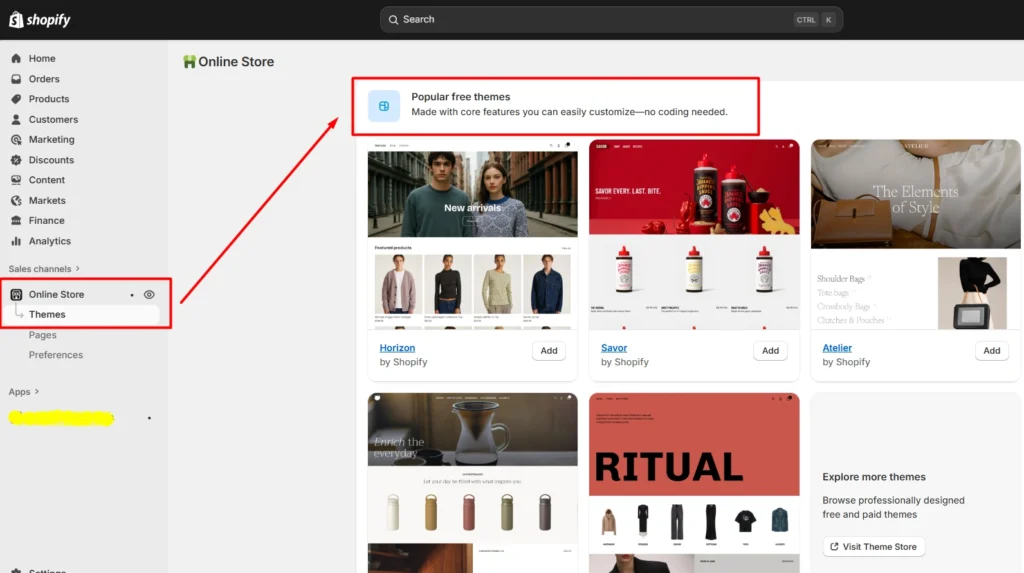
Your store’s design is the first thing customers notice, and it can determine whether they stay or leave within seconds. Shopify offers both free and premium themes, all optimized for mobile devices and tailored for different industries. In 2025, Shopify has expanded its theme library, making it easier to find layouts suited for fashion, tech, lifestyle, or niche markets.
- Free themes = clean, mobile-friendly, fast.
- Paid themes = advanced filtering, upsells, mega menus.
- All themes = fully customizable.
“A theme should not only look good, but also sell well.”
Free Shopify Themes 2025: Which One Is Right for Your Store?
Step 3: 2025 Update – Shopify’s AI Theme Generator
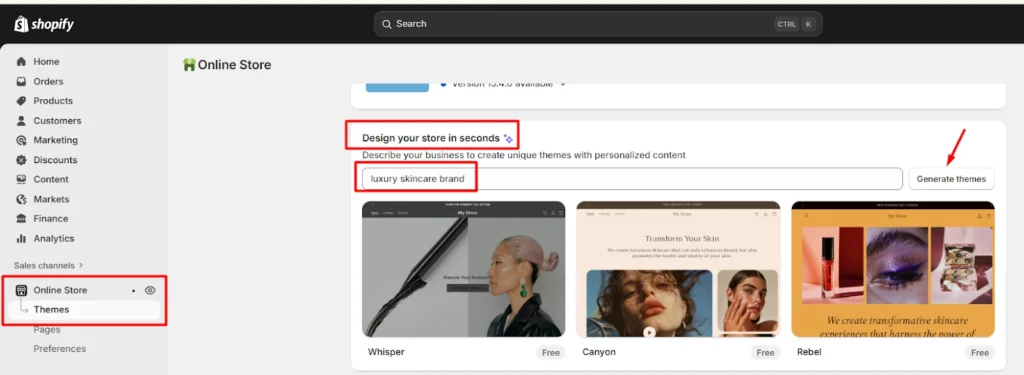
One of the most exciting updates in 2025 is Shopify’s AI Theme Generator. Instead of scrolling through dozens of templates, you can now type a few keywords describing your business, and Shopify automatically generates a tailor-made theme. This feature saves hours of setup time while giving you a store design that matches your brand vision.
- Enter keywords (e.g., “luxury skincare brand”).
- AI instantly generates a custom theme preview.
- Adjust colors, fonts, and layouts directly after generation.
- Works perfectly for beginners who want a quick professional setup.
“AI doesn’t just save time—it creates designs that feel personalized to your brand from day one.”
Tip: While the AI generator is powerful, pairing it with human creative input ensures your store not only looks attractive but is also optimized for conversions.
Step 3: Customize Your Store
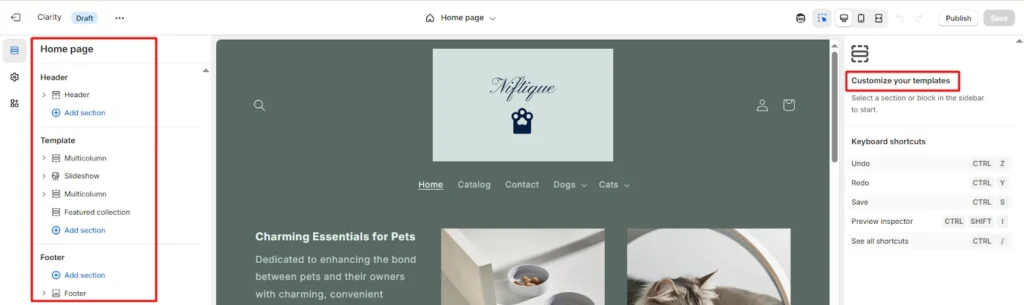
Once you’ve chosen a theme, the real personalization begins. Customization is where your store transforms from a generic template into a branded online shop. With Shopify’s drag-and-drop editor, you can control layout, colors, and fonts, making sure your site reflects your brand identity. For merchants in 2025, AI tools now assist with creating visuals, but human creativity still ensures consistency and style.
- Change navigation menus for easy browsing.
- Add your brand logo to boost identity.
- Test your store on both desktop and mobile.
In 2025, Shopify introduced Sidekick, an AI-powered assistant built directly into your store editor. Think of it as your creative partner—it can generate product descriptions, homepage banners, ad copy, and even design visuals like headers or promotional graphics.
This makes setting up a store much faster, especially for entrepreneurs with limited design or writing experience.
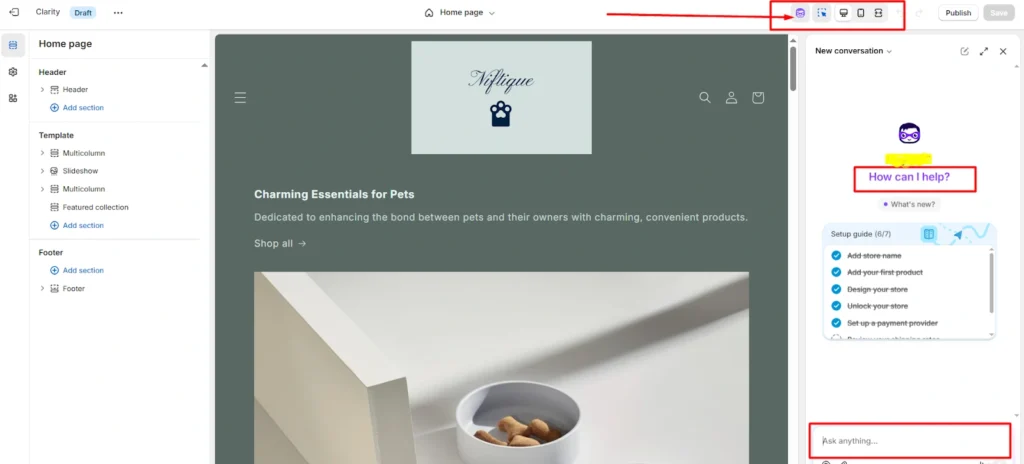
Note: “AI can get you 80% there, but the final 20%—human creativity, brand tone, and conversion focus—is where real success lies.”
Step 4: Add Your First Products
Products bring your store to life, and how you present them greatly impacts conversions. From the title and description to pricing and photography, every detail contributes to whether a customer clicks “Buy.” Shopify’s product setup page is intuitive, guiding you through uploading images, writing descriptions, and managing stock. In 2025, AI features make content creation quicker, but it’s still important to personalize listings.
- Title → clear & keyword-rich.
- Description → highlight features + benefits.
- Price → regular & sale price.
- Images → high-resolution & lifestyle photos.
If you sell variations (size, color, style), add them under Variants so customers can easily choose.
Pro Tip: Shopify Magic AI can draft descriptions, but refining them for SEO + conversions makes the difference.
Step 5: Organize Products into Collections
A store without structure can overwhelm customers. Collections make navigation simple by grouping similar products into categories, allowing shoppers to browse efficiently. In 2025, automated rules make it easy to create dynamic collections that update themselves as you add new stock, saving you time and ensuring your site stays organized.
- Manual → handpick items for each collection.
- Automated → products grouped by tags/conditions.
- Examples: Best Sellers, Summer Essentials, New Arrivals.
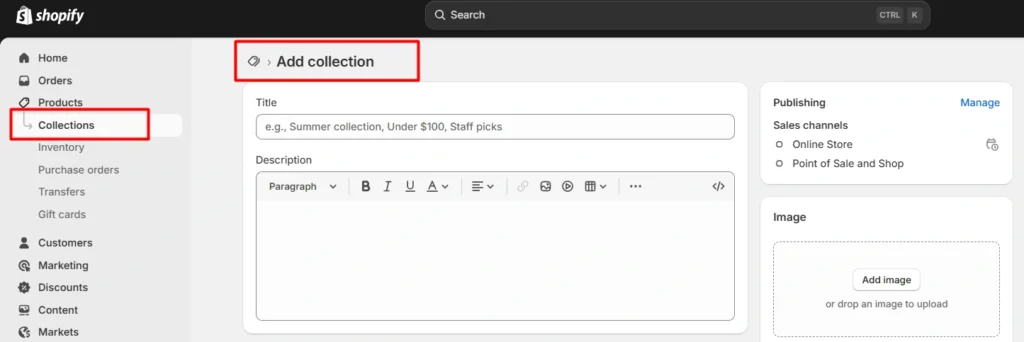
Note: Shoppers prefer curated collections — it simplifies decision-making.
Step 6: Create Essential Pages & Legal Policies
Customers expect more than products—they want transparency, professionalism, and trust. That’s why every Shopify store needs supporting pages such as About Us, Contact, and FAQs. In 2025, Shopify has improved its built-in templates, making it easier to generate policies that comply with international eCommerce laws. This not only builds credibility but also protects your business legally.
- About Us → humanize your brand.
- Contact Page → give customers a way to reach you.
- FAQs → answer common objections upfront.
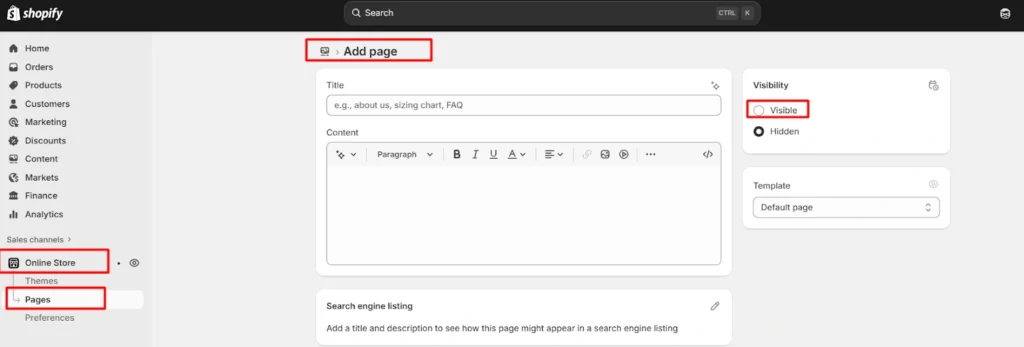
Shopify also has ready-to-use templates for Refund, Privacy, and Terms of Service policies.
Pro Tip: Clarity reduces returns and builds customer trust.
Step 7: Set Up Payments
A smooth checkout process can make or break sales. Shopify offers its own payment gateway, but you can also connect multiple methods to suit global audiences. In 2025, payment flexibility has expanded, with Shopify now supporting regional wallets and even certain crypto options in select countries. By offering diverse payment options, you reduce abandoned carts and improve customer confidence.
- Shopify Payments → major cards accepted.
- PayPal → trusted and widely used.
- Apple Pay, Google Pay → mobile convenience.
- BNPL (Buy Now, Pay Later) → flexible shopping.
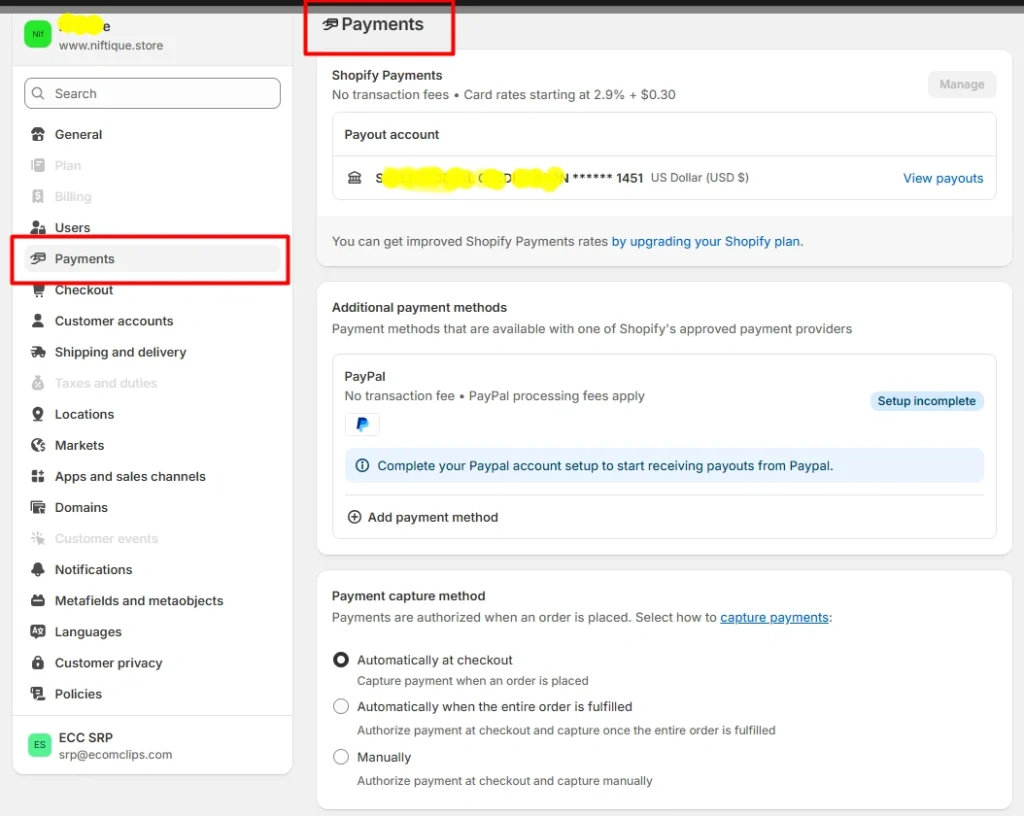
The more payment methods you offer, the fewer abandoned carts you’ll see.
Step 8: Launch with a Custom Domain
Once your products, pages, and payments are set up, it’s time to go live. Removing the password protection makes your store publicly accessible, but to look professional you’ll need a custom domain. A domain not only builds brand recognition but also helps with SEO rankings in Google. Shopify makes this process seamless in 2025 by allowing domain purchases and connections directly inside your dashboard.
- Improves professionalism.
- Boosts SEO rankings.
- Builds long-term trust.
Bonus: Marketing Your Shopify Store in 2025
Launching is just the beginning—traffic and conversions are what make your store successful. In 2025, Shopify has enhanced its marketing tools, offering integrations with ad platforms, email marketing systems, and automation apps. A strong marketing mix ensures consistent growth and keeps your brand ahead of competitors.
- SEO optimization → Rank on Google.
- Email marketing → Retain & upsell.
- Social media ads → TikTok, Instagram, Facebook.
- Google & Meta Ads → Paid growth.
- Upsell apps → Boost average order value.
Marketing without strategy is like sailing without a compass.
FAQs: Building a Shopify Store in 2025
Q1. Do I need coding skills to build a Shopify store?
No. Shopify is designed for beginners with drag-and-drop tools and AI support.
Q2. How much does Shopify cost in 2025?
Plans start at $39/month, with advanced options for scaling. $1 trials often available.
Q3. Is a free Shopify theme good enough?
Yes. Free themes are SEO-optimized and mobile-friendly. Paid themes offer more advanced features.
Q4. Can I migrate from another platform?
Yes, Shopify provides migration tools. For large stores, expert guidance helps preserve SEO.
Q5. How do I accept payments?
Shopify Payments, PayPal, Google Pay, Apple Pay, BNPL, and crypto (in select countries).
Q6. Can I dropship on Shopify in 2025?
Yes, using apps like DSers and Spocket.
Q7. How do I drive traffic?
Through SEO, ads, content marketing, and email campaigns.
Q8. Is Shopify scalable?
Yes. Start small, upgrade to Shopify Plus as you grow.
Q9. What’s new in Shopify 2025?
AI tools → Theme Generator, Sidekick AI, Shopify Magic.
Q10. Why should I get professional help?
While DIY is possible, working with experts ensures your store is not just live, but built to convert.
Conclusion
Building a Shopify store from scratch in 2025 is more accessible than ever. With AI-powered tools, customizable themes, and flexible payments, anyone can start selling online in hours. But success comes from strategy—from how you present products to how you market them.
That’s where Ecomclips stands out. As one of the best Shopify partners, we’ve helped countless businesses turn basic stores into thriving, profitable brands. If you’re ready to launch or scale, we’re here to guide you every step of the way.
Ready to build and scale your Shopify store? Contact us at info@ecomclips.com today for a free Shopify audit.