

Introduction: The Unseen Sales Engine – How A+ Content Redefines Success on Amazon
In Amazon’s crowded marketplace, getting clicks is easy, converting them into sales is the real challenge. That’s where A+ Content comes in.
Often overlooked or misused, A+ Content is more than just extra images and text. It’s a strategic sales tool that can boost conversion rates, improve SEO, and strengthen brand trust—all within the product detail page.
Yet many sellers miss the mark, treating it like a visual add-on instead of the powerful narrative engine it truly is.
In this guide, we’ll break down what makes A+ Content effective, uncover common mistakes, and show you how to use it to turn casual browsers into loyal customers—24/7.
A+ Content Strategy Breakdown
Chapter 1: Brand Story Basics
Use the Brand Story module to share your brand’s purpose and connect with buyers.
Chapter 2: Smart Use of Text & Images
Show with images, rank with text. Avoid putting important info only in pictures.
Chapter 3: Use Comparison & Carousel Modules
Engage shoppers with carousels and help them decide with clear comparison charts.
Chapter 4: Premium A+ Content (A++)
Add videos and advanced features to boost conversions—if your budget allows.
Chapter 5: Build a Strong, Consistent A+ Page
Keep your layout clean, on-brand, mobile-friendly, and test often.
Chapter 1: The Foundation of Your Brand on Amazon – Mastering the Brand Story Module
Before a customer invests in your product, they must first invest their trust in your brand. The Brand Story module within A+ Content is arguably the most important, and most frequently overlooked, tool for building that foundational trust. It is the digital handshake, the “about us” page, and the brand mission statement all rolled into one powerful, visually engaging section.
What is the Amazon Brand Story Module?
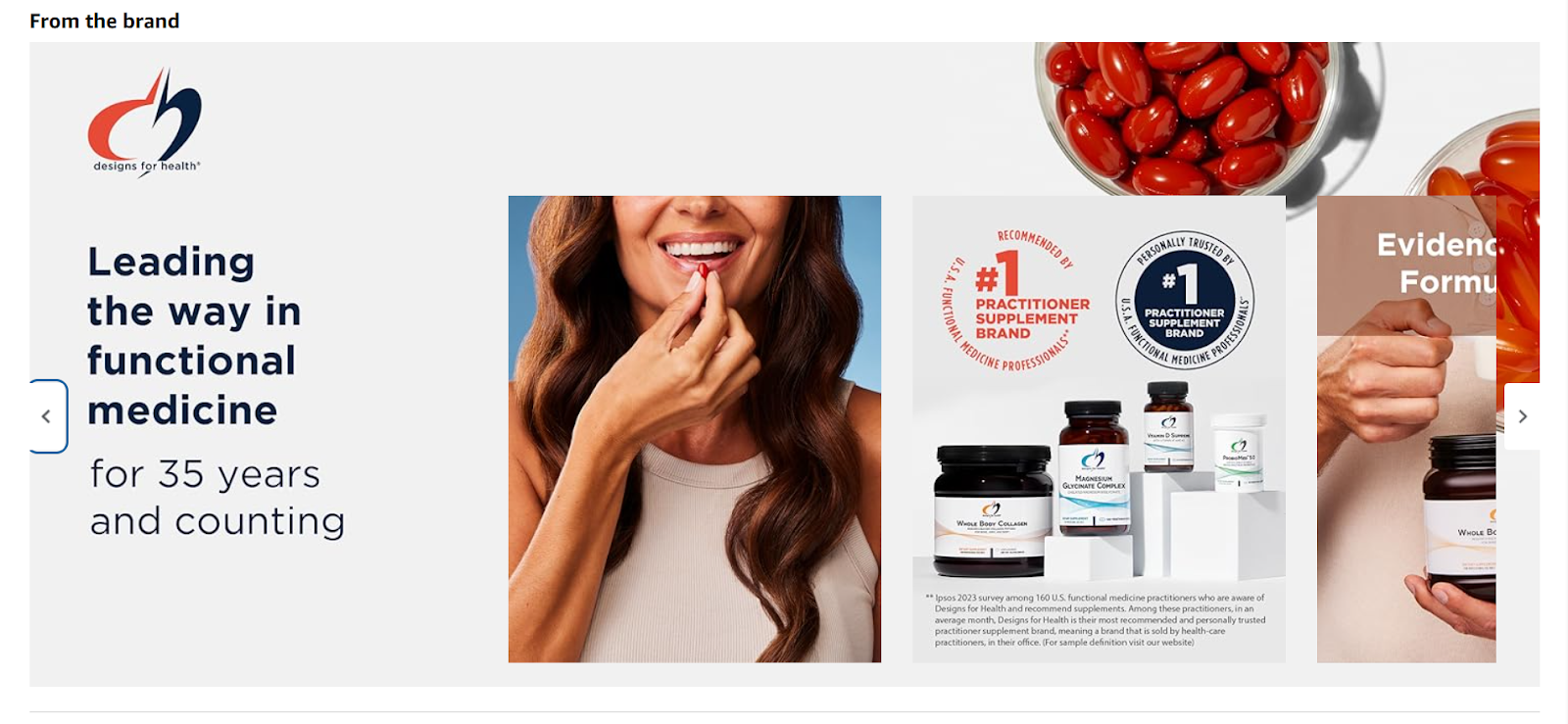
The Brand Story appears directly above the main A+ Content description modules on a product detail page. It is a carousel-style feature that allows brands to share their history, values, and a wider product portfolio. Unlike the standard A+ modules that are focused on the specifics of a single product, the Brand Story provides a panoramic view of who you are as a company. This is your dedicated space to answer the crucial questions a thoughtful consumer has: Who is behind this product? What do they stand for? Why should I choose them over the countless other options available?
The Critical Error of a Vacant Brand Story
Leaving the Brand Story section empty is one of the most significant strategic errors a seller can make. Nature abhors a vacuum, and so does Amazon’s retail space. When you fail to occupy this valuable real estate with your own narrative, two things happen, both of which are detrimental to your sales:
- Competitors Fill the Void: Amazon may use that empty space to display sponsored ads from your direct competitors. A customer who was moments away from purchasing your product is now presented with an enticing alternative, potentially leading them away from your page forever.
- Amazon Shows “Similar Items”: Alternatively, Amazon’s algorithm may populate the space with a “Products related to this item” or “Compare with similar items” carousel, showcasing products from other brands. You have effectively used your own listing to advertise for others.
By not adding a Brand Story, you are relinquishing control over a key section of your product page. You are creating a gap in the customer journey, inviting distraction and actively risking the sale you worked so hard to attract.
Crafting a Compelling Brand Narrative for Higher Engagement
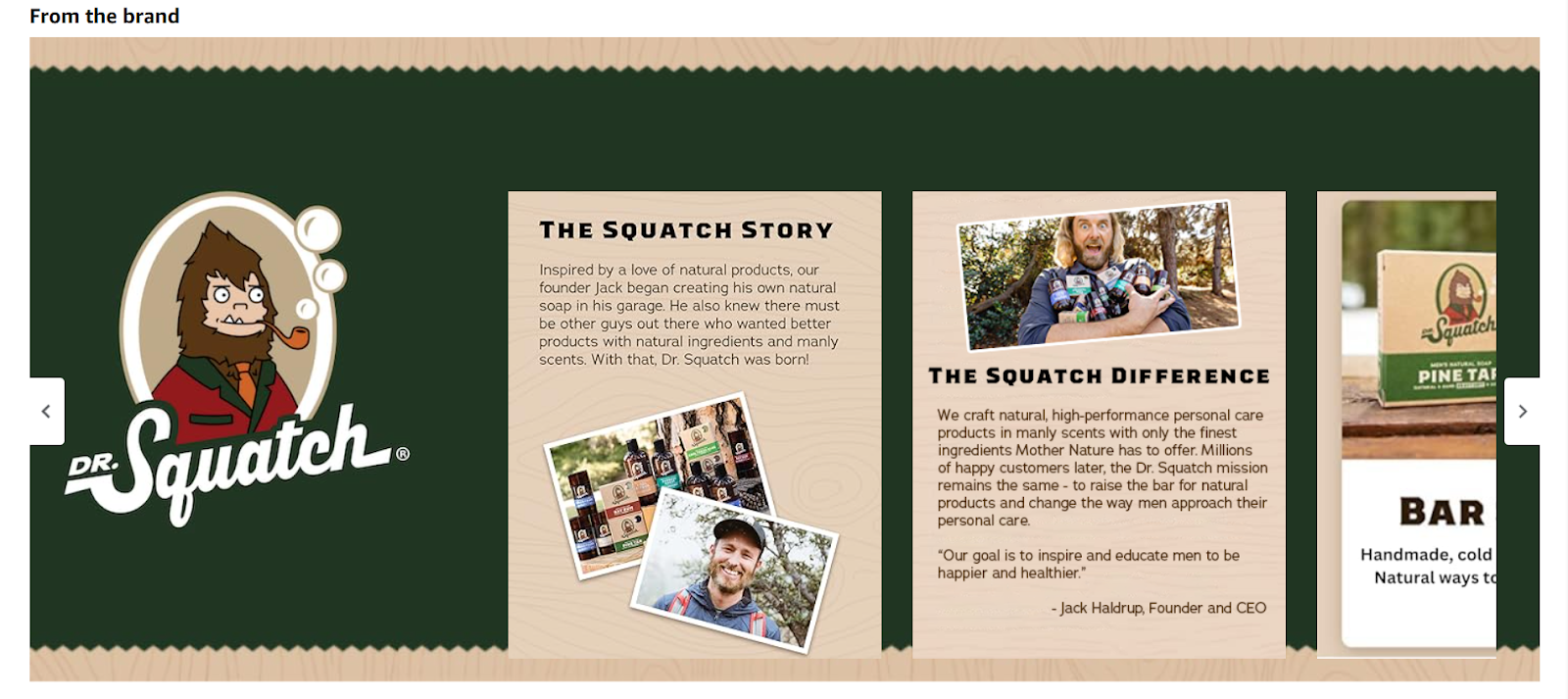
A well-crafted Brand Story builds trust and connection; it’s more than just filler.
- Share your origin: Let shoppers know why your brand exists and what inspired it.
- Highlight your values: Communicate what your brand stands for to attract like-minded customers.
- Cross-sell smartly: Use brand cards to feature related products and link to your Storefront.
- Boost SEO: The text is crawlable, so add relevant keywords to strengthen your ranking.
Key Elements of a Winning Brand Story
- A “Brand Card” Background Image: Use a high-quality, aspirational image that encapsulates your brand’s essence.
- “About the Brand” Module: A concise and compelling paragraph about your company’s mission and history.
- Four “Brand Asin” Modules: Feature four of your other key products, with high-quality images and direct links to their pages.
- A Link to Your Brand Store: This is a non-negotiable element. It should be the final card in the carousel, inviting customers to explore your full range of offerings.
By mastering the Brand Story, you transform your product page from a simple sales listing into a brand embassy. You control the narrative, build trust, and create pathways for customers to engage more deeply with your entire product line, effectively shutting the door on competitors.
Chapter 2: The Symbiotic Power of Visuals and Text for Maximum Conversion
In the world of e-commerce, a picture may be worth a thousand words, but on Amazon, the right words are worth thousands in revenue. A successful A+ Content strategy hinges on the understanding that images and text serve two different, yet equally important, masters. Images capture the attention of the human shopper, while text feeds the Amazon A9 search algorithm. A failure to serve both masters results in a page that is either invisible to search or unconvincing to shoppers.
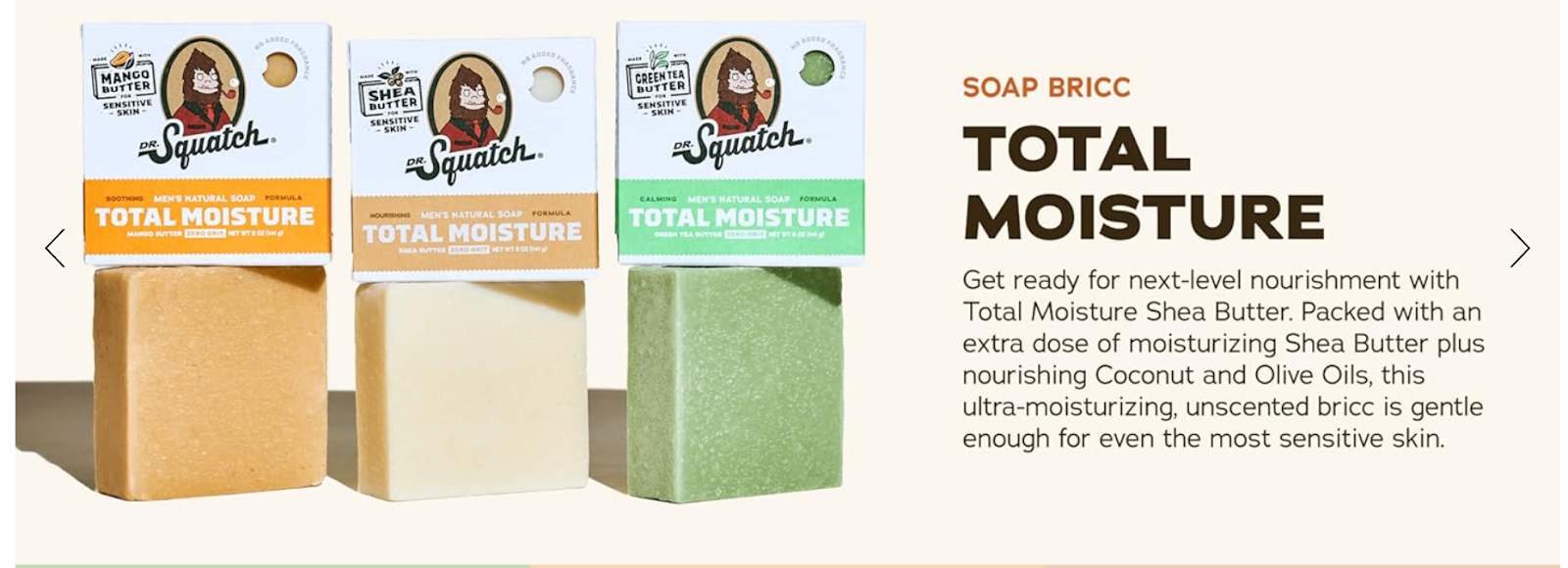
The Golden Rule of A+ Content: Images for People, Text for Algorithms
This simple mantra should guide every decision you make when designing your A+ modules.
- Images for People: High-quality lifestyle photos, infographics, and product close-ups are designed to appeal to the customer. They help the shopper visualize the product in their life, understand its benefits quickly, and feel an emotional connection. Visuals should be clean, aspirational, and easy to interpret at a glance.
- Text for Algorithms: The A9 algorithm, which powers Amazon’s search results, cannot “see” images. It relies on text to understand, index, and rank your product for relevant search queries. When you embed crucial keywords and product information only within an image file, you are effectively making that information invisible to the very system that determines your visibility.
Section 2.1: The Hidden Cost of Non-Crawlable, Image-Based Text
A very common mistake sellers make is designing a beautiful banner image in a graphic design program and embedding all the descriptive text, features, and benefits directly into that image file before uploading it. While it may look visually appealing, it is an SEO catastrophe.
- Zero SEO Value: Every word embedded in that image is lost. If a customer searches for a specific feature, benefit, or use case that you have only mentioned in an image, your product will not appear in the search results. You are sacrificing countless opportunities to rank for valuable, long-tail keywords that signal high purchase intent.
- Poor User Experience: Text within images is often difficult to read, especially on mobile devices where the majority of Amazon shopping now occurs. It cannot be enlarged easily, and it presents significant accessibility challenges for visually impaired shoppers using screen readers. This frustration can lead to page abandonment.
Section 2.2: Strategic Implementation of Crawlable Text for Amazon SEO
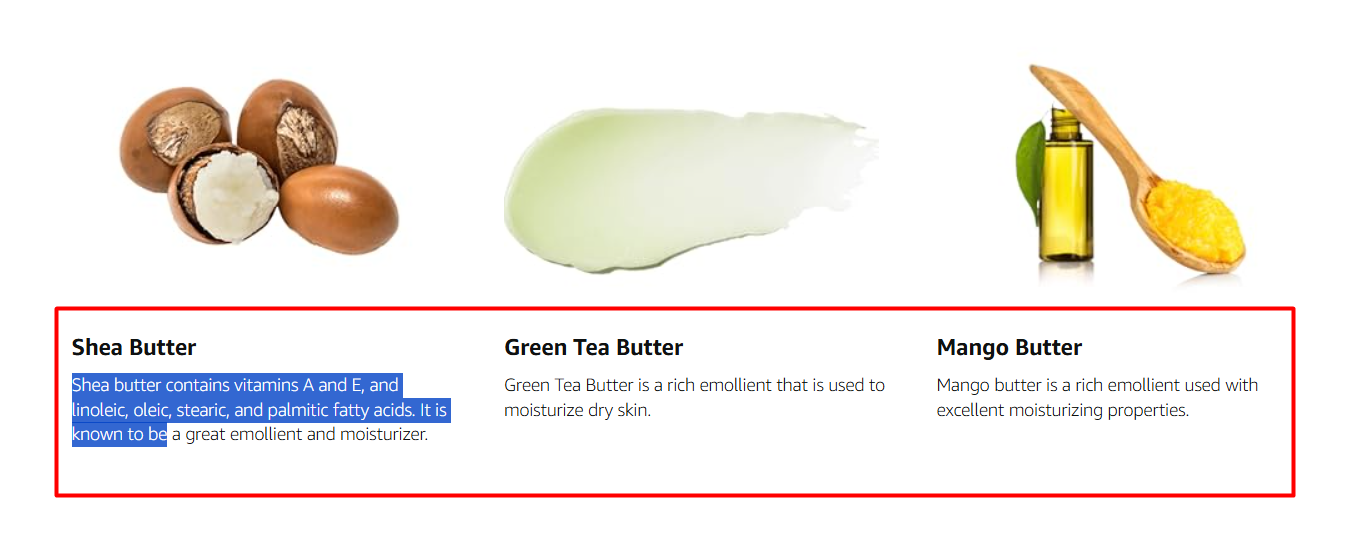
The solution is to use A+ modules that allow for a combination of an image and a separate, real-text field. This gives you the best of both worlds: a compelling visual for the shopper and keyword-rich, indexable text for the algorithm.
- Keyword Research is Paramount: Before writing your A+ text, you must know what your customers are searching for. Use Amazon SEO tools to identify primary and secondary keywords, as well as long-tail phrases (e.g., “hypoallergenic face wash for sensitive skin” instead of just “face wash”).
- Weave Keywords Naturally: Your A+ content is the perfect place to incorporate these keywords in a natural, readable way. Use them in your module headers and descriptive paragraphs. Describe the product’s features, benefits, and applications using the same language your target audience uses in the search bar.
- Structure for Readability: While the text is for the algorithm, it must also be readable for humans. Use short sentences, break up long paragraphs, and use bolding to emphasize key benefits. A well-structured text block can effectively communicate value to a skimming customer while being thoroughly scanned and indexed by the A9 algorithm.
Section 2.3: Optimizing Visuals with Keyword-Rich Alt Text
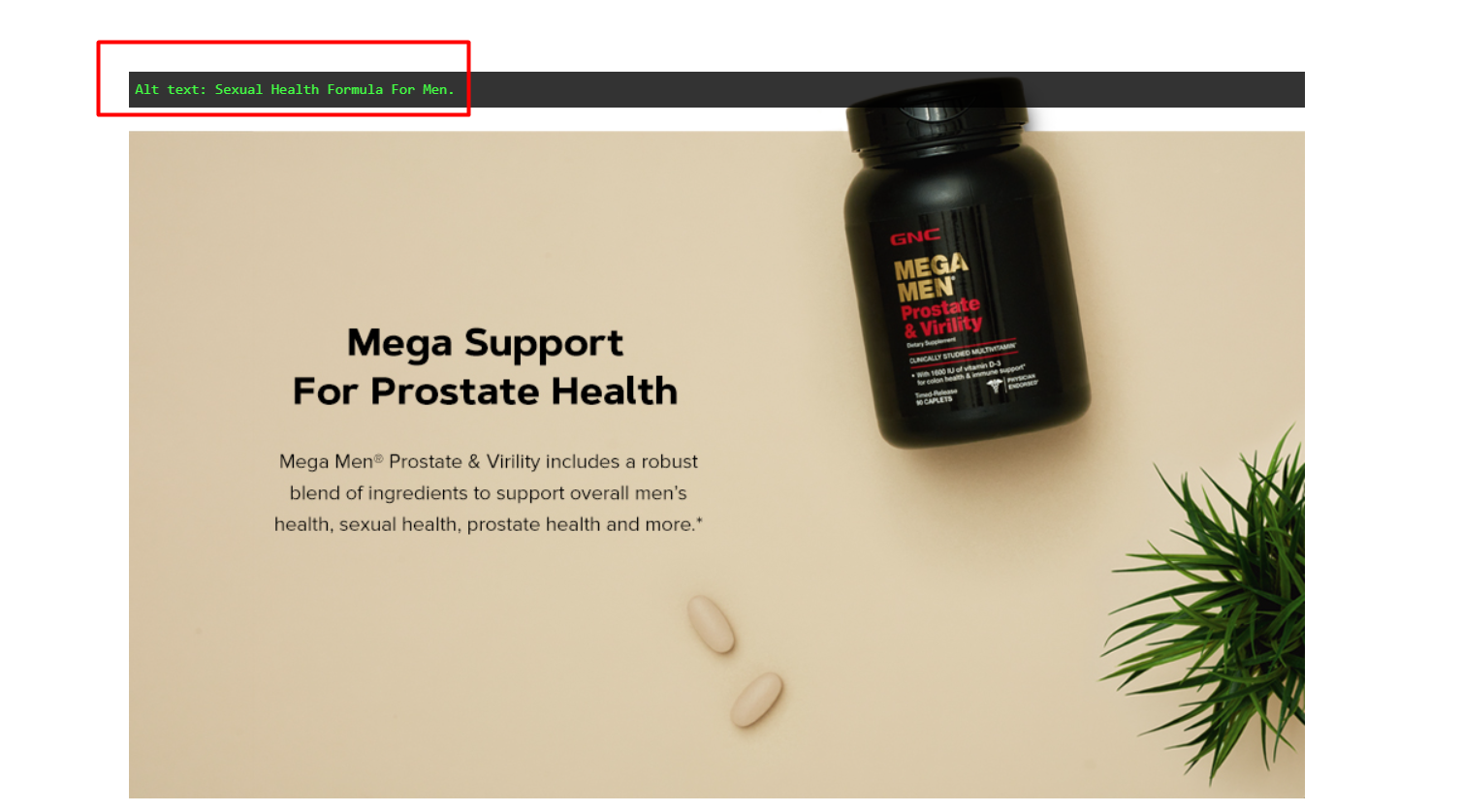
Even your images have a hidden text component that contributes to SEO: the alt text. Alt text (alternative text) is a short description of an image that is added to the image’s metadata. While its primary purpose is for accessibility (to be read aloud by screen readers), Amazon uses it as another signal for indexing.
Each image you upload to your A+ Content can have up to 100 characters of alt text. Do not waste this opportunity.
- Be Descriptive and Specific: Instead of “Product Image 1,” write “Stainless steel 12-inch non-stick frying pan with cool-touch handle.”
- Include Keywords: Naturally incorporate your most important keywords. For a skincare product, an image of the bottle could have the alt text: “50ml bottle of our Vitamin C serum with hyaluronic acid for brighter, hydrated skin.”
By diligently applying the “images for people, text for algorithms” rule and optimizing every available text field, including alt text, you provide the A9 algorithm with a rich, detailed blueprint of your product. This dramatically increases your chances of being found by the right customers at the exact moment they are ready to buy.
Chapter 3: Elevating the Shopper Journey with Interactive and Comparative Modules
Once you have captured a shopper’s attention and provided the foundational information, the next goal is to keep them engaged and guide them confidently toward a purchase decision. Static content can be passive; interactive and comparative modules, however, turn the shopper from a passive observer into an active participant. These tools are crucial for increasing time-on-page (a key ranking factor for Amazon) and maximizing the value of every visitor.
Section 3.1: The Interactive Advantage of Image Carousels
An image carousel within an A+ module allows you to present multiple images and text panels in a single, compact space that the user can click through. This simple act of interaction significantly increases engagement. Instead of scrolling past a wall of content, the shopper is invited to explore.
- Show, Don’t Just Tell: Carousels are perfect for a visual deep-dive into your product. You can use the different cards to:
- Highlight multiple key features with close-up shots.
- Showcase the product from various angles.
- Demonstrate different use-cases or steps in a process.
- Tell a sequential story, such as a “before and after” scenario.
- Display testimonials or trust badges.
- Increased Time-on-Page: The more a user clicks, interacts, and stays on your page, the stronger the signal it sends to Amazon’s A9 algorithm that your listing is relevant and valuable. This can positively influence your organic search ranking over time. The longer a customer spends with your product, the more invested they become, and the closer they are to making a purchase.
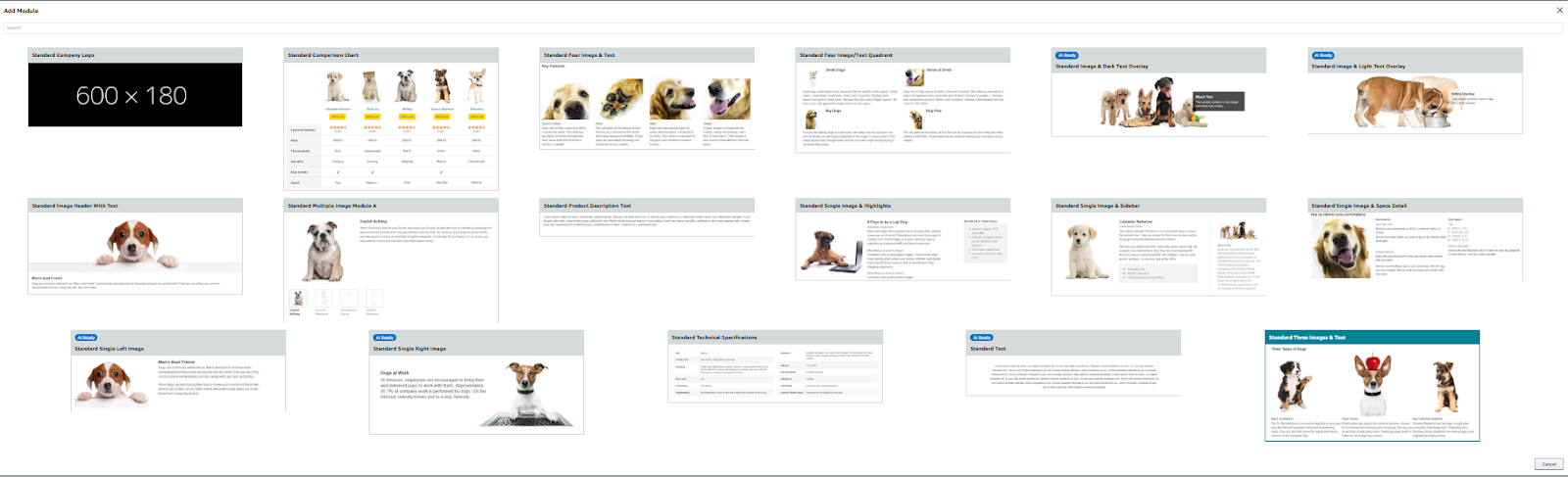
Section 3.2: The Decisive Power of the Product Comparison Chart
The product comparison chart is arguably the single most powerful sales tool available within the standard A+ Content framework. Shoppers on Amazon are professional comparers; they constantly weigh options to find the perfect product for their specific needs. The comparison chart allows you to take control of this comparison process.
A staggering mistake many brands make is omitting this module. Without it, a confused or curious shopper has no choice but to leave your page, either by hitting the “back” button to view competitor listings or by starting a new search. In either case, you have likely lost the sale.
The comparison chart module allows you to pre-emptively answer the customer’s question: “What else do you have, and how is it different?” By showcasing a selection of your own products side-by-side, you keep the entire comparison process within your brand’s ecosystem.
- Facilitating Informed Decisions: A well-designed chart helps customers quickly see the differences in features, size, color, target audience, or other key attributes. This clarity builds confidence and reduces purchase friction.
- Driving High-Value Cross-Sells: The chart is the ultimate cross-selling tool. A customer might land on your “basic” model’s page, but after seeing the enhanced features of your “pro” model in the comparison chart, they may decide to upgrade, increasing your average order value.
- Preventing Sales Leakage: Even if the product on the current page isn’t a perfect fit, the chart can guide the shopper to another product in your catalog that is. You save the sale by directing them to a better-suited item from your own brand, rather than losing them to a competitor.
Checklist for an Effective Product Comparison Chart
- Feature Relevant Products: Select a range of 3-5 of your other products that represent logical alternatives or complements.
- Use High-Quality Images: The product image in the chart is the first thing a customer will see. Make it clear and appealing.
- Include Product Titles: Ensure the titles are clear and concise.
- Link to Each Product: The chart must have clickable links that take the shopper directly to the other product detail pages.
- Highlight Key Differentiating Features: Use the rows to compare the most important attributes (e.g., “Volume,” “Key Ingredient,” “Best For,” “Customer Rating”).
- Include Ratings: Displaying the star ratings for each product adds a layer of social proof and trust.
- Add to Cart Button: The most effective charts include an “Add to Cart” button for each item, making the purchase as seamless as possible.
By strategically using interactive carousels and a comprehensive comparison chart, you transform your A+ content from a static product description into a guided selling experience. You hold the customer’s attention longer, answer their questions proactively, and make it easy for them to purchase the perfect product—from you.
Chapter 4: Unleashing Full Potential with Amazon Premium A+ Content (A++)
For brands that meet certain eligibility criteria, Amazon offers an even more powerful tier of enhanced content: Premium A+ Content, also known as A++. This advanced toolkit provides larger content modules, greater interactivity, and most importantly, the ability to embed video directly within the product listing. While standard A+ Content is a significant upgrade over a plain text description, Premium A+ can be a true game-changer for brand perception and conversion rates.
Defining Premium A+ Content
Premium A+ Content is an invitation-only program for sellers who are brand-registered and have a history of publishing high-quality A+ Content. It expands upon the standard modules by offering:
- Full-width imagery: Modules can span the entire width of the product detail page, creating a more immersive, cinematic experience.
- More module options: A wider variety of layouts, including interactive hotspot modules, video modules, and enhanced comparison charts.
- Higher resolution images: The ability to use larger and more detailed visuals.
The Unmatched Engagement of Integrated Video Modules
The single most impactful feature of Premium A+ is the ability to add video. In today’s digital landscape, video is the preferred medium for content consumption for a huge segment of the population. It is dynamic, engaging, and capable of conveying a vast amount of information in a short period.
Omitting video from a Premium A+ layout is a colossal missed opportunity. Here’s why it’s so effective:
- Grabs Attention Instantly: A video player with a play button is an irresistible draw for a scrolling shopper. It breaks up the monotony of static images and text.
- Demonstrates the Product in Action: You can show your product being used in a real-world context. A customer can see how a piece of kitchen equipment works, how a skincare product is applied, or how an item of clothing fits and moves. This removes guesswork and builds immense purchase confidence.
- Builds Trust and Authenticity: Video allows you to tell a story, feature a founder or expert, and connect with customers on a more personal level. It feels more authentic and trustworthy than polished ad copy.
- Dramatically Increases Conversion: Numerous studies have shown that product pages with video have significantly higher conversion rates than those without. Video can be the final piece of persuasion that pushes a hesitant buyer over the edge.
Exploring Other Advanced Features of Premium A+
Beyond video, Premium A+ offers other powerful tools:
- Interactive Hotspots: This feature allows you to place clickable dots or “hotspots” on a lifestyle image. When a user hovers over or clicks a hotspot, a pop-up appears with more information about that specific feature. This is an engaging way to deconstruct a product’s benefits without cluttering the main image.
- Enhanced Carousels: Premium carousels are larger and can feature a mix of video and images, creating a rich media experience.
- Q&A Modules: Some layouts allow for a “Question and Answer” format, letting you proactively address common customer queries in a visually appealing way.
A Cost-Benefit Analysis: Is Premium A+ a Worthwhile Investment?
While there used to be a significant fee for Premium A+ Content, Amazon has made it available at no additional cost to sellers who meet the eligibility requirements. The primary investment is in creating the high-quality assets—especially professional video—required to make the most of the features.
For most brands, the answer is a resounding yes. The potential uplift in conversion rate, brand perception, and sales often far outweighs the cost of producing the creative assets. By leveraging Premium A+ Content, you can create a listing that is on par with the direct-to-consumer websites of major global brands, establishing a level of professionalism and trust that sets you far apart from the competition.
Chapter 5: A Strategic Synthesis – Building a Cohesive, High-Converting A+ Page
Creating individual, optimized modules is only half the battle. The true art of A+ Content lies in assembling those modules into a cohesive, strategic narrative that guides the shopper seamlessly from interest to purchase. The overall structure and flow of your A+ page are just as important as the content within each section.
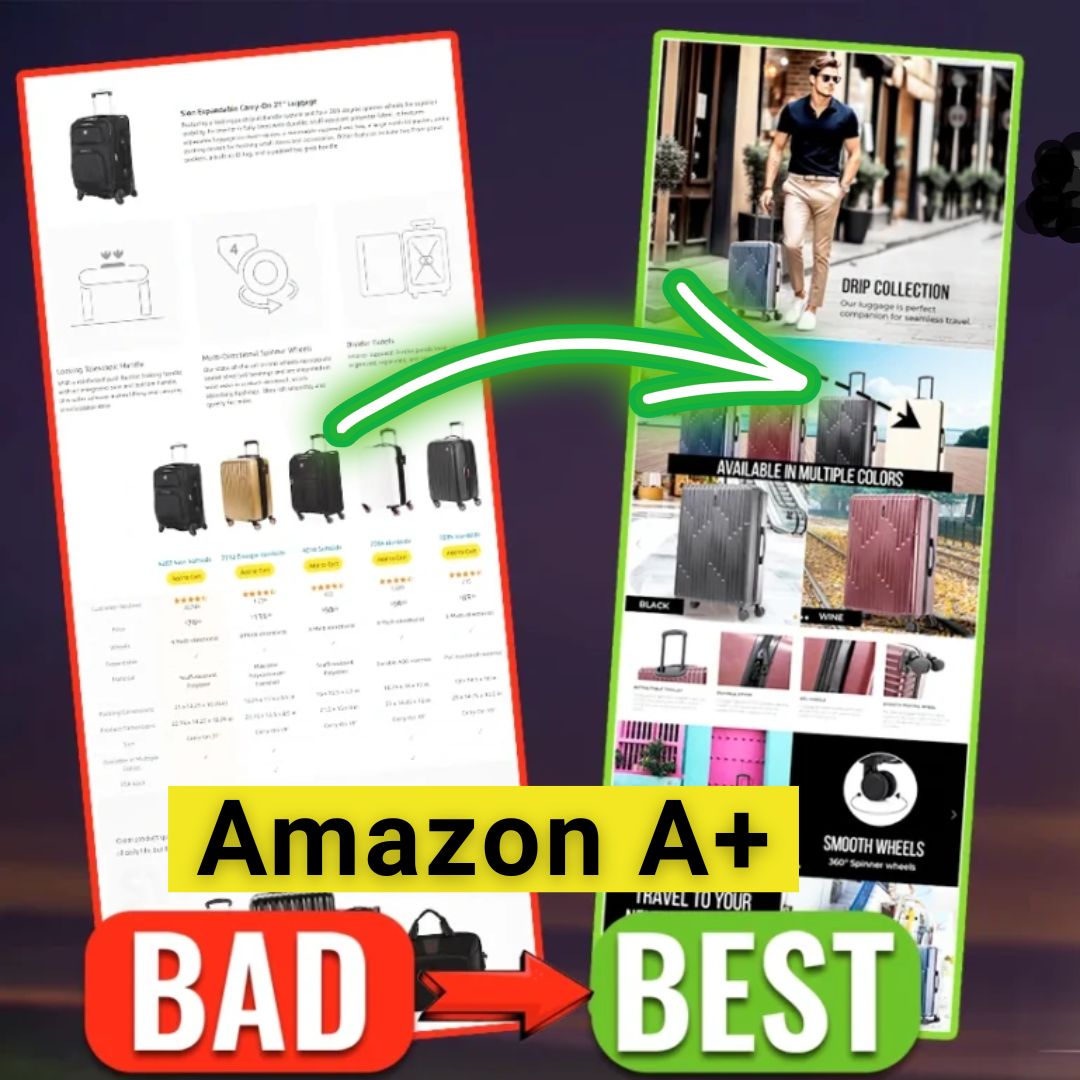
Designing an Intentional Information Flow
Your A+ Content should not be a random assortment of images and text. It should tell a story with a clear beginning, middle, and end. A proven structure flows as follows:
- The Hook (Top Banner): Start with your most compelling lifestyle image and a powerful headline that encapsulates the primary benefit of your product. This is your first and best chance to grab the shopper’s attention.
- Problem & Solution: Use the next module to address the customer’s pain point and position your product as the ideal solution. Show them you understand their needs.
- Feature Deep Dive: Use a series of modules, including carousels and text/image combinations, to explore the key features and technical specifications. This is where you provide the logical reasons to believe in your product.
- Brand Reinforcement: Weave in a module that reinforces your brand’s quality, perhaps with trust badges, certifications, or a mention of your unique manufacturing process.
- The Cross-Sell (Comparison Chart): Before you conclude, introduce the comparison chart. This is strategically placed to capture shoppers who may be looking for a slightly different option, keeping them within your brand family.
- The Final Vision: End with another strong, aspirational lifestyle image that helps the customer visualize the positive outcome of using your product.
The Importance of Brand Consistency
Your A+ Content is a direct extension of your brand. The fonts, colors, image style, and tone of voice should be consistent with your website, social media, and packaging. This consistency builds brand recognition and reinforces a sense of professionalism and reliability. A disjointed or off-brand A+ page can feel cheap and untrustworthy, undermining all your efforts.
Prioritizing a Mobile-First A+ Content Design
With a majority of Amazon traffic coming from mobile devices, designing for a small screen is no longer optional.
- Test on Mobile: Always preview your A+ Content on a mobile device before publishing. Modules stack vertically, so the flow you design on a desktop will look different.
- Large, Readable Text: Ensure any text within images (used sparingly) and all crawlable text is large and clear enough to be read comfortably on a phone.
- Simple, Bold Visuals: Complex, busy images can become incomprehensible on a small screen. Opt for clean layouts and strong focal points.
The Role of Continuous Testing and Iteration
A+ Content should not be a “set it and forget it” task. Amazon provides tools to A/B test your content, allowing you to run two different versions simultaneously to see which one performs better. You can test different headlines, images, module orders, and more. Continuously analyzing your results and iterating on your content is the key to long-term success. A small 1% increase in conversion rate, compounded over time, can lead to substantial growth in revenue.
Conclusion: Your Next Steps from Effective Listing to Market Dominance
We have journeyed through the intricate and powerful world of Amazon A+ Content, moving far beyond the simple notion of “adding more images.” We have established that a strategic approach is not just beneficial; it is essential for survival and growth in the competitive Amazon ecosystem.
By embracing the Brand Story, you build trust and control your page’s valuable real estate. By adhering to the golden rule of “images for people, text for algorithms,” you satisfy both your customers and the Amazon search engine. By leveraging interactive carousels and decisive comparison charts, you engage shoppers and intelligently guide their purchase journey. And by unlocking the potential of Premium A+ with video, you can create a best-in-class brand experience that drives unparalleled conversion.
Fixing common A+ Content mistakes is one of the highest-return activities an Amazon seller can undertake. These are not minor tweaks; they are fundamental improvements to your digital storefront that directly impact visibility, conversion, and sales.
However, we understand that designing and implementing a comprehensive, SEO-optimized, and visually stunning A+ Content strategy requires expertise, time, and resources. That is where we can help.
At ecomclips, we specialize in transforming Amazon listings into powerful sales assets. With over 12 years of experience and having served more than 1,000 brands across countless categories, our team of expert designers, copywriters, and Amazon strategists understands what converts. We don’t just create pretty pictures; we build strategic, data-driven A+ Content designed with one purpose: to deliver results.
If you are ready to stop leaving money on the table and unlock the true potential of your products, we invite you to take the next step. Email us today at info@ecomclips.com for a comprehensive listing audit. Let our team analyze your current strategy and show you the precise steps needed to upgrade your brand presence, boost your conversion rate, and push your products to page one—where they belong.